Google Minesweeper may look simple at first, but that’s what makes it so interesting. Anyone can open the game and start clicking tiles, yet many players quickly realize it’s harder than it seems. You see numbers, try to avoid the hidden mines, and hope each move is the right one. That mix of luck and logic keeps people coming back. If you’ve ever wanted to understand the game better and win more often, you’re in the right place. In this guide, we’ll explore clear, helpful Google Minesweeper tips that make every game easier to read and play.
How to Play Google Minesweeper (Beginner-Friendly Overview)
Learning how to play Google Minesweeper doesn’t have to feel confusing or overwhelming. Many new players click around and hope for the best, but once you understand what the tiles, numbers, and flags actually mean, the game becomes much easier—and a lot more fun. This beginner-friendly guide will walk you through the basics so you can start playing with confidence instead of guesswork.
Understanding Minesweeper Rules Explained Simply
When you open a Google Minesweeper board, you’ll see a grid of covered tiles. Some tiles hide safe spaces, while others hide mines. Your goal is simple: clear all the safe tiles without clicking a mine. Every time you open a tile, you’ll either reveal a blank area, a number, or—if you’re unlucky—a mine.
The numbers are the key to playing well. Each number tells you how many mines are touching that tile, including diagonally. For example, if you see a “1,” there’s one mine in the eight surrounding spaces. If you see a “3,” then three of the nearby tiles are dangerous. Learning to read these numbers will help you make smart moves instead of random guesses.
You also have flags, which you can place on tiles you believe contain mines. This keeps you from clicking them by accident and helps you track your logic. And don’t forget about safe clicks—areas where the numbers clearly point to safe tiles. Once you understand how tiles, numbers, and flags work together, the game starts to feel much more predictable and easier to control.
Google Minesweeper Beginner Guide for First-Time Players
Whether you’re playing on desktop or mobile, Google Minesweeper has a clean and simple layout. On desktop, you’ll use left-click to open tiles and right-click to place flags. On mobile, tapping opens a tile, and a long press adds a flag. The board stays responsive and easy to use on both platforms, so you don’t need any special skills to begin.
If you’re brand new to the game, I recommend starting on the Easy difficulty level. This gives you a small grid with fewer mines, helping you learn the basics without pressure. Once you’re comfortable reading numbers and spotting patterns, move up to Medium to test your developing skills. Hard should come later, once you’re confident in your logic, because it requires faster decision-making and stronger pattern recognition.
The great thing about Google Minesweeper is that you can switch between difficulty levels anytime. As you improve, you’ll start seeing familiar patterns and understanding why certain tiles are safe or risky. With a bit of practice, the board begins to “speak” to you, and each move becomes easier to predict.
How to Play Minesweeper Step by Step
Playing Minesweeper well starts with understanding the role of your first click. No matter where you click, Google Minesweeper guarantees your first move will never hit a mine. This removes the fear of losing instantly and gives you a safe starting point to open up the board.
After the first click, you’ll usually see a few numbers and sometimes large blank clusters. Whenever you find a blank area, click around its edges to reveal more of the board. These clusters are incredibly helpful because they create space and simplify the puzzle. As you expand each area, look closely at the numbers—they tell you exactly where the nearby mines might be hiding.
To find early safe zones, focus on sections where the numbers are clear and easy to interpret. For example, if you see a “1” touching only one covered tile, that tile almost always contains the mine. Once you flag it, the surrounding tiles usually become safe to open. Little by little, you’ll uncover more of the board and build confidence in your logic.
The more you practice these steps, the faster the game begins to feel like a clear, logical puzzle rather than a guessing challenge. With a steady approach, even beginners can start winning more often—and enjoying Google Minesweeper on a whole new level.
Google Minesweeper Strategies Every Player Should Know
If you’ve ever looked at a Minesweeper board and thought, “There’s no way to solve this without guessing,” you’re not alone. Many beginners feel that way, but the truth is that Google Minesweeper strategies are mostly about logic—not luck. Once you understand how skilled players read the board, the game becomes far more predictable and satisfying. In this section, we’ll walk through practical minesweeper tips and tricks that help you spot safe moves, control the board, and reduce risky guesses.
Foundational Logic Used by Skilled Players
One of the biggest surprises for new players is realizing how little luck top players rely on. Skilled players use deduction to uncover most of the board, only guessing when absolutely necessary. This mindset alone can boost your win rate, because you begin treating each number as a clue, not a random symbol.
A huge part of mastering logic is pattern recognition. As you play more, you’ll start noticing common tile arrangements that reveal where mines are likely hiding. For example, a simple “1” touching a single unopened tile almost always signals a mine. Meanwhile, patterns like “1-2-1” often suggest a predictable lineup of mines behind certain tiles. Once these patterns click, the board becomes much easier to interpret.
To build this skill, try slowing down on early moves and mentally reviewing why a tile is safe or dangerous. Over time, these deductions become automatic. With consistent practice, you’ll begin seeing the board like a puzzle rather than a guessing game, which is exactly how expert players approach it.
Google Minesweeper Tricks to Improve Board Control
Now that you understand the logic behind the game, let’s move into specific Google Minesweeper tricks that can help you manage the board more effectively. One of the most useful skills is learning safe-clearing methods. Whenever you’ve flagged all the mines around a number, you can confidently open the remaining adjacent tiles. This lets you clear large areas quickly without overthinking each move.
Another essential skill is efficient flagging. Many beginners flag too early or too often, which can clutter the board and make it harder to think clearly. Instead, try flagging only when the logic is undeniable—such as when a tile is a guaranteed mine based on nearby numbers. This keeps your board neat and prevents you from locking yourself into incorrect assumptions.
To finish strong, practice tactical board scanning. Instead of clicking tiles at random, move your eyes across the board in a methodical way—left to right, top to bottom, or in small sections. This helps you catch patterns you might miss and ensures you’re not overlooking easy wins. Skilled players often cycle between sections repeatedly, looking for simple deductions that open up new areas.
These minesweeper tips and tricks might seem small at first, but together they create the strong foundation you need to win more often. The more you use them, the more confident and in control you’ll feel in every game.
Minesweeper Patterns Guide: The Key to Winning Consistently
If you’ve ever stared at a Minesweeper board and thought, “There has to be a hidden trick to this,” you’re right—but it’s not really a trick. It’s patterns. Once you learn to spot the most common tile patterns, the entire board starts making sense. That’s why this minesweeper patterns guide is so important. Patterns help remove guesswork, build confidence, and give you a repeatable system you can use in every game. By understanding these setups, you’ll unlock true minesweeper winning strategies that work even on tougher difficulty levels.
The Most Common Minesweeper Patterns (1-1, 1-2-1, 1-2-2-1)
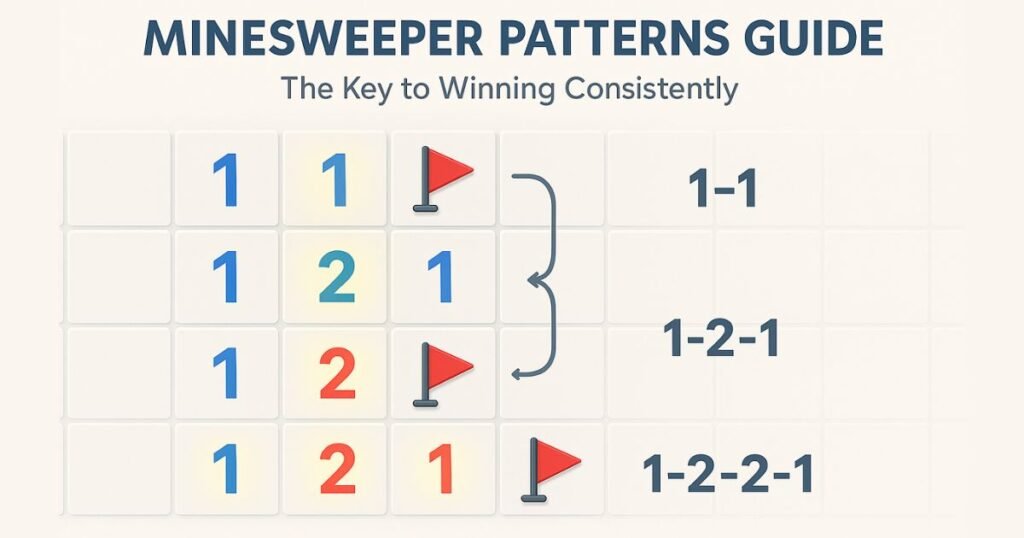
Some patterns show up so often that experienced players can identify them almost instantly. The classic “1-1” pattern, for example, usually means there’s one mine touching each “1,” often forming a predictable line behind them. Another common pattern is “1-2-1.” This one is even more powerful because it strongly suggests where the mines sit relative to the central “2.” When you see this formation, you can often mark the mines quickly and open safe tiles around it.
The “1-2-2-1” pattern offers even more clues, especially when found along edges and corners. Edges are easier to solve because fewer tiles touch the numbers, removing some ambiguity. Corners are similar—they limit possible mine positions, making pattern interpretation faster. The more you practice recognizing these shapes, the more each board begins to feel like a familiar puzzle instead of a random challenge.
Try taking screenshots of boards and practicing identifying these patterns. Over time, your brain will start spotting them without effort.
Applying Minesweeper Advanced Tactics on Hard Boards
Once you’re comfortable with common patterns, it’s time to apply minesweeper advanced tactics to handle tougher boards. Hard difficulty introduces larger grids and more complex number combinations, which can feel overwhelming at first. Instead of panicking, break down the board into smaller sections. Look for clusters with numbers like 3-3-2 or mixed sequences such as 2-3-1 and analyze how many unopened tiles touch each number. Logic often reveals safe moves that don’t look obvious at first.
Managing large open fields is another challenge. When you uncover a wide, empty area, use it as an anchor. Work outward from the cleared zone and gradually push into more uncertain territory. This approach reduces risk and makes the board easier to control. Advanced players often treat each open area as a “base,” scanning the edges for new deductions.
Hard boards reward patience and careful thinking. As long as you stay focused on number relationships, even seemingly impossible setups start to make sense.
Minesweeper Winning Strategies That Work Across All Difficulty Levels
Whether you’re playing Easy, Medium, or Hard, certain minesweeper winning strategies work every time. One of the most useful is pattern stacking—combining multiple patterns to unlock safer moves. For instance, recognizing a “1-2-1” next to a “1-1” can create a chain reaction of logical deductions. When two or more patterns overlap, you gain more certainty about which tiles hide mines.
Another key strategy is strategic prioritization. Not all zones of the board are equal. Some areas offer clearer clues, while others remain uncertain. Skilled players always solve the most logical sections first, saving ambiguous zones for last. This reduces the need for risky guesses and increases your chances of clearing the board safely.
By focusing on patterns, prioritizing clear zones, and staying patient, you’ll develop a more consistent, reliable way to win. These skills form the core of what makes Minesweeper both challenging and deeply rewarding—and they’re exactly what will help you improve across every difficulty level.
How to Play Minesweeper Without Guessing (When Logic Beats Luck)
Every Minesweeper player eventually reaches a moment where the board seems impossible to solve without luck. Maybe you’re down to two unopened tiles and one of them is a mine. Maybe the numbers look unclear, or the layout feels like a coin toss. But here’s the good news: most situations aren’t truly random. Once you learn how to play Minesweeper without guessing, you’ll realize that many “lucky moments” are actually solvable with careful logic. And even when guessing becomes unavoidable, you can make smarter, more calculated decisions that increase your chances of winning.
Situations Where Guessing Seems Inevitable—And How to Avoid It
One of the biggest struggles players face is telling the difference between a forced guess and a perceived guess. A forced guess occurs when the board truly offers no logical solution—usually because two or more tiles mirror each other and either choice could be a mine. These situations do happen, especially on higher difficulties, but they’re far less common than most beginners think.
A perceived guess happens when a player feels stuck but hasn’t fully considered all clues. Hidden logical cues often sit just a few tiles away from where your attention is focused. For example, a section of the board you solved earlier might limit the possibilities in the current zone. Numbers like “2” or “3” may look confusing, but when you count how many mines you’ve already flagged nearby, the answer becomes clearer.
Whenever you feel stuck, zoom out. Scan the entire board and ask: What do I know for sure? This simple mindset shift helps uncover logic you may have overlooked and stops you from taking unnecessary risks.
Minesweeper Probability Strategy for Uncertain Positions
Even the best players use a minesweeper probability strategy when logic runs out. Probability doesn’t mean “random guessing”—it means understanding which tiles carry the least risk. Start by identifying tiles that appear in multiple number zones. If one tile is part of two or three possible mine locations, its risk is higher than a tile involved in only one scenario.
Expert players often create quick mental maps. They ask questions like:
- If this tile is a mine, does the rest of the board still make sense?
- If it isn’t a mine, does that create contradictions with nearby numbers?
This mental simulation helps you eliminate unlikely options. When two choices remain, you pick the one with the lower risk based on the map you created. Even though you’re “guessing,” you’re doing it strategically—not blindly.
With practice, this probability-based thinking becomes second nature and can turn many losing positions into unexpected wins.
Minesweeper Logic vs Guessing: Which Wins More Games?
When it comes to winning consistently, minesweeper logic vs guessing isn’t a fair fight. Logic wins almost every time. A logic-first approach allows you to solve most of the board safely, reduce risk, and keep control over the game. It also helps you develop long-term skills, like pattern recognition and probability evaluation, that improve your win rate across all difficulties.
Guessing, on the other hand, has obvious drawbacks. You might get lucky, but your success won’t be consistent. Relying on guessing can also create bad habits—you stop looking for deeper clues and miss opportunities to learn better strategies.
The most successful players combine both approaches but always lead with logic. They use deduction for 95% of the game and reserve guessing for the rare moments when the board simply cannot be solved any other way. That balance is what produces the highest win rates and the most satisfying victories.
By focusing on logic, using probability wisely, and only guessing when absolutely necessary, you’ll gain full control of the board—and enjoy Minesweeper in a whole new way.
Improve Minesweeper Speed: Performance Tips to Level Up Fast
If you’ve ever watched someone clear a Minesweeper board in just a few seconds, you may have wondered how they move so quickly. While it may look like magic, the truth is that speed comes from a mix of strategy, muscle memory, and efficient board-reading skills. Once you learn the habits that top players use, you’ll naturally improve Minesweeper speed and play with much more confidence. These tips aren’t just for speedrunners—anyone can use them to shorten solve times and enjoy smoother gameplay.
Speed Techniques Used by Top Players
One of the first steps to getting faster is mastering effective board scanning patterns. Instead of staring at the same area for too long, top players sweep the board in structured passes—left to right, top to bottom—looking for obvious logic moves. This prevents wasted time and helps you spot patterns instantly.
Another important technique is reducing mouse movement. The less distance your cursor travels, the faster you can act. Many fast players keep their cursor close to active zones and avoid jumping around the board randomly. On desktop versions, this tiny optimization can shave seconds off your time.
If you’re playing a version that supports keyboard shortcuts, use them. Hotkeys for opening tiles or placing flags can dramatically speed up your moves. Even cutting one second per decision adds up, especially if you’re aiming to beat your personal best.
Together, these small optimizations create a smoother, faster playstyle that helps you build momentum early in the game.
Minesweeper Speedrun Tips to Boost Reaction Time
If your goal is to follow true minesweeper speedrun tips, reaction time becomes just as important as logic. One powerful technique is mental batching, where you evaluate clusters of tiles at once instead of focusing on single numbers. For example, spotting a “1-2-1” pattern instantly tells you which tiles to flag or open, reducing hesitation.
Another great method is practicing predictive logic. This involves rehearsing common patterns so your brain recognizes them instantly. You can even train this skill outside the game by looking at screenshots or using pattern drills. Think of it like flashcards for Minesweeper—your mind becomes faster at matching numbers to safe moves.
Speedrunners also train themselves to trust their muscle memory. When your hands and eyes work together, you make decisions faster and with more confidence. Over time, your brain gets used to common board layouts, and your reactions become automatic instead of conscious.
The more you practice batching and predictive thinking, the faster your overall gameplay will feel.
Learning from the Fastest Minesweeper Time Records
If you look at the fastest Minesweeper time ever recorded, you’ll notice something remarkable: elite players don’t rely on guessing or random clicking. They rely on precision. These players understand that speed and accuracy are deeply connected. A single mistake—like clicking the wrong tile—can end the game instantly, which means going fast only works if your logic stays sharp.
When studying minesweeper time records, you’ll see that top players follow a consistent rhythm. They open clusters quickly, place flags with confidence, and rarely pause to rethink their moves. This rhythm allows them to finish boards in seconds rather than minutes.
Elite players also use pattern recognition at an advanced level. They don’t just see “1-1” or “1-2-1”—they visualize the solution immediately. This reduces decision-making time and keeps the game flowing smoothly.
The real lesson from these record holders is that you don’t need elite reflexes. You just need a mix of solid logic, good habits, and steady practice. As your accuracy improves, your speed will rise naturally, helping you move closer to the fast, fluid style you see in top Minesweeper runs.
By combining logic, rhythm, and efficiency, you’ll dramatically improve your Minesweeper speed—and maybe even challenge your own personal records.
Playing Google Minesweeper Across Devices
One of the best things about Minesweeper today is how easy it is to play it anywhere. Whether you’re at your desk, on the couch, or waiting in line at a store, you can jump into Google Minesweeper online within seconds. The modern version is smooth, simple, and designed to work well on every type of device. But the experience does change slightly depending on where you play—and knowing these differences can help you win more often. Let’s look at how the game behaves across desktop, mobile, and classic setups so you can choose the style that suits you best.
Google Minesweeper Online vs Classic Versions
If you’ve ever played the original Windows Minesweeper, you’ll notice right away that Google Minesweeper online feels a bit different. The classic version is very fast and relies heavily on precise mouse clicks. It’s designed for speed and offers a very minimal layout.
Google’s online version, on the other hand, focuses more on accessibility. The user interface is cleaner, the animations are smoother, and the controls feel more forgiving. The board resizes nicely depending on your device, and the responsive design means tiles stay easy to tap or click.
In terms of gameplay, both versions use the same logic rules—numbers, mines, flags, and safe zones—but the user experience is softer in Google’s version. Classic Minesweeper often appeals to speedrunners, while Google’s version is great for casual players and anyone learning the game for the first time.
Play Google Minesweeper Free on Any Device
One of the reasons the game remains so popular is that you can play Google Minesweeper free from almost any device with a web browser. There’s nothing to download—just open your browser, search for the game, and start playing. This makes it perfect for quick sessions during breaks or while traveling.
If you prefer apps, there are Minesweeper variations available in most app stores. While they aren’t always identical to Google’s version, many offer similar features, puzzles, and difficulty levels. Some even include themes or customization settings that let you personalize the game.
No matter what device you’re using, the experience stays consistent: clean visuals, fast loading, and easy access. That reliability makes Google Minesweeper one of the most convenient puzzle games to enjoy on the go.
Google Minesweeper on Mobile and Phone Tips
Playing Google Minesweeper on mobile or tablet is incredibly convenient, but it does take a bit of adjustment—especially if you’re used to a mouse. The touch controls make the game feel more tactile, but they also make misclicks more likely. That’s why using long presses to place flags is essential. It reduces mistakes and helps you stay in control of the board.
When playing Google Minesweeper on phone, try zooming in slightly if your screen feels cramped. This makes each tile easier to tap accurately. You can also slow your pace during tricky sections to avoid accidental tile openings.
A few mobile-friendly tactics include:
- Use your thumb for tapping and your index finger for flagging to build muscle memory.
- Hold your phone steady with both hands to improve tap accuracy.
- Work from cleared zones outward so you don’t accidentally tap near a mine-heavy area.
With a little practice, the touch controls become second nature. Whether you’re playing during your commute or relaxing at home, mobile Minesweeper is a smooth and enjoyable way to keep your puzzle skills sharp.
Google Minesweeper vs Minesweeper Classic
If you’ve played Minesweeper for years, switching between versions can feel a bit strange at first. The layout looks different, the controls respond differently, and even the pace of the game changes depending on whether you’re using Minesweeper Classic vs Google. But these differences aren’t just cosmetic—they shape how you think, how fast you move, and how you develop your strategy. Understanding how the two versions compare can help you choose the one that fits your goals, whether you’re playing for fun or trying to improve your skills.
Comparing Rules, Layout, and Difficulty
While both games follow the same basic rules—avoid mines, read numbers, use logic—the experience can feel surprisingly different. Minesweeper Classic is known for its sharp, minimalist layout. There are no animations, no soft edges, and no visual distractions. Every click is immediate, which is why speedrunners love it. This fast response time supports a more analytical playstyle, where precision and muscle memory matter.
Google Minesweeper, on the other hand, has a more modern look. The tiles are rounded, the animations are smoother, and the interface feels more friendly. While the gameplay rules stay the same, the visual style creates a slightly slower pace. This isn’t a bad thing—it actually helps beginners understand patterns and numbers without feeling rushed.
Difficulty also varies between versions. Minesweeper Classic often feels harder because the board loads instantly and everything is visible at once, creating pressure to solve quickly. Google’s version is more forgiving, with clearer tiles and a more relaxed design that helps players ease into harder levels.
These differences mean your approach to strategy will shift depending on which version you’re playing.
Which Version Is Better for Improving Your Skills?
Choosing the better version depends on what you want to improve. If you’re practicing logic, pattern recognition, or learning how to slow down and think carefully, Google Minesweeper is a fantastic starting point. The friendlier layout makes it easy to review clues, understand number patterns, and avoid mistakes caused by fast clicking.
But if you’re trying to get faster, more precise, and ready for serious challenges, Minesweeper Classic becomes your best friend. Its quick response time helps build muscle memory and sharpens the logic skills needed to play under pressure. This is one reason many competitive players recommend using both versions during practice.
Switching between versions can make you a stronger player overall. Google Minesweeper helps build confidence and understanding, while the classic version pushes you to use that knowledge at a higher speed. Think of it like training with different tools—each one strengthens a different part of your game.
By practicing across both versions, you’ll become more adaptable, more observant, and far more confident on any board you face.
Conclusion
Winning more often in Google Minesweeper comes down to using clear logic, spotting simple patterns, and practicing a little each day. Once you understand how the numbers guide your moves, the game becomes easier and much more enjoyable. Try using the tips from this guide the next time you play, and take your time learning what each board is telling you.
If you want to improve even faster, challenge yourself with different levels, track your best times, or read more guides to sharpen your skills. Now, go ahead and open a new game—you’re ready to play with more confidence and win more than ever.
Further Reading
Doodle Cricket Tips to Smash Your High Score
Rise of the Half Moon Doodle: What You Need to Know
Google Tic Tac Toe Game: How to Play Instantly Online
Frequently Asked Questions About Google Minesweeper
How do you play Google Minesweeper for beginners?
To play Google Minesweeper as a beginner, start by clicking any tile to open a safe area. The numbers you see tell you how many mines are touching that tile. Use this information to decide which tiles are safe to open and which ones should be flagged. Begin on the Easy level to learn the basics before moving to harder boards.
What do the numbers mean in Google Minesweeper?
Each number shows how many mines are touching that tile. For example, a “1” means one nearby mine, while a “3” means three adjacent tiles contain mines. These clues help you decide where to open tiles and where to place flags.
How can I win Google Minesweeper without guessing?
You can often win without guessing by using logic, spotting common patterns, and checking surrounding tiles for clues. If a tile’s number matches the number of flagged mines around it, the remaining tiles are usually safe to open. When guessing becomes necessary, analyze which option has the lowest risk.
What are the best strategies to improve in Google Minesweeper?
The best strategies include learning common board patterns, using flags wisely, clearing large open spaces early, and focusing on sections with clear clues. As you practice, you’ll start recognizing patterns faster and making safer choices.
How do I get faster at Google Minesweeper?
To improve your speed, use steady board-scanning routines, reduce unnecessary mouse movements, and practice solving common tile patterns. Speedrunners often group tiles mentally and open them quickly using learned patterns. With consistent play, your reaction time and accuracy will naturally improve.
Is Google Minesweeper different from the classic Minesweeper game?
Yes, Google Minesweeper has a more modern design with smoother visuals and animations, while the classic version is faster and more minimal. Both follow the same rules, but the classic version is often preferred by players who want speed and precision.
Can I play Google Minesweeper on my phone?
Yes, you can play Google Minesweeper on your phone using any mobile browser. Tap to open tiles and long-press to place flags. If the board feels small, zoom in slightly to avoid misclicks and improve accuracy.
What difficulty level should I start with in Google Minesweeper?
Start with the Easy level to learn how numbers and patterns work. Once you feel comfortable reading clues, move to Medium. Hard mode is best for players who want a challenge and have experience solving complex boards.
Are there patterns that help you solve Google Minesweeper faster?
Yes, common patterns like “1-1,” “1-2-1,” and “1-2-2-1” can help you identify safe tiles and mine locations quickly. Learning these patterns reduces guesswork and makes solving the board much easier.
What should I do if I’m stuck and can’t find a logical move?
If no move seems logical, zoom out and scan the entire board for areas with clearer clues. Sometimes the answer is in another corner of the board. If guessing is the only option, choose the tile that poses the lowest risk based on nearby numbers.