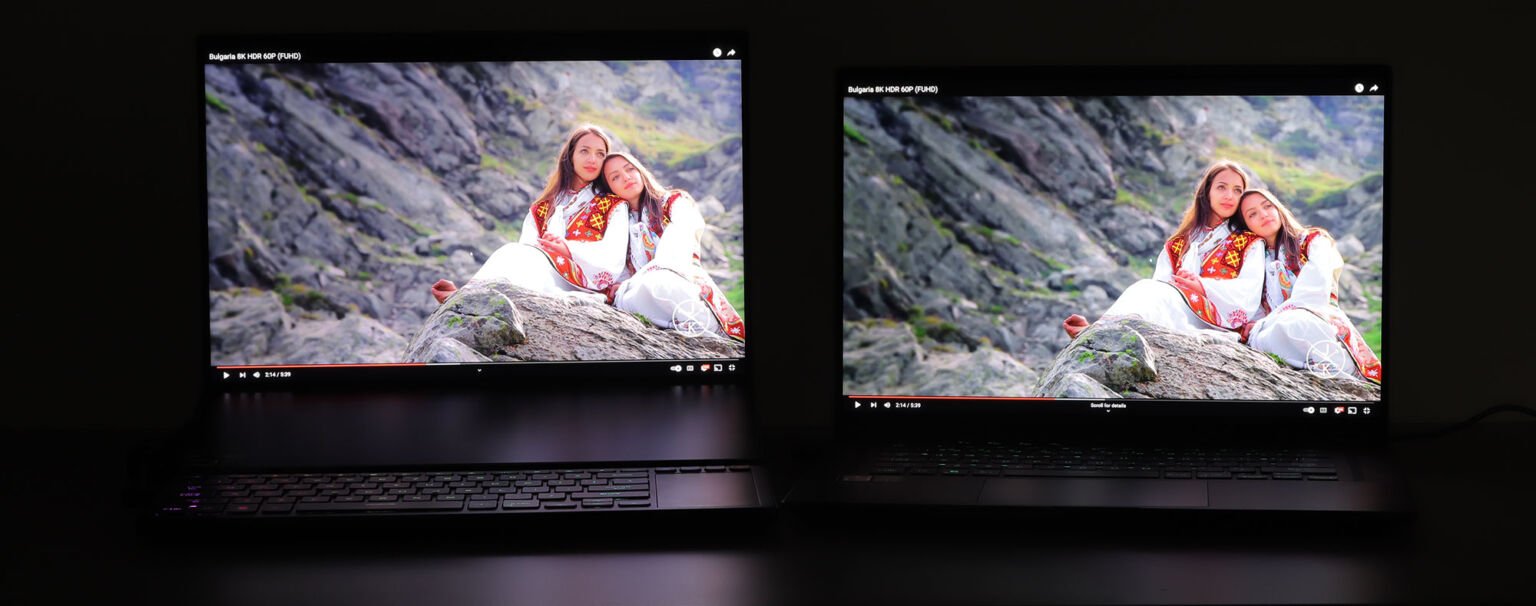
Choosing between Mini LED and OLED for your next gaming laptop comes down to what you value most in your sessions. The Mini LED vs OLED gaming laptop comparison splits along clear lines: OLED delivers deeper blacks and faster pixel response, while Mini LED offers higher brightness and zero burn-in anxiety. Both represent massive upgrades over standard IPS panels, but they serve different gaming lifestyles.
OLED panels light each pixel individually, creating perfect black levels that Mini LED cannot replicate. Mini LED uses thousands of tiny backlights behind an LCD layer, trading infinite contrast for punchier highlights and longer peace of mind. Your answer depends on where you game, what genres you play, and how long you plan to keep the machine.
Quick Answer
The Mini LED vs OLED gaming laptop choice hinges on your environment and habits. OLED provides superior contrast and faster response times, making it ideal for story-driven games in dim rooms. Mini LED delivers higher sustained brightness and eliminates burn-in risk, which suits bright-space gamers and competitive players running static HUDs.
If you prioritize cinematic visuals and control your lighting, choose OLED. If you need reliability in varied conditions and want lower long-term worry, choose Mini LED.
How OLED and Mini LED Actually Work (So You Can Stop Guessing)
Understanding the engineering behind these displays removes guesswork from your purchasing decision. OLED and Mini LED achieve their visual strengths through fundamentally different approaches to light generation and control. Knowing which system operates inside your laptop helps you anticipate performance during actual gameplay.
Pixel-Level Self-Lighting Versus Thousands of Tiny Backlights
OLED displays work by making each individual pixel produce its own light and color. Every pixel contains organic material that illuminates when electricity passes through it. When a pixel needs to show black, it simply turns off completely.
This creates what manufacturers call infinite contrast because pure black pixels sit beside bright white pixels without any light bleeding between them.
Mini LED takes a completely different approach. It places tens of thousands of miniature LEDs behind a traditional LCD panel instead of replacing the backlight entirely. These tiny diodes form a grid that dims or brightens specific zones across the screen independently.
The LCD layer still controls which pixels let light through, but Mini LED's local dimming determines how much backlight each area receives. More dimming zones generally mean better contrast and less visible blooming around bright objects against dark backgrounds.
Why This Architectural Difference Matters So Much
The structural gap between these two technologies creates practical consequences that appear in every gaming session. OLED's self-emissive design eliminates the need for a separate backlight layer, which is why those displays can be thinner and lighter than Mini LED equivalents. That construction advantage matters if you carry your gaming laptop to tournaments or commute regularly.
Mini LED's reliance on a backlight array means manufacturers must balance zone count against cost and thermal output. A laptop with 500 dimming zones handles HDR differently than one with 2,000 zones. Both look dramatically better than standard IPS screens, but the visual experience diverges noticeably during intense gaming marathons.
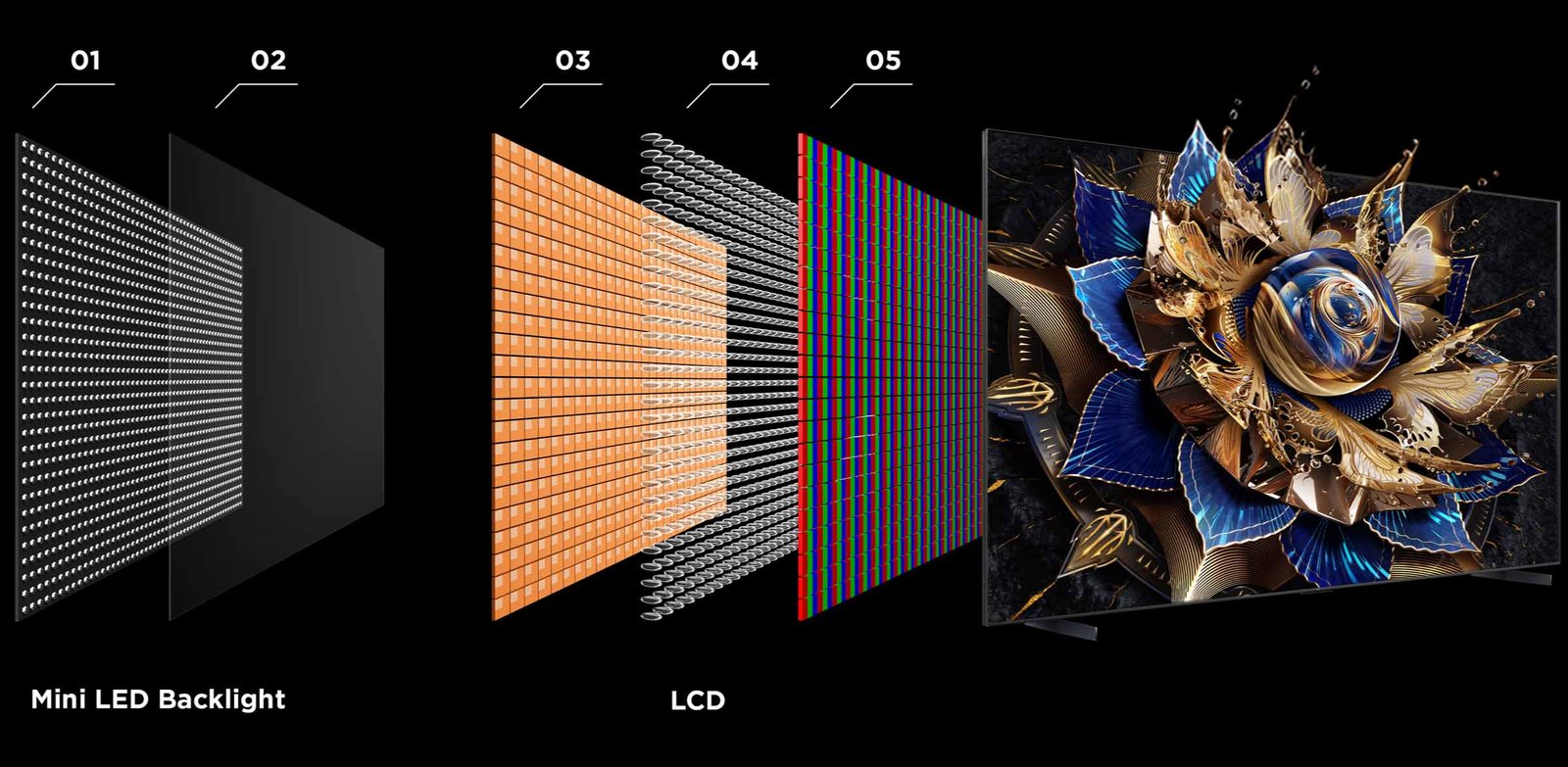
Image source: Bing (Web (fair-use with source credit))
Looking at how these panels compare side by side makes the trade-offs crystal clear. OLED wins on pure contrast and response speed. Mini LED wins on sustained brightness and longevity confidence.
Neither technology is universally superior, which is exactly why the comparison exists in the first place.
The Middle Ground: QD-OLED and Other Hybrid Approaches
Quantum Dot OLED, often called QD-OLED, represents a hybrid combining elements of both worlds. This technology layers quantum dots onto an OLED base, boosting brightness and expanding color volume beyond what traditional OLED achieves. Some gaming laptops feature QD-OLED panels now, though they typically carry a premium price compared to standard OLED alternatives.
The hybrid approach doesn't fully solve OLED's burn-in vulnerability. Quantum dots improve brightness output, but the underlying self-emissive pixels remain organic materials subject to the same degradation patterns over time. If you want OLED-level contrast without committing fully to traditional organic panels, QD-OLED deserves a closer look before you pull the trigger.
Standard IPS LCD panels still dominate the budget gaming laptop segment, so understanding why OLED and Mini LED exist helps you appreciate the upgrade path available above that baseline. Moving from IPS to either of these technologies represents a genuine leap in visual quality, not a marginal improvement.
The Real-Screen Differences That Matter Most in Games
Spec sheets tell you numbers, but your eyes and reflexes tell you the truth during actual gameplay. The differences between Mini LED and OLED become obvious the moment you launch a game and start paying attention to what actually matters in the experience. Black levels, response times, peak brightness, and color accuracy all shift dramatically depending on which technology sits in your lap.
Contrast and Black Levels: Where OLED Pulls Away
Dark corridors in horror games or starfield scenes in space sims reveal OLED's advantage immediately. Those perfectly black pixels create depth and atmosphere that Mini LED struggles to replicate. Even premium Mini LED displays with thousands of dimming zones will show subtle haloing or blooming around bright objects against dark backgrounds.
A white spaceship moving across a black sky might leave a faint glow trailing behind it on Mini LED. On OLED, that same scene looks exactly as the developer intended, with crisp separation between light and dark elements.
This contrast advantage also elevates HDR content significantly. Games built with HDR in mind use the full range from deepest black to brightest highlight to create immersive visual storytelling. OLED's ability to hit those extremes simultaneously gives HDR titles a cinematic quality that Mini LED approximates but rarely matches perfectly.
Response Time and Motion Clarity
OLED's pixel response time sits around 0.2 milliseconds in manufacturer specifications. That number translates to virtually zero motion blur during fast-paced action sequences. Competitive shooters like Counter-Strike 2 or Valorant demand split-second reaction times, and every millisecond of input lag or smear matters when you're tracking enemies across a screen.
Mini LED displays face a different bottleneck. The LCD layer controlling each pixel introduces response times ranging from approximately 1 to 5 milliseconds depending on panel quality. While this sounds acceptable on paper, gamers sensitive to motion clarity will notice the difference during rapid camera movements or high-speed chases.
The gap closes further on premium Mini LED panels using faster LCD substrates, but OLED still holds a measurable advantage in this category.
Brightness: The Mini LED King
Here is where Mini LED fights back hard. Premium Mini LED displays can push 1,000 to 1,600 nits of peak brightness during HDR moments. OLED panels typically max out around 400 to 1,000 nits depending on the size of the bright area on screen.
Full-screen brightness tends to throttle lower on OLED as a protective measure against accelerated aging.
If you game in a brightly lit room with windows, during daylight hours, or under strong overhead lighting, that brightness gap becomes critical. Mini LED cuts through ambient light the way OLED sometimes cannot. Text and UI elements stay readable without cranking the brightness to maximum, which also helps preserve battery life on those machines.
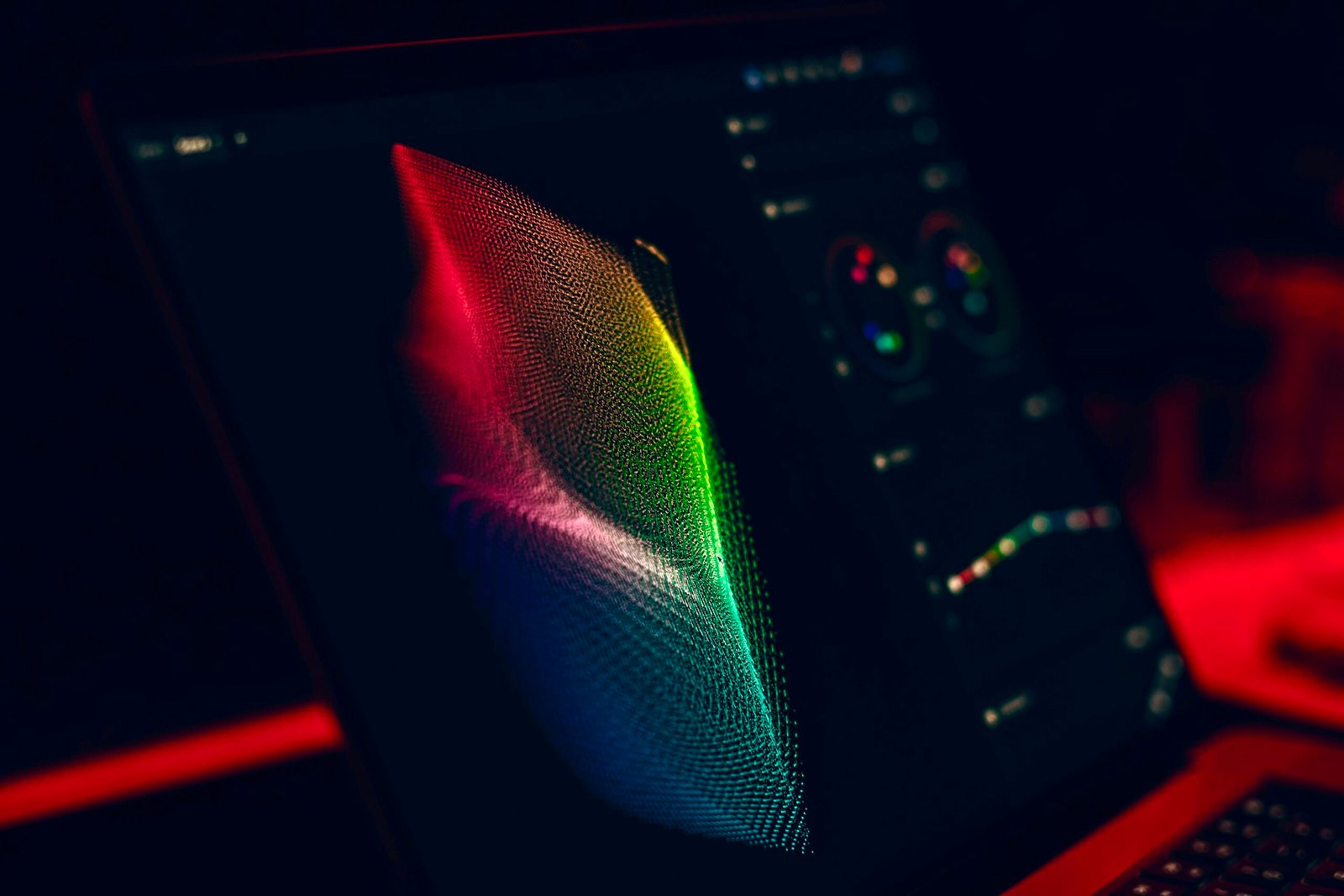
Image source: Bing (Web (fair-use with source credit))
Color Accuracy and Gamut Coverage
Both technologies easily cover 100 percent of the DCI-P3 color gamut, which is the standard most HDR content creators and game developers target. Color reproduction on premium Mini LED and OLED panels alike falls well within acceptable Delta E ranges for consumer displays. Creators working on video projects or photo editing alongside their gaming sessions should find either option serviceable.
OLED typically ships with slightly more saturated colors out of the box, which some gamers find more visually exciting during casual play. Mini LED panels often lean toward a more neutral factory calibration that appeals to users wanting accuracy over punch. Many gaming laptops include software modes that let you switch between vivid, sRGB, and DCI-P3 presets regardless of which display technology you choose.
Refresh Rate and Resolution Trade-offs
High refresh rates matter more for competitive gaming than display type does. Both Mini LED and OLED panels appear in laptops configured for 120Hz, 144Hz, 165Hz, 240Hz, and even 360Hz in some configurations. The sweet spot for most gamers sits around 165Hz paired with WQHD+ resolution, balancing visual fidelity with smooth motion.
OLED panels tend to pair more commonly with QHD+ resolutions rather than 4K, since pushing higher resolution on self-emissive displays increases power draw and heat generation. Mini LED displays maintain the flexibility to support 4K at 60Hz or QHD+ at higher refresh rates depending on the laptop manufacturer's design choices and GPU pairing.
OLED Gaming Laptops: What They Do Best (and Where They Stumble)
OLED gaming laptops have carved out a dedicated following among gamers who prioritize visual immersion above nearly everything else. The technology delivers cinematic contrast and lightning-fast response times that transform familiar games into visually stunning experiences. But those strengths come with real limitations that deserve honest scrutiny before you commit.
The Immersion Advantage Nobody Can Ignore
Playing story-driven titles like Cyberpunk 2077, God of War, or Elden Ring on an OLED display hits differently than on any other laptop screen. The deep blacks make nighttime scenes feel genuinely dark instead of grayish. Explosions and magical effects pop with intensity that raises the emotional impact of pivotal moments.
Game developers increasingly optimize their titles for HDR, and OLED translates those artistic intentions into reality more faithfully than almost any other portable display option available.
Color vibrancy also contributes to immersion in ways that pure technical specs don't capture. Greens in forest environments look richer, skies hold deeper blues, and skin tones render more naturally. This sensory upgrade makes single-player RPGs and adventure games feel like stepping inside the artwork rather than observing it from outside.
The Burn-In Question Everyone Asks
OLED burn-in remains the single biggest concern for potential buyers, and it deserves careful consideration. Burn-in happens when organic pixels degrade unevenly because certain areas of the screen stay illuminated at consistent brightness for extended periods. Static elements like taskbars, health bars, inventory screens, and chat windows create the highest risk scenarios since they occupy the same screen positions for hundreds of hours.
Manufacturers have developed multiple strategies to combat this problem. Modern OLED panels include pixel shifting routines that microscopically move the entire image several times per second. Screen savers activate automatically after brief inactivity periods.
Taskbar transparency settings reduce the contrast between static UI and dynamic content. Some brands even offer dedicated OLED care modes that dim overall brightness and enable additional protection features.
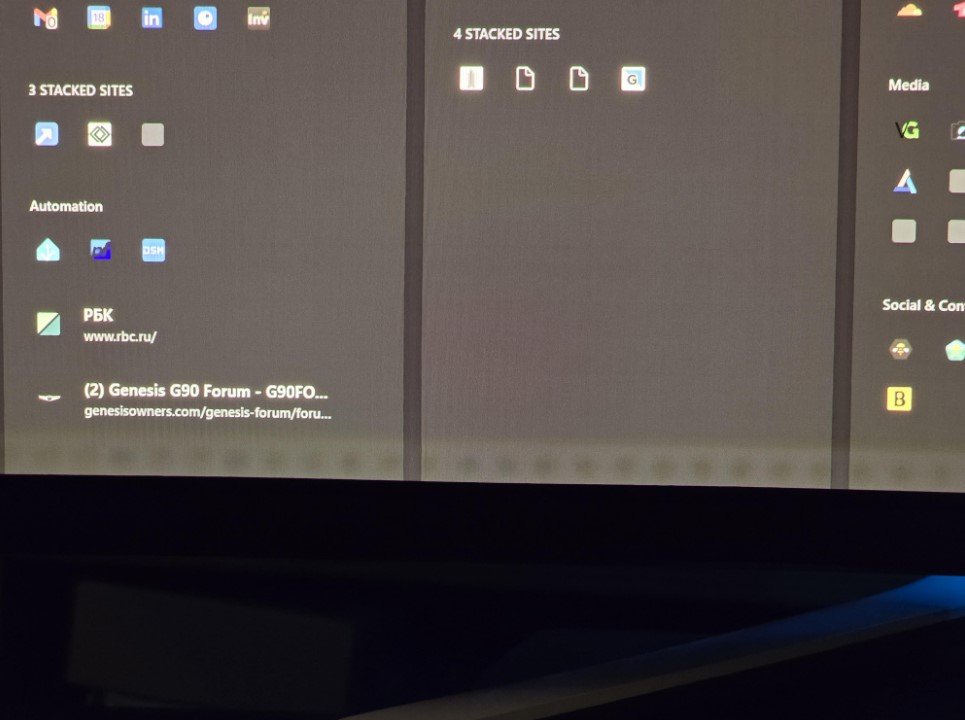
Image source: Bing (Web (fair-use with source credit))
Despite these safeguards, burn-in risk persists, particularly for gamers who run competitive titles with permanent HUD overlays or streamers who leave dashboards visible for hours. Several major manufacturers explicitly exclude burn-in damage from their standard warranty coverage. This exclusion means a damaged OLED panel could require a $400 to $800 replacement that falls entirely on your wallet.
Battery Life Reality Check
OLED displays consume more power than Mini LED when showing bright or colorful content because every lit pixel draws current independently. Dark-themed games actually help OLED efficiency since black pixels turn off completely and draw zero power. But games filled with bright explosions, magical effects, or daytime outdoor scenes force the panel to work harder, which drains your battery noticeably faster than Mini LED equivalents.
If you game unplugged frequently or travel between locations often, expect roughly 20 to 35 percent shorter battery life compared to a similarly specced Mini LED gaming laptop. Pairing that reality with your typical usage pattern prevents unpleasant surprises later. Understanding how How Long Does a Gaming Laptop Battery Last applies to OLED-specific conditions helps you set realistic expectations before purchasing.
Who Should Buy OLED Without Hesitation
OLED gaming laptops make the most sense for gamers who primarily play single-player titles in controlled lighting environments. If your gaming room has curtains drawn or ambient lighting you can manage, OLED's contrast advantage shines without competition from bright windows or harsh lamps. Casual to moderate gaming sessions under four hours daily give the panel's protective measures time to do their job effectively.
Content creators who also game benefit enormously from OLED's color accuracy and HDR performance. Video editors working on projects requiring precise color grading will appreciate the panel's ability to represent the full creative range accurately. A laptop that serves double duty as both a creative workstation and a gaming machine maximizes your investment considerably.
Who Should Think Twice Before Buying OLED
Competitive FPS players who run long sessions with permanent on-screen indicators should approach OLED with caution. Counter-Strike, Rainbow Six Siege, and similar titles overlay damage indicators, minimaps, and ammo counts that stay fixed for entire matches spanning dozens or hundreds of hours weekly. Even with protective features active, the cumulative exposure accelerates wear patterns that eventually become visible.
Gamers in brightly lit spaces face a different limitation. OLED's lower peak brightness means screen glare and washed-out visuals become problems during daytime gaming near windows. Mini LED's higher nits output maintains readability where OLED struggles, making it the objectively better choice for sun-drenched bedrooms or home offices without light control.
Mini LED Gaming Laptops: The Bright-Screen, No-Risk Alternative
Mini LED gaming laptops represent the safer commitment for most buyers despite not offering OLED's absolute visual peak. The technology delivers dramatic improvements over standard IPS panels while avoiding the degradation anxieties that shadow OLED purchases. Understanding Mini LED's strengths and compromises helps you evaluate whether its particular blend of benefits matches your gaming lifestyle.
The Brightness Advantage in Practice
Mini LED panels consistently reach higher peak brightness levels than OLED, often exceeding 1,000 nits in HDR mode and maintaining strong full-screen brightness well above 600 nits. This brightness advantage matters tremendously for gamers who cannot control their environment perfectly. Playing while sunlight streams through windows, gaming in a well-lit common area, or using your laptop outdoors at a park all benefit from Mini LED's ability to overpower ambient light.
The sustained brightness also helps during extended gaming sessions where OLED might throttle down to protect itself. Mini LED maintains consistent output throughout your marathon without triggering automatic dimming routines. Visual consistency matters more than peak performance numbers during long competitive matches where sudden brightness shifts could distract you mid-fight.
Zero Burn-In Anxiety
Perhaps the greatest psychological advantage Mini LED offers is the complete absence of burn-in risk. The LCD layer combined with a localized LED backlight array cannot develop permanent image retention the way organic pixels can. You can leave your taskbar visible for thousands of hours, run the same HUD overlays for countless matches, and never worry about ghost images permanently etching into your screen.
This reliability translates directly into longer usable lifespan without performance anxiety. A Mini LED gaming laptop purchased today should look essentially identical five years from now regarding brightness uniformity and color consistency. OLED panels, even with all modern protections, will show some degree of wear, particularly in the areas most exposed to static content.
Blooming: The Trade-off You Must Accept
Mini LED's local dimming creates a visible artifact called blooming when bright objects appear against dark backgrounds. Light spills slightly into surrounding dark areas, creating a halo effect around otherwise sharp edges. A moon against a night sky or a character holding a glowing weapon will exhibit this phenomenon to varying degrees depending on zone count and dimming algorithm quality.
Premium Mini LED displays with 1,000 to 2,000+ zones minimize blooming significantly, but the effect never disappears completely. Budget Mini LED panels with fewer zones exhibit more pronounced halos that can distract during visually delicate scenes. Understanding this limitation prevents disappointment when you transition from an IPS panel and expect perfection rather than a very good approximation of it.
Better Value Across Price Ranges
Mini LED gaming laptops appear across a wider price spectrum than OLED options. Quality Mini LED panels show up in machines ranging from roughly $800 to $2,500 depending on configuration, while OLED gaming laptops typically start around $1,200 and climb quickly from there. The technology reaches more budget-conscious buyers without forcing them into compromised IPS displays.
This accessibility makes Mini LED particularly appealing for students and younger gamers who want noticeable visual upgrades without premium pricing. The performance gap between a well-specced Mini LED laptop and an equivalent OLED model narrows considerably when you factor in the price difference, often making Mini LED the rational value choice for first-time upgraded display buyers.
Side-by-Side: OLED vs Mini LED Across the Specs That Shape Your Gameplay
Comparing these technologies head-to-head across the specifications that actually influence your gaming experience reveals where each excels and where compromises force difficult decisions. The following breakdown focuses exclusively on practical gaming performance rather than lab measurements designed to impress spec sheets.
| Specification | OLED Gaming Laptops | Mini LED Gaming Laptops |
|---|---|---|
| Peak Brightness (HDR) | 400–1,000 nits | 800–1,600+ nits |
| Sustained Brightness | Lower, throttles under load | Higher, maintains output |
| Contrast Ratio | Effectively infinite | 1,000:1 to 1,000,000:1 |
| Response Time | ~0.2ms GtG | ~1–5ms GtG |
| Burn-In Risk | Present, especially with static UI | None |
| Blooming / Halos | None | Visible, depends on zone count |
| Typical Price Range | $1,200–$3,500+ | $800–$2,500 |
| Color Gamut Coverage | 100% DCI-P3 common | 100% DCI-P3 common |
| Battery Life Impact | Shorter due to pixel power draw | Longer, more efficient |
| Warranty Coverage for Panel Damage | Often excludes burn-in | Standard coverage applies |
Refresh Rate Considerations That Apply Equally
Both display technologies support the same refresh rate options found throughout the gaming laptop market, from 120Hz entry points up through 360Hz competitive panels. Your refresh rate preference depends primarily on the types of games you play and your GPU capability rather than display technology choice. A well-tuned 165Hz Mini LED display will outperform a poorly calibrated 240Hz OLED in competitive scenarios because consistent frame delivery matters more than theoretical maximums.
Modern laptops pairing RTX 40-series or comparable GPUs can drive QHD+ resolutions at high refresh rates comfortably, making the display technology secondary to graphics card selection in many competitive contexts. Pairing your display choice with Best Budget Gaming Laptop Processor research ensures your entire system balances properly rather than bottlenecking one component on premium hardware elsewhere.
HDR Performance Differences
HDR implementation varies significantly between the two technologies beyond simple brightness numbers. OLED achieves superior HDR through perfect contrast combined with wide color volume, creating images with remarkable depth and dimensionality. Mini LED approaches HDR differently, relying on extreme brightness peaks to make highlights pop while accepting slightly compromised black levels in dimly lit scenes.
Games that emphasize atmospheric lighting and shadow detail benefit more from OLED's HDR approach. Titles focused on vibrant explosions and luminous effects may showcase Mini LED's brightness advantage more effectively. Neither approach is wrong; they simply emphasize different aspects of the HDR experience based on artistic intent and rendering choices made by developers.
Who Should Buy an OLED Gaming Laptop (and Who Should Walk Away)
Making the right choice requires honest assessment of your actual gaming habits, environment, and priorities rather than chasing whatever sounds impressive on a spec sheet. OLED gaming laptops serve specific user profiles exceptionally well while creating unnecessary compromise for others who would be happier with alternative technology.
Perfect Matches for OLED Ownership
Story-driven single-player gamers who immerse themselves in richly visual worlds for three to four hour sessions represent OLED's ideal audience. RPG enthusiasts, adventure game fans, and narrative-focused players will notice OLED's contrast and color advantages immediately and repeatedly. These games rarely feature persistent static HUDs that threaten panel longevity during normal play patterns.
Creative professionals who also game find OLED particularly valuable because the display serves dual purposes equally well. Photo editors, video producers, and digital artists benefit from OLED's accurate color representation and deep contrast when reviewing their work. Switching between creative applications and evening gaming sessions becomes seamless when one display handles both tasks excellently.
Players who control their gaming environment completely also maximize OLED's potential. Rooms with blackout curtains, adjustable ambient lighting, and predictable screen placement allow OLED to perform without external interference degrading the experience. These conditions eliminate the brightness disadvantage that plagues OLED in uncontrolled environments.
Clear Reasons to Choose Something Else Instead
Competitive multiplayer gamers running identical matches with permanent interface elements should strongly consider Mini LED over OLED. Hour-long ranked sessions featuring always-visible health bars, minimaps, and score counters accumulate screen time that stresses OLED's protective measures continuously. The incremental visual quality gain rarely justifies the long-term degradation risk for this user profile.
Daylight gamers and outdoor portable users face another limitation. No amount of screen tinting or privacy filters fully compensates for OLED's lower peak brightness when fighting direct sunlight or bright overhead fluorescent lights. Mini LED maintains readability where OLED becomes frustratingly difficult to see clearly, especially during extended sessions where eye strain accumulates.
Budget-conscious buyers who want visual upgrades without premium pricing should also lean toward Mini LED. The technology delivers most of the perceptible improvement at considerably lower cost, leaving room in your budget for better graphics cards, more RAM, or additional peripherals that improve gaming performance beyond display quality alone. Exploring options among 5 Best Budget Gaming Laptops Under 1000 reveals how Mini LED stretches dollars further while still delivering impressive visual results.
Who Should Choose Mini LED Instead
Mini LED gaming laptops attract a broader range of users precisely because they avoid the vulnerabilities that constrain OLED adoption. Certain gamer profiles and lifestyle factors align so naturally with Mini LED's characteristics that choosing anything else requires deliberate justification rather than easy assumption.
Competitive Gamers and Streamers
Multiplayer competitive players who treat gaming as a serious hobby or semi-professional pursuit benefit enormously from Mini LED's reliability. Tournament preparation, ranked climbing sessions, and practice routines all involve repetitive HUD exposure that OLED handles reluctantly. Mini LED panels maintain consistent performance across thousands of hours without developing persistent image retention or visible wear patterns.
Content creators who stream their gameplay face identical concerns amplified by broadcast requirements. Stream overlays, subscriber alerts, and chat windows remain visible for hours during live broadcasts. Mini LED handles this workload without anxiety, letting streamers focus on engagement rather than worrying about panel degradation accumulating during every broadcast session.
Bright Environment Gamers
Windows-facing desks, sunlit bedrooms, and open-plan living spaces all favor Mini LED's brightness capabilities. Ambient light washing out an OLED display forces you to either reposition your setup or accept compromised visual quality during preferred gaming times. Mini LED punches through competing light sources effectively enough to maintain consistent image quality regardless of environmental conditions.
Traveling gamers who game in diverse locations encounter this advantage regularly. Hotel rooms with unfamiliar lighting, coffee shops with large windows, and outdoor gatherings all present varying brightness challenges that Mini LED handles gracefully while OLED requires environmental adaptation.
Long-Term Ownership Buyers
Gamers planning to keep their laptops for four or five years without replacement prioritize Mini LED's resistance to degradation. The panel you purchase today should look essentially the same years from now regarding brightness uniformity and color consistency. OLED panels age visibly even with protective measures, and that aging becomes more apparent the longer you own the machine.
Warranty peace of mind also favors Mini LED significantly. Standard manufacturer warranties typically cover Mini LED panels without burn-in exclusions that complicate OLED claims processing. Unexpected panel failure during ownership becomes financially predictable rather than potentially devastating with OLED's exclusionary terms.
Checking Why Does My Gaming Laptop Get So Hot guides alongside display maintenance knowledge helps maximize any panel's lifespan regardless of technology chosen.
The Hidden Costs and Trade-offs You Won't See on the Spec Sheet
Pricing stickers and promotional pages rarely disclose the full financial picture surrounding display technology ownership. Understanding hidden costs, real-world lifespan expectations, and warranty limitations prevents buyer remorse after that exciting unboxing moment fades into daily usage reality.
Panel Replacement Costs That Hurt
OLED panel replacements on gaming laptops routinely cost between $400 and $800 depending on size, resolution, and availability. This expense frequently exceeds 40 percent of the original laptop purchase price for mid-range models, making burn-in damage financially catastrophic for unaffected owners. Mini LED panels carry replacement costs in a similar range, but the dramatically lower risk of failure makes that expense theoretical rather than probable.
These replacement figures underscore why warranty terms deserve careful examination before purchase. Reading your manufacturer's full warranty documentation rather than skimming highlights reveals exactly what failures receive coverage and which ones fall outside protection. Small print about organic panel exclusions appears everywhere in the industry, and ignorance of those terms provides no legal protection when problems surface.
Brightness Throttling Behavior
OLED panels automatically reduce brightness when displaying large areas of white or when internal temperatures rise during sustained heavy use. This protective throttling prevents accelerated organic material degradation but creates inconsistent visual experiences during intensive gaming sessions. Bright cinematic moments that should feel spectacular instead feel appropriately bright initially then settle into comfortable mediocrity as the panel protects itself.
Mini LED displays maintain consistent brightness output across extended sessions without triggering protective dimming routines. This stability matters more than spec comparisons suggest because visual consistency prevents distraction during crucial gameplay moments when every detail carries competitive or narrative significance.
Realistic Lifespan Expectations
OLED panels typically maintain acceptable performance for three to five years under normal gaming usage before noticeable brightness degradation or color shift becomes apparent. Heavy daily use with bright content accelerates this timeline considerably, while mixed usage with regular dark content extends it. Manufacturers often rate OLED panels for approximately 30,000 hours before brightness drops to 50 percent of original output, but real-world conditions frequently deviate from ideal laboratory testing parameters.
Mini LED panels face far less degradation pressure from their inorganic backlight components. Ten-plus year lifespans with minimal brightness loss represent realistic expectations for well-maintained Mini LED displays used in typical gaming scenarios. This longevity difference becomes economically significant when calculating total cost of ownership across multiple years of daily use.
Understanding how 5 Best Budget Laptop for Gaming and Video Editing compares across display options helps contextualize these lifespan differences within broader ownership economics rather than isolating display technology from total system value.
How to Protect Your Investment After You Buy
Display preservation begins immediately after purchase and continues throughout your ownership period. Simple habit changes and setting adjustments prevent the majority of common display degradation scenarios without requiring technical expertise or expensive accessories.
Daily Settings That Prevent Cumulative Damage
Adjusting brightness to approximately 60 to 75 percent during regular gaming sessions reduces stress on display components without sacrificing visibility. Auto-brightness features should remain enabled because they respond to ambient light changes faster than manual adjustments, keeping your screen comfortable while preventing unnecessary maximum output during darker scenes. Many gaming laptops include software utilities that let you create custom profiles for different game genres, allowing you to switch between optimal settings automatically based on what you play.
Screen timeout intervals deserve equal attention. Setting your display to dim or sleep after five to ten minutes of inactivity gives pixels periodic rest during brief pauses between matches or while reading menus. Even experienced gamers frequently step away from their laptops for extended periods without realizing it, making automatic sleep modes essential for long-term panel preservation.
Weekly Maintenance That Matters More Than You Think
Dust accumulation on laptop vents creates thermal problems that indirectly affect display lifespan. Overheating components generate excess heat that transfers to nearby parts including the display assembly, accelerating aging across all internal electronics. Cleaning ventilation openings weekly with compressed air prevents dust buildup that chokes cooling systems and forces fans to work harder.
Display surface cleaning requires equally careful attention. Use only microfiber cloths designed for screens along with manufacturer-approved cleaning solutions. Paper towels, clothing fabrics, and household cleaners damage protective coatings permanently and create microscopic scratches that scatter light and reduce perceived contrast over time.
A quick monthly wipe-down removes fingerprints and oils that attract additional dust without introducing cleaning chemicals near vents or ports.
Monthly Checks That Catch Problems Early
Running manufacturer diagnostic tools monthly reveals developing issues before they become permanent damage. Most gaming laptop brands include built-in screen testing utilities that check for dead pixels, backlight uniformity problems, and color accuracy drift. Documenting baseline measurements helps you identify when deviations occur and whether they fall within acceptable ranges or indicate developing failures.
Backup configurations deserve equal attention. Saving your preferred display settings, color profiles, and performance configurations prevents data loss during system updates or unexpected failures. Cloud storage or external drives make simple backups that take minutes but save hours of restoration work if something goes wrong.
Keeping How Often Should I Clean Gaming Laptop Fans routines consistent ensures these monthly checks address thermal management alongside display-specific maintenance.
When to Seek Professional Help Instead of DIY Fixes
Certain display issues require professional intervention rather than user troubleshooting. Purple discoloration spreading from screen edges indicates backlight failure or liquid crystal degradation that no software adjustment can repair. Persistent vertical or horizontal lines suggest physical panel damage or flexible cable connection problems requiring replacement rather than adjustment.
Recognizing these signs early prevents attempting ineffective fixes that waste time while the underlying problem worsens.
Manufacturer support channels provide the safest first response for warranty-covered devices. Opening service tickets promptly ensures you maintain coverage eligibility while technicians diagnose problems accurately. DIY repairs on modern ultrathin laptops often void warranties and risk additional damage during disassembly, making professional service the smarter choice for most users.
Common Mistakes Buyers Make When Choosing Between These Displays
Even well-researched buyers fall into predictable traps when comparing Mini LED and OLED gaming laptops. These mistakes stem from focusing on specifications rather than real-world usage patterns, which creates mismatches between expectations and actual experience. Recognizing these pitfalls before they influence your decision prevents expensive disappointment.
Prioritizing Peak Brightness Over Real-World Usability
Marketing materials emphasize peak brightness numbers achieved under laboratory conditions that rarely match actual gaming environments. A display claiming 1,600 nits might only reach that level for tiny HDR highlights lasting fractions of a second. Full-screen brightness during extended gaming sessions typically runs significantly lower, making peak specifications misleading for practical comparison purposes.
Focusing instead on sustained brightness ratings and viewing angle performance provides more useful information. Screens maintaining consistent brightness across wide angles prevent color shifting when viewed from different positions, which matters considerably if multiple people share gaming sessions or if you adjust seating positions frequently throughout long sessions.
Ignoring Panel Uniformity and Quality Control Variance
Manufacturers ship panels with varying quality characteristics even within identical model lines. Two laptops featuring the same supposedly identical display can show noticeably different backlight uniformity, color accuracy, or brightness consistency depending on production batch and individual panel binning. Specification sheets rarely reveal this variance, making individual unit inspection impossible before purchase.
Reading detailed reviews from multiple sources helps identify consistent quality patterns across different production runs. Look for reviewer comments about backlight bleeding, color consistency, and uniformity complaints that appear repeatedly across different review samples. Single negative experiences might represent individual defective units, but repeated complaints signal systematic quality issues worth avoiding.
Overlooking Wattage and Power Efficiency Differences
Display technology dramatically affects total system power consumption beyond what specification comparisons reveal. OLED panels draw different power depending on content brightness patterns, creating variable consumption that standard battery life estimates cannot predict accurately. Mini LED displays maintain more consistent power draw regardless of on-screen content, making battery predictions more reliable but potentially higher during bright scenes.
Checking comprehensive power consumption tests from independent reviewers provides better predictions than manufacturer claims. Systems pairing efficient displays with appropriate GPU configurations achieve noticeably better battery life than mismatched combinations where high-power displays drain batteries quickly regardless of graphics card capabilities. Reading guides about Why Is My Gaming Laptop Slower on Battery helps contextualize display power impact within overall system efficiency.
Assuming All OLED Panels Handle Burn-In Equally
Not all OLED implementations address burn-in prevention with equal sophistication. Some manufacturers invest heavily in pixel shifting algorithms, screen saver routines, and brightness management systems while others provide minimal protective features. Panel age, brightness history, and manufacturing quality all influence actual burn-in susceptibility beyond generic technology labels.
Researching specific laptop models rather than assuming technology category guarantees reveals which implementations include robust protection features. Verified buyer feedback and professional review databases show real-world longevity patterns that specification comparisons cannot predict accurately.
Neglecting Keyboard and Trackpad Compatibility
Display choices sometimes conflict with input method preferences without obvious connection. Higher brightness screens reduce keyboard visibility during typing sessions, particularly on lighter-colored chassis where backlight shine creates glare. Matte display coatings improve viewing comfort but sometimes correlate with glossy keyboard decks that reflect overhead lighting uncomfortably.
Considering your complete usage environment prevents mismatches between display characteristics and input device usability. Testing keyboards and trackpads alongside display types whenever possible reveals compatibility issues before purchase completion.
Expert Tips for Picking the Right Gaming Laptop Screen in 2025
Current market conditions favor informed buyers who understand both technology capabilities and practical limitations. Several factors distinguish smart purchasing decisions from impulse buys driven by specification comparisons or promotional pricing.
Verify Actual Usage Patterns Before Comparing Specifications
Most gamers overestimate their competitive multiplayer time while underestimating single-player session length. Tracking your actual gaming habits for one week reveals usage patterns that specification shopping ignores completely. If your weekly hours split evenly between competitive shooters and story-driven RPGs, neither display type dominates clearly, making secondary factors like price and warranty more decisive.
Documenting actual usage patterns prevents buying displays optimized for scenarios you rarely encounter. A Mini LED laptop purchased for competitive gaming provides excellent value if that genuinely represents your primary use case, but becomes disappointing if single-player immersion matters more to your satisfaction.
Match Display Choice to GPU Capability Realistically
Premium displays paired with inadequate graphics cards create visual frustration regardless of panel quality. An RTX 4060 driving a 240Hz OLED panel at QHD+ resolution struggles to maintain target frame rates in demanding titles, negating refresh rate advantages through constant framerate drops and stuttering. Matching display specifications to actual GPU performance prevents paying premium prices for capabilities your system cannot utilize effectively.
Researching balanced configurations like those found in 5 Best Budget Gaming Laptop With 16gb Ram guides helps ensure your entire system works cohesively rather than prioritizing display quality at the expense of graphical performance.
Test Color Accuracy Claims with Your Own Eyes
Factory calibration reports sound impressive until you compare them against your personal visual preferences. Some calibrated displays lean noticeably warm or cool depending on manufacturer targeting, which affects how games and creative work appear compared to your expectations. Checking actual sample images and video reviews reveals color rendition characteristics that specification sheets hide behind idealized measurements.
If possible, compare side-by-side demonstrations before purchasing. Physical comparison reveals real-world differences more accurately than any specification reading or reviewer description, helping you identify personal preference variations that matter more than objective superiority.
Factor In Peripheral Upgrades Budget Alongside Display Costs
Display improvements often inspire additional upgrade desires that strain budgets unexpectedly. Better screens make existing peripherals look inadequate by comparison, tempting purchases of superior headsets, mice, keyboards, and desk setups that compound costs beyond original intentions. Setting aside reserve funds for complementary upgrades prevents financial stress when display improvements trigger cascading upgrade desires.
Planning complete setup economics rather than isolated display purchases ensures sustainable upgrade pacing that improves your gaming experience without creating financial pressure. Considering options from 5 Best Budget Laptop for Gaming and Streaming helps identify complete ecosystem improvements that complement display upgrades rather than replacing them entirely.
Respect Warranty Terms Rather Than Assuming Coverage
Warranty exclusions appear everywhere in display purchases, often hidden within multi-page documents that buyers skim briefly before signing. Burn-in exclusions, accidental damage limitations, and battery replacement policies vary considerably between manufacturers and deserve explicit confirmation before purchase completion. Taking fifteen minutes to read warranty terms thoroughly prevents devastating surprises during future repair scenarios.
Saving digital copies of warranty documentation and registration confirmations ensures easy access when service requests become necessary. Organized records speed up claim processing and prevent administrative delays that extend downtime unnecessarily.
Mini LED vs OLED Gaming Laptop FAQs
Shoppers consistently ask similar questions when evaluating these display technologies, revealing common concerns about longevity, performance, and value. Addressing these questions directly helps eliminate uncertainty before purchase decisions become final.
Does Mini LED Really Last Longer Than OLED?
Mini LED panels typically outlast OLED displays by several years under equivalent usage conditions because their inorganic backlight components resist degradation far more effectively than organic self-emissive materials. Most Mini LED displays maintain acceptable performance for seven to ten years with minimal brightness reduction, while OLED panels commonly show noticeable degradation beginning around three to five years depending on usage intensity and protective measures employed. Realistic lifespan expectations depend heavily on daily usage patterns, brightness settings, and environmental conditions during operation.
Can I Use an OLED Laptop for Office Work Without Risk?
Office work presents lower burn-in risk than intensive gaming because document editing and web browsing involve more varied on-screen content with less persistent static elements. Static taskbars and dock icons remain the primary concern, but reducing their visual prominence through transparency settings or automatic hiding minimizes exposure significantly. Light office usage totaling under four hours daily with moderate brightness settings generally poses acceptable risk for most modern OLED implementations.
Will Mini LED Blooming Distract Me During Competitive Games?
Blooming visibility depends entirely on individual sensitivity and specific game scenes rather than representing a universal experience. Most competitive gamers adapt quickly to mild haloing around bright effects against dark backgrounds, though highly sensitive viewers notice it more prominently during atmospheric sequences. Testing displays personally whenever possible reveals whether blooming levels remain tolerable for your specific visual sensitivity before committing to purchases.
Do Both Technologies Support External Monitor Connections Equally?
Yes, both Mini LED and OLED laptops connect to external displays through identical port configurations including HDMI, DisplayPort, and USB-C alternatives. Your external monitor quality and connectivity options remain completely independent of your laptop's built-in display technology. Connecting superior external displays often proves more economical than upgrading laptop-integrated panels when desk-based gaming represents your primary setup configuration.
Should I Wait for Micro LED Technology Instead?
Micro LED represents genuine next-generation display technology offering OLED-level contrast with Mini LED brightness and zero burn-in risk, but current laptop implementations remain prohibitively expensive and scarce. Commercial availability in consumer gaming laptops remains limited to experimental prototypes and extremely expensive special edition models as of 2026. Waiting for mainstream Micro LED adoption likely means expecting another two to four years before prices reach reasonable consumer purchasing ranges.
Can I Adjust OLED Brightness Without Accelerating Degradation?
Lower brightness settings actually reduce organic material stress and slow degradation rates considerably. Running OLED displays at 50 to 70 percent maximum brightness extends panel longevity significantly compared to sustained maximum output while maintaining comfortable viewing conditions for most environments. Automatic brightness management features that adapt to ambient lighting prevent manual settings from remaining excessively high during darker gaming sessions unnecessarily.
Final Recommendation: Which Display Technology Wins for You
Making your final decision requires honest assessment of personal priorities rather than chasing theoretical perfection across every measurable specification. Neither technology dominates universally because each serves distinct usage patterns optimally while compromising differently across other dimensions.
The Decision Framework That Actually Works
Choose OLED when your primary gaming involves single-player story experiences in controlled lighting environments, visual immersion ranks above all other display characteristics, acceptable future panel replacement costs seem reasonable insurance for current excellence, and daily gaming sessions average under four hours with varied on-screen content minimizing persistent static element exposure. Your enjoyment gains from superior contrast and response times justify accepting potential longevity trade-offs willingly.
Choose Mini LED when competitive multiplayer gaming with permanent HUD elements represents your primary activity, bright or variable lighting conditions characterize your typical gaming environment, warranty protection and long-term reliability outweigh absolute visual perfection desires, sustained brightness consistency during extended sessions matters considerably, and achieving strong value across moderate to upper-mid price ranges without significant visual compromises remains important. Your peace of mind and consistent performance justify accepting slightly reduced contrast quality gladly.
Questions That Ultimately Determine Your Choice
Ask yourself honestly whether you game primarily in darkness or daylight. Dark room gamers maximize OLED advantages while bright room gamers maximize Mini LED advantages consistently. Consider whether you play competitive titles with permanent interfaces or narrative experiences with minimal HUD elements.
Interface-heavy gamers protect themselves best with Mini LED while cinematic gamers gain more from OLED immersion.
Evaluate whether you plan keeping your current laptop three, five, or seven plus years before considering replacement. Long-term owners benefit enormously from Mini LED longevity while shorter ownership cycles make OLED's visual advantages more economically justifiable despite potential replacement costs appearing sooner.
The Reality Behind Perfect Choices
Perfect display technology for hypothetical ideal users rarely exists matching real personal circumstances exactly. Both Mini LED and OLED represent substantial upgrades over standard IPS panels dominating budget gaming laptop segments currently. Understanding which compromises align with your actual usage patterns prevents expensive mismatches between expectations and experience far more effectively than specification comparisons alone ever could.
Taking time to honestly assess daily gaming habits, environmental conditions, budget constraints, and ownership timeline expectations before deciding prevents post-purchase regret consistently. The genuinely superior display technology depends entirely on your specific situation rather than abstract benchmark superiority measured under idealized laboratory conditions.