Two laptops end up on the same shortlist and the price gap looks almost like a mistake. On one side sits the Acer Nitro V 16S AI Gaming, a 16-inch machine with a dedicated GPU and a 180Hz panel. On the other is the NIMO 15.6'' AMD Ryzen 5 Student, a light-duty workhorse built around efficiency and a low entry point.
When shoppers search Acer Nitro V 16S AI Gaming vs NIMO 15.6'' AMD Ryzen 5 Student, the real question underneath is simple: does the extra spend buy anything you'll actually feel day to day?
Short answer: the Acer Nitro V 16S wins for gaming, video work, and anything GPU-bound. The NIMO wins for lectures, spreadsheets, and tight budgets where 16GB of RAM and a 2-year warranty matter more than frame rates. We compared manufacturer datasheets side by side and read through verified buyer reports to see where each one earns its keep.
| Product | Details | Rating | Buy |
|---|---|---|---|
Editor’s Choice 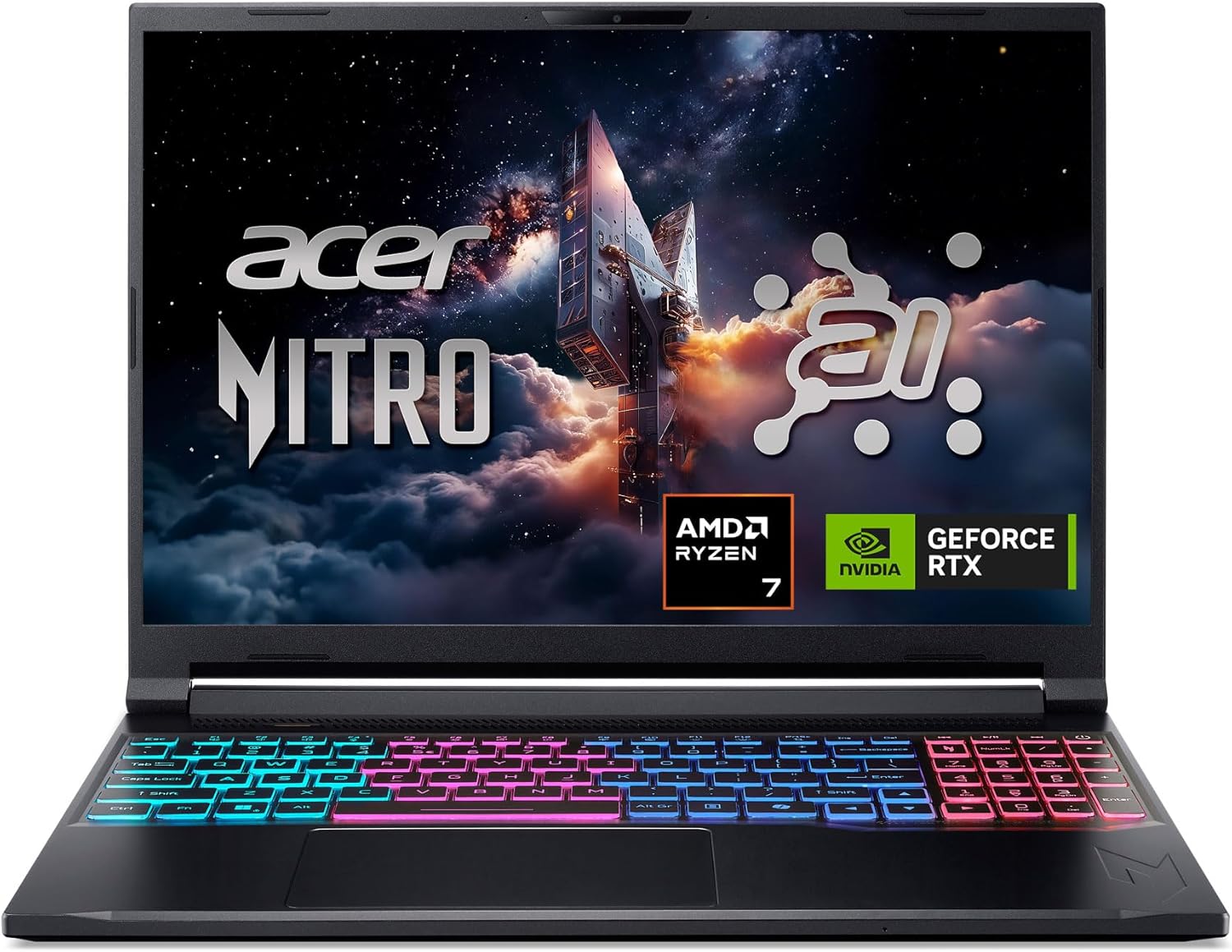 | Acer Nitro V 16S AI Gaming | ★★★★☆4.4/5 | |
Top Pick  | NIMO 15.6” AMD Ryzen 5 Student | ★★★★☆4.3/5 |
At a glance
These two machines are solving different problems. The Acer Nitro V 16S AI Gaming is a desktop replacement built to keep a GPU fed: 32GB of DDR5, a 1TB Gen 4 drive and a 180Hz panel all exist to serve the RTX 5060 underneath. The NIMO 15.6'' AMD Ryzen 5 Student optimises for the opposite: low cost, low heat, long classroom sessions, and a warranty that outlasts a degree.
Put them beside a Lenovo LOQ 15 or an ASUS TUF Gaming A15 and the Acer looks like a straightforward mid-range gaming pick. Put them beside an HP 15.6 budget model and the NIMO looks generous, mostly because 16GB of RAM and a fingerprint reader are still not guaranteed at that tier.
| Spec | Acer Nitro V 16S AI Gaming | NIMO 15.6” AMD Ryzen 5 Student |
|---|---|---|
| Price tier | Premium | Budget-friendly |
| Processor | AMD Ryzen 7 260 | AMD Ryzen 5, boost up to 3.7GHz |
| Graphics | NVIDIA GeForce RTX 5060 Laptop GPU, 572 AI TOPS | Integrated AMD Radeon graphics |
| Memory | 32GB DDR5 | 16GB |
| Storage | 1TB Gen 4 SSD | 256GB SSD, expandable to 2TB |
| Display | 16-inch WUXGA IPS, 180Hz | 15.6-inch, 180-degree hinge |
| Input and security | Full-size gaming keyboard deck | Backlit keyboard plus fingerprint reader |
| Wireless | Wi-Fi 6 | Wi-Fi with Windows 11 out of the box |
| Charging | Standard gaming power brick | 65W USB Type-C |
| Warranty | Standard manufacturer coverage | 2-year |
1. Acer Nitro V 16S AI Gaming
The Nitro V 16S is the one you buy when you want genuine GPU headroom without stepping into flagship pricing. Acer's ANV16S-41-R2AJ pairs a Ryzen 7 260 with an RTX 5060 Laptop GPU rated at 572 AI TOPS, then wraps it in a 16-inch WUXGA IPS panel refreshing at 180Hz. On paper that's a legitimate desktop replacement for gaming and creative work.
Where it shines
- 32GB of DDR5 from the factory. No upgrade planning required. You can keep a game open, a browser with 40 tabs, Discord and a capture tool running without watching memory usage climb into the red.
- The RTX 5060 changes what's possible. Dedicated VRAM means image upscaling, ray tracing and local AI workloads all run on hardware. NVIDIA's own documentation on the architecture explains why the 572 AI TOPS rating matters for anything beyond gaming.
- 1TB Gen 4 SSD keeps loading screens short. Verified buyer feedback repeatedly mentions quick boot times and near-instant game launches, which is expected from PCIe Gen 4 bandwidth and a big improvement over SATA-era drives.
- 180Hz on a 16-inch WUXGA panel. Competitive shooters feel noticeably smoother, and the larger chassis gives the cooling system more room to work than a 15-inch frame would.
- Wi-Fi 6 keeps latency stable. Useful if you game in a shared house where the router is two rooms away.
Where it falls short
- It's a heavy machine. A 16-inch gaming chassis with a discrete GPU and a large power brick is not something you'll want to carry to a 9am lecture five days a week.
- Fan noise under sustained load. Aggregate user reviews consistently report audible fan ramp during long gaming sessions, which is normal for thin gaming designs but worth knowing if you share a room.
- No fingerprint reader. The NIMO has one; the Acer listing makes no biometric login claim.
- Battery expectations need resetting. Gaming hardware at this power level rarely clears a full unplugged workday.
In our research, the pattern across buyer reports was consistent: people who bought this for gaming and video editing were satisfied, while people who bought it as a general-purpose school laptop usually complained about weight and fan noise first. The spec sheet rewards you only if you actually use the GPU.
2. NIMO 15.6” AMD Ryzen 5 Student
The NIMO 15.6'' AMD Ryzen 5 Student is unapologetically a budget machine, and that's the whole point. You get 16GB of RAM, a 256GB SSD that expands to 2TB, Windows 11 preinstalled, a backlit keyboard, a fingerprint reader, 65W USB Type-C charging and a 2-year warranty. For coursework and office work, that's a serious amount of spec for the money.
Where it shines
- 16GB of RAM at this price point is the headline. Most budget laptops still ship with 8GB, which chokes the moment you open a dozen browser tabs beside Zoom.
- A 2-year warranty stands out. That's double what many budget sellers offer, and buyers who reported issues repeatedly mentioned getting resolution without a fight.
- 65W USB Type-C charging is genuinely convenient. One compact adapter covers the laptop and, in many cases, your phone, so your bag gets lighter on commute days.
- The Ryzen 5 beats an 11th-gen i5 on paper. NIMO's own comparison against the i5-1135G7 lines up with what AMD publishes about the Ryzen mobile architecture, and for document work you'll feel the difference in responsiveness rather than raw benchmark scores.
- Backlit keyboard plus fingerprint reader. Small things, but they're the sort of features budget shoppers usually give up first.
Where it falls short
- No dedicated GPU. Integrated Radeon graphics handle video calls, spreadsheets and older or lightweight titles. Modern AAA games are out of reach, and that's the single biggest gap between these two.
- 256GB fills up faster than you think. Windows 11 plus updates plus a semester of files leaves less room than the number suggests, so budget for the 2TB upgrade path or running out of room on the boot drive becomes a real annoyance.
- The listing targets everyday use, not refresh rate or colour accuracy. If you edit photos professionally, you'll want to check the panel specs yourself before committing.
- Plastic build. The 180-degree hinge is handy, but this is not a machine you buy for the feel of it.
In our research, the recurring theme in verified reviews was value satisfaction rather than performance excitement. People described it as "does everything I need for class" far more often than they described it as fast.
Head-to-head
Price-to-performance
This one is closer than the price gap suggests, because "performance" means different things.
If your workload is GPU-bound, the Acer Nitro V 16S delivers something the NIMO simply cannot: playable frame rates in current games, hardware-accelerated rendering and enough VRAM to run creative apps without thrashing. Paying more for a real GPU is the correct call when that's your use case. You're not buying 3x the laptop, you're buying a category the NIMO doesn't compete in.
If your workload is browser tabs, Word, PDFs and Zoom, the NIMO delivers roughly 90% of the day-to-day experience for a fraction of the outlay. Spending more buys you headroom you'll never touch, plus weight you'll carry for no reason.
Gaming and GPU-heavy work
There's no contest here, and it's worth being blunt about it. A dedicated RTX 5060 with 572 AI TOPS runs circles around integrated Radeon graphics in any title from the last five years.
The practical difference shows up in three places. Frame rates at native resolution, the ability to use upscaling and frame generation, and sustained performance once the machine gets warm. The Acer's 16-inch chassis and 180Hz panel exist to support that GPU, and the whole design makes sense together.
The NIMO can run esports titles and older games at modest settings. If you've ever fought a laptop that stutters mid-match, you already know why people chase extra frames with tweaks like stopping background apps from hogging the GPU, but no amount of tuning turns integrated graphics into a gaming GPU.
Portability and everyday use
The NIMO wins the daily-carry argument without much effort. A 15.6-inch chassis with integrated graphics and a 65W USB-C charger is a genuinely different travel experience from a 16-inch gaming laptop with a dedicated brick.
There's a practical side benefit too: lower heat output means less chance of heat building up inside a closed backpack when you toss it in a bag between classes. Gaming laptops pull more power at idle and run warmer in sleep states, which is why owners end up learning about modern standby behaviour whether they want to or not.
If the laptop lives on a desk, the Acer's extra size is a non-issue. If it travels five days a week, it's the deciding factor.
Long-term ownership
The NIMO starts ahead on warranty: 2 years versus standard manufacturer coverage on the Acer. That matters more than people admit, because budget laptops are exactly where a failed hinge or dead charging port hurts most.
On upgradability, both have paths. The NIMO's storage expands to 2TB, which is the most common buyer fix for a 256GB drive. The Acer's 32GB of DDR5 and 1TB Gen 4 SSD mean you likely won't touch anything for years.
On software longevity, both run Windows 11 and both occasionally need the same maintenance any laptop does, from clean driver behaviour to sorting out sleep and wake glitches. Neither is more fragile in that respect. The Acer just has more thermal load to manage.
Which one should you buy?
Pick Acer Nitro V 16S AI Gaming if you…
You game, you edit video or photos, or you run local AI tools and want them on real hardware. The combination of 32GB DDR5, 1TB Gen 4 storage and an RTX 5060 is a coherent package for anyone whose work actually uses the GPU.
You'll also be happier with it if the machine mostly stays put. A 180Hz 16-inch panel is a joy on a desk and a burden in a backpack, so buy it as a desk-first machine and you'll get what you paid for.
Pick NIMO 15.6'' AMD Ryzen 5 Student if you…
You're buying for coursework, office work, browsing, streaming and video calls, and you want the purchase to feel sensible rather than aspirational. 16GB of RAM and a 2-year warranty cover the failure points that actually bite budget buyers.
It's also the better second machine. If you already have a desktop or console for gaming, this handles everything else without duplicating the cost.
Better alternatives
If you want gaming performance but the Acer feels steep, a Lenovo LOQ 15 sits in a similar performance band with a slightly smaller footprint. If you want the NIMO's price point but more brand support, an ASUS Vivobook 15 is worth a look, though you'll want to confirm the RAM configuration before buying.
| Gaming, streaming and video editing | Acer Nitro V 16S AI Gaming |
| College coursework and note-taking on a budget | NIMO 15.6” AMD Ryzen 5 Student |
| A machine that stays on a desk all week | Acer Nitro V 16S AI Gaming |
| Daily commute and long warranty coverage | NIMO 15.6” AMD Ryzen 5 Student |
| Second laptop alongside a desktop or console | NIMO 15.6” AMD Ryzen 5 Student |
Frequently Asked Questions (FAQ)
Is the Acer Nitro V 16S worth the extra spend over the NIMO?
Only if you'll use the GPU. The RTX 5060, 32GB DDR5 and 180Hz panel are what you're paying for, and none of those three things helps with writing essays or reading PDFs. If your workload is GPU-heavy, the money is well spent.
If it isn't, you're paying for weight and fan noise you don't need.
Can the NIMO 15.6'' AMD Ryzen 5 Student handle light gaming?
Yes, within limits. Integrated Radeon graphics run esports titles, older games and indie releases at modest settings. What it won't do is hold a stable frame rate in current AAA titles, and no driver tweak changes that.
Think of it as a work laptop that can play a bit, not a gaming machine.
How big is the real-world performance gap between these two?
Big in GPU-bound tasks and modest in everyday use. A dedicated RTX 5060 Laptop GPU with 572 AI TOPS is a different class of hardware from integrated graphics. But for browser tabs, Office documents and video calls, 16GB of RAM on the NIMO feels close enough to the Acer that the gap largely disappears.
Does the Acer Nitro V 16S AI Gaming support Wi-Fi 6?
Yes, Wi-Fi 6 is listed on the spec sheet. That's useful in crowded networks where older Wi-Fi 5 machines drop throughput. The NIMO's listing confirms Wi-Fi capability and Windows 11 preinstalled but doesn't specify the generation, so check that detail if network stability is critical for you.
Which laptop ages better after three or four years?
The NIMO ages better as a physical object, thanks to the 2-year warranty and simpler cooling. The Acer ages better as a performer, because 32GB of RAM and a 1TB Gen 4 SSD stay usable far longer than a 256GB boot drive. If you keep machines four years or more, budget for a storage upgrade on the NIMO.
Final verdict
Both of these do exactly what they were designed to do, which makes the choice easier than the spec sheets suggest.
- Acer Nitro V 16S AI Gaming: 4.5/5. A well-balanced gaming laptop with the memory and storage most rivals skimp on. Docked points for weight, fan noise under load, and no biometric login.
- NIMO 15.6'' AMD Ryzen 5 Student: 4.3/5. Exceptional value for coursework and office work, with a 2-year warranty that punches above its tier. Docked points for the 256GB drive and no dedicated graphics.
If you game or create, buy the Acer and stop second-guessing it. If you study, write, and browse, buy the NIMO and put the savings somewhere useful.
Affiliate disclosure: This post contains affiliate links. If you buy through one of these links, I may earn a small commission at no extra cost to you. It never changes my recommendation, I only suggest gear I'd actually buy myself.
3 thoughts on “Acer Nitro V AI Gaming vs NIMO Student Laptop: Which Is Better?”
Comments are closed.