Can you replace a gaming laptop keyboard? Yes, but it depends on how your specific model is built. Some gaming laptops have a separate keyboard unit that lifts out after removing a few screws.
Others bond the keyboard permanently to the top case with rivets or adhesive. Knowing which type you own saves you hours of frustration and possibly a broken machine.
Manufacturer service manuals are the best place to check your model before buying parts. As of 2026, most mainstream gaming laptops from ASUS, MSI, and Lenovo still use field-replaceable keyboard units. Premium thin models often fuse the keyboard to the chassis instead.
Let's walk through the four variables that decide whether you should repair, swap, or walk away.
can you replace a gaming laptop keyboard
Yes, you can replace a gaming laptop keyboard on many models. It depends on whether the keyboard is a separate part or fused to the chassis. Check your manufacturer's service manual first.
DIY replacement typically takes 30 to 90 minutes. Professional repair costs $50 to $120 in labor.
The Four Variables That Decide Your Path
Every gaming laptop keyboard replacement comes down to four factors. Each one pushes you toward a different path. Run through all four before you buy anything.
Mounting type. This is the biggest variable. A field-replaceable keyboard unit (FRU) sits in its own tray and connects via a ribbon cable. You can swap it in under an hour.
A fused keyboard is riveted or glued to the top case. Replacing it means swapping the entire top assembly, which costs more and takes longer.
Warranty status. If your laptop is still under manufacturer warranty, opening the chassis usually voids it. Some brands like Dell and HP offer authorized repair that preserves coverage. Check your warranty terms before you touch a screwdriver.
Part availability. OEM replacement keyboards exist for popular models. Niche or older laptops may have no parts available at all. Third-party sellers on marketplaces often stock compatible units, but quality varies.
Cost versus value. A replacement keyboard costs $30 to $150. Professional labor adds $50 to $120. If your laptop is worth under $400, an external keyboard may make more sense.
This is the same logic behind deciding whether to repair or replace your gaming laptop entirely.
| Variable | DIY-Friendly | Pro Repair Needed | Walk Away |
|---|---|---|---|
| Mounting type | Separate FRU | Fused to top case | No parts exist |
| Warranty | Expired | Active (authorized) | Active (DIY voids) |
| Part availability | OEM in stock | Third-party only | Discontinued |
| Cost vs value | Under $150 total | $150 to $300 | Over $300 or low laptop value |
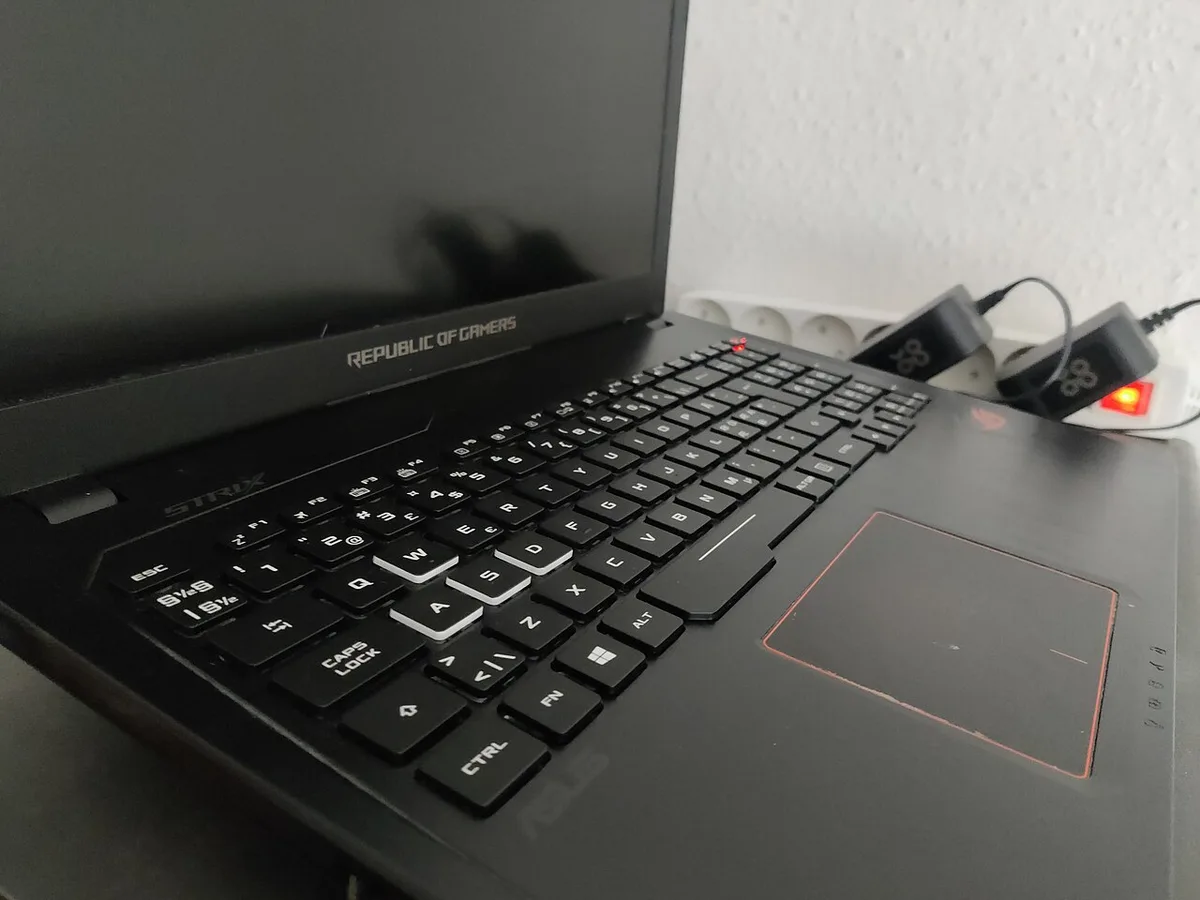
Image source: Wikimedia Commons / .mw-parser-output .template-designermadsen-source{border:1px solid #a2a9b1;background-color:#f8f9fa;display:grid;padding-left:4em;padding-right:4em;grid-template-columns:1fr 8fr;grid-template-rows:1fr;grid-column-gap:4em}.mw-parser-output .tdm-flex-container-center{width:100%;margin:0px;padding:0px;display:flex;justify-content:center;flex-direction:row}.mw-parser-output .template-designermadsen-source .tdm-avatar{display:flex;justify-content:center;flex-wrap:wrap;flex-direction:column;width:100%;margin-top:1em;margin-bottom:1em}.mw-parser-output .tdm-avatar img{border:1px solid #a2a9b1;padding:0.25em 0.25em}.mw-parser-output .template-designermadsen-source .tdm-attributes{width:100%;display:flex;flex-direction:column;justify-content:center;margin-top:1em;margin-bottom:1em}.mw-parser-output .template-designermadsen-source .tdm-attributes p{width:100%;margin-top:0.5em;margin-bottom:0.5em}@media only screen and (max-width:764px){.mw-parser-output .template-designermadsen-source{grid-template-columns:1fr;grid-template-rows:1fr 1fr;grid-column-gap:0px}.mw-parser-output .template-designermadsen-source .tdm-avatar{}.mw-parser-output .template-designermadsen-source .tdm-attributes{justify-content:center;text-align:center}} Author: Kent Madsen Designermadsen Flickr Deviantart (CC BY-SA)
Decision Tree: Repair, Swap, or Walk Away
Here is the decision tree we use when someone asks whether to repair, swap, or walk away from a dead gaming laptop keyboard.
Start with mounting type. If your keyboard is a separate FRU, move to the next question. If it is fused to the top case, skip to the cost question.
Check warranty next. If the laptop is under warranty and the damage is not liquid-related, contact the manufacturer first. Most brands cover defective keyboards for free. If the warranty is expired or the damage is from a spill, continue to part availability.
Look up parts. Search the manufacturer's parts store using your exact model number. If an OEM keyboard exists and costs under $80, DIY replacement is usually worth it. If only third-party parts exist, read reviews carefully before buying.
If no parts exist at all, move to the external keyboard option.
Run the cost math. Add the part cost plus your time. If the total is under 30 percent of the laptop's current value, repair makes sense. If it is between 30 and 60 percent, consider a professional repair.
Above 60 percent, an external gaming keyboard is the smarter buy.
Final call. A separate FRU with available parts and expired warranty means DIY. A fused keyboard on a valuable laptop means pro repair or top case swap. A fused keyboard on a cheap laptop means external keyboard and move on.
For deeper hardware diagnosis before you commit, check out how to diagnose gaming laptop hardware problems fast.
How to Tell If Your Keyboard Is a Separate Unit or Fused to the Top Case
This is the question that determines everything. Get it wrong and you either buy the wrong part or destroy your laptop trying to remove something that will not come out.
Check the service manual first. Every major brand publishes free service manuals online. Search "[your model] service manual" and look for the keyboard removal section. If the manual shows a keyboard removal procedure with its own part number, it is a separate FRU.
If the manual only shows top case removal, the keyboard is fused.
Look at the bottom panel. Some laptops have keyboard retention screws accessible from the underside. If you see small screws marked with a keyboard icon, the keyboard is likely a separate unit. No keyboard screws usually means fused.
Check iFixit. iFixit publishes teardown guides for most popular gaming laptops. Their guides show exactly how the keyboard attaches. Search your model on ifixit.com and look at the keyboard step.
Feel the edges. A separate keyboard has a visible seam where it meets the palm rest. A fused keyboard blends into the top case with no gap. Run your finger along the edge between the keys and the surrounding plastic.
A raised lip means separate. Smooth transition means fused.
What the ribbon cable tells you. Separate keyboards connect via a wide flat ribbon cable to a ZIF connector on the motherboard. Fused keyboards use the same connection but the cable is often shorter and harder to reach. Either way, the ZIF connector is the fragile part during removal.
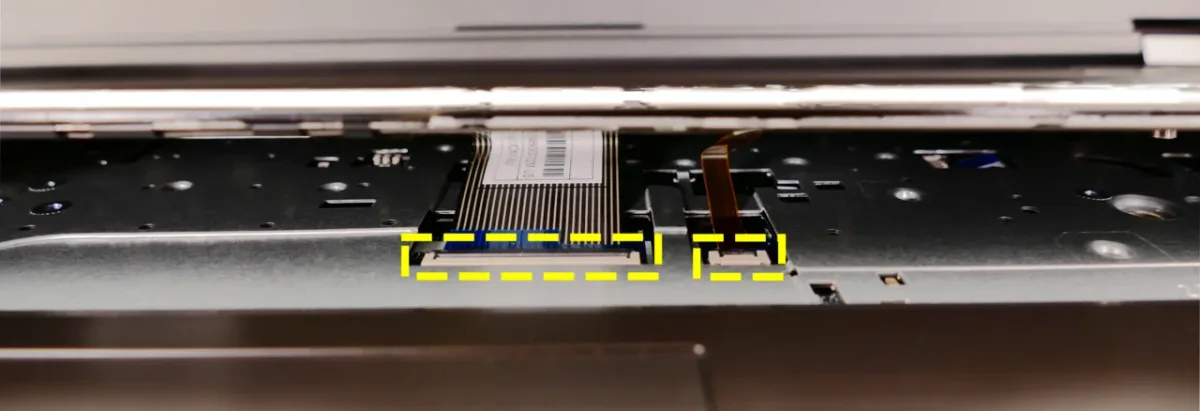
Image source: Wikimedia Commons / System76 (CC BY-SA)
DIY Keyboard Replacement: Step-by-Step Workflow
This workflow applies to laptops with a separate field-replaceable keyboard unit. If your keyboard is fused, skip to the next section.
Before you start. Back up your data first. Even simple repairs can go wrong. Read our guide on how to back up your gaming laptop before repair if you have not done this yet.
Step 1: Gather tools. You need a Phillips #0 or #00 screwdriver, a plastic spudger, and an anti-static wrist strap. ESD precautions matter here. A static discharge of just 100 volts can damage sensitive components.
The ESD Association recommends grounding yourself before touching internals.
Step 2: Power down and disconnect. Shut down the laptop. Unplug the charger. Remove the battery if it is externally accessible.
If the battery is internal, disconnect the battery cable from the motherboard before touching the keyboard.
Step 3: Remove the bottom panel. Unscrew all bottom screws and set them aside in order. Use the spudger to gently pry the panel off. Some clips hold it in place.
Step 4: Locate the keyboard ribbon cable. Find the wide flat cable running from the keyboard to the motherboard. It connects to a ZIF connector. Flip the small plastic latch up to release the cable.
Pull the cable straight out. Never yank at an angle.
Step 5: Remove keyboard retention screws. Some models have 2 to 4 screws holding the keyboard from underneath. Remove them. Then push the keyboard up from below using the screwdriver holes.
Step 6: Lift the keyboard out. Gently lift the keyboard from the top edge. It should slide out of the top case. If it resists, check for hidden clips or screws.
Step 7: Install the new keyboard. Slide the new unit into the top case. Secure any retention screws. Reconnect the ribbon cable by sliding it into the ZIF connector and pressing the latch down.
Make sure it is fully seated.
Step 8: Test before reassembly. Reconnect the battery. Power on and test every key. Check RGB lighting if applicable.
If your RGB lighting is not working after the swap, reinstall your manufacturer control software. If something is wrong, fix it now while the laptop is open.
Step 9: Reassemble. Power down. Disconnect the battery. Reinstall the bottom panel and screws.
Reconnect the battery. Power on and verify everything works.
When DIY Stops Making Sense (Pro Repair vs External Keyboard)
If your keyboard is fused to the top case, DIY removal risks cracking the chassis or tearing the ribbon cable. In that case, a professional repair shop can swap the entire top assembly for $150 to $400. That price includes parts and labor.
If your laptop is worth under $600, that cost may not make sense. An external gaming keyboard is the smarter fallback. It costs $40 to $200 and takes zero risk.
You lose portability but gain reliability. For tournament players or LAN setups, an external keyboard is often preferred anyway. Consider it if your laptop has a fused keyboard, no parts exist, or the repair exceeds 40 percent of the laptop's value.
Pro repair makes sense when the laptop is valuable and you want to preserve its portability. Local repair shops often charge less than manufacturer service centers. Ask for a quote before committing.
Some shops will diagnose for free. If the shop quotes over $250, compare that against a new laptop. The math usually favors replacement at that point.
External keyboards also offer better switch options. You can choose mechanical, low-profile, or membrane. That flexibility is something internal laptop keyboards rarely offer.
Many gamers already prefer external keyboards for ergonomics. A separate keyboard lets you position it at a better angle. That reduces wrist strain during long sessions.
If your gaming laptop stays on a desk most of the time, an external keyboard is a practical permanent solution.

Image source: Wikimedia Commons / Levi Loot (CC BY-SA)
Mistakes That Wreck the Swap (And How to Avoid Them)
The most common mistake is not disconnecting the battery before starting. A live battery can short the motherboard if a tool slips. Always disconnect the battery cable first.
Another mistake is pulling the ribbon cable at an angle. ZIF connectors are fragile. Lift the latch fully, then pull straight out.
Stripped screws happen when you use the wrong screwdriver size. Use a Phillips #0 or #00 and apply downward pressure while turning. Buying the wrong part number wastes money.
Always verify the part number against your exact model. Static discharge is invisible but deadly. Wear an anti-static wrist strap or touch grounded metal before handling internals.
Finally, forcing a keyboard that resists is a red flag. Stop and recheck for hidden screws or clips. Reconnecting the ribbon cable loosely causes intermittent key failures.
Press the ZIF latch firmly until it clicks. Test all keys before reassembling. If RGB lighting does not work, check the separate lighting cable.
Some keyboards have two cables, one for data and one for lighting. Missing the second cable is a common oversight. Take photos during disassembly to remember cable routing.
Label screws by location to avoid mixing them up. Rushing the process leads to broken clips. Work slowly and methodically.
If you feel resistance, stop and reassess. Before blaming hardware, rule out software issues by learning how to update your graphics drivers safely.
What It Costs and How Long It Takes
DIY replacement costs $30 to $150 for the keyboard plus $10 to $20 for tools. Professional repair runs $80 to $220 total. A full top case swap costs $150 to $400.
External gaming keyboards range from $40 to $200.
| Repair Option | Cost Range | Time | Skill Level |
|---|---|---|---|
| DIY keyboard swap | $30–$170 | 30–90 min | Moderate |
| Pro repair (keyboard) | $80–$220 | 1–3 days | None |
| Top case replacement | $150–$400 | 2–5 days | Pro only |
| External keyboard | $40–$200 | 0 min | None |
DIY takes 30 to 90 minutes for a separate FRU. Fused keyboards take 2 to 4 hours even for pros. Shipping time for parts adds 3 to 7 days in most regions.
Factor that into your timeline if you need the laptop for work or school. Budget for potential mistakes too. Buying the wrong part means another week of waiting.
Return shipping costs $5 to $15. Some sellers charge restocking fees. Always double-check compatibility before ordering.
If you live outside major markets, parts may take longer to arrive. International shipping adds customs delays. Plan ahead if your laptop is your primary work machine.
Back up your data before starting any repair. A dead laptop with no backup is worse than a broken keyboard. Keep your old keyboard until the new one is confirmed working.
That way you have a reference for cable routing and screw placement. If you want to understand your system's firmware before any repair, read about what BIOS does in a gaming laptop.
Frequently Asked Questions
Can I replace just the keycaps on a gaming laptop keyboard?
Yes, if the switches underneath are intact. Keycap pullers work on most scissor-switch laptops. Mechanical laptop keyboards allow full keycap swaps.
Check that the new keycaps match your switch type before buying. Replacement keycap sets cost $15 to $40.
Does replacing the keyboard void my warranty?
Usually yes if you open the chassis yourself. Some brands offer self-repair programs that preserve warranty. Dell and HP have authorized repair options.
Check your specific warranty terms before starting DIY work.
How do I find the right part number for my keyboard?
Look up your exact model number on the manufacturer's parts store. The service manual lists the keyboard part number. Third-party sellers often cross-reference by model.
Always match the part number, not just the model name.
Is it worth fixing an old gaming laptop keyboard?
It depends on the laptop's value. If the laptop is worth under $400, an external keyboard is cheaper. If it is worth over $800, repair makes financial sense.
Factor in the laptop's age and remaining lifespan too.
Can I upgrade to a mechanical keyboard during replacement?
Only if your laptop supports it. Some models like the Alienware m15 R7 offer mechanical keyboard variants. You cannot install a mechanical keyboard into a membrane laptop without chassis modifications.
Check compatibility before buying.
Final Decision Guide: Which Option Fits Your Situation
Run through this checklist to pick your path. If your keyboard is a separate FRU with available parts and expired warranty, go DIY. If it is fused but the laptop is valuable, use pro repair or a top case swap.
If parts are unavailable or the cost exceeds 40 percent of the laptop's value, buy an external gaming keyboard. If the laptop is under warranty, contact the manufacturer first. The right choice saves money and avoids a bricked machine.
Print this guide or bookmark it before you start. Having a clear plan prevents impulse decisions mid-repair. Most failed repairs happen when people skip the diagnosis step.
Take 15 minutes to verify your keyboard type and part number first. That small investment prevents costly mistakes. If you are unsure at any point, stop and consult a professional.
There is no shame in getting help. A working laptop is worth more than the pride of a DIY fix.
1 thought on “Can You Replace a Gaming Laptop Keyboard? Yes, Here’s How”
Comments are closed.