Gaming laptops are thick because heat management comes first. A powerful mobile GPU and CPU can push well over 100 watts during play. That heat needs copper, fans, and air space.
If you want sustained frame rates, thickness is often the trade-off.
As of 2026, many high-end models still use TGP ratings from 115W to 175W. Manufacturer specifications indicate that lower TGP parts can fit thinner shells, but they may run louder or slower. The right thickness depends on how you game, not just size.
Let's break down what actually drives chassis depth.
why are gaming laptops so thick
Heat is the main reason. High-wattage GPUs and CPUs need bigger cooling parts. Thicker chassis leave room for fans and heat pipes.
Extra space also fits large batteries and ports. Thin designs often throttle under load.
The Real Reason Gaming Laptops Are Thick
Thickness is mostly a thermal decision, not a style choice. A gaming laptop has to move heat away from the GPU and CPU without choking. That means space for heat pipes, a vapor chamber, and airflow.
It also means a chassis that does not flex under load.
You will notice three forces at work. Power raises heat. Heat needs surface area.
Surface area needs depth.
- Higher TGP means more heat.
- More heat means larger cooling parts.
- Larger cooling parts mean a thicker shell.
Aggregate reviews report that thin machines can feel fast for short bursts. They often slow down after a few minutes. A thicker chassis usually holds performance longer.
How TGP, TDP, and Thermal Envelope Drive Chassis Thickness
TGP means Total Graphics Power. It is the wattage budget for the mobile GPU. TDP is similar for the CPU.
Together, they define the thermal envelope.
If the envelope is high, the cooling system must be bigger. That is why two laptops with the same GPU name can perform differently. One may run at 80W.
Another may run at 140W.
| GPU Class | Typical TGP | Common Chassis Feel |
|---|---|---|
| Entry mobile GPU | 35W to 60W | Thin and light |
| Mid-range mobile GPU | 80W to 115W | Medium thickness |
| High-end mobile GPU | 130W to 175W | Thick and heavy |
NVIDIA mobile GPU guidance shows that Max-Q designs target lower power. They fit thinner bodies. They also trade peak performance for efficiency.
If you play esports titles, lower TGP may be enough. If you want high settings in demanding games, higher TGP helps. The chassis thickness follows that choice.
What's Actually Inside a Thick Gaming Laptop
A thick gaming laptop is not just empty space. It packs cooling hardware, a large battery, and stronger frame parts. The extra height also helps air move from intake to exhaust.
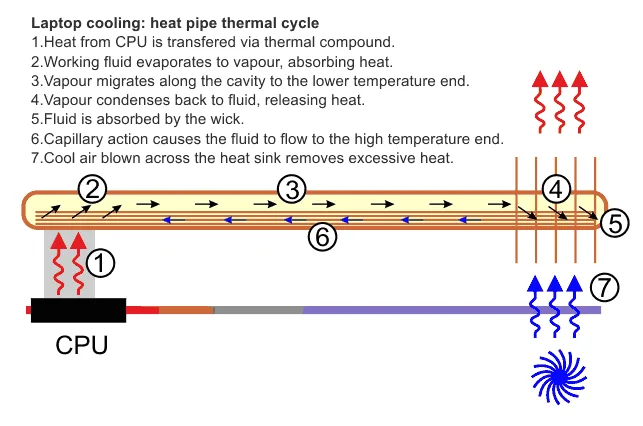
Image source: Wikimedia Commons / Graham Wyatt (CC BY-SA)
Common internal parts include:
- Multiple heat pipes
- A vapor chamber or heatsink stack
- Two or more fans
- A large lithium-ion battery
- A rigid magnesium or aluminum frame
- Dense port and speaker modules
Manufacturer specifications indicate that vent size matters as much as fan size. Blocked vents can raise temperatures fast. Dust buildup also reduces airflow over time.
If you plan upgrades, check access panels first. Some thick chassis make RAM and SSD swaps easy. Others hide screws under rubber feet.
For keyboard work, review keyboard replacement paths before opening the shell.
Thick vs. Thin-and-Light vs. Desktop: Which Fits You
This is where the decision starts. Thick laptops favor sustained power. Thin-and-light models favor travel.
Desktops favor raw value.
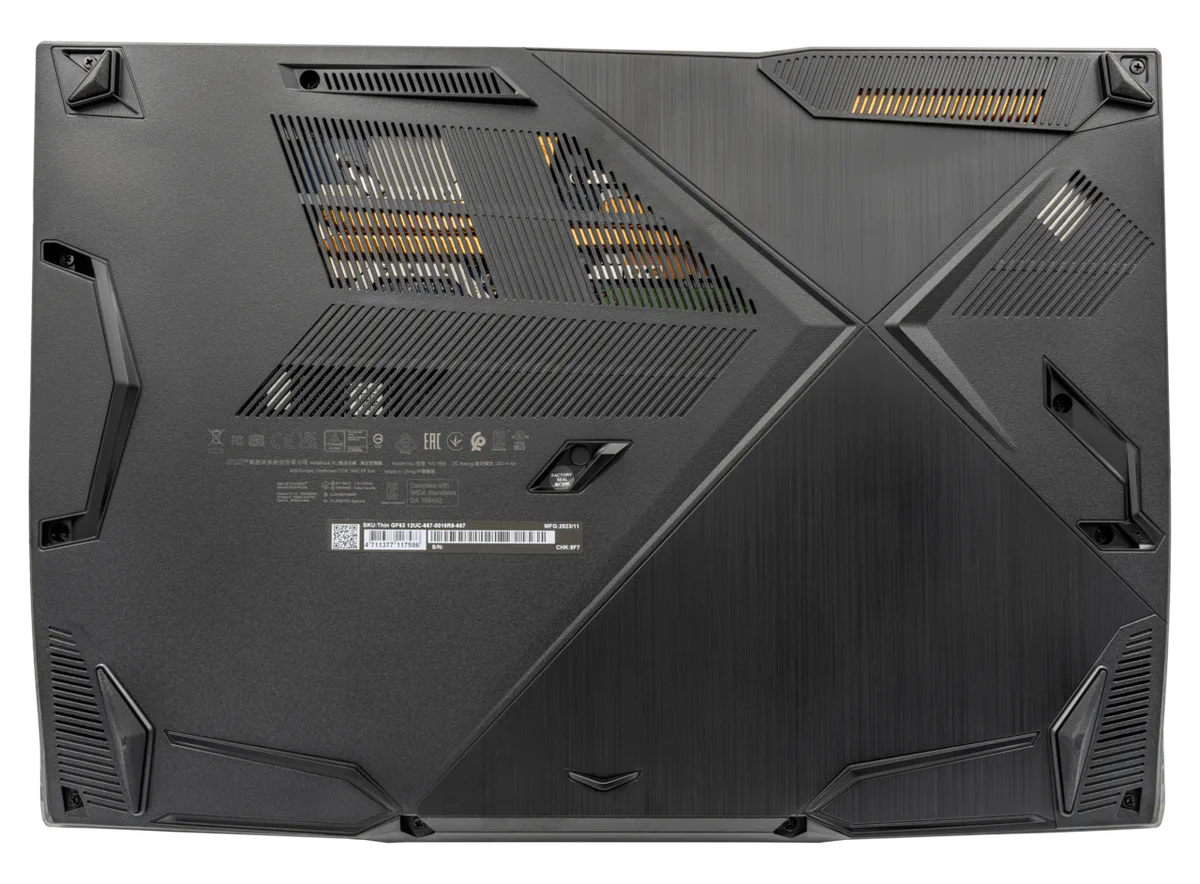
Image source: Wikimedia Commons / PantheraLeo1359531 (CC BY)
| Option | Best For | Main Trade-Off |
|---|---|---|
| Thick gaming laptop | High FPS and long sessions | Weight and battery life |
| Thin-and-light gaming laptop | Travel and light gaming | Lower TGP and more heat |
| Desktop PC | Maximum power per dollar | No portability |
A thick laptop makes sense if you plug in often. It also helps if you play demanding games for hours. A thin model fits a backpack better.
It may need a cooling pad for long sessions.
Port layouts also matter. Thick chassis often have more ports. That helps with monitors, controllers, and wired headsets.
If you use many accessories, check port layouts before buying.
Who Actually Needs a Thick Chassis
You need a thick chassis if performance stability matters most. This includes streamers, creators, and competitive players. It also includes anyone who games on a desk for long sessions.
Choose thick if these apply:
- You play AAA games at high settings.
- You render video or 3D assets.
- You hate fan spikes and throttling.
- You use the laptop as a desktop replacement.
- You want easier internal upgrades.
A thin model may be better if these apply:
- You travel every week.
- You play lighter games.
- You value battery life away from a wall.
- You use external displays at home.
Controller setups can work well with either type. The bigger question is whether you need sustained power or portability. If you are unsure, pick the thinnest model that still meets your game settings.
Common Mistakes Buyers Make About Thickness
Thickness alone does not guarantee cool temperatures. A thick laptop with blocked vents can still throttle. Buyers often chase the biggest GPU without checking its TGP.
Another mistake is assuming thin models are "just as fast." They may match in short benchmarks. They often lose speed during long sessions.
- Buying by GPU name only, not TGP
- Ignoring vent placement and desk airflow
- Blocking bottom intakes with blankets or laps
- Expecting thick models to be light
- Skipping dust cleaning for years
- Assuming loud fans mean better cooling
If your speakers sound weak, fix audio settings before blaming chassis size. You can improve gaming laptop audio with a few quick tweaks. Tinny laptop speakers are often a separate issue from heat.
Keeping a Thick Gaming Laptop Running Cool Long-Term
Long-term cooling is mostly maintenance. Dust, dried paste, and poor airflow cause most heat problems. A thick chassis gives headroom, but only if you protect it.
Clean the vents every few months. Use compressed air in short bursts. Keep the laptop on a hard surface.
- Use a stand to lift the rear
- Repaste if temps climb over time
- Replace worn thermal pads
- Tune fan curves for your games
- Lower CPU power limits if needed
- Keep room temperature reasonable
If you use external displays, connect your laptop to a TV or monitor with good airflow behind it. That keeps ports and vents clear. It also reduces cable strain.
Frequently Asked Questions
Do thicker gaming laptops always run cooler?
No. Thickness helps, but airflow matters more. A thick laptop with blocked vents can run hot.
Clean intakes and good fan curves matter more than size alone.
Is a thick gaming laptop bad for travel?
It can be. Thick models are heavier and harder to fit in small bags. If you travel weekly, a thin model may be easier.
You can still game on the road with lower settings.
Can a thin gaming laptop match a thick one?
Sometimes in short bursts. Sustained performance is where thick models win. Thin designs may throttle after several minutes.
Check TGP before comparing two models.
Does thickness affect battery life?
Yes, indirectly. Thick laptops often hold larger batteries. They also draw more power under load.
Battery life depends on settings, screen brightness, and game type.
Should I buy thick or thin?
Choose thick if you want sustained power. Choose thin if you value portability. If you are unsure, check your games' settings first.
Match the TGP to your real workload.
How many USB ports do I need on a gaming laptop?
Most players need at least three. Controllers, headsets, and external drives add up fast. If you use many accessories, check port layouts before buying.
The Decision Guide: Choose by Your Priorities
Start with your main use. Then match thickness to that need. Do not buy extra power you will not use.
If you play demanding games for hours, choose thick. If you travel often, choose thin. If you stream, prioritize sustained TGP and fan noise.
- High FPS and long sessions: thick chassis
- Travel and battery life: thin-and-light
- Best value per dollar: desktop PC
- Mixed use: mid-range thickness
If you game with a controller, disable touchpad while gaming to avoid accidental input. If you play online, fix internet lag before upgrading hardware. External links like NVIDIA's laptop guidance can help you compare TGP options.
The best choice is the one you can cool, carry, and afford. Match the machine to your habits, not the other way around.
1 thought on “Why Gaming Laptops Are So Thick: The Real Reasons”
Comments are closed.