Is it cheaper to buy a gaming laptop or build a PC? The honest answer is that sticker price only tells part of the story. You also have to count peripherals, cooling, and upgrade limits.
A cheap laptop can cost more over three years if you replace it sooner.
As of 2026, a mid-range gaming laptop often starts near $1,000, while a comparable desktop build can start near $900 before monitor, keyboard, and mouse. The gap changes fast with GPU tier, RAM, and storage. Let's break the full cost down.
is it cheaper to buy a gaming laptop or build a PC
A gaming laptop is often cheaper upfront. A custom desktop usually wins on performance per dollar. Desktops also upgrade more easily.
Laptops cost more to replace later. Your real winner depends on portability and budget.
Why the Gaming Laptop vs. Desktop PC Cost Question Is Harder Than It Looks
A gaming laptop bundles the screen, keyboard, battery, cooling, and chassis into one price. A desktop spreads the same job across a tower, monitor, keyboard, mouse, and speakers. That is why a simple sticker-price comparison can mislead you.
You need to compare the same target, such as 1080p high settings or 1440p competitive play. You also need to include taxes, shipping, warranty length, and likely upgrades. A laptop can save space and setup time.
A desktop can reuse parts and last longer. The core differences between laptops and desktops show why the same budget buys different value.
What a Gaming Laptop Really Costs You
A gaming laptop usually includes Windows, a display, speakers, and a battery. That bundle can make the upfront price look better than it is. You may still need a cooling pad, dock, external mouse, and extra storage.
The bigger cost is limited upgrade room. Many laptops solder the RAM or GPU. Battery wear can push you toward a full replacement sooner.
Repair can also be pricey because parts are model-specific. Check warranty terms before buying, since coverage varies by brand and region.

Image source: Wikimedia Commons / Falcon Northwest (CC BY-SA)
Thermal limits matter too. Thin chassis can reduce sustained GPU performance. That means you may pay more per frame over time.
If you travel often, that trade can still be worth it.
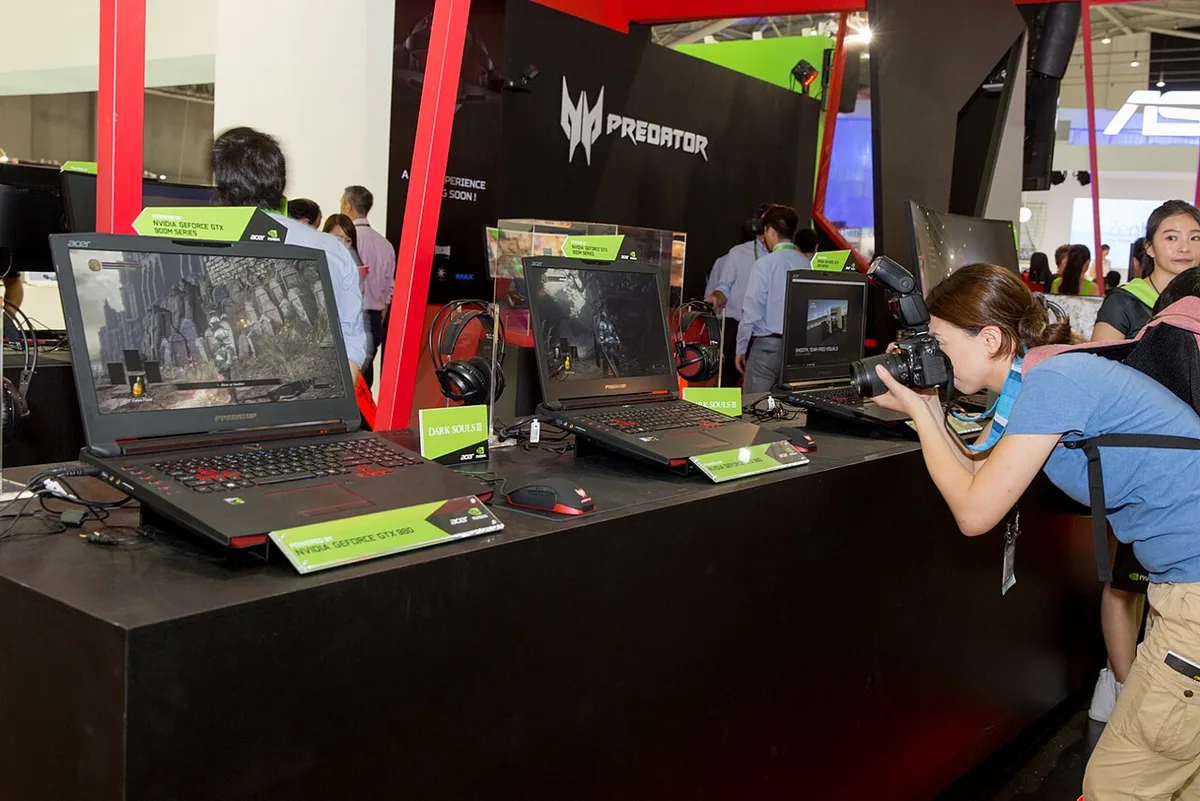
Image source: Wikimedia Commons / NVIDIA Taiwan (CC BY)
What a Custom-Built Gaming PC Really Costs You
A custom build lets you choose each part. That can improve performance per dollar, but it also adds risk. You need compatibility checks, assembly time, and a safe workspace.
Costs often missed include the operating system license, case fans, thermal paste, and a monitor. Shipping can also add up if parts come from several stores. Dead-on-arrival parts create extra work, even when returns are free.
Power supply quality matters. Look for a certified unit and enough wattage for your GPU. ENERGY STAR lists certified power supplies and monitors.
A good PSU can last through several builds.
Thermal limits in laptops are not your only concern. Desktops need airflow, dust cleaning, and cable management. They also take more desk space.
If you have room, the upgrade path is usually much better.
Side-by-Side Cost, Performance, and Upgrade Comparison
| Factor | Gaming Laptop | Custom-Built Desktop |
|---|---|---|
| Upfront cost | Often lower with bundled parts | Often lower for same GPU tier |
| Peripherals | Included | Extra cost |
| Performance per dollar | Good | Usually better |
| Upgrade path | Limited | Strong |
| Portability | High | Low |
| Lifespan | Shorter due to battery and heat | Longer with part swaps |
The table shows the pattern. Laptops win on convenience. Desktops win on long-term value.
A raw power comparison helps if your main goal is maximum frames for each dollar.
Do not ignore used parts or refurbished systems. A used desktop can be cheap, but warranty and condition matter. A refurbished laptop can also be a smart middle ground.
Always price the full setup, not just the tower or laptop.
Best Choice by Budget, Space, and Lifestyle
Choose based on how you actually use the machine. A dorm room favors a laptop. A fixed desk favors a desktop.
A tight budget favors whichever gives the target frame rate at the lowest total cost.
- Small space or shared room: A gaming laptop saves desk space.
- Frequent travel: A laptop is the clear winner.
- Maximum value for one game library: A custom desktop usually wins.
- Console alternative for tight budgets: Compare a gaming console before committing.
- Handheld option for travel: A handheld PC can beat a laptop for portability.
Also think about repair support and warranty. Some brands make service easier than others. If you are not comfortable building, a prebuilt desktop may be safer.
It costs more than DIY, but less than many laptop replacements.
Hidden Costs and Long-Term Ownership Traps
The real cost gap often appears after checkout. A desktop needs a monitor, keyboard, mouse, speakers, and sometimes a desk or chair. A gaming laptop includes those basics, but it may need a cooling pad, dock, external storage, or battery service later.
| Hidden cost | Gaming laptop | Custom desktop |
|---|---|---|
| Display | Included | Extra |
| Keyboard and mouse | Included | Extra |
| Cooling | Built in, may need pad | Fans and airflow extra |
| Storage growth | Often limited | Easy to add |
| Battery wear | Common over time | Not applicable |
Electricity and heat matter too. A desktop can draw more power at full load, but a laptop may throttle to stay cool. ENERGY STAR lists efficient computers and monitors, which helps when comparing long-term running costs.
A weak cooling plan can erase the value of a strong GPU.
Repair and resale also change the math. Laptop parts can be model-specific and costly to replace. Desktop parts usually sell individually and fit future builds.
If you worry about service, review repair support options before you buy.
Mistakes That Make Either Option More Expensive
Buying on GPU name alone is a common mistake. A strong GPU paired with weak RAM or slow storage will bottleneck your games. You should match the CPU, GPU, RAM, and storage to the same performance tier.
Otherwise you pay for power you cannot use.
Cheap power supplies are another trap. A low-quality PSU can waste power and risk your components. Choose a certified unit with enough wattage for your GPU and future upgrades.
Do not treat the power supply as an afterthought.
People also forget warranty and return terms. Restocking fees, short coverage, and limited service centers can add real cost. FTC consumer guidance covers refunds, warranties, and buyer rights, so read it before a big purchase.
If you want to compare coverage, use a brand warranty comparison as a starting point.
Skipping peripherals in the desktop budget is another costly error. A $900 tower becomes a $1,300 setup once you add the monitor and accessories. Laptop buyers make the opposite mistake by ignoring battery wear and limited upgrades.
Both paths can cost more if you plan poorly.
Expert Tips for Getting the Best Value
Start with your target resolution and frame rate. 1080p high settings need less power than 1440p or 4K. That single choice controls your GPU, CPU, and cooling budget. It also keeps you from overspending on parts you will not use.
Buy upgradeable hardware when possible. Choose a desktop motherboard with extra RAM slots and M.2 slots. Choose a laptop with socketed RAM and an accessible SSD.
Those small choices extend the useful life of your system.
Prioritize efficient cooling and a quality power supply. Good airflow keeps performance stable over long sessions. A certified PSU protects your parts and can survive several upgrades.
Spending a little more here often saves money later.
Consider refurbished or used options carefully. A refurbished laptop or used desktop can deliver strong value. Check battery health, warranty status, and return policy first.
If you mainly need basic gaming, also compare normal laptop limitations before paying for gaming features you will not use.
Frequently Asked Questions
Is a gaming laptop ever cheaper than a desktop?
Yes, when you need the screen, keyboard, and portability included. A laptop can cost less as a complete setup for travel or small spaces. A desktop can still win on performance per dollar over time.
The cheaper option depends on your total budget and how long you keep it.
How much extra do desktop peripherals cost?
A basic monitor, keyboard, and mouse can add $150 to $400. Better displays and audio can push that higher. These costs matter most in tight budgets.
Always price the full setup, not just the tower.
Can you upgrade a gaming laptop later?
Some models allow RAM or SSD upgrades. Many thin laptops solder RAM or limit access. GPU upgrades are rare in laptops.
Check the exact model specs before buying.
Does a desktop use more electricity?
A desktop often uses more power at full load. Laptops may use less, but they can throttle to manage heat. Efficiency varies by GPU, CPU, and power supply.
Compare certified models when electricity costs matter.
Is a prebuilt desktop worth it over DIY?
A prebuilt desktop costs more than many custom builds. It saves assembly time and reduces compatibility risk. It can also include a single warranty.
DIY still offers better long-term value for confident builders.
Which option lasts longer?
A desktop usually lasts longer because you can replace parts. A laptop can last years, but battery wear and heat reduce its lifespan. Upgrades extend desktop life more easily.
Good cooling and maintenance help both.
Final Verdict: Which Option Saves You More Money?
A gaming laptop saves money when you need portability, space savings, and an all-in-one setup. A custom-built desktop saves money when you want maximum performance per dollar and easy upgrades. The real winner is the option that matches your space, budget, and gaming goals.
If you travel, live in a dorm, or share a room, the laptop is usually the smarter buy. If you play at a fixed desk and want to upgrade later, the desktop is usually cheaper over time. Before deciding, compare the laptop power gap against your target games and budget.
1 thought on “Is It Cheaper to Build a PC or Buy a Gaming Laptop?”
Comments are closed.