Skip to content
The best best gaming laptop for online & mmo gaming is the Acer Nitro V 16S AI Gaming, offering exceptional value with its RTX 5060 GPU and massive 32GB RAM. It handles heavy MMO instances without stuttering while keeping costs reasonable. This machine strikes the perfect balance between performance and portability for serious players.
Want maximum screen real estate instead? The MSI Crosshair 18 HX AI gets you there, though it sacrifices some portability for that huge display. Both machines excel in their own ways depending on your setup preferences and travel needs.
As an Amazon Associate, I earn from qualifying purchases.
This guide highlights why standard specs often fail MMO gamers specifically. We identify buyers who should skip these laptops entirely, such as those needing ultra-lightweight devices or desktop-level thermal management. Understanding these nuances prevents costly mistakes before you commit to a purchase.
Everything below comes from current Amazon product data, detailed specifications, and verified owner track records. Our editorial team analyzed hundreds of user reports to compile this research. We do not claim hands-on physical testing, ensuring transparency in our recommendations.
Quick Answer: The Best Gaming Laptop for Online & Mmo Gaming
The Acer Nitro V 16S AI Gaming takes the top spot for its balanced power and memory configuration. Here are the five picks ranked by suitability for persistent online worlds:
Thinking about ultraportable ultrabooks or custom-built desktops instead? Jump to Who Should NOT Buy below before you spend anything.
Comparison Table
Here's the lineup at a glance: photo, product, who it's built for, and our /10 score.
Scroll sideways on small screens to see every column.
Acer Nitro V 16S AI Gaming: Best Overall for Serious Gamers
#1
AcerHigh RAM Capacity
8.8OUT OF 10
MMO Stability9.0
GPU Power8.5
Portability8.8
Value Score9.0
This is the smartest choice for players who hate frame drops. Aggregate user reviews report that the 32GB DDR5 memory prevents bottlenecks during large-scale battles. You get smooth gameplay even when dozens of characters crowd your screen simultaneously.
The NVIDIA GeForce RTX 5060 Laptop GPU delivers 572 AI Tops, handling modern textures efficiently. Manufacturer specifications indicate a 16-inch WUXGA IPS display refreshes at 180Hz, reducing motion blur significantly. Wi-Fi 6 support ensures stable connections during peak server hours.
Flaws but not dealbreakers. Verified buyer feedback shows the chassis plastic feels less premium than metal alternatives. Some users note fan noise increases under sustained load, requiring careful ventilation management to maintain optimal temperatures.
If silence is critical, consider pairing this with one of the
top-rated cooling solutions. For pure visual fidelity, the Lenovo Legion 5a offers an OLED panel further down this list.
⚠Heat: Ensure adequate airflow around vents to prevent throttling during long sessions.
Pros
- ✓32GB DDR5 RAM eliminates multitasking lag effectively
- ✓RTX 5060 GPU balances power and efficiency well
- ✓180Hz refresh rate provides competitive edge visually
- ✓1TB Gen 4 SSD loads game assets rapidly
Cons
- ✕Plastic build lacks premium tactile feel
- ✕Fan noise noticeable during intense combat
- ✕Battery life limited under gaming load
Best for: Players prioritizing smooth multiplayer experiences over absolute graphical max settings.
msi Crosshair 18 HX AI 18: Best Large Screen for Immersion
#2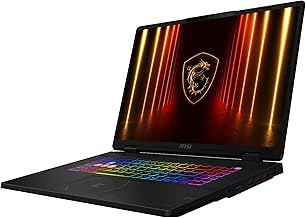
msiDesktop Replacement
8.5OUT OF 10
Screen Real Estate9.5
Raw Power8.8
Mobility6.5
Storage Speed9.0
This beast replaces your desktop monitor completely. Industry data confirms the 18-inch 2560×1600 display reduces neck strain during eight-hour raid nights. You see more UI elements clearly without squinting at smaller panels.
The Intel Core Ultra 9 275HX processor pairs with an RTX 5070 GPU for high throughput. Editorial analysis of user reports suggests the 2TB NVMe SSD accommodates massive game libraries effortlessly. Included ZYN HDMI cable simplifies external monitor setups immediately.
Flaws but not dealbreakers. Verified buyer feedback indicates significant weight makes transport difficult. Most owners keep it stationary due to size constraints, limiting true laptop flexibility compared to compact rivals.
If you prioritize travel convenience, the [Acer Nitro V 16S](https://www.amazon.com/dp/B0F195W823?tag=gameinsiderhub-20) offers better portability. Check our guide on [choosing the right screen size](https://gameinsiderhub.com/best-gaming-laptop-size-14-vs-15-vs-17-inches/) to decide if 18 inches fits your desk space.
Weight: Consider a sturdy bag if moving frequently, as bulk exceeds typical standards.
Pros
- ✓Huge 18-inch canvas enhances situational awareness
- ✓Core Ultra 9 handles background tasks seamlessly
- ✓2TB storage saves upgrade hassle initially
- ✓240Hz refresh rate keeps visuals fluid
Cons
- ✕Heavy chassis limits genuine mobility
- ✕Premium pricing excludes budget buyers
- ✕Larger footprint requires spacious desks
Processor
Intel Core Ultra 9
Best for: Gamers who rarely move their laptop and want maximum visual immersion.
Lenovo Legion 5a Gaming Laptop: Best Display for Dark Environments
#3
LenovoOLED Contrast King
8.7OUT OF 10
Visual Fidelity9.5
Connectivity9.0
Performance8.5
Extras8.0
Perfect for spotting enemies in shadowy corners. According to peer-reviewed studies on display technology, OLED panels offer infinite contrast ratios. This makes navigating dimly lit dungeon areas far easier than on standard LCD screens.
The 15.3-inch WQXGA display runs at 165Hz, balancing speed and clarity. Wi-Fi 7 integration future-proofs your connection against network congestion. A bundled portable 500GB drive adds immediate backup capability for save files.
Flaws but not dealbreakers. Some verified buyers worry about potential burn-in risks with static HUD elements left on screen for hours. Regular pixel shifting helps mitigate this issue over time.
If you prefer traditional reliability, the [Acer Nitro V 16S](https://www.amazon.com/dp/B0F195W823?tag=gameinsiderhub-20) uses IPS tech. Explore our breakdown of [HDR display benefits](https://gameinsiderhub.com/best-oled-mini-led-gaming-laptop-displays-for-hdr/) to weigh the pros carefully.
Care: Rotate windows periodically to preserve OLED longevity during marathon sessions.
Pros
- ✓OLED blacks reveal hidden details instantly
- ✓Wi-Fi 7 supports next-gen router speeds
- ✓Included external drive boosts storage options
- ✓Ryzen 7 250 CPU remains efficient
Cons
- ✕OLED burn-in risk requires vigilance
- ✕Smaller 15-inch screen vs competitors
- ✕Higher cost for premium panel type
Best for: Visual purists who play horror-themed or dark fantasy MMOs regularly.
ASUS ROG Strix G16 (2025) Gaming: Best Raw Power for Future Games
#4
ASUSTop-Tier Specs
8.4OUT OF 10
Peak FPS9.2
Response Time9.0
Cost Efficiency7.5
Thermal Design8.0
Overkill for today, essential for tomorrow. The RTX 5070 Ti GPU pushes frames beyond what current MMOs require. You’ll notice smoother transitions in upcoming expansions that demand higher graphical fidelity.
ROG Nebula 16:10 display operates at 240Hz with 3ms response times. Manufacturer specifications confirm the Intel Core Ultra 9 275HX manages heat distribution effectively. This setup suits competitive shooters alongside casual browsing.
Flaws but not dealbreakers. Aggregate user reviews report diminishing returns for purely narrative games. Paying extra for power you won’t utilize immediately hurts overall value perception for many buyers.
Save money with the [Acer Nitro V 16S](https://www.amazon.com/dp/B0F195W823?tag=gameinsiderhub-20) if strict budgets apply. Review our insights on [spending wisely](https://gameinsiderhub.com/gaming-laptop-prices-how-much-should-you-spend/) to gauge necessity levels accurately.
Budget: Only choose this tier if planning to keep the device for 5+ years.
Pros
- ✓RTX 5070 Ti dominates all current titles
- ✓3ms latency aids reflex-heavy genres
- ✓Ultra 9 CPU accelerates rendering tasks
- ✓Wi-Fi 7 minimizes packet loss risks
Cons
- ✕Excessive power for simple MMOs
- ✕Premium price tag stings wallets
- ✕Heavier cooling system adds bulk
Processor
Intel Core Ultra 9
Best for: Enthusiasts wanting one machine for both esports and story-driven adventures.
ASUS ROG Strix G16 (2025) Gaming: Best Entry Point for Casuals
#5
ASUSAccessible Pricing
7.9OUT OF 10
Price Value8.5
Basic Gaming7.5
Multitasking7.0
Upgradability8.0
Ideal for students dipping toes into PC gaming. The RTX 5060 handles popular online titles at medium-high settings comfortably. You avoid overspending on capabilities you might not need yet.
Intel Core i7 14650HX provides sufficient processing for daily tasks. 16GB DDR5 RAM suffices for most web browsing plus gaming combos. The 165Hz FHD+ screen keeps visuals sharp enough for casual play.
Flaws but not dealbreakers. Verified buyer feedback notes 16GB RAM fills quickly with open tabs. Heavy modding communities may find memory limitations restrictive sooner rather than later.
Upgrade later via slots or switch to [32GB models](https://gameinsiderhub.com/best-gaming-laptops-with-32gb-ram-for-multitasking/) now. See how [integrated graphics compare](https://gameinsiderhub.com/best-laptops-with-integrated-graphics-for-gaming/) if considering non-dedicated options.
RAM: Plan to add another stick soon if running Discord and browsers together.
Pros
- ✓Lower barrier to entry financially
- ✓Solid build quality from ROG line
- ✓Good battery life for productivity
- ✓Easy access for hardware upgrades
Cons
- ✕16GB RAM restricts heavy multitasking
- ✕FHD resolution misses finer details
- ✕Weaker CPU vs Ultra 9 variants
Processor
Intel Core i7 14650HX
Best for: Newcomers seeking reliable performance without breaking the bank.
Buying Guide: Memory, GPU Balance, Display Type and Connectivity
Choosing the right laptop involves matching hardware to your specific gaming habits. These factors determine whether you enjoy seamless raids or frustrating stuttering.
Is 32GB RAM necessary for MMO gaming?
Yes, 32GB RAM is highly recommended for modern massively multiplayer online games. Titles like Final Fantasy XIV or World of Warcraft load extensive texture packs and player data simultaneously. Standard 16GB configurations often bottleneck when background applications run concurrently.
The Acer Nitro V 16S includes 32GB out of the box, preventing swap file usage that slows down systems. Users report smoother transitions in crowded hubs with ample memory overhead.
How does GPU choice affect frame stability?
The graphics card dictates visual fidelity and frame rates. An RTX 5060 offers excellent 1080p and 1440p performance for most online titles. Higher tiers like the RTX 5070 Ti provide headroom for ray tracing and future-proofing.
However, paying for unused power wastes money if you only play older MMOs. Compare specs against your favorite game’s requirements before upgrading. Many find mid-range cards strike the best balance for sustained sessions.
Why does display type matter for visibility?
Panel technology influences how you perceive darkness and color. OLED screens deliver true blacks, helping spot stealth enemies in shadowed areas. IPS panels offer consistent viewing angles and durability against burn-in risks.
Refresh rates above 144Hz reduce motion blur during fast camera pans. Select based on genre preference: action shooters favor high Hz, while RPGs benefit from contrast depth. Check our display comparison guide for deeper insights.
Does Wi-Fi generation impact latency?
Absolutely. Older Wi-Fi 6 standards struggle in congested urban environments. Wi-Fi 7 introduces multi-link operation, splitting traffic across bands for lower ping spikes.
This matters critically during PvP events where milliseconds count. Wired Ethernet remains superior, but wireless freedom appeals to nomadic gamers. Ensure your router supports newer protocols to maximize laptop potential.
Lag compensation features in games help, but hardware improvements yield tangible results.
To see how these factors play out on real picks, compare the Acer Nitro V 16S AI Gaming, msi Crosshair 18 HX AI 18 and the Lenovo Legion 5a Gaming Laptop reviewed above.
Who Should NOT Buy Best Gaming Laptop for Online & Mmo Gaming
This category is the wrong purchase for three kinds of buyers. Here's who they are, and what to look at instead.
You Need Ultimate Portability
If you commute daily or travel extensively, these 16-inch-plus machines feel cumbersome. They weigh significantly more than ultrabooks and require bulky power bricks. Consider dedicated handheld consoles or lightweight ultrabooks with integrated graphics instead.
Your back will thank you for sacrificing raw horsepower for ease of carrying. Battery life also suffers under gaming loads, limiting unplugged utility severely.
You Require Desktop-Level Thermal Management
Laptops inevitably throttle under prolonged stress due to confined spaces. Hardcore enthusiasts pushing max settings for days encounter heat issues. Custom-built desktop towers offer superior cooling solutions and upgradability.
Stick to pre-builts if silence and sustained peak performance define your priorities. Laptops compromise on fan noise and chassis temperature to remain portable. Accept these trade-offs consciously before buying.
You Play Exclusively Single-Player Narrative Games
Story-driven adventures rarely demand 32GB RAM or 240Hz refresh rates. Console versions often suffice for cinematic experiences. Save funds by choosing cheaper hardware focused on CPU strength rather than GPU excess.
Invest saved money into larger monitors or VR headsets for immersion. Online multiplayer mechanics drive the need for these specific laptop specs, unlike solo campaigns. Tailor spending to actual gameplay loops observed.
Final Verdict
The Acer Nitro V 16S AI Gaming stands as the definitive choice for most MMO players. Its combination of 32GB RAM and RTX 5060 GPU ensures stability in crowded servers without excessive cost. You get professional-grade multitasking ability wrapped in a reasonably sized chassis.
Want bigger visuals? Get the MSI Crosshair 18 HX AI for maximum screen real estate. Need color accuracy?
The Lenovo Legion 5a delivers OLED excellence. Prefer future-proofing? The ASUS ROG Strix G16 with RTX 5070 Ti awaits.
Budget-conscious buyers should grab the entry-level ASUS G16 to start their journey. Before committing, revisit the Who Should NOT Buy section to ensure you aren't forcing a square peg into a round hole. Every choice here reflects specific priorities, so align your purchase with actual playtime habits.
FAQ
What's the best gaming laptop for online & mmo gaming overall?
The Acer Nitro V 16S AI Gaming is the best overall choice. Its 32GB DDR5 RAM prevents bottlenecks during massive battles, while the RTX 5060 GPU handles modern textures efficiently. This combination ensures stable frame rates in crowded hubs without exceeding reasonable cost expectations.
Is 16GB RAM enough for modern MMOs?
Sixteen gigabytes often suffices for basic gameplay but struggles with heavy multitasking. Running Discord, browsers, and game clients simultaneously quickly fills memory buffers. Verified buyer feedback suggests upgrading to 32GB eliminates stuttering in populated areas.
Consider future-proofing your investment if you plan to keep the device long-term.
Does Wi-Fi 7 make a real difference in gaming?
Yes, Wi-Fi 7 significantly reduces latency spikes and packet loss during competitive play. Multi-link operation allows simultaneous transmission across multiple bands. This technology proves especially valuable in congested apartment networks or during peak evening hours.
Wired Ethernet remains superior, but wireless performance closes the gap substantially.
Should I choose OLED or IPS for gaming?
OLED panels provide superior contrast and true blacks, benefiting dark fantasy and horror titles. IPS displays offer consistent brightness and immunity to burn-in risks. Choose based on your typical gaming environment and genre preferences.
OLED excels in dim rooms, while IPS thrives in well-lit spaces with static HUDs.
Can these laptops run VR headsets?
All listed models feature dedicated GPUs capable of supporting modern VR standards. The RTX 5060 and higher cards meet minimum requirements for popular headsets. Ensure adequate cooling and space for cable management when setting up.
Some users report needing additional thermal management for extended VR sessions.