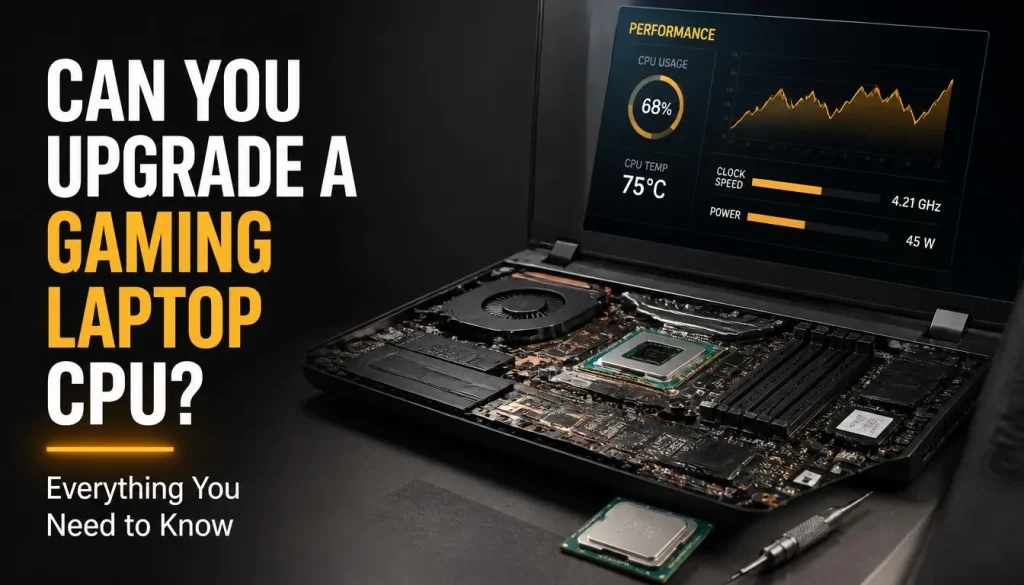
If your gaming laptop is starting to feel slow, upgrading the processor may seem like the obvious solution. Desktop PC owners can often replace an older CPU with a faster one, so it is reasonable to wonder: can you upgrade a gaming laptop CPU too?
In most modern gaming laptops, the answer is no. The CPU is usually soldered directly to the motherboard, which means it cannot be removed and replaced like a desktop processor.
However, there are exceptions. Some older gaming laptops, desktop-replacement models, and a small number of specialised systems use designs that make processor upgrades possible. Even then, compatibility depends on much more than simply finding a CPU that fits.
This guide explains how gaming laptop CPU upgrades work, how to check whether your processor is replaceable, what compatibility issues you need to consider, and what you can upgrade instead if your CPU is permanently soldered.
Can You Upgrade the CPU in a Gaming Laptop?
Most modern gaming laptop CPUs cannot be upgraded individually.
Laptop manufacturers commonly use processors that are permanently attached to the motherboard using a BGA, or Ball Grid Array, package. Instead of placing the processor into a removable socket, the CPU is soldered directly onto the board during manufacturing.
That design helps manufacturers build thinner laptops with compact cooling systems and tightly controlled power delivery.
So, for the majority of current gaming laptops, upgrading the processor would require replacing the entire motherboard rather than simply replacing the CPU.
Older laptops can be different. Some models used socketed processors that could technically be removed and replaced with another compatible CPU.
The important word is compatible. Even if your processor is removable, that does not automatically mean you can install any faster laptop CPU.
Why Are Most Gaming Laptop CPUs Soldered?
Laptop manufacturers have several reasons for soldering processors directly onto the motherboard.
Smaller Laptop Designs
A soldered CPU takes up less vertical space than a traditional processor socket. This allows manufacturers to build thinner and lighter gaming laptops.
Better Control Over Cooling
Gaming laptops have limited cooling capacity compared with desktop computers. Manufacturers design the heatsink, heat pipes, fans, and power limits around a specific processor.
Keeping the CPU permanently attached makes it easier to control those thermal requirements.
Simplified Motherboard Design
A soldered processor can simplify the electrical connections between the CPU, memory, chipset, and other components.
More Predictable Power Consumption
Laptop batteries, chargers, voltage regulators, and cooling systems are designed around specific processor power limits. Allowing unrestricted CPU upgrades could create power and temperature problems.
The disadvantage is obvious: once the processor becomes outdated, upgrading it is difficult or impossible.
BGA vs Socketed Laptop CPUs
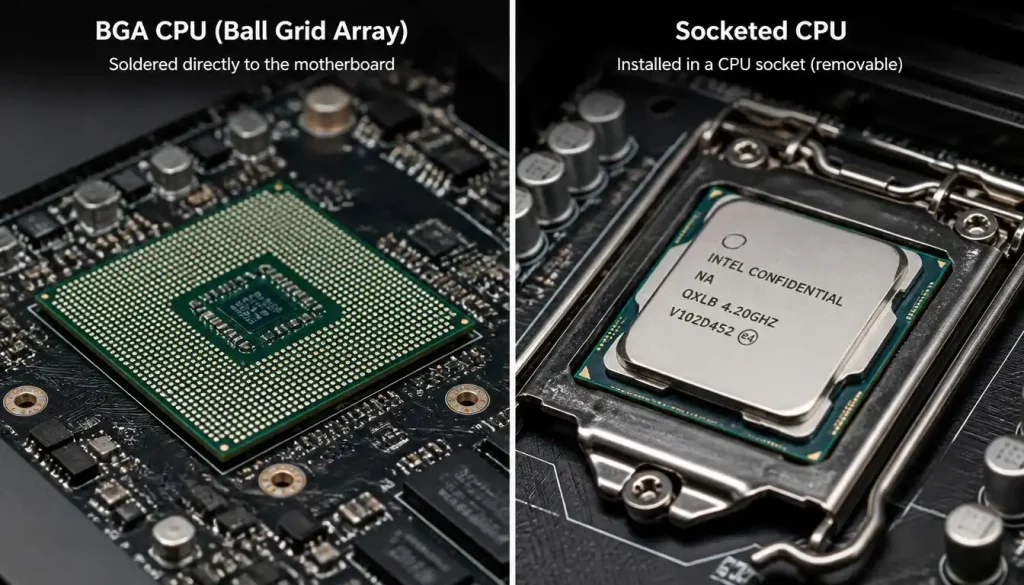
Understanding the difference between BGA and socketed processors is one of the easiest ways to determine whether your gaming laptop CPU can be upgraded.
BGA CPU
BGA stands for Ball Grid Array.
A BGA processor is soldered directly to the motherboard.
If your gaming laptop uses a BGA CPU, you normally cannot replace the processor as a standard upgrade.
Most modern gaming laptops use this design.
Socketed CPU
A socketed processor sits inside a removable CPU socket.
These processors were more common in older laptops and large desktop-replacement gaming notebooks.
If your gaming laptop has a socketed processor, an upgrade may be possible, but you still need to check:
- CPU socket compatibility
- chipset compatibility
- BIOS support
- processor generation
- power requirements
- cooling capacity
- motherboard limitations
A matching socket alone does not guarantee that a replacement CPU will work.
How to Check If Your Gaming Laptop CPU Is Upgradeable
Before buying any processor, confirm exactly what your laptop supports.
Find Your Exact Laptop Model
Do not rely only on the brand or series name.
Two laptops with almost identical names may use completely different motherboards.
You can usually find the model number:
- on a sticker underneath the laptop
- inside the BIOS
- in Windows System Information
- on the original packaging
- in the manufacturer’s support software
Write down the full model number.
Identify Your Current Processor
On Windows, one simple method is:
- Right-click the Start button.
- Open Task Manager.
- Select Performance.
- Click CPU.
You should see the full processor model.
You can also check:
Settings > System > About
Third-party hardware tools can provide additional processor and motherboard information if needed.
Check the Processor Package
Search the processor model on the manufacturer’s official specification page.
Look for information such as:
- package type
- socket
- FCBGA
- BGA
- PGA
- rPGA
If the processor uses a BGA-style package, it is normally soldered.
If it uses a removable socket, an upgrade might be possible.
Read the Laptop Service Manual
A manufacturer’s service or maintenance manual can provide valuable information about the motherboard and processor.
If the repair instructions show the motherboard being removed while the CPU remains permanently attached, the processor is soldered.
If the manual contains a separate processor removal procedure, the CPU may be socketed.
Check the Motherboard
If specifications are unclear, search for your laptop’s exact motherboard model.
Pictures of replacement motherboards can sometimes reveal whether the processor is permanently attached.
However, avoid opening your laptop unless you understand the warranty and repair risks.
How Can You Tell If a Laptop CPU Is Soldered?
There are several practical ways to confirm whether your processor is soldered.
Start with the CPU’s official specifications.
A package name containing BGA generally indicates that the CPU is designed to be soldered to the motherboard.
You can also search for:
“[Your laptop model] CPU replacement”
or
“[Your laptop model] service manual”
If replacement motherboard listings already include the CPU as part of the board, that is another strong indication that the processor is soldered.
Do not assume that a powerful laptop CPU is removable simply because it belongs to an H, HX, or other high-performance product family.
Processor performance level and processor upgradeability are two different things.
Can You Upgrade a Gaming Laptop CPU Without Replacing the Motherboard?
Usually not.
If the processor is soldered, replacing the CPU alone would require professional BGA rework equipment.
That is completely different from replacing a desktop CPU.
A technician would need to remove the soldered processor, prepare the motherboard, install another compatible chip, and ensure the BIOS and electrical design support it.
Even if technically possible, it is rarely practical.
If the processor is socketed, however, you may be able to upgrade the CPU without changing the motherboard.
Older gaming laptops are much more likely to offer this possibility than modern systems.
What If Your Gaming Laptop Has a Socketed CPU?
Finding a removable CPU does not mean the upgrade is automatically safe.
You need to check several compatibility factors first.
CPU Socket Compatibility
The replacement processor must use the correct physical socket.
If the socket is different, the CPU will not fit.
Chipset Compatibility
A motherboard chipset may support only certain processor generations or models.
Two processors can use similar sockets while still requiring different motherboard support.
BIOS Support
The BIOS must recognise the replacement processor.
Without proper firmware support, the laptop may:
- refuse to boot
- run incorrectly
- show incorrect CPU information
- experience stability problems
Check the laptop manufacturer’s supported CPU list whenever possible.
Power Requirements
A faster processor may consume more power.
The motherboard’s voltage regulation system must be capable of supplying that power safely.
Cooling Capacity
This is one of the biggest concerns.
Your laptop’s cooling system may have been designed for a lower-power processor.
Installing a hotter CPU could cause:
- thermal throttling
- louder fan noise
- overheating
- lower sustained clock speeds
- unexpected shutdowns
A theoretically faster processor is not useful if the cooling system cannot handle it.
Can You Upgrade a Gaming Laptop From Core i5 to Core i7?
Sometimes, but usually not on a modern gaming laptop.
If both processors are soldered, you cannot simply remove the Core i5 and install a Core i7.
On an older socketed laptop, an i5-to-i7 upgrade may be possible if both processors are supported by the same:
- CPU socket
- chipset
- BIOS
- motherboard
- cooling system
You should also compare their power limits.
An older Core i7 may produce significantly more heat than the Core i5 your laptop was originally designed to cool.
Before attempting the upgrade, compare the actual processor model numbers rather than relying only on the i5 and i7 branding.
Can You Upgrade a Gaming Laptop From Core i7 to Core i9?
For most modern gaming laptops, no.
Core i7 and Core i9 mobile processors are typically soldered directly onto the motherboard.
Even if two laptop models in the same series are sold with either an i7 or i9, manufacturers may use different:
- motherboard revisions
- cooling systems
- power limits
- BIOS configurations
- chargers
In some cases, replacing the entire motherboard with the higher-end version may work, but the cost can make the project difficult to justify.
Can You Upgrade an AMD Ryzen Gaming Laptop CPU?
The same basic rule applies to AMD Ryzen gaming laptops.
Most modern Ryzen mobile processors are soldered to the motherboard.
You generally cannot replace a Ryzen 5 mobile processor with a Ryzen 7 or Ryzen 9 simply because a higher-end model exists.
An upgrade would depend on the actual motherboard design.
Desktop AMD platforms such as AM4 or AM5 should not be confused with Ryzen laptop platforms. Desktop processors and mobile processors use very different packaging, power limits, and motherboard designs.
Can You Replace an Intel Laptop CPU With an AMD CPU?
No, not as a normal processor upgrade.
Intel and AMD processors use different platforms and motherboard designs.
Changing from Intel to AMD would typically require replacing much more than the processor.
You would normally need a different motherboard designed specifically for the AMD processor, and that motherboard would also need to be compatible with your laptop’s:
- chassis
- cooling system
- memory
- display connectors
- battery
- keyboard
- ports
- charger
- BIOS
In practical terms, switching a gaming laptop from Intel to AMD means replacing the platform, not simply upgrading the CPU.
Can You Upgrade an H- or HX-Series Gaming Laptop CPU?
Do not assume an H- or HX-series processor is upgradeable.
These labels generally indicate higher-performance mobile CPUs, but they do not mean the processor is installed in a removable desktop-style socket.
Many powerful gaming laptop processors are still soldered directly to the motherboard.
Always check the exact processor package and laptop motherboard rather than judging upgradeability by the CPU name.
Can a Soldered Gaming Laptop CPU Be Replaced?
Technically, a soldered processor can sometimes be removed by a specialist with advanced BGA rework equipment.
Practically, it is usually not a sensible gaming laptop upgrade.
The process involves heating and removing the existing processor, cleaning the motherboard contacts, preparing the replacement chip, and soldering it correctly.
Even after successful installation, the laptop may not support the new CPU because of:
- BIOS limitations
- power delivery differences
- chipset restrictions
- firmware incompatibility
- cooling limitations
For most users, replacing a soldered CPU is closer to advanced motherboard repair than a normal hardware upgrade.
Is BGA Rework Worth It for a CPU Upgrade?
Usually not.
BGA CPU replacement requires specialised equipment and a highly skilled technician.
The cost of the work, combined with the risk of damaging the motherboard, often makes it poor value.
It can make sense in some repair situations if a technician is replacing a failed processor with the exact same chip.
Using BGA rework purely to install a faster gaming laptop CPU is much less practical.
Can You Replace the Entire Motherboard to Upgrade the CPU?
Sometimes.
Because the processor is attached to the motherboard, replacing the motherboard can effectively upgrade the CPU.
For example, a laptop manufacturer may sell the same chassis with:
- a Core i5 motherboard
- a Core i7 motherboard
- a Core i9 motherboard
In theory, installing the higher-end board may upgrade your processor.
In practice, several problems can appear.
The replacement board may require a different:
- cooling assembly
- charger
- GPU configuration
- display connector
- battery
- firmware
- internal cable layout
The cost of a replacement gaming laptop motherboard can also be high.
By the time you include the motherboard, cooling components, labour, and possible compatibility problems, buying a newer laptop may provide better value.
Are There Any Modern Laptops With Upgradeable CPUs?
There are a few unusual designs that offer more upgrade flexibility than traditional laptops.
Some modular laptops allow users to replace the mainboard with a newer board containing a newer CPU.
However, there is an important distinction.
You are usually upgrading the mainboard and processor together, not removing the processor from a socket and installing a new one.
This is more upgrade-friendly than a conventional gaming laptop, but it is still different from a desktop PC CPU upgrade.
Were Older Gaming Laptop CPUs Upgradeable?
Yes, some were.
Older laptops were more likely to use removable mobile processors.
Large desktop-replacement gaming notebooks sometimes used socketed laptop processors or even desktop-class CPUs.
These machines were typically:
- thicker
- heavier
- more power-hungry
- easier to service
Modern gaming laptops have largely moved away from this design because manufacturers prioritise compact size, efficiency, and integrated cooling.
So if you own an older gaming notebook, checking CPU upgradeability may actually be worthwhile.
CPU Upgrade vs CPU Replacement: What Is the Difference?
These terms are often used interchangeably, but they can describe different jobs.
A CPU upgrade means replacing your current processor with a faster model to improve performance.
A CPU replacement can simply mean replacing a failed processor with an identical or compatible one.
A motherboard replacement involves changing the entire board, which may also replace the CPU and GPU if those components are soldered onto it.
Understanding the difference matters when comparing repair costs.
A technician who offers “CPU replacement” may be describing motherboard repair rather than a performance upgrade.
How Much Does It Cost to Upgrade a Gaming Laptop CPU?
There is no standard price because the cost depends heavily on the laptop design.
For a rare socketed laptop, you may need to pay for:
- a compatible processor
- thermal paste
- technician labour
- possible cooling upgrades
For a soldered laptop, the cost can be much higher because you may need:
- BGA rework
- a replacement motherboard
- professional installation
- additional cooling components
Availability also matters.
Older laptop processors and replacement motherboards can be surprisingly expensive because they are no longer widely manufactured.
Users in the USA, UK, Canada, and Australia may also face different labour costs, shipping fees, taxes, or import charges.
Before spending money, compare the total upgrade cost with the price of a newer gaming laptop.
Is Upgrading a Gaming Laptop CPU Worth It?
For most modern gaming laptops, no.
Even when a processor upgrade is technically possible, the performance increase may not justify the expense and risk.
A CPU upgrade makes the most sense when:
- the CPU is genuinely removable
- a significantly faster compatible processor is inexpensive
- the BIOS supports it
- the cooling system can handle it
- the rest of the laptop is still powerful enough
It makes less sense when:
- the CPU is soldered
- the motherboard must be replaced
- the GPU is also outdated
- the battery is worn out
- the display is poor
- the cooling system is already struggling
- the upgrade cost approaches the price of a newer laptop
Will Upgrading the CPU Increase Gaming FPS?
It can, but not always.
Gaming performance depends on both the CPU and GPU.
If your game is CPU-limited, a faster processor may improve:
- average FPS
- minimum FPS
- frame-time consistency
- performance in crowded scenes
- simulation speed
CPU upgrades can be particularly useful in:
- competitive esports games
- simulation games
- strategy games
- large multiplayer games
- CPU-heavy open-world titles
However, if your graphics card is already running close to 100% usage, a faster processor may provide little improvement.
In a GPU-limited game, the graphics card remains the main performance bottleneck.
How to Know If Your CPU Is Bottlenecking Your Gaming Laptop
Before trying to upgrade the processor, check whether the CPU is actually causing your performance problem.
Signs of a CPU bottleneck may include:
- low GPU utilisation while FPS remains low
- one or more CPU cores reaching very high usage
- severe FPS drops in crowded areas
- poor performance in simulation-heavy games
- frequent frame-time spikes
- better FPS after reducing CPU-heavy settings
However, high CPU usage alone does not prove that the processor needs replacing.
Temperature, power limits, background apps, RAM capacity, and software issues can create similar symptoms.
CPU Bottleneck vs GPU Bottleneck
Knowing the difference can save you from spending money on the wrong upgrade.
Signs of a CPU Bottleneck
You may see:
- high CPU usage
- lower-than-expected GPU usage
- FPS that barely changes when graphics settings are reduced
- stuttering in large battles or crowded environments
Signs of a GPU Bottleneck
You may see:
- GPU usage consistently near maximum
- FPS increasing significantly when graphics settings are reduced
- performance dropping at higher resolutions
- strong performance differences between Low and Ultra settings
A GPU bottleneck is extremely common in gaming laptops because the graphics chip usually determines gaming performance.
Your CPU May Not Actually Be the Problem
Before considering major hardware replacement, rule out more common causes of poor gaming performance.
Thermal Throttling
Gaming laptop processors reduce their clock speed when temperatures become too high.
A powerful CPU running at reduced speed can perform worse than expected.
Monitor CPU temperature while gaming.
If temperatures are extremely high and clock speeds fall during heavy workloads, cooling may be the real problem.
Dusty Fans
Dust can block heatsinks and reduce airflow.
Cleaning the cooling system may restore lost performance.
Old Thermal Paste
Thermal paste transfers heat between the CPU and heatsink.
Over time, its performance can deteriorate.
Replacing thermal paste can sometimes improve temperatures, although laptop disassembly should only be attempted if you understand the risks.
Insufficient RAM
Modern games can struggle when a laptop has too little memory.
If your gaming laptop has only 8GB of RAM, moving to 16GB may provide a noticeably smoother experience in many modern games.
Single-Channel Memory
Some systems lose performance when memory runs in a limited configuration.
Adding a compatible second RAM module can improve memory bandwidth on supported systems.
Background Applications
Browsers, launchers, recording software, antivirus scans, Windows updates, and other applications can consume CPU resources.
Close unnecessary programs before gaming.
Power-Saving Mode
Gaming laptops often reduce processor and graphics performance when running on battery.
For maximum performance, connect the original or properly rated charger and use the appropriate performance mode.
Overheating GPU
Sometimes users assume the CPU is responsible for low FPS when the GPU is actually overheating or power-limited.
Monitor both components before making a diagnosis.
What Can You Upgrade Instead of the CPU?
Even if your processor is soldered, your gaming laptop may still have useful upgrade options.
Upgrade the RAM
RAM is one of the most practical gaming laptop upgrades.
Moving from 8GB to 16GB can improve performance in memory-heavy games and multitasking.
Moving from 16GB to 32GB can be useful for:
- content creation
- streaming
- video editing
- virtual machines
- heavily modded games
- professional workloads
Before buying memory, check:
- maximum supported capacity
- DDR generation
- memory speed
- number of available slots
- whether any RAM is soldered
Upgrade the SSD
A faster or larger SSD can improve the overall experience.
It can reduce:
- game loading times
- Windows startup time
- application loading time
- file transfer times
However, an SSD upgrade usually does not dramatically increase average gaming FPS.
Think of it as a responsiveness and storage upgrade rather than a CPU replacement.
Improve Cooling
Cooling improvements can sometimes recover performance that you already paid for.
Useful steps include:
- cleaning air vents
- removing dust from fans
- keeping the rear vents unobstructed
- using the laptop on a hard surface
- replacing worn thermal materials when appropriate
A cooling pad may also help some laptops, although results vary depending on the airflow design.
Optimise Power Settings
Gaming laptops often include performance profiles such as:
- Silent
- Balanced
- Performance
- Turbo
Using the correct performance profile while connected to AC power can significantly affect CPU and GPU behaviour.
Avoid assuming that hardware is outdated until you have tested the laptop in its proper performance mode.
Update BIOS and Drivers
Firmware and driver updates can fix:
- performance bugs
- power-management issues
- compatibility problems
- stability problems
Use your laptop manufacturer’s support page for BIOS updates.
For graphics drivers, use the appropriate NVIDIA, AMD, Intel, or laptop manufacturer resources depending on the system.
When Should You Buy a New Gaming Laptop Instead?
Sometimes replacement is the most sensible upgrade.
Consider buying a newer gaming laptop if:
- the CPU is permanently soldered
- the CPU is several generations old
- the GPU can no longer run your games properly
- the laptop regularly overheats
- the motherboard upgrade is expensive
- the battery is heavily degraded
- RAM or storage expansion is limited
- major components are beginning to fail
- repair costs are approaching the price of a replacement system
Replacing a laptop may cost more initially, but you gain improvements across the entire system, including:
- CPU performance
- GPU performance
- cooling
- battery efficiency
- display quality
- faster memory
- newer connectivity
- warranty coverage
Gaming Laptop CPU Upgrade Checklist
If you believe your laptop processor may be upgradeable, go through this checklist before buying anything:
- Find the exact laptop model number.
- Identify the exact CPU model.
- Check whether the processor is soldered or socketed.
- Check the CPU package type.
- Identify the motherboard and chipset.
- Confirm socket compatibility.
- Confirm BIOS support.
- Compare CPU power requirements.
- Check cooling-system capacity.
- Check charger and power-delivery requirements.
- Compare motherboard versions.
- Check warranty implications.
- Compare the total upgrade cost with a new laptop.
- Back up important files before any hardware work.
Skipping any of these steps can turn an upgrade into an expensive repair.
Frequently Asked Questions
Can I upgrade the processor in my gaming laptop?
Usually not. Most modern gaming laptop processors are soldered directly to the motherboard. Older laptops with socketed CPUs may allow processor upgrades.
Are gaming laptop CPUs soldered?
Most modern ones are. Manufacturers commonly use BGA processors that are permanently soldered to the motherboard.
How do I know if my laptop CPU is soldered?
Check the CPU’s official package specifications, your laptop’s service manual, or the motherboard specifications. A BGA or FCBGA processor is normally soldered.
Can I upgrade my laptop from Core i5 to Core i7?
Only if the processor is replaceable and the motherboard, socket, BIOS, power system, and cooling system support the Core i7. Most modern laptops do not allow this type of upgrade.
Can I upgrade Ryzen 5 to Ryzen 7 in a gaming laptop?
Usually not. Most Ryzen mobile CPUs are soldered. A motherboard replacement may be required.
Can I replace an Intel laptop CPU with AMD?
No, not as a normal CPU upgrade. Intel and AMD processors require different motherboard platforms.
Can you upgrade an HX gaming laptop processor?
The HX name does not guarantee upgradeability. Many HX processors are still soldered to the motherboard.
Can a soldered CPU be removed?
Yes, technically, using professional BGA rework equipment. However, it is not a practical upgrade for most laptop owners.
Can I upgrade a gaming laptop CPU without replacing the motherboard?
Only if the laptop uses a compatible socketed processor. With a soldered CPU, the motherboard normally needs to be replaced.
Will a CPU upgrade increase FPS?
It can improve FPS in CPU-limited games, but it may make little difference if the GPU is already the main bottleneck.
Does adding more RAM help a CPU bottleneck?
RAM does not make the processor itself faster, but insufficient or poorly configured memory can reduce gaming performance. Upgrading RAM may improve smoothness if memory is currently a limitation.
Can I use a desktop CPU in a gaming laptop?
Normally no. Laptop motherboards are designed for specific mobile processors. A few unusual desktop-replacement laptops have used desktop-class CPUs, but they are exceptions.
What parts of a gaming laptop can usually be upgraded?
Depending on the model, you may be able to upgrade the RAM, SSD, Wi-Fi card, and sometimes the battery. CPU and GPU upgrades are far less common.
Is it better to upgrade the CPU or buy a new gaming laptop?
If your CPU is socketed and a compatible replacement is inexpensive, an upgrade may make sense. If the CPU is soldered and requires motherboard replacement, buying a newer gaming laptop is often the better long-term option.
Final Verdict
So, can you upgrade a gaming laptop CPU?
For most modern gaming laptops, the answer is no because the processor is soldered directly to the motherboard.
Some older or specialised laptops use socketed processors and may allow CPU upgrades, but you must confirm the socket, chipset, BIOS, power requirements, and cooling capacity before installing anything.
If your CPU is permanently soldered, replacing the entire motherboard may technically provide a processor upgrade, but it is often expensive and difficult to justify.
Before spending money, make sure the CPU is actually causing your gaming performance problem. Upgrading RAM, installing a better SSD, cleaning the cooling system, fixing thermal throttling, or optimising power settings may improve the laptop without replacing the processor.
And if both the CPU and GPU are becoming major limitations, putting the upgrade budget toward a newer gaming laptop will usually deliver a much bigger improvement.