If you are shopping for a gaming laptop and keep seeing models with 16GB of memory, you may be wondering whether that is really enough for modern games. For most gamers, yes, 16GB RAM is enough for a gaming laptop in 2026. It provides enough memory for esports titles, most AAA games, everyday multitasking, and gaming at 1080p or 1440p without making RAM the obvious bottleneck.
That does not mean 16GB is perfect for everyone. If you stream while gaming, keep lots of programs open, play heavily modded games, use demanding simulators, or want your laptop to have more memory headroom for the next several years, 32GB can be a smarter choice.
Current game requirements show why there is no single answer for every player. Fortnite recommends 16GB RAM, while Starfield lists 16GB for both its minimum and recommended memory requirements. At the heavier end, Microsoft Flight Simulator 2024 lists 16GB as minimum, 32GB as recommended, and 64GB for its ideal specification.
The important thing is to match your RAM to the games you play, the other applications you run, and the hardware inside your laptop.
Is 16GB RAM Enough for Gaming in 2026?
For the average gamer, 16GB remains a practical amount of system memory.
If your laptop has a capable processor, a suitable dedicated GPU, an SSD, and 16GB of properly configured RAM, you can play a wide range of current games without needing 32GB just because the number is bigger.
Official requirements for games such as Fortnite, Starfield, and Alan Wake 2 demonstrate that 16GB remains relevant for modern PC gaming. Fortnite recommends 16GB or higher, Starfield specifies 16GB, and Epic lists 16GB or higher for Alan Wake 2’s minimum system memory.
For gamers, 16GB is particularly suitable for:
- Competitive games such as Fortnite and similar esports titles
- Most 1080p gaming
- Most 1440p gaming
- Many modern AAA games
- Gaming with Discord, Steam, or a few browser tabs open
- Budget and mid-range gaming laptops
- Players who can upgrade their laptop memory later
The situation changes when your workload starts using most or all of that memory. Once the system runs short of available RAM, Windows may need to rely more heavily on storage-based virtual memory. That is much slower than physical RAM and can contribute to slower application switching or inconsistent performance.
So the better question is not simply, “Is 16GB enough?” It is whether 16GB is enough for the way you actually use your gaming laptop.
How Much RAM Do Modern Games Actually Need?
Game memory requirements vary enormously. A competitive shooter designed to run on a broad range of hardware does not have the same demands as a large simulation game, heavily modded open-world title, or game running alongside recording and streaming software.
Esports and Competitive Games
For competitive gaming, 16GB is usually a comfortable amount of RAM.
Games in this category are often designed to work across a wide range of PCs because developers want large player bases. Fortnite, for example, currently lists 8GB as its minimum system memory and recommends 16GB or higher.
If you mainly play competitive titles, moving from 16GB to 32GB should not automatically be your first upgrade. CPU performance, GPU performance, cooling, display refresh rate, and memory configuration can be equally or more important depending on the laptop.
Modern AAA Games
AAA games can use considerably more resources, but 16GB is still sufficient for many of them.
Starfield officially lists 16GB RAM under both its minimum and recommended PC specifications. Alan Wake 2 also lists 16GB or higher in its minimum system requirements.
That does not guarantee every gaming laptop with 16GB will deliver excellent performance. A laptop with 16GB RAM and a weak GPU can still perform poorly, while another 16GB laptop with a stronger GPU and CPU may provide a much better experience.
RAM is only one part of the system.
Simulation and Memory-Heavy Games
Simulation games are where extra RAM can become much more valuable.
Microsoft Flight Simulator 2024 is a good example. Its published specifications list:
- 16GB RAM – Minimum
- 32GB RAM – Recommended
- 64GB RAM – Ideal
That is a much wider memory range than many mainstream games and shows why someone buying a laptop primarily for demanding simulation workloads may benefit from 32GB or more.
Heavily Modded Games
Mods can change the memory requirements of a game dramatically.
A standard installation of Minecraft, Skyrim, or another moddable game may work comfortably with 16GB of system RAM, while large texture packs, extensive mod collections, shaders, additional background tools, or large custom worlds can increase memory usage.
If modding is a major part of how you play, 32GB gives you more room before memory capacity becomes a limitation.
How Much RAM Do Popular Games Need?
Here is a useful way to put 16GB into perspective.
| Game | Published RAM Requirement | Is 16GB Enough? |
|---|---|---|
| Fortnite | 8GB minimum, 16GB recommended | Yes for the recommended memory target |
| Starfield | 16GB minimum and recommended | Yes, based on the listed RAM requirement |
| Alan Wake 2 | 16GB or higher minimum | 16GB meets the listed minimum memory requirement |
| Microsoft Flight Simulator 2024 | 16GB minimum, 32GB recommended, 64GB ideal | Enough for minimum spec, but more is recommended |
These figures come from the publishers’ current PC requirement pages.
Remember that meeting the RAM requirement does not guarantee a particular frame rate. CPU, GPU, VRAM, resolution, graphics settings, storage, cooling, and laptop power limits also affect gaming performance.
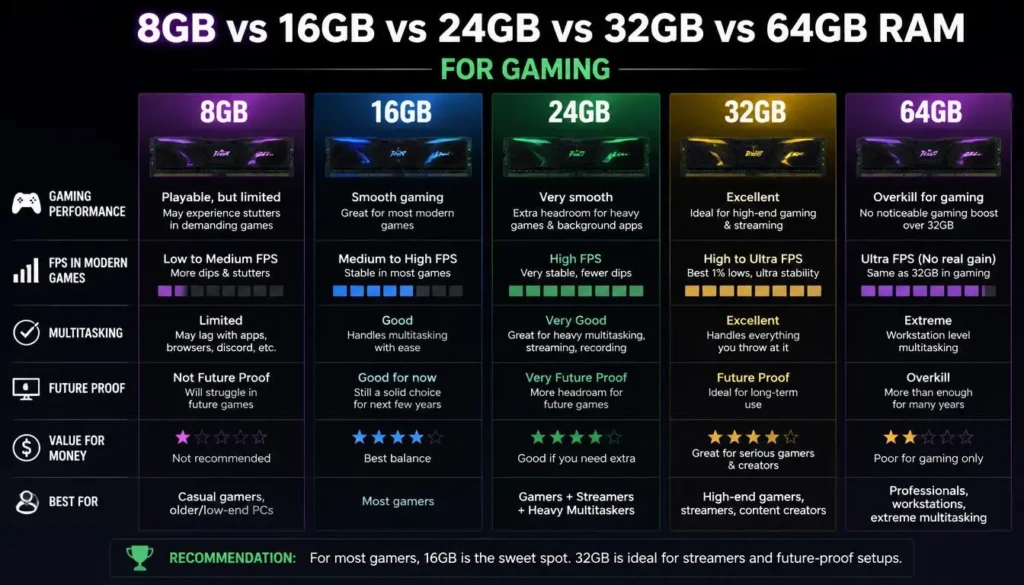
8GB vs 16GB vs 24GB vs 32GB vs 64GB RAM for Gaming
The easiest way to choose gaming laptop RAM is to think about what each capacity is actually good for.
| RAM Capacity | Best For | Gaming Recommendation |
|---|---|---|
| 8GB | Older games, very light gaming, entry-level systems | Too limiting for many new gaming laptops |
| 16GB | Mainstream gaming, esports, most AAA gaming | Best starting point for most gamers |
| 24GB | Gaming with extra multitasking headroom | Useful middle ground on compatible systems |
| 32GB | Heavy gaming, streaming, mods, content creation | Excellent for demanding users |
| 64GB | Specialized simulations and professional workloads | Usually unnecessary for gaming alone |
8GB RAM
A new gaming laptop with only 8GB deserves careful consideration.
Fortnite may list 8GB as its minimum memory requirement, but its recommended specification calls for 16GB. Modern Windows, game launchers, browsers, voice chat, monitoring software, and the game itself all compete for memory.
If an otherwise good budget gaming laptop comes with 8GB but has an easy upgrade path, it may still be worth considering. Ideally, budget for an upgrade.
16GB RAM
This is the practical baseline for mainstream gaming.
It offers enough memory for a broad range of games without forcing budget-conscious buyers to pay for capacity they may never use.
24GB RAM
24GB can make sense when you want more headroom than 16GB but do not need 32GB.
However, laptop memory configurations vary, so check the manufacturer’s supported capacities and memory layout before planning an upgrade.
32GB RAM
32GB becomes attractive when gaming is only one part of what you do.
It is particularly useful for:
- Gaming and streaming
- Heavy browser use
- Video editing
- Large game mods
- Simulation games
- Running multiple creative applications
- Keeping a laptop for several years
64GB RAM
For gaming alone, 64GB is usually unnecessary.
There are exceptions. Microsoft lists 64GB as the ideal memory specification for Microsoft Flight Simulator 2024, which demonstrates that certain specialized games can use far more memory than a typical title.
For most people buying a gaming laptop, however, money beyond 32GB is often better spent elsewhere unless a specific game or professional workload requires it.
How Does 16GB RAM Affect Gaming Performance?
RAM capacity can affect gaming performance, but it does not work like a simple FPS multiplier.
Installing more RAM does not make every game faster. The benefit appears when your existing memory configuration or capacity is limiting the system.
Average FPS
If a game and your background applications comfortably fit within 16GB, upgrading to 32GB may produce little noticeable improvement in average frame rate.
In that situation, the CPU or GPU is more likely to determine your performance ceiling.
1% Lows
Average FPS does not tell the entire story.
A system can report a good average frame rate while occasionally suffering from slower frames. These dips are often discussed using metrics such as 1% lows.
If memory pressure is contributing to those slowdowns, adding RAM may help smooth the experience. But low 1% figures can also be caused by the CPU, GPU, game engine, shader compilation, storage, thermal throttling, or other factors.
Stuttering and Frame-Time Spikes
Running out of physical memory can force the system to move data between RAM and storage more aggressively.
Because SSD storage is much slower than system memory, severe memory pressure can make a PC feel less responsive. It may show up as hitching, slower task switching, or longer delays when returning to a game.
More RAM can help when insufficient memory is actually the problem.
Loading and Multitasking
Do not expect a RAM capacity upgrade to magically cut every loading screen in half. Modern game loading is heavily influenced by storage, CPU performance, asset handling, and the game itself.
Extra RAM becomes more noticeable when you are doing several things simultaneously.
Does 32GB RAM Increase FPS Compared With 16GB?
Sometimes, but 32GB does not automatically give you more FPS than 16GB.
If a game uses less memory than you already have available, adding unused capacity provides limited benefit. You cannot turn unused RAM into additional GPU processing power.
The upgrade becomes more useful when:
- Your 16GB is regularly close to full
- You play memory-heavy games
- You stream or record gameplay
- You use large mods
- You keep many applications open
- Your workload frequently pushes Windows into virtual memory
This is why two people can upgrade from 16GB to 32GB and report completely different experiences. One may solve a real memory bottleneck, while the other simply ends up with more unused RAM.
When Is 16GB RAM Not Enough?
16GB begins to feel restrictive when your total workload needs more than gaming alone.
Gaming While Streaming
A game, OBS or another streaming application, browser windows, Discord, overlays, music, and additional utilities can all remain active at once.
The game might fit comfortably within a 16GB system by itself, but the complete streaming setup may leave far less spare memory.
Heavy Multitasking
Some gamers rarely close anything.
Chrome may have numerous tabs open. Discord is running. Steam and another game launcher are active. Spotify is playing. RGB software, hardware monitoring tools, cloud-sync applications, antivirus software, and Windows services are also using memory.
Microsoft officially lists 4GB RAM as the minimum memory requirement for Windows 11, but that is an operating-system minimum rather than a recommendation for a modern gaming workload.
Your game only gets access to the memory left after the operating system and other software take their share.
Modded Games
Large texture packs, extensive mod lists, custom assets, shaders, and other modifications can significantly increase a game’s resource demands.
Players who spend most of their time with modded titles should consider 32GB more seriously than someone who plays games in their standard configuration.
Gaming and Content Creation
If your gaming laptop is also your work machine, 32GB becomes easier to justify.
Video editing, photo editing, 3D applications, development tools, and game engines can be much more memory intensive than ordinary gaming. Epic’s current recommended hardware specification for Unreal Engine 5 development, for example, lists 32GB RAM.
That does not mean a gamer needs 32GB because Unreal Engine does. It shows how quickly requirements change when the laptop is used for professional creation as well as playing games.
Windows and Background Applications
You do not have all 16GB available exclusively to your game.
Windows, drivers, launchers, browser processes, chat applications, security software, and system utilities are using part of it before your game even starts.
This is one reason a machine can feel memory-limited even when the game itself appears to require less than 16GB.
Virtual Memory and Page File Usage
Windows can use storage as virtual memory when additional memory is needed.
This feature is useful, but an SSD is not a substitute for physical RAM. If your workload is constantly exceeding available physical memory, increasing RAM can provide a better solution than depending heavily on the page file.
16GB RAM vs VRAM: What Is the Difference for Gaming?
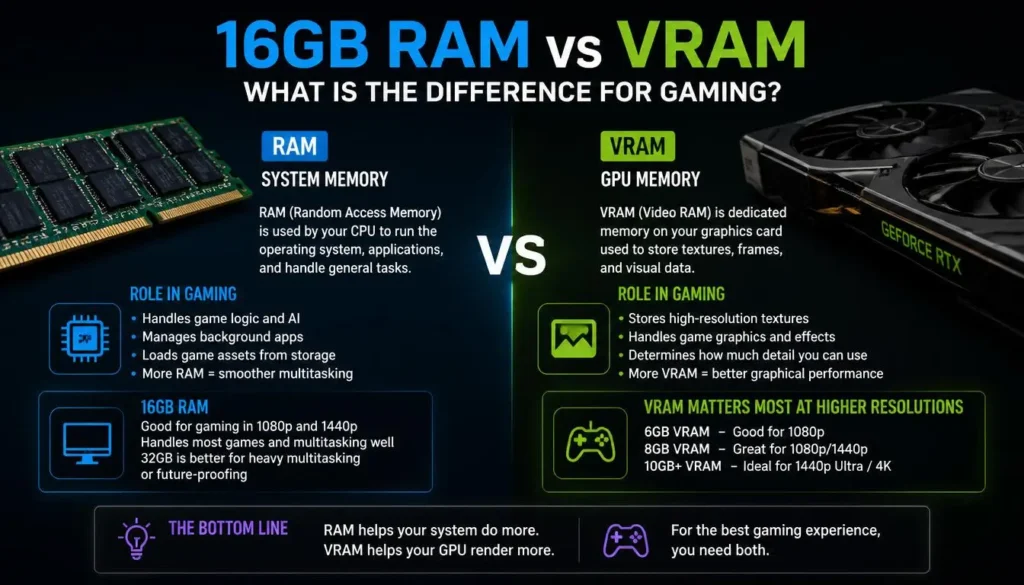
RAM and VRAM are not the same thing.
This distinction matters because gaming laptop listings might advertise 16GB RAM alongside an NVIDIA or AMD GPU that has its own separate amount of video memory.
System RAM is used by Windows, games, applications, and general system processes.
VRAM, or video memory, is memory available to the GPU for graphics-related data such as textures and frame buffers.
Official game specifications often list the two separately. Epic’s Fortnite requirements, for example, distinguish system memory from GPU/VRAM requirements.
That means adding system RAM does not increase your GPU’s dedicated VRAM.
If a game is struggling because the graphics card does not have enough VRAM for high-resolution textures, upgrading the laptop from 16GB to 32GB of system RAM will not transform an 8GB GPU into a 12GB GPU.
Is 16GB RAM Enough With 6GB or 8GB VRAM?
It can be.
System RAM and VRAM solve different problems, so you should judge both separately.
A balanced gaming laptop needs enough system memory for the game and background applications, while the GPU needs enough VRAM and processing power for the graphics workload you expect it to handle.
Is 16GB RAM Enough for 1080p, 1440p, and 4K Gaming?
Generally, yes, but resolution alone does not determine how much system RAM you need.
Moving from 1080p to 4K usually puts significantly more pressure on the graphics subsystem. That does not mean system RAM becomes irrelevant, but upgrading RAM is not the same as upgrading the GPU.
1080p Gaming
16GB is a strong match for most 1080p gaming laptops.
If you are buying a budget or mid-range machine primarily for 1080p gaming, there is usually little reason to reject it solely because it has 16GB instead of 32GB.
1440p Gaming
16GB can also be enough for 1440p.
At this resolution, GPU performance becomes increasingly important. A stronger graphics processor will often matter more than simply doubling system RAM when 16GB is not being exhausted.
4K Gaming
A laptop can still game at 4K with 16GB of system memory if the game and total workload fit within that capacity.
However, 4K gaming places substantial demands on the GPU. If you are spending premium money on a high-end laptop intended for 4K gaming, 32GB often makes sense as part of a more balanced high-end specification.
Is 16GB RAM Enough for Gaming and Streaming?
It can be, but 32GB is more comfortable.
A lighter game combined with straightforward streaming can work on 16GB. The problem appears when you combine a demanding title with OBS, browser sources, several Chrome tabs, Discord, recording software, overlays, and other background applications.
If streaming is occasional, starting with 16GB may be reasonable, especially if the laptop can be upgraded.
If streaming is a major part of why you are buying the laptop, 32GB provides useful headroom and reduces the chance that memory becomes the weak point in your setup.
1x16GB vs 2x8GB RAM for Gaming Laptops
Capacity is not the only thing that matters. Memory configuration matters too.
A laptop may advertise “16GB RAM” while using:
- One 16GB module
- Two 8GB modules
- Soldered memory
- A combination of soldered and replaceable memory
Those configurations are not always equivalent.
Single-Channel Memory
A traditional 1x16GB setup may operate with less total memory bandwidth than a properly configured two-channel setup, depending on the platform and memory architecture.
Dual-Channel Memory
Intel explains that dual-channel mode allows the processor’s memory controller to exchange data through two memory channels, increasing available bandwidth.
That can matter in workloads where memory bandwidth affects performance.
Which Configuration Should You Choose?
For traditional DDR4 laptops where everything else is equal, a properly configured 2x8GB setup can be preferable for immediate memory bandwidth.
But 1x16GB may leave a second slot available for an easy upgrade to 32GB later.
DDR5 complicates simple 1-stick-versus-2-stick comparisons because its memory architecture differs from DDR4. The safest approach is to check independent benchmarks for the specific laptop rather than judging performance from capacity alone. Crucial notes that DDR5 changed channel architecture and bandwidth compared with DDR4.
DDR4 vs DDR5: Does RAM Type Matter for Gaming?
Yes, but capacity should still be considered alongside speed, latency, CPU support, and the rest of the laptop.
DDR5 offers higher bandwidth than older DDR4 platforms and uses a different memory architecture.
That does not mean you should automatically choose a weak gaming laptop simply because it has DDR5.
A gaming laptop is a complete system. GPU performance, CPU performance, cooling, display quality, storage, battery behavior, build quality, and price can all matter more than the RAM generation printed on the specification sheet.
Does RAM Speed Matter for Gaming?
It can.
Faster memory can improve bandwidth, but game-to-game gains vary. Once memory performance is already adequate, spending more for dramatically higher memory speeds may produce smaller gaming benefits than upgrading another component.
Capacity vs Speed: Which Matters More?
Avoid thinking of this as a universal either-or question.
If your game needs more memory than you physically have, capacity matters enormously.
If you already have enough capacity, memory speed and configuration may become more relevant.
For a gaming laptop buyer comparing 16GB DDR5 with 32GB DDR4, there is no automatic winner. The 32GB machine has more capacity, while the DDR5 machine may be based on a newer platform with different bandwidth characteristics.
Compare the complete laptops, not just the RAM label.
Does Your GPU Affect How Much RAM You Need?
Your GPU and system RAM work together as part of the gaming system, but they are not interchangeable.
A high-end GPU does not automatically require 32GB system RAM, just as installing 32GB RAM cannot compensate for an underpowered GPU.
The best configuration is balanced around the games and resolution you want to play.
RAM vs GPU: Which Should You Upgrade First?
If you already have 16GB RAM and your games are not exhausting it, improving GPU performance would generally have a greater impact on graphics-heavy gaming than simply adding unused memory.
There is one big catch with laptops: the dedicated GPU in most gaming laptops is not a practical user-upgrade component. Your RAM may be replaceable, but the laptop GPU usually comes as part of the machine’s fixed hardware design.
That makes the decision especially important when buying a new laptop.
If the choice is between:
- A stronger GPU with 16GB upgradeable RAM
- A weaker GPU with 32GB RAM
the stronger-GPU laptop can often be the more sensible gaming purchase, provided 16GB is enough for your current workload and there is a reasonable upgrade path.
16GB RAM With Entry-Level GPUs
16GB is generally a sensible match for entry-level dedicated gaming GPUs. Spending heavily on 32GB or 64GB while compromising GPU performance usually creates an unbalanced gaming machine.
16GB RAM With Mid-Range and High-End GPUs
16GB can still work with a more powerful GPU.
However, buyers spending more on a premium gaming laptop may prefer 32GB because it better matches heavier multitasking, high-end game workloads, streaming, and the longer ownership period often expected from an expensive machine.
Should You Buy a Gaming Laptop With 16GB or 32GB RAM?
For many buyers, this is the most important question.
Choose 16GB If:
- Gaming is your main workload
- You mainly play esports or mainstream AAA games
- You have a limited budget
- You want to prioritize a better GPU or CPU
- You do not keep dozens of applications open
- Your laptop’s RAM can be upgraded later
- You mainly game at 1080p or 1440p
Choose 32GB If:
- You regularly stream while gaming
- You run heavy background applications
- You play memory-heavy simulations
- You use large mod packs
- You edit video or create content
- You use development or 3D applications
- The laptop has soldered, non-upgradeable memory
- You want more long-term memory headroom
For an average gaming-focused buyer, 16GB is the value choice; 32GB is the comfort and headroom choice.
Should You Upgrade From 16GB to 32GB RAM?
Do not upgrade simply because 32 is larger than 16.
Upgrade because your current system gives you a reason.
A move to 32GB is worth considering if you notice:
- Memory usage staying close to maximum while gaming
- Stuttering when other applications are open
- Poor responsiveness when switching between the game and desktop
- Heavy streaming or recording workloads
- Large mod packs
- Memory-intensive simulation games
- Frequent use of editing or productivity applications alongside gaming
If your laptop sits comfortably below its memory limit during your normal workload, upgrading RAM may not produce the dramatic gaming improvement you expect.
How to Check If 16GB RAM Is Holding Back Your Gaming Laptop
You do not need to guess. Windows can help you check.
Step 1: Open Task Manager
Press Ctrl + Shift + Esc and open the Performance section.
Step 2: Check Memory Usage Before Gaming
Look at how much memory Windows and your normal background programs are already using.
Step 3: Launch Your Game
Run the game you normally play using your usual settings.
Do not close applications you normally keep open just to make the test look better.
Step 4: Recheck Memory Usage
Look at memory consumption while the game and your usual applications are active.
If 16GB is consistently being pushed close to its limit, additional RAM may help.
Step 5: Watch for Symptoms
High memory utilization matters more when it appears alongside problems such as:
- Stuttering
- Applications becoming unresponsive
- Slow Alt-Tab switching
- Background programs closing or reloading
- Heavy storage activity during memory pressure
Step 6: Rule Out Other Bottlenecks
Do not blame RAM immediately.
Check:
- GPU usage
- GPU VRAM
- CPU usage
- CPU and GPU temperatures
- Power mode
- SSD space and health
- Game settings
- Drivers
A gaming laptop can stutter with plenty of free RAM if something else is causing the problem.
What to Check Before Upgrading Gaming Laptop RAM
Laptop upgrades require more care than desktop upgrades because designs vary widely.
Is the RAM Upgradeable?
Check the laptop manufacturer’s documentation or service manual.
Do not assume that a gaming laptop has removable RAM just because older models from the same brand did.
Soldered vs SO-DIMM RAM
Traditional laptop memory often uses replaceable SO-DIMM modules.
Other designs solder some or all of the memory directly to the motherboard. If all memory is soldered, your purchasing decision becomes more important because you cannot simply add another memory module later.
Number of RAM Slots
A laptop may have:
- Two replaceable slots
- One replaceable slot plus soldered memory
- No replaceable slots
Knowing the configuration helps you plan the cheapest upgrade path.
Maximum Supported Capacity
Check how much memory the specific laptop model and platform support.
Do not buy a 64GB kit simply because it physically fits.
DDR4 or DDR5 Compatibility
DDR4 and DDR5 are different standards.
Buy the memory type supported by your laptop. You cannot treat DDR4 and DDR5 SO-DIMMs as interchangeable upgrades.
RAM Speed and Matching Modules
When adding memory, match the supported memory specification as closely as possible.
Compatibility matters more than buying the module with the biggest number on the package.
How Much RAM Should a New Gaming Laptop Have in 2026?
For a new gaming laptop, these are practical starting points:
| Type of Gaming Laptop | Recommended RAM Target |
|---|---|
| Entry-level gaming laptop | 16GB |
| Budget gaming laptop | 16GB |
| Mid-range gaming laptop | 16GB to 32GB |
| Premium gaming laptop | 32GB is preferable |
| Gaming + streaming laptop | 32GB |
| Gaming + content creation laptop | 32GB or more |
| Heavy simulation/professional workstation use | 32GB to 64GB depending on software |
Think of these as buying guidelines rather than strict game requirements.
A well-balanced 16GB gaming laptop with a strong GPU is a better purchase than a badly balanced 32GB model simply because it has more memory.
How Long Will 16GB RAM Be Enough for Gaming?
There is no reliable way to promise that a particular RAM capacity will remain ideal for a fixed number of years.
Games continue to evolve, but the types of games you play matter just as much.
Current examples already show the range. Fortnite recommends 16GB, Starfield lists 16GB, while Microsoft Flight Simulator 2024 recommends 32GB and lists 64GB for its ideal specification.
That means the future has effectively arrived at different speeds for different kinds of games.
If you are buying an affordable laptop that can be upgraded later, starting with 16GB is still reasonable.
If you are buying an expensive laptop with soldered memory and plan to keep it for many years, paying for 32GB upfront may be the safer choice.
Final Verdict: Is 16GB RAM Enough for a Gaming Laptop?
Yes, 16GB RAM is enough for most gaming laptops in 2026. It remains a practical capacity for esports, mainstream AAA games, 1080p gaming, 1440p gaming, and everyday use alongside a reasonable number of background applications. Current requirements from major games such as Fortnite and Starfield reinforce that 16GB is still relevant.
But 16GB should be viewed as a strong mainstream baseline rather than the perfect amount for every user.
Go with 16GB if you mainly want to game and would rather put your budget toward a stronger GPU, CPU, display, or SSD.
Go with 32GB if you stream, multitask heavily, use demanding mods, play memory-heavy simulators, create content, or want additional headroom from a laptop you expect to keep for several years.
Most importantly, do not judge a gaming laptop by RAM capacity alone. A balanced machine with the right GPU, CPU, cooling, VRAM, storage, and memory configuration will give you a better gaming experience than one that simply has the largest RAM number on the product page.
Frequently Asked Questions
Is 16GB RAM Enough for AAA Games?
Yes, 16GB is enough for many AAA games. Starfield officially lists 16GB under both its minimum and recommended memory specifications, while Alan Wake 2 lists 16GB or higher as its minimum system memory.
Some unusually memory-heavy games can benefit from 32GB, so check the requirements for the specific titles you play.
Is 16GB RAM Enough for Fortnite?
Yes. Epic currently lists 8GB RAM as the minimum for Fortnite on PC and recommends 16GB or higher.
If Fortnite is your main game, 16GB is a sensible capacity, assuming the rest of the laptop meets your performance goals.
Is 16GB RAM Enough for Minecraft?
For normal Minecraft gameplay, 16GB system RAM is generally more than a typical player needs solely for the game.
The situation can change with large mod packs, high-resolution resource packs, shaders, servers, background applications, and other modifications. Heavy Minecraft modding is one scenario where having 32GB of total system memory can provide additional headroom.
Is 16GB RAM Enough for Gaming and Streaming?
It can be. A lighter game and simple streaming setup can run with 16GB.
For demanding games combined with OBS, browser sources, Discord, recording, overlays, and other programs, 32GB is a more comfortable choice.
Is 16GB RAM Enough for 1440p Gaming?
Yes, 16GB can be enough for 1440p gaming.
The move from 1080p to 1440p generally makes GPU capability increasingly important. You do not automatically need 32GB of system RAM just because your display resolution is higher.
Is 16GB RAM Enough for 4K Gaming?
It can be, provided the game and background workload fit within 16GB.
For 4K gaming, GPU performance and VRAM are especially important. On premium 4K-focused gaming laptops, however, 32GB is often a sensible overall configuration.
Is 24GB RAM Enough for Gaming?
Yes. 24GB gives you more capacity than 16GB and can provide useful multitasking headroom.
Just make sure the configuration is properly supported by your laptop before upgrading.
Is 32GB RAM Overkill for Gaming?
Not necessarily.
It may be more than you need for gaming alone, but it is useful for streaming, content creation, simulation games, modding, heavy multitasking, and buyers who want extra memory headroom.
Does 32GB RAM Give More FPS Than 16GB?
Not automatically.
If your games and applications are already running comfortably within 16GB, simply adding another 16GB may produce little improvement in average FPS. The upgrade becomes more valuable when your existing memory capacity is actually being exhausted.
Is 16GB DDR5 Better Than 32GB DDR4 for Gaming?
Neither configuration is universally better.
16GB DDR5 offers newer memory technology and higher potential bandwidth, while 32GB DDR4 provides twice the capacity. DDR5 also differs architecturally from DDR4.
Compare the entire laptop, including its CPU, GPU, cooling system, RAM configuration, and upgradeability, instead of choosing based on DDR generation alone.
Should I Upgrade RAM or GPU First?
If you already have 16GB and are not running out of memory, a stronger GPU generally matters more for graphics-heavy gaming.
However, gaming laptop GPUs are usually not practical user-upgrade parts. If you are buying a laptop, prioritize getting the GPU performance you need from the start and consider whether the RAM can be upgraded later.
Is 16GB RAM Enough for the Next Five Years?
It may remain sufficient for many games, but nobody can guarantee that every game released over the next five years will be comfortable with 16GB.
Current requirements already range from 16GB in titles such as Fortnite and Starfield to a 32GB recommended target for Microsoft Flight Simulator 2024.
If you want maximum flexibility for a long ownership period, 32GB provides more headroom.
Should I Buy a Gaming Laptop With 16GB or 32GB RAM?
Choose 16GB if you primarily game, want better value, and can upgrade the RAM later.
Choose 32GB if you stream, create content, use large mods, run demanding simulations, multitask heavily, or are purchasing a laptop with non-upgradeable memory.
For most gaming-focused buyers, 16GB remains enough. For power users, 32GB is the more comfortable long-term choice.
2 thoughts on “Is 16GB RAM Enough for a Gaming Laptop? A Practical 2026 Guide”
Comments are closed.