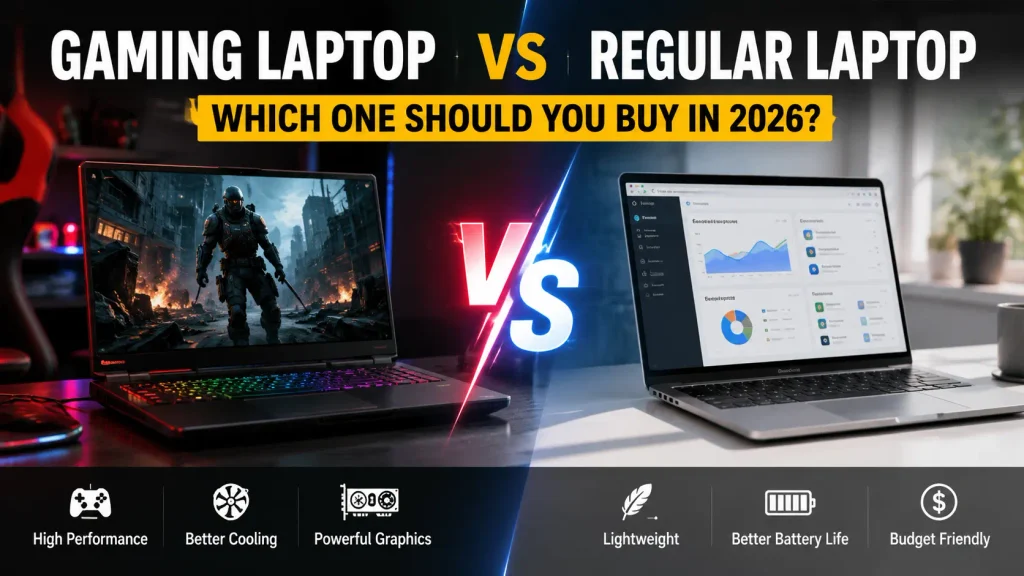
Choosing between a gaming laptop and a regular laptop is not really about deciding which type is more powerful. It is about deciding which one fits the way you actually use a computer.
A gaming laptop is usually the better choice if you play demanding PC games, edit video regularly, work with 3D graphics, or use software that benefits from a dedicated GPU. A regular laptop makes more sense for most students, office workers, travelers, remote workers, and anyone who values battery life and portability more than gaming performance.
If you only browse the web, work in Microsoft Office or Google Workspace, attend video calls, stream movies, and do light creative work, buying a gaming laptop may mean paying for performance you rarely use.
On the other hand, if you want one machine that can handle work during the day and modern games at night, the extra size, heat, and cost of a gaming laptop can be worth it.
Affiliate Disclosure: As an Amazon Associate, we earn from qualifying purchases. This does not affect the price you pay.
Gaming Laptop vs Regular Laptop: Quick Comparison
| Feature | Gaming Laptop | Regular Laptop |
|---|---|---|
| Gaming performance | Excellent on suitable models | Basic to moderate on most models |
| Dedicated GPU | Common | Less common |
| Everyday performance | Excellent | Excellent |
| Heavy creative workloads | Usually stronger | Depends on configuration |
| Cooling | More powerful cooling system | Usually simpler |
| Fan noise | Usually higher under load | Usually quieter |
| Battery life | Usually shorter | Usually better |
| Portability | Usually heavier | Usually lighter |
| Charger size | Often larger | Usually smaller |
| High-refresh display | Common | Available on some models |
| RAM/SSD upgrades | Model-dependent | Model-dependent |
| Power consumption | Higher under heavy load | Usually lower |
| Office and school work | Excellent | Excellent |
| Travel | Less convenient | Usually better |
| Best for | Gaming and demanding workloads | Everyday productivity and mobility |
Quick verdict: Choose a gaming laptop when you will genuinely use its stronger GPU and sustained performance. Choose a regular laptop when portability, battery efficiency, and everyday productivity matter more.
What Is a Gaming Laptop?
A gaming laptop is a portable computer designed to run games and other demanding applications at relatively high performance levels.
The biggest difference is usually the graphics hardware. Most gaming laptops include a dedicated GPU from NVIDIA, AMD, or another discrete graphics platform. They also tend to use higher-performance processors and stronger cooling systems.
Typical gaming laptop features include:
- Dedicated graphics
- High-performance CPU options
- 120Hz, 144Hz, 165Hz, 240Hz, or faster displays
- Larger cooling systems
- Higher power limits
- Performance-focused software modes
- Gaming-oriented keyboards
- More aggressive styling on some models
RGB lighting does not make a laptop a gaming laptop. A machine with a plain black chassis can still be a powerful gaming system.
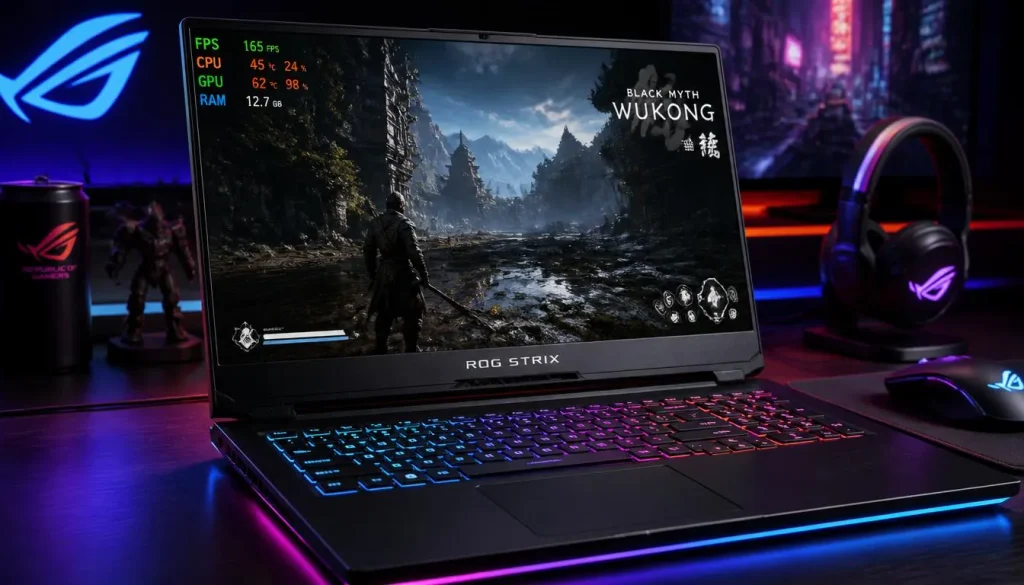
A good current example is the ASUS ROG Strix G16, which pairs an Intel Core i7-14650HX processor with an NVIDIA GeForce RTX 5060 Laptop GPU, 16GB of DDR5 memory, a 1TB SSD, and a 165Hz display.
What Is a Regular Laptop?
A regular laptop, sometimes called a normal laptop or general-purpose laptop, is built primarily for everyday computing rather than gaming.
That can include:
- Web browsing
- Microsoft Office
- Google Workspace
- Video streaming
- Remote work
- Coding
- School assignments
- Video calls
- Light photo and video editing
Many regular laptops rely on integrated graphics, although that is not a rule. Some productivity and creator laptops also include dedicated GPUs.
Regular laptops often focus more heavily on battery efficiency, weight, compact design, webcam quality, quiet operation, and portability.
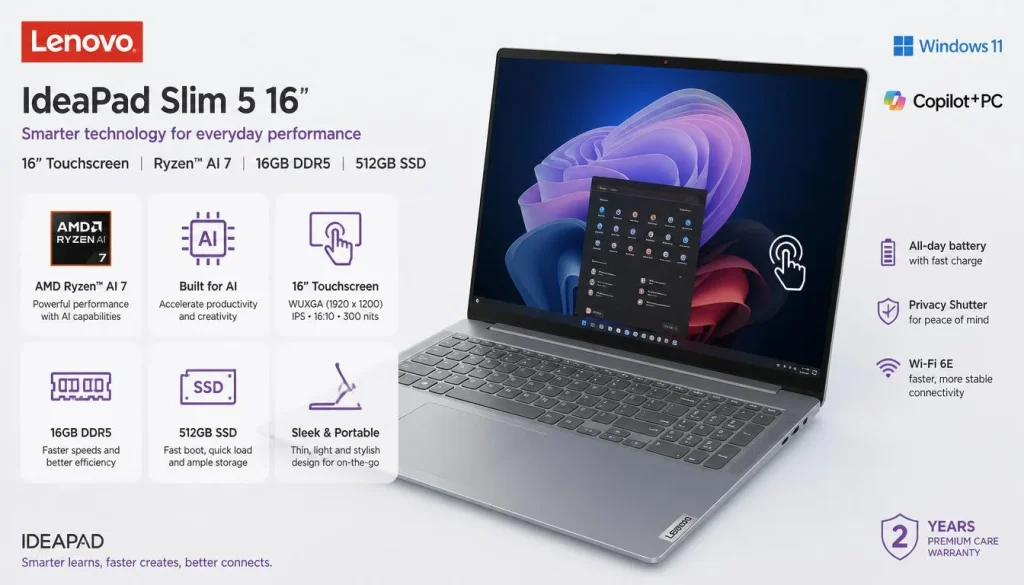
For example, the Lenovo IdeaPad Slim 5 combines an AMD Ryzen AI 7 350 processor with Radeon 860M integrated graphics, 16GB of DDR5 memory, 512GB of storage, and a 16-inch WUXGA touchscreen.
Gaming Laptop vs Regular Laptop: Key Differences
1. Gaming Performance
This is where the biggest difference appears.
A gaming laptop with a capable dedicated GPU can run modern games at much higher frame rates and graphics settings than the average regular laptop.
A regular laptop with integrated graphics can still handle many lighter games. Esports titles, indie games, older games, and less demanding releases may work surprisingly well on modern integrated graphics.
The problem appears when you move to demanding AAA titles, high-resolution gaming, ray tracing, or high graphics settings.
That is when a gaming GPU becomes much more important.
Winner for serious gaming: Gaming laptop
2. Graphics Performance
The GPU is usually the most important hardware difference in a gaming laptop vs normal laptop comparison.
Integrated graphics share system resources and are designed around efficiency. Dedicated graphics have their own processing hardware and, in most cases, dedicated video memory.
A stronger dedicated GPU helps with more than games. It may also accelerate:
- Blender
- 3D rendering
- CAD
- Game development
- DaVinci Resolve
- Adobe Premiere Pro
- GPU-based AI workloads
- Certain engineering applications
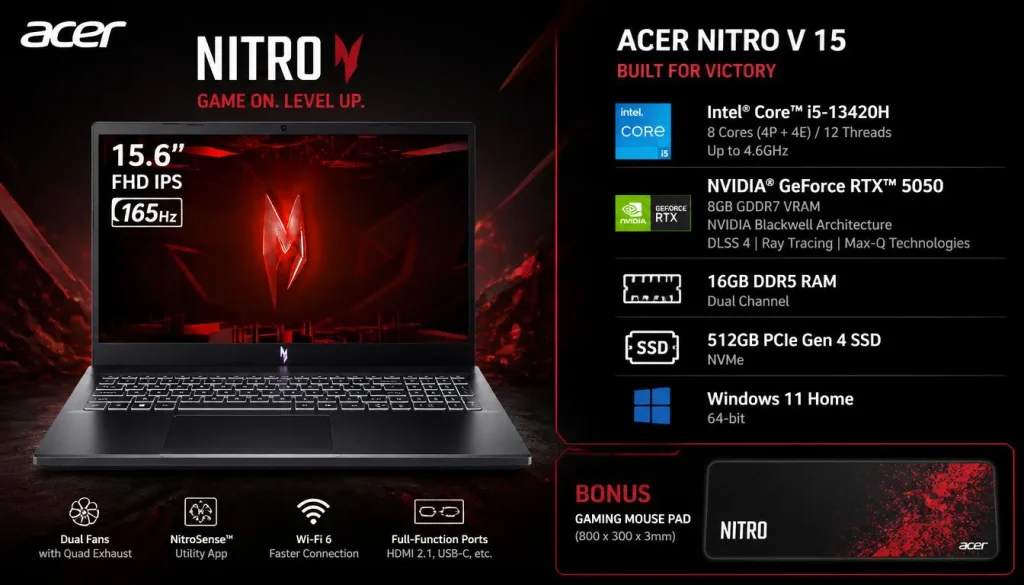
For example, the Acer Nitro V 15 includes an NVIDIA GeForce RTX 5050 Laptop GPU with 8GB of GDDR7 memory, making it much more suitable for GPU-heavy work than a typical productivity laptop with integrated graphics.
Winner for GPU-intensive tasks: Gaming laptop
3. CPU and Everyday Performance
A common mistake is assuming that a gaming laptop will feel dramatically faster during every task.
That is not necessarily true.
Browsing Chrome, writing documents, watching YouTube, attending Zoom meetings, and working in spreadsheets do not usually require a gaming-class GPU.
A well-configured regular laptop with a modern processor, enough RAM, and an SSD can feel just as responsive during ordinary work.
Gaming laptops become more useful when workloads stay demanding for longer periods or require both CPU and GPU performance.
For everyday computing, therefore, there is no automatic winner.
Winner: Depends on the laptop and workload
4. Sustained Performance and Thermal Throttling
Laptop performance is not only about the name printed beside the CPU or GPU.
Cooling matters.
A processor may deliver strong performance for a short burst and then reduce its clock speed when temperatures or power limits become restrictive. This is commonly known as thermal or power throttling.
Gaming laptops usually have larger fans, more heat pipes, bigger vents, and more aggressive cooling profiles because they are expected to run demanding workloads for long periods.
This can make them better suited to:
- Long gaming sessions
- Rendering
- Compiling large projects
- Video exports
- Simulations
- Sustained CPU/GPU workloads
However, cooling quality still varies greatly between models. A gaming label alone does not guarantee excellent thermals.
5. Display Quality and Refresh Rate
Gaming laptops often feature faster displays.
A 144Hz or 165Hz screen can display motion more smoothly than a traditional 60Hz panel, provided the computer can produce enough frames per second.
This matters most in fast games such as:
- Counter-Strike
- Valorant
- Fortnite
- Apex Legends
- Call of Duty
- Racing games
But refresh rate is only one part of screen quality.
Regular premium laptops may offer:
- Higher resolution
- Better color accuracy
- Higher brightness
- OLED panels
- Better HDR performance
- Better efficiency
A gaming display is therefore not automatically a better display.
For competitive gaming, refresh rate and response time matter more. For photography or design, color accuracy may matter more.
6. Cooling, Heat, and Fan Noise
More performance produces more heat.
That is why gaming laptops generally have more substantial cooling systems than regular laptops.
The trade-off is noise.
During gaming or rendering, gaming laptop fans can become clearly audible. A regular productivity laptop doing light office work may remain nearly silent.
If you work in libraries, classrooms, meetings, or other quiet environments, fan behavior deserves consideration.
Gaming laptops can also feel warmer around the keyboard or exhaust areas during demanding workloads.
7. Battery Life
For most buyers, battery life is one of the strongest arguments for choosing a regular laptop.
Gaming laptops contain powerful components that can consume significantly more energy under load. Dedicated GPUs, high-performance processors, high-refresh displays, and aggressive performance modes all affect battery runtime.
Modern gaming laptops can disable or reduce use of the dedicated GPU during light work, which improves efficiency. Even so, regular thin-and-light laptops are generally designed more aggressively around battery life.
The Apple MacBook Air M5 is a good example of the opposite design philosophy. It focuses on portability and efficiency rather than dedicated gaming hardware.
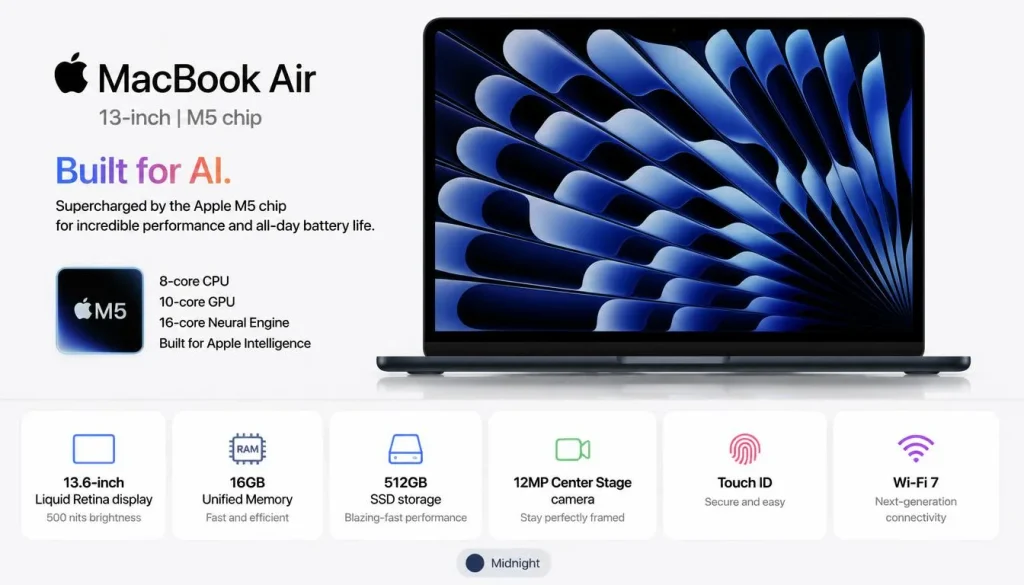
One important point: gaming while unplugged is usually not ideal. Many gaming laptops reduce performance on battery, and demanding games can drain a battery quickly.
Winner for battery life: Usually a regular laptop
8. Portability, Weight, and Charger Size
If you carry your laptop every day, specifications on a product page do not tell the whole story.
You also need to carry the charger.
Gaming laptops often use larger cooling systems and higher-wattage power adapters. The combined weight can become noticeable during daily commutes.
Regular laptops are generally easier to use for:
- University
- Business travel
- Coffee shops
- Flights
- Train journeys
- Moving between meetings
A thin 13- or 14-inch productivity laptop is usually much easier to carry than a performance-focused 16-inch gaming machine.
Winner for mobility: Regular laptop
9. Keyboard, Webcam, Ports, and Connectivity
Gaming laptops often provide a useful selection of ports because gamers connect monitors, keyboards, mice, headsets, and Ethernet cables.
You may find:
- HDMI
- USB-A
- USB-C
- Ethernet
- Audio jack
- Display output
- USB4 or Thunderbolt on certain models
However, this varies considerably.
A business or premium productivity laptop may offer excellent connectivity as well.
Regular laptops can also have an advantage in areas such as:
- Webcam quality
- Microphone quality
- Fingerprint readers
- Privacy shutters
- Video conferencing features
Check the individual laptop instead of assuming one category always has better ports.
10. RAM, Storage, Upgradeability, and Future-Proofing
Gaming laptops are sometimes easier to upgrade, but this is not guaranteed.
Depending on the model, you may be able to replace or expand:
- RAM
- SSD storage
- Wi-Fi card
Some models also provide a second M.2 SSD slot.
Regular thin-and-light laptops are more likely to use soldered memory in certain designs, although many still offer upgradeable storage or RAM.
The important point is this:
Do not buy a gaming laptop simply because you assume it is upgradeable. Verify the exact model first.
Laptop CPUs and GPUs are generally not practical upgrades later. If future gaming performance matters, choose enough GPU performance at the time of purchase.
11. Build Quality and Durability
Gaming laptops are not automatically more durable than regular laptops.
There are inexpensive gaming laptops with mostly plastic chassis, and there are premium productivity laptops built from aluminum or other high-quality materials.
Durability depends more on the individual product than the category.
Look at:
- Chassis flex
- Hinge strength
- Keyboard quality
- Port construction
- Cooling maintenance
- Warranty
- Availability of replacement parts
A business-class regular laptop can easily have better physical durability than an entry-level gaming system.
12. Price and Value for Money
Gaming laptops usually dedicate more of their hardware budget to GPU performance, cooling, and power delivery.
Regular laptops may spend more of their design budget on:
- Thinness
- Battery efficiency
- Display quality
- Premium materials
- Webcam quality
- Touchscreens
- Convertible designs
This means a gaming laptop is not automatically more expensive.
Premium productivity laptops can cost more than midrange gaming laptops.
The better question is:
Which features are you actually paying for?
If you never use the dedicated GPU, the gaming laptop may offer poor value for your needs.
If you play demanding games every week, however, spending extra on graphics performance may make much more sense than buying a thin laptop that cannot run them well.
Do Gaming Laptops Use More Electricity Than Regular Laptops?
Usually, yes—especially during gaming and other demanding workloads.
A gaming laptop may contain a high-power CPU and dedicated GPU running at the same time. It may also require a much larger charger.
During simple web browsing, the difference can become smaller because modern gaming systems can reduce CPU power and switch away from the dedicated GPU.
But under full load, a gaming laptop will normally consume considerably more power than a thin productivity laptop.
For most home users, electricity cost alone should not determine the purchase. Battery life, heat, charger size, and noise are usually more noticeable differences.
Gaming Laptop vs Regular Laptop for Gaming
Casual Gaming
If you play lighter games occasionally, a regular laptop with modern integrated graphics may be enough.
Examples include many:
- Indie games
- Older PC games
- 2D titles
- Less demanding esports games
- Browser games
You may need to lower resolution or graphics settings.
Competitive Gaming
A gaming laptop becomes much more useful for competitive titles because a dedicated GPU can produce higher frame rates.
Pairing that performance with a 144Hz or 165Hz display also provides smoother motion.
AAA Gaming
For modern, graphically demanding AAA games, a gaming laptop is the safer choice.
A model such as the ASUS ROG Strix G16 or Acer Nitro V 15 is designed around a dedicated NVIDIA GPU and sustained gaming workloads.
Cloud Gaming
Cloud gaming changes the equation.
If your games run on a remote server, your laptop mainly needs:
- A good internet connection
- A decent display
- Reliable Wi-Fi or Ethernet
- Support for your cloud gaming service
In that situation, a regular laptop may be completely sufficient.
Gaming Laptop vs Regular Laptop for Work
For basic professional work, a gaming laptop is usually unnecessary.
Email, Word, Excel, Slack, Teams, browser-based apps, and video meetings run perfectly well on a modern regular laptop.
A gaming laptop becomes more attractive if your work involves:
- 3D graphics
- Video production
- CAD
- GPU computing
- Game development
- Complex visual effects
There is also a practical issue to consider. A thick RGB-heavy gaming machine may not be ideal for every professional environment, although many gaming laptops now have much more understated designs.
For normal office and remote work, a regular laptop is usually the more convenient choice.
Gaming Laptop vs Regular Laptop for Students
The right choice depends heavily on the course.
A typical student studying business, law, English, marketing, accounting, or social sciences usually does not need a gaming laptop for coursework.
A regular laptop offers several advantages on campus:
- Lighter weight
- Better battery life
- Smaller charger
- Easier use in lectures
- Less fan noise
The Apple MacBook Air M5 and Lenovo IdeaPad Slim 5 represent the type of portability-focused systems that can make sense for everyday student use.
When Should a Student Choose a Gaming Laptop?
Consider one if you:
- Play demanding games
- Study architecture
- Need 3D rendering
- Work with GPU-heavy engineering software
- Study game development
- Edit video frequently
Otherwise, portability may be more valuable than unused GPU power.
Gaming Laptop vs Regular Laptop for Programming
Most programmers do not need a gaming laptop.
Web development, Python, Java, JavaScript, C++, database work, and most university coding can run comfortably on a good regular laptop.
Prioritize:
- A capable modern CPU
- At least enough RAM for your workflow
- Fast SSD storage
- Comfortable keyboard
- Good display
- Battery life
A gaming laptop becomes more useful for developers working with:
- Game engines
- GPU computing
- Local AI models
- Machine learning
- 3D applications
- Heavy virtualized environments
For a typical web developer or software student, a regular laptop is usually the more practical buy.
Gaming Laptop vs Regular Laptop for Engineering Students
Engineering is one area where the answer becomes more complicated.
Some engineering courses mainly require coding, spreadsheets, MATLAB, reports, and light CAD work. A strong regular laptop can handle these tasks.
Others involve:
- SolidWorks
- Revit
- 3D CAD
- Simulation
- Rendering
- Architecture software
- GPU-accelerated applications
A gaming laptop can provide significantly more graphics performance for those workloads.
Before buying, check the recommended hardware requirements for the exact software used by your university. That is more reliable than assuming every engineering student needs a gaming machine.
Gaming Laptop vs Regular Laptop for Video Editing
For casual editing of short videos, a regular laptop can be enough.
For heavier editing, a gaming laptop can offer a major advantage because modern editing applications can use GPU acceleration for effects, playback, rendering, and exports.
A dedicated GPU becomes especially useful when working with:
- 4K footage
- Multiple video layers
- Effects
- Color grading
- Motion graphics
- High-resolution timelines
However, do not focus only on GPU performance.
Video editors should also consider:
- Display color accuracy
- RAM
- Storage capacity
- SSD speed
- Media engine support
- Port selection
A premium creator-focused regular laptop may sometimes be a better editing machine than an inexpensive gaming laptop with a poor display.
Gaming Laptop vs Regular Laptop for Travel
For frequent travelers, a regular laptop usually wins.
The biggest reasons are simple:
- Less weight
- Better battery life
- Smaller charger
- Easier use in tight spaces
- Less heat
- Less fan noise
A gaming laptop makes sense for travel when gaming or high-performance work is important enough to justify carrying the additional hardware.
If your laptop spends most of its life inside a backpack, portability should carry a lot of weight in your decision.
Is a Gaming Laptop Worth It If You Don’t Game?
For most people, no.
If you never play demanding games and your work consists mainly of browsing, documents, spreadsheets, streaming, video meetings, and light coding, a regular laptop is generally the better fit.
However, gaming laptops are useful for more than gaming.
Buying one can still make sense if you regularly use:
- Blender
- CAD
- 3D rendering
- Game engines
- AI workloads
- GPU-accelerated video editing
- Engineering applications
In other words, you do not need to be a gamer to benefit from gaming-class hardware.
You do need a workload that can actually use it.
Can You Use a Gaming Laptop as a Regular Laptop?
Absolutely.
A gaming laptop can do the same everyday tasks as a normal Windows laptop.
You can use one for:
- Office work
- School
- Programming
- Streaming
- Online meetings
- Browsing
- Photo editing
The disadvantages are practical rather than functional.
You may be carrying a heavier computer, using a larger charger, hearing more fan noise, and getting less battery life than necessary.
Can a Regular Laptop Be Used for Gaming?
Yes, but the answer depends on the game and the laptop.
Modern integrated graphics are much more capable than older integrated GPUs. A regular laptop may handle less demanding games at reasonable settings.
However, that does not make it equivalent to a gaming laptop with an RTX-class dedicated GPU.
If you mainly play indie games, older games, or use cloud gaming, a regular laptop may be enough.
If you want high frame rates in demanding modern releases, choose a gaming laptop.
Do You Actually Need a Gaming Laptop or Just a Dedicated GPU?
This is an important distinction.
A dedicated GPU does not automatically turn a computer into a gaming laptop.
Creator laptops, mobile workstations, and some premium productivity machines also include dedicated graphics.
If you need GPU acceleration for professional work but rarely game, a creator or workstation laptop may offer:
- Better display accuracy
- More professional styling
- Better port selection for your workflow
- Different driver support
- Better portability
Do not shop based on the word “gaming” alone.
Shop for the hardware your software actually needs.
Gaming Laptop vs Regular Laptop at the Same Price
Suppose you compare a gaming laptop and a regular laptop at roughly the same budget.
The gaming model may put more of that money into:
- Dedicated GPU
- Cooling
- High-refresh display
- Higher sustained performance
The regular laptop may put more of its budget into:
- Thin chassis
- Battery life
- Premium materials
- Better webcam
- Touchscreen
- Higher-resolution display
- Lower weight
Neither approach is automatically better.
A gamer gets more value from the first design. A frequent traveler may get far more value from the second.
Do Gaming Laptops Last Longer Than Regular Laptops?
There is no universal winner.
A gaming laptop may remain powerful enough for demanding software for longer because it started with stronger hardware.
At the same time, gaming systems can spend more time operating at high temperatures and power levels.
A laptop’s useful lifespan depends on factors such as:
- Component quality
- Cooling design
- Battery health
- Dust buildup
- Usage habits
- Build quality
- Software requirements
- Availability of repairs
- RAM and storage upgrade options
A well-maintained regular laptop can outlast a poorly designed gaming laptop, and the reverse can also be true.
Maintenance and Repair Costs
Gaming laptops can require a little more attention because their cooling systems deal with more heat.
Over time, owners may need to consider:
- Fan cleaning
- Vent cleaning
- Battery replacement
- SSD upgrades
- RAM upgrades
- Charger replacement
Repairability varies by model.
Some gaming laptops provide easy access to RAM and storage. Others are less convenient. Some thin regular laptops use soldered memory but may still allow SSD replacement.
Always check the service manual or teardown information for the exact laptop you are considering.
Software and Operating System Differences
The gaming laptop vs regular laptop decision can also involve operating systems.
Most gaming laptops run Windows because Windows provides the widest support for modern PC games and gaming hardware.
Regular laptops may use:
- Windows
- macOS
- ChromeOS
A Mac such as the Apple MacBook Air M5 can be excellent for general productivity, creative work, coding, and portability, but buyers should check compatibility with the specific games and professional software they intend to use.
Chromebooks can work well for browser-based productivity and light computing but are not substitutes for Windows gaming laptops when demanding native PC games or specialized Windows applications are required.
Choose your software first, then choose the hardware.
Advantages of a Gaming Laptop
A gaming laptop makes sense because it can provide:
- Strong gaming performance
- Dedicated GPU power
- Better performance in GPU-heavy applications
- High-refresh displays
- Stronger sustained performance
- More powerful cooling
- One computer for gaming and professional work
- Good external monitor support on many models
The biggest advantage is versatility for demanding workloads.
Disadvantages of a Gaming Laptop
The trade-offs can include:
- Higher power consumption
- More fan noise
- More heat
- Heavier chassis
- Larger charger
- Shorter battery life in many cases
- Higher cost when you do not need the GPU
These disadvantages matter much more for someone who carries a laptop all day than for someone who keeps it on a desk.
Advantages of a Regular Laptop
A regular laptop may provide:
- Better portability
- Longer battery life
- Quieter operation
- Smaller chargers
- Better travel convenience
- Plenty of performance for everyday work
- Wide range of designs and prices
For the average non-gamer, these benefits are often more useful than having a dedicated gaming GPU.
Disadvantages of a Regular Laptop
Possible limitations include:
- Weaker gaming performance
- Limited GPU performance
- Lower sustained performance in some thin designs
- Fewer upgrade options on certain models
- Limited suitability for heavy 3D workloads
Again, these are general tendencies. High-end productivity and workstation laptops can be extremely powerful.
Who Should Buy a Gaming Laptop?
Choose a gaming laptop if you:
- Regularly play demanding PC games
- Want high frame rates
- Need a dedicated GPU
- Edit demanding video projects
- Work with 3D graphics
- Use CAD or rendering software
- Work with GPU-based AI applications
- Want one system for both gaming and heavy work
- Do not mind extra weight and fan noise
The Acer Nitro V 15 represents a more accessible gaming configuration, while the ASUS ROG Strix G16 represents a more performance-focused option.
Who Should Buy a Regular Laptop?
Choose a regular laptop if you:
- Mainly browse the web
- Use Office or Google Workspace
- Attend school or university
- Work remotely
- Travel regularly
- Want long battery life
- Prefer a lighter laptop
- Do not play demanding PC games
- Do not regularly use GPU-intensive software
The Lenovo IdeaPad Slim 5 is an example of a Windows productivity-focused laptop, while the Apple MacBook Air M5 represents a highly portable macOS alternative.
Gaming Laptop or Regular Laptop? 7 Questions to Ask Before Buying
Before spending your money, answer these seven questions.
1. What games will I actually play?
Check the system requirements of the games you care about rather than buying more GPU power simply because it sounds safer.
2. Do I need a dedicated GPU?
If your work involves rendering, 3D design, demanding games, or GPU compute, probably.
For basic productivity, probably not.
3. Will I carry the laptop every day?
If yes, weight and charger size deserve serious consideration.
4. How important is battery life?
If you regularly work away from an outlet, a regular laptop may be much more convenient.
5. Do my applications benefit from GPU acceleration?
Check the recommended requirements for your editing, engineering, AI, or design software.
6. Can I upgrade the RAM and storage?
Do not assume. Check the exact model.
7. Am I paying for performance I will actually use?
This is the most important question.
A powerful laptop is only good value when its power solves a real problem for you.
Gaming Laptop vs Regular Laptop: Which Offers Better Value?
For gamers, a gaming laptop usually offers better value because the dedicated GPU directly improves the experience they care about.
For non-gamers, a regular laptop often provides better value because money can be spent on features they use every day, such as portability, display quality, battery life, or build quality.
Think of value as useful performance, not maximum performance.
A laptop that is 30% faster in a workload you never run is not necessarily better value.
Frequently Asked Questions
Is a gaming laptop better than a regular laptop?
A gaming laptop is better for demanding games and many GPU-heavy workloads. A regular laptop is usually better for people who prioritize portability, battery life, and everyday productivity. Neither category is universally better.
Is a gaming laptop good for everyday use?
Yes. Gaming laptops handle browsing, office applications, streaming, video calls, and other everyday tasks easily. The main disadvantages are usually weight, battery life, fan noise, and charger size.
Can a gaming laptop do everything a normal laptop can?
In most everyday computing situations, yes. A gaming laptop can perform the same productivity tasks as a regular laptop while also providing stronger gaming and graphics performance.
Is a gaming laptop faster than a regular laptop?
It depends on the two laptops being compared. Gaming laptops often have stronger GPUs and high-performance CPUs, but a premium regular laptop can be extremely fast during everyday tasks.
Is a gaming laptop worth it if I don’t game?
Usually not if you only perform basic productivity tasks. It can still be worthwhile if you use 3D rendering, CAD, video editing, AI, game development, or another GPU-intensive workload.
Can a normal laptop run games?
Yes. Many regular laptops can run lighter games, indie titles, older games, esports titles at reduced settings, and cloud gaming services. Demanding AAA games generally benefit much more from a dedicated gaming GPU.
Do gaming laptops have worse battery life?
Gaming laptops usually have shorter battery life than efficiency-focused regular laptops because of their more powerful hardware, although battery performance varies significantly between individual models and settings.
Does a gaming laptop consume more electricity?
Usually under heavy workloads. A dedicated GPU and high-performance CPU can draw much more power while gaming or rendering than an efficiency-focused productivity laptop.
Are gaming laptops good for college students?
They can be excellent for students who game or need GPU-heavy engineering, architecture, 3D, or creative software. Students who mainly write documents, browse, code, and attend classes may prefer a lighter regular laptop.
Should I buy a gaming laptop for programming?
Most programmers do not need one. A gaming laptop becomes more useful for game development, GPU programming, AI, machine learning, 3D work, and other demanding workloads.
Do engineering students need gaming laptops?
Not always. The answer depends on the software used in the course. Students using demanding CAD, rendering, or simulation tools may benefit from a dedicated GPU, while lighter engineering workloads can run well on regular laptops.
Are gaming laptops good for office work?
Yes, but they can be unnecessary. A regular laptop usually offers enough performance for office work while being lighter, quieter, and more battery-efficient.
Can a gaming laptop last five years?
It can, but there is no guaranteed lifespan. Cooling, build quality, battery health, maintenance, workload, and changing software requirements all influence how long a laptop remains useful.
Are gaming laptops harder to maintain?
Not necessarily, although their cooling systems may collect dust and require cleaning. Repairability and upgradeability depend more on the individual model than on whether it is marketed for gaming.
Why are gaming laptops heavier than regular laptops?
Gaming laptops often need larger cooling systems, more powerful hardware, stronger power delivery, and larger batteries or chassis. These additions can increase both weight and thickness.
What is the biggest disadvantage of a gaming laptop?
For many users, it is the combination of extra weight, higher power consumption, fan noise, and shorter battery life. If you do not need the dedicated GPU, those trade-offs can be difficult to justify.
Final Verdict: Gaming Laptop vs Regular Laptop
The gaming laptop vs regular laptop debate becomes much easier once you stop asking which category is more powerful and start asking which one fits your life.
Buy a gaming laptop if gaming, GPU performance, rendering, video production, CAD, or other demanding workloads are important to you. The extra cooling, power, and graphics performance can be genuinely useful.
Buy a regular laptop if your priorities are studying, office work, browsing, programming, remote work, battery life, and portability. You will usually get a lighter and more convenient computer without paying for graphics performance you rarely use.
For most people who do not game or run GPU-heavy applications, a regular laptop is the smarter purchase.
For people who want demanding games and serious performance from the same portable computer, a gaming laptop is worth the trade-offs.
The right laptop is not the one with the biggest specifications. It is the one whose strengths match what you actually do.
8 thoughts on “Gaming Laptop vs Regular Laptop: Which One Should You Buy in 2026?”
Comments are closed.