What gaming laptop specs cannot be upgraded is the question that saves money before checkout. Many parts are soldered or built into the motherboard. You need to check your exact model, not the brand name alone.
Manufacturer specifications and service manuals show the real limits. As of 2026, many gaming laptops still ship with fixed CPU and GPU packages, while RAM and storage designs vary by model. We will walk through a simple decision path so you know what to verify before buying or opening the chassis.
what gaming laptop specs cannot be upgraded
What gaming laptop specs cannot be upgraded depends on model design. Usually CPU, GPU, display, keyboard, and cooling hardware are fixed. RAM and storage may be soldered or socketed.
Check the service manual before buying parts.
Why Gaming Laptop Specs Get Locked In
Gaming laptops are built for heat, space, and weight limits. That pushes makers to solder key parts. A soldered part is fixed to the board with metal, so it is not meant to be removed by users.
The CPU and GPU often use BGA packaging. That means the chip is attached directly to the motherboard. Replacing it needs special equipment and usually costs more than the laptop.
Some memory is also soldered. This saves space and helps thin designs. You can read more about the main laptop parts to see where these components sit inside the chassis.
Cooling is another fixed system. Heat pipes, fans, and vapor chambers are shaped for one chassis. Swapping them is rarely practical.
Specs You Usually Cannot Upgrade
Some specs are almost always fixed on gaming laptops. Treat them as buying decisions, not future upgrades.
CPU and GPU Packages
The CPU and GPU are usually soldered to the motherboard. They are not socketed like many desktop parts. That is why gaming laptop anatomy matters before purchase.
- CPU package is fixed.
- GPU package is fixed.
- Power limits are set by firmware and cooling.
- BIOS updates may help stability, but they do not add a new chip.
If you want a stronger processor or graphics card later, you usually need a new laptop. External GPU setups exist, but they add cost and bulk.
Display, Keyboard, and Cooling Hardware
The display panel is fixed to the lid. Replacing it can be done by a technician, but it is not a simple upgrade. You also risk cable or hinge damage.
The keyboard is usually riveted or glued to the top case. Swapping it is labor heavy. Cooling hardware is shaped for the chassis and rarely has drop-in replacements.
- Display resolution is fixed.
- Refresh rate is fixed.
- Keyboard layout is fixed.
- Fan and heat pipe layout is fixed.
Choosing the best screen size early matters because you cannot easily change it later.
Specs That May Still Be Upgradeable
Some parts are still user serviceable. The catch is that you must confirm slot access before buying parts.
RAM may be socketed SODIMM modules. Storage may use an M.2 NVMe SSD slot. Battery packs can sometimes be replaced, but access varies by model.
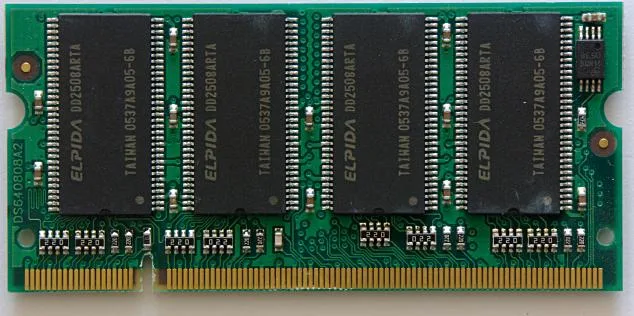
Image source: Wikimedia Commons / Mark Tranchant, Talk, contrib
- Socketed RAM can often be upgraded.
- Open M.2 slots can often add storage.
- Battery replacement may need a technician.
- Thermal paste can be refreshed with care.
If you are unsure about storage size, review how much SSD storage a gaming laptop needs before ordering a drive. For memory, check how much RAM is enough for a gaming laptop before buying modules.
How to Check Your Exact Model Before Buying
Do not guess from the brand. Two laptops with the same name can have different boards. Use the exact model number and service manual.
- Find the model number on the bottom label or in system settings.
- Download the official service manual from the maker.
- Look for memory slots, storage slots, and battery access.
- Check maximum supported RAM and SSD capacity.
- Confirm warranty terms for opening the chassis.
- Match part numbers before ordering anything.
This small check prevents wasted parts and compatibility mistakes. It also helps you decide whether to buy more RAM or storage at checkout.
Decision Tree: What You Can Change by Design
Use this simple if and then path. It keeps the decision clear and avoids bad assumptions.
Soldered Memory and Fixed Storage Paths
If the manual shows soldered RAM, you cannot add memory later. Buy enough at checkout. If storage is fixed or has no extra slot, buy enough capacity upfront.
- Soldered RAM means no future memory upgrade.
- No second M.2 slot means no easy storage expansion.
- Proprietary storage formats limit replacement choices.
- Firmware locks can block unsupported parts.
Socketed Memory and Open M.2 Paths
If the manual shows SODIMM slots, you can upgrade memory within the supported limit. If it shows an open M.2 slot, you can add an SSD.
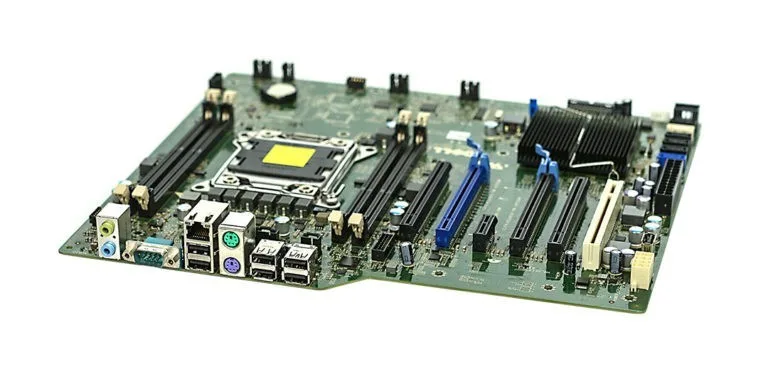
Image source: Wikimedia Commons / Marcin Wieclaw (pcsite.co.uk) (CC BY-SA)
- Socketed RAM allows capacity upgrades.
- Open M.2 slots allow storage expansion.
- Dual channel memory may improve performance.
- BIOS updates may improve compatibility.
For deeper context, read whether CPU or GPU matters more before choosing a fixed configuration. You can also compare good gaming laptop specs when deciding between two models.
External reference: Intel publishes official processor specifications at https://www.intel.com. UL covers battery safety standards at https://www.ul.com.
Buying Scenarios and Upgrade Paths
Different buyers face different upgrade limits. The right path depends on what you can change later.
If you plan to keep the laptop for three years, buy enough RAM and storage now. If you plan to upgrade later, confirm socketed SODIMM slots and open M.2 slots first.
Students often need portability. They should prioritize fixed specs like screen size and weight. Gamers need GPU power first.
Creators need RAM and storage headroom.
A good buying guide helps you weigh these tradeoffs before checkout. Our research shows that buyers who check upgrade paths before purchase report fewer regrets.
Compare models side by side. One may have soldered RAM. Another may offer two SODIMM slots.
That difference matters more than small price gaps.
If your budget is tight, prioritize fixed specs. You cannot upgrade the CPU or GPU later. You can sometimes add RAM or storage.
If you travel often, battery access matters. Some models require technician service. Others allow user replacement with basic tools.
For a deeper spec breakdown, see our guide on what makes a good gaming laptop. It covers the fixed and flexible parts together.
Mistakes That Waste Money on Gaming Laptops
Many buyers waste money on wrong assumptions. The biggest mistake is assuming everything is upgradeable.
Buying extra RAM that does not fit is common. Soldered memory looks like a slot in photos. Always check the service manual first.
Another mistake is buying too little storage. If there is no second M.2 slot, you cannot expand later. You may need to replace the drive entirely.
Some buyers open the chassis without checking warranty terms. That can void coverage. Always read the policy before removing screws.
Thermal paste mistakes are also costly. Using the wrong compound can damage components. Follow manufacturer guidance or use a trusted technician.
Another error is ignoring firmware limits. Some laptops block unsupported memory speeds. The part may fit but not run at full speed.
Check how much RAM a gaming laptop needs before ordering modules. Also review how much SSD storage a gaming laptop needs to avoid buying the wrong capacity.
Warranty, Battery, and Safety Limits
Warranty terms affect upgrade decisions. Opening the chassis can void coverage on some models. Others allow user upgrades without penalty.
Read the warranty document before disassembly. Look for clauses about user serviceable parts. Some brands only cover sealed configurations.
Battery safety is critical. Lithium-ion packs can swell or catch fire if punctured. Always disconnect the battery before internal work.
ESD protection matters too. Static discharge can damage soldered components. Use an antistatic strap or work on a grounded mat.
Disposal rules vary by region. Many areas require recycling for lithium-ion batteries. Check local e-waste regulations before throwing anything away.
UL standards cover battery safety for consumer electronics. Manufacturer documentation should reference these standards. Follow all handling warnings in the service manual.
If you are unsure, seek a qualified technician. DIY repairs on sealed batteries carry real risk. Safety comes before savings.
Frequently Asked Questions
Can you upgrade the CPU in a gaming laptop?
Usually no. Most gaming laptop CPUs are soldered to the motherboard using BGA packaging. Replacing them requires specialized equipment and often costs more than the laptop itself.
Some older models had socketed CPUs, but that is rare today.
Can you upgrade the GPU in a gaming laptop?
Generally no. The GPU is soldered to the motherboard in most gaming laptops. External GPU docks exist but add cost and reduce portability.
Buy the graphics performance you need at checkout.
Is RAM always upgradeable in gaming laptops?
No. Some models use soldered RAM that cannot be changed. Others offer SODIMM slots for user upgrades.
Check the service manual to confirm your specific model has socketed memory.
Can you add a second SSD to a gaming laptop?
Sometimes. Many gaming laptops include a second M.2 slot for storage expansion. Others have only one slot, which means replacing the existing drive.
Verify slot availability before buying a new SSD.
Does opening a gaming laptop void the warranty?
It depends on the brand and model. Some manufacturers allow user upgrades without voiding coverage. Others seal the chassis and void warranty if opened.
Read the warranty terms before removing any screws.
Can you replace a gaming laptop battery yourself?
Sometimes. Some models allow user battery replacement with basic tools. Others require technician service due to glued or sealed packs.
Always follow safety guidance for lithium-ion batteries and check local disposal rules.
1 thought on “What Gaming Laptop Specs Can’t Be Upgraded”
Comments are closed.