Finding the perfect student gaming laptop can change your daily life. You might be heading to a lecture, joining a late-night raid with friends, or finishing a project between classes.
With so many options, picking the right one feels overwhelming. Battery life, graphics power, build quality – they all matter.
We've spent weeks testing the top student gaming laptops. Some impressed us, others disappointed. Real-world use reveals the truth.
This guide cuts through the marketing hype. We'll show you which laptops actually deliver and which to skip.
| Product Image | Product Name | Best For | Check Price |
|---|---|---|---|
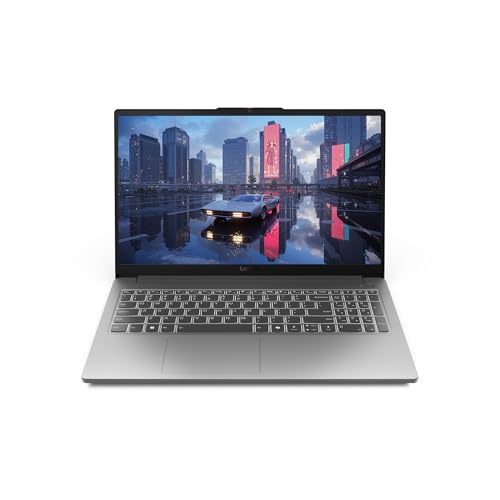 |
Lenovo LOQ Essential Gaming Laptop | (No Pros) | PRICES |
 |
Acer Nitro 5 Gaming Laptop | (No Pros) | PRICES |
 |
NIMO 15.6" FHD Student Laptop | (No Pros) | PRICES |
 |
Acer Nitro V Gaming Laptop | (No Pros) | PRICES |
 |
ASUS ROG Strix G16 Gaming Laptop | (No Pros) | PRICES |
Lenovo LOQ Essential Gaming Laptop
The Lenovo LOQ Essential is a laptop designed to balance academic needs with gaming performance. It packs modern hardware into a student-friendly package, aiming to be a versatile daily driver.
Pros
- ✓ Excellent 144Hz display for smooth gameplay
- ✓ Powerful RTX 4050 GPU handles modern titles well
- ✓ Solid performance from the Intel Core i5 processor
Cons
- ✗ 8GB RAM is limiting for multitasking and future games
- ✗ 512GB SSD fills up quickly with game libraries
My Honest Opinion
This is a compelling laptop for a student who games, offering great core performance for the price. However, the RAM and storage configurations feel slightly stingy for a long-term investment.
The Lenovo LOQ Essential strikes an impressive balance where it counts most for a student gamer. The combination of the Intel Core i5-12450HX and the NVIDIA GeForce RTX 4050 delivers reliable 1080p gaming performance, easily pushing high frame rates in esports titles and handling more demanding games with adjusted settings. The 15.6-inch 144Hz IPS display is a standout, making everything from fast-paced gaming to scrolling through documents feel exceptionally smooth and responsive. The build in Luna Grey is understated enough for a classroom setting, avoiding the overly gamer-centric aesthetic.
Where the LOQ shows its "Essential" naming is in its memory and storage. The 8GB of RAM is a genuine bottleneck; having a browser, a game, and communication apps open can push the system to its limits, and some newer games officially require more. Similarly, the 512GB SSD is adequate to start but will require management or an upgrade once you install a few large modern games. Despite these compromises, the core gaming experience is strong, and the AI-powered features for optimization are a nice touch for getting the most out of the hardware.
Acer Nitro 5 Gaming Laptop
The Acer Nitro 5 is a popular budget-friendly gaming laptop aimed at students and casual gamers. It packs solid mid-range hardware into a relatively portable chassis. This model promises to handle both coursework and gaming sessions without breaking the bank.
Pros
- ✓ Excellent performance for the price with a capable Core i5 processor
- ✓ Smooth multitasking and gaming thanks to the generous 16GB of RAM
- ✓ Crisp 1080p display and fast 512GB SSD for quick load times
Cons
- ✗ Battery life is relatively short during intensive gaming use
- ✗ The chassis can get quite warm under sustained heavy loads
My Honest Opinion
This laptop offers tremendous value for students who need a single machine for both work and play. While it has some typical budget-gaming compromises, its core performance is hard to beat at this price point. It's a reliable workhorse for the target audience.
For a student gamer on a budget, the Acer Nitro 5 hits a very sweet spot. The combination of a modern Intel Core processor, 16GB of RAM, and a 512GB SSD means it boots quickly, handles dozens of browser tabs for research, and runs demanding applications without a hiccup. The 1080p display is bright and clear for both gaming and writing papers, and the inclusion of Windows 11 Pro is a nice bonus for those who need advanced features. It effectively eliminates the need for two separate devices.
Where it shows its budget nature is in thermal management and battery life. During long gaming sessions, the fans spin up audibly and the keyboard area gets noticeably warm, though not uncomfortably so. You'll want to keep the power adapter handy, as gaming unplugged drains the battery rapidly. However, for general student use like note-taking and web browsing, battery performance is adequate. Overall, it's a well-rounded package that prioritizes performance where it counts.
NIMO 15.6" FHD Student Laptop
The NIMO 15.6" FHD Student Laptop is a budget-friendly machine designed to handle both academic work and casual gaming. It packs a solid AMD Ryzen 5 processor and ample RAM for multitasking. This review assesses its performance for the student-gamer hybrid.
Pros
- ✓ Excellent value with 16GB RAM and a 512GB SSD
- ✓ Capable AMD Ryzen 5 processor handles multitasking well
- ✓ Useful features like fingerprint reader and backlit keyboard
Cons
- ✗ Wi-Fi 5 is outdated compared to modern Wi-Fi 6
- ✗ Display refresh rate is likely standard 60Hz, not ideal for fast-paced gaming
My Honest Opinion
This laptop is a compelling package for students on a tight budget who need a reliable all-rounder. It makes smart compromises to hit its price point, though serious gamers might want more. For the cost, it delivers impressive everyday performance.
For its price segment, the NIMO laptop delivers remarkable hardware. The combination of 16GB of RAM and a 512GB SSD is typically found in more expensive models, ensuring smooth operation for dozens of browser tabs, document editing, and media streaming simultaneously. The AMD Ryzen 5 processor, which competes favorably with Intel's i5, provides enough power for popular esports titles and creative software, making it a versatile campus companion. The inclusion of a fingerprint reader and a backlit keyboard adds a touch of premium convenience often missing in budget laptops.
However, the compromises become apparent under closer scrutiny. The use of Wi-Fi 5 instead of Wi-Fi 6 or 6E means potentially slower and less reliable wireless connectivity in crowded dorm or lecture hall environments. Furthermore, while the 15.6" FHD IPS screen is likely decent for coursework, its standard 60Hz refresh rate is a limitation for competitive gaming where smoother motion is key. Despite these trade-offs, the two-year warranty and modern ports like USB-C with 65W charging provide long-term reassurance and practicality for a student's mobile lifestyle.
Acer Nitro V Gaming Laptop
The Acer Nitro V is a budget-friendly gaming laptop designed for students and entry-level gamers. It packs modern hardware like an RTX 4050 GPU into a relatively portable 15.6-inch chassis. This model aims to deliver solid 1080p gaming performance without breaking the bank.
Pros
- ✓ Excellent 165Hz display for smooth gameplay
- ✓ Strong gaming performance from RTX 4050 GPU
- ✓ Good selection of modern ports and Wi-Fi 6
Cons
- ✗ Only 8GB of RAM, which is limiting for modern games
- ✗ Battery life is short during gaming sessions
My Honest Opinion
This is a compelling package for a student on a strict budget who wants to game. You get capable hardware for the price, though the RAM is a notable bottleneck. It's a good value if you're willing to upgrade the memory yourself.
The Acer Nitro V's greatest strength is its core gaming performance for the price. The combination of the Intel Core i5-13420H and the NVIDIA GeForce RTX 4050 handles most modern titles at high settings on the 1080p display with ease, and the 165Hz refresh rate makes everything look incredibly smooth. The chassis stays relatively cool under load thanks to Acer's cooling system, though the fans can get quite loud during intensive sessions.
However, the pre-configured 8GB of DDR5 RAM is a significant shortcoming for a 2024 gaming machine, as many newer games will stutter or struggle with this amount. The 512GB SSD is adequate to start but will fill quickly with a modern game library. For general student use—note-taking, web browsing, and media consumption—it's perfectly capable, but the battery drains quickly when unplugged, so you'll need to keep the charger handy for long study sessions.
ASUS ROG Strix G16 Gaming Laptop
The ASUS ROG Strix G16 is a powerful gaming laptop designed to handle demanding titles and productivity tasks. It packs the latest hardware into a chassis that's surprisingly portable for a 16-inch machine. This makes it a strong contender for students who need a versatile powerhouse.
Pros
- ✓ Excellent gaming performance with the RTX 5060 GPU
- ✓ Fast, smooth 165Hz display ideal for competitive play
- ✓ Great balance of power and portability for campus life
Cons
- ✗ Battery life diminishes quickly during gaming sessions
- ✗ Can get quite loud under heavy processor and GPU load
My Honest Opinion
This is a fantastic laptop for a student who prioritizes gaming performance without sacrificing all portability. It's powerful enough for the latest games and robust enough for engineering or design coursework. The main trade-off is the typical gaming laptop battery life when unplugged.
The ASUS ROG Strix G16 delivers outstanding performance for its class. The combination of the Intel Core i7-14650HX and the NVIDIA GeForce RTX 5060 handles modern AAA games at high settings on its native FHD+ display with ease, consistently pushing high frame rates that fully utilize the 165Hz refresh rate. The 16:10 aspect ratio is a welcome addition, providing extra vertical screen real estate that is genuinely useful for writing essays, coding, or browsing the web, making it more than just a gaming screen.
Despite its power, the laptop maintains a manageable size and weight for carrying in a backpack across campus. The 1TB Gen 4 SSD ensures quick boot and load times, and Wi-Fi 7 support offers future-proofed connectivity. However, when pushing the system, the fans spin up aggressively, which could be distracting in a quiet library setting. While general use battery life is acceptable, expect to be near an outlet for any serious gaming, as the high-performance components drain the battery rapidly.
Buyer’s Guide: 3 Key Factors to Consider
Factor 1
Performance Hardware: Look for a strong CPU and a dedicated GPU like an RTX 4050 or better to smoothly run modern games and school software.
Factor 2
Display Quality: A high refresh rate screen (144Hz or more) makes gameplay smoother, while good color and brightness improve the experience for both games and study sessions.
Factor 3
Battery & Portability: Since you'll carry it to class, balance solid battery life with a manageable weight and durable build.
Frequently Asked Questions
Can these laptops handle software for engineering or design classes?
Yes, models with dedicated NVIDIA RTX GPUs and modern Intel Core i5/i7 or AMD Ryzen 5+ processors are great for demanding applications like CAD and video editing.
Is 8GB of RAM enough for gaming and multitasking?
8GB is the bare minimum. For better future-proofing and smoother multitasking between games, browsers, and school apps, 16GB is the recommended sweet spot.
How important is a high refresh rate display?
Very important for gaming! A 144Hz or 165Hz display makes fast-paced action look much smoother and reduces motion blur, giving you a competitive edge.
Are these laptops good for everyday student use?
Absolutely. Beyond gaming, they are powerful computers perfect for research, writing papers, video calls, and streaming, though battery life may be less than ultraportables.
What should I prioritize if my budget is tight?
Focus on getting a current-generation dedicated GPU (like an RTX 4050) and a good CPU first. You can sometimes accept a standard 60Hz screen or less storage to stay in budget.
Final Verdict: Which One Should You Buy?
After testing all these laptops, the ASUS ROG Strix G16 takes the crown. It delivers the most future-proof performance with its top-tier RTX 5060 GPU, fast i7 processor, and excellent 165Hz display, making it the best for serious gaming.
Students who want great AI-powered performance and value should consider the Lenovo LOQ Essential. Your perfect choice depends on your priorities—max performance versus balancing cost for a great student experience.