If you have ever plugged in your laptop, launched a demanding game, and wondered whether you are slowly ruining the battery, the short answer is reassuring: gaming while charging a laptop is generally safe, and for a gaming laptop, staying plugged in is usually the better way to play.
Modern laptops are designed to manage charging automatically. Once the battery reaches its charging target, the laptop does not simply keep forcing power into the battery indefinitely. More importantly, demanding games need much more power than everyday tasks such as browsing or watching videos. A wall adapter can usually provide that power more consistently than the battery alone.
That does not mean battery health should be ignored. Long periods at a very high charge level, excessive heat, an underpowered charger, blocked cooling vents, or a worn battery can all create problems over time.
The key is not to avoid gaming while charging. The key is to game while charging in the right way.
Quick Answer: Is It Safe to Play Games While Charging a Laptop?
Yes. In most cases, it is completely normal to play games while your laptop is charging.
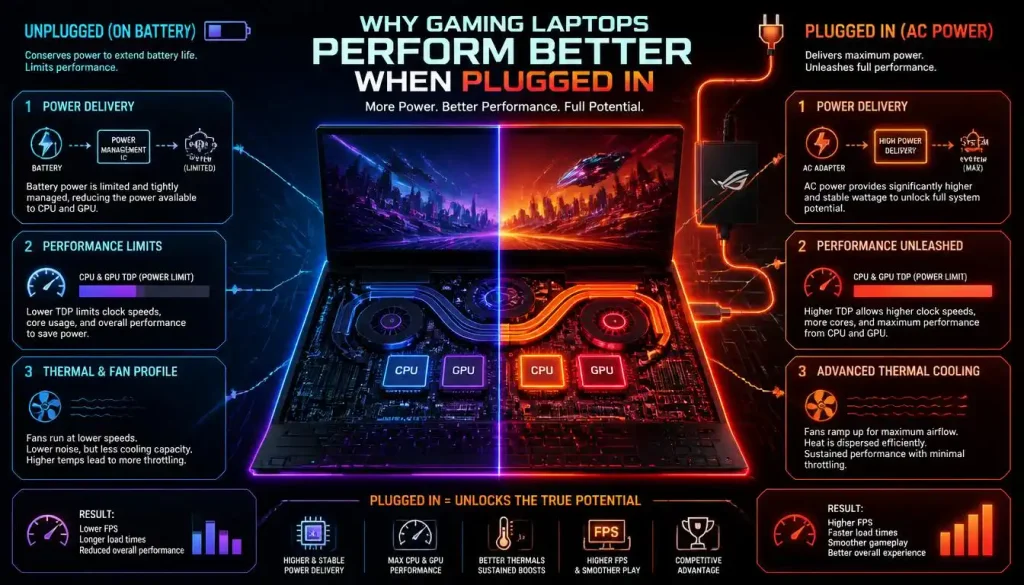
In fact, gaming laptops are generally designed to deliver their best CPU and GPU performance when connected to the correct AC adapter. When you unplug the charger, the laptop may reduce processor power, GPU power, display refresh behavior, or background activity to conserve battery life.
The bigger concerns are heat and long-term battery stress—not the simple fact that the charger is connected.
If your laptop is running at normal temperatures, you are using the correct charger, the battery is healthy, and the charging system is working properly, there is usually no reason to unplug the laptop while gaming.
Is It Better to Game Plugged In or on Battery?
For most gaming laptops, plugged-in gaming is better.
Here is a simple comparison:
| Factor | Plugged In | On Battery |
|---|---|---|
| Gaming performance | Usually highest | Often reduced |
| FPS stability | More consistent | May fluctuate |
| CPU/GPU power | Higher available power | Usually limited |
| Gaming time | Not limited by battery capacity | Usually short |
| Battery drain | Minimal or controlled | Very fast |
| Battery charge cycles | Generally fewer | More frequent |
| Portability | Lower | Higher |
| Best use case | Long gaming sessions | Short, light gaming |
A laptop battery is designed to make the computer portable. It is not necessarily designed to supply the full sustained power that a high-performance CPU and discrete GPU may demand during a long gaming session.
That is why you may notice a game running smoothly at 100 FPS while plugged in, then dropping noticeably as soon as you remove the charger.
Why Gaming Laptops Perform Better While Plugged In
Gaming workloads are demanding.
A modern game may simultaneously push the CPU, dedicated GPU, system memory, cooling fans, storage, display, RGB lighting, networking hardware, and other components. All of that requires power.
Why the CPU and GPU Need More Power
Processors do not consume the same amount of power all the time. During light browsing, your CPU may spend much of its time at low power. During gaming, however, both the processor and graphics chip can remain under sustained load.
When the charger is connected, the laptop can usually provide these components with a larger power budget.
On battery power, manufacturers often reduce those limits so the battery does not discharge extremely quickly.
Why FPS Can Drop After Unplugging the Charger
If your FPS falls immediately after unplugging your gaming laptop, it does not necessarily mean something is broken.
The laptop may switch to a more efficient power profile, reduce GPU wattage, lower CPU boost behavior, activate battery-saving features, or change display settings.
Windows itself allows different power modes for plugged-in and battery operation. Its Best Performance mode prioritizes performance but uses more power, while efficiency-focused modes reduce consumption.
Does Plugging In a Laptop Increase Gaming Performance?
It often does on gaming laptops, but not because charging magically makes the hardware faster.
The difference comes from power availability.
When connected to the correct adapter, the laptop can allow the CPU and GPU to operate closer to their intended performance limits. On battery, those limits may be reduced to extend runtime and manage battery discharge.
Does a Laptop Use the Battery While Plugged In and Gaming?
Usually, the charger becomes the primary source of power when a laptop is plugged in. However, the exact behavior depends on the laptop’s charging and power-management design.
What Happens When the Battery Reaches Its Charge Target?
A modern charging controller monitors the battery and manages when charging starts and stops.
If the battery reaches 100%, or whatever charging limit you have configured, the system normally stops continuously charging it. Charging may resume later when the battery percentage falls below a manufacturer-defined threshold.
This is why seeing a battery stay at 97%, 98%, or 99% while plugged in is not automatically a problem.
Can the Laptop Use Battery Power Even While Plugged In?
On some high-performance laptops, yes.
Certain systems can temporarily supplement adapter power with battery power during unusually heavy workloads. This can happen if the combined CPU and GPU demand exceeds what the adapter is supplying at that moment.
That behavior is model-dependent, so you should not assume every laptop operates the same way.
If your battery drops only a few percentage points during an extremely demanding gaming session and then stabilizes, it may be part of the laptop’s power-management design. If it keeps falling steadily, however, you should investigate the charger and power settings.
Does Gaming While Charging Damage the Battery or Reduce Its Lifespan?
Gaming while charging does not automatically damage a laptop battery.
Battery aging is influenced by several factors, including temperature, time spent at very high charge levels, discharge depth, charging cycles, battery chemistry, and the manufacturer’s charging strategy.
Can a Modern Laptop Battery Overcharge?
Under normal conditions, a properly functioning modern laptop should not continuously charge the battery beyond its designed limit.
The charging controller manages the process.
That is very different from saying a battery can never degrade while plugged in. Keeping a lithium-based battery near full charge for extended periods can still contribute to long-term aging, especially when combined with high temperatures.
Heat vs Charging: Which Matters More?
Heat is one of the most important things to pay attention to.
Gaming produces heat because the CPU and GPU are working hard. Charging can add some additional thermal load, particularly when the battery is actively charging from a low percentage.
If the laptop sits on a blanket, bed, couch, or other surface that blocks its air intake, internal temperatures can rise much more than they would on a hard desk.
So if you want to protect battery health, cooling matters more than repeatedly unplugging the charger in the middle of a game.
Is It Bad to Keep a Gaming Laptop Plugged In at 100%?
Keeping a laptop at 100% occasionally is not something you need to worry about.
The more relevant question is what happens if your gaming laptop spends nearly every day plugged into a desk and rarely needs its full battery capacity.
In that situation, a battery charge limit can be useful.
Should You Use an 80% Battery Charge Limit?
If your laptop stays plugged in most of the day, setting a lower maximum charge can reduce the amount of time the battery spends at a very high state of charge.
There is no universal percentage that every laptop owner must use. Some manufacturers offer an 80% limit, others provide different thresholds, and some laptops do not offer manual charge limiting at all.
For example, ASUS offers Battery Care/Battery Health Charging options on supported models, including charge-limiting modes, while Acer supports an 80% charge limit on many notebooks. HP offers configurable battery-care limits on supported consumer notebooks, and some Lenovo systems include Conservation Mode that keeps the battery below a full charge.
If you frequently travel or need maximum battery runtime away from a socket, charging to 100% before leaving home still makes perfect sense.
How to Limit Battery Charging While Gaming
The setting is usually found in the manufacturer’s own software or firmware rather than in a universal Windows menu.
| Brand | Possible Battery Feature |
|---|---|
| ASUS | Battery Care Mode / Battery Health Charging |
| Acer | Battery Charge Limit / Optimized Battery Charging |
| Lenovo | Conservation Mode / Battery Threshold |
| HP | Battery Care Function |
| Other brands | Check the manufacturer’s control app or BIOS |
The names and available percentages vary between models, so do not worry if your laptop does not match the options shown above.
ASUS, for example, documents 80% and 60% charge-limiting modes on supported systems, while Acer documents an 80% limit for many notebooks. Lenovo’s implementation varies by product family, and HP’s Battery Care Function supports configurable maximum charge levels on compatible consumer models.
If your laptop has no battery-limit feature, simply focus on good cooling and normal usage rather than constantly connecting and disconnecting the charger.
Does Gaming While Charging Cause Overheating?
Gaming can make a laptop hot whether it is charging or not.
The CPU and GPU are normally the biggest sources of heat during a demanding game. Plugging in the charger may allow those components to run at higher performance levels, so a plugged-in laptop can sometimes run hotter than it does on battery.
That does not automatically mean it is overheating.
Gaming laptops are built to operate at higher temperatures than lightweight office laptops. The fans may become loud, the keyboard area may feel warm, and hot air may leave the exhaust vents.
What matters is whether the system can cool itself properly.
Using the laptop on a hard, flat surface, keeping vents clear, cleaning accumulated dust, maintaining reasonable room temperature, and avoiding unnecessary background workloads can all help.
A cooling pad can also improve airflow on some laptop designs, although it is not mandatory for every system.
Why Does My Battery Drain While Gaming Even Though It Is Plugged In?
This is one of the most confusing charging problems.
You connect the charger, start a demanding game, and notice that your battery falls from 80% to 75%, then 70%.
Several things can cause this.
The most common explanation is that the laptop is consuming more power than the charger is currently supplying. This can happen with an underpowered replacement adapter, some USB-C chargers, a damaged charger, a loose connection, aggressive performance settings, or a power adapter that is not operating correctly.
A gaming laptop originally shipped with a large 180W, 230W, 280W, or higher adapter may not be able to sustain full performance from a much lower-power USB-C charger, even if that USB-C charger can technically charge the machine.
The exact wattage requirements depend on the model, so check the rating printed on the original adapter or the manufacturer’s specification.
Why Does My Laptop Say “Plugged In, Not Charging” While Gaming?
“Plugged in, not charging” does not always mean the battery is failing.
If you have enabled an 80% or similar battery-care limit, the laptop may intentionally stop charging when it reaches that target.
Some laptops also avoid repeatedly topping up a nearly full battery. Lenovo, for example, documents cases where charging may not restart immediately near full capacity as part of battery protection behavior.
However, the message deserves attention if the battery is low and still refuses to charge.
In that case, check whether the correct charger is connected, whether the charging port is secure, whether a battery-care threshold is enabled, and whether the battery percentage continues to fall.
A persistent problem may require testing the charger, battery, or charging circuit.
Does a Laptop Charge More Slowly While Gaming?
Yes, it can.
Imagine that your charger has a fixed amount of power available. Part of that power must run the laptop, and any remaining power can be used to charge the battery.
During light browsing, the laptop may use relatively little power, leaving plenty available for battery charging.
During a demanding game, the CPU and GPU may consume much more. That can leave less power available for the battery, so charging slows down.
On a properly matched gaming adapter, the battery may still charge while you play. On a lower-wattage charger, it might barely charge, remain at the same percentage, or slowly lose charge.
Can You Game While Charging With USB-C?
Sometimes, but there is an important distinction between being able to charge through USB-C and being able to deliver full gaming performance through USB-C.
Many modern laptops support USB-C Power Delivery. That is convenient for travel and everyday work.
But a high-performance gaming laptop may require more power during demanding games than its USB-C input supports.
If your laptop came with a large dedicated power brick, that adapter is usually the safer choice for serious gaming unless the manufacturer explicitly states that the USB-C charging mode supports full performance.
USB-C is excellent for portability. It is not automatically a replacement for every gaming laptop’s original power adapter.
Should You Always Use the Original Charger for Gaming?
Using the original charger is usually the simplest option because it was selected for your laptop’s voltage, current, connector, and power requirements.
A reputable compatible replacement can also work, but it should meet the laptop manufacturer’s specifications.
Using an adapter with insufficient power may cause reduced gaming performance, slow charging, or battery drain while plugged in.
A higher-wattage compatible adapter does not automatically “push” all of that power into the laptop. A properly designed laptop draws the amount of power it requires. Compatibility, voltage, charging protocol, connector quality, and manufacturer guidance still matter, however.
Avoid cheap, unknown chargers for a high-powered gaming laptop.
Is It Normal for a Laptop Charger to Get Hot While Gaming?
A warm power adapter is common during gaming.
The charger is converting AC electricity from the wall into the DC power your laptop uses, and some energy is lost as heat during that conversion.
A large gaming laptop can keep its adapter under substantial load for hours.
What is not normal is a charger that develops a burning smell, shuts off repeatedly, makes unusual electrical noises, has melted or discolored plastic, has exposed wiring, or becomes so hot that its behavior clearly changes.
If you notice those symptoms, stop using it and replace or inspect the adapter.
Also avoid covering the power brick with clothes, bedding, or other materials that trap heat.
What Happens If You Game on Battery Instead?
Gaming on battery is not forbidden. It is simply less practical for most demanding games.
Battery runtime can drop quickly because gaming draws much more power than ordinary productivity work.
The laptop may also restrict CPU and GPU performance to prevent extremely rapid discharge. That can produce lower FPS, more variable frame times, or reduced graphics performance.
There is another consideration: repeatedly gaming until the battery becomes very low means you will need to recharge more often.
If an electrical outlet is available and you are playing a demanding title, staying plugged in usually makes more sense.
Best Settings for Gaming While Plugged In
Start with your laptop manufacturer’s performance software. Gaming machines from ASUS, Lenovo, Acer, HP, Dell, MSI and other brands often include performance profiles that control CPU power, GPU behavior, fan speed, and battery management.
Windows also lets you choose a power mode. Best Performance can maximize responsiveness when power consumption is not a concern, while Balanced may offer a better mix of temperature, fan noise, and performance for less demanding games. Microsoft notes that higher-performance modes consume more power and can make a laptop run warmer.
There is no need to run every game in the most aggressive Turbo mode. If a game already reaches the frame rate you want, a balanced profile can sometimes deliver a quieter experience with less heat.
When Gaming While Charging Can Actually Be Bad
Gaming while charging becomes concerning when you see signs of a hardware, battery, cooling, or power problem. Stop and investigate if you notice:
- A swollen or visibly deformed battery or chassis
- A burning or chemical smell
- A damaged charging cable or loose connector
- Repeated charger shutdowns
- Extreme heat around the charging port
- Sudden shutdowns during gaming
- Battery percentage dropping rapidly with the correct full-power adapter connected
- Blocked cooling vents or fans that are no longer working properly
These are not normal side effects of simply gaming while plugged in.
Best Way to Game While Charging Without Hurting Battery Health
For most people, the ideal routine is straightforward.
Use the charger designed for the laptop. Place the computer on a hard surface with good airflow. Keep the cooling system reasonably clean. If the laptop spends most of its life connected to a desk, consider enabling the manufacturer’s battery-care or charge-limit feature.
If you are going to travel, temporarily charging to 100% is fine.
You do not need to interrupt a gaming session every time the battery reaches full charge, nor do you need to constantly unplug and reconnect the adapter.
A stable, cool, properly powered laptop is generally better than repeatedly running the battery down during demanding games.
Common Myths About Gaming While Charging
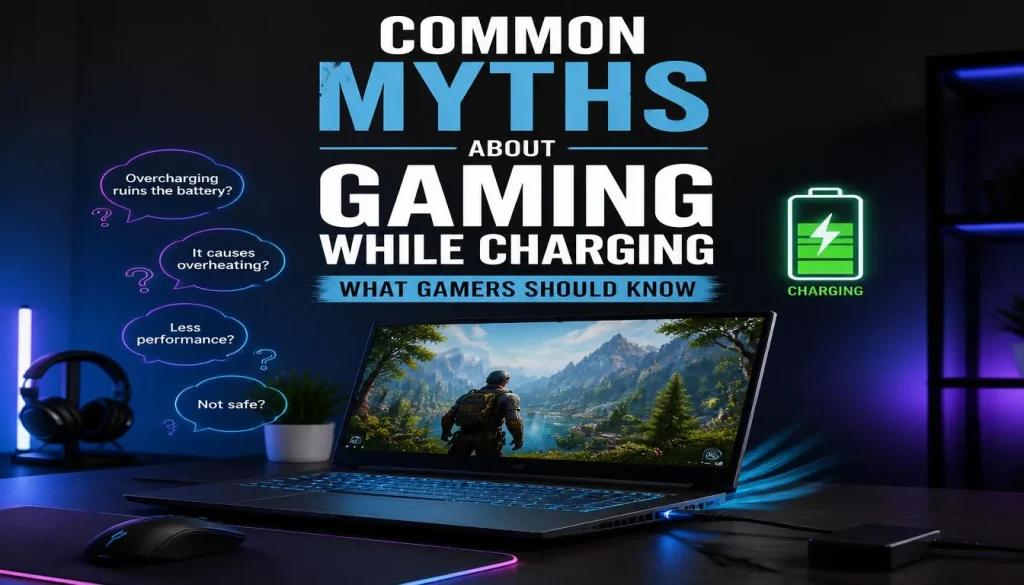
Myth: Gaming While Charging Always Damages the Battery
It does not.
Modern laptops are designed to operate while connected to external power. The battery and charging controller manage the charging process automatically.
Poor thermal conditions or inappropriate charging equipment are more useful things to worry about.
Myth: Keeping the Charger Connected Causes Continuous Overcharging
A properly functioning modern laptop does not simply keep forcing charge into a full battery forever.
Charging is controlled electronically.
That said, long periods at maximum state of charge can contribute to normal battery aging, which is why battery-care limits exist on many laptops.
Myth: Gaming on Battery Is Healthier for the Laptop
Not necessarily.
Gaming on battery can increase discharge depth and require more frequent recharging. It can also significantly reduce gaming performance.
There is little benefit in deliberately unplugging a gaming laptop just to make the battery work harder.
Myth: You Must Unplug the Charger at 100%
You do not need to watch the battery percentage and pull out the charger the moment it reaches 100%.
If you regularly use the laptop plugged in, a built-in charge limit is a much more convenient battery-care strategy.
Myth: You Should Regularly Drain the Battery to 0%
Modern lithium-based laptop batteries do not need routine 0% discharge as part of everyday battery care.
Battery calibration may occasionally be useful when the reported percentage becomes inaccurate, but that is different from deliberately deep-discharging the battery every day.
Myth: Any USB-C Charger Is Good Enough for Gaming
USB-C tells you the connector type, not necessarily the amount of usable gaming power.
A compact USB-C charger that works perfectly for browsing may be unable to provide enough power for a high-performance gaming laptop running its CPU and GPU at full load.
Frequently Asked Questions
Can I play games while my laptop is charging?
Yes. For most laptops, especially gaming laptops, playing while charging is normal. Using the correct charger usually allows the laptop to deliver better sustained gaming performance.
Should I keep my gaming laptop plugged in while gaming?
Usually, yes. If an outlet is available, keeping a gaming laptop plugged in typically provides better performance and avoids rapid battery discharge.
Does playing games while charging damage the battery?
Not by itself. Battery health is affected more by factors such as heat, battery age, charging behavior, and prolonged high state of charge.
Does gaming while charging reduce battery life?
Normal battery aging will happen regardless of how you use the laptop. Gaming while plugged in is not inherently harmful, although excessive heat and constantly keeping the battery at maximum charge can contribute to faster degradation over time.
Is gaming at 100% battery bad?
Occasional gaming at 100% is fine. If the laptop stays plugged in almost all day, using a manufacturer-supported charge limit may be beneficial for long-term battery health.
Should I limit my gaming laptop battery to 80%?
An 80% limit can be useful if your laptop spends most of its time plugged in. However, use the battery-care options provided by your specific manufacturer rather than assuming every laptop should use the same threshold.
Does a laptop perform better while charging?
Many gaming laptops do. When plugged in, the CPU and GPU generally have access to a larger power budget than they do on battery.
Why does FPS drop when I unplug my gaming laptop?
The laptop may reduce CPU or GPU power to conserve battery life. Windows or the manufacturer’s performance software may also switch to a more efficient power profile.
Why does my battery drain while plugged in and gaming?
The charger may be underpowered, damaged, incorrectly connected, or unable to supply enough power for the current workload. Some laptop designs can also use a small amount of battery power temporarily during peak demand.
Why does my laptop say plugged in but not charging while gaming?
A battery charge limit may be enabled, or the battery may already be close to full. If the battery is low and still will not charge, inspect the charger, charging settings, battery condition, and power connection.
Does a laptop charge slower while gaming?
It can. The laptop must power the CPU, GPU, display, fans, and other components first, which can leave less adapter power available for charging the battery.
Can I game using a USB-C charger?
Yes on some laptops, but full gaming performance depends on the laptop’s USB-C power input limit and the charger’s output. A dedicated high-wattage adapter may still be necessary for demanding gaming.
Is it normal for the charger to get hot while gaming?
Some warmth is normal under heavy load. Burning smells, melting, repeated shutdowns, or abnormal electrical behavior are not normal.
Can gaming while charging cause overheating?
Gaming generates significant heat, and plugged-in performance can increase power consumption. Proper airflow and a clean cooling system are important.
Should I unplug my laptop after gaming?
You do not have to unplug it immediately. If the laptop stays connected most of the time, consider using its built-in battery-care feature if available.
Can I leave my gaming laptop plugged in overnight?
Generally, a healthy modern laptop can remain connected to its charger. If you regularly keep it plugged in for long periods, using a manufacturer-supported battery charge limit can reduce the time the battery spends at maximum charge.
Final Verdict: Is It Bad to Game While Charging a Laptop?
Plugged-in power usually allows the CPU and GPU to deliver their intended performance, provides steadier FPS, and prevents the battery from draining rapidly during demanding games.
The real issues to watch are different: excessive heat, blocked airflow, a damaged or underpowered charger, a failing battery, and keeping the battery at maximum charge unnecessarily for months at a time.
Use the correct power adapter, keep the laptop cool, enable a battery charge limit if your usage pattern makes it worthwhile, and let the laptop’s charging system do its job.
For most gamers, there is no need to choose between good performance and battery safety. A properly cooled gaming laptop with the correct charger is designed to be used while plugged in.