Buying a gaming laptop can feel confusing when every model promises powerful performance, high-speed graphics, and an immersive gaming experience. Product pages are filled with processor names, GPU numbers, refresh rates, RAM capacities, storage types, and marketing terms that are not always easy to compare.
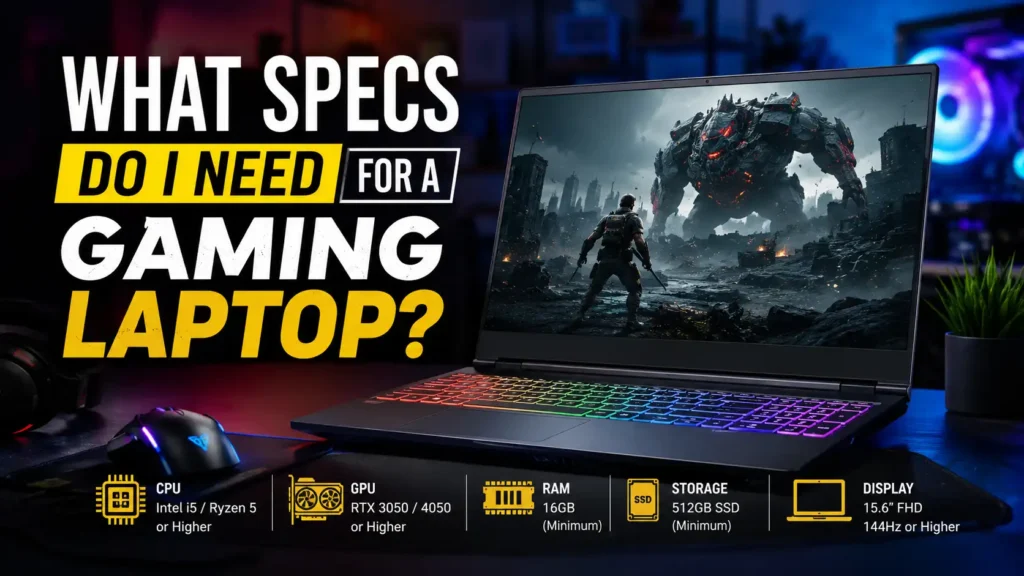
The right specifications depend on the games you play, the resolution you want, your preferred frame rate, and whether you also plan to stream, edit videos, study, or work on the laptop.
For most gamers, a balanced gaming laptop should have a modern six-core or better processor, a dedicated graphics card, at least 16GB of RAM, a 1TB NVMe SSD, and a 1080p or 1600p display with a refresh rate of 144Hz or higher. However, competitive gaming, modern AAA titles, VR, streaming, and high-resolution gaming may require more powerful hardware.
This guide explains what specs you need for a gaming laptop and shows you how to choose the right configuration without overspending on features that will not improve your gaming experience.
Quick Answer: What Specs Do You Need for a Gaming Laptop?
For most gamers, the following specifications provide a practical balance between performance, storage, display quality, and long-term usability:
- A modern six-core or eight-core H, HS, or HX-series processor
- A dedicated laptop GPU with at least 6GB of VRAM
- 16GB of dual-channel RAM
- A 1TB NVMe SSD
- A 1080p, 1200p, 1440p, or 1600p display
- A refresh rate of at least 120Hz, preferably 144Hz or 165Hz
- A strong dual-fan cooling system
- Wi-Fi 6 or newer connectivity
- USB-A, USB-C, HDMI, audio, and preferably Ethernet ports
- Upgradeable RAM or storage where possible
Higher refresh rates can make movement appear smoother, especially in fast-paced games. Modern gaming laptops commonly offer 120Hz, 144Hz, 165Hz, 240Hz, or faster panels.
Here is a simple starting point:
| Component | Minimum for Light Gaming | Recommended for Most Gamers | High-End Gaming |
|---|---|---|---|
| Processor (CPU) | Modern 6-core CPU | Modern 6- to 8-core H/HS CPU | High-performance 8-core or better H/HX CPU |
| Graphics (GPU) | Dedicated GPU with 4GB–6GB VRAM | Dedicated GPU with 8GB VRAM | High-end GPU with 12GB+ VRAM |
| Memory (RAM) | 16GB RAM | 16GB–32GB RAM | 32GB–64GB RAM |
| Storage | 512GB NVMe SSD | 1TB NVMe SSD | 2TB or more NVMe SSD |
| Display | 1080p, 120Hz | 1080p–1600p, 144Hz–165Hz | QHD+, OLED or Mini-LED, 240Hz |
| Cooling | Basic dual-fan design | Strong dual-fan cooling | Premium cooling or vapor chamber |
| Connectivity | Wi-Fi 6 and HDMI | Wi-Fi 6E/7, HDMI, and USB-C | USB4 or Thunderbolt with advanced display outputs |
These are general recommendations rather than fixed requirements. Always compare a laptop with the recommended system requirements and real benchmark results for the games you plan to play.
Minimum vs Recommended Gaming Laptop Specs
A laptop that meets the minimum requirements for a game may technically run it, but that does not guarantee smooth gameplay, high graphics settings, or stable frame rates.
Minimum specifications are suitable when you mainly play older titles, indie games, lightweight esports games, or less demanding multiplayer games. Recommended specifications provide more room for modern games, multitasking, future updates, and higher-quality settings.
| Component | Minimum Specification | Recommended Specification | Future-Ready Specification |
|---|---|---|---|
| CPU | Modern 6-core mobile processor | Strong 6- to 8-core H/HS processor | High-performance 8-core or better processor |
| GPU | Entry-level dedicated GPU | Mainstream dedicated GPU | High-end dedicated GPU |
| VRAM | 4GB–6GB | 8GB | 12GB or more |
| RAM | 16GB | 16GB–32GB | 32GB |
| Storage | 512GB SSD | 1TB SSD | 2TB SSD |
| Resolution | 1080p | 1080p, 1200p, 1440p or 1600p | QHD+, ultrawide external display or 4K |
| Refresh rate | 120Hz | 144Hz–165Hz | 240Hz or higher |
| Cooling | Dual-fan system | Strong multi-heat-pipe system | Premium cooling or vapor chamber |
For modern gaming, 16GB of RAM is generally considered a reasonable starting point, while 32GB becomes more useful for serious gaming, demanding multitasking, streaming, creative applications, and heavily modified games.
Start With the Games You Want to Play
Before comparing processors or graphics cards, identify the games you actually intend to play. Different types of games place different demands on a laptop.
Esports and Competitive Games
Games such as Valorant, Counter-Strike, Fortnite, Rocket League, Overwatch, and League of Legends are generally designed to run on a wide range of hardware.
However, competitive players often want very high frame rates, low latency, and stable performance. For this type of gaming, prioritize:
- A strong processor
- A dedicated GPU capable of maintaining high frame rates
- A 144Hz, 165Hz, 240Hz, or faster display
- Fast display response times
- A MUX switch or direct GPU mode
- Ethernet or reliable Wi-Fi
- Good cooling for sustained performance
A powerful GPU is still useful, but competitive games may become more dependent on CPU performance when you reduce the resolution and graphics settings to achieve extremely high frame rates.
Modern AAA Games
Graphically demanding games usually require a stronger GPU, more VRAM, and better cooling.
For modern AAA gaming, prioritize:
- A dedicated GPU with at least 8GB of VRAM where your budget allows
- 16GB or preferably 32GB of RAM
- A 1TB or larger SSD
- Strong sustained cooling
- A 1080p, 1200p, 1440p, or 1600p display
- Variable refresh rate support
- Support for modern upscaling technologies
If you want to use high-resolution textures, ray tracing, high graphics presets, or an external QHD display, GPU performance becomes even more important.
Simulation and Strategy Games
Simulation, city-building, strategy, and physics-heavy games may place substantial demand on the processor and memory.
Examples include large-scale strategy games, flight simulators, city-building titles, and heavily modified sandbox games.
For these games, consider:
- A strong multicore processor
- 32GB of RAM for large simulations or extensive modifications
- Good single-core performance
- A fast SSD
- Strong cooling
- Adequate GPU performance for your chosen resolution
The CPU handles important tasks such as game logic, physics, artificial intelligence, and background applications.
Gaming, Streaming and Content Creation
Streaming adds another workload on top of the game. You may be running broadcasting software, a browser, voice chat, alerts, recording tools, and background applications at the same time.
For gaming and streaming, a practical configuration includes:
- A strong six-core or eight-core processor
- A dedicated GPU with a hardware video encoder
- 32GB of RAM
- At least 1TB of SSD storage
- Multiple USB ports
- Ethernet connectivity
- Good thermal performance
A 16GB laptop may still handle gaming and basic streaming, but 32GB gives you more headroom for multitasking.
What Specs Do You Need for Your Target Resolution and FPS?
Your target resolution and frame rate should influence how much you spend on the GPU, CPU, and display.
Specs for 1080p at 60 FPS
This is a sensible target for casual gamers and people who prefer visual quality over extremely high frame rates.
Look for:
- A modern six-core processor
- An entry-level or mainstream dedicated GPU
- 6GB or more VRAM
- 16GB RAM
- A 512GB or 1TB SSD
- A 120Hz or 144Hz display
Even when you target 60 FPS, a 120Hz or 144Hz screen can make general motion, scrolling, and supported games feel smoother.
Specs for 1080p at 144 FPS
This target is suitable for competitive gaming.
Look for:
- A strong modern processor
- A dedicated GPU suitable for high-refresh 1080p gaming
- 16GB or 32GB RAM
- A 144Hz, 165Hz, or 240Hz panel
- A fast response time
- A MUX switch or Advanced Optimus
- Strong cooling
The laptop must be capable of producing frame rates that meaningfully use the display’s refresh rate. A 240Hz screen offers limited value when the hardware only produces 60 to 80 FPS in your games.
Specs for 1440p or 1600p at 60 FPS
Higher resolution increases the number of pixels the GPU must render.
Look for:
- A strong mainstream or high-end dedicated GPU
- At least 8GB of VRAM
- A modern six-core or eight-core processor
- 16GB or preferably 32GB RAM
- A 1TB SSD
- A QHD or 1600p display with variable refresh rate support
This is a good target for gamers who want sharper images without moving all the way to 4K.
Specs for 1440p or 1600p at 120–165 FPS
This is a demanding target that requires a strong GPU and effective cooling.
Look for:
- A high-performance dedicated GPU
- 8GB–12GB or more VRAM
- A strong H, HS, or HX-series processor
- 32GB RAM
- A 165Hz or 240Hz display
- High GPU power availability
- Strong sustained thermal performance
Specs for 4K Gaming
4K gaming is significantly more demanding than 1080p or 1440p gaming.
A 4K gaming laptop should have:
- A high-end dedicated GPU
- Plenty of VRAM
- A high-performance processor
- 32GB RAM
- At least 1TB–2TB of storage
- Strong cooling
- Support for upscaling and frame-generation technologies
On a smaller laptop display, the visual improvement from 4K may not always justify the increased GPU demand, reduced battery life, and higher price. A strong 1600p display often provides a better balance for a 15- or 16-inch gaming laptop.
GPU: The Most Important Gaming Laptop Specification
For most gaming laptops, the GPU has the greatest effect on graphics quality, resolution, ray tracing, and frame rate.
The GPU renders textures, lighting, shadows, reflections, effects, and the final image displayed on the screen.
Dedicated GPU vs Integrated Graphics
Integrated graphics share system resources with the processor and are suitable for everyday tasks, media consumption, older games, and some lightweight competitive titles.
A dedicated GPU has its own graphics memory and is designed for more demanding gaming workloads.
Choose dedicated graphics when you want to play:
- Modern AAA games
- VR games
- High-refresh competitive games
- Games at QHD or 4K resolution
- Ray-traced games
- Heavily modified games
- Games while streaming or recording
Modern integrated graphics can be surprisingly capable, but they are not a direct replacement for a strong dedicated GPU when sustained gaming performance is the priority.
How Much VRAM Do You Need?
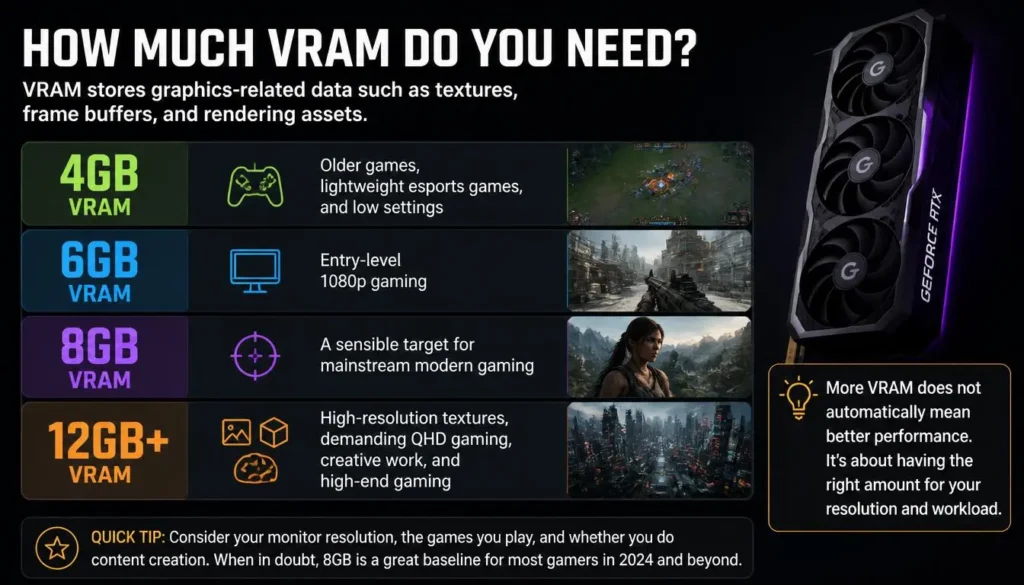
VRAM stores graphics-related data such as textures, frame buffers, and rendering assets.
A practical guide is:
- 4GB VRAM: Older games, lightweight esports games, and low settings
- 6GB VRAM: Entry-level 1080p gaming
- 8GB VRAM: A sensible target for mainstream modern gaming
- 12GB or more: High-resolution textures, demanding QHD gaming, creative work, and high-end gaming
More VRAM does not automatically make one GPU faster than another. GPU architecture, memory bandwidth, core configuration, power limits, cooling, and software support also matter.
Laptop GPU vs Desktop GPU
A laptop GPU and desktop GPU with similar branding should not be assumed to deliver identical performance.
Laptop graphics processors must operate within the power, heat, and physical limitations of a portable chassis. Their power limits and clock speeds may differ significantly from desktop versions.
When comparing gaming performance, use laptop-specific benchmarks instead of desktop GPU benchmarks.
Why GPU TGP Matters
TGP refers to the amount of power available to the laptop GPU. The same GPU can perform differently in two laptops when one model allows more sustained power and provides better cooling.
Lower-TGP configurations may deliver lower sustained performance during extended gaming sessions.
Do not choose a laptop based only on the GPU name. Check:
- GPU TGP or maximum graphics power
- Dynamic Boost allocation
- Cooling design
- Chassis thickness
- Performance mode
- Real gaming benchmarks
- Noise and temperature tests
A higher TGP does not automatically make a laptop better. A poorly cooled laptop may not sustain its advertised power, while an efficient design may deliver excellent performance at a lower wattage.
Do You Need a MUX Switch?
Many gaming laptops use hybrid graphics. The dedicated GPU renders the game, but the completed frames may pass through the integrated graphics before reaching the internal display.
A MUX switch allows the laptop to connect the display directly to the dedicated GPU. This can improve performance and reduce latency in supported situations, although it may increase power consumption.
ASUS describes the discrete GPU mode as a direct connection between the dedicated GPU and the laptop display.
Advanced Optimus can switch between graphics modes automatically on compatible laptops.
A MUX switch is particularly valuable for:
- Competitive gaming
- High-refresh-rate gaming
- CPU-limited esports titles
- Players who want the laptop’s maximum plugged-in performance
Ray Tracing, Upscaling and Frame Generation
Ray tracing can improve lighting, shadows, and reflections, but it also increases GPU demand.
Upscaling technologies render a game at a lower internal resolution and reconstruct the image to improve performance. Frame-generation technologies can create additional frames between traditionally rendered frames.
NVIDIA describes DLSS Frame Generation as a technology designed to increase frame rates using AI-assisted rendering.
These technologies can be useful, but do not judge a laptop only by an advertised frame-generation result. Compare:
- Native-resolution performance
- Upscaled performance
- Frame-generation performance
- Input latency
- Image quality
- 1% low frame rates
A laptop should deliver acceptable base performance before frame generation is enabled.
CPU: Which Processor Is Best for a Gaming Laptop?
The CPU manages game logic, physics, artificial intelligence, background tasks, and communication between major system components.
For most gamers, a modern six-core processor is a practical starting point. Eight cores or more can be beneficial for demanding games, streaming, editing, simulation, multitasking, and long-term use.
How Many CPU Cores Do You Need?
A general guide is:
- Four cores: Suitable mainly for older or lightweight games
- Six cores: A practical starting point for modern gaming
- Eight cores: Recommended for demanding gaming and multitasking
- More than eight cores: Useful for streaming, rendering, editing, simulation, and professional workloads
Core count should not be considered alone. A newer six-core processor can outperform an older eight-core processor because architecture, clock behavior, cache, power limits, and efficiency also matter.
H, HS and HX Processors Explained
Gaming laptops often use performance-focused processor families.
- U-series processors: Designed mainly for efficiency and thin laptops
- HS-series processors: Balance performance and efficiency
- H-series processors: Designed for sustained performance
- HX-series processors: Designed for high-performance gaming and workstation-class laptops
Intel recommends looking at H or HX-designated processors when selecting a gaming laptop from its processor range.
Naming systems differ between brands and generations, so always check the processor’s full model name rather than relying only on labels such as “Core i7” or “Ryzen 7.”
Core i5 vs Core i7 for Gaming Laptops
A modern performance-class Core i5 can be enough for mainstream gaming, especially when paired with a balanced GPU.
A Core i7 may be worthwhile when you need:
- Very high frame rates
- Streaming
- Video editing
- Heavy multitasking
- Simulation games
- A high-end GPU
- More long-term processing headroom
Do not sacrifice a significantly stronger GPU just to move from a Core i5 to a Core i7. In many gaming situations, a balanced CPU and GPU combination provides better results.
Ryzen 5 vs Ryzen 7 for Gaming Laptops
A modern Ryzen 5 performance-class processor can handle mainstream gaming well. Ryzen 7 processors generally provide more cores, threads, or performance headroom, depending on the generation.
Choose Ryzen 7 when you plan to stream, edit, multitask heavily, run simulations, or pair the processor with a high-end GPU.
Again, compare the full processor model, generation, benchmark results, power limit, and laptop cooling rather than the family name alone.
Does Clock Speed Matter?
Clock speed affects how quickly a processor can complete certain tasks, but advertised boost speed is not the same as sustained gaming speed.
Actual performance depends on:
- Processor architecture
- Power limit
- Temperature
- Number of active cores
- Cooling
- Laptop performance mode
- Game optimization
A laptop may advertise a high maximum boost clock but maintain a much lower speed during a long gaming session.
Avoid CPU and GPU Imbalances
A weak CPU can limit a powerful GPU in high-frame-rate games. A very expensive CPU paired with a weak GPU can also be poor value for graphics-heavy gaming.
For 1080p competitive gaming, CPU performance becomes particularly important. For QHD and 4K gaming, the GPU usually carries more of the workload.
How Much RAM Do You Need for Gaming?
RAM stores data that the processor and applications need to access quickly.
Is 8GB RAM Enough?
An 8GB gaming laptop may run older games and lightweight esports titles, but it is not an ideal choice for a new gaming system.
The operating system, browser, game launcher, voice chat, security software, and background applications can use a substantial portion of that memory before the game starts.
An 8GB laptop may experience:
- Stuttering
- Slow application switching
- Limited multitasking
- Poor performance in memory-heavy games
- Reduced long-term usability
Is 16GB RAM Enough?
Yes. For most gamers, 16GB is a practical starting point.
It is generally enough for:
- Esports games
- Mainstream AAA gaming
- General multitasking
- Discord and browser use
- School or office applications
- Light recording
For the best results, use dual-channel memory where supported.
When Do You Need 32GB RAM?
Choose 32GB when you plan to:
- Stream while gaming
- Edit videos
- Use large game modifications
- Play memory-heavy simulation games
- Run virtual machines
- Keep many applications open
- Use the laptop for professional creative work
- Keep the laptop for several years
For serious gamers and multimedia workloads, 32GB can provide useful additional headroom.
Do You Need 64GB RAM?
Most gamers do not need 64GB.
It may be justified for:
- Professional 3D work
- Advanced video production
- Large software-development projects
- Complex simulation
- Multiple virtual machines
- Heavy content creation alongside gaming
Adding 64GB will not automatically improve frame rates when the game uses far less memory.
Single-Channel vs Dual-Channel RAM
Dual-channel memory can provide more memory bandwidth than a comparable single-channel configuration.
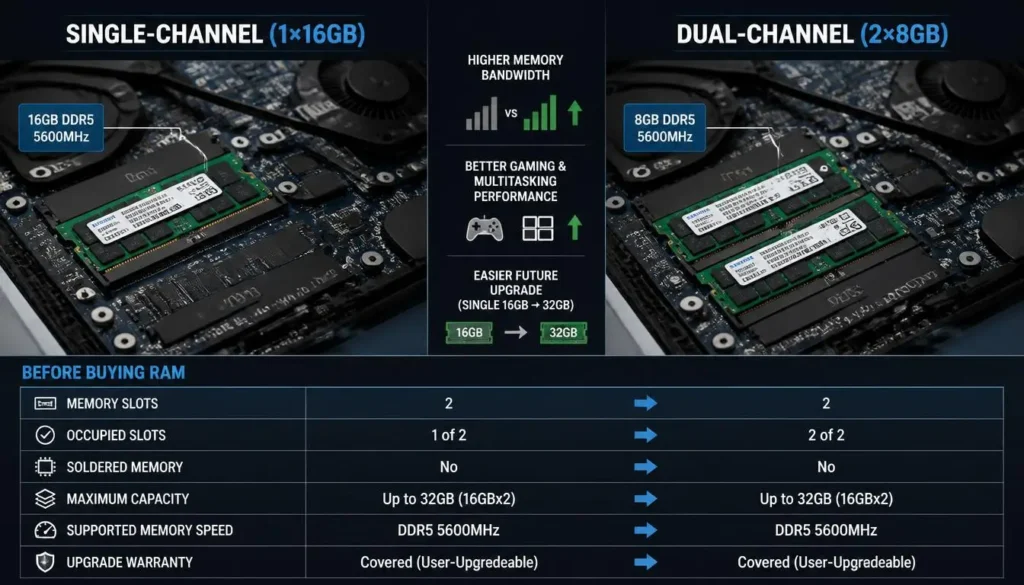
For example, two compatible 8GB modules may perform better in certain situations than one 16GB module. However, a single 16GB module may make a future upgrade to 32GB easier.
Before buying, check:
- Number of memory slots
- Whether one or both slots are occupied
- Whether any memory is soldered
- Maximum supported capacity
- Supported memory speed
- Warranty conditions for upgrades
DDR4 vs DDR5 RAM
DDR5 provides higher bandwidth and is common in modern gaming laptops. However, RAM generation should not be the main reason to choose one laptop over another.
GPU performance, cooling, display quality, memory capacity, and upgradeability usually have a greater effect on the overall experience.
A well-balanced DDR4 laptop may still outperform a poorly configured DDR5 laptop.
How Much Storage Do You Need?
Modern games can require a large amount of storage. The operating system, updates, applications, recordings, and temporary files also consume space.
SSD vs HDD for Gaming
An NVMe SSD is strongly recommended for the operating system and games.
Compared with a hard drive, an SSD provides:
- Faster startup
- Faster game loading
- Faster installation and updates
- Better responsiveness
- Less noise
- Better resistance to physical movement
An HDD may still be useful for backups or media storage, but it should not be the primary drive in a modern gaming laptop.
Is a 512GB SSD Enough?
A 512GB SSD can work for a budget gaming laptop, but available space becomes limited after installing Windows, applications, updates, and several large games.
It may be enough when:
- You play only a few games at a time
- Your games are relatively small
- The laptop has a second SSD slot
- You are comfortable uninstalling games regularly
- You use external storage
Is 1TB the Best Starting Point?
For most gamers, 1TB is the better starting point.
It offers enough space for the operating system, applications, and a reasonable collection of games without making storage management an immediate problem.
When Should You Choose 2TB?
Choose 2TB or more when you:
- Maintain a large game library
- Record gameplay
- Edit videos
- Use large texture packs or modifications
- Store creative projects
- Do not want to upgrade soon
Check for a Second M.2 Slot
Before buying, check whether the laptop has:
- A second M.2 SSD slot
- A replaceable primary SSD
- A supported maximum capacity
- Easy access to the storage compartment
- Suitable cooling for additional drives
Expandable storage can make a 512GB or 1TB laptop much more practical over time.
What Display Specs Are Best for Gaming?
A laptop may have excellent internal hardware but still provide a disappointing experience if the display is dim, slow, inaccurate, or poorly matched to the GPU.
The three major display considerations are resolution, refresh rate, and panel type.
1080p vs 1200p vs 1440p vs 1600p
1080p: Provides good performance and is well suited to competitive gaming.
1200p: Common on 16:10 displays and provides slightly more vertical space than 1080p.
1440p: Produces sharper images while remaining more manageable than 4K.
1600p: A popular 16:10 resolution that provides additional vertical workspace and strong visual quality.
4K: Produces very sharp images but requires significantly more GPU power.
The best choice depends on screen size, GPU performance, target frame rate, and whether you prioritize sharpness or speed.
What Refresh Rate Do You Need?
A refresh rate describes how many times the display can update each second.
- 60Hz: Suitable for basic use but not ideal for a modern gaming laptop
- 120Hz: A good minimum for gaming
- 144Hz: Excellent for mainstream and competitive gaming
- 165Hz: A strong balance for modern gaming laptops
- 240Hz: Useful for competitive players and powerful systems
- 360Hz or higher: Mainly beneficial to highly competitive players
The laptop must generate enough frames to take advantage of the refresh rate.
Response Time and Ghosting
Refresh rate is not the only factor affecting motion clarity.
A panel with slow pixel response times may show visible trails or ghosting even when it has a high refresh rate.
Look for independent display tests that measure:
- Pixel response time
- Overshoot
- Ghosting
- Input latency
- Motion clarity
Do not rely entirely on advertised response-time numbers.
IPS vs OLED vs Mini-LED
IPS displays generally offer good colors, wide viewing angles, and reasonable pricing.
OLED displays provide excellent contrast, deep blacks, and very fast pixel response. Potential disadvantages include higher prices, reflections, power consumption, and long-term burn-in concerns.
Mini-LED displays can offer high brightness, strong HDR performance, and improved contrast. They may be more expensive and can show blooming around bright objects.
Brightness and Color Coverage
For normal indoor gaming, a sufficiently bright display with good contrast is usually enough.
Choose higher brightness when you use the laptop:
- Near windows
- In brightly lit rooms
- Outdoors
- In different locations throughout the day
For gaming and content creation, look for strong sRGB or DCI-P3 coverage and reasonable factory calibration.
G-SYNC, FreeSync and Variable Refresh Rate
Variable refresh rate synchronizes the display’s refresh behavior with the GPU’s frame output. This can reduce tearing and stuttering when frame rates fluctuate.
AMD explains that FreeSync synchronizes the display refresh rate with compatible graphics output to reduce visual problems such as tearing and stuttering.
Variable refresh rate is especially useful when your games do not maintain a perfectly consistent frame rate.
What Gaming Laptop Screen Size Should You Choose?
Screen size affects portability, cooling, keyboard layout, battery size, and immersion.
14-Inch Gaming Laptops
Best for:
- Students
- Travelers
- Commuters
- Users who value portability
- External-monitor users
Possible disadvantages include smaller keyboards, reduced cooling capacity, and fewer upgrade options.
15- and 16-Inch Gaming Laptops
This is the most balanced size range for many buyers.
It usually provides:
- Better cooling than smaller laptops
- A comfortable display
- More ports
- Larger batteries
- Better keyboards
- Reasonable portability
A 16-inch, 16:10 display is especially useful for gaming, work, browsing, and content creation.
17- and 18-Inch Gaming Laptops
These models are designed more like desktop replacements.
They may offer:
- Larger displays
- Stronger cooling
- Higher GPU power
- More ports
- Larger keyboards
- Better sustained performance
However, they are heavier and usually come with large power adapters.
16:9 vs 16:10
A 16:9 display is common for games and video.
A 16:10 display provides additional vertical space, which is useful for productivity, browsing, editing, and strategy games. Many modern 16-inch gaming laptops use 1600p 16:10 panels.
Cooling and Thermal Performance
Gaming laptops operate within a compact chassis, so cooling has a major effect on sustained performance.
A laptop may perform well during a short benchmark but lose speed during a long gaming session if heat builds up.
Why Cooling Matters
Poor cooling can cause:
- Thermal throttling
- Lower sustained frame rates
- Uncomfortable keyboard temperatures
- Excessive fan noise
- Reduced component longevity
- Inconsistent performance
Thin design is attractive, but it can reduce the space available for fans, heat pipes, heatsinks, and airflow.
Cooling Features to Look For
Look for:
- Two or more cooling fans
- Multiple heat pipes
- Large air intakes
- Rear and side exhausts
- Separate CPU and GPU cooling paths
- Vapor-chamber cooling on premium models
- User-selectable performance profiles
- Accessible vents for cleaning
How to Evaluate Cooling Before Buying
Read reviews that test:
- CPU and GPU temperature
- Sustained performance
- Fan noise
- Keyboard temperature
- Clock speeds after extended gaming
- Performance in balanced and turbo modes
- Performance on a flat desk
Do not judge cooling only by the number of visible vents.
Do You Need a Cooling Pad?
A cooling pad may help when it improves airflow into the laptop’s intake vents.
However, results vary by laptop design. Simply raising the rear of the laptop can sometimes improve airflow.
A cooling pad cannot compensate for a fundamentally poor internal cooling system.
Battery Life, Charger and Portability
Gaming laptops are portable, but they are not designed to deliver maximum gaming performance for long periods on battery power.
Why Gaming Laptops Perform Better When Plugged In
High-performance CPUs and GPUs require more power than the battery can usually provide continuously.
When unplugged, a gaming laptop may:
- Reduce GPU power
- Reduce processor speed
- Limit frame rates
- Change display behavior
- Switch to integrated graphics
- Disable the highest performance mode
For demanding gaming, use the manufacturer-provided charger.
Battery Capacity
Battery capacity is commonly measured in watt-hours.
A larger battery can help, but battery life also depends on:
- Processor efficiency
- GPU mode
- Display brightness
- Display resolution
- Refresh rate
- Background applications
- Battery profile
- Laptop size
Gaming battery life will usually be much shorter than battery life during browsing, writing, or video playback.
Check the Charger Weight
A laptop may appear portable until you include its large power adapter.
When comparing weight, consider:
- Laptop weight
- Charger weight
- Cable weight
- Protective case
- Daily travel distance
A lightweight laptop with a heavy charger may not be as portable as its advertised laptop weight suggests.
Ports and Connectivity You Should Check
Ports are easy to overlook, but they affect monitors, controllers, storage, streaming equipment, networking, and everyday convenience.
Essential Ports
A practical gaming laptop should include:
- At least two USB-A ports
- At least one USB-C port
- HDMI
- A headphone and microphone connection
- A power connector
- Ethernet, or support for an adapter
Useful Optional Connections
Depending on your needs, look for:
- USB4
- Thunderbolt
- DisplayPort over USB-C
- A full-size SD card reader
- A microSD card reader
- Multiple display outputs
- High-speed USB ports
External Monitor Support
Before connecting a high-refresh external monitor, check:
- HDMI version
- USB-C display support
- DisplayPort support
- Maximum supported resolution
- Maximum supported refresh rate
- Whether the port connects to the dedicated GPU
- Variable-refresh-rate compatibility
A USB-C port does not automatically support charging or video output. Check the laptop’s technical specifications.
Wireless Connectivity
Look for Wi-Fi 6 or newer wireless technology and a recent Bluetooth version.
Ethernet remains valuable for:
- Competitive gaming
- Stable downloads
- Game streaming
- Lower network variability
- Large updates
Keyboard, Build Quality and Everyday Features
Performance is the priority, but secondary features affect how enjoyable the laptop is to use every day.
Keyboard
Check:
- Key travel
- Key spacing
- Arrow-key size
- Number-pad availability
- Anti-ghosting
- N-key rollover
- RGB zones or per-key lighting
- Dedicated media controls
- Keyboard temperature during gaming
Build Quality
Look for:
- A stable hinge
- Limited keyboard flex
- A rigid screen lid
- Durable port placement
- Good ventilation
- Easy access for maintenance
A metal chassis is not automatically more durable than a well-designed plastic chassis.
Webcam, Microphone and Speakers
These features matter when you use the laptop for:
- Online classes
- Meetings
- Streaming
- Voice chat
- Remote work
A poor webcam may not affect gaming performance, but it can still reduce the laptop’s usefulness as an all-purpose computer.
Can You Upgrade a Gaming Laptop Later?
Upgradeability can extend the useful life of a gaming laptop, but not every component can be replaced.
Components You May Be Able to Upgrade
Depending on the model, you may be able to upgrade:
- RAM
- NVMe SSD
- Wi-Fi card
- Battery
- Thermal interface material
Components You Usually Cannot Upgrade
In most gaming laptops, you cannot practically upgrade:
- CPU
- GPU
- Display resolution
- Display refresh rate
- Soldered memory
Because the CPU and GPU are usually fixed, choose these components carefully at the time of purchase.
Upgradeability Checklist
Before buying, check:
- Is the RAM soldered?
- How many memory slots are available?
- What is the maximum supported RAM?
- Is there a second M.2 slot?
- Can the primary SSD be replaced?
- Is the Wi-Fi card replaceable?
- Is the battery accessible?
- Does opening the laptop affect the warranty?
Do not assume that every version of the same laptop has the same upgrade options.
How to Read a Gaming Laptop Specification Sheet
A specification sheet can help you compare laptops, but only when you understand what the numbers mean.
Check the Exact CPU Model
Do not compare laptops using only labels such as:
- Core i5
- Core i7
- Core Ultra 7
- Ryzen 5
- Ryzen 7
Check the full model number, generation, core count, power class, and independent benchmark results.
Check the Exact GPU and Power Limit
Look for:
- Full GPU name
- VRAM capacity
- TGP or maximum graphics power
- Dynamic Boost
- MUX switch
- Advanced Optimus
- Supported graphics technologies
Current manufacturer specifications may list the GPU wattage separately. For example, ASUS product specifications can show base GPU power plus Dynamic Boost allocation alongside MUX and Advanced Optimus support.
Do Not Trust “Up to” Without Checking the Configuration
A product page may advertise:
- Up to 64GB RAM
- Up to a high-end GPU
- Up to 2TB storage
- Up to a 240Hz display
The specific laptop being sold may have a much lower configuration.
Confirm the exact:
- Processor
- GPU
- RAM
- Storage
- Display
- Battery
- Keyboard layout
- Operating system
- Warranty
Do AI PC and NPU Specs Matter for Gaming?
An NPU can accelerate certain artificial-intelligence tasks and operating-system features, but it should not be prioritized over the GPU, CPU, RAM, storage, cooling, and display when gaming is your main goal.
Do not pay a large premium for AI branding unless the related features are genuinely useful to your workflow.
How to Check Whether a Laptop Can Run Your Games
Follow this process before buying.
Step 1: Find the Game’s Official Requirements
Check the game developer’s or store page for:
- Minimum processor
- Recommended processor
- Minimum GPU
- Recommended GPU
- RAM requirement
- Storage requirement
- Operating-system requirement
Step 2: Focus on Recommended Requirements
Minimum requirements usually target basic playability.
Recommended requirements are more useful when you want:
- Stable frame rates
- Better graphics
- Higher resolution
- A smoother overall experience
Step 3: Compare Laptop-Specific Hardware
Do not assume a laptop GPU matches a desktop GPU with a similar name.
Search for benchmarks using the laptop GPU and, where possible, the exact laptop model.
Step 4: Match the Benchmark Settings
Compare results at the resolution and graphics settings you intend to use.
A benchmark at 1080p Low does not predict performance at 1600p Ultra.
Step 5: Check More Than Average FPS
Look for:
- Average FPS
- 1% low FPS
- Frame-time consistency
- Temperature
- Fan noise
- Power mode
- Native-resolution performance
- Upscaled performance
- Ray-tracing performance
The 1% low result can help show how smooth the game feels during its slower moments. A laptop with a slightly lower average but stronger 1% lows may feel more consistent.
Recommended Gaming Laptop Specs by Use Case
Esports Gaming
Recommended:
- Strong six-core or eight-core processor
- Dedicated GPU
- 16GB RAM
- 512GB or 1TB SSD
- 144Hz–240Hz display
- Low response time
- MUX switch
- Ethernet
Casual and Indie Gaming
Recommended:
- Modern six-core processor
- Entry-level dedicated GPU or strong integrated graphics
- 16GB RAM
- 512GB SSD
- 120Hz or 144Hz display
- Good battery life
Modern AAA Gaming
Recommended:
- Strong dedicated GPU
- 8GB or more VRAM where possible
- Modern six-core or eight-core processor
- 16GB–32GB RAM
- 1TB SSD
- 144Hz–165Hz variable-refresh-rate display
- Strong cooling
Competitive 240Hz Gaming
Recommended:
- High-performance processor
- GPU capable of very high frame rates
- 16GB–32GB RAM
- 240Hz display
- Fast pixel response
- MUX switch or Advanced Optimus
- Ethernet
- Strong cooling
Gaming and Streaming
Recommended:
- Strong eight-core processor
- Dedicated GPU with hardware encoding
- 32GB RAM
- 1TB–2TB SSD
- Ethernet
- Multiple USB ports
- Good microphone or external audio support
Gaming and Video Editing
Recommended:
- Strong multicore processor
- Powerful dedicated GPU
- 32GB RAM
- 1TB–2TB SSD
- Color-accurate display
- SD card reader where needed
- External-monitor support
VR Gaming
Recommended:
- A VR-ready dedicated GPU
- Strong processor
- 16GB–32GB RAM
- Correct headset display connection
- Required USB ports
- Strong cooling
- Laptop-specific VR compatibility
Always compare the laptop with the official requirements of your specific VR headset and games.
Gaming Laptop Specs by Budget
Exact prices vary between brands, countries, sales, taxes, and configurations. Focus on component balance rather than a single price threshold.
Entry-Level Gaming Laptop
Prioritize:
- Dedicated GPU
- 16GB RAM or easy RAM upgradeability
- Good cooling
- 512GB SSD with expansion
- 120Hz or 144Hz display
Common compromises may include:
- Lower display brightness
- Smaller battery
- Plastic construction
- Limited color coverage
- Lower GPU power
- Less storage
- Fewer premium features
Mid-Range Gaming Laptop
This category often provides the strongest overall value.
Look for:
- Mainstream dedicated GPU
- 16GB–32GB RAM
- 1TB SSD
- Strong cooling
- 144Hz–165Hz display
- MUX switch
- Good port selection
- Upgradeable storage
High-End Gaming Laptop
A high-end model may include:
- Powerful GPU
- 12GB or more VRAM
- High-performance HX processor
- 32GB–64GB RAM
- 2TB storage
- OLED or Mini-LED display
- 240Hz refresh rate
- Premium cooling
- Strong build quality
Performance gains become more expensive at the top of the market. Make sure the additional cost delivers a visible benefit for your games and workload.
Buying in the USA, UK, Canada or Australia
The same laptop model may have different configurations, keyboards, warranties, and prices across regions.
Before buying, check:
- Local warranty coverage
- Return period
- Dead-pixel policy
- Keyboard layout
- Charger plug
- Taxes or VAT
- Shipping costs
- Parts availability
- Student discounts
- Open-box warranty
- Refurbished-product warranty
- International warranty restrictions
USA
Check whether sales tax is included in the displayed price. Return policies may vary substantially between retailers.
UK
Confirm whether VAT is included and whether the laptop uses a UK keyboard layout.
Canada
Check whether prices are shown in Canadian dollars and whether warranty service is available within your province.
Australia
Confirm local warranty coverage, Australian keyboard and charger details, delivery costs, and retailer return conditions.
Avoid importing a laptop solely to save money unless you have verified the warranty, charger, tax, and return implications.
Common Gaming Laptop Buying Mistakes
Buying Based Only on the GPU Name
The same GPU can perform differently because of TGP, cooling, and chassis design.
Choosing 8GB RAM Without Checking Upgradeability
An inexpensive 8GB model may become a poor purchase when the memory is soldered or difficult to upgrade.
Pairing a Weak GPU With a High-Resolution Screen
A sharp display is less useful when the GPU cannot run games smoothly at its native resolution.
Ignoring Cooling
Short benchmark results do not show how the laptop performs after an hour of gaming.
Paying for an Unnecessary Processor
A very expensive processor paired with a modest GPU may provide worse gaming value than a balanced configuration.
Choosing a High Refresh Rate Without Enough Performance
A 240Hz display does not guarantee 240 FPS.
Ignoring Storage Expansion
A 512GB drive fills quickly when modern games, recordings, and applications are installed.
Assuming Battery Gaming Will Match Plugged-In Gaming
Most gaming laptops reduce performance when unplugged.
Ignoring the Charger
A large power adapter can add significant weight to your daily bag.
Ignoring Display Quality
Refresh rate alone does not reveal brightness, color quality, response time, ghosting, or contrast.
Ignoring Port Placement
Rear ports can be convenient for a desk setup, while side ports may be easier for travel. Make sure the ports fit your intended accessories.
Comparing Laptop and Desktop Hardware Directly
Laptop hardware operates within different power and thermal limits. Use laptop-specific test results.
What Specs Make a Gaming Laptop Future-Ready?
No gaming laptop is completely future-proof. New games, graphics technologies, and software requirements continue to evolve.
However, you can improve long-term usability by prioritizing the right components.
Prioritize the GPU
The GPU is usually not upgradeable, so choose enough graphics performance and VRAM for your target resolution.
Choose Enough RAM
Start with 16GB for mainstream gaming. Choose 32GB when you want greater multitasking headroom or intend to keep the laptop for several years.
Choose Expandable Storage
A second M.2 slot can make future expansion easier and more affordable.
Avoid Overspending on the CPU
Buy enough CPU performance for your games, GPU, streaming, and work. Do not reduce your GPU budget solely to obtain a higher processor label.
Select a Sensible Display
A good 1440p or 1600p display with variable refresh rate may remain more practical than a 4K display paired with insufficient GPU power.
Check Repairability and Warranty
Long-term ownership is easier when replacement parts, batteries, fans, and warranty support are available in your country.
Gaming Laptop Specification Checklist
Use this checklist before placing an order:
- What games will I play?
- What resolution do I want?
- What frame rate do I want?
- What graphics settings do I expect?
- What is the exact CPU model?
- What is the exact GPU model?
- How much VRAM does it have?
- What is the GPU TGP?
- Does it have a MUX switch?
- Does it support Advanced Optimus or similar switching?
- Does it have 16GB or 32GB RAM?
- Is the memory dual-channel?
- Is any RAM soldered?
- Can the RAM be upgraded?
- Does it have at least a 512GB or 1TB NVMe SSD?
- Is there a second M.2 slot?
- What is the display resolution?
- What is the display refresh rate?
- Does it support variable refresh rate?
- How bright is the display?
- Does it have good color coverage?
- Has the display response time been independently tested?
- Does the cooling system sustain performance?
- How loud are the fans?
- How hot does the keyboard become?
- How large is the battery?
- How heavy is the charger?
- Does USB-C support video output?
- Does USB-C support charging?
- What HDMI version does it use?
- Does it have Ethernet?
- What Wi-Fi version does it support?
- Are the required ports available?
- What is the warranty period?
- What is the return policy?
- Is the exact regional configuration clearly listed?
Final Recommendation
For most gamers, the best gaming laptop is not the model with the highest numbers. It is the laptop with the most balanced combination of GPU performance, processor power, memory, storage, display quality, cooling, and price.
A strong mainstream configuration should include a modern six-core or eight-core performance-class processor, a dedicated GPU with sufficient VRAM, 16GB or 32GB of RAM, a 1TB NVMe SSD, and a 144Hz or 165Hz display.
Prioritize the GPU when playing graphically demanding games. Prioritize CPU performance and refresh rate when playing competitive games at very high frame rates. Choose 32GB of RAM when you stream, edit, multitask heavily, or use demanding modifications.
Most importantly, do not judge a laptop from its specification sheet alone. Check GPU power, cooling, display testing, 1% low frame rates, fan noise, upgradeability, warranty, and laptop-specific gaming benchmarks before making your final decision.
Frequently Asked Questions on What Specs Do I Need for a Gaming Laptop
Is 16GB of RAM enough for a gaming laptop?
Yes. For most modern games, 16GB is a practical starting point. It can handle mainstream gaming, voice chat, a browser, and normal background applications. Choose 32GB for streaming, content creation, demanding simulation games, extensive modifications, or heavier multitasking.
Is 8GB of RAM enough for gaming?
It may be enough for older games, lightweight esports titles, and basic settings, but it is not ideal for a new gaming laptop. The operating system and background applications can use much of the available memory, increasing the risk of stuttering and slow multitasking.
Is a Core i5 or Ryzen 5 good for gaming?
A modern performance-class Core i5 or Ryzen 5 can be excellent for mainstream gaming. The full processor model, generation, power class, cooling, and GPU pairing matter more than the family label alone.
Do I need a Core i7 or Ryzen 7 for gaming?
Not necessarily. A Core i7 or Ryzen 7 is more useful for high-refresh gaming, streaming, editing, simulation, and heavy multitasking. A balanced laptop with a stronger GPU may provide better gaming value than a higher processor paired with weaker graphics.
How much VRAM does a gaming laptop need?
For entry-level 1080p gaming, 6GB can be workable. For modern mainstream gaming, 8GB is a safer target. Consider 12GB or more for high-resolution textures, demanding QHD gaming, creative workloads, or greater long-term headroom.
Is a 512GB SSD enough for a gaming laptop?
It can be enough for a limited game library, but space may become tight after installing Windows, applications, updates, and several large games. A 1TB SSD is more practical for most gamers.
Do I need a 144Hz display?
You do not strictly need one, but 144Hz provides smoother movement than 60Hz and is especially useful for action and competitive games. The laptop must also generate sufficiently high frame rates to take advantage of it.
Is 1080p or 1440p better for gaming laptops?
1080p provides higher frame rates and places less demand on the GPU. A 1440p or 1600p display offers sharper images but requires stronger graphics hardware. The better option depends on your GPU, screen size, preferred games, and frame-rate target.
Can I upgrade a gaming laptop GPU?
Usually not. In most gaming laptops, the GPU is permanently attached to the motherboard. Choose the GPU carefully when purchasing because RAM and storage are much more likely to be upgradeable.
Do gaming laptops need 32GB RAM?
Most gamers do not strictly need 32GB, but it is useful for streaming, video editing, large modifications, simulations, development tools, and heavy multitasking. It can also provide more long-term flexibility.
Are gaming laptops good for work and college?
Yes. Gaming laptops can handle productivity, programming, design, editing, and academic software. However, consider battery life, weight, fan noise, charger size, webcam quality, and professional appearance before using one as a daily school or work laptop.
Can integrated graphics run modern games?
Modern integrated graphics can run many esports, indie, and older games, often at lower resolutions or settings. A dedicated GPU remains the better choice for demanding AAA gaming, ray tracing, high resolutions, VR, and consistently high frame rates.
How long should a gaming laptop last?
A well-chosen gaming laptop can remain useful for several years, although you may need to reduce graphics settings in newer games over time. Longevity depends on the original GPU, VRAM, cooling, build quality, upgradeability, maintenance, and your performance expectations.
Should I buy a gaming laptop or desktop?
Choose a gaming laptop when portability and an all-in-one design are important. Choose a desktop when you want easier upgrades, stronger performance for the price, more ports, and better long-term repairability.
What is the most important specification in a gaming laptop?
For most modern games, the dedicated GPU is the most important specification. However, it must be supported by a suitable CPU, enough RAM, adequate storage, effective cooling, and a display that matches the laptop’s performance.