If you are comparing a 512GB vs 1TB SSD gaming laptop, the best choice for most gamers is 1TB. A 512GB SSD can still work well if you mainly play esports titles, keep only a few games installed, or plan to upgrade the storage later. However, 1TB gives you much more breathing room for AAA games, Windows, apps, updates, DLC, mods, and recorded gameplay.
The important point is that 1TB does not automatically give you more FPS than 512GB. You are mainly paying for extra storage capacity and convenience. If both laptops use similar SSD technology, CPU, GPU, and RAM, storage size alone should not dramatically change gaming performance.
Quick verdict: Choose 512GB for a tight budget, smaller game library, or an easily upgradeable laptop. Choose 1TB if you regularly play modern AAA games, dislike uninstalling games, stream or record gameplay, or want the laptop to remain comfortable to use for several years.
Affiliate disclosure: As an Amazon Associate I earn from qualifying purchases. Amazon product availability and pricing can change.
512GB vs 1TB SSD Gaming Laptop: Quick Comparison
| Feature | 512GB SSD | 1TB SSD |
|---|---|---|
| Advertised capacity | 512GB | 1TB |
| Approx. binary capacity before OS/files | 476.8 GiB | 931.3 GiB |
| Best for | Budget and casual gamers | Most regular gamers |
| Large game library | Limited | Much easier to manage |
| AAA gaming | Usable with storage management | Better suited |
| Esports gaming | Usually enough | More than enough for many users |
| FPS advantage | No inherent advantage | No inherent advantage |
| Game load times | Depends on SSD itself | Depends on SSD itself |
| Price | Usually lower | Usually higher |
| Storage management | More frequent | Less frequent |
| Updates, DLC and mods | Less headroom | More headroom |
| Long-term convenience | Fair | Better |
| Best overall choice | Budget users | Most gamers |
The biggest difference is simple: 1TB gives you almost twice the advertised storage of 512GB. That extra room becomes valuable once Windows, launchers, large games, updates, and personal files begin competing for space.
What Is the Real Difference Between a 512GB and 1TB SSD?
The obvious difference is capacity, but the practical difference is how often you have to think about storage.
A manufacturer-rated 512GB SSD represents roughly 476.8 GiB when measured using binary units, while a 1TB drive represents roughly 931.3 GiB. Neither number represents the amount of completely free storage you will see on a new gaming laptop because Windows, recovery files, drivers, utilities, and bundled software already consume part of the drive.
Microsoft lists a 64GB-or-larger storage device as the minimum storage requirement for Windows 11 and notes that additional storage can be required for updates and specific features. Windows can also reserve storage to help updates and system processes run reliably.
That is why a 512GB laptop can feel smaller than expected once you start installing games.
512GB vs 1TB SSD: How Much Usable Storage Do You Actually Get?
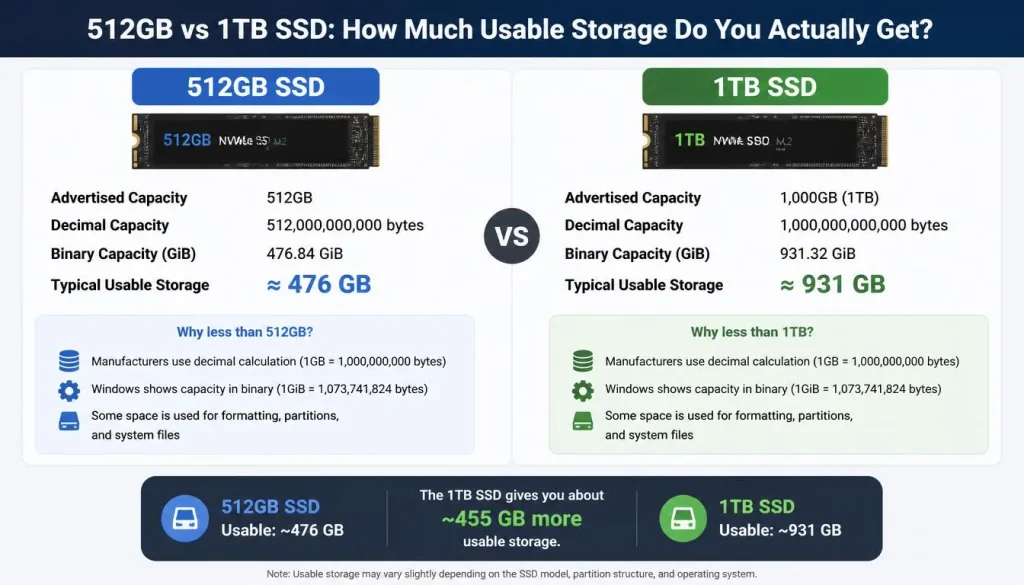
Do not assume that buying a 512GB laptop means you have 512GB available for games.
Before Windows and other files are considered:
- A 512GB SSD is roughly 476.8 GiB in binary capacity.
- A 1TB SSD is roughly 931.3 GiB in binary capacity.
The exact free space on a new laptop varies because manufacturers use different recovery partitions, drivers, software packages, and Windows configurations.
This matters more on the 512GB model. Losing tens of gigabytes to Windows and system files represents a much larger percentage of the total drive than it does on a 1TB SSD.
For that reason, when planning your game library, always work from the free space shown inside Windows, not the number printed on the laptop box.
How Much SSD Storage Do You Need for Gaming in 2026?
There is no single perfect number for every gamer. Your ideal capacity depends on the type of games you play and how many you want installed simultaneously.
256GB: Too Small for Most Dedicated Gaming Laptops
A 256GB drive can handle Windows and a few smaller games, but it leaves very little flexibility for a modern gaming library. I would only consider it if the laptop has easy storage expansion and the price is unusually attractive.
512GB: Good for Light or Focused Gaming
A 512GB SSD makes sense when you:
- Play mostly esports or smaller games.
- Keep only a few large games installed.
- Have fast internet for redownloading games.
- Use cloud or external storage for personal files.
- Know the laptop has an easy SSD upgrade path.
- Need to keep the initial purchase price low.
1TB: The Best Balance for Most Gamers
For most people buying a gaming laptop today, 1TB is the safer starting point. It gives you enough flexibility to keep several large games, Windows, launchers, applications, and personal files without constantly checking the storage meter.
2TB: Better for Large Libraries
You should consider 2TB if you want many AAA games installed at once, use large mod packs, record lots of gameplay, edit video, or simply hate deleting games.
You do not necessarily need 2TB on day one. A laptop with a second M.2 slot can make a 1TB configuration much easier to expand later.
How Many Games Can 512GB vs 1TB Hold?
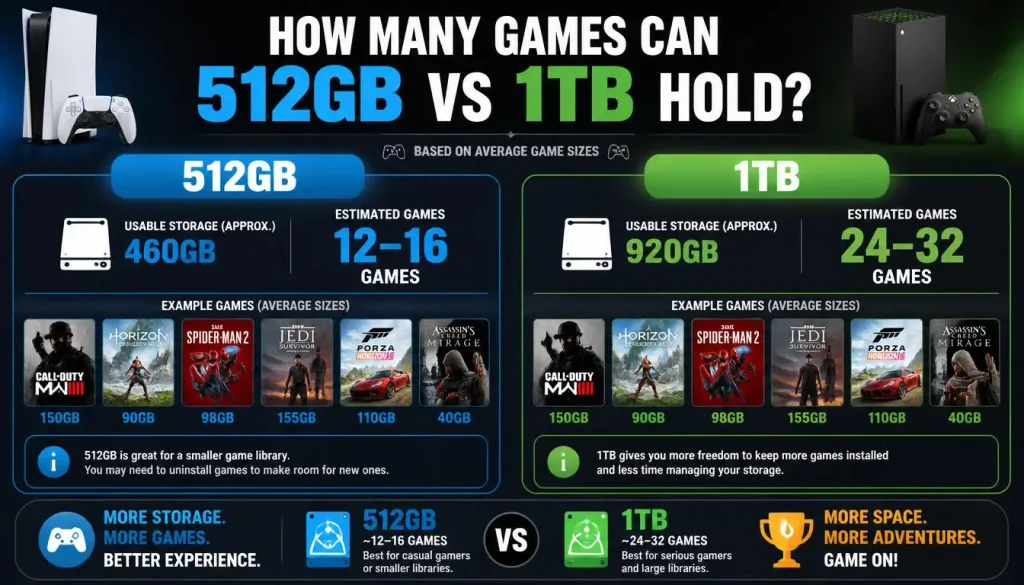
There is no accurate universal game count because game sizes vary enormously.
A better way to understand the difference is to look at real PC storage requirements.
At the time of checking, Steam lists approximately:
| Game | Listed Storage Requirement |
|---|---|
| Elden Ring | 60GB |
| Cyberpunk 2077 | 70GB |
| Forza Horizon 5 | 110GB |
| Baldur’s Gate 3 | 150GB |
Elden Ring lists 60GB of available storage, Cyberpunk 2077 lists 70GB, Forza Horizon 5 lists 110GB, and Baldur’s Gate 3 lists 150GB.
Those four games alone account for about 390GB of listed storage requirements.
That example shows why 512GB can become uncomfortable surprisingly quickly. The drive still needs room for Windows, launchers, updates, temporary files, other applications, and your personal data.
A 1TB SSD gives the same four-game library much more headroom.
Small and Esports Games
If your library is mainly competitive games and smaller titles, 512GB can be perfectly practical. You may be able to keep plenty of games installed because many esports titles are much smaller than heavyweight AAA releases.
Large AAA Games
If your library consists mostly of open-world games, RPGs, racing games, and other large releases, 1TB becomes much easier to recommend.
Do Not Forget Updates, DLC and Mods
The storage number shown on a game’s store page should not be treated as a permanent maximum.
Your real usage can grow because of:
- Patches and updates
- Expansion packs
- DLC
- High-resolution texture packs
- Mods
- Shader caches
- Screenshots
- Saved clips
- Recording files
This is another reason I prefer leaving comfortable free space instead of buying a drive that is almost full from day one.
Is 512GB SSD Enough for a Gaming Laptop?
Yes, 512GB can be enough for gaming, but only for the right type of user.
A 512GB gaming laptop makes sense if you usually play two or three main games at a time and do not mind removing old titles.
It is especially reasonable for competitive gamers who spend most of their time in a small number of games instead of maintaining a huge Steam library.
512GB Is Enough If You:
- Mainly play esports games.
- Rotate between only a few AAA games.
- Have fast, unlimited internet.
- Store media in the cloud or externally.
- Have another PC or storage device.
- Can add a second SSD later.
- Are trying to maximize GPU performance within a limited budget.
512GB May Not Be Enough If You:
- Keep many AAA games installed.
- Have slow internet or a data cap.
- Use large mods.
- Record gameplay locally.
- Edit videos.
- Store movies or large project files.
- Use the laptop for both work and gaming.
- Do not want to uninstall and redownload games regularly.
The real question is therefore not simply, “Is 512GB good for gaming?” It is:
Are you comfortable managing a smaller game library?
If the answer is yes, 512GB remains usable.
Is 1TB SSD Enough for Gaming?
For most gamers, 1TB is enough to provide a much more comfortable experience than 512GB.
You still cannot install an unlimited number of large games, but you have far more room before storage management becomes annoying.
I would choose 1TB if the laptop will be your main computer and you plan to keep it for several years.
Why 1TB Is Better for Most Gamers
You get more room for:
- AAA games
- Steam, Epic Games, Xbox and other launchers
- Game updates
- DLC
- Mods
- Windows updates
- Productivity software
- Gameplay clips
- Personal files
It is less about making games faster and more about removing storage friction.
When 1TB May Still Not Be Enough
A 1TB drive can still fill quickly if you install many 100GB+ games at once.
Consider 2TB or a second SSD if you are:
- A game collector
- A heavy mod user
- A streamer
- A video editor
- A creator working with large files
- Someone who rarely uninstalls anything
512GB vs 1TB SSD Performance: Is 1TB Faster for Gaming?
A common misconception is that a 1TB SSD automatically makes a gaming laptop faster than a 512GB SSD.
That is not how storage capacity works.
Gaming FPS
Moving from 512GB to 1TB does not inherently increase FPS.
Your CPU, GPU, RAM, cooling system, power limits, game settings, and resolution have a much larger influence on frame rate.
If two laptops are identical except for SSD capacity, do not expect the 1TB version to suddenly deliver a meaningful FPS advantage simply because the drive is larger.
Game Loading Times
Loading speed depends on the actual SSD.
You need to compare:
- SSD model
- NVMe versus SATA
- PCIe generation
- NAND
- Controller
- Read/write performance
- Laptop storage interface
A fast 512GB NVMe drive can outperform a slower 1TB SSD.
Capacity vs SSD Speed
This distinction is important:
512GB vs 1TB = capacity comparison.
PCIe Gen 3 vs Gen 4 vs Gen 5, NVMe vs SATA, and one SSD model vs another = performance comparison.
Do not mix the two.
For example, the Amazon-listed Samsung 990 EVO Plus 1TB is an NVMe drive with PCIe 4.0 x4/PCIe 5.0 x2 compatibility and advertised sequential reads of up to 7,150MB/s. Those specifications describe that particular SSD—not 1TB drives in general.
Real Amazon Examples: 512GB vs 1TB Gaming Laptops
To make the comparison easier to visualize, here are two currently listed Amazon examples built around a similar MSI Thin 15 platform.
These are shopping examples, not a controlled performance benchmark. Always compare the exact CPU, GPU, RAM, display, seller, warranty, and SSD configuration before purchasing.
512GB Example: MSI Thin 15 RTX 4060 Gaming Laptop
MSI Thin 15 Gaming Laptop – Core i5-13420H, RTX 4060, 16GB RAM, 512GB SSD (paid link)
Credit: Amazon
The Amazon listing specifies a Core i5-13420H processor, RTX 4060 laptop GPU, 16GB memory, a 144Hz Full HD display, and a 512GB NVMe SSD.
This type of configuration makes sense when your priority is getting strong GPU hardware while accepting a smaller initial SSD.
1TB Example: MSI Thin 15 RTX 4060 Gaming Laptop
MSI Thin 15 Gaming Laptop – Core i5-13420H, RTX 4060, 16GB RAM, 1TB NVMe SSD (paid link)
Credit: Amazon
Amazon lists this MSI Thin 15 configuration with the Core i5-13420H, RTX 4060, 16GB memory and a 1TB NVMe SSD.
For a gamer who wants more storage from day one, the 1TB configuration avoids much of the immediate storage pressure associated with a 512GB drive.
512GB vs 1TB SSD for AAA Gaming
For AAA gaming, I would usually choose 1TB.
Modern AAA games can consume tens or even hundreds of gigabytes each. Baldur’s Gate 3 alone lists 150GB of available storage, while Forza Horizon 5 lists 110GB.
With 512GB, a few large titles can consume most of your practical free space.
With 1TB, you have far more flexibility to keep several big games installed without immediately deciding what to delete.
Winner for AAA gaming: 1TB.
512GB vs 1TB SSD for Competitive Gaming
The answer changes for esports-focused players.
If you spend most of your gaming time on a small group of competitive titles, 512GB can be completely reasonable.
Competitive gamers often care more about:
- GPU performance
- CPU performance
- High refresh-rate display
- Low input latency
- Cooling
- Stable frame rates
If choosing a 1TB SSD forces you to downgrade an important performance component, the larger SSD may not be the smartest use of your budget.
Winner for budget competitive gaming: 512GB can be enough.
512GB vs 1TB for Gaming and Streaming
Streaming changes the storage equation.
OBS itself is not the problem. Local recordings are.
High-quality gameplay recordings can consume storage quickly, especially if you keep raw footage before editing or uploading it.
For gaming plus streaming, I would treat 1TB as the more practical minimum, and I would seriously consider a second SSD if you record frequently.
A useful setup is:
- Main SSD: Windows, applications and active games
- Second SSD: recordings, video projects and additional games
512GB vs 1TB for Gaming and College or Work
A gaming laptop often becomes a user’s everyday computer.
You may also need space for:
- Microsoft Office files
- University projects
- Programming tools
- Adobe applications
- Photos
- Videos
- Downloads
- Work documents
In that situation, 1TB makes even more sense.
Light gaming + schoolwork: 512GB can work.
AAA gaming + school/work: 1TB is the safer choice.
Gaming + professional content creation: Consider 1TB to 2TB.
Is 1TB SSD Worth It Over 512GB for a Gaming Laptop?
Usually, yes—but not at any price.
The value of a 1TB upgrade depends on how much the laptop manufacturer or seller charges for it.
Before paying more, compare three things:
- The price difference between the 512GB and 1TB configurations.
- The price of buying your own compatible 1TB SSD.
- Whether the laptop has a free second M.2 slot.
If the factory 1TB upgrade is reasonably priced, buying it from the start is convenient.
If the manufacturer charges a large premium and the laptop has an easy second M.2 slot, the 512GB configuration plus a later upgrade can offer better value.
Cost Per GB: 512GB vs 1TB
Do not compare only the final laptop price.
Think about cost per gigabyte.
For example, imagine two otherwise identical laptops:
- 512GB model: $1,000
- 1TB model: $1,080
You are paying $80 for roughly another 512GB of advertised storage.
That may be worthwhile if you value convenience.
But imagine the 1TB version costs $1,200 instead.
In that case, buying the cheaper configuration and installing your own SSD may be smarter—assuming the laptop supports easy expansion.
Always compare current prices because laptop and SSD pricing changes frequently.
Better GPU or Bigger SSD: Which Should You Prioritize?
This is one of the most important buying decisions.
Imagine you are choosing between:
Laptop A: RTX 5070 + 512GB SSD
Laptop B: RTX 5060 + 1TB SSD
If the laptops are otherwise comparable and the 512GB model can be upgraded later, I would generally prioritize the stronger GPU.
Why?
Storage is often replaceable or expandable.
The laptop GPU normally is not.
The same logic applies when comparing other configurations. Do not sacrifice a major gaming-performance component just to get more factory storage unless the smaller SSD cannot be upgraded or your storage requirements are unusually high.
Before buying, verify the exact model’s upgrade options.
Buy 1TB Now or Upgrade a 512GB Gaming Laptop Later?
There are three common approaches.
Option 1: Buy the 1TB Configuration
Best if you want:
- No installation work
- No drive cloning
- More storage immediately
- Simple setup
Option 2: Buy 512GB and Add a Second SSD
This can be the best-value solution when the laptop has an empty M.2 slot.
You keep the original Windows drive and add another SSD for games.
Option 3: Replace the 512GB SSD
This works when there is only one storage slot, but it may require:
- Cloning the original drive
- Reinstalling Windows
- Opening the laptop
- Checking SSD compatibility
Always check the manufacturer’s service manual or exact model specifications before ordering a drive.
Amazon SSD Upgrade Example
If your gaming laptop supports a compatible M.2 NVMe upgrade, one example available on Amazon is the:
Samsung 990 EVO Plus 1TB NVMe SSD (paid link)
Credit: Amazon
Amazon currently lists the 1TB 990 EVO Plus as an NVMe internal SSD compatible with laptops and desktops, with PCIe 4.0 x4/5.0 x2 support and advertised sequential read speeds up to 7,150MB/s. The listing was in stock when checked.
Compatibility warning: Do not buy an SSD based only on speed. Confirm your gaming laptop supports the drive’s M.2 form factor and interface first.
What to Check Before Upgrading a Gaming Laptop SSD
Before assuming that a 512GB laptop is easy to upgrade, check:
- Number of M.2 SSD slots
- Whether a second slot is empty
- Supported SSD form factor
- PCIe generation
- Maximum supported drive size
- Whether a heatsink will fit
- Ease of bottom-panel removal
- Manufacturer warranty terms
- Whether Windows needs cloning or reinstalling
A cheap 512GB laptop stops being a bargain if upgrading it is unusually difficult.
512GB Laptop + External SSD vs 1TB Internal SSD
An external SSD is another option, but it is not as convenient as having enough internal storage.
| Factor | 512GB + External SSD | 1TB Internal SSD |
|---|---|---|
| Portable setup | Extra device required | Cleaner |
| Cables | Usually yes | No |
| Storage expansion | Easy | Built in |
| Travel convenience | Lower | Better |
| Game library flexibility | Good | Good |
| Risk of unplugging device | Yes | No |
| Best use | Secondary library/storage | Main game library |
If you rarely travel and already own a fast external SSD, a 512GB laptop can be easier to live with.
For an all-in-one gaming laptop experience, I prefer 1TB internal storage.
512GB SSD + 1TB HDD vs 1TB SSD for Gaming
Some older or budget systems combine a smaller SSD with a larger hard drive.
A 512GB SSD + 1TB HDD setup gives you more total storage than a single 1TB SSD, but not all of that storage has SSD performance.
A practical arrangement would be:
- SSD: Windows and frequently played games
- HDD: media, backups and less performance-sensitive files
However, if the price is similar, I would generally prefer 1TB of all-SSD storage in a modern gaming laptop for simplicity, responsiveness, portability and fewer moving parts.
Does Internet Speed Affect Whether 512GB Is Enough?
Yes, indirectly.
Fast internet makes a smaller SSD easier to manage because you can uninstall a game and download it again later without much inconvenience.
A 512GB laptop becomes more frustrating if you have:
- Slow broadband
- Monthly data limits
- Shared internet
- Large AAA downloads
- Limited time to reinstall games
If downloading a 100GB game is a major event in your household, keeping more games installed locally has real value.
In that situation, the jump to 1TB is easier to justify.
Does a 1TB SSD Last Longer Than a 512GB SSD?
Drive endurance depends on the specific SSD model, NAND, controller, firmware, workload, and rated write endurance—not capacity alone.
Higher-capacity versions within the same SSD family can sometimes have higher write-endurance ratings, but you should check the manufacturer’s specifications rather than assuming every 1TB SSD lasts longer than every 512GB SSD.
For normal gaming, endurance usually matters less than it does for heavy write workloads such as constant video recording or professional scratch-disk use.
For buyers who record gameplay every day, checking the SSD’s TBW rating and warranty is worthwhile.
Capacity Is Not Everything: Check the SSD Type Too
Do not choose a gaming laptop based only on “512GB” or “1TB.”
Check what kind of SSD you are actually getting.
Important terms include:
NVMe
NVMe SSDs communicate through PCIe and are standard in many modern gaming laptops.
SATA SSD
SATA SSDs are still much faster than mechanical hard drives but have lower interface bandwidth than modern PCIe NVMe drives.
PCIe Gen 3, Gen 4 and Gen 5
These describe generations of the PCIe interface.
A higher generation can support more bandwidth, but real gaming benefits depend on the SSD, laptop and workload.
M.2
M.2 describes a physical form factor commonly used for internal laptop SSDs.
When shopping for an upgrade, compatibility matters more than buying the drive with the biggest benchmark number.
Is 1TB More Future-Proof Than 512GB for Gaming?
Yes, from a storage-capacity perspective.
Games are not becoming easier to fit into a small drive, and your laptop will probably accumulate more applications, screenshots, recordings, documents, updates, and miscellaneous files over time.
That does not mean every gamer needs 2TB.
It simply means that 1TB gives you a larger margin before storage becomes a recurring problem.
If you plan to keep your laptop for three to five years, I would lean toward 1TB unless:
- The 512GB model is significantly cheaper.
- It has excellent storage upgradeability.
- You play a small number of games.
- You already own additional storage.
Should You Skip 1TB and Buy 2TB Instead?
For many gamers, 2TB is a luxury rather than a necessity.
But it makes sense if you:
- Maintain a large Steam library.
- Play many 100GB+ games.
- Use extensive mods.
- Record gameplay.
- Edit videos.
- Have only one M.2 slot.
- Want minimal storage management for several years.
For an average gamer, I would still describe 1TB as the sweet spot.
For a power user, 2TB can be worth the additional cost.
512GB vs 1TB SSD Gaming Laptop: Pros and Cons
512GB SSD Pros
- Lower initial cost
- Enough for smaller gaming libraries
- Suitable for esports-focused players
- Lets you spend more budget on GPU or CPU
- Can be a good choice if storage is easily upgradeable
512GB SSD Cons
- Fills quickly with AAA games
- Less room for updates and DLC
- Requires more frequent uninstalling
- Less convenient for streaming and recording
- Limited long-term headroom
1TB SSD Pros
- Nearly twice the advertised capacity
- Better for AAA libraries
- More room for Windows, apps and files
- Less storage management
- Better for streaming and content creation
- More comfortable for long-term ownership
1TB SSD Cons
- Higher purchase price
- Still possible to fill with a large library
- Factory upgrade pricing can sometimes be poor value
- Does not automatically improve FPS
Who Should Buy a 512GB Gaming Laptop?
Buy a 512GB model if most of these sound like you:
- You are on a strict budget.
- You mainly play esports games.
- You keep only a few large games installed.
- Your internet is fast.
- The laptop has a free M.2 slot.
- You are comfortable upgrading later.
- Choosing 512GB allows you to buy a better GPU.
For this buyer, 512GB can be a smart budget decision rather than a compromise.
Who Should Buy a 1TB Gaming Laptop?
Buy a 1TB model if:
- You regularly play AAA games.
- You want several games installed at the same time.
- The laptop is also your main work or school computer.
- You record gameplay.
- You use mods.
- Your internet is slow or capped.
- You do not want to manage storage every few weeks.
- You plan to keep the laptop for several years.
For most mainstream gaming-laptop buyers, this is the configuration I would choose.
Quick Decision Table: 512GB or 1TB?
| Your Situation | Better Choice |
|---|---|
| Strict budget | 512GB |
| Mostly esports games | 512GB |
| Only 2–3 main games installed | 512GB |
| Easy second SSD upgrade | 512GB can make sense |
| Several AAA games | 1TB |
| Slow internet | 1TB |
| Gaming + school/work | 1TB |
| Streaming and recording | 1TB or more |
| Large mod library | 1TB or more |
| Hate uninstalling games | 1TB |
| Large Steam library | 1TB–2TB |
| Content creation | 1TB–2TB |
| Long-term convenience | 1TB |
512GB vs 1TB SSD Gaming Laptop: Final Recommendation
For most buyers, 1TB is the better storage size for a gaming laptop.
It gives you enough extra capacity to make a noticeable difference in everyday ownership without moving into the cost of a very large drive.
I would choose 512GB when the budget is tight, the game library is small, or the laptop has an easy upgrade path.
I would choose 1TB when the laptop will be used for AAA gaming, school, work, streaming, recording, mods, or long-term ownership.
There is one important exception: do not sacrifice a significantly better GPU just to get a bigger SSD if the smaller SSD can easily be upgraded later.
A stronger GPU affects the games you can run and the frame rates you can achieve. Storage is often much easier to expand.
So the simplest buying rule is:
512GB = workable.
1TB = comfortable.
2TB = ideal for large libraries and power users.
For the typical gamer choosing between otherwise comparable laptops, 1TB is the option I would buy.
Frequently Asked Questions
Is 512GB SSD enough for a gaming laptop?
Yes. A 512GB SSD can be enough if you play a limited number of games, mainly use smaller or esports titles, and are comfortable uninstalling games when necessary.
Is 1TB SSD enough for gaming?
Yes. For most gamers, 1TB provides a good balance between price and storage capacity. Heavy game collectors and content creators may eventually want 2TB or additional storage.
How many games can a 512GB SSD hold?
It depends entirely on game size. Several small games can fit easily, while only a handful of very large AAA titles can consume most of the practical free space.
How many games can a 1TB SSD hold?
It depends on the games. A 1TB drive can accommodate a much larger mixed library than 512GB, but several 100GB+ games can still consume the drive quickly.
Is 1TB SSD faster than 512GB SSD?
Not necessarily. Capacity alone does not determine SSD speed. Compare the exact drive model, controller, NAND, PCIe generation, and read/write specifications.
Does a bigger SSD increase FPS?
Not by itself. Moving from 512GB to 1TB does not inherently increase gaming FPS. CPU, GPU, RAM, cooling, power limits and game settings matter far more for frame rate.
Is 512GB SSD good for AAA gaming?
It can work, but storage management becomes important. Large AAA games can consume 60GB, 100GB, 150GB or more each, so 1TB is more convenient.
Should I get 512GB or 1TB for gaming?
Choose 512GB if you are budget-focused and can upgrade later. Choose 1TB if you want a larger installed game library and less storage management.
Should I buy a 512GB gaming laptop and upgrade later?
Yes, if the laptop has an accessible free M.2 slot or allows the original drive to be replaced easily. Check the exact model before buying.
Is 512GB enough for Steam games?
It can be enough for a focused Steam library, but users who keep many AAA games installed will benefit significantly from 1TB or more.
Is 1TB enough for AAA gaming?
For most users, yes. It provides much more flexibility than 512GB, although a very large AAA library can eventually require 2TB.
Is 512GB SSD plus 1TB HDD good for gaming?
It can provide good total capacity, but a 1TB SSD gives you more all-SSD storage. Keep frequently played games on the SSD if you use an SSD/HDD combination.
Is an external SSD good for gaming laptops?
Yes, a compatible external SSD can be useful for expanding your game library, although internal storage is usually cleaner and more convenient for a portable setup.
Should I choose a better GPU or more SSD storage?
If the smaller SSD can be upgraded later, prioritize the stronger GPU in most gaming-focused purchases. Laptop GPUs usually cannot be replaced, while storage often can.
Is 2TB overkill for a gaming laptop?
Not for users with large game libraries, mods, recordings, or video projects. For an average gamer, however, 1TB usually offers the better balance of cost and capacity.
How much free SSD space should I keep?
Avoid planning a laptop purchase around filling the drive completely. Leave working room for Windows updates, game patches, temporary files, new installations, and normal system operation.
Does a full SSD slow down a gaming laptop?
An almost-full SSD can create practical problems because the operating system, applications, updates, and the SSD itself need working space. Regardless of capacity, avoid running your primary drive with virtually no free space.
Is 1TB worth the extra money over 512GB?
For most AAA gamers, yes—provided the price premium is reasonable. If the factory upgrade is expensive and the laptop has easy SSD expansion, buying 512GB and upgrading later can offer better value.
1 thought on “512GB vs 1TB SSD Gaming Laptop: Which Storage Size Should You Choose?”
Comments are closed.