If you are comparing gaming laptops, you may notice that two models can use the same NVIDIA GeForce RTX GPU but deliver noticeably different gaming performance. One of the main reasons is TGP.
TGP stands for Total Graphics Power. In simple terms, it describes the power budget available to a laptop’s graphics hardware and is measured in watts. A GPU with more available power can often maintain higher clock speeds and deliver stronger performance, provided the laptop has enough cooling to handle it. ASUS describes TGP as the maximum amount of power a laptop graphics card can use for performance.
That is why checking only the words “RTX 5060” or “RTX 5070” on a product page is not always enough. If you want to understand how fast a gaming laptop may actually be, TGP deserves your attention.
What Does TGP Mean in a Gaming Laptop?
TGP stands for Total Graphics Power. It is usually expressed in watts, such as 60W, 100W, 115W, or 150W.
Think of TGP as the amount of electrical power the laptop manufacturer allows the graphics system to use under suitable workloads.
For example, imagine two laptops using the same GPU:
- Laptop A: RTX 5060 Laptop GPU with a lower power configuration
- Laptop B: RTX 5060 Laptop GPU with a higher power configuration
Even though the GPU name is identical, Laptop B may be able to maintain higher GPU clock speeds during demanding games. As a result, it may produce higher frame rates.
However, TGP is only one part of the performance equation. Cooling, CPU performance, memory, GPU architecture, game settings, and thermal limits also matter.
How Does Laptop GPU TGP Work?
A gaming laptop has a limited amount of power and cooling capacity. The CPU, GPU, display, storage, fans, and other components all need energy.
Laptop manufacturers therefore configure the graphics system to operate within a specific power range.
A thin gaming laptop might use a lower GPU power limit because the chassis cannot remove as much heat. A thicker performance-focused laptop may allow the GPU to consume more power because it has larger fans, heatsinks, vapor chambers, or additional cooling hardware.
This is one reason the same graphics chip can behave differently in different laptops.
More power can allow the GPU to sustain higher frequencies, but only when the workload needs it and the system has enough thermal and electrical headroom.
TGP vs GPU Power Limit vs Maximum Graphics Power
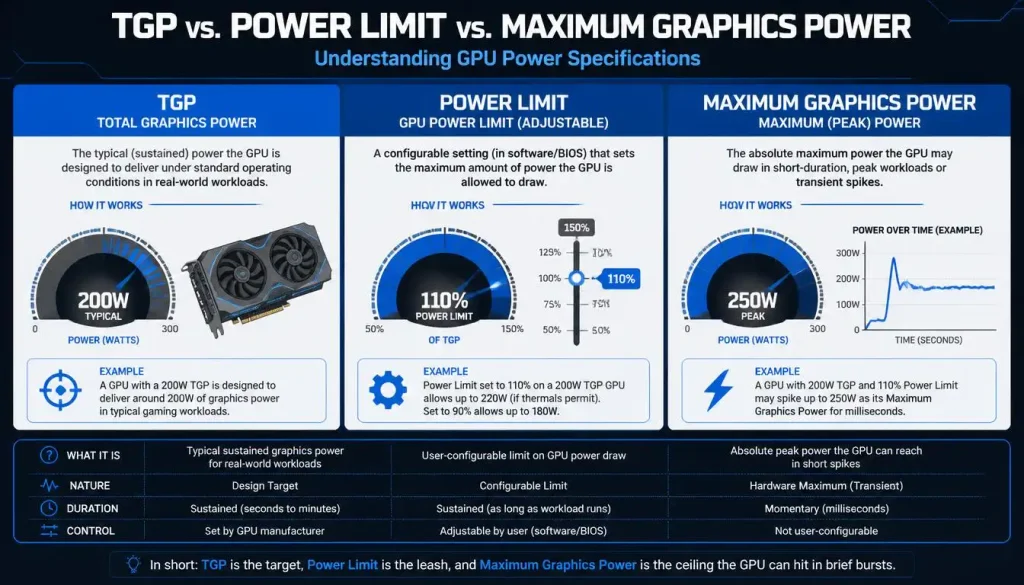
These terms are closely related, but manufacturers and software tools do not always use exactly the same wording.
TGP
TGP usually refers to the total graphics power budget configured for the laptop GPU.
GPU Power Limit
The GPU power limit is the maximum amount of power the system allows the graphics hardware to draw under specific operating conditions.
Maximum Graphics Power
You may see Maximum Graphics Power listed in NVIDIA software or on a laptop specification page.
ASUS, for example, recommends checking the laptop’s official specifications or looking under System Information in NVIDIA software for fields such as Power Limit or Maximum Graphics Power.
For a buyer, the practical lesson is simple: do not get too distracted by the naming. What matters is how much graphics power the exact laptop model is configured to provide.
Why Is TGP Important for Gaming Laptops?
TGP matters because modern laptop GPUs can operate across different power configurations.
A higher power budget can help a GPU:
- Maintain higher clock speeds
- Deliver more FPS in GPU-heavy games
- Handle demanding graphics settings more comfortably
- Improve rendering performance in some creative workloads
- Sustain performance for longer when cooling is sufficient
ASUS notes that higher TGP can improve frame rates and sustained GPU performance, while also requiring a more capable cooling system.
This makes TGP particularly useful when you are comparing two laptops that use the same GPU.
If one RTX 5070 laptop is configured for significantly more graphics power than another, the two machines should not automatically be expected to perform identically.
How Does TGP Affect FPS and Gaming Performance?
When a game places heavy demand on the GPU, the graphics chip attempts to operate as fast as its power, temperature, voltage, and frequency limits allow.
Providing more available power can give the GPU more room to boost.
For example, if a GPU is constantly hitting its power limit during a demanding game, a higher-TGP version of the same GPU may be able to maintain higher clocks and produce more frames.
But the relationship between wattage and FPS is not perfectly linear.
Moving from 60W to 100W does not automatically mean you will receive 66% more FPS. GPUs become less efficient as clocks and power increase, and other bottlenecks can limit performance.
Low-TGP Gaming Laptop
A lower-TGP laptop may offer:
- Lower temperatures
- Quieter fans
- A thinner chassis
- Better portability
- Lower power consumption
It can make sense for esports, casual gaming, school, work, travel, and users who prioritize portability.
High-TGP Gaming Laptop
A higher-TGP model is generally aimed at users who prioritize:
- Maximum gaming performance
- Higher graphics settings
- High-refresh-rate gaming
- GPU-heavy AAA titles
- 3D rendering
- Video production
- Other demanding GPU workloads
The trade-off is usually more heat, more cooling demand, and potentially more fan noise.
Why Can Two Laptops With the Same GPU Perform Differently?
This is one of the most important things to understand when buying a gaming laptop.
Suppose two laptops both advertise an RTX 5070 Laptop GPU.
That does not guarantee identical performance.
Their results may differ because of:
- Different GPU power configurations
- Different CPU models
- Different cooling systems
- Different memory configurations
- Different performance profiles
- Different chassis sizes
- Different thermal limits
- Different display resolutions
- Different firmware tuning
NVIDIA itself lists broad power ranges for its current laptop GPUs rather than one fixed wattage for every notebook.
This is why comparing the exact laptop models is much more useful than comparing GPU names alone.
Does Higher TGP Always Mean Better Performance?
No.
Higher TGP is useful, but more watts do not automatically make one gaming laptop better than another.
For example, a well-designed laptop with excellent cooling may sustain its performance consistently, while another laptop with a high advertised GPU power figure may run closer to thermal or system limits.
GPU architecture also matters.
A newer, more efficient GPU may produce more performance per watt than an older design. Comparing the wattage of completely different GPU generations therefore tells you very little by itself.
You should also consider:
- GPU model and generation
- VRAM capacity
- CPU
- Cooling quality
- RAM
- Screen resolution
- Real gaming benchmarks
- Noise
- Battery life
- Price
TGP is most useful when comparing similar laptops rather than judging an entire gaming system from one number.
Rated TGP vs Actual GPU Power Draw
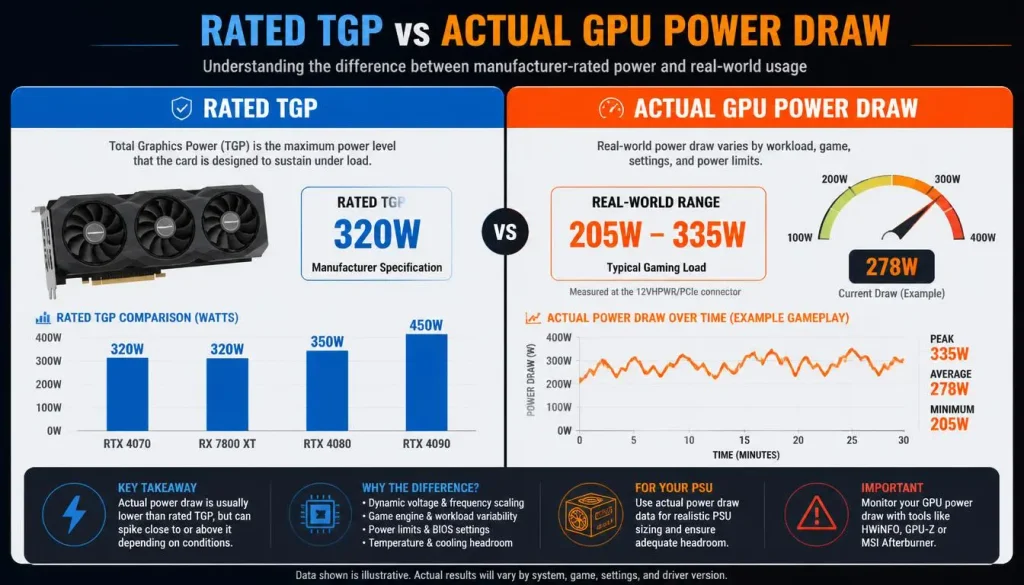
A common mistake is assuming a 100W GPU must consume exactly 100W whenever you launch a game.
It does not work that way.
The advertised power figure is a limit or available power budget, not a promise that the GPU will continuously consume that amount.
A GPU may draw only 55W during a lighter game and move much closer to its maximum power during a demanding AAA title.
Actual power consumption changes according to workload.
It can also be affected by:
- Frame-rate caps
- Game engine limitations
- CPU bottlenecks
- Temperature
- GPU utilization
- Performance mode
- Dynamic power management
So if monitoring software shows your GPU below its maximum rated wattage, that does not automatically mean something is wrong.
Why Is My GPU Not Reaching Its Maximum TGP?
Seeing less power draw than the advertised maximum can be completely normal.
Here are the most common reasons.
The Game Does Not Need Maximum GPU Power
Older games, esports titles, or games running at low settings may not place enough demand on the GPU to require its full power budget.
You Have an FPS Limit
If you cap a game at 60 FPS, the GPU may reduce clocks and power consumption once it can comfortably maintain that frame rate.
Your Game Is CPU-Limited
In CPU-heavy games, the processor may become the bottleneck before the GPU reaches maximum utilization.
Giving the GPU more power will not fix a CPU bottleneck.
The Laptop Is in Balanced or Silent Mode
Many gaming laptops include Silent, Balanced, Performance, and Turbo profiles.
A quiet profile may intentionally reduce CPU and GPU power to control fan noise and temperature.
Temperature Is Limiting Performance
A GPU may reduce frequency or power when temperatures become too high.
This is why cooling design matters so much in performance-focused gaming laptops.
You Are Gaming on Battery Power
Gaming laptops normally deliver their strongest performance while connected to the correct AC adapter.
Battery operation prioritizes efficiency and runtime, so GPU performance may be significantly reduced.
Dynamic Power Is Being Used Elsewhere
Modern gaming laptops can dynamically balance power between the CPU and GPU.
NVIDIA Dynamic Boost, for example, automatically adjusts power between the GPU, GPU memory, and CPU depending on the workload.
This means the GPU does not necessarily receive its maximum possible allocation every second.
Base TGP, Maximum TGP, and NVIDIA Dynamic Boost
Laptop power specifications can become confusing because manufacturers may describe base power and maximum boosted power differently.
A laptop might have a normal GPU power allocation and then gain additional power when system conditions allow it.
This is where NVIDIA Dynamic Boost becomes important.
Dynamic Boost automatically manages power between the CPU, GPU, and GPU memory according to the workload.
Imagine a game that is heavily GPU-bound but does not need much CPU power. The system may shift available power toward the GPU.
In a CPU-heavy workload, the power balance may change again.
Therefore, when you see a phrase such as “Max TGP with Dynamic Boost,” read the specification carefully. The maximum figure may not represent a constant power draw.
RTX 50 Series Laptop GPU Power Ranges
NVIDIA currently lists the following GPU Subsystem Power ranges for its GeForce RTX 50-series Laptop GPUs:
| Laptop GPU | NVIDIA-Listed GPU Subsystem Power |
|---|---|
| GeForce RTX 5090 Laptop GPU | 95–150W |
| GeForce RTX 5080 Laptop GPU | 80–150W |
| GeForce RTX 5070 Ti Laptop GPU | 60–115W |
| GeForce RTX 5070 Laptop GPU | 50–100W |
| GeForce RTX 5060 Laptop GPU | 45–100W |
| GeForce RTX 5050 Laptop GPU | 35–100W |
These ranges make one thing clear: the GPU name alone does not tell you its exact laptop power configuration.
There is another detail buyers need to understand. NVIDIA’s comparison table uses the term GPU Subsystem Power, while individual laptop manufacturers may advertise a separate maximum TGP that includes Dynamic Boost behavior.
For example, ASUS advertises a 2025 ROG Strix G16 configuration with an RTX 5080 Laptop GPU at up to 175W max TGP with Dynamic Boost, even though NVIDIA’s general RTX 5080 Laptop GPU subsystem-power table lists an 80–150W range.
That is exactly why you should verify the specification of the specific laptop, not rely on a generic GPU chart.
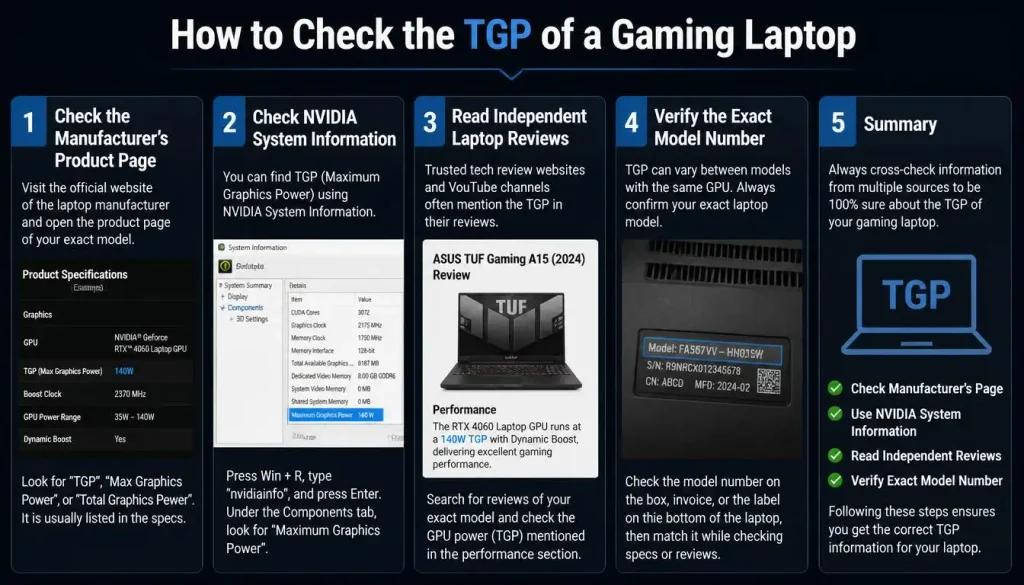
How to Check the TGP of a Gaming Laptop
The easiest time to check TGP is before you buy.
1. Check the Manufacturer’s Product Page
Search for the full model number of the laptop and open the manufacturer’s technical specifications.
Look under:
- Graphics
- GPU
- Maximum Graphics Power
- TGP
- Power Limit
- GPU power
This is usually more reliable than a short retailer listing.
2. Check NVIDIA System Information
For supported NVIDIA laptops, open NVIDIA software and look at the system or graphics information.
Depending on the software version and laptop, you may see a field such as Maximum Graphics Power or Power Limit. ASUS documents this method for checking supported systems.
3. Read Independent Laptop Reviews
A good review can tell you more than the specification sheet.
Look for:
- Sustained GPU wattage
- Gaming temperatures
- GPU clock speeds
- Fan noise
- Actual game benchmarks
These details show whether the laptop can maintain strong performance in real use.
4. Verify the Exact Model Number
Never assume every version of a laptop has the same GPU configuration.
The same product family may be sold with different processors, GPUs, displays, and power limits in the USA, UK, Canada, and Australia.
Always compare the exact SKU or model number you plan to purchase.
What Is a Good TGP for a Gaming Laptop?
There is no single TGP number that is perfect for everyone.
A “good TGP” depends on the GPU itself, your games, resolution, cooling design, and performance goals.
Is 45W TGP Good for Gaming?
It can be.
A 45W configuration may suit lighter gaming, esports, and thin-and-light laptops, particularly when paired with an efficient modern GPU.
Do not judge it without checking benchmarks for the exact GPU.
Is 60W TGP Good for Gaming?
A 60W laptop GPU can provide a useful balance between performance and portability.
It may work well for 1080p gaming depending on the GPU model and game settings.
Is 80W TGP Good for Gaming?
80W is common territory for performance-oriented thin gaming laptops.
With the right GPU, it can deliver strong 1080p performance and handle many more demanding games.
Is 100W TGP Good for Gaming?
For many modern laptop GPUs, 100W offers substantial graphics power.
However, remember that a 100W RTX 5050 and a 100W RTX 5070 are completely different GPUs. Wattage alone cannot tell you which one is faster.
Is 115W TGP Good for Gaming?
A 115W graphics configuration can be a strong option for gaming laptops designed for sustained performance.
The cooling system becomes increasingly important as power rises.
Is 150W TGP Good for Gaming?
150W represents a high graphics power level in current performance-focused gaming laptops.
It is most relevant to high-end GPUs and systems designed to prioritize maximum performance over thinness or battery life.
The best rule is simple:
Choose the GPU first, then compare TGP among laptops using that GPU.
High TGP vs Low TGP Gaming Laptop
| Factor | Higher TGP | Lower TGP |
|---|---|---|
| Gaming performance | Usually higher with the same GPU | Usually lower with the same GPU |
| GPU clock potential | Higher | Lower |
| Heat output | Usually higher | Usually lower |
| Cooling requirement | Greater | Lower |
| Fan noise | Can be higher | Often quieter |
| Power consumption | Higher | Lower |
| Portability | Often found in larger systems | Common in thinner laptops |
| Battery-friendly design | Less of a priority | Often a bigger priority |
| Best for | Maximum performance | Portability and efficiency |
Neither option is automatically better.
A university student who carries a laptop every day may prefer a thinner lower-power model. Someone buying a desktop-replacement gaming machine may be happier with a high-TGP laptop.
Can a Higher-TGP Lower-Tier GPU Beat a Lower-TGP Higher-Tier GPU?
Sometimes, yes—but this should not be treated as a universal rule.
A heavily power-limited higher-tier GPU may not perform as well as expected, while a lower-tier chip operating with a generous power budget may get much closer to it than the model names suggest.
ASUS specifically notes that a lower-end GPU with higher TGP can sometimes outperform a higher-end GPU operating at a lower TGP.
However, GPU specifications still matter.
A higher-tier GPU may have:
- More CUDA cores
- More VRAM
- A wider memory interface
- More ray-tracing hardware
- More AI processing capability
The only reliable way to settle a close comparison is to look at benchmarks from the exact laptops.
TGP vs TDP: What Is the Difference?
TGP and TDP are often confused, but they should not automatically be treated as the same specification.
| Term | Full Form | Main Purpose |
|---|---|---|
| TGP | Total Graphics Power | Describes the graphics power budget |
| TDP | Thermal Design Power | Commonly relates to the thermal/power design target used when designing cooling |
| TBP | Total Board Power | Commonly used for total graphics-card board power, especially on desktop hardware |
For gaming-laptop shopping, TGP or Maximum Graphics Power is normally the more useful number when you are trying to understand GPU power configuration.
Can You Increase the TGP of a Gaming Laptop?
Sometimes you can access more of the laptop’s manufacturer-supported graphics power by choosing the correct performance mode.
For example, a manufacturer utility may offer:
- Silent mode
- Balanced mode
- Performance mode
- Turbo mode
Dynamic Boost can also automatically allocate more available power toward the GPU when a workload benefits from it.
However, laptop GPU power limits are heavily tied to the manufacturer’s firmware, motherboard design, charger, cooling system, and validated thermal limits.
Trying to force an unsupported power limit through modified firmware is not the same as selecting an official performance profile and can create stability, temperature, or hardware problems.
For most users, the better solution is to buy a laptop with the desired GPU power configuration from the start.
How TGP Affects Heat, Fan Noise, Efficiency, and Battery Life
More performance requires energy, and that energy eventually becomes heat.
A higher-TGP laptop therefore needs enough cooling capacity to remove heat from the GPU and surrounding components.
This can mean:
- Larger heatsinks
- More heat pipes
- Vapor chambers
- Multiple fans
- Faster fan speeds
- A thicker chassis
Higher graphics power can also lead to more fan noise during gaming.
Lower-TGP laptops often prioritize efficiency instead. They may run quieter, fit into thinner designs, and use less power under load.
ASUS similarly highlights the trade-off between higher TGP performance and the portability, noise, and battery advantages often associated with lower-power configurations.
Does TGP Affect Battery Life?
TGP can influence overall power consumption, but you should not estimate battery life simply by looking at the GPU’s maximum wattage.
Most gaming laptops reduce graphics performance dramatically when disconnected from the charger.
Battery life also depends on:
- CPU efficiency
- Display brightness
- Refresh rate
- Battery capacity
- Integrated graphics switching
- Background applications
- Windows power settings
- Gaming versus normal desktop use
If battery life matters to you, check independent battery tests rather than using TGP as your only guide.
TGP vs VRAM: Which Matters More?
They measure completely different things.
TGP tells you about the GPU’s power budget.
VRAM is the dedicated graphics memory available to store textures, frame buffers, and other graphical data.
A GPU can have plenty of VRAM but still operate at a relatively low power configuration. Another GPU can have a high TGP but less VRAM.
For modern gaming, both can matter.
When choosing between laptops, consider GPU model, power configuration, VRAM capacity, and actual game benchmarks together.
Should You Choose a Gaming Laptop Based on TGP Alone?
No.
TGP is useful, but buying a laptop based only on the highest wattage number is a mistake.
Before buying, check:
- Exact GPU model
- GPU power configuration
- CPU
- VRAM
- Cooling system
- RAM capacity and configuration
- Display resolution and refresh rate
- Real gaming benchmarks
- Temperature and fan noise
- Battery life
- Weight and portability
- Price
This gives you a much more complete picture of the laptop.
How to Compare Two Gaming Laptops With the Same GPU
If two laptops use the same graphics chip, follow this process.
Step 1: Confirm the Exact GPU
Make sure both machines genuinely use the same Laptop GPU, not simply GPUs with similar names.
Step 2: Compare Their GPU Power Specifications
Find the TGP, Maximum Graphics Power, or manufacturer-listed GPU power configuration.
Step 3: Compare Cooling
A laptop needs enough cooling to sustain high power without excessive temperature or noise.
Step 4: Compare CPUs
A stronger GPU will not always help if the game becomes CPU-limited.
Step 5: Check the Display Resolution
A laptop running games at 2560×1600 has a much heavier GPU workload than one running at 1920×1080.
Step 6: Check Actual Gaming Benchmarks
Look for tests using the exact laptop configurations whenever possible.
Step 7: Compare Price
A slightly faster high-TGP laptop is not automatically the better purchase if it costs hundreds of dollars more.
The best gaming laptop is the one that gives you the right balance of performance, price, portability, display quality, cooling, and battery life.
Common TGP Mistakes to Avoid When Buying a Gaming Laptop
Looking Only at the GPU Name
“RTX 5070” does not tell you everything about how the GPU is configured inside a particular laptop.
Assuming More Watts Always Means More FPS
Performance gains usually become less efficient as power rises, and other bottlenecks can prevent additional wattage from helping.
Comparing Different GPUs Only by TGP
A 100W GPU from one performance tier is not automatically comparable to another 100W GPU.
Ignoring Cooling
A high power limit is much less useful if the laptop cannot sustain performance comfortably.
Confusing Maximum TGP With Constant Power Draw
A maximum value is not the amount of power the GPU will use every second.
Ignoring Dynamic Boost
Part of the advertised maximum graphics power may depend on dynamic system power allocation.
Trusting Incomplete Retail Listings
Retailers often focus on the GPU model and leave detailed power information out.
Always verify important specifications using the laptop manufacturer’s page and reliable reviews.
Frequently Asked Questions About What Is TGP in a Gaming Laptop
What does TGP mean in a gaming laptop?
TGP means Total Graphics Power. It refers to the graphics power budget available to a laptop GPU and is measured in watts.
Does TGP affect FPS?
Yes, TGP can affect FPS. A higher power configuration can allow the same GPU to sustain higher clocks in demanding workloads, although the performance increase is not always proportional to the extra wattage.
Is higher TGP better for gaming?
Usually, a higher TGP can improve performance when comparing the same GPU. However, cooling, CPU performance, GPU architecture, and thermal limits also affect gaming results.
Is 100W TGP good for gaming?
100W can provide strong gaming performance with many modern laptop GPUs. Whether it is “good” depends on the exact GPU, resolution, cooling, and the games you play.
How do I check my laptop GPU TGP?
Check the manufacturer’s specification page first. On supported NVIDIA laptops, you may also find Maximum Graphics Power or Power Limit information in NVIDIA system information.
Why is my GPU not reaching its maximum TGP?
Your game may not need full GPU power, the system may be CPU-limited, an FPS cap may be active, the laptop may be in a quieter power mode, or thermal and dynamic power-management limits may be affecting consumption.
Does a higher TGP increase temperature?
It can. More GPU power generally creates more heat, so high-TGP laptops require stronger cooling to sustain performance.
Does TGP affect battery life?
It can influence power consumption, but gaming laptops usually reduce GPU performance while running on battery. Actual battery life depends on the entire system.
Can two laptops with the same GPU have different FPS?
Yes. Different power configurations, CPUs, cooling systems, memory, firmware, and display resolutions can lead to different gaming performance even when the GPU model is the same.
Can I increase my gaming laptop’s TGP?
You may be able to access the manufacturer’s supported maximum performance by using Performance or Turbo mode. Manually exceeding manufacturer limits is generally not recommended.
Is TGP more important than the GPU model?
No. Start with the GPU model, then use TGP to compare how that GPU is configured in different laptops.
What is the difference between TGP and Maximum Graphics Power?
They are closely related terms used to describe graphics power limits or configurations. Exact naming varies between GPU vendors, laptop manufacturers, and software tools.
Final Verdict: How Much Does TGP Really Matter?
TGP matters a lot when you are comparing gaming laptops, but it should never be the only specification you check.
The biggest takeaway is this: two laptops with the same GPU name can deliver different performance because their graphics power, cooling, CPU, and overall system design may be different.
Start by choosing the right GPU for your games and resolution. Then compare the TGP or Maximum Graphics Power of laptops using that GPU. Finally, check real gaming benchmarks, cooling performance, noise, display quality, battery life, and price.
If you follow that approach, TGP becomes genuinely useful instead of just another confusing number on a gaming laptop specification sheet.
1 thought on “What Is TGP in a Gaming Laptop? Complete Guide to GPU Power and Performance”
Comments are closed.