Are thin gaming laptops good for gaming? Yes, when you match the laptop to the games you play and the settings you expect. The word "thin" hides big differences in cooling, GPU wattage, and sustained performance.
As of 2026, many slim gaming notebooks range from 15mm to 21mm thick and use discrete GPUs rated from 35W to 140W. The real test is how long the laptop can hold its clock speeds under load, not how it looks closed. Let's start with what "thin" actually means.
Why "Thin Gaming Laptop" Doesn't Mean One Thing
Thin is a marketing word, not a performance class. A 16-inch machine can be 17mm thick and still run a 140W GPU if the cooling system is large enough. Another 15-inch machine can be 16mm thick and cap the same GPU at 55W.
Chassis thickness is measured in millimeters, but GPU TGP is measured in watts. Those two numbers do not move together. A vapor chamber, large fans, and thick heat pipes can make a slim laptop run harder than a thicker one with a basic cooler.
You also need to separate weight from thickness. A laptop can be thin but heavy because of a metal lid, large battery, or copper cooling hardware. Likewise, a thicker plastic chassis can weigh less.
When you compare models, look for three numbers first:
- Thickness in mm
- GPU TGP in watts
- Sustained CPU power in watts
If a listing only says "thin and light," it is not telling you enough. You should also check whether the RAM is upgradeable, how many fans are used, and whether the manufacturer publishes sustained power limits. Some brands advertise peak GPU wattage but drop to much lower sustained power after a few minutes.
How Thin Laptops Actually Run Games
Games stress both the CPU and GPU, and heat is the main limit. In a slim chassis, the cooling system has less room for fans and heat pipes. That means the laptop may lower clock speeds to stay within safe temperatures.
This is called thermal throttling.
A thin laptop can still deliver good gaming if the manufacturer gives the GPU enough power and keeps temperatures controlled. Many use performance modes that raise fan speed and power limits. Some also use a MUX switch, which lets the discrete GPU send frames directly to the display instead of routing through the integrated graphics.
Real performance depends on sustained FPS, not a short benchmark spike. You should check 1% low FPS, temperatures, and fan noise, not just average frame rates. Official GPU power specs can help you understand the wattage range for a given GPU name.
Upscaling helps too. DLSS, FSR, and XeSS can raise frame rates at 1080p or 1440p without needing a much thicker laptop. That is why a slim machine with a mid-range GPU can feel smoother than its raw specs suggest.
If you care about smoother motion, keyboard responsiveness matters too, especially in fast shooters.
Thin vs Thick Gaming Laptops: The Real Trade-Offs
The choice is usually portability versus sustained power. Thin laptops are easier to carry, fit in standard sleeves, and look more normal in class or meetings. Thick laptops usually offer more cooling room, higher GPU wattage, and easier upgrades.
A thick gaming laptop may run quieter at high settings because the fans do not need to spin as fast. It may also handle long gaming sessions better. A thin laptop can match it in short sessions, but it may run hotter and louder.
Price can surprise you. Some thin models cost more because compact cooling and premium materials are expensive. A thicker laptop with the same GPU may cost less and perform better.
If you play esports titles at 1080p, a thin laptop is often enough. If you play demanding AAA games at high settings for hours, thickness matters more. For travel-heavy users, better laptop audio and port charging support can make a slim machine feel more complete.
Side-by-Side Comparison
| Factor | Thin Gaming Laptop | Thick Gaming Laptop |
|---|---|---|
| Portability | High | Lower |
| Cooling room | Limited | Larger |
| Typical GPU power | 35W to 100W | 80W to 175W+ |
| Sustained FPS | Good to very good | Usually higher |
| Fan noise under load | Often higher | Often lower |
| Battery life away from games | Usually better | Usually shorter |
| Upgrade access | Often limited | Usually better |
| Price at same GPU | Often higher | Often lower |
Use the table as a starting point, not a verdict. A well-cooled 14-inch laptop can beat a poorly cooled 16-inch laptop. Always check independent benchmark results for the exact model, not just the GPU name.
Intel processor specs are also useful when comparing CPU power limits.
What You Gain (and What You Give Up)
You gain portability, lower carry weight, and a laptop that fits daily life. Thin gaming laptops are easier to use on trains, in small rooms, and during travel. They also tend to have better battery life when you are not gaming.
You give up cooling headroom. That can mean lower sustained GPU power, hotter surfaces, and louder fans. Some models also solder the RAM, limit storage access, or use smaller batteries to save space.
There is also a comfort trade-off. A thin laptop may put heat near the keyboard or palm rest. If you game for long sessions, that matters more than a spec sheet.
A TV output setup can help if you want a cooler desk experience at home.
For many users, the gain is worth it. If you value one device for work, school, and gaming, a thin model makes sense. If gaming is the main job of the laptop, a thicker chassis is usually the safer buy.
It also helps to think about USB port count before you choose a slim design.
Best Use Cases for Thin Gaming Laptops
Thin gaming laptops shine for people who move around a lot. Students, travelers, and hybrid workers benefit most because one machine handles classes, meetings, and gaming. If you play competitive titles at 1080p, a slim laptop with a mid-range GPU is often plenty.
Esports players are a strong match. Games like Valorant, CS2, and Rocket League do not need massive GPU power. A thin laptop with a 60W to 80W GPU can hold high frame rates at 1080p without pushing thermals to the edge.
Content creators who also game are another good fit. A slim chassis with a color-accurate display works for video editing and photo work. Just make sure the CPU has enough sustained power for rendering tasks.
LAN party attendees and dorm room gamers benefit from the smaller footprint. A thin laptop fits on a small desk and travels in a standard backpack. You will not need a separate bag or a bulky power brick in some cases.
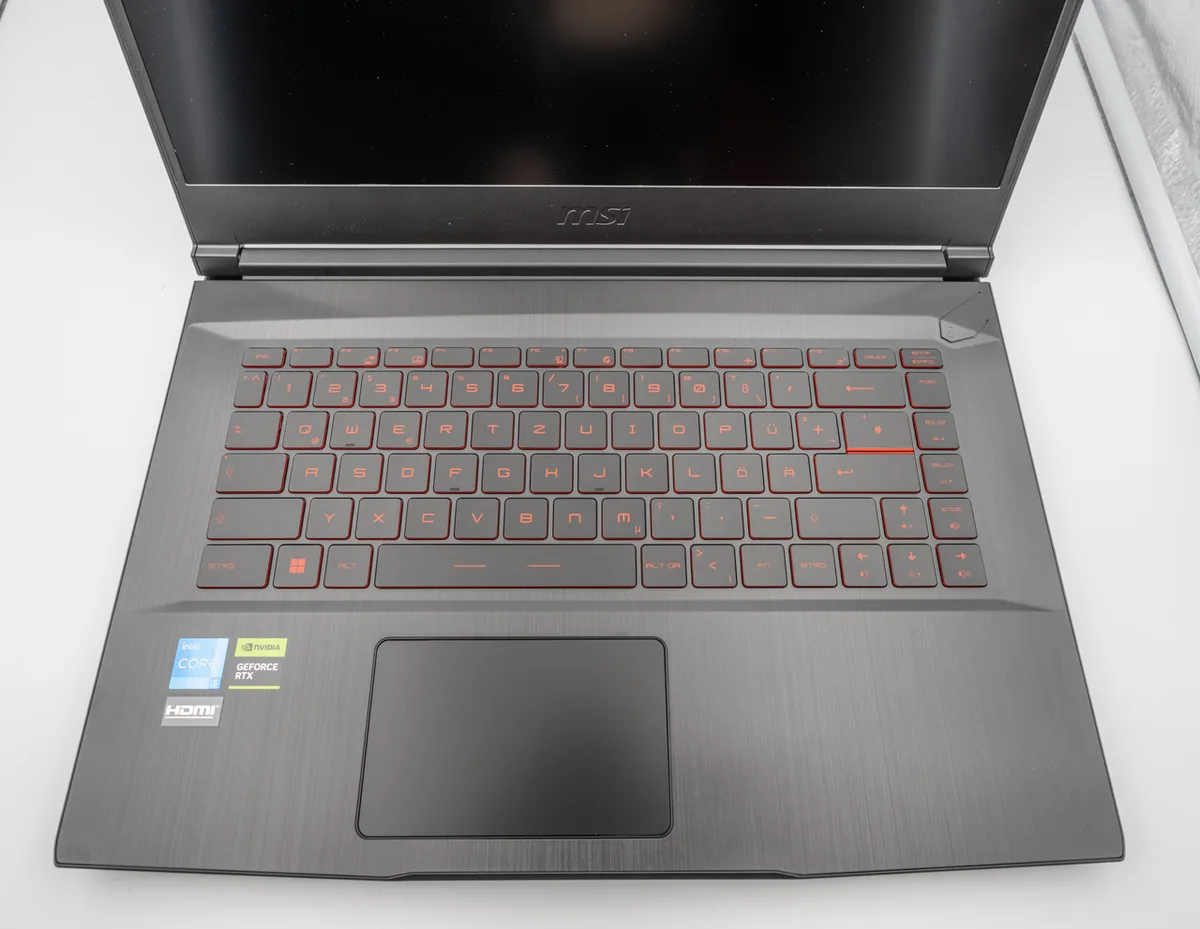
Image source: Wikimedia Commons / PantheraLeo1359531 (CC BY)
If you want a cleaner desk setup, pairing a thin laptop with an external display helps. You can connect a gaming laptop to a TV for a bigger screen at home while keeping the laptop portable.
When to Skip Thin and Go Thick or Desktop
Skip thin if gaming is the primary purpose of the machine. A thick gaming laptop usually offers more cooling room and higher GPU wattage. That translates to better sustained frame rates in demanding AAA titles.
Long gaming sessions are another reason to go thick. A slim chassis can run hot after an hour or two of continuous load. Surface temperatures near the keyboard and palm rest can become uncomfortable.
If you want upgrade flexibility, thick laptops usually win. Many allow RAM and storage swaps. Some thin models solder the RAM, which locks you into the configuration you bought.
Desktop PCs are the better choice if you never move the machine. A desktop offers the best cooling, the most upgrade paths, and the lowest cost per frame. You lose portability, but you gain raw performance.
If you stream while gaming, a thicker laptop or desktop handles the extra load better. Streaming adds CPU and GPU demand on top of the game itself. A thin laptop may drop frames or overheat under that combined load.
How to Choose the Right Thin Gaming Laptop
Start with the games you play. Casual and competitive titles need less GPU power than AAA games. Match the GPU wattage to your target resolution and frame rate.
Check sustained power, not peak power. Manufacturer specs sometimes list maximum GPU wattage that only holds for seconds. Look for independent reviews that report sustained GPU power under a 30-minute stress test.
Cooling design matters more than thickness alone. A vapor chamber and dual fans usually outperform a single fan with heat pipes. Check whether the laptop uses liquid metal on the CPU, which can improve thermal transfer.
Display quality is worth attention. A 1080p panel at 144Hz is fine for esports. A 1440p panel at 165Hz or higher suits AAA gaming and creative work.
Look for at least 300 nits of brightness if you use the laptop near windows.
Port selection is easy to overlook. Thin laptops often have fewer USB ports. If you use a mouse, headset, and external drive at once, you may need a hub.
You can check which ports support charging before you buy.
Mistakes Buyers Make With Thin Gaming Laptops
Buying based on GPU name alone is the most common mistake. An RTX 4060 at 55W performs very differently from an RTX 4060 at 115W. Always check the wattage rating for the specific model.
Ignoring fan noise is another error. Thin laptops often run louder under load because the fans spin faster. Read or watch reviews that measure noise in decibels, not just subjective impressions.
Overlooking battery life during gaming is a frequent surprise. Most thin gaming laptops last one to two hours on battery while gaming. Plan on using the charger for anything beyond light tasks.
Skipping the warranty check can cost you later. Some manufacturers void warranties if you repaste the thermal interface material. If you plan to upgrade or modify the cooling, verify the policy first.
Keyboard replacement is another area where warranty terms matter.
Assuming all thin laptops are quiet at idle is wrong too. Some run fans constantly even during light use. Check idle noise levels if you work in quiet environments.
FAQs
Are thin gaming laptops good for gaming?
Yes, for the right games and settings. A thin laptop with a mid-range GPU handles esports and 1080p gaming well. Demanding AAA titles at high settings may require lower wattage limits or reduced graphics quality.
Do thin gaming laptops overheat?
They can run warmer than thicker models. Good cooling design prevents dangerous temperatures, but surface heat and fan noise increase. Check sustained temperature data in reviews before buying.
Is a 14-inch gaming laptop worth it?
Yes, if portability matters most. A 14-inch model is lighter and easier to carry. The trade-off is less cooling room, which can limit GPU wattage and sustained performance.
How long do thin gaming laptops last?
Most last three to five years for gaming. The GPU becomes the limiting factor as games grow more demanding. Upgradeable RAM and storage can extend useful life.
Are thin gaming laptops quieter than thick ones?
Usually no. Thin laptops often run louder under load because fans spin faster in smaller spaces. At idle, many are quiet, but gaming raises noise levels noticeably.
Can you upgrade a thin gaming laptop?
Sometimes, but options are limited. Many solder the RAM, though storage is often upgradeable. Check the specific model's service manual before buying if upgrades matter to you.
Final Verdict: Are Thin Gaming Laptops Good for Gaming?
Yes, for the right person. A thin gaming laptop is a smart buy if portability matters and your games are not ultra-demanding. It is a weaker choice if raw performance and long sessions are your top priority.
The key is matching expectations to hardware. Check GPU wattage, cooling design, and sustained power before you buy. A slim laptop with a well-cooled 80W GPU often beats a thicker laptop with a poorly cooled 100W GPU.
If you play esports or 1080p titles, a thin laptop will serve you well. If you play AAA games at 1440p for hours, go thicker or consider a desktop. Battery life while gaming is short on almost all gaming laptops, so plan to stay near a charger.
Price matters too. Thin models often cost more for the same GPU. Compare total cost including a cooling pad, external monitor, or USB hub if needed.
A controller setup can also improve comfort during long sessions.
Warranty and upgrade paths deserve attention. Some thin laptops solder RAM and limit storage access. If you plan to keep the machine for five years, upgrade flexibility matters.
Keyboard latency and audio quality also affect daily satisfaction.
For frequent travelers, a thin gaming laptop is hard to beat. It fits in standard backpacks, works in meetings, and handles travel gaming without bulk. Just manage thermals with a cooling pad and keep vents clear.
The bottom line is simple. Thin gaming laptops are good for gaming when you choose the right model for your actual games. Do your research, check sustained performance data, and buy for your real use case.
3 thoughts on “Are Thin Gaming Laptops Actually Good for Gaming?”
Comments are closed.