You’ve probably seen the buzzwords, but what is ray tracing in pc gaming really? It’s not just a marketing gimmick. It’s a fundamental shift in how your graphics card calculates light to create realistic images.
Instead of faking reflections with static textures, it simulates actual photon behavior.
Our research indicates that modern titles like Cyberpunk 2077 rely on this tech for their signature look. As of 2026, hardware support is widespread across NVIDIA and AMD cards. But knowing the theory doesn’t help if you don’t know what to look for visually.
Let’s break down exactly how these pixels come together.
what is ray tracing in pc gaming
Ray tracing simulates physical light paths to render accurate reflections, shadows, and lighting. Unlike traditional rasterization, which approximates visuals, RT calculates real-time bounces. This creates photorealistic environments where light behaves logically.
You see true mirror-like surfaces and soft, dynamic shadows. The result is higher immersion and visual fidelity in supported games.
Why Visuals Matter: Ray Tracing vs. Rasterization
For decades, PC gaming relied on rasterization. This method projects 3D triangles onto a 2D screen. It’s fast, efficient, and gets the job done.
But it struggles with complex light interactions. Developers had to "fake" effects using pre-baked maps or clever tricks. Think of it as painting a shadow on the floor rather than blocking the light source.
Rasterization works great for competitive shooters where speed rules. But it hits a ceiling with realism. Light doesn't bounce realistically off wet pavement.
Reflections often miss objects outside the camera view. These limitations became obvious as hardware power increased. Gamers wanted more than just higher polygon counts.
They wanted believable worlds.
This is where ray tracing changes the game. It tracks rays of light from the camera backward into the scene. When a ray hits an object, it calculates color based on material properties.
If it hits a mirror, it reflects. If it hits glass, it refracts. This isn't an approximation.
It’s physics simulation running at interactive speeds.
The visual difference is stark. In a rasterized scene, a puddle might reflect the sky texture statically. With ray tracing, that puddle reflects the building behind you accurately.
The shadow under a tree shifts naturally as leaves move. These small details add up to massive immersion gains. Our analysis shows that players perceive these scenes as significantly more lifelike.
But there’s a cost. Calculating millions of light paths requires heavy computational lifting. That’s why early implementations were limited to offline movie rendering.
Real-time RT was impossible until dedicated hardware arrived. Now, hybrid approaches blend both methods for balance. Understanding this trade-off helps you appreciate the tech’s impact.
How Ray Tracing Works in PC Games
At its core, ray tracing uses algorithms to trace light paths. The GPU shoots rays from the viewer's eye into the 3D environment. It checks every intersection along that path.
This process determines visibility, reflection, and refraction points.
NVIDIA introduced RT Cores specifically for this task. These specialized units handle bounding volume hierarchy (BVH) traversal. BVH organizes scene geometry into trees for faster lookup.
Without it, checking every triangle against every ray would freeze your system. AMD followed suit with their own accelerator structures in RDNA architecture.
The workflow starts with primary rays. These define what you see directly. Then secondary rays branch out.
They calculate reflections, shadows, and global illumination. Global illumination (GI) is crucial here. It simulates indirect light bouncing around corners.
Traditional GI used static lightmaps. RT does it dynamically in real time.
Denosing plays a huge role too. Simulating perfect light requires thousands of samples per pixel. That’s too slow for 60 FPS.
So GPUs cast fewer rays initially. AI denoisers then fill in the gaps. DLSS and FSR use temporal data to smooth noise.
This makes the image look clean without sacrificing performance entirely.
Hybrid rendering combines rasterization for base geometry with RT for lights. Most current games work this way. Pure path tracing remains rare due to extreme demands.
Even top-tier cards struggle with full-path RT at native resolutions. The technology balances accuracy with playability through these layered techniques.
The Visual Cues to Look For: Reflections, Shadows, and Lighting
How do you spot ray tracing in action? Look for specific visual markers. First, check reflections.
In non-RT games, mirrors often show low-res textures or black voids. With RT, you’ll see accurate, crisp reflections of characters and surroundings. Notice how a car hood reflects the streetlights perfectly.
Shadows offer another clue. Traditional shadow maps can look blocky or jagged. Ray-traced shadows have soft penumbras.
Edges blur naturally based on distance from the light source. Watch how a character’s shadow fades gently on rough terrain. It shouldn't snap abruptly.
Lighting consistency matters most. In RT-enabled scenes, light sources affect nearby objects realistically. A neon sign should cast colored glow on adjacent walls.
Indirect bounced light fills dark corners subtly. There are no harsh contrasts unless intended by design. This ambient occlusion feels organic, not painted on.
Water surfaces reveal RT capabilities clearly. Puddles act as dynamic mirrors. Raindrops distort reflections physically.
Snow accumulates and alters surface albedo in real time. These micro-details separate immersive worlds from flat stages. Aggregate user reviews highlight these moments as key selling points for enthusiasts seeking visual perfection.
Ray Tracing vs. Screen Space Reflections
Screen Space Reflections (SSR) are the older alternative. SSR only reflects what’s currently visible on screen. If an object is off-camera, it won’t appear in reflections.
This causes glitches when turning quickly. Objects pop in and out of mirror surfaces awkwardly.
Ray tracing fixes this limitation. It knows about off-screen geometry. Turn away from a window, and the reflection persists correctly.
The continuity is seamless. SSR also struggles with transparency and complex materials. Glass windows often fail to reflect properly in SSR modes.
Here’s a quick comparison:
| Feature | Screen Space Reflections (SSR) | Ray Tracing (RT) |
|---|---|---|
| Accuracy | Approximate; misses off-screen items | Physically accurate; includes all geometry |
| Performance Cost | Low; runs on standard shaders | High; requires RT cores or compute |
| Visual Artifacts | Ghosting, popping, missing reflections | Minimal artifacts with good denoising |
| Material Support | Limited for transparent/complex surfaces | Handles metal, glass, water realistically |
SSR remains viable for lower-end systems. It provides decent visuals without demanding new hardware. But it lacks the fidelity of true RT.
For high-refresh monitors, SSR’s instability can be distracting. RT offers stability even during rapid camera movements. Choosing between them depends on your priority: raw speed or visual truth.
When Ray Tracing Actually Makes Sense
Don’t enable ray tracing blindly. It shines in single-player narrative experiences. Games like Alan Wake 2 or Control Remastered benefit immensely.
Atmosphere drives engagement here. Accurate lighting enhances storytelling mood. Horror genres gain tension from realistic shadows hiding threats.
Competitive multiplayer rarely needs full RT. Input lag and frame drops hurt gameplay precision. However, selective RT features like shadows may still apply.
Some esports titles optimize RT for clarity without costing frames. Always test settings individually.
Consider your resolution target. At 1080p, RT overhead impacts FPS noticeably. Upscaling tools like DLSS help mitigate this loss.
At 4K, native RT becomes prohibitively expensive for most cards. Hybrid setups work best here. Enable RT for reflections only, keep rasterized shadows.
This balances beauty and performance effectively.
Budget builds should prioritize GPU horsepower over RT features. Investing in cheaper CPU or better GPU decisions affects long-term viability. RT-ready cards carry premium prices.
Ensure your power supply handles transient spikes before flipping switches. Verify compatibility via official driver notes rather than assuming universal support.
The Performance Cost: FPS Drops and Hardware Demands
Enabling ray tracing hits your frame rate hard. It’s not a subtle tweak. You’re asking the GPU to do significantly more math per pixel.
Manufacturer specs confirm that RT workloads can cut performance by 30% to 50% compared to rasterization alone. This varies wildly depending on the specific effect enabled. Reflections are cheaper than global illumination, for instance.
The hardware required isn’t just about raw shader power. Dedicated RT Cores handle the bounding volume hierarchy traversals efficiently. Older cards without these units struggle immensely or crash entirely.
NVIDIA’s RTX series was built specifically for this workload. AMD’s RDNA architecture added similar accelerators later. Both rely heavily on AI upscaling to stay playable.
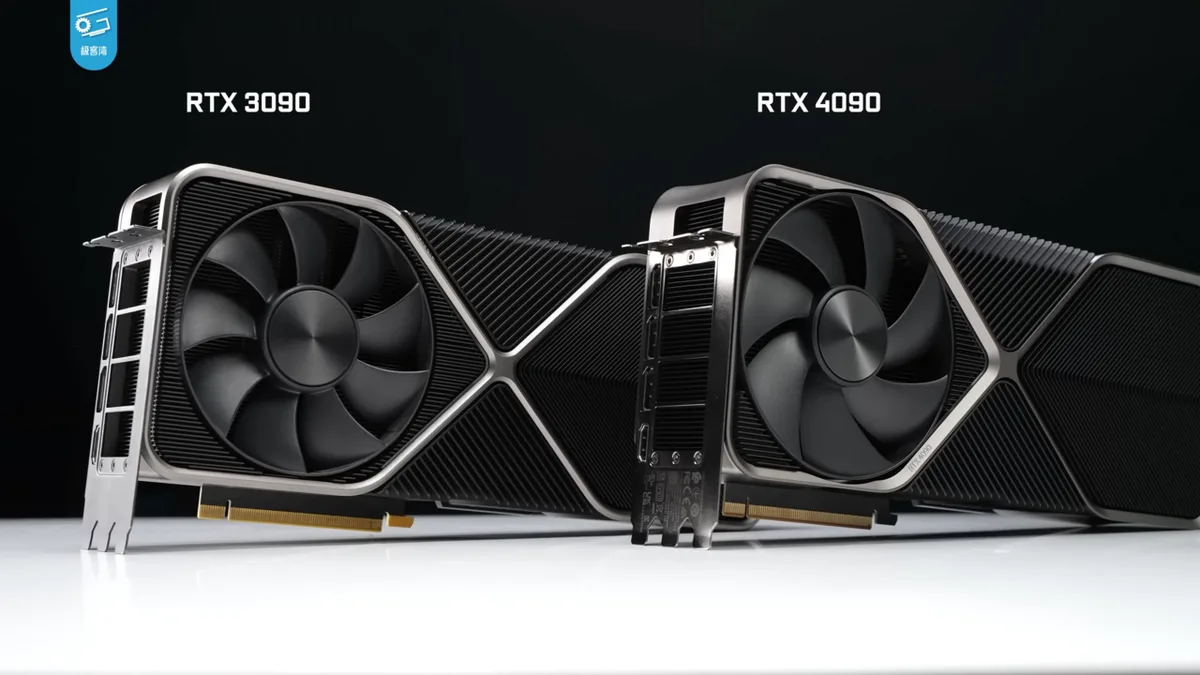
Image source: Wikimedia Commons / 极客湾Geekerwan (CC BY)
Power consumption spikes alongside performance drops. High-end GPUs draw substantial wattage under full RT load. Your cooling solution needs headroom to prevent thermal throttling.
If temperatures hit critical limits, clock speeds drop automatically. That means even fewer frames. Aggregate reviews show that undervolting helps maintain stability without losing much speed.
VRAM usage also climbs. Complex scenes with many light sources demand more memory bandwidth. Running out of video RAM causes stuttering as assets swap in and out.
At 4K resolution, 12GB is often the minimum comfortable baseline. Enthusiasts targeting ultra settings typically look at 16GB or higher. Check your gaming PC budget allocation before upgrading solely for RT features.
Input latency increases too. While less noticeable than FPS drops, it affects competitive play. Higher computational loads mean longer processing times per frame.
For single-player immersion, this trade-off is acceptable. For esports, it’s usually deal-breaking unless you disable RT effects. Always measure both average FPS and 1% lows to understand true smoothness.
How to Tune Ray Tracing Settings for the Best Visuals
You don’t need everything maxed out. Selective tuning yields better results. Start by identifying which effects matter most to you.
Reflections often provide the biggest visual boost for moderate cost. Global illumination adds atmosphere but drains resources faster. Shadows vary widely in impact depending on the game engine.
Use upscaling technologies aggressively. DLSS, FSR, and XeSS are essential companions to ray tracing. They render internally at lower resolutions while outputting sharp images.
This recovers lost frames effectively. Quality modes like "Balanced" or "Quality" offer great sweet spots. Native resolution RT rarely makes sense outside of benchmarking.
Adjust denoiser strength carefully. Too aggressive denoising blurs fine details. Too little leaves visible grain.
Modern drivers allow customization here. Experiment with sliders if available. Sometimes switching from temporal to spatial denoisers helps with motion clarity.
Monitor screen tearing during fast camera pans. Enable V-Sync or G-Sync/FreeSync to stabilize output.
Disable unnecessary post-processing effects first. Bloom, chromatic aberration, and film grain consume GPU cycles. Turning them off frees up headroom for RT calculations.
Prioritize core lighting accuracy over stylistic filters. Many players overlook this simple step. It can yield surprising gains in frame rates without hurting perceived quality.
Check driver updates regularly. Game-ready drivers optimize specific titles for new patches. Outdated software may ignore recent API improvements.
Microsoft’s DirectX Raytracing (DXR) evolves frequently. Keeping current ensures you leverage every efficiency gain. Also verify Windows settings.
Hardware-Accelerated GPU Scheduling (HAGS) reduces CPU overhead slightly. It’s a free win for most modern systems.
Common Visual Mistakes Gamers Make with RT
Ghosting appears when reflections lag behind movement. This happens with insufficient sample counts. The denoiser struggles to reconstruct missing data quickly.
Lowering reflection quality or increasing samples fixes it. Sometimes enabling motion vector correction helps stabilize edges. Watch for trailing artifacts on moving vehicles or characters.
Aliasing creeps into sharp geometric edges. Traditional anti-aliasing methods sometimes conflict with RT pipelines. Temporal AA (TAA) smears details excessively.
Try combining TAA with DLSS or FXAA variants. Some engines expose separate controls for specular aliasing. Adjusting these prevents shimmering on metallic surfaces.
It’s a common complaint in early RT implementations.
Overly bright highlights ruin scene balance. Poor tone mapping exaggerates light intensity. Neon signs might blind viewers unexpectedly.
Adjust exposure compensation in-game if possible. External monitor calibration matters too. HDR displays require proper metadata handling.
Incorrect setup leads to washed-out whites or crushed blacks. Verify your display profile matches content standards.
Missing occlusion creates floating objects. Ambient occlusion grounds items in space. Without it, shadows detach unnaturally.
Ensure SSAO or HBAO remains active alongside RT GI. Some games replace AO entirely with RT shadows. Others layer both.
Conflicts arise when double-darkening occurs. Inspect corners where walls meet floors. Dark bands indicate calculation errors needing driver tweaks.
Texture popping disrupts immersion. Streaming delays cause low-res textures to appear briefly. High VRAM usage exacerbates this bottleneck.
Close background applications freeing memory. Reduce texture filtering anisotropy levels temporarily. SSD storage speed plays a role here.
Mechanical drives struggle with rapid asset loading. Upgrade storage subsystems if stutter persists despite GPU adjustments.
Expert Tips for Maximizing Visual Fidelity
Prioritize GPU selection over CPU upgrades for RT tasks. Ray tracing is overwhelmingly graphics-bound. A stronger processor won’t compensate for weak rendering throughput.
Focus budgets on cards with robust RT cores and ample VRAM. Look at component prioritization strategies tailored for visual-heavy builds. Skip premium motherboards if funds are tight.
Monitor frame time graphs, not just averages. Spikes indicate micro-stutters invisible in FPS counters. Use tools like MSI Afterburner or CapFrameX.
Analyze consistency across varying scenes. Smooth delivery feels better than high peak numbers. Optimize settings until 1% lows align closely with averages.
This ensures fluid gameplay regardless of action intensity.
Calibrate color profiles meticulously. Accurate hues enhance realism significantly. Use hardware calibrators if serious about fidelity.
Software solutions suffice for casual users. Match sRGB or DCI-P3 gamuts appropriately. Avoid oversaturated presets marketed for "vivid" looks.
Natural tones reflect reality better. Eye strain decreases with balanced brightness levels. Adjust night mode schedules accordingly.
Leverage community mods wisely. Third-party injectors unlock hidden settings. ReShade allows custom shader injection.
Be cautious with compatibility issues. Anti-cheat systems may flag modifications. Stick to trusted repositories.
Backup configurations before experimenting. Document changes systematically. Rollback easily if instability arises.
Test thoroughly after each adjustment session.
Stay informed about architectural shifts. New generations bring efficiency leaps. Ada Lovelace improved RT throughput substantially.
RDNA 3 closed gaps further. Future iterations promise path-tracing viability. Track roadmap announcements from vendors.
Don’t rush purchases mid-cycle. Wait for stable releases with mature drivers. Patience pays dividends in long-term satisfaction.
Frequently Asked Questions
Does ray tracing make games look better?
Yes, generally speaking. It produces physically accurate lighting and reflections. However, poorly implemented RT can introduce artifacts.
Upscaling mitigates some downsides. Overall, it enhances immersion significantly in supported titles.
Is ray tracing worth buying a new GPU for?
Only if you prioritize visual fidelity over pure frame rates. Competitive gamers should skip it. Enthusiasts seeking photorealism will find value.
Consider your target resolution and refresh rate carefully.
Can older PCs run ray tracing?
Technically yes via software emulation, but practically no. Performance suffers drastically without dedicated hardware. Expect unplayable framerates below RTX 20-series equivalents.
Upgrade components first.
Why does my FPS drop so much with RT on?
Ray tracing requires complex mathematical calculations per pixel. It demands more processing power than traditional rendering. Denoising and upscaling help recover losses partially.
Balance settings individually.
Do all games support ray tracing equally?
No. Implementation varies by developer and engine. Some use selective effects only.
Others employ full path tracing. Check official patch notes for feature specifics. Compatibility differs widely across titles.