If you're wondering how to check whether a psu has the right gpu cables, start with the connectors, not the wattage. A PSU can have plenty of power and still ship the wrong cable set. The wrong cable can fit badly, overheat, or leave the GPU without enough power.
As of 2026, many new GPUs use 12V-2×6 connectors instead of older 8-pin designs. Manufacturer specifications indicate that modular cables are often model-specific, even within one brand. That is why visual matching matters before first boot.
We'll walk through the shapes and labels to trust.
how to check whether a psu has the right gpu cables
Check the GPU's required connector types and pin counts first. Then match those connectors to the PSU's native cable labels and ports. Never use cables from another PSU.
Look for keyed shapes, sense pins, and full seating. Finally, confirm wattage and +12V headroom before powering on.
Why Visual Checks Matter More Than Wattage Numbers
Wattage tells you capacity. It does not tell you whether the cable in your hand belongs to that PSU. That gap causes many bad builds.
A modular PSU may have enough wattage but the wrong cable pinout. Using a cable from another unit can short a rail or melt a connector. Visual checks catch that before power reaches the GPU.
GPU power needs also vary by model. Some cards need one 8-pin connector. Others need two, three, or a 12V-2×6 connector.
The PSU must provide both enough power and the right physical connector.
Cable condition matters too. Look for heat marks, bent pins, loose crimps, and stiff bends. A damaged cable can fail even when the PSU is healthy.
If you're planning wattage headroom for future upgrades, treat cable compatibility as part of that plan. The best PSU on paper still needs the correct cable set.
Per PCI-SIG specifications, PCIe power connectors have defined pin layouts and current limits. Those layouts are why a connector should never be forced into place.
The Cable and Connector Shapes You Need to Recognize
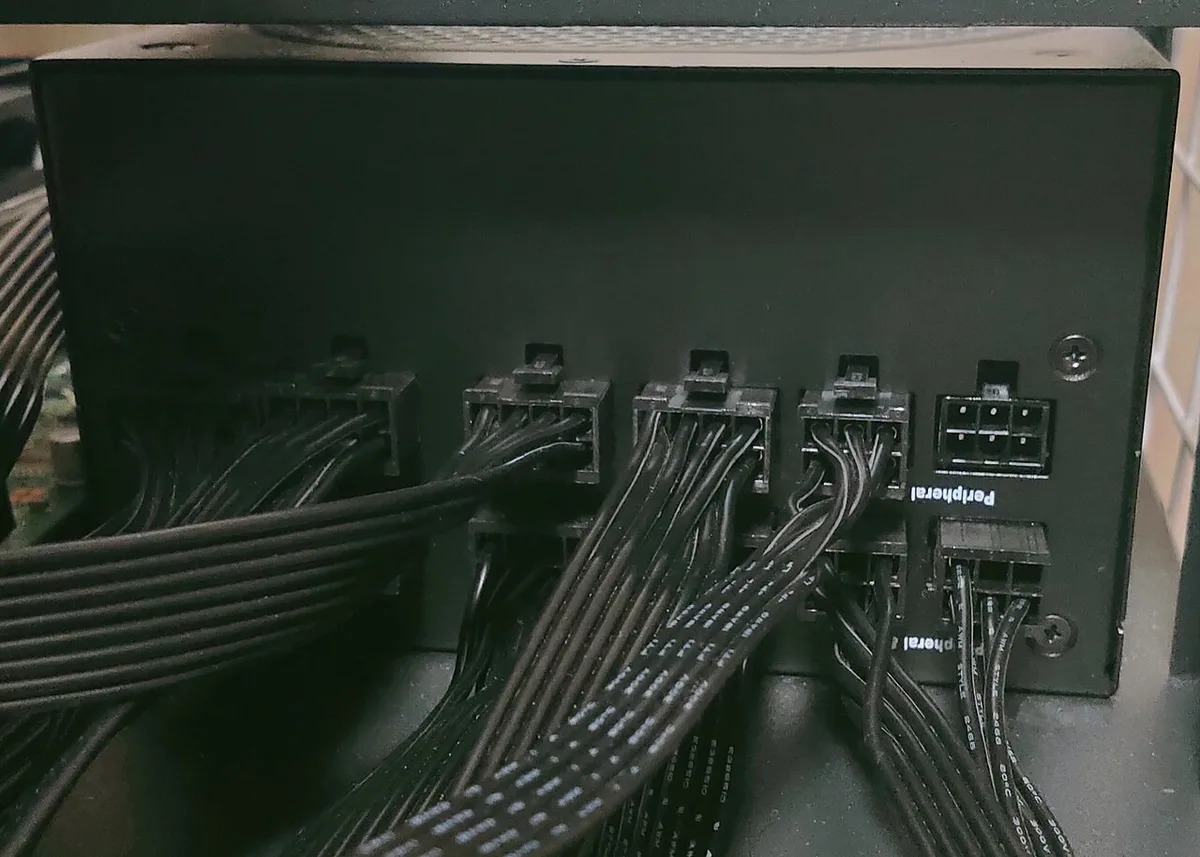
Image source: Wikimedia Commons / Project Kei (CC BY-SA)
Start by learning the common GPU power connector shapes. Each one has a distinct keying pattern. That pattern is your first safety check.
A 6-pin PCIe connector has a flat rectangular shape with a clip. An 8-pin connector is wider and has a different keying pattern. A 6+2-pin connector combines both shapes on one cable.
The 12VHPWR connector uses a compact 12+4 pin design. Its newer replacement, the 12V-2×6 connector, looks similar but has improved retention and sense pin behavior. If you're comparing 12VHPWR vs 12V-2×6, focus on the connector revision and PSU support.
| Connector | Typical Use | Visual Cue |
|---|---|---|
| 6-pin PCIe | Lower-power GPUs | Flat 6-pin block with clip |
| 8-pin PCIe | Mid to high-power GPUs | Wider keyed block |
| 6+2 pin | Flexible 6 or 8-pin use | Split or hinged 6+2 shape |
| 12VHPWR | High-power GPUs | Compact 12+4 block |
| 12V-2×6 | Newer high-power GPUs | Compact block with revised retention |
Never assume two similar connectors are interchangeable. Keying exists to prevent wrong insertion. If the shape needs force, stop.
Also check the PSU side. Modular ports may be labeled VGA, PCIe, CPU, or EPS. Those labels are not decorative.
Match the cable to the correct port.
Step-by-Step Visual Inspection Before Connecting
Follow this order before plugging anything in. It keeps the check simple and repeatable.
- Read the GPU manual or spec sheet for required connectors.
- Find the PSU model number and its included cable list.
- Lay the GPU cable next to the GPU input.
- Compare pin count, shape, and keying.
- Check the PSU port label matches the cable label.
- Inspect pins, clip, and strain relief for damage.
- Confirm PSU wattage and +12V capacity.
- Seat the connector until the clip clicks.
- Route the cable with gentle bends only.
- Power on and monitor for errors or heat.
If you're using a modular, semi-modular, or non-modular PSU, the cable rules differ. Non-modular units have fixed cables, so compatibility is simpler. Modular units require more care.
Do not mix cables from another PSU, even from the same brand. Pinouts can change between revisions. A cable that fits may still be electrically wrong.
Use only native cables when possible. If you must use an adapter, verify its rating and connector type. Keep the adapter short and well supported.
For a modular PSU, check both ends of the cable. The PSU end and GPU end can have different shapes. Each end must match its own device.
PSU-Side Clues: Modular Ports, Labels, and Cable Sets
The PSU side is where many mistakes begin. Modular ports can look similar but serve different rails or devices.
Look for labels such as PCIe, VGA, CPU, EPS, or SATA. PCIe and GPU labels usually indicate graphics power. CPU and EPS labels are for motherboard power.
Do not swap them.
Cable labels also matter. Some manufacturers print the connector type on the cable sleeve. Others use color coding or small tags.
Match the printed label to the PSU port.
A cable set should be treated as one matched system. Keep it with the PSU box after installation. That helps with future upgrades and RMA claims.
If you're choosing a PSU for a high-end graphics card, cable count becomes a buying factor. A card needing three 8-pin connectors needs three native PCIe cables or a validated adapter setup.
Check the PSU specification for the number of native PCIe connectors. Do not rely on wattage alone. A 1000 W unit with only two PCIe cables may still be wrong for a three-connector GPU.
Warranty terms can matter here. Some manufacturers void coverage for third-party cables. Others sell official replacement cable kits.
Use those when available.
GPU-Side Clues: Power Inputs, Pin Counts, and Keying
The GPU side tells you exactly what the card expects. Look at the top edge or rear edge of the card. Count the power inputs and their shapes.
A single 8-pin input is common on mid-range cards. High-end cards may have two or three 8-pin inputs. Newer cards may have one 12V-2×6 input.
Pin count is more reliable than cable color. Count the pins in each block. Then count the pins on the cable.
They must match exactly.
Keying prevents wrong insertion, but do not test it with force. Align the clip and notch first. Press straight and even.
Stop if resistance feels uneven.
Sense pins are small pins that help the GPU detect a proper connection. On 12VHPWR and 12V-2×6 connectors, proper seating is critical. A partially seated connector can overheat.
If the GPU has multiple inputs, connect all of them. Do not leave one empty because the system boots. Some cards can run on fewer connectors but may throttle or draw unsafe current.
Check the card's power requirement against your PSU. A card with high peak power needs both the right connector and enough +12V current. That pairing is as important as the physical fit.
When using adapters, verify that the adapter matches both the PSU cable and GPU input. An adapter can solve a layout problem, but it adds another failure point. Keep it visible during first use.
If you're checking ATX 3.1 support, look for native 12V-2×6 cables and proper transient power handling. That matters most with high-end GPUs that spike above their average draw.
Common Visual Mistakes That Cause Melting or No Boot
Most damage starts with a small visual error. A connector can look right and still be wrong. Stop the moment anything feels forced.
- Forcing a connector until it clicks
- Using an EPS or CPU cable on the GPU
- Leaving a 6+2 pin only half seated
- Daisy-chaining two high-power GPUs on one cable
- Reusing cables from a different PSU
- Ignoring brown plastic or melted pins
If your system shows shutdowns under load, cable mismatch can be part of the fault. Heat at the connector is a warning sign too. Check for failing PSU signs before you blame the GPU.
Per PCI-SIG guidance, PCIe power connectors have defined pin layouts and current limits. That is why shape alone is not enough. The cable must also belong to that exact PSU.
Adapters, Pigtails, and Mixed Cable Sets: What to Verify
Adapters can solve layout problems, but they add another failure point. Verify every layer before first boot. Native cables are still the cleanest option.
- Confirm the adapter rating matches the GPU input
- Keep the adapter short and supported
- Do not mix old and new cable sets blindly
- Check pigtail current sharing before dual-GPU use
- Inspect strain relief for cracks or loose crimps
- Review warranty terms for third-party cables
If you are learning modular PSU types, remember that modular does not mean interchangeable. A cable from another unit can fit and still be wrong. That risk is highest with mixed cable kits.
| Setup | Best Use | Watch Out For |
|---|---|---|
| Native PCIe cable | Cleanest GPU power path | Must match PSU model |
| Pigtail 8-pin | One connector feeding two inputs | Shared current limit |
| Adapter cable | Layout or connector conversion | Extra heat and failure points |
For a demanding card, high-end GPU PSU choice should include native cable count. Wattage alone will not fix a missing connector.
Reference Guide: Quick Visual Match Table
Use this table as a final check before power-on. Match the GPU input, cable, and PSU port in one pass. Do not skip the visual seating check.
| GPU Input | Cable to Use | PSU Port Label | Visual Check |
|---|---|---|---|
| One 8-pin | Native 8-pin PCIe | PCIe or VGA | Full click with no gap |
| Two 8-pin | Two native cables | Two PCIe ports | No pigtail overload |
| 12V-2×6 | Native 12V-2×6 | 12VHPWR or PCIe 5 | Sense pins fully seated |
| 6-pin | Native 6-pin PCIe | PCIe or VGA | Keying matches exactly |
If you are unsure about 12V-2×6 connector basics, compare the connector revision and retention design. Newer designs focus on better seating. That matters because partial insertion can raise heat.
Keep cables routed with gentle bends. Sharp bends near the connector can stress pins. Support heavy adapters so they do not pull sideways.
Frequently Asked Questions
Can I use a PSU cable from another brand?
No. Modular cables are often model-specific, even within one brand. The connector may fit while the pinout is wrong.
Use only the cable set made for that PSU.
Is a 6+2 pin connector safe for an 8-pin GPU?
Yes, when it is the correct native cable and fully seated. The split design is meant to cover both 6-pin and 8-pin use. Do not force it if the keying feels wrong.
Do I need all GPU power connectors plugged in?
Yes. Connect every input the card has. Leaving one empty can cause poor current sharing or unstable power.
Some cards may boot, but that is not a safe test.
What does a melted 12VHPWR connector look like?
Look for brown or black plastic, warped housing, or a loose fit. You may also see a burnt smell. Stop using it immediately and replace the cable and adapter if needed.
Should I replace cables with third-party kits?
Only when the kit is made for your exact PSU model. UL certification and clear labeling are useful checks. Avoid unbranded cables with no pinout documentation.