If you've ever wondered what is a full tower gaming pc case, you're really asking about space, airflow, and build flexibility. A full tower is the largest mainstream PC chassis category, and it exists for builders who need room for big GPUs, large radiators, and lots of storage. It's not just a bigger box.
It changes how you build and cool a system.
Manufacturer specifications indicate that most full towers support E-ATX motherboards and GPUs well over 350 mm long. That extra clearance matters as of 2026, with modern graphics cards growing larger every generation. The tradeoff is footprint, weight, and cost.
Let's break down what that means in practice.
what is a full tower gaming pc case
A full tower gaming PC case is the largest mainstream chassis for desktop builds. It supports E-ATX motherboards and long graphics cards. It offers more space for cooling, storage, and cable routing.
Most models stand over 500 mm tall. Builders choose them for airflow and upgrade room.
Why Size and Space Are the First Things to Understand
Desk footprint and room clearance
A full tower takes up real space. Most models are 500 to 600 mm tall and 250 to 300 mm wide. That's bigger than a mid-tower by a noticeable margin.
Measure your desk, shelf, or floor spot before buying. Leave room for airflow behind and above the case. A case crammed against a wall traps heat.
Internal volume versus external dimensions
External size doesn't tell the whole story. Internal volume is what actually matters for builds. Two cases with similar footprints can have very different usable space.
Check the motherboard tray size, PSU shroud depth, and fan mount positions. Those details decide what fits. If you're planning storage capacity, internal volume shapes how many drives you can mount cleanly.
| Case type | Typical height | Typical width | Typical depth |
|---|---|---|---|
| Mini-ITX | 200-350 mm | 150-250 mm | 200-350 mm |
| Mid-tower | 400-500 mm | 200-230 mm | 400-500 mm |
| Full tower | 500-600 mm | 230-300 mm | 500-600 mm |
What Actually Defines a Full Tower Case
Motherboard form factor support
The defining trait is E-ATX support. E-ATX motherboards are wider than standard ATX boards. A full tower's tray is built to hold that extra width.
That single feature separates a true full tower from a large mid-tower. Many builders never use E-ATX, but the tray size still benefits cable routing and component spacing.
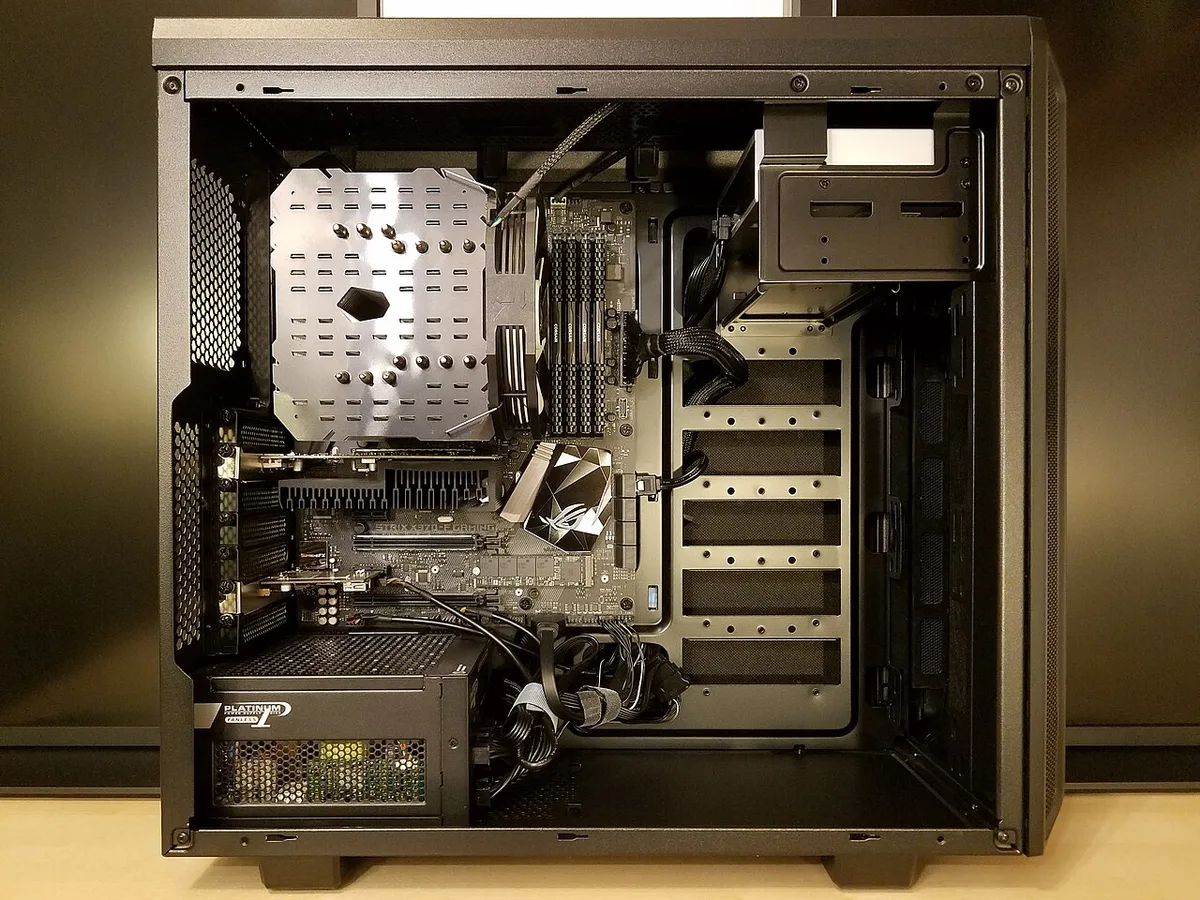
Image source: Wikimedia Commons / Bretwa (CC BY-SA)
Typical height, width, and depth ranges
Most full towers fall in a predictable range. Height runs 500 to 600 mm. Width runs 230 to 300 mm.
Depth runs 500 to 600 mm. Weight ranges from 12 to 20 kg empty. These numbers matter for shipping, moving, and desk placement.
Check the spec sheet, not just marketing photos.
How a Full Tower Differs in Build Volume and Layout
E-ATX tray and standoff spacing
The wider tray changes standoff placement. Standoffs must match your motherboard's hole pattern. E-ATX boards use extra mounting points near the right edge.
A full tower includes those standoffs pre-installed or in the accessory box. Always verify standoff positions before dropping in the board. Misaligned standoffs can short the motherboard.
PSU shroud and cable routing channels
Full towers usually include a PSU shroud. It hides the power supply and excess cables. Behind the motherboard tray, you get wider routing channels.
That space makes cable management much easier. If you're planning power headroom, the shroud also leaves room for larger units.
What Fits Inside: GPUs, Coolers, Radiators, and Storage
GPU length and thickness clearance
Modern GPUs are long and thick. Full towers handle cards over 350 mm long. Some support 400 mm or more.
Thickness matters too, since triple-slot cards need extra width. Check the spec sheet for both length and slot clearance. Manufacturer specs confirm these limits, and PCI-SIG defines the underlying PCIe connector standards.
If you're building around a high-end graphics card, clearance is your first check.
Image source: Wikimedia Commons / Nick Stathas (CC BY-SA)
CPU cooler height and radiator support
Air coolers up to 180 mm tall fit in most full towers. That covers nearly every tower cooler on the market. For liquid cooling, radiator support is the key spec.
Most full towers fit 360 mm radiators. Many fit 420 mm units. Front, top, and side mounts vary by model.
Verify radiator thickness too, since thick radiators eat into fan clearance.
Drive bays and front I/O layout
Storage support is generous in full towers. Expect multiple 3.5-inch and 2.5-inch drive bays. Some models include hot-swap bays.
Front I/O typically includes USB-A, USB-C, and audio jacks. If you use M.2 storage, the case still needs drive bays for bulk storage. Plan your mix of fast and bulk drives early.
Airflow, Cooling, and Cable Management in Practice
Mesh panels versus tempered glass fronts
Mesh fronts prioritize airflow. Tempered glass fronts prioritize looks. A solid glass front can restrict intake air.
Mesh panels let fans pull air freely. Aggregate reviews report that mesh cases run cooler under load. Choose based on your cooling needs, not just appearance.

Image source: Wikimedia Commons / Hustvedt (CC BY-SA)
Fan placement and positive pressure
Full towers support more fans than smaller cases. Six to ten fan mounts are common. Positive pressure means more intake than exhaust.
That setup reduces dust buildup. Place intake fans at the front and bottom. Place exhaust at the rear and top.
This pattern follows natural heat rise.
Cable routing for clean builds
Good cable management starts with the case. Full towers offer wider channels behind the tray. Tie-down points and Velcro straps help organize cables.
Route the thickest cables first. Then fill in smaller ones. A clean build improves airflow and looks better through glass panels.
Real Build Scenarios Where a Full Tower Makes Sense
Custom loop water cooling builds
A full tower earns its size when the build actually needs the room. Custom loops are the clearest case. A 360 mm or 420 mm radiator needs mounting space and tube routing room.
Reservoirs and pumps need brackets. Extra volume keeps tubing gentle and reduces kinks. Aggregate reviews report that large loops are easier to service in full towers.
Large GPU and workstation builds
Large GPU and workstation builds also benefit. Rendering and simulation rigs often run hot for hours. Extra fan mounts and radiator support help hold boost clocks.
A wide tray leaves room for long cards without blocking airflow. If your workload includes thermal throttling on NVMe SSDs, extra case volume helps keep drives cooler too.
Multi-drive storage and upgrade-focused builds
Storage-heavy builds are another fit. Video editors and archivists often want multiple drives. Full towers usually include several 3.5-inch bays.
That keeps bulk storage inside the case instead of external boxes. Upgrade-focused builders also like the headroom. Extra space today means fewer rebuilds tomorrow.
| Build scenario | Full tower advantage | What to verify |
|---|---|---|
| Custom loop | Radiator and tube room | Radiator thickness and mount positions |
| Large GPU workstation | Card clearance and airflow | GPU length and slot width |
| Storage-heavy build | Multiple drive bays | 3.5-inch and 2.5-inch bay count |
| Upgrade-focused build | Future component room | Motherboard tray and PSU length |
Common Mistakes Builders Make With Full Towers
Buying without measuring space
The most common mistake is buying before measuring. A full tower can be taller than expected. It may not fit under a desk or inside a shelf.
Measure height, width, and depth with doors open. Leave space for cables and airflow.
Assuming bigger always means cooler
The second mistake is assuming size equals cooling. A big case with a solid glass front can run warm. Airflow depends on panel design and fan placement.
Mesh fronts usually perform better in thermal tests. Check reviews for temperature data, not just looks.
Ignoring GPU sag and cable length
The third mistake is ignoring GPU sag. Long cards can droop over time. That strains the PCIe slot and power connectors.
Use a support bracket or vertical mount. Also check cable length. Modular power supplies help, but very large cases may need longer cables.
Costs, Specs, and What to Check Before Buying
Typical price tiers and value differences
Price tiers vary widely. Budget full towers often start around $120 to $160. Mid-range models land near $180 to $260.
Premium showcase cases can exceed $350. Higher prices usually buy better materials, modular panels, and included fans. Decide how much of that you actually need.
Spec checklist before purchase
Before buying, run through a spec checklist. Confirm motherboard support, GPU clearance, cooler height, and radiator size. Check drive bay count and front I/O.
Verify weight and shipping dimensions. Look for dust filters and tool-less panels. Small details affect daily use.
Pairing with UL product safety listings helps when choosing high-wattage components.
Weight, transport, and delivery considerations
Transport matters too. A 15 to 20 kg empty case is heavy. Moving it upstairs or across a room is easier with two people.
Check for reinforced handles or packaging quality. If you live in a small space, delivery size can be a real constraint.
| Price tier | Typical range | What you usually get |
|---|---|---|
| Budget | $120 to $160 | Basic steel, fewer fans, limited modularity |
| Mid-range | $180 to $260 | Mesh panels, more mounts, better cable routing |
| Premium | $350+ | Tempered glass, modular brackets, included RGB fans |
Frequently Asked Questions
Is a full tower case worth it for gaming?
Yes, if your build needs the space. A full tower helps with large GPUs, big radiators, and extra storage. For a simple single-GPU build, it may be unnecessary.
The value comes from cooling room and upgrade flexibility, not raw gaming performance.
Can a full tower fit under a desk?
Sometimes, but check measurements first. Many full towers are 500 to 600 mm tall. Desk clearance and cable routing space matter.
Leave room behind the case for airflow. If clearance is tight, consider a mid-tower instead.
Do full tower cases improve temperatures?
They can, but size alone does not guarantee cooler parts. Mesh panels and good fan placement matter more. Aggregate reviews report that well-ventilated full towers run cooler under load.
Solid glass fronts can restrict intake air.
What motherboard sizes fit in a full tower?
Most full towers support E-ATX, ATX, micro-ATX, and mini-ITX boards. E-ATX support is the defining feature. Always check standoff positions before installing.
The tray size also helps with cable routing.
Are full towers too heavy to move?
They can be heavy. Empty weight often ranges from 12 to 20 kg. A built system weighs much more.
Use two people for moving. Look for reinforced handles and secure packaging.
Is a full tower overkill for a single GPU build?
Often yes, unless you need extra cooling or storage. A mid-tower handles most single-GPU builds well. Choose a full tower for custom loops, large cards, or future upgrades.
Otherwise, you pay for unused space.
1 thought on “What Is a Full Tower Gaming PC Case? Explained”
Comments are closed.