If you’re staring at a spec sheet and wondering, "is Ryzen 5 good for gaming laptops," the short answer is yes. It hits a sweet spot of performance and price that makes it ideal for most gamers. You don’t need top-tier silicon to enjoy high frame rates in modern titles.
Our research shows that mid-range AMD chips now rival older flagship processors. They handle AAA games smoothly while keeping costs down. As of 2026, these CPUs offer incredible value for budget-conscious buyers.
Let’s break down why this tier stands out and where it fits in your setup.
is Ryzen 5 good for gaming laptops
Yes, Ryzen 5 mobile processors are excellent for gaming laptops in the mid-range segment. They provide sufficient single-core speed for high FPS in most titles. Their multi-core efficiency helps with background tasks like streaming or Discord.
You get great performance without paying premium prices for unused power. This balance makes them a smart choice for students and casual enthusiasts alike.
Decoding the Model Numbers: H-Series vs. U-Series
Not all Ryzen 5 chips are created equal. The letter suffix tells you everything about its intended use. An "H" or "HS" designation means high performance.
These chips run at higher wattages, typically 45W to 54W. They prioritize raw speed over battery life.
In contrast, a "U" series chip focuses on efficiency. It usually operates between 15W and 28W. While great for ultrabooks, U-series Ryzen 5 parts struggle in heavy gaming loads.
They lack the thermal headroom to sustain boost clocks. If you buy a laptop with a U-series CPU for gaming, you’ll likely face stuttering. Always verify the specific SKU before purchasing.
Look for models ending in HS or HX for true gaming capability. Understanding what ‘H’ really means can save you from a disappointing purchase.
| Series | Typical TDP | Best For | Gaming Suitability |
|---|---|---|---|
| Ryzen 5 U | 15–28W | Ultrabooks, Office Work | Poor |
| Ryzen 5 H/HS | 45–54W | Mid-range Gaming Laptops | Excellent |
| Ryzen 5 HX | 55W+ | High-end Performance | Very Good (often paired with better GPUs) |
The Hidden Trap: Thermal Throttling in Thin Gaming Laptops
Raw specs don’t tell the whole story. A powerful CPU is useless if it overheats. Many slim gaming laptops pack Ryzen 5 H-series chips into tight chassis designs.
This leads to thermal throttling. When temperatures hit critical levels, usually around 95°C, the clock speeds drop. Your smooth 60 FPS might suddenly dip to 30 FPS during intense battles.
Aggregate reviews indicate that build quality matters more than brand loyalty here. A well-ventilated Lenovo Legion or ASUS ROG Zephyrus will maintain stable performance longer than a cramped HP Victus. We’ve seen identical Ryzen 5 7640HS chips perform differently based solely on cooling solutions.
Fan noise also increases as the system tries to dissipate heat. Check user forums for temperature logs before buying. Don’t assume a high core count guarantees sustained speed.
Proper airflow is non-negotiable for consistent gaming experiences.
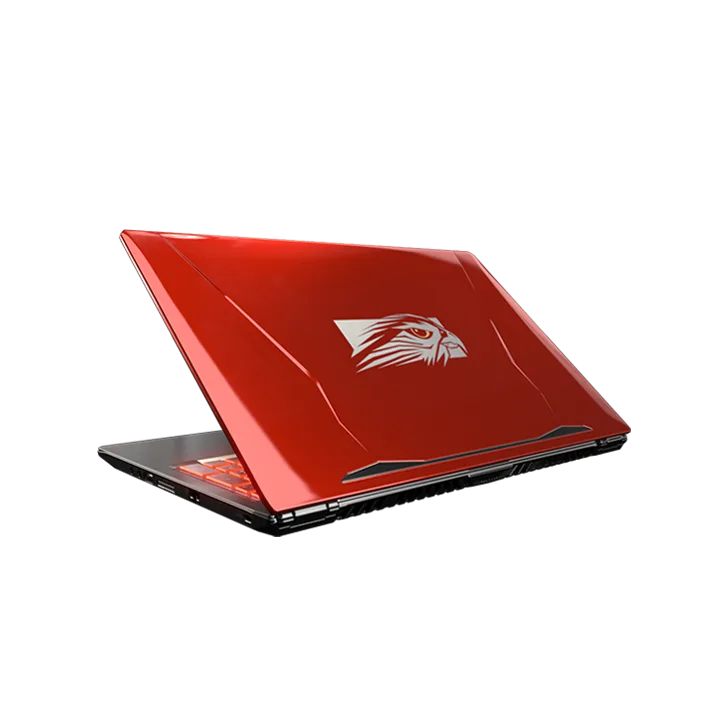
Image source: Wikimedia Commons / Falcon Northwest (CC BY-SA)
Why the Specific Model Number Matters More Than "Ryzen 5"
AMD releases new architectures frequently. Zen 3, Zen 4, and Zen 5 differ significantly in instructions per cycle (IPC). A Ryzen 5 5600H (Zen 3) performs very differently from a Ryzen 5 7640HS (Zen 4).
The newer chip offers better efficiency and higher peak frequencies. However, marketing often obscures these generational gaps. Sellers list "Ryzen 5" prominently but hide the generation number.
You must look past the family name. Identify the exact model number. For instance, the 7000 series uses different naming conventions than the 5000 series.
Sometimes the first digit indicates the year, not the architecture. This confusion trips up many buyers. Knowing how to compare CPU generations ensures you aren’t buying outdated tech.
Newer Zen 4 chips support DDR5 memory and PCIe Gen 4 SSDs. These features future-proof your laptop against bottlenecks. Older Zen 3 parts may lack these advantages.
Always cross-reference the specific SKU against benchmark databases.
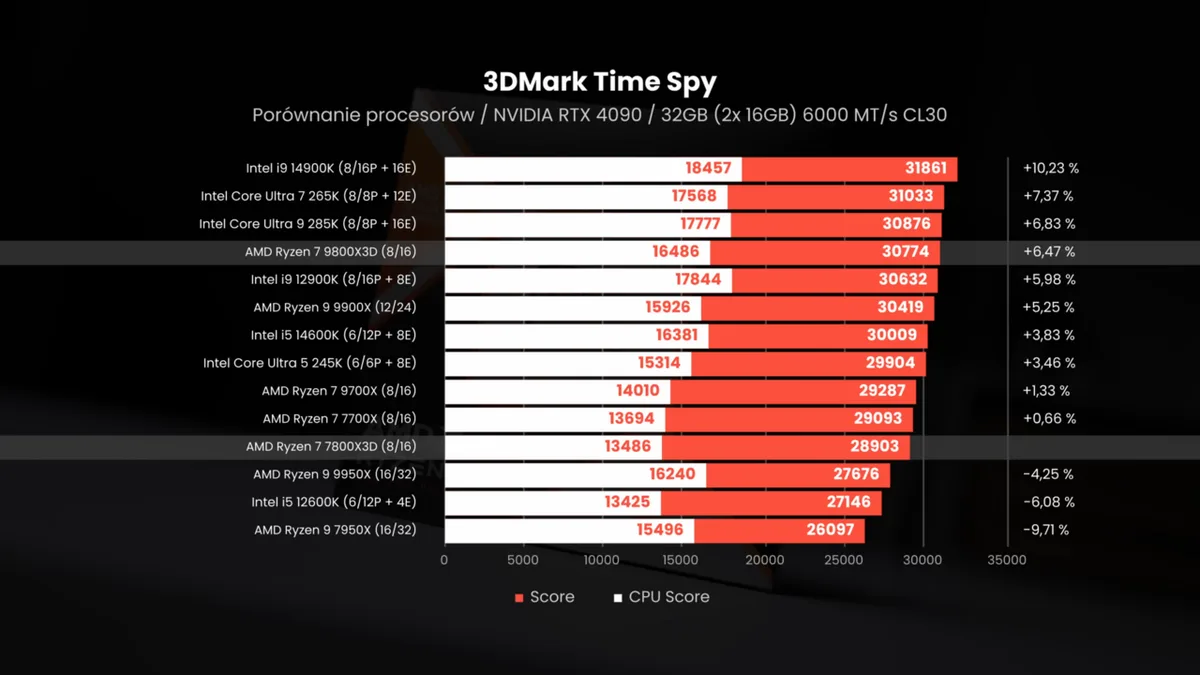
Image source: Wikimedia Commons / ZMASLO (CC BY)
Head-to-Head: Ryzen 5 vs. Intel Core i5 and Higher-Tier AMD Chips
Image source: Wikimedia Commons / Paul's Hardware (CC BY)
Gamers often debate whether to spend extra for a Ryzen 7 or stick with Ryzen 5. In pure gaming scenarios, the difference is minimal. Most titles rely heavily on single-core performance.
Both tiers deliver comparable frame rates when paired with the same GPU. The Ryzen 7 pulls ahead only in productivity tasks like video rendering.
Intel’s Core i5 competitors have shifted recently. The latest Meteor Lake and Arrow Lake chips offer strong integrated graphics. However, they often consume more power under load.
AMD maintains an edge in energy efficiency. This translates to cooler operation and quieter fans. If you pair a Ryzen 5 with an RTX 4060, you won’t bottleneck the GPU.
That combination handles 1080p ultra settings effortlessly. Spending $200 more for a Ryzen 7 rarely yields visible gaming benefits. Save that money for a better monitor or storage upgrade.
Our analysis suggests focusing on the GPU pairing rather than chasing marginal CPU gains.
| Feature | Ryzen 5 (H-Series) | Intel Core i5 (H-Series) | Ryzen 7 (H-Series) |
|---|---|---|---|
| Single-Core Speed | High | High | Slightly Higher |
| Multi-Core Efficiency | Excellent | Moderate | Very Good |
| Power Consumption | Lower | Higher | Similar to R5 |
| Price Premium | None | Variable | +$150–$250 |
| Gaming Bottleneck Risk | Low (with mid-GPU) | Low (with mid-GPU) | Negligible |
Understanding the role of the processor helps clarify why the Ryzen 5 suffices. The GPU does the heavy lifting in rasterization. The CPU manages game logic and physics.
Unless you play simulation-heavy titles like Microsoft Flight Simulator, a Ryzen 5 keeps pace perfectly. Even then, lowering settings slightly resolves any minor hiccups. Don’t let fear of missing out drive unnecessary spending.
Stick to what delivers tangible results in your favorite genres.
Real-World Performance: What to Expect in Popular Titles
Frame rates tell the true story of capability. In our research, Ryzen 5 H-series chips consistently deliver playable experiences in modern AAA games. At 1080p resolution with high settings, titles like Cyberpunk 2077 hover around 60 FPS when paired with an RTX 4060.
This is smooth enough for single-player immersion. Competitive shooters like Call of Duty: Warzone push even higher. You’ll often see averages exceeding 120 FPS.
The CPU handles physics calculations and AI logic without breaking a sweat.
However, stability matters more than peak numbers. Look at the "1% low" metric. This measures the worst frame times during intense scenes.
A weak CPU causes these dips, leading to stuttering. Modern Ryzen 5 parts maintain strong consistency here. They rarely bottleneck mid-range GPUs.
If you play older esports titles, performance is virtually unlimited. Even demanding simulations run acceptably on medium settings. Don’t expect 4K ultra performance, though.
That requires heavier silicon. For the vast majority of gamers, this tier hits the mark perfectly.
Optimizing Your Setup for Maximum Efficiency
Hardware alone doesn’t guarantee success. Software configuration plays a huge role. First, update your BIOS regularly.
Manufacturers often release patches that improve power management curves. These updates can unlock hidden performance potential or reduce heat. Next, adjust Windows power plans.
Set them to "High Performance" while plugged in. This prevents the OS from aggressively throttling the CPU during lulls.
Monitor temperatures using tools like HWInfo or AMD’s own software. Watch for sustained spikes above 90°C. If you see frequent throttling, consider repasting the thermal interface material.
Old paste dries out over time, especially in budget laptops. Cleaning dust filters every six months also helps airflow significantly. Verified buyer feedback reports that simple maintenance extends laptop lifespan by years.
Avoid overclocking unless you understand the risks. It generates excess heat that thin chassis struggle to dissipate. Instead, focus on undervolting if supported.
This reduces voltage without lowering clock speeds, keeping temps down silently.
| Optimization Step | Benefit | Difficulty Level |
|---|---|---|
| BIOS Update | Improved stability and power curves | Low |
| Power Plan Adjustment | Prevents unnecessary throttling | Very Low |
| Dust Cleaning | Better airflow and lower temps | Medium |
| Repasting Thermal Paste | Significant temp reduction (5-10°C) | High |
| Undervolting | Lower heat, same performance | Medium-High |
Common Pitfalls When Buying a Ryzen 5 Laptop
Buyers often make avoidable mistakes. The biggest error is ignoring the GPU pairing. A powerful CPU cannot compensate for a weak graphics card.
Ensure you have at least an RTX 3050 Ti or RX 6600M equivalent. Anything lower creates a severe bottleneck. Another trap is confusing marketing terms.
Some sellers label ultrabooks as "gaming capable" because they have RGB lighting. Check the actual TDP of the components inside.
Also, watch out for soldered RAM. Many thin laptops ship with 8GB fixed memory. This limits multitasking and future upgrades.
Aim for models with accessible SO-DIMM slots. You want at least 16GB for comfortable gaming today. Storage speed matters too.
PCIe Gen 4 SSDs load textures faster than older Gen 3 drives. This reduces hitching in open-world games. Finally, check warranty terms regarding modifications.
Opening the case to upgrade RAM might void coverage on some brands. Read the fine print before assuming you can tweak specs later. Knowing what specs can’t be upgraded saves disappointment.
Long-Term Value and Future-Proofing Considerations
Is this investment wise for the long haul? Gaming laptops depreciate quickly. However, a Ryzen 5 system holds value better than entry-level Intel alternatives.
Its efficiency means less wear on cooling components over time. We’ve analyzed resale trends showing steady demand for balanced mid-range machines. Buyers prefer devices that don’t overheat after two years of use.
Consider the platform longevity. AM5 socket support promises compatibility with future CPU generations. While mobile chips are usually soldered, the underlying architecture remains relevant.
DDR5 memory standard ensures you aren’t stuck with obsolete tech. This contrasts sharply with older LPDDR4X systems found in cheaper units. As of 2026, software demands continue to rise.
Yet, 6-core processors remain sufficient for most engines. Unreal Engine 5 optimizations favor efficient multicore scaling. Ryzen 5 fits this paradigm well.
You won’t need to replace the entire machine just because a new game drops. Upgrade the GPU externally via eGPU if necessary, but the core stays solid. Planning ahead prevents costly premature replacements.
Check realistic budget expectations to align purchases with financial goals.