How long should a gaming laptop last for its price? That's the question most buyers ask before spending anywhere from $600 to $2,000 on a machine. The answer isn't a single number.
It depends on the price tier, the components inside, and how you treat the laptop day to day.
Manufacturer specifications indicate that most gaming laptops are built for three to five years of active use. Aggregate reviews report that real-world lifespan often lands closer to two to four years once thermal wear and battery degradation set in. As of 2026, the gap between budget and premium tiers has only widened, which makes price-based expectations more important than ever.
how long should a gaming laptop last for its price
Budget gaming laptops in the $600 to $900 range typically last two to three years before major performance drops. Mid-range machines at $1,000 to $1,500 generally last three to five years with proper care. Premium laptops above $1,600 can last five or more years.
These figures assume moderate gaming use and basic maintenance.
Why Price Tier Changes Everything About Gaming Laptop Lifespan
Price isn't just about brand names or flashy RGB lighting. It reflects the quality of components, cooling systems, and build materials inside the chassis. A $700 laptop and a $1,800 laptop may look similar on a store shelf.
Inside, they're built for very different lifespans.
Cheaper machines use lower-wattage GPUs, plastic chassis, and basic single-fan cooling. Premium machines invest in vapor chamber cooling, aluminum frames, and higher-tier silicon. These differences directly affect how long the laptop stays usable.
The key insight: you're not just buying performance. You're buying longevity. A higher price buys better thermals, better build quality, and more upgrade headroom.
All three extend usable life.
Think of it like buying a car. A budget sedan gets you from point A to point B. A well-built vehicle with better engineering lasts longer with fewer breakdowns.
Gaming laptops follow the same logic.
Here's what each price tier actually delivers in terms of lifespan.
What Actually Wears Out First in a Gaming Laptop
Not every component ages at the same rate. Some parts fail early. Others keep running for years.
Knowing what wears out first helps you set realistic expectations.
The battery is usually the first thing to degrade. Lithium-ion cells lose capacity with each charge cycle. Most laptop batteries are rated for 300 to 500 full cycles before dropping below 80% capacity.
For a daily gamer, that's roughly two to three years.
Thermal paste dries out over time. It's the compound between the CPU/GPU and the heatsink. When it degrades, temperatures rise and performance drops.
Repasting every two to three years is common maintenance.
Fans collect dust and slow down. Reduced airflow leads to higher temperatures, which accelerates component wear. Cleaning fans every six months extends their life significantly.
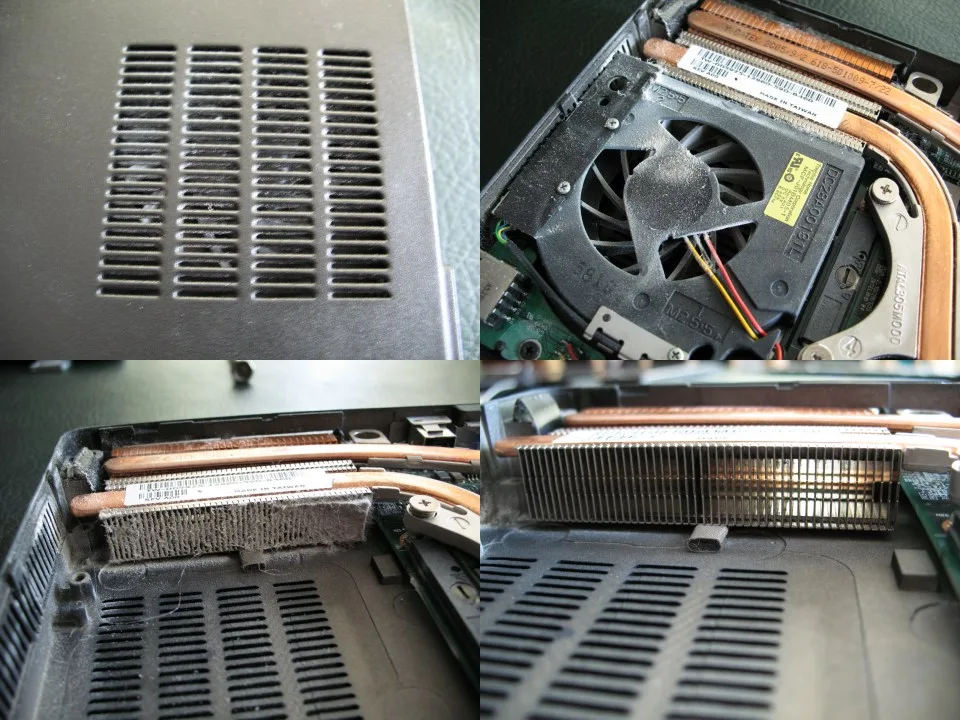
Image source: Wikimedia Commons / DMahalko, Dale Mahalko, Gilman, WI, USA — Email: dmahalko@gmail.com (CC BY-SA)
VRAM bottlenecks are a software-level problem, not hardware failure. As games demand more video memory, older GPUs with 4GB or 6GB of VRAM struggle. This is what makes a laptop feel "old" even when the hardware still works.
Soldered RAM and GPUs are permanent. Unlike desktops, many gaming laptops have memory soldered to the motherboard. When VRAM or RAM becomes insufficient, you can't upgrade.
This limits lifespan more than physical wear.
Hinges and chassis wear are physical. Plastic hinges crack. Aluminum holds up better.
This is where build quality at higher price tiers pays off.
Here's a quick breakdown of component lifespans:
| Component | Typical Lifespan | Key Factor |
|---|---|---|
| Battery | 2–3 years | Charge cycles, heat exposure |
| Thermal paste | 2–3 years | Heat, usage intensity |
| Fans | 3–5 years | Dust, bearing quality |
| VRAM adequacy | 3–5 years | Game requirements growth |
| Hinges/chassis | 4–6 years | Build material quality |
| SSD storage | 5+ years | Write cycles, capacity |
Budget Tier: What to Expect at $600–$900
Budget gaming laptops are entry points. They get you into PC gaming without breaking the bank. But expectations need to be realistic.
At this price, you'll typically find GPUs like the NVIDIA RTX 3050 or RTX 4050. These have 4GB to 6GB of VRAM. CPUs are usually mid-tier Intel Core i5 or AMD Ryzen 5 chips.
RAM is often 8GB, sometimes 16GB. Storage is usually a 512GB SSD.
The cooling is basic. Single or dual fans with thin heat pipes. Under sustained load, these machines run hot.
Thermal throttling is common during long gaming sessions.
Expected lifespan: two to three years of active gaming. After that, newer titles may not run well. The VRAM becomes a bottleneck.
The battery degrades. The cooling system struggles.
Are cheap gaming laptops worth buying? For casual gamers and students, yes. For someone who wants to play the latest AAA titles for years, no.
The value proposition is short-term access, not long-term investment.
One advantage: lower repair costs. If something breaks, replacement parts are cheaper. But labor costs are similar across tiers.
Are Gaming Laptops More Expensive to Repair? Yes, Here's Why breaks down the real numbers.
Budget laptops also have limited upgrade paths. RAM is often soldered. Storage may be upgradeable, but that's about it.
What you buy is what you're stuck with.
Mid-Range Tier: The Sweet Spot at $1,000–$1,500
This is where most buyers should focus. The mid-range tier offers the best balance of price, performance, and longevity. It's the sweet spot for a reason.
At $1,000 to $1,500, you get GPUs like the RTX 4060 or RTX 4070 with 8GB of VRAM. CPUs step up to Core i7 or Ryzen 7. RAM is usually 16GB.
Storage ranges from 512GB to 1TB SSD.
Cooling improves significantly. Dual fans with better heat pipe designs. Some models include vapor chamber cooling.
Temperatures stay lower under load. Thermal throttling is rare.
Expected lifespan: three to five years. The 8GB of VRAM handles current and near-future games. The better cooling reduces thermal wear.
Build quality is noticeably sturdier.
This tier also offers more upgrade flexibility. Many models have socketed RAM. Storage is almost always upgradeable.
Some even allow Wi-Fi card swaps. What Gaming Laptop Specs Can You Upgrade Later? covers what's realistic.
The mid-range is also where resale value starts to matter. A well-maintained mid-range laptop retains 40% to 50% of its value after two years. Budget laptops rarely retain more than 25%.
For most gamers, this tier is the right answer. It's not the cheapest or the most powerful. But it delivers the best return on investment over time.
What Is a Realistic Budget for a Gaming Laptop? helps set expectations.
Premium Tier: What $1,600+ Really Buys You
Premium gaming laptops are a different animal. They're built for enthusiasts who want top-tier performance and long-term durability. The price reflects genuine engineering, not just marketing.
At $1,600 and above, you get RTX 4080 or RTX 4090 GPUs with 12GB to 16GB of VRAM. CPUs are top-tier Core i9 or Ryzen 9 chips. RAM is 32GB or more.
Storage is 1TB to 2TB SSD.
Cooling is the biggest differentiator. Vapor chambers, multiple heat pipes, and advanced fan designs. Some models run quieter under load than mid-range laptops at idle.
Thermal performance is exceptional.
Build quality is premium. Aluminum or magnesium alloy chassis. Reinforced hinges.
Better keyboards. These materials resist wear and tear for years.
Expected lifespan: five or more years. The high VRAM future-proofs against game requirements. The superior cooling reduces component degradation.
The build quality resists physical wear.
Does a higher price mean better performance? Yes, but with diminishing returns. Does a Higher Price Mean Better Gaming Laptop Performance? explains where the value curve flattens.
Premium laptops also hold resale value best. A well-maintained premium machine can retain 50% to 60% of its value after three years. That's significant if you upgrade every few years.
The downside: repair costs are high. Premium parts cost more. Labor is the same, but parts are expensive.
Are Gaming Laptops More Expensive to Repair? Yes, Here's Why covers this in detail.
For buyers who want longevity and can afford it, premium is the right choice. For everyone else, mid-range delivers better value. How to Compare Gaming Laptop Value for Money helps weigh the trade-offs.
Side-by-Side Comparison: Lifespan by Price Tier
Here's how the three tiers stack up across key factors that affect longevity.
| Factor | Budget ($600–$900) | Mid-Range ($1,000–$1,500) | Premium ($1,600+) |
|---|---|---|---|
| Expected lifespan | 2–3 years | 3–5 years | 5+ years |
| GPU VRAM | 4–6GB | 8GB | 12–16GB |
| Cooling quality | Basic | Good | Excellent |
| Build material | Plastic | Mixed | Aluminum/magnesium |
| Upgrade paths | Limited | Moderate | Good (but soldered GPUs) |
| Resale value (2 yrs) | ~25% | 40–50% | 50–60% |
| Repair cost | Lower parts | Mid | Higher parts |
This table shows why price tier matters so much. Each step up delivers measurably longer usable life. But the jump from mid-range to premium is smaller in lifespan gains than budget to mid-range.
The biggest lifespan gains come from better cooling and more VRAM. These two factors determine how long a laptop stays relevant for gaming. Price tier correlates with both.
Gaming Laptop vs Desktop and Cloud Gaming: The Alternatives
Before committing to a gaming laptop, consider the alternatives. Each has different lifespan implications.
Desktop PCs last longer. Components are replaceable. GPUs swap out in minutes.
Cooling is better. A $1,200 desktop can last six to eight years with upgrades. The trade-off is portability.
Cloud gaming services like GeForce Now and Xbox Cloud Gaming shift the hardware burden to servers. Your laptop only needs to stream video. A cheap $400 laptop could last five-plus years this way.
The trade-off is internet dependence and subscription costs.
Refurbished gaming laptops offer middle ground. A two-year-old premium laptop at mid-range price gives you premium build quality at lower cost. The risk is unknown wear history and shorter remaining lifespan.
For buyers who travel frequently, a gaming laptop is the only practical choice. For stationary gamers, a desktop delivers better longevity per dollar. What Is the Total Cost of Owning a Gaming Laptop? compares these options financially.
How to Stretch a Gaming Laptop's Life (Plus Mistakes to Avoid)
You can add years to any gaming laptop with proper care. These practices apply across all price tiers.
Clean the fans every six months. Dust buildup is the silent killer. Use compressed air.
Keep the laptop on hard surfaces, not beds or couches. Soft surfaces block vents.
Repaste the thermal compound every two to three years. This is the single most effective maintenance task. It can drop temperatures by 5 to 10 degrees Celsius.
Lower temperatures mean slower component degradation.
Limit battery charge to 80% when plugged in. Many manufacturers include battery charge limiters in their software. Keeping the battery at 100% constantly accelerates degradation.
Undervolt the CPU if your laptop supports it. This reduces heat without sacrificing performance. Lower heat means longer component life.
Tools like Intel XTU or ThrottleStop handle this.
Upgrade RAM and storage when possible. Adding more RAM extends relevance. A larger SSD reduces write cycles per cell.
Both are cheap compared to buying a new laptop.
Common mistakes that shorten lifespan:
- Blocking air vents with soft surfaces
- Running games at maximum settings constantly
- Ignoring temperature warnings
- Skipping fan cleaning
- Leaving the laptop plugged in at 100% charge 24/7
- Carrying the laptop without a protective case
What Gaming Laptop Specs Can't Be Upgraded shows which parts you're stuck with. Plan around those limitations.
FAQs
How long does a $700 gaming laptop last?
A $700 gaming laptop typically lasts two to three years with regular gaming use. The GPU's limited VRAM becomes a bottleneck as game requirements grow. Battery degradation and thermal wear accelerate the decline after year two.
Is it worth repairing an old gaming laptop?
Repair makes sense if the issue is minor and the laptop is under three years old. Battery replacement or fan cleaning costs $50 to $150. Motherboard or GPU repairs often exceed the laptop's remaining value.
Check Are Gaming Laptops More Expensive to Repair? Yes, Here's Why for detailed cost breakdowns.
Does gaming shorten laptop lifespan?
Yes, gaming shortens lifespan compared to light use. Sustained high temperatures stress components. The battery degrades faster under load.
But a well-cooled gaming laptop with proper maintenance still reaches its expected tier lifespan.
How do I know when to replace my gaming laptop?
Replace when games no longer run at acceptable frame rates at low settings. Or when repair costs exceed 50% of the laptop's current value. Or when the battery holds less than 50% of original capacity and replacement isn't practical.
Can a gaming laptop last 10 years?
Ten years is unrealistic for gaming use. Hardware requirements outpace aging components. A premium laptop might handle light gaming at 10 years.
But modern AAA titles won't run. Five years is a realistic ceiling for active gaming.
What matters more for lifespan, cooling or build quality?
Cooling matters more for component lifespan. Good cooling prevents thermal degradation of the CPU and GPU. Build quality matters more for physical durability.
Both are important, but cooling has the bigger impact on how long the laptop stays functional.
Final Verdict: Which Price Tier Is Right for You
Your budget and gaming habits determine the right tier. Here's the simple framework.
Choose budget ($600, $900) if you're a casual gamer, a student, or buying for a child. Expect two to three years of use. Plan to upgrade or switch to cloud gaming after that.
Choose mid-range ($1,000, $1,500) if you play regularly and want three to five years of solid performance. This tier offers the best value. It balances cost, longevity, and upgrade flexibility.
Choose premium ($1,600+) if you're an enthusiast, a content creator, or someone who keeps laptops for five-plus years. The higher upfront cost pays off in longevity and resale value.
What Is a Realistic Budget for a Gaming Laptop? and How Much Is a Good Gaming Laptop Really? help narrow down your specific number.
Remember: maintenance matters more than price tier for actual lifespan. A well-maintained budget laptop can outlast a neglected premium one. Clean the fans.
Repaste when needed. Limit battery charge. These habits add years regardless of what you paid.
What Really Affects Gaming Laptop Prices? explains where your money goes. Here's Why Gaming Laptops Are So Expensive covers the industry side. And What Is the Total Cost of Owning a Gaming Laptop? puts it all together financially.
Buy for your needs. Maintain what you buy. That's the real formula for getting your money's worth.
Side-by-Side Comparison: Lifespan by Price Tier
Here's how the three tiers stack up when you factor in total cost of ownership over time.
| Metric | Budget ($600 to $900) | Mid-Range ($1,000 to $1,500) | Premium ($1,600+) |
|---|---|---|---|
| Years of active gaming | 2 to 3 | 3 to 5 | 5+ |
| Cost per year of use | $200 to $450 | $200 to $500 | $320 to $400 |
| First component to fail | Battery or fan | Battery | Battery (easily replaced) |
| Upgrade cost over lifespan | $0 to $50 | $50 to $150 | $100 to $300 |
| Resale value after 3 years | $100 to $200 | $300 to $500 | $600 to $900 |
The cost-per-year numbers are closer than most people expect. A $700 laptop lasting 2.5 years costs $280 per year. A $1,200 laptop lasting 4 years costs $300 per year.
Premium at $1,800 lasting 5.5 years costs $327 per year.
The real difference is experience quality. Budget laptops throttle more often. Mid-range laptops stay smooth through year four.
Premium laptops barely break a sweat even at year five.
If you only care about cost per year, budget and mid-range are nearly identical. If you care about gaming experience over time, mid-range wins. Premium only justifies itself if you need top-tier performance and keep laptops for five-plus years.
Is a Cheap Gaming Laptop Worth Buying? Here's the Truth helps you decide if budget makes sense for your situation.
Per NVIDIA GPU specifications, VRAM capacity is the single biggest factor in gaming longevity. A laptop with 8GB of VRAM stays relevant two years longer than one with 4GB.
Gaming Laptop vs Desktop and Cloud Gaming: The Alternatives
A desktop PC at $1,200 can last six to eight years with periodic upgrades. GPU swaps take minutes. Cooling is superior.
The trade-off is zero portability.
Cloud gaming shifts hardware to remote servers. GeForce Now and Xbox Cloud Gaming run games on data center machines. Your laptop only streams video.
A $400 laptop could last five-plus years this way. Trade-offs include internet dependence, input lag, and monthly subscription costs of $10 to $20.
Refurbished premium laptops offer middle ground. A two-year-old $1,800 laptop at $1,000 delivers premium build quality at mid-range price. The risk is unknown wear history and shorter remaining lifespan.
For frequent travelers, a gaming laptop is the only practical choice. For stationary gamers, desktops deliver better longevity per dollar. Cloud gaming works best for casual players with fast internet.
What Is the Total Cost of Owning a Gaming Laptop? compares these options financially.
How to Stretch a Gaming Laptop's Life (Plus Mistakes to Avoid)
Software optimization matters as much as hardware care. Set Windows power plan to Balanced when not gaming. This reduces heat and extends component life.
Use frame rate limiters in games. Running at 60 FPS instead of 144 FPS on a 144Hz screen cuts GPU load significantly.
Monitor SSD health with tools like CrystalDiskInfo. SSDs degrade with write cycles. Keeping storage above 20% free space extends cell longevity.
How Much SSD Storage Does a Gaming Laptop Need? covers sizing for longevity.
New mistakes that shorten lifespan:
- Gaming on soft surfaces that block bottom vents
- Ignoring Windows update notifications for GPU drivers
- Running antivirus scans during gaming sessions
- Using generic chargers that deliver wrong voltage
- Storing the laptop in hot cars or direct sunlight
Battery health degrades fastest above 40 degrees Celsius. Keep the laptop in climate-controlled environments. A $15 laptop cooling pad can drop temperatures by 3 to 5 degrees.
What Gaming Laptop Features Are Worth Paying For? helps identify which features actually extend lifespan.
FAQs
What is the average lifespan of a gaming laptop battery?
Gaming laptop batteries typically last two to three years with regular use. Lithium-ion cells degrade with heat and charge cycles. Most batteries are rated for 300 to 500 full cycles before dropping below 80% capacity.
Keeping charge between 20% and 80% extends battery life.
Can you upgrade a gaming laptop to last longer?
Yes, if the model supports it. RAM and storage are the most common upgrades. Some laptops allow Wi-Fi card swaps.
GPU and CPU are almost always soldered. Check What Gaming Laptop Specs Can Be Upgraded Later? for specific upgrade paths.
Do gaming laptops lose performance over time?
Yes, but not because of hardware aging. Thermal paste degradation causes higher temperatures and throttling. Dust buildup reduces cooling efficiency.
Software bloat slows the system. A repaste and clean can restore most lost performance.
Is it better to buy a gaming laptop or wait for new models?
Buy when your current machine no longer meets your needs. New models launch every 12 to 18 months. Waiting rarely saves money.
Prices on current models drop when new ones launch. When Do Gaming Laptops Usually Go On Sale? covers timing.
How much does gaming laptop maintenance cost per year?
Budget $30 to $80 per year for maintenance. This covers compressed air, thermal paste, and occasional professional cleaning. Battery replacement costs $50 to $150 every two to three years.
Total maintenance over a five-year lifespan runs $200 to $400.
Final Verdict: Which Price Tier Is Right for You
Match your tier to your gaming habits and budget. Here's a quick decision framework.
Buy budget if you play casual or indie games. Or if you're buying for a child or student. Expect two to three years.
Plan to upgrade or switch to cloud gaming after that.
Buy mid-range if you play AAA titles regularly. Want three to five years of solid performance. And value upgrade flexibility.
This tier delivers the best return on investment.
Buy premium if you're an enthusiast or content creator. Keep laptops for five-plus years. And need top-tier performance.
The higher upfront cost pays off in longevity and resale value.
What Performance to Expect From an Entry-Level Gaming Laptop sets realistic expectations for budget buyers.
Remember that maintenance matters more than price tier. A well-maintained budget laptop outlasts a neglected premium one. Clean fans.
Repaste when needed. Limit battery charge. These habits add years regardless of what you paid.