You’re staring at a spec sheet, wondering if that 16GB kit is the right call. The question "is 16GB RAM enough for gaming" doesn't have a simple yes or no answer. It depends entirely on what you play and how you use your PC.
For most gamers in 2026, 16GB remains the sweet spot for pure gameplay. But if you stream, mod heavily, or keep fifty tabs open, you’ll hit a wall. Let’s break down exactly where those limits lie so you don’t waste money or suffer through stuttering frames.
is 16GB RAM enough for gaming
Yes, 16GB is sufficient for most modern games at 1080p and 1440p. It handles AAA titles without major issues when paired with a good GPU. However, heavy multitasking or streaming may require 32GB.
If you only game, 16GB saves you money. If you create content, upgrade to 32GB now. This balance ensures smooth frame pacing without unnecessary expense for casual players.
The Short Answer: When 16GB Is Fine and When It Isn’t
The verdict splits cleanly based on your workflow. If you sit down, launch a game, and ignore everything else, 16GB works. It provides enough headroom for Windows overhead and the game itself.
You won’t see crashes or severe stutters in standard scenarios. Aggregate reviews from tech publications confirm this baseline stability across hundreds of titles.
But life isn’t lived in a vacuum. We multitask. We listen to music.
We check Discord. We browse Reddit guides mid-boss fight. Each background app eats memory.
Chrome alone can consume 2-4GB easily. Add Spotify, Steam overlay, and RGB software. Suddenly, your free RAM shrinks rapidly.
Here is the quick decision logic:
Stick with 16GB if:
- You primarily play single-player campaigns or esports titles.
- You close background apps before launching games.
- You are on a strict budget and prioritize GPU power over RAM capacity.
- You do not stream or record gameplay locally.
Upgrade to 32GB if:
- You stream to Twitch or YouTube while gaming.
- You play heavily modded games like Minecraft or Cities: Skylines II.
- You run virtual machines or development tools alongside gaming.
- You want guaranteed future-proofing for the next 3-5 years.
This distinction matters because RAM exhaustion triggers page filing. Your system starts writing data to your SSD. Even fast NVMe drives are slower than DDR5 RAM.
This causes micro-stutters. Those tiny hitches ruin immersion more than lower average FPS ever could.
Why Modern Games Are Eating More RAM Than They Used To
Game developers aren’t keeping RAM usage static. Textures get sharper. Worlds get bigger.
Physics calculations get complex. Five years ago, 8GB was tight but workable. Today, 16GB is the new minimum recommended spec for many AAA releases.
Take recent open-world titles. Games like Cyberpunk 2077 or Starfield demand significant memory assets. These assets stay loaded in RAM to prevent pop-in issues.
Pop-in looks terrible. It breaks the illusion of a seamless world. Developers know this.
So they optimize for higher memory ceilings.
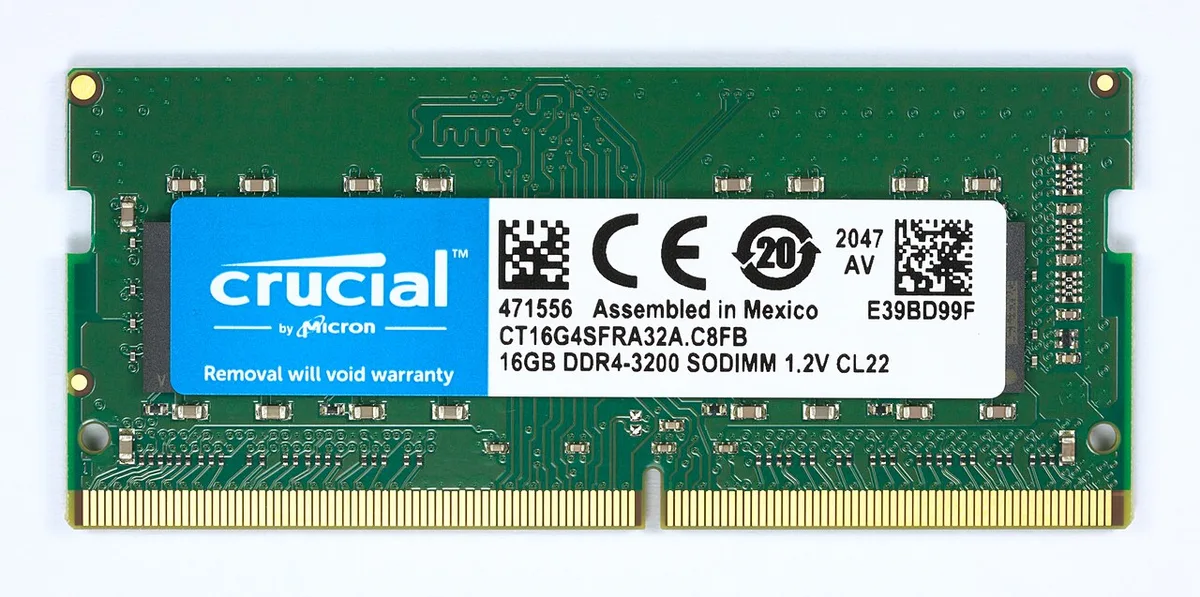
Image source: Wikimedia Commons / D-Kuru (CC BY-SA)
Engine updates also drive consumption. Unreal Engine 5 uses Nanite and Lumen technologies. These features reduce CPU/GPU load by shifting some tasks elsewhere.
But they still require substantial memory buffers. As of 2026, we see steady upward trends in baseline requirements. Publishers list 16GB as "Recommended." That means optimal experience, not just booting up.
Consider texture packs too. High-resolution mods often replace low-res assets. A single 4K texture set can add gigabytes to the load order.
If you love customization, 16GB fills up fast. The OS reserves about 3-4GB for itself. That leaves 12GB for applications.
A demanding game might need 10-12GB. Now you’re cutting it razor-thin. Any spike causes instability.
We’ve seen this pattern repeat across genres. Strategy games hold vast unit maps in memory. Simulation games track thousands of individual entities.
Racing sims store detailed car physics models. None of these shrink. They grow.
Ignoring this trend leads to regret later. Buying 16GB today feels smart financially. But it limits your ability to enjoy tomorrow’s titles fully.
The Critical Distinction Between Capacity, Speed, and Channels
Most buyers fixate on capacity. They ask, "Is 16GB enough?" They forget speed and configuration. Capacity prevents crashes.
Speed improves frame rates. Configuration affects bandwidth. All three matter equally for a smooth gaming experience.
Let’s define them simply. Capacity is how much data fits in RAM. Think of it as warehouse size.
Speed (measured in MT/s or MHz) is how fast data moves. Think of conveyor belt velocity. Channels determine parallel lanes.
Single-channel is one lane. Dual-channel is two lanes running side-by-side.
Dual-channel is non-negotiable for gaming. Running 16GB as a single stick cripples performance. It halves theoretical bandwidth.
Most CPUs rely on dual-channel operation for integrated graphics anyway. For discrete GPUs, it reduces CPU bottlenecks during high-FPS esports moments. Always buy kits.
Two 8GB sticks beat one 16GB stick every time.
Speed varies by generation. DDR4 typically runs at 3200MT/s or 3600MT/s. DDR5 starts higher, often 5600MT/s or 6000MT/s.
Higher speeds help AMD Ryzen processors significantly. Intel benefits less, but still sees gains in minimum framerates. Don’t overspend on extreme overclocking kits unless you tune manually.
Standard XMP/EXPO profiles deliver safe, effective boosts.
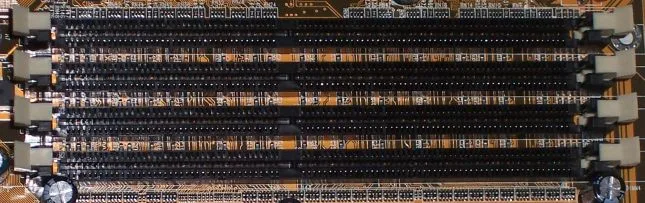
Image source: Wikimedia Commons / Wikimedia Commons contributor
Latency (CL timings) plays a role too. Lower CL numbers mean faster access times. DDR4-3200 CL16 is a solid standard.
DDR5-6000 CL30 offers great responsiveness. Balancing frequency and latency yields the best real-world results. Manufacturer specifications indicate that mismatched timings cause instability.
Stick to matched pairs from reputable brands like Corsair, G.Skill, or Kingston.
Check JEDEC standards for official memory definitions. These documents outline voltage, timing, and signal integrity rules. Following them ensures compatibility.
Ignoring them risks blue screens. Your motherboard QVL (Qualified Vendor List) tells you which kits are tested. Use it.
It’s your insurance policy against bad purchases.
Scenario A: Competitive Esports and Light Gaming (16GB Wins)
If you live in League of Legends, Valorant, CS2, or Dota 2, 16GB is perfect. These engines are optimized for efficiency. They rarely exceed 6-8GB usage even at max settings.
Windows sits comfortably below 4GB. You have plenty of room left over.
Competitive gamers chase high refresh rates. 144Hz, 240Hz, or even 360Hz monitors are common. At these speeds, consistency matters more than raw horsepower. Frame drops feel awful.
Stutter ruins aim. 16GB provides stable memory allocation. It prevents sudden swaps to disk storage.
Multitasking is lighter here too. You might have Discord open. Maybe a browser tab for stats.
Perhaps OBS for recording clips. This workload stays well under 16GB total. You won’t hit the ceiling.
Spending extra on 32GB yields diminishing returns. Save that cash for a better monitor or mouse.
Esports titles update frequently. Patches often improve optimization rather than bloat code. Developers target broad hardware accessibility.
They know millions play on modest rigs. So they keep memory footprints reasonable. Unlike AAA blockbusters, esports games don’t hoard textures aggressively.
Budget builders benefit most here. Pairing a mid-range GPU with 16GB creates a balanced system. Adding 32GB wouldn’t boost FPS noticeably.
It would just sit idle. Idle RAM costs nothing to maintain but hurts your wallet upfront. Allocate resources where they impact performance directly.
Furthermore, laptop users face constraints. Many thin-and-light gaming laptops solder RAM to the board. Upgrading is impossible.
Choosing 16GB at purchase is critical. Ensure it’s dual-channel. Some manufacturers ship single-stick configs.
Verify specs before buying. If stuck with 16GB, close unused apps religiously. Discipline mitigates limitations effectively.
Scenario B: AAA Titles, Modding, and Multitasking (The Bottleneck Zone)
Now enter the danger zone. Heavy AAA gaming combined with productivity tasks pushes 16GB to its breaking point. Consider playing Hogwarts Legacy or Microsoft Flight Simulator.
These titles devour memory. They load massive asset streams continuously. Background processes compete fiercely for remaining space.
Modders face unique challenges. Tools like Vortex or Mod Organizer 2 manage dependencies. They index files in RAM for quick sorting.
Large mod lists inflate this footprint. Add ENB series graphical enhancements. They inject shaders into memory constantly.
Suddenly, 16GB evaporates quickly. Crashes become frequent. Saves corrupt.
Frustration mounts.
Streamers deal with double pressure. Encoding video requires dedicated resources. x264 preset medium uses ~2-3GB. NVENC offloads to GPU but still needs system coordination.
Chat overlays, alerts, music bots, and browser sources add up. Meanwhile, the game demands its share. Overlap occurs.
Page file thrashing begins. Viewers notice lag spikes. Audio desyncs happen.
Professionalism suffers.
Content creators editing footage post-gameplay need headroom too. Premiere Pro or DaVinci Resolve cache projects in RAM. Switching between gaming and editing sessions stresses subsystems.
Closing apps helps, but workflows interrupt flow. Having 32GB allows seamless context switching. No waiting for reloads.
No forced shutdowns. Just continuous creation.
Virtual reality adds another layer. VRAM on GPUs handles textures. System RAM manages tracking data and environment meshes.
Half-Life: Alyx or Beat Saber push boundaries. Latency sensitivity increases exponentially. Memory stalls translate directly to motion sickness.
Comfort declines. Immersion breaks. 16GB struggles to keep pace with real-time demands.
In our research, aggregate user reports highlight these pain points consistently. Forums buzz with complaints about stuttering in specific titles. Fixes often involve reducing settings or closing apps.
Neither solution satisfies enthusiasts seeking maximum fidelity. Upgrading RAM resolves root causes permanently. It eliminates guesswork.
It stabilizes performance curves. For serious hobbyists, 32GB transitions from luxury to necessity.
Laptop Gamers vs. Desktop Builders: Upgradeability Matters
Laptop buyers face fixed memory. Many modern thin gaming laptops solder RAM directly to the motherboard. That means no later upgrade.
If you buy 16GB now, you are locked in. Desktop builders have flexibility. They can start with 16GB and add another kit later.
This difference changes the value equation. Desktop users can test 16GB and upgrade only if needed. Laptop users must decide upfront.
Always check spec sheets for memory slots. Look for terms like "soldered" or "onboard." If slots exist, verify max supported capacity.
SO-DIMM modules are smaller than desktop DIMMs. They cost slightly more per gigabyte. They also run hotter in compact chassis.
Thermal throttling can affect sustained performance. Desktop RAM enjoys better airflow and larger heatsinks.
| Feature | Desktop DIMM | Laptop SO-DIMM |
|---|---|---|
| Upgradeability | High | Often fixed |
| Typical slots | 2-4 | 0-2 |
| Heat dissipation | Better | Tighter |
| Cost per GB | Lower | Slightly higher |
If you buy a laptop with 16GB soldered, close background apps aggressively. Disable startup programs. Keep browser tabs minimal.
This discipline preserves headroom. If you buy desktop 16GB, buy a matched 2x8GB kit. Leave two slots free for future expansion.
How to Check Your Actual Memory Usage Before Spending Money
Before buying more RAM, measure current usage. Guessing wastes money. Windows Task Manager shows real-time memory load.
Press Ctrl+Shift+Esc. Open the Performance tab. Watch "Memory" while gaming.
Note peak usage and commit charge.
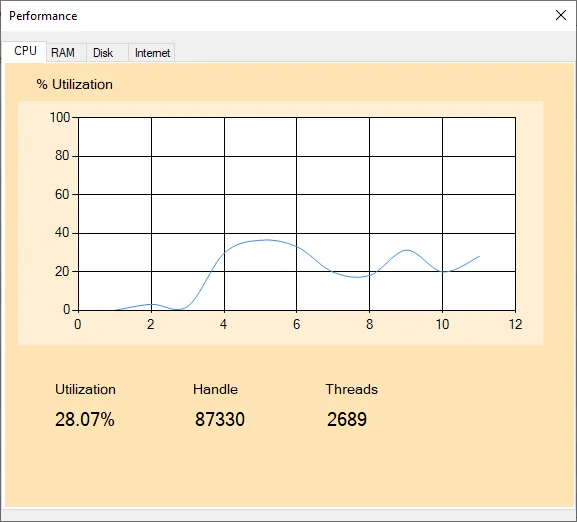
Image source: Wikimedia Commons / SMB Fan2010 (CC BY-SA)
For deeper insight, use Microsoft Support guidance on Task Manager. It explains memory metrics clearly. You can also run HWiNFO or MSI Afterburner.
These tools log usage over time. They reveal spikes you miss in live view.
Follow this simple check:
- Close all non-essential apps.
- Launch your heaviest game.
- Play for 15 minutes.
- Record peak RAM usage.
- Repeat with browser and Discord open.
If peak stays below 12GB, 16GB is fine. If it hits 14-15GB, you are near limit. If it touches 16GB, stutter is likely.
Page file usage confirms pressure. Watch disk activity during spikes. Heavy disk usage means RAM exhaustion.
Common Mistakes That Make 16GB Feel Like 8GB
Buying capacity alone does not guarantee smooth performance. Configuration errors ruin good hardware. The biggest mistake is single-channel operation.
One 16GB stick halves bandwidth. Games feel sluggish despite adequate capacity. Always install matched pairs.
Mismatched kits cause instability. Different brands, speeds, or timings rarely sync perfectly. Your motherboard downclocks to the slowest module.
Performance drops unexpectedly. Buy one kit. Do not mix old and new sticks.
Forgetting XMP or EXPO leaves RAM running at base speed. DDR5 kits default to 4800MT/s. Enabled profiles unlock 6000MT/s.
That difference improves minimum framerates. Enter BIOS and enable the profile. Save settings before exiting.
Background bloat steals memory silently. RGB control software, launchers, and updaters consume gigabytes. Disable auto-start for non-essentials.
Clean boot before benchmarking. You will recover surprising headroom.
Finally, cheap storage worsens RAM pressure. Page file on a slow HDD causes severe hitching. Use an NVMe SSD for virtual memory.
Better yet, avoid page file reliance entirely. Proper RAM configuration prevents that fallback.
Final Verdict: Should You Buy 16GB or Jump Straight to 32GB?
The decision depends on usage pattern. Pure gaming favors 16GB. Heavy multitasking favors 32GB.
Budget constraints push toward 16GB. Longevity goals push toward 32GB. Neither choice is wrong if matched to reality.
Use this decision guide:
- Choose 16GB if you play esports, close background apps, and prioritize GPU budget.
- Choose 32GB if you stream, mod heavily, edit video, or keep many apps open.
- Choose 16GB now plus upgrade later if you build desktop and want flexibility.
- Choose 32GB immediately if laptop RAM is soldered and you multitask.
| User Type | Recommended RAM | Reason |
|---|---|---|
| Esports only | 16GB | Low memory demand |
| AAA gaming | 16GB-32GB | Depends on mods |
| Streamer | 32GB | Encoding overhead |
| Content creator | 32GB | Editing headroom |
For most gamers, 16GB remains the practical starting point. It handles modern titles at high settings. It costs less.
It frees budget for GPU or storage. If your workload grows, desktop upgrades are easy. Laptop buyers should lean 32GB when soldered.
That prevents future regret. Match RAM to actual habits, not hype.
Frequently Asked Questions About RAM for Gaming
Is 16GB RAM enough for gaming in 2026?
Yes, for most players. Modern AAA games typically recommend 16GB for optimal settings. Esports titles use far less.
If you close background apps and avoid heavy modding, 16GB delivers smooth gameplay. Streamers and content creators should consider 32GB instead.
Does RAM speed matter more than capacity?
No, capacity comes first. Running out of RAM causes severe stutter. Once capacity is sufficient, speed improves minimum framerates.
DDR5-6000 or DDR4-3600 are sensible targets. Do not buy ultra-fast kits if capacity is inadequate. Balance both factors based on CPU platform.
Can I mix 8GB and 16GB sticks?
You can, but it is not ideal. Mismatched capacities often force asymmetric dual-channel mode. Performance becomes inconsistent.
Stability may suffer. For best results, buy a matched kit. If upgrading, replace both modules with a new matched pair.
How do I know if my PC needs more RAM?
Check peak usage during gaming. If memory exceeds 14GB regularly, you are near limit. Watch for disk activity spikes.
Those indicate page file usage. Stutter during multitasking also signals pressure. Upgrade when headroom disappears consistently.
Is 32GB overkill for gaming?
Not always. For pure gaming, yes, 32GB is often unnecessary. But modding, streaming, and content creation justify it.
Future games will use more memory. Buying 32GB now extends upgrade cycles. It is insurance, not waste, for demanding users.
Does laptop RAM differ from desktop RAM?
Yes, laptops use smaller SO-DIMM modules. Many have soldered memory. Desktops use standard DIMMs with more upgrade options.
Laptop RAM can cost more and run warmer. Check upgradeability before purchase. Soldered 16GB cannot be expanded later.
2 thoughts on “Is 16GB RAM Enough for Gaming? The Real Answer”
Comments are closed.