If you've asked why are Razer gaming laptops expensive, the short answer is that you're paying for premium design, parts, and brand positioning, not just raw FPS. The price also reflects compact cooling, high-grade displays, and a thinner chassis. For some buyers, that trade-off is worth it.
For others, thicker rivals deliver more gaming power per dollar.
As of 2026, many Razer Blade configurations use NVIDIA GeForce RTX 40-series GPUs and 100% DCI-P3 displays, while manufacturer specs often list chassis thickness around 16.8 mm. That combination is costly to build and keep cool. The real question is whether those extras match your daily use.
Let's break down where the money goes.
why are Razer gaming laptops expensive
Why are Razer gaming laptops expensive? You pay for compact metal chassis, high-end displays, cooling, and brand premium. Raw FPS per dollar is often lower than thicker rivals.
The premium makes sense for portability and finish, not for every buyer.
Why Razer Gaming Laptops Cost More Than Most Buyers Expect
Many shoppers expect a gaming laptop price to track mainly with the GPU. Razer often charges more because the Blade line targets a premium segment. That means better materials, tighter tolerances, and a cleaner look.
It also means you may pay for design work that does not raise frame rates.
The gap shows up fastest when you compare spec sheets. A Razer Blade can cost more than a thicker laptop with a similar RTX GPU. The extra money may buy less fan noise, a sharper display, or a smaller footprint.
It may also buy stronger resale value, depending on condition and demand.
Think of it like buying a compact sports car. The engine matters, but the chassis, weight, and finish matter too. If you mainly play at a desk, those extras may feel optional.
If you travel weekly, they can feel essential.
For a deeper look at materials, what materials are used in a gaming laptop chassis helps explain why metal builds cost more. CNC machining, tighter tolerances, and finishing all add labor and waste. Those costs land in the final price.
What Actually Drives Razer Gaming Laptop Prices
The biggest driver is the total bill of materials. Razer uses premium parts in a small space. That forces custom cooling, denser layouts, and stricter quality control.
Each of those choices raises cost.
- Premium CNC-milled aluminum chassis
- High-refresh QHD or OLED display panels
- NVIDIA GeForce RTX mobile GPUs
- Intel Core HX or AMD Ryzen mobile processors
- Vapor chamber cooling systems
- DDR5 memory and PCIe SSD storage
- Per-key RGB Chroma lighting
- Large precision trackpads
- Thunderbolt 4 or USB4 ports
- Compact high-wattage power adapters
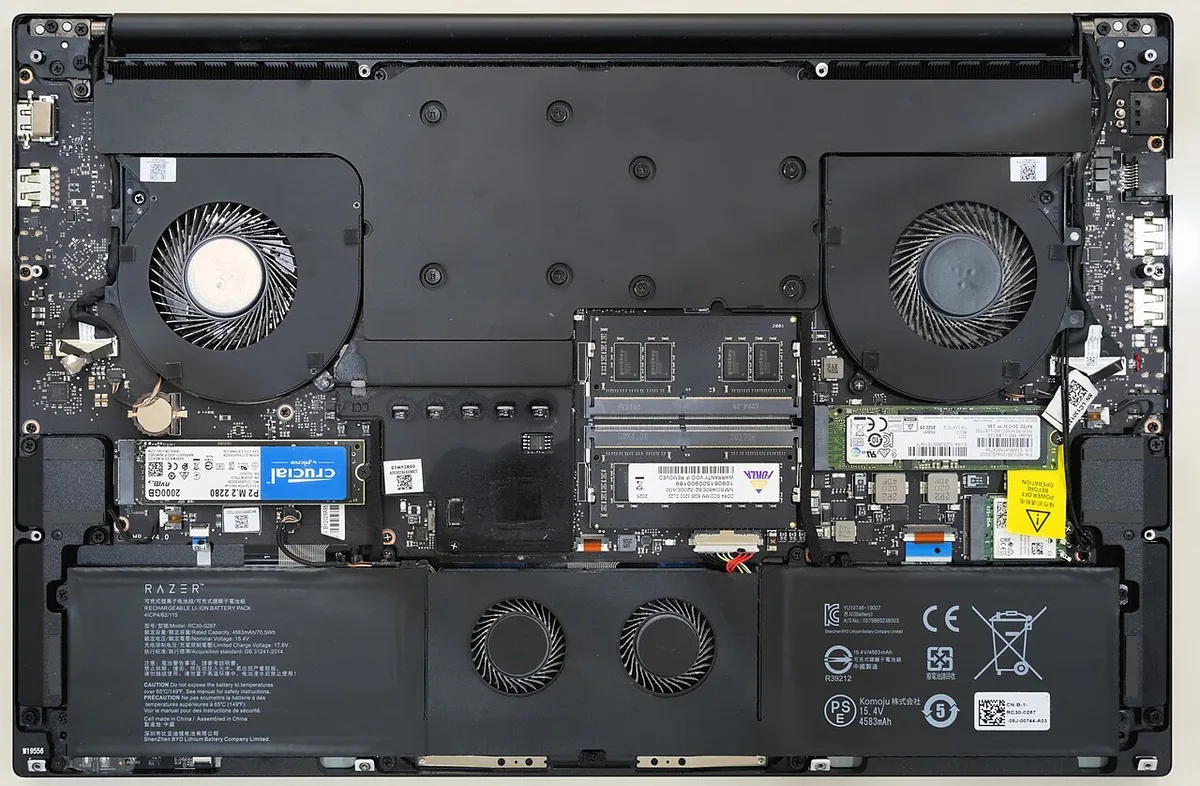
Image source: Wikimedia Commons / Benlisquare (CC BY-SA)
Cooling is a hidden cost. A thin laptop has less airflow than a thick one. To keep performance stable, Razer must use better heat pipes, fans, and thermal interfaces.
That can mean a higher price even when the GPU model looks familiar.
Software and ecosystem also matter. Razer Synapse controls lighting, fan profiles, and performance modes. RazerCare can add cost, but it may reduce repair risk.
Regional taxes, import duties, and retailer pricing can also shift the final number.
Before you buy, how to check gaming laptop build quality before you buy is worth reading. Panel flex, hinge feel, and cooling design often explain price better than a spec list.
Premium Components and Build Quality Inside a Razer Blade
A Razer Blade usually sells on refinement. The chassis feels solid because aluminum is machined rather than stamped. The display is often a strong selling point, especially on QHD and OLED models.
Those panels cost more than basic 1080p screens.
The GPU is still the headline part. NVIDIA GeForce RTX laptop GPUs can vary by TGP, meaning power limits differ by model. A higher TGP usually means more heat and more cooling.
Razer's thinner design can limit sustained power compared with bulkier laptops.
Common premium traits include:
| Part | Why It Adds Cost |
|---|---|
| CNC aluminum chassis | Machining time and material waste |
| High-refresh display | Panel cost and calibration |
| Vapor chamber cooling | Custom thermal hardware |
| RTX laptop GPU | Silicon demand and power design |
| DDR5 memory | Faster, costlier modules |
| PCIe SSD storage | Speed and capacity pricing |
CPU choice matters too. Intel Core HX and AMD Ryzen mobile chips can draw high power. In a thin chassis, that power must be managed carefully.
Aggregate reviews report that fan noise and surface heat can rise during long gaming sessions.
The keyboard and trackpad also help justify price. A large precision trackpad and per-key RGB Chroma lighting feel more polished than budget parts. These are small details, but they shape daily use.
Pros and Cons of Paying the Razer Premium
The main benefit is a laptop that feels premium while staying portable. You get a strong display, a solid chassis, and a clean design. For travel, presentations, and mixed work, that can be valuable.
The laptop also looks less flashy than many gaming machines.
The drawbacks are clear. You may pay more for less raw performance per dollar. Some models have limited upgrade paths, especially where memory is soldered.
Repairs and out-of-warranty service can also be expensive.
Pros:
- Strong build quality
- High-quality displays
- Thin and travel-friendly design
- Good keyboard and trackpad experience
- Strong aesthetic appeal
- Ecosystem integration with Razer accessories
- Potential resale value retention
Cons:
- High upfront price
- Lower price-to-performance ratio than thicker laptops
- Thermal limits under sustained loads
- Fan noise during gaming
- Limited upgradeability on some models
- Expensive repairs outside warranty
If you are unsure about thin designs, are thin gaming laptops actually good for gaming gives useful context. Thin laptops can game well, but cooling and power limits matter more than marketing claims.
Razer vs ASUS ROG, MSI, Alienware, and Lenovo Legion
Razer competes with ASUS ROG, MSI, Alienware, and Lenovo Legion. Most rivals offer more configuration variety. Many also offer thicker chassis with higher GPU power limits.
That can make them better for pure gaming value.
Razer's edge is usually fit and finish. It often feels more like a premium ultrabook than a traditional gaming laptop. ASUS ROG gaming laptops are strong rivals if you want performance and features at a lower price.
Lenovo Legion gaming laptops often deliver strong cooling and value.
Display, Cooling, and Portability Differences
Razer usually wins on display quality and portability. Many Blade models use high-refresh panels with strong color coverage. Rivals may offer brighter screens or better cooling, depending on the model.
A thicker laptop can sustain higher power, but it weighs more.
Cooling is where trade-offs become obvious. A vapor chamber helps, but physics still favors larger fans and vents. If you play demanding games for hours, a thicker chassis may stay cooler.
If you carry the laptop daily, Razer's thinner body may be worth the heat trade-off.
GPU TGP and Real Gaming Performance
GPU TGP is critical. Two laptops can list the same RTX 4070, but one may run it at a higher wattage. Higher wattage usually means better sustained performance.
Razer's thin design can limit TGP compared with thicker competitors.
That does not make Razer slow. It means the premium is not always for maximum FPS. Manufacturer specifications and independent testing show that chassis size, power limits, and cooling design shape real results.
Always compare TGP before judging value.
NVIDIA's official GeForce laptop GPU pages are useful when checking mobile GPU variants. They help separate marketing names from actual power limits. That step matters more than brand badges.
Who Should Actually Buy a Razer Gaming Laptop
A Razer Blade fits buyers who value portability and finish. If you travel often or use one machine for work and play, the premium can make sense. If you chase maximum FPS at minimum cost, look elsewhere.
The strongest case is mixed use. A thin aluminum chassis, strong display, and clean design help in meetings and on flights. Those traits matter less if the laptop stays on a desk.
Buyers already in the Razer ecosystem may also benefit. Razer Synapse profiles and accessories can make setup smoother. Still, ecosystem value should not override poor specs.
Best fit:
- Frequent travelers
- Students or professionals using one laptop for work and play
- Users who care about display quality
- Buyers who prefer a clean, compact design
Poor fit:
- Budget-focused gamers
- Buyers who want maximum FPS per dollar
- Users who need easy RAM upgrades
- People who game mostly at a desk
If you use a gaming laptop for daily work, daily work use is worth checking before you buy. Portability only helps if the keyboard, battery, and thermals match your routine. If you travel often, carrying it safely also matters.
Real Razer Prices, Specs, and Performance-per-Dollar
Prices vary by region, configuration, and season. As of 2026, entry Blade configs often land around $1,600 to $2,000. Midrange models often sit around $2,200 to $3,000.
Flagship 16-inch and 18-inch models can pass $3,500.
| Tier | Typical Price Range | Common Traits |
|---|---|---|
| Entry | $1,600 to $2,000 | RTX 4060 or 4070, 1080p or QHD display |
| Midrange | $2,200 to $3,000 | RTX 4070 or 4080, QHD high-refresh display |
| Flagship | $3,500+ | RTX 4080 or 4090, larger display, premium cooling |
Performance-per-dollar is where Razer looks weaker. A thicker rival may offer higher GPU TGP for less money. NVIDIA's GeForce RTX laptop GPU specifications help compare mobile GPU variants.
Check power limits, not just model names.
Display and chassis quality can still justify cost for some buyers. A high-refresh QHD panel and solid aluminum body are not free. If you value those daily, the math changes.
Common Mistakes When Buying a Razer Gaming Laptop
The biggest mistake is comparing only GPU names. A lower-TGP RTX 4070 can trail a higher-TGP RTX 4060 in some games. Always read full specs.
Other common mistakes:
- Buying at full MSRP when sales are common
- Skipping RAM upgrade checks before purchase
- Expecting desktop-level sustained performance
- Ignoring fan noise and surface heat
- Forgetting adapter size and travel weight
- Not registering warranty or RazerCare
Some Razer Blade models have soldered memory. That limits future upgrades. If you plan to keep the laptop for years, buy enough RAM on day one.
Do not assume premium price means premium cooling. Thin chassis limits airflow. Aggregate reviews report that sustained gaming can raise fan noise and surface temperature.
Check real testing, not just marketing claims.
How to Get the Best Value From a Razer Laptop
Start with the spec sheet. Compare GPU TGP, CPU power limits, display panel, and upgrade paths. A cheaper config with the right TGP can beat an expensive one with weak cooling.
Use this checklist:
- Compare GPU TGP and CPU power limits.
- Check RAM and SSD upgrade options.
- Compare display resolution, refresh rate, and color coverage.
- Wait for seasonal discounts or certified refurb stock.
- Register the warranty after delivery.
- Test thermals and fan noise in your first week.
Previous-generation models can be smart buys. They may lose little real performance while dropping in price. Refurb units can also help if warranty terms are clear.
Razer's support documentation is useful for warranty and service details.
Use Razer Synapse wisely. Performance modes can raise heat and noise. A balanced profile may be better for daily use.
Save the highest mode for demanding games.
Frequently Asked Questions
Why are Razer gaming laptops so expensive?
Razer gaming laptops cost more because they combine premium materials, compact cooling, high-end displays, and brand positioning. You often pay for thinner chassis and better finish. Raw gaming value per dollar may be lower than thicker rivals.
Is a Razer Blade worth the money?
A Razer Blade is worth it if you value portability, display quality, and build feel. It is less compelling if you only want maximum FPS for the lowest price. Match the laptop to your daily use.
Are Razer laptops better than ASUS ROG or Lenovo Legion?
Razer is not automatically better. ASUS ROG and Lenovo Legion often offer stronger performance per dollar and more configuration choices. Razer usually wins on design, portability, and display polish.
Compare the exact models.
Does GPU TGP matter more than the GPU name?
Yes, TGP matters a lot. Two laptops can use the same RTX model but run at different power limits. Higher TGP usually means stronger sustained performance.
Always compare wattage, not just the GPU label.
Can you upgrade RAM or storage in a Razer Blade?
Storage is often upgradeable, but RAM depends on the model. Some Blade laptops use soldered memory. Check the exact configuration before buying.
If RAM is fixed, buy enough on day one.
Do Razer laptops hold resale value?
Razer laptops can hold resale value better than many budget gaming laptops. Condition, generation, and spec still matter. Keep the box, charger, and warranty records.
Clean care also helps resale price.