Can a gaming laptop be used for work every day? Yes, but only when the job fits the machine. For many people, it already does.
The real question is not speed. It's comfort, battery, noise, and how you move through the day.
Manufacturer specifications and aggregate buyer reviews show that real-world battery life often lands between 3 and 8 hours. That gap is where the daily experience lives, and it's the first thing to check.
The Real Problem With Using a Gaming Laptop for Work
People ask this because they want one machine for work and play. That can save money and desk space. But daily work asks for different things than gaming.
Gaming laptops are built for short bursts of high power. Work is long hours of steady use. Heat, fan noise, and battery drain matter more than frame rates.
If you dock it at a desk, many of these issues fade. If you live on battery, they can take over your day. The fix is matching the setup to the workday, not forcing one laptop to do everything.
can a gaming laptop be used for work every day
Yes. It can handle daily work. It fits power-hungry tasks best.
It struggles on long battery days. Quiet spaces make fan noise obvious. Check employer rules first.
If you code, edit video, or run CAD, the extra power helps. If you write, browse, and join calls, it may be overkill. The answer is a workflow decision, not a yes or no.
The Six Factors That Decide Whether It Works for Your Job
The daily experience comes down to six factors. None of them is raw benchmark speed.
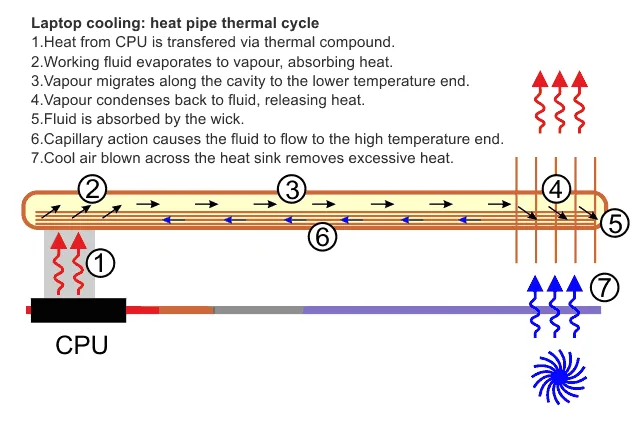
Image source: Wikimedia Commons / Graham Wyatt (CC BY-SA)
Your Workload and Software Demands
If your day includes compiling code, rendering video, or 3D work, a gaming laptop makes sense. If it's email, docs, and calls, the power sits idle. Match the tool to the load.
Battery Life and How You Move Through the Day
Real-world runtime often lands between 3 and 8 hours. Screen brightness and load change that number fast. If you have outlets all day, battery matters less.
If you travel, it matters a lot. Airline rules for lithium batteries are worth checking before a trip.
Noise, Heat, and Where You Actually Work
Fans can reach 40 to 55 dB under load. In a quiet office, that is loud. Heat can warm your lap and desk.
Docked use with good airflow helps. Lap use during long calls does not.
Display Quality and Eye Comfort
Look for 300 to 500 nits brightness and solid color coverage. A high refresh rate is nice but not required for work. Eye comfort and glare control matter more than speed.
Portability and Commute Reality
Many gaming laptops weigh 4 to 6 lbs, plus a 230 to 330W charger. That changes your commute. If you carry it daily, total weight and backpack fit deserve real thought.
Safe moving between rooms matters too.
Employer Rules and Security Requirements
Some companies require encryption, device management, or approved models. Gaming laptops may not qualify. Ask IT before you buy.
Do not assume personal use rules apply at work.
Match Your Workday to the Right Setup
The same laptop can feel great in one routine and awful in another. Use the branch that matches your day.
| Setup route | Best for | Watch out for |
|---|---|---|
| Docked desktop replacement | Fixed desk, heavy apps, external monitor | Fan noise and heat in small rooms |
| Hybrid office and home | Split week, moderate travel | Charger weight and bag space |
| Travel-heavy | Frequent flights, client sites | Battery life and outlet access |
| One device for work and gaming | Tight budget, small space | Wear, noise, and security limits |
The Docked Desktop-Replacement Route
This is the easiest win. Plug in power, add an external monitor, and use a real keyboard. Heat and battery fade into the background.
Your main job is cable and desk setup.
The Hybrid Office-and-Home Route
This works if you can leave a charger at each location. Travel-heavy days need a plan for battery and bag weight. Thin models help, but heat limits still apply.
The Travel-Heavy Route
This is the hardest fit. Battery life, charger size, and weight all fight you. If you fly often, check FAA battery rules and pack the charger in carry-on.
A lighter business laptop may be the better daily tool.
The One-Device Work-and-Gaming Route
This is common for students and home workers. It saves money and space. It also means more wear, more noise, and stricter security habits.
Keep work data backed up and separate.
How to Set It Up for Daily Work
A good setup turns a gaming laptop into a reliable work tool. A bad setup makes it feel like a mistake.
| Step | What to do | Why it helps |
|---|---|---|
| 1 | Set a balanced power profile | Cuts heat and fan noise |
| 2 | Tune fan curves | Keeps noise predictable |
| 3 | Limit charge to 80 percent | Slows battery wear |
| 4 | Raise and angle the screen | Reduces neck strain |
| 5 | Enable encryption and backups | Protects work data |
Pick the Right Power Profile
Use balanced mode for normal work. Save performance mode for renders, compiles, or games. This single change lowers heat and noise.
It also stretches battery life.
Tame the Fans and Heat
Clean vents every few months. Keep the laptop on a hard surface. Use a cooling pad if heat builds.
Fan noise is easier to manage when airflow is not blocked.
Protect Battery Health
Avoid running at 100 percent charge all day. Use battery charge limiting if the maker offers it. Keep the machine cool.
Lithium-ion packs age faster with heat and full charge.
Fix the Display and Ergonomics
Raise the screen to eye level. Add an external keyboard and mouse. Follow basic workstation ergonomics guidance for posture and breaks.
A high refresh screen helps gaming, but brightness and color help work.
Lock Down Security and Backups
Turn on BitLocker or full-disk encryption. Use a VPN when needed. Keep backups automatic.
Webcam quality and mic quality matter for calls, so test them before client meetings. If keyboard feel matters, check keyboard response settings too.
Common Mistakes That Ruin the Experience
Running Performance Mode All Day
Performance mode sounds better. It usually adds heat and fan noise. Use balanced mode for normal work.
Save performance mode for renders, compiles, or games.
Ignoring Fan Curves and Dust
Dust blocks vents and makes fans work harder. Clean the intake and exhaust every few months. Set a custom fan curve if the maker offers it.
Quiet airflow beats raw speed for daily work.
Skipping Docking and Ergonomics
Lap use gets uncomfortable fast. Raise the screen to eye level. Add a real keyboard and mouse.
A simple docked setup fixes most daily complaints.
Forgetting About Employer Policies
Some teams require approved models or device management. Ask IT before you buy. Do not assume personal use rules apply at work.
Treating Battery Life Like a Gaming Laptop's Problem
Battery life is a workflow issue. Carry the charger. Lower brightness.
Use battery saver mode. Plan around outlets instead of hoping for all-day runtime.
What It Really Costs (Specs and Pricing)
As of 2026, a capable gaming laptop often starts around $900. Stronger models with better screens and cooling can reach $3,000 or more. The charger is heavy, so include it in your daily carry math.
| Spec | Typical range | Daily work impact |
|---|---|---|
| Weight | 4 to 6 lbs | Harder commute |
| Battery | 56 to 99 Wh | 3 to 8 hours real use |
| Charger | 230 to 330W | Extra bag weight |
| Display | 300 to 500 nits | Better office visibility |
| RAM | 16 to 64GB | Smooth multitasking |
| Storage | 512GB to 2TB | Space for files and apps |
| Warranty | 1 year standard | Repair planning matters |
Do not judge value by the GPU alone. Cooling, battery, and display matter more for daily work. A cheaper model with poor thermals can feel worse than a midrange model with good airflow.
FAQs
Can a gaming laptop handle office apps smoothly?
Yes. Email, spreadsheets, and browsers run fine. The extra power helps with heavy multitasking.
It can feel like overkill for light tasks. It still works well.
How long does battery last during work?
Plan for 3 to 8 hours in real use. Bright screens and heavy apps shorten it. Balanced mode and lower brightness help.
Keep the charger nearby for long days.
Are gaming laptops too loud for meetings?
They can be. Fans may reach 40 to 55 dB under load. Use balanced mode and clean vents.
A quiet room makes fan noise more obvious. Test before important calls.
Will an employer allow one?
Maybe. Some companies require approved devices or security tools. Ask IT before buying.
Confirm encryption and management rules. Do not assume it will pass.
Is it worth buying if I also game?
Yes, if you want one device. It saves money and desk space. It also means more wear and noise.
Keep work data backed up and separate.
The Final Verdict: Should You Use One Every Day?
If your work is heavy, docked, and power-hungry, yes. A gaming laptop can be a strong daily tool. If your day is travel, calls, and battery-first, maybe not.
The right answer depends on your routine.
Use the six factors to decide. Match power to the workload. Match weight to the commute.
Match noise to the room. Then set it up well and stick to balanced mode.
1 thought on “Can a Gaming Laptop Be Used for Work Every Day?”
Comments are closed.