People often ask what is the purpose of a gaming pc, assuming it’s just for playing video games. That definition misses the mark entirely. A modern gaming rig is actually a versatile performance machine designed to handle heavy computational loads with speed and precision.
Whether you’re rendering 4K textures or compiling code, the hardware prioritizes raw throughput over efficiency. As of 2026, these systems serve as hubs for entertainment, creation, and even professional work. Let’s break down why this distinction matters for your wallet and workflow.
What a Gaming PC Is Actually Built to Do
A gaming PC exists to render complex graphics in real time without dropping frames. It combines a powerful central processing unit (CPU) with a dedicated graphics processing unit (GPU). This pairing allows the system to calculate physics, lighting, and geometry simultaneously.
Unlike office computers, which prioritize battery life and quiet operation, gaming rigs chase maximum clock speeds. They use high-bandwidth memory to feed data to the GPU instantly. The goal is to eliminate latency between your input and the screen.
This architecture also supports multitasking. You can stream gameplay while running voice chat and browser tabs. The surplus horsepower handles background processes without stuttering.
Manufacturers design these boards with robust voltage regulators to sustain peak loads.
Think of it as a sports car built for the track. An economy sedan gets you there too, but it won’t corner at high speed. Similarly, a standard laptop struggles with ray-traced shadows.
A gaming desktop chews through them effortlessly.
The secondary purpose involves content creation. Video editors rely on CUDA cores for acceleration. Streamers need encoding power that doesn’t sacrifice game performance.
These tasks demand sustained thermal headroom, a feature unique to large tower cases.
So, it isn’t just about fun. It’s about removing bottlenecks in any task requiring rapid graphical calculation. If your work involves 3D modeling or simulation, the utility extends far beyond leisure.
The Conditions That Change Its Purpose
Your specific goals dictate how you configure the hardware. There is no single "gaming PC" spec sheet that fits everyone. Instead, three main variables shift the requirement profile significantly.
First, resolution changes everything. Playing at 1080p demands less VRAM than 4K. Second, frame rate targets alter cooling needs.
Competitive players want 240Hz stability. Story gamers accept 60fps caps for higher visual fidelity. Third, software ecosystem influences component choice.
Some apps favor AMD architectures; others optimize for NVIDIA features like DLSS.
Consider streaming. If you broadcast live, your CPU must encode video while the GPU renders the game. This dual-load scenario requires more cores than solo play.
Conversely, if you only record locally, NVENC encoders on the GPU handle the load efficiently.
VR adds another layer. Virtual reality doubles the rendering workload because it draws two images per eye. This spikes GPU utilization dramatically.
A build suited for flat-screen esports might choke in VR environments.
We’ve seen users buy mid-range cards expecting future-proofing, only to find they lack the VRAM buffer for new titles. Context is king here. You must define your primary activity before selecting parts.
Otherwise, you’ll overspend on unused potential or underspend on critical bottlenecks.
For those exploring top-rated brewers alongside their tech setup, don’t forget peripheral synergy. Just as coffee quality affects focus, headset audio clarity impacts immersion. Check our guide on audio gear essentials to ensure sound matches visual intensity.
Resolution, Refresh Rate, and Game Type
Resolution determines pixel count. Higher resolutions stress the GPU more. Refresh rate measures smoothness.
Faster rates reduce motion blur and input lag.
Game type dictates where balance lies. Strategy games tolerate lower frame rates. Shooters punish inconsistency.
Here’s how priorities shift:
| Use Case | Primary Stressor | Recommended Focus |
|---|---|---|
| Competitive FPS | Input Latency | High Clock Speeds, Low RAM Timings |
| AAA Single-Player | Visual Fidelity | Max VRAM, Ray Tracing Cores |
| Simulation/Strategy | CPU Calculation | Core Count, Cache Size |
| Creative Work | Multi-thread Load | Balanced CPU/GPU, Fast Storage |
If you play mostly indie titles, an integrated GPU might suffice. But once you enter Unreal Engine 5 landscapes, discrete hardware becomes mandatory. Don’t confuse marketing hype with actual performance curves.
Streaming, VR, and Content Creation
Streaming splits resources. Encoding consumes bandwidth that could otherwise boost FPS. Dedicated hardware encoders solve this.
Without them, your game stutters when viewers join.
VR requires consistent frame pacing. Dropped frames cause nausea. Therefore, thermal stability outweighs peak burst speeds.
Liquid cooling often helps maintain steady clocks during long sessions.
Content creators benefit from quick sync storage. Editing timelines load faster with PCIe Gen 4 or 5 SSDs. Large projects eat RAM quickly. 32GB is now the baseline for serious editing.
These workflows transform the PC from a toy into a production tool. The purpose expands to include revenue generation. Reliability becomes paramount.
Crashes mean lost footage or missed broadcasts.
Decision Branches: Which Gaming PC Fits Your Goal
Choosing components feels overwhelming until you map out your path. Start by asking one question: What will I do most? Then follow the branch.
If you said casual gaming, look at entry-level builds. If you said competitive play, aim for high-frequency CPUs. For enthusiasts, target flagship GPUs.
Each branch has distinct trade-offs.
Let’s walk through the three main paths. We’ll ignore edge cases for now and focus on typical user profiles. This simplifies the decision tree into actionable steps.
Remember, spending money doesn’t guarantee satisfaction if the mismatch persists. A $3,000 PC used for spreadsheet work is wasteful. A $800 PC struggling with 4K gaming is frustrating.
Match spend to outcome.
Casual 1080p Play
Casual gamers value ease of access. They don’t care about micro-stutter or sub-millisecond latency. Stability matters more than speed records.
Target specs include:
- Mid-tier CPU (e.g., 6-core Ryzen or Intel i5 equivalent)
- Entry-to-mid GPU (enough for 60fps at medium-high settings)
- 16GB DDR4 or DDR5 RAM
- Standard air cooler
This configuration handles popular titles comfortably. You save cash for peripherals like a good mousepad or chair. Upgradeability remains decent since motherboards support newer chips later.
Don’t overspecify here. Buying a top-shelf card for old games wastes potential. Save that budget for a larger monitor instead.
Screen real estate improves immersion more than marginal FPS gains at low resolutions.
Competitive Esports
Esports players chase every advantage. Frame times matter. Consistency beats peak numbers.
A sudden drop from 200fps to 150fps can lose a match.
Key requirements:
- High-clock-speed CPU (often favors fewer cores with higher GHz)
- Powerful GPU capable of sustaining >200fps at 1080p/1440p
- Fast RAM (low CAS latency)
- Reliable PSU with clean power delivery
Cooling solutions must prevent throttling during marathon sessions. Airflow optimization is critical. Dust filters help maintain longevity.
Invest in a high-refresh-rate monitor (240Hz+). Pair it with responsive peripherals. Our review of input devices highlights how mechanical switches affect reaction times.
Small details add up to big wins.
4K, VR, and High-End Enthusiast Builds
Enthusiasts want maximum visuals. They run ultra settings with ray tracing enabled. VR demands double the rendering load.
This tier requires premium hardware.
Essential components:
- Flagship GPU (high VRAM capacity, e.g., 16GB+)
- Top-tier multi-core CPU
- 32GB+ fast RAM
- Advanced cooling (custom loop or high-end AIO)
- High-capacity, fast NVMe storage
Power supplies need ample wattage headroom (850W, 1000W+). Cases should offer excellent cable management space. Noise dampening materials improve comfort during loud fan spins.
Expect significant costs. Prices fluctuate based on market supply. Check current trends via pricing guides to avoid overpaying.
Patience pays off during sales cycles.
Core Components That Define the Experience
Understanding each part clarifies why certain combinations work better than others. The motherboard acts as the nervous system. It connects all elements and manages data flow.
The CPU serves as the brain. It executes instructions and calculates logic. Modern designs mix performance and efficiency cores.
This hybrid approach balances heat and speed effectively.
RAM provides temporary workspace. Insufficient capacity forces reliance on slower disk swapping. Games increasingly demand 16GB minimum.
Background apps consume extra overhead.
Storage holds assets. Traditional hard drives are obsolete for OS and games. Solid-state drives (SSDs) drastically cut load times.
Gen 4 NVMe drives offer sequential reads exceeding 7,000 MB/s.
Finally, the GPU renders pixels. It contains thousands of shader cores working in parallel. Vendor-specific technologies like upscaling algorithms enhance perceived performance.
Drivers update frequently to fix bugs and unlock optimizations.
Each piece interacts dynamically. Weak links drag down overall system capability. Bottleneck analysis tools help identify mismatches early.
Regular driver updates ensure compatibility with new releases.
Security software protects against threats lurking online. Malware can hijack resources meant for gaming. Review trusted options for protection layers to keep your rig safe without sacrificing performance.
Costs, Specs, and Real Performance Targets
Budget planning prevents buyer’s remorse. Hardware prices vary widely by region and retailer. Taxes and shipping add hidden fees.
Always calculate total landed cost.
Here’s a rough breakdown of expected expenditures as of 2026:
| Tier | Estimated Cost Range | Typical Performance Outcome |
|---|---|---|
| Budget | $600 – $900 | 1080p Medium-High @ 60fps |
| Mid-Range | $1,000 – $1,500 | 1440p High/Ultra @ 60-100fps |
| High-End | $1,600 – $2,500 | 4K Ultra @ 60fps / VR Ready |
| Enthusiast | $2,500+ | 4K High Refresh / Professional Workloads |
Note that prebuilt systems sometimes undercut custom builds due to bulk purchasing. However, customization offers better upgrade paths. Research both routes carefully.
Visit prebuilt comparisons to weigh convenience versus control.
Performance metrics extend beyond synthetic benchmarks. Actual gaming experiences depend on engine optimization. Well-coded titles run smoother on modest hardware.
Poorly optimized ports struggle even on flagships.
Look for independent testing data from reputable sources. Aggregate reviews provide broader consensus than single opinions. Manufacturer specs indicate theoretical limits, not real-world results.
Electricity consumption correlates with performance tiers. High-end rigs draw substantial watts under load. Factor ongoing operational costs into ownership budgets.
Efficiency ratings matter for long-term savings.
Display technology ties directly to investment return. Matching GPU output to monitor capabilities avoids waste. Learn more about optimal pairings in our screen selection guide.
Proper alignment ensures crisp visuals and fluid motion.
How to Choose Based on Your Use Case
Selecting parts starts with defining your primary activity. If you play competitive shooters, prioritize CPU speed and low latency. For story-driven adventures, focus on GPU power and VRAM capacity.
This initial split prevents wasted budget on irrelevant specs.
Next, determine your resolution target. Playing at 1080p allows mid-range hardware to shine. Moving to 1440p demands stronger graphics cards. 4K gaming requires flagship-tier components.
Be honest about your monitor setup before buying silicon.
Consider your upgrade timeline too. A modular motherboard lets you swap CPUs later. Proprietary laptops often lock you into fixed configurations.
Desktop towers offer the best flexibility for future-proofing. Check socket compatibility before finalizing your cart.
Software needs also influence hardware choices. Video editing benefits from extra RAM cores. Streaming relies heavily on encoder efficiency.
Gaming alone stresses the GPU most. Map out your weekly usage habits accurately.
If you plan to stream, allocate resources carefully. Dual-PC setups simplify this process significantly. Single-machine builds need robust multi-core processors.
Ensure your power supply handles peak loads safely. Undersized PSUs cause random shutdowns during intense sessions.
Finally, factor in peripheral synergy. High-refresh monitors pair best with fast GPUs. Mechanical keyboards improve input precision for gamers.
Quality headsets enhance spatial awareness in games. Explore audio gear essentials to match visual fidelity with clear sound. Don’t neglect ergonomic chairs either.
Comfort sustains long play sessions better than raw FPS numbers ever will.
Mistakes That Undercut a Gaming PC’s Purpose
Buying mismatched components creates immediate bottlenecks. Pairing a top-tier GPU with an old CPU wastes money. The processor cannot feed data fast enough to the card.
Frames drop despite expensive hardware sitting idle. Always balance your build sheet evenly.
Ignoring thermal management leads to throttling issues. Overclocking without adequate cooling damages stability. Fans spin loudly trying to dissipate excess heat.
Dust accumulation worsens temperatures over time. Clean filters monthly to maintain airflow efficiency.
Undervaluing the power supply unit is a common error. Cheap units deliver unstable voltage under load. This risks damaging sensitive motherboard circuits permanently.
Look for 80 Plus Gold certification minimum. Calculate total wattage needs plus twenty percent headroom.
Overlooking BIOS settings limits potential performance. Many systems default to conservative profiles. Enabling XMP or EXPO unlocks rated RAM speeds.
Update firmware regularly for security patches and fixes. Neglecting these steps leaves free performance on the table.
Neglecting driver updates causes compatibility glitches. New game releases often require specific optimizations. Outdated drivers crash applications unexpectedly.
Use manufacturer utilities to manage installations automatically. Manual downloads risk version conflicts if done incorrectly.
Finally, skipping benchmark tests hides underlying problems. Stress testing reveals instability before it ruins gameplay. Run tools like Prime95 or FurMark cautiously.
Monitor temperatures closely during these runs. Stop immediately if sensors report dangerous levels. Protecting your investment means verifying stability early.
Maintenance and Long-Term Optimization
Regular cleaning preserves component longevity effectively. Dust acts as insulation, trapping heat inside cases. Compressed air removes debris from fans and heatsinks.
Perform this task every three to six months. Hold fan blades still to prevent bearing damage.
Thermal paste degrades slowly over years. Reapplying it restores contact between chips and coolers. Do this only if temperatures spike noticeably.
Old paste cracks and loses conductivity. Follow manufacturer guidelines for application thickness.
Driver hygiene keeps software running smoothly. Uninstall obsolete versions before installing new ones. Registry cleaners rarely help modern operating systems.
Stick to official vendor support pages. Automated updaters sometimes install bloatware inadvertently.
Monitor system logs for recurring errors. Event Viewer highlights critical failures instantly. Address warning signs before they become crashes.
Backup important files regularly using cloud services. Local drives fail unpredictably without prior notice.
Optimize startup programs to reduce boot times. Disable unnecessary background services via Task Manager. Fewer active processes free up RAM quickly.
Adjust virtual memory settings if needed. SSDs handle paging better than HDDs anyway.
Check cable connections periodically for looseness. Vibration can disconnect SATA cables over time. Reseat RAM sticks if blue screens occur frequently.
Tighten screws gently to avoid stripping threads. Small physical checks prevent major diagnostic headaches.
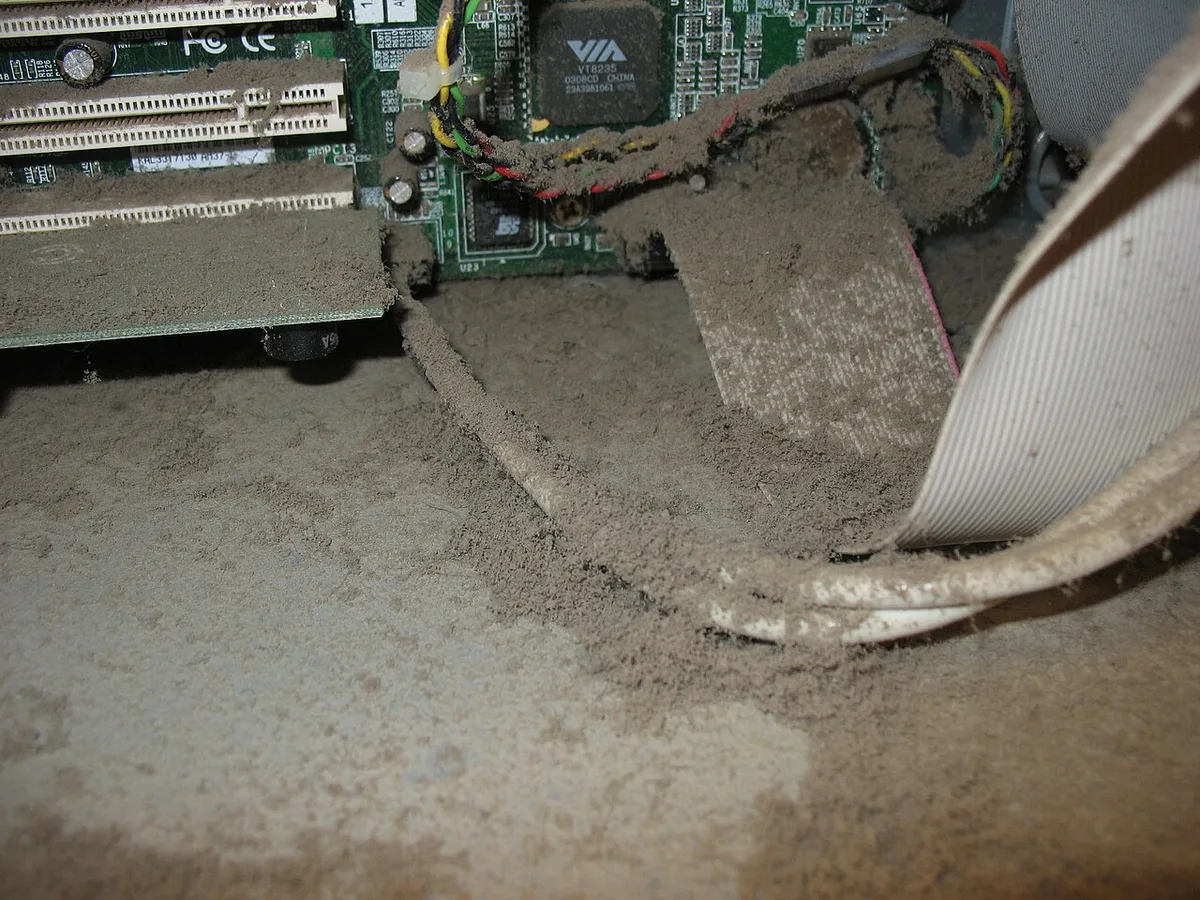
Image source: Wikimedia Commons / Andyzweb (CC BY-SA)
Visual inspection confirms internal cleanliness easily. Clear side panels allow quick assessment without disassembly. Watch for discoloration indicating overheating spots.
Replace damaged fans promptly to avoid silence becoming noise. Proactive care costs less than emergency repairs later.
FAQs
Can I use a gaming PC for work?
Yes, absolutely. These machines excel at video rendering, 3D modeling, and compiling code. Their powerful CPUs and GPUs accelerate professional tasks significantly.
Just ensure your software supports the hardware architecture. Most creative suites optimize well for NVIDIA or AMD components. It doubles as a high-performance workstation effortlessly.
Is building cheaper than buying prebuilt?
Not always anymore. Component prices fluctuate wildly based on market demand. Prebuilts benefit from bulk purchasing discounts.
However, custom builds offer better upgrade paths. You choose exact parts rather than accepting compromises. Compare current totals carefully before deciding which route saves more cash overall.
How long does a gaming PC last?
Typically five to seven years for mainstream gaming. Technology advances rapidly, raising baseline requirements yearly. Mid-range cards struggle with new AAA titles sooner.
Regular maintenance extends usable life considerably. Upgrading just the GPU often revitalizes older systems. Plan replacements strategically to maximize return on investment per dollar spent initially.
Do I need Windows specifically?
No, Linux distributions now support gaming well. SteamOS and other variants handle many titles natively. Proton compatibility layers bridge gaps for unsupported games.
Drivers remain slightly trickier than on Windows though. Consider dual-booting if you rely on specific Adobe apps. Flexibility increases with open-source alternatives available today.
What happens if I ignore dust buildup?
Temperatures rise steadily until throttling occurs. Performance drops noticeably during intensive sessions. Prolonged exposure shortens capacitor lifespans drastically.
Fans may seize due to grit accumulation. Eventually, permanent hardware failure becomes likely. Preventative cleaning avoids costly replacements entirely.
Keep intakes filtered and exhausts clear consistently.