How many motherboard M.2 slots does a gaming PC need? The honest answer is one, two, or three depending on your build. Most gamers land on two.
But the right number depends on your budget, board size, and how big your game library gets.
An M.2 slot is a small connector on the motherboard that holds an NVMe SSD, which is the fastest type of storage drive for gaming. Manufacturer specs show that most mid-range ATX boards ship with two M.2 slots as of 2026. Let us walk through the decision step by step so you buy the right board the first time.
how many motherboard m.2 slots does a gaming pc need
Most gaming PCs need two M.2 slots. One holds your boot drive with the operating system. The second holds a large game library drive.
Budget builds can work with one slot. High-end builds benefit from three or more.
Why the Right Number of M.2 Slots Depends on Your Build
There is no single right answer here. A budget esports rig and a 4K gaming workstation have different storage needs. The number of slots you need changes based on three things: how many games you install, how much you want to spend, and how big your motherboard is.
Think of M.2 slots as parking spaces for fast SSDs. One slot covers the basics. Two slots give you room to grow.
Three or more slots suit gamers who hoard large libraries or run mods and capture software.
The key is planning ahead. Buying a board with too few slots means you add external drives later. That adds cables and slows load times.
Buying a board with too many slots you never use wastes money.
One Slot vs. Two Slots vs. Three or More
One slot works for a single SSD that holds your OS and a handful of games. Two slots separate your OS from your game library. That split makes reinstalls cleaner and keeps load times fast.
Three or more slots suit streamers, modders, and anyone who keeps 2TB or more of games installed.
Here is the short version. Match your slot count to your habits, not to marketing.
The Variables That Change Your Storage Plan
Before you pick a board, think about four variables. Each one shifts the answer.
Game library size. Modern AAA games run 80GB to 150GB each. A 1TB SSD fills fast if you keep ten or more games installed. A 2TB drive buys breathing room.
Know your library size before you shop.
Motherboard size. ATX boards offer the most slots. Micro-ATX boards usually have two. Mini-ITX boards often have one or two.
Smaller boards trade slots for compactness.
CPU generation. Newer CPUs like Intel 14th gen and AMD Ryzen 7000 support more PCIe lanes. That affects how many slots run at full speed. Older CPUs share lanes more often.
Upgrade timeline. If you plan to add storage in two years, buy a board with a spare slot now. If you buy once and never touch it, one slot may do.
Game Library Size and Install Sizes
A single AAA game can eat 100GB. Call of Duty, Baldur's Gate 3, and Starfield all sit well above 80GB. Ten games at 100GB each need 1TB.
Add the OS and apps and you are at 1.2TB.
That math is why one slot often is not enough. A 2TB drive costs more per gigabyte than two 1TB drives in some cases. Two slots let you mix sizes and upgrade one drive at a time.
Motherboard Size and Physical Slot Placement
ATX is the easiest to work with. Most ATX gaming boards carry two or three M.2 slots spaced apart. Micro-ATX boards often place slots close together or under the GPU.
Mini-ITX boards squeeze slots into tight spots.
Slot placement matters for heat. A slot under the graphics card runs hotter. A heatsink helps but adds bulk.
Check the board layout before you buy if thermals matter to you.
Decision Branches by Budget, Size, and Game Library
Here is the if-then logic most builders should follow.
If your budget is tight and your library is small, buy a board with one M.2 slot. Add a cheap SATA SSD for bulk storage if needed. This keeps costs low and still beats a hard drive.
If your budget is mid-range and you play a mix of games, buy a board with two M.2 slots. Put the OS on a 500GB or 1TB drive. Use the second slot for a 2TB game drive.
This is the sweet spot for most gamers.
If your budget is high and you keep many games installed, buy a board with three or more M.2 slots. Use Gen4 drives for the best price-to-speed ratio. Reserve Gen5 for the boot drive only if your workload benefits.
If you build in a small case, check slot count against case size. Mini-ITX boards with two slots exist but cost more. Sometimes a micro-ATX board in a slightly larger case is the better trade.
Budget Builds With One Main Drive
A budget build usually pairs a cheap CPU with a budget board. Those boards often have one M.2 slot. That is fine if you buy a 1TB or 2TB drive and manage your library.
The trick is not to overfill the drive. Keep free space above 10 percent for SSD health. Uninstall games you are not playing.
Reinstalling from a fast connection is often faster than buying a second drive.
Mid-Range Builds With Boot and Game Drives
This is where two slots shine. Separate the OS from games. Your Windows install stays clean.
Game updates do not fragment the system drive.
Mid-range boards like the MSI B760 Tomahawk or ASUS TUF B650E ship with two M.2 slots. Both support Gen4 speeds. That is plenty for gaming as of 2026.
Gen5 offers little real-world benefit for game load times today.
High-End Builds With Extra Storage Headroom
High-end boards carry three, four, or even five M.2 slots. The ASUS ROG Crosshair X670E Hero has four. The MSI MEG Z790 ACE has four.
These boards suit streamers who capture footage to a fast drive.
But more slots mean more complexity. Lane sharing kicks in. Some slots drop to Gen3 speeds when all are filled.
Read the manual before you populate every slot.
How PCIe Lanes and Slot Sharing Affect Real Speed
This is where many builders get tripped up. Not every M.2 slot runs at the same speed. The speed depends on PCIe lanes, and lanes are limited.
A CPU has a fixed number of PCIe lanes. The chipset has a few more. The motherboard routes those lanes to slots, ports, and expansion cards.
When you add a second M.2 drive, the board may split lanes. That can drop a slot from x4 to x2 or from Gen4 to Gen3.
Lane sharing also affects SATA ports. Some boards disable two SATA ports when you install a second M.2 drive. That matters if you planned to add a hard drive later.
CPU vs. Chipset M.2 Slots
CPU-connected slots run at full speed with no sharing. They are the fastest and most reliable. Chipset-connected slots share bandwidth with other devices.
They are still fast but can throttle under heavy use.
Most boards label which slots are CPU and which are chipset. The first M.2 slot is usually CPU. The second is often chipset.
Check the manual for the exact routing.
When a Second Slot Shares SATA or PCIe Lanes
This is the hidden cost of extra slots. Populating the second M.2 slot can disable SATA ports 5 and 6 on some boards. It can also reduce the GPU slot from x16 to x8.
For gaming, x8 is usually fine. But it is worth knowing before you build.
The fix is simple. Read the lane chart in the manual. Plan which ports you need.
If you use SATA drives, leave a shared slot empty.
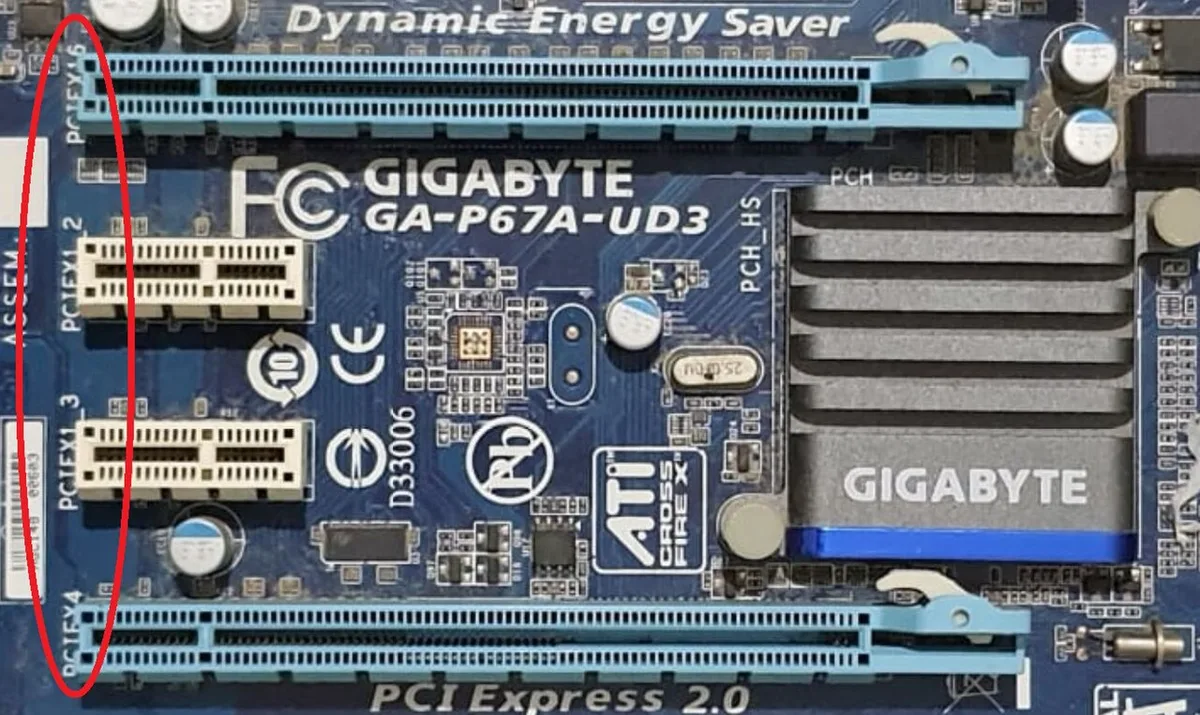
Image source: Wikimedia Commons / PantheraLeo1359531 (CC BY)
Recommended M.2 Slot Counts for Common Gaming Builds
Here is a practical guide based on build type.
| Build Type | Recommended Slots | Why |
|---|---|---|
| Budget 1080p | 1 | One 1TB drive covers OS and a few games |
| Mid-range 1440p | 2 | Separate boot and game drives, room to grow |
| High-end 4K | 2 to 3 | Large library plus capture or mod storage |
| Streamer / creator | 3 to 4 | Fast scratch drive plus archive storage |
| Small form factor | 1 to 2 | Space limits slot count, pick carefully |
Most gamers should target two slots. That covers 90 percent of use cases. One slot is enough if you are disciplined about storage.
Three or more only makes sense if you have a real need.
One Slot: When It Is Enough
One slot works if you buy a large drive upfront. A 2TB or 4TB NVMe SSD holds the OS and dozens of games. You manage space by uninstalling old titles.
Cloud saves make reinstalling painless.
This approach saves money on the board. You can spend the savings on a bigger drive. For a budget build, that trade often makes sense.
Two Slots: The Practical Sweet Spot
Two slots give you flexibility without complexity. Put Windows on a 500GB or 1TB drive. Use the second slot for a 2TB or 4TB game drive.
When one fills, replace it without touching the other.
This split also protects your OS. If a game drive fails, Windows still boots. If you reinstall Windows, your game library stays intact.
That alone is worth the second slot.
Three or More Slots: When They Are Worth It
Three or more slots suit specific workflows. Streamers capture footage to a fast drive. Modders keep large mod folders separate.
Creators run scratch disks for editing.
For pure gaming, three slots rarely help. Game load times do not improve with more drives. They improve with faster drives and lower latency.
Spend on a good Gen4 drive before you buy a board with five slots.
Image source: Wikimedia Commons / Hans Haase (CC BY-SA)
How to Read a Motherboard Manual Before You Buy
The manual is where the real answer lives. Start with the lane chart. It shows which slot connects to the CPU and which connects to the chipset.
It also lists disabled SATA ports and PCIe slot changes.
If the chart shows a slot running at x4, that is full speed. If it shows x2, expect roughly half the bandwidth. For gaming, x4 Gen4 is plenty. x2 Gen3 can still load games fine, but it is not ideal for large transfers.
Heatsink clearance matters too. A GPU sitting above an M.2 slot blocks airflow. Check whether the heatsink fits under the card.
If it does not, use a low-profile heatsink or skip it and monitor temps.
Which M.2 slot should hold your boot drive?
The CPU-connected slot, usually the first one, should hold your boot drive. It gets full bandwidth with no sharing. The chipset slot is fine for a game library drive.
| Manual Clue | What It Means | Action |
|---|---|---|
| CPU x4 | Full speed, no sharing | Use for OS drive |
| Chipset x4 | Full speed but shared | Use for games |
| x2 speed | Half bandwidth | Avoid for boot if possible |
| SATA ports disabled | Lane sharing | Plan storage around it |
Before buying, also check physical layout. A slot under the GPU needs a heatsink with a thermal pad. If your case has tight GPU clearance, measure twice.
Heat buildup hurts sustained performance, so thermal headroom is worth protecting.
M.2 Storage Mistakes That Cost Gamers Money
The biggest mistake is ignoring shared SATA ports. You install a second M.2 drive and suddenly two SATA ports stop working. That breaks plans for a hard drive or optical drive.
Buying Gen5 without a real need is another costly error. Gen5 drives run hot and cost more. For gaming load times, Gen4 is the smarter buy as of 2026.
Gen5 helps with large file transfers and creative work, not frame rates.
Filling a QLC drive past 80 percent slows writes dramatically. That hurts game installs and updates. Leave headroom or buy TLC NAND.
Lane confusion is common too. Builders assume every slot is full speed. Then benchmarks show half the expected throughput.
Read the manual before you blame the drive.
Other frequent mistakes:
- Skipping a backup before cloning the OS
- Forgetting the motherboard standoff screw for M.2 drives
- Reusing an old thermal pad with poor contact
- Buying a 22110-length drive for a 2280-only slot
If you spot performance bottlenecks after an upgrade, check slot speeds first. The drive may be running in x2 mode.
Planning an Upgrade Path Without Rebuilding Later
The best upgrade path starts with an empty slot. If you buy a board with two slots and use one, you can add storage later without touching your OS. That saves hours of reinstall work.
If both slots are full, a PCIe add-in card is the next step. These cards add one or more M.2 slots to a PCIe x4 or x8 lane. They cost more than a motherboard slot but avoid a full rebuild.
When to Leave an Empty M.2 Slot
Leave a slot empty if you expect to grow your library. A second drive later costs less than replacing the whole board. It also keeps your OS drive untouched during upgrades.
This matters most for mid-range builds. You may start with a 1TB game drive and move to 2TB later. A spare slot makes that swap trivial.
When a PCIe Add-In Card Makes More Sense
Use an add-in card when your board is full and your case has spare PCIe slots. These cards suit streamers and creators with heavy storage needs. They also work well on older boards with only one M.2 slot.
The tradeoff is heat and lane sharing. A card in a lower PCIe slot may run at reduced bandwidth. Check your board's lane chart before buying.
| Upgrade Path | Cost | Complexity | Best For |
|---|---|---|---|
| Empty motherboard slot | Low | Easy | Most gamers |
| PCIe add-in card | Medium | Moderate | Full boards |
| External SSD | Low | Easy | Portable storage |
| Board replacement | High | Hard | Major rebuilds |
If you plan a processor upgrade later, check CPU lane counts. A newer CPU may unlock more full-speed slots on the same board.
Frequently Asked Questions
How many M.2 slots do most gaming motherboards have?
Most gaming motherboards have two M.2 slots. Budget boards often have one. High-end boards can have three to five.
Two slots cover the needs of most gamers as of 2026.
Is one M.2 slot enough for gaming?
Yes, one slot is enough if you buy a large drive upfront. A 2TB or 4TB NVMe SSD holds the OS and dozens of games. You must manage space and uninstall old titles.
Do extra M.2 slots slow down the GPU?
They can on some boards. Populating a second slot may drop the GPU from x16 to x8. For gaming, x8 is usually fine.
Check the lane chart to be sure.
Should you use Gen4 or Gen5 SSDs in a gaming PC?
Use Gen4 for gaming. Gen5 costs more and runs hotter with little real-world load time benefit. Gen5 helps with large file transfers and creative workloads.
Can you add M.2 storage later without reinstalling Windows?
Yes, if you have a spare slot. Install the new drive, format it, and use it for games. Your OS stays on the original drive untouched.
What happens if you fill every M.2 slot?
Some slots may drop to lower speeds or disable SATA ports. Performance usually stays acceptable for gaming. Heat and lane sharing become the main concerns.
1 thought on “How Many M.2 Slots Does a Gaming PC Actually Need?”
Comments are closed.