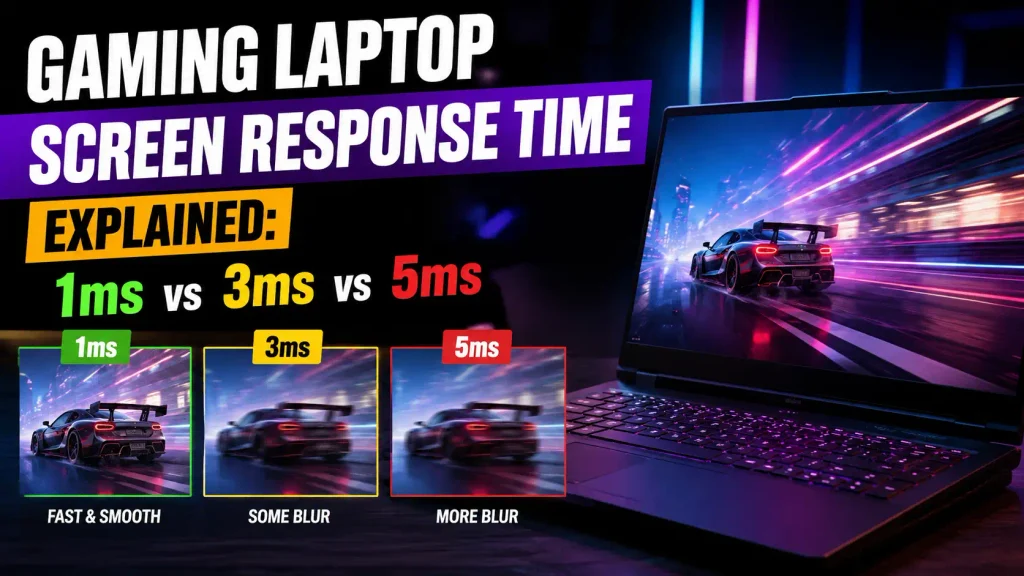
When you shop for a gaming laptop, you will often see display specifications such as 144Hz, 165Hz, 240Hz, 1ms, 3ms, or 5ms. Refresh rate gets most of the attention, but screen response time can have just as much impact on how clear and responsive a game feels.
Response time tells you how quickly the pixels on a laptop screen can change from one state to another. In simple terms, a faster response time helps moving objects look sharper and reduces visible trails behind enemies, cars, weapons, or other fast-moving objects.
For most gamers, a genuine response time of around 3ms to 5ms is already very good. Competitive players may benefit from even faster displays, especially when combined with a 240Hz or 360Hz refresh rate. However, the number printed on a specification sheet does not always tell the full story.
This guide explains gaming laptop screen response time, how 1ms compares with 3ms and 5ms, how response time differs from refresh rate and input lag, and what you should actually look for when buying a gaming laptop.
What Is Screen Response Time on a Gaming Laptop?
Screen response time measures how quickly a pixel can change from one color or brightness level to another. It is normally measured in milliseconds, or ms.
A millisecond is one-thousandth of a second.
So:
- 1ms = 0.001 seconds
- 3ms = 0.003 seconds
- 5ms = 0.005 seconds
- 10ms = 0.010 seconds
A lower number generally means the pixels can change more quickly.
That matters during gaming because the image on your screen is constantly changing. If the pixels cannot transition quickly enough, parts of the previous image can remain visible for a short moment. This can create ghosting, smearing, or reduced motion clarity.
Response Time in Milliseconds Explained
Imagine an enemy moving quickly from the left side of your screen to the right.
On a fast display, the pixels change quickly enough to keep the enemy relatively sharp.
On a slow display, some pixels may still be showing parts of the previous frame while the new frame is already appearing. You may see a faint trail behind the enemy.
The difference can be especially noticeable in games with rapid camera movement.
How Pixels Change From One Color to Another
LCD pixels do not simply turn on and off instantly. Their liquid crystals need time to change orientation and produce a new color or brightness level.
Different transitions can also take different amounts of time.
For example, changing from light gray to dark gray may happen faster than changing between two other shades. This is one reason why a laptop advertised as having a 1ms response time does not necessarily complete every pixel transition in exactly 1ms.
GtG vs MPRT: Which Response Time Number Matters?
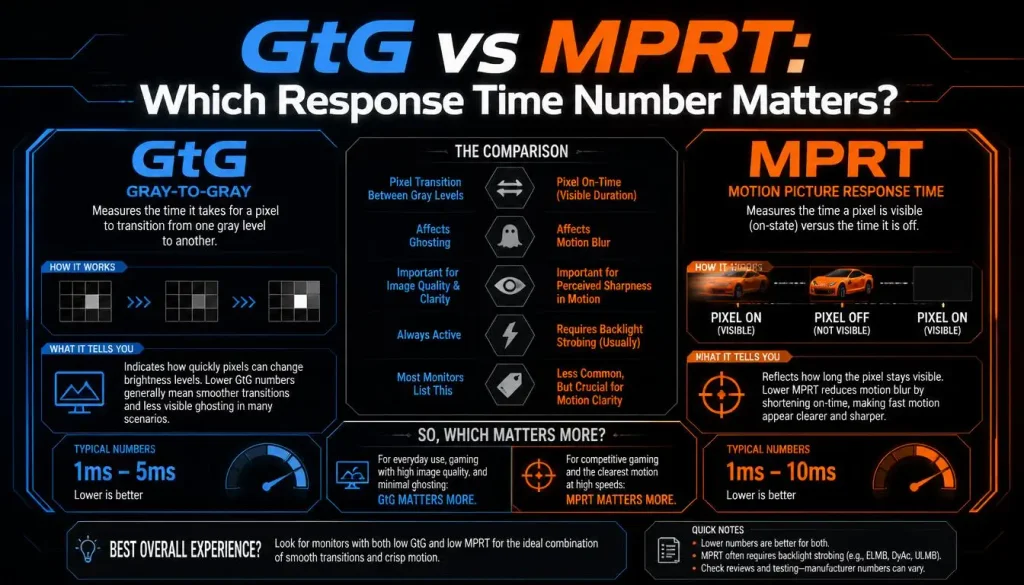
Two common response-time measurements are GtG and MPRT.
They are related to motion performance, but they measure different things.
What Does GtG Mean?
GtG stands for Gray-to-Gray.
It measures how quickly a pixel changes from one gray level to another.
Because modern screens constantly move between different brightness and color levels, GtG is often useful when discussing actual pixel transition speed.
A laptop advertised as having a 3ms GtG response time is claiming that certain pixel transitions can occur in roughly three milliseconds.
What Does MPRT Mean?
MPRT stands for Moving Picture Response Time.
Instead of focusing only on how quickly the pixel changes state, MPRT is related to how long a moving image remains visible to your eyes.
Display manufacturers may use techniques such as backlight strobing to reduce perceived motion blur and achieve a lower MPRT figure.
Is 1ms GtG the Same as 1ms MPRT?
No.
A 1ms GtG display and a 1ms MPRT display are not necessarily equal in real-world motion performance.
A laptop may advertise 1ms MPRT while its actual pixel transitions are slower. This is why you should check whether the manufacturer is quoting GtG, MPRT, or another measurement.
Why Does Response Time Matter for Gaming?
Response time mainly affects motion clarity.
Games with fast camera movement make slow pixel transitions easier to notice.
Ghosting
Ghosting appears as a faint trail behind a moving object.
You might notice it behind:
- Enemies
- Crosshairs
- Vehicles
- Trees and buildings while turning quickly
- Text while scrolling
- Bright objects moving across dark backgrounds
A faster response time can reduce this effect.
Motion Blur
Motion blur can come from several sources, including the game itself, display persistence, and pixel response.
If the screen’s pixels cannot change quickly enough, moving objects can appear softer than stationary ones.
Fast-Moving Targets
Competitive shooters place a greater demand on display response than slower games.
In titles where you constantly flick the camera, track opponents, or react to movement, cleaner motion can make targets easier to follow.
That does not automatically mean a 1ms display will make you a better player. It simply reduces one potential source of visual blur.
What Is a Good Response Time for a Gaming Laptop?
There is no single response time that every gamer needs.
A useful general guide is:
| Response Time | Gaming Experience | Best Use |
|---|---|---|
| Under 1ms | Extremely fast | High-end esports |
| Around 1ms | Excellent | Competitive FPS gaming |
| 2–3ms | Very fast | Competitive and general gaming |
| 4–5ms | Good | Most gamers |
| 6–10ms | Usable | Casual and slower-paced gaming |
| Above 10ms | More ghosting may be visible | General use rather than serious gaming |
These numbers should be treated as general guidance rather than strict rules because real-world display performance depends on more than one specification.
Is 1ms Response Time Good for Gaming?
Yes.
A genuine 1ms response time is excellent for gaming.
It is most useful when paired with a high refresh rate such as 240Hz or 360Hz, where the display has very little time to complete each transition.
However, you should not buy a laptop simply because the manufacturer prints “1ms” on the product page.
The actual panel may perform differently across various pixel transitions.
Is 3ms Response Time Good for Gaming?
Yes.
A 3ms response time is very good for nearly every type of gaming.
For many players, a high-quality 3ms panel will look extremely clear during motion, especially at 144Hz, 165Hz, or 240Hz.
The difference between 1ms and 3ms may be difficult to notice outside highly competitive situations.
Is 5ms Response Time Good for Gaming?
For most gamers, yes.
A good 5ms panel can still deliver a smooth and enjoyable gaming experience.
Story-driven games, RPGs, strategy games, simulation games, and casual multiplayer games normally do not require ultra-low response times.
What matters is whether the panel actually maintains clean transitions without excessive ghosting.
Is 10ms Too Slow for Gaming?
Not necessarily, but it is less ideal.
A 10ms response time can still be playable, particularly at 60Hz.
However, faster gaming laptops with 144Hz or higher refresh rates benefit from quicker pixel transitions.
You may notice more smearing or ghosting on a 10ms panel during rapid movement.
1ms vs 3ms vs 5ms Response Time: Can You Tell the Difference?
This is where response-time marketing can become misleading.
The numerical difference sounds large:
- 1ms to 3ms is a 2ms difference
- 1ms to 5ms is a 4ms difference
But whether you actually notice that difference depends on several factors.
These include:
- Refresh rate
- Frame rate
- Panel quality
- Overdrive tuning
- Game type
- Individual sensitivity to motion blur
1ms vs 3ms
The difference between a good 1ms panel and a good 3ms panel is small.
Competitive players using a high-refresh display may appreciate the faster panel, but most gamers should focus more on overall motion performance rather than chasing the lowest possible number.
1ms vs 5ms
The difference can become more noticeable during very fast movement, especially on high-refresh displays.
Still, a well-tuned 5ms display may look better than a poorly tuned “1ms” panel with strong overshoot.
Does a Casual Gamer Need 1ms?
No.
For casual gaming, image quality, brightness, contrast, resolution, battery life, and price may matter more than reducing response time from 3ms or 5ms to 1ms.
Response Time vs Refresh Rate: What Is the Difference?
Response time and refresh rate are often confused, but they describe different parts of display performance.
Refresh rate tells you how many times the screen can refresh every second.
Response time tells you how quickly individual pixels can change.
For example:
- 60Hz = 60 screen refreshes per second
- 144Hz = 144 refreshes per second
- 165Hz = 165 refreshes per second
- 240Hz = 240 refreshes per second
- 360Hz = 360 refreshes per second
A laptop can have a high refresh rate and still suffer from slow pixel transitions.
That means a 240Hz display is not automatically better than every 144Hz display.
Why High Refresh Rate Needs Fast Pixel Response
Each refresh cycle has a limited amount of time available.
| Refresh Rate | Time Per Refresh |
|---|---|
| 60Hz | 16.67ms |
| 120Hz | 8.33ms |
| 144Hz | 6.94ms |
| 165Hz | 6.06ms |
| 240Hz | 4.17ms |
| 360Hz | 2.78ms |
At 240Hz, the display receives a new refresh roughly every 4.17ms.
If many pixel transitions take much longer than that, the panel may struggle to fully show one frame before the next refresh begins.
This can reduce motion clarity.
Does Gaming Laptop Response Time Change With Refresh Rate?
It can.
A display does not always behave exactly the same at every refresh rate.
Some gaming laptop panels are tuned to perform best near their maximum refresh rate. At lower refresh rates, the same overdrive setting may create more overshoot or produce slower-looking transitions.
This becomes especially relevant when using variable refresh rate.
What Is Refresh Rate Compliance?
Refresh rate compliance describes how well a display’s pixel transitions keep up with the refresh window.
A 240Hz screen has only about 4.17ms between refreshes.
If most transitions take considerably longer, the screen may be technically refreshing at 240Hz while the pixels are not changing quickly enough to take full advantage of it.
This is why refresh rate and response time should be considered together.
Response Time vs Input Lag: They Are Not the Same
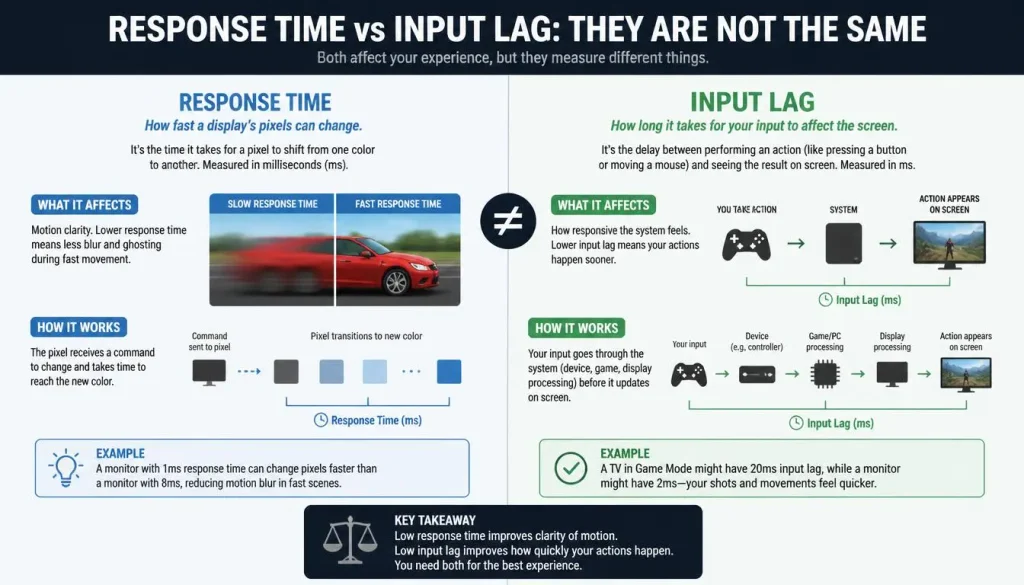
Another common mistake is assuming that a 1ms response time means the entire laptop reacts in one millisecond.
It does not.
Response time is mainly about pixel transitions.
Input lag is the delay between an input and the visible result appearing on the display.
For example, after clicking your mouse:
- The mouse sends the command.
- The CPU processes game logic.
- The GPU renders the frame.
- The display receives the frame.
- The pixels change to show it.
Pixel response time is only one part of this chain.
Can a 1ms Screen Have High Input Lag?
Yes.
A display could have very fast pixel transitions but still introduce more display processing delay.
Likewise, the entire gaming system may have higher latency due to:
- Low frame rates
- V-Sync
- Slow CPU processing
- GPU rendering time
- Wireless peripheral latency
- Frame queues
You should not use response time alone as a measurement of total gaming responsiveness.
Screen Response Time vs Total System Latency
Total system latency includes much more than the laptop screen.
It may involve:
- Mouse or controller latency
- USB or wireless latency
- CPU processing
- GPU render time
- Frame buffering
- Display processing
- Pixel response
This explains why two laptops with the same advertised 1ms display can still feel different when gaming.
A powerful CPU and GPU producing high, stable frame rates can improve responsiveness just as much as a fast panel.
Does Response Time Affect FPS?
No.
Screen response time does not increase or decrease the number of frames your GPU produces.
If your gaming laptop is running a game at 120 FPS, changing from a 5ms panel to a 1ms panel will not suddenly increase it to 150 FPS.
What may improve is the clarity of those frames when objects move.
FPS and response time work together, but they measure different things.
Gaming Laptop Panel Type and Response Time
Panel technology can strongly influence response performance.
IPS Response Time
IPS panels are extremely common in gaming laptops.
Modern Fast IPS panels can offer:
- High refresh rates
- Good colors
- Wide viewing angles
- Fast pixel transitions
A well-designed IPS gaming laptop can provide excellent motion clarity.
OLED Response Time
OLED displays are particularly strong when it comes to pixel response.
Each OLED pixel produces its own light and can switch states very quickly.
This is one reason OLED gaming laptops often look exceptionally clean during motion.
OLED also offers excellent contrast and perfect blacks.
However, OLED laptops may cost more, and buyers should also consider brightness behavior, battery life, burn-in precautions, and text rendering.
TN Response Time
TN panels have historically been known for fast response times.
They were once extremely common in competitive gaming displays.
Today, gaming laptops use IPS and OLED far more often because those technologies can offer better image quality while still delivering fast performance.
Mini-LED Response Time
Mini-LED refers to the backlight technology rather than the LCD pixel type itself.
A Mini-LED laptop may still use an IPS-type LCD panel.
Therefore, the response time depends largely on the LCD panel rather than the Mini-LED backlight alone.
OLED vs IPS Response Time for Gaming Laptops
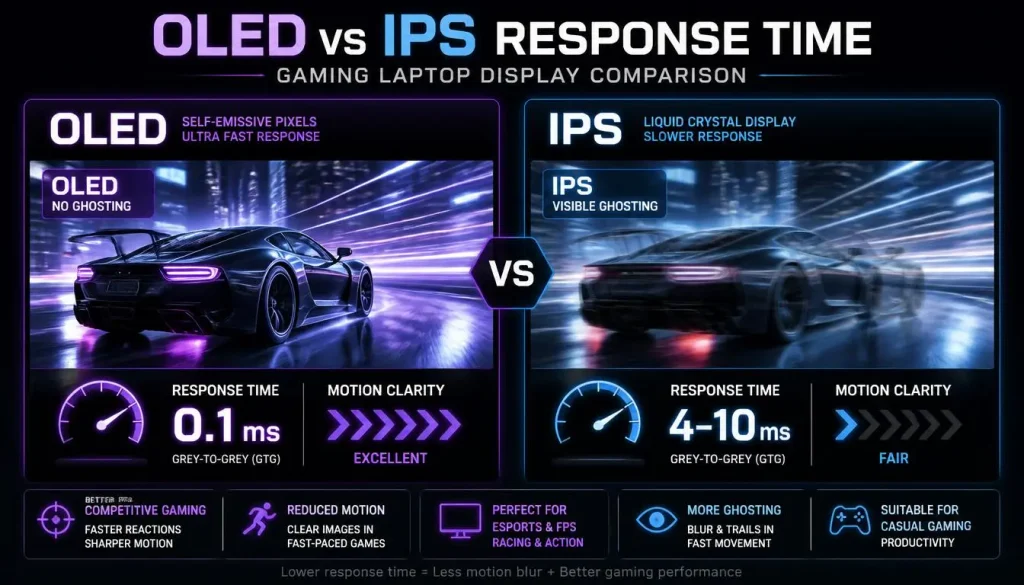
OLED normally has an advantage in raw pixel transition speed.
This can produce especially clear motion in fast games.
IPS, however, still has several strengths:
- Wider range of affordable laptops
- Excellent color quality
- High refresh-rate options
- No traditional OLED burn-in concern
- Strong brightness options
For competitive gaming, both technologies can be excellent.
If you want the cleanest pixel transitions and deep blacks, OLED is attractive.
If you want a wider selection of laptops at different price points, a fast IPS panel may offer better value.
What Is Ghosting on a Gaming Laptop Screen?
Ghosting is one of the clearest signs that pixel transitions are too slow.
It looks like a faded copy or trail following a moving object.
For example, if you move your character quickly across a dark background, you may see a faint outline following behind.
Ghosting vs Motion Blur
They are related but not identical.
Ghosting usually refers to visible trails caused by incomplete pixel transitions.
Motion blur is a broader term that describes loss of clarity during movement.
Motion blur can come from:
- Slow pixel response
- Sample-and-hold display behavior
- Camera movement
- Low frame rates
- In-game motion blur effects
What Is Inverse Ghosting?
Inverse ghosting happens when pixel transitions are pushed too aggressively.
Instead of a normal faded trail, you may see bright or dark halos around moving objects.
This is often caused by excessive overdrive.
It demonstrates an important point:
A lower response-time number is not always better if achieving that number creates visible artifacts.
What Is Overdrive and How Does It Affect Response Time?
Overdrive increases the voltage applied to LCD pixels so they can transition more quickly.
Gaming monitors commonly provide settings such as:
- Off
- Normal
- Fast
- Faster
- Extreme
Gaming laptops sometimes offer similar controls through manufacturer software or display settings.
Why Maximum Overdrive Is Not Always Best
The strongest overdrive setting can make certain transitions faster, but it may push pixels beyond their intended target.
This creates overshoot.
Overshoot can appear as inverse ghosting.
The best setting is normally the one that balances fast transitions with minimal visible artifacts.
Why an Advertised 1ms Response Time Can Be Misleading
Response-time claims should never be treated as guarantees that every pixel transition occurs in exactly that amount of time.
A manufacturer may advertise:
“1ms response time”
But that figure might represent:
- A specific transition
- A best-case transition
- A strong overdrive mode
- An MPRT measurement
- A laboratory condition
Real-world performance may be different.
Fastest Transition vs Average Transition
A screen can perform one transition in 1ms while several others take 4ms, 6ms, or longer.
That is why independent measurements are often more useful than a single manufacturer number.
A screen with consistent 3ms transitions may produce better overall motion than a screen that reaches 1ms only in ideal conditions.
What Is Response Time Consistency?
Response time consistency describes how evenly a display handles different pixel transitions.
Ideally, transitions should remain fast without creating excessive overshoot.
Poor consistency can cause certain colors or brightness levels to leave more visible trails than others.
For gaming, consistency is often more useful than one impressive best-case number.
What Is Black Smearing?
Black smearing is a visible dark trail that can appear behind moving objects, particularly during transitions involving very dark colors.
It has historically been associated with certain slower dark-level transitions on some panel types.
In games with dark scenes, caves, nighttime environments, or horror settings, black smearing can be easier to notice.
If you frequently play dark games, review motion tests instead of relying only on the advertised response time.
How VRR, G-SYNC, and FreeSync Affect Motion
Variable Refresh Rate, or VRR, allows the display refresh rate to change dynamically so it can better match the frame rate produced by the GPU.
G-SYNC and FreeSync are two well-known VRR technologies.
Their main purpose is not to make pixels transition faster.
Instead, they help reduce issues such as:
- Screen tearing
- Uneven frame delivery
- Some forms of stuttering
Does VRR Reduce Response Time?
Not directly.
VRR controls when frames are displayed.
Response time controls how quickly the pixels change after those frames arrive.
Both can affect how smooth gaming feels, but they solve different problems.
Ghosting vs Screen Tearing vs Stuttering
These problems are frequently confused.
| Problem | What You See | Common Cause |
|---|---|---|
| Ghosting | Trail behind moving objects | Slow pixel transitions |
| Inverse ghosting | Bright or dark halo | Too much overdrive |
| Motion blur | Reduced clarity during movement | Several possible causes |
| Screen tearing | Horizontal split in the image | Frame and refresh mismatch |
| Stuttering | Uneven or jerky movement | Poor frame pacing or unstable FPS |
Knowing the difference makes troubleshooting much easier.
If you see trails behind objects, investigate response time and overdrive.
If the image looks horizontally torn, VRR or V-Sync settings are more relevant.
Best Response Time for Different Types of Games
Different games place different demands on the screen.
Competitive FPS Games
Examples include Counter-Strike 2, Valorant, Rainbow Six Siege, and Overwatch 2.
Recommended target:
Around 1–3ms with a high refresh rate
Competitive players benefit the most from fast transitions because targets move quickly and reaction time matters.
Battle Royale Games
Examples include Fortnite, Apex Legends, and Call of Duty: Warzone.
Recommended target:
Around 1–3ms
These games combine fast aiming with rapid camera movement.
Racing Games
Recommended target:
Around 1–5ms
Fast motion across the screen makes good response time useful, especially when driving at high speed.
RPG and Story-Driven Games
Recommended target:
Around 3–5ms
A slightly slower response time is rarely a major problem in slower-paced games.
Higher resolution, HDR, contrast, and color quality may matter more.
Strategy and Simulation Games
Recommended target:
Around 5ms or lower
Extremely fast response times are usually unnecessary.
How to Test Gaming Laptop Screen Response Time and Ghosting
Measuring exact pixel response time at home is difficult without specialized equipment.
However, you can still check whether the display has obvious motion problems.
Check Professional Reviews
Look for reviews that measure:
- Average response time
- Rise and fall times
- Overshoot
- Response-time charts
- Refresh-rate compliance
- Motion clarity
These measurements are far more useful than simply repeating the manufacturer’s advertised specification.
Use a Motion Test
Browser-based motion tests can help you visually inspect:
- Ghosting
- Smearing
- Inverse ghosting
- Motion blur
A moving-object test can make display artifacts much easier to notice than a static desktop.
Test at the Laptop’s Maximum Refresh Rate
Make sure Windows is actually using the highest supported refresh rate.
A 240Hz laptop running at 60Hz will not show you the display’s full gaming potential.
Can You Improve Gaming Laptop Screen Response Time?
You cannot fundamentally change the physical speed of the panel, but you may be able to improve its behavior.
Enable the Highest Refresh Rate
Go to your Windows display settings and confirm that the laptop is using the maximum supported refresh rate.
Check Manufacturer Software
Some gaming laptops include overdrive or panel response settings in apps from brands such as ASUS, Lenovo, MSI, Acer, Dell, or HP.
The setting may be called:
- Panel Overdrive
- Response Time
- LCD Overdrive
- Fast Response
- Gaming Display Mode
Use a Balanced Overdrive Setting
If your laptop offers several response modes, the fastest option may not always look best.
Choose the setting that provides clear motion without obvious inverse ghosting.
Keep Graphics Drivers Updated
Drivers will not physically make LCD pixels faster, but updated drivers can improve display compatibility, VRR behavior, and overall gaming performance.
Should You Avoid a Gaming Laptop With No Listed Response Time?
Not necessarily.
Many laptop manufacturers advertise refresh rate but do not clearly publish response time.
That does not automatically mean the screen is slow.
Instead, search for independent reviews of the exact laptop or panel.
Look for:
- Ghosting observations
- Pixel response measurements
- Motion test photos
- Panel model information
- Overdrive behavior
A laptop with no advertised response time may still have an excellent display.
What Response Time Should You Look for When Buying a Gaming Laptop?
Your ideal target depends on how you play.
Budget Gaming Laptop
Prioritize:
- 144Hz or higher refresh rate
- Reasonably fast pixel response
- Good brightness
- Decent color quality
- Stable gaming performance
A genuine 3–5ms panel is perfectly reasonable.
Mid-Range Gaming Laptop
Look for:
- 165Hz to 240Hz
- Around 1–4ms real-world response
- VRR support
- Good color coverage
- Low overshoot
High-End Gaming Laptop
Consider:
- 240Hz, 300Hz, or 360Hz displays
- Very fast response time
- OLED or premium Fast IPS
- Strong VRR performance
- Excellent brightness and color
Competitive Esports Laptop
Motion performance should become one of your main priorities.
A fast 240Hz or 360Hz panel with low response time and low system latency can provide a more responsive competitive experience than a slower display.
Response Time vs Other Gaming Laptop Display Specs
Response time matters, but it should never be the only display specification you consider.
Also look at:
Refresh Rate
Higher refresh rates make movement appear smoother when the GPU can produce enough frames.
Resolution
1080p generally allows higher FPS.
1440p or 1600p provides a sharper image but requires more GPU power.
Brightness
Higher brightness improves visibility in bright rooms and helps HDR content.
Color Gamut
Better color coverage makes games look more vibrant and accurate.
Contrast
High contrast improves dark scenes and gives the picture more depth.
OLED is especially strong here.
VRR Support
G-SYNC, FreeSync, or compatible VRR can reduce tearing when FPS changes.
The best gaming display balances all of these factors.
Common Gaming Laptop Response Time Myths
Myth 1: 1ms Means Zero Input Lag
False.
Pixel response is only one part of total gaming latency.
Myth 2: Lower Response Time Always Means a Better Screen
False.
A display can achieve a lower response time while producing excessive overshoot or poor image quality.
Myth 3: Every 240Hz Screen Is Fast
False.
Refresh rate and pixel response are different measurements.
A 240Hz panel can still have slow transitions.
Myth 4: Every 1ms Display Performs the Same
False.
Manufacturers may use different test methods and response modes.
Myth 5: Casual Gamers Need 1ms
False.
A high-quality 3ms or 5ms display can be excellent for casual and single-player gaming.
Gaming Laptop Screen Response Time FAQ
Is lower response time always better?
Generally, lower response time is desirable, but only if it does not introduce excessive overshoot or inverse ghosting. Overall motion quality matters more than chasing the lowest advertised number.
Is 1ms response time good for a gaming laptop?
Yes. A genuine 1ms response time is excellent for gaming, especially for competitive titles and high-refresh displays.
Is 3ms response time good for gaming?
Yes. A 3ms gaming laptop display is fast enough for almost every gamer, including many competitive players.
Is 5ms response time bad for gaming?
No. A good 5ms panel can still deliver an excellent experience, especially in casual, RPG, racing, strategy, and single-player games.
Can you notice the difference between 1ms and 5ms?
Sometimes. The difference is easier to notice during fast motion and at higher refresh rates. Many casual gamers may not see a dramatic difference.
Is response time more important than refresh rate?
Neither should be considered alone. Refresh rate controls how often a new image can appear, while response time affects how quickly the pixels can show that new image.
Does response time affect FPS?
No. Response time does not determine how many frames your GPU produces.
Does response time affect input lag?
They are different measurements, although both contribute to how responsive a gaming experience feels.
Is OLED response time better than IPS?
OLED generally offers faster pixel transitions than IPS. However, both can provide excellent gaming performance when properly implemented.
Does 144Hz need a 1ms response time?
No. A 144Hz screen does not require a 1ms response time. A good 3–5ms panel can still provide strong motion performance.
What response time is best for 240Hz gaming?
For a 240Hz display, very fast pixel transitions are desirable because each refresh lasts only about 4.17ms. A high-quality panel with response times around that range or faster will make better use of the refresh rate.
Can a 1ms gaming laptop still have ghosting?
Yes. An advertised 1ms figure may describe only certain transitions or a specific overdrive mode. Other transitions may still produce visible ghosting.
Does G-SYNC or FreeSync reduce response time?
Not directly. These technologies synchronize display refresh behavior with GPU frame output. They mainly help with tearing and frame-delivery smoothness.
Does screen resolution affect response time?
Resolution itself does not directly determine pixel response time. However, higher resolutions require more GPU power, which can reduce FPS and change how responsive a game feels.
Does response time affect picture quality?
It mainly affects motion quality. Color accuracy, brightness, contrast, resolution, and HDR are separate parts of overall picture quality.
Is a 0.03ms OLED display noticeably better than a 1ms LCD?
OLED can deliver noticeably cleaner transitions, particularly in fast motion, but the difference depends on refresh rate, game type, frame rate, and the quality of the LCD panel being compared.
Final Verdict: How Much Does Screen Response Time Really Matter?
Gaming laptop screen response time matters because it affects how clearly the display handles movement.
For competitive gamers, a fast response time can reduce ghosting and make fast-moving targets easier to track. A genuine 1–3ms display paired with a high refresh rate is ideal.
For most gamers, however, a good 3–5ms panel is already fast enough.
The most important lesson is not to judge a gaming laptop by one advertised number.
A “1ms” label does not guarantee perfect motion performance, just as a 240Hz refresh rate does not guarantee fast pixel transitions.
When choosing a gaming laptop, look at response time together with refresh rate, overshoot, VRR support, panel technology, brightness, contrast, resolution, and real-world display testing.
If the laptop delivers clean motion, minimal ghosting, a high refresh rate, and the image quality you want, the difference between 1ms, 3ms, and 5ms becomes far less important than the overall quality of the screen.