Is an older gaming laptop still worth buying? For some buyers, yes. For others, it becomes a repair bill with a keyboard attached.
The answer depends on the GPU, thermals, battery, and total cost after cleanup. We'll walk through the checks that separate a smart used buy from a tired machine.
As of 2026, many last-generation laptops still run 1080p games well. Manufacturer specs show that a healthy battery and clean cooling matter as much as the chip. A laptop with a worn battery or clogged fans can feel slow even with good parts.
Start with the condition, then compare the price.
The Real Problem With Buying an Older Gaming Laptop
The main risk is not age alone. The real risk is paying a low price, then adding hidden repair costs. A two-year-old gaming laptop can be a strong value.
A five-year-old model can be a money pit if the battery, fans, or ports are worn.
Older machines also carry limits you cannot fix. The GPU is usually soldered. The CPU may not support newer Windows features.
VRAM can cap modern textures. Aggregate reviews report that heat and dust are the biggest long-term issues.
Before you buy, compare the full cost. Include a new charger, battery, thermal service, and possible screen repair. If you skip that step, the deal can disappear fast.
A quick value check helps you see the real number, not just the listing price.
What Actually Makes an Older Gaming Laptop Worth It
An older gaming laptop earns its price when the core parts still match your games. That usually means a capable discrete mobile GPU, enough RAM, and a fast SSD. It also helps if the chassis has room for upgrades.
The sweet spot is often a last-generation model with a strong GPU and a healthy battery. You get mature drivers and proven cooling. You also avoid the steepest new-laptop depreciation.
The biggest wins are practical. You save money. You get a familiar layout.
You may gain upgradeable RAM or storage. The tradeoff is shorter battery life and older display tech.
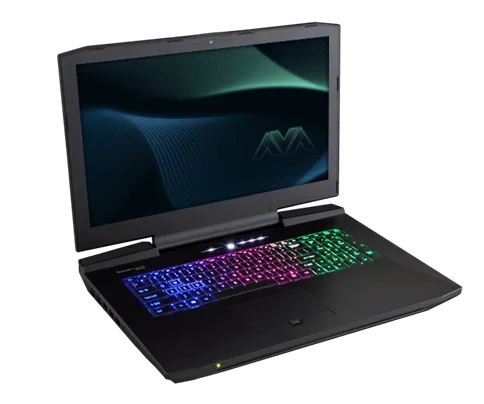
Image source: Wikimedia Commons / Nikitarama (CC BY-SA)
| What Still Matters | Why It Matters | Red Flag |
|---|---|---|
| Discrete mobile GPU | Handles modern 1080p games | Shared or very old GPU |
| 16GB RAM | Smooth multitasking | 8GB on a used machine |
| NVMe SSD | Fast load times | Slow or tiny drive |
| Clean thermals | Stable performance | Loud fans or hot chassis |
Condition Variables That Change the Answer
The same model can be worth buying or skipping. Condition changes everything. Battery health, thermal state, and physical wear matter more than the spec sheet.
Check the battery first. A high cycle count means shorter runtime. A swollen battery is a safety issue.
Then check temperatures under load. Manufacturer specs confirm that mobile GPUs need proper cooling to reach their power limits.
Also inspect the screen, hinges, keyboard, and ports. Dead pixels and hinge cracks are expensive fixes. Soldered RAM or CPU limits upgrades.
If the machine is locked to an older Windows version, that can shorten its useful life.

Image source: Wikimedia Commons / Daniel Benavides from Austin, TX (CC BY)
| Variable | Good Sign | Walk Away If |
|---|---|---|
| Battery | Low cycles, stable charge | Swollen or very weak |
| Thermals | Cool, quiet under load | Throttling or loud fans |
| Display | No dead pixels | Cracks or severe ghosting |
| Upgrade path | Open RAM or SSD slots | Fully soldered parts |
Decision Branches: Buy, Skip, or Wait
Use if and then logic. If the GPU is strong, the battery is healthy, and the price leaves room for service, buy it. If the price is high but the machine is clean, wait for a sale.
If the GPU is weak or the battery is swollen, skip it.
Here is a simple branch guide. It keeps emotion out of the deal.
| If You Find This | Then Do This |
|---|---|
| Strong GPU, healthy battery, fair price | Buy after testing |
| Strong GPU, weak battery, low price | Buy only with repair budget |
| Weak GPU, high price | Skip |
| Good price, missing charger, unclear history | Wait or negotiate |
| Swollen battery or cracked screen | Skip |
If you are unsure, compare it with a new budget model. Sometimes the safer buy is a discounted current-generation laptop. Sometimes a used premium chassis still wins.
The key is total cost, not the sticker price.
How to Inspect a Used Gaming Laptop Before You Pay
Do not trust the listing photos alone. Test the machine before money changes hands. Start with power, then screen, then keyboard, then thermals.
Run a dead-pixel test. Check every key. Plug in every port.
Listen for fan noise. Watch for thermal throttling during a short stress test. Ask for the original charger, because underpowered adapters can cause problems.
Also check BIOS access, Windows activation, and storage health. Fresh OS installs are fine, but you want proof of a clean system. If the seller resists testing, walk away.

Image source: Wikimedia Commons / Anon
- Boot the laptop and confirm the OS loads.
- Check battery percentage and cycle count.
- Run a dead-pixel and brightness test.
- Test every keyboard key and trackpad click.
- Plug in all ports and the charger.
- Run a short temperature and fan-noise check.
- Verify storage size and free space.
- Confirm BIOS, Wi-Fi, and Bluetooth work.
Before you buy, learn which specs can be upgraded later. That one check can turn a risky purchase into a good long-term machine.
Older Gaming Laptop vs. New Budget and Refurbished Options
An older used laptop makes sense when you need 1080p performance and can accept battery wear. A new budget model makes sense when you want warranty coverage and modern parts. Refurbished units sit between those two paths.
If your budget is tight, a used premium chassis can beat a new entry-level machine. If you need support and predictable battery life, buy new. If you want balance, choose a certified refurbished unit with a return window.
| Option | Best For | Main Risk |
|---|---|---|
| Older used laptop | Low cost, 1080p gaming | Hidden wear |
| New budget laptop | Warranty and new battery | Weaker GPU |
| Refurbished laptop | Middle ground | Limited stock |
| Used desktop | Best value per dollar | Not portable |
Before you decide, run a fair value comparison and check whether cheap models can still make sense. It also helps to set a realistic budget before browsing listings.
Costs, Specs, and Performance Targets to Check
Price alone does not tell the full story. Add charger, battery, and service costs before you compare machines. A low listing price can become average fast.
For 1080p gaming, aim for 16GB RAM, a 512GB NVMe SSD, and a discrete mobile GPU with at least 6GB VRAM. A 120Hz or 144Hz display helps in fast games. TGP matters because the same GPU name can perform very differently across laptops.
Also check Windows 11 CPU support. Microsoft's official Windows 11 requirements can rule out some older processors. Storage upgrades are easier than RAM upgrades, so check which gaming laptop specs can be upgraded later.
If you want a faster buying process, learn how to read gaming laptop specifications before you shop.
| Target | Good Minimum | Why It Matters |
|---|---|---|
| RAM | 16GB | Smooth multitasking |
| Storage | 512GB NVMe | Fast installs |
| VRAM | 6GB | Modern textures |
| Display | 1080p 120Hz | Fluid motion |
| Battery cycles | Under 300 | Better runtime |
Mistakes That Turn a Cheap Laptop Into a Bad Deal
The biggest mistake is ignoring the battery. A weak or swollen battery can erase the savings. Another mistake is assuming every used laptop can be upgraded.
Many RAM and CPU parts are soldered.
Buyers also skip stress testing. A machine that boots fine can throttle hard under load. Missing chargers and unclear return policies are common traps too.
- Do not pay without testing the screen and keyboard.
- Do not assume a low price means good value.
- Do not ignore fan noise or high temperatures.
- Do not forget to budget for repair costs.
- Do not buy a machine with no return option.
If the laptop needs major work, compare the total cost of owning a gaming laptop with a cleaner used option. Repair pricing can surprise you, so review why gaming laptops are more expensive to repair before you commit.
Real Buyer Scenarios and What I'd Do
A college student playing esports at 1080p can do well with an older used laptop. The GPU is usually enough, and the price is easier to justify. A swollen battery or cracked screen still kills the deal.
A casual single-player gamer should focus on VRAM and cooling. Modern games punish weak mobile GPUs and hot chassis. If the price is close to a refurbished unit, I would lean refurbished.
A traveler needs light weight and decent battery life. Older gaming laptops often fail there. For that buyer, a newer efficient model may be worth the extra money.
| Buyer | Older Laptop Fit | Better Choice If |
|---|---|---|
| Esports student | Strong | Battery is weak |
| Casual gamer | Moderate | GPU is old |
| Traveler | Weak | Weight matters |
| Creator | Moderate | VRAM is low |
Frequently Asked Questions
How old is too old for a gaming laptop?
A laptop older than five years can still work, but parts availability and Windows support become harder. If the GPU is weak and the battery is worn, the value drops fast. For most buyers, three to four years is a safer used range.
Should I buy a used gaming laptop without a charger?
No. A missing charger adds cost and risk. You may need an exact wattage adapter, and underpowered chargers can cause charging or performance issues.
Ask the seller to include the original charger or reduce the price.
Is a refurbished gaming laptop better than used?
Usually yes for risk-averse buyers. Refurbished units often include testing, cleaning, and a short warranty. Used units can cost less, but the condition depends on the seller.
Choose based on your repair budget and tolerance for risk.
Can an older gaming laptop run modern games?
Yes, if it has a capable discrete mobile GPU and enough RAM. Expect lower settings, lower resolution, or reduced ray tracing. A machine with 4GB VRAM will struggle more than one with 6GB or 8GB.
What is the biggest red flag when buying used?
A swollen battery is the biggest red flag. It is a safety issue and a replacement cost. Other major red flags include thermal throttling, dead pixels, cracked hinges, and a missing or wrong charger.