What is the difference between air cooling and liquid cooling? It comes down to how heat leaves your CPU: air coolers push heat into metal fins, while liquid coolers move it through fluid to a radiator. For most builds, the choice is less about raw cooling and more about budget, case space, and noise tolerance.
Manufacturer specs as of 2026 show many mid-range air coolers handling 150W to 250W TDP, while 240mm AIOs often land in a similar range with lower noise under sustained load. Let's walk through both so you can match the cooler to your build.
The Short Answer: Air vs Liquid Cooling in 60 Seconds
Air cooling uses a heatsink and fan. Liquid cooling uses a pump, coolant, cold plate, and radiator. Both move heat from the CPU to the air around your PC.
Air cooling is simpler and cheaper. Liquid cooling is often quieter under heavy load and can fit tighter spaces. Neither is automatically better.
Your CPU power, case size, and tolerance for maintenance matter more than the cooler type.
How an Air Cooler Actually Moves Heat Away From Your CPU
An air cooler starts at the CPU's metal lid, called the integrated heat spreader. Thermal paste sits between that lid and the cooler's base plate. Heat moves into copper heat pipes.
Those pipes carry it up into aluminum fins. A fan pushes air through those fins and out of the case.
Direct-contact heat pipes touch the CPU lid with less metal in between. That can improve heat transfer, but mounting pressure still matters. A large dual-tower cooler can outperform a basic 120mm AIO on some CPUs.
It can also block tall RAM or crowd the top PCIe slot. Before buying, checking cooler clearance saves a lot of frustration.
Image source: Wikimedia Commons / Hans Haase (CC BY-SA)
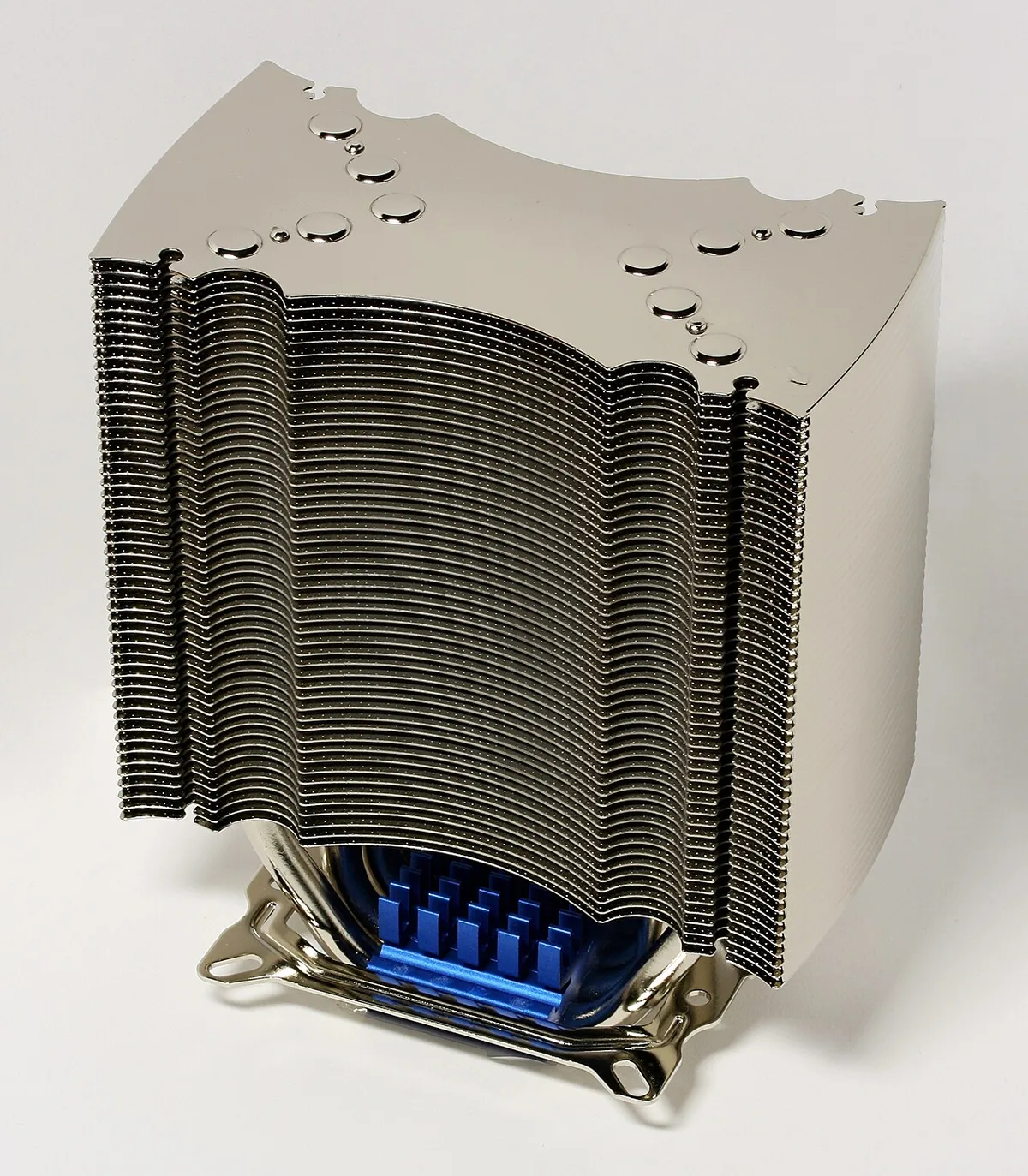
Image source: Wikimedia Commons / D-Kuru (CC BY-SA)
Air coolers have no pump and no fluid. That means fewer moving parts. They are easy to install and easy to troubleshoot.
Dust buildup is the main long-term enemy. A quick cleaning with compressed air usually restores performance.
How a Liquid Cooler (AIO or Custom Loop) Does the Same Job
A liquid cooler uses a pump to move coolant from the CPU cold plate to a radiator. The cold plate sits on the CPU. The radiator sits where case fans mount.
Fans push air through the radiator fins. Heat leaves the fluid and exits the case.
An AIO is sealed at the factory. You do not refill it. A custom loop is open.
You choose the pump, reservoir, tubing, and coolant. Custom loops offer more flexibility and more upkeep.
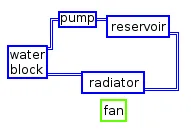
Image source: Wikimedia Commons / KVDP (CC BY-SA)
Liquid cooling can move heat to a larger radiator. That helps with high-wattage CPUs and sustained workloads. It can also keep the area around the socket cooler.
That may help VRMs and nearby components. But pumps can fail, and leaks are possible. AIOs are far safer than custom loops, but not risk-free.
If you plan a liquid build, case choice matters early. Radiator thickness, fan clearance, and tubing room all affect the final result. Choosing a case for liquid cooled PCs prevents buying parts that do not fit.
Air Cooling vs Liquid Cooling: Side-by-Side Comparison
| Factor | Air Cooling | Liquid Cooling (AIO) |
|---|---|---|
| Upfront cost | Usually lower | Usually higher |
| Installation | Simpler | More steps |
| Leak risk | None | Low but real |
| Maintenance | Dust cleaning | Pump noise checks, dust cleaning |
| Noise under load | Can be louder with small fans | Often quieter with large radiator fans |
| RAM clearance | Can be tight | Usually better |
| Lifespan concern | Fan bearings | Pump and coolant |
| Best fit | Budget, simple builds | High heat, quiet builds |
Air cooling wins on simplicity. Liquid cooling wins on heat capacity and aesthetics. The gap narrows in the mid-range.
A good tower cooler can beat a cheap 120mm AIO. A 360mm AIO can beat most air coolers on heavy sustained loads.
Case airflow still matters either way. A mesh front panel and good fan layout help both cooler types. Case size also changes how much air moves through the system.
Real Performance Numbers: Temps, Noise, and Pricing
Numbers vary by CPU, case, and fan curve. Still, general ranges help. Many mainstream CPUs run 65W to 170W under load.
High-end chips can exceed 250W. Air coolers often cost $25 to $80. AIOs often cost $70 to $200 or more.
Custom loops can cost much more.
Noise is where people feel the difference. A small air cooler may spin fast and get loud. A 280mm or 360mm AIO can move the same heat at lower fan speed.
That often means lower noise. But pump whine exists on some units. Aggregate reviews report that pump noise is the most common complaint on budget AIOs.
Fan count also changes results. More fans can improve airflow, but they can also add noise. The number of fans a case supports affects your layout and radiator size.
| Component | Typical Range |
|---|---|
| Mid-range air cooler price | $25 to $80 |
| 240mm AIO price | $70 to $130 |
| 360mm AIO price | $100 to $200 |
| Common TDP range | 65W to 250W |
| Common radiator sizes | 120mm, 240mm, 280mm, 360mm |
For gaming, temperatures matter most when they cause throttling. A CPU that stays under its thermal limit can boost better. That can improve frame consistency in long sessions.
For rendering or encoding, sustained heat is the real test. That is where larger radiators help.
Which One Fits Your Build: Use Cases and Recommendations
For a budget build, a tower air cooler is usually the smart buy. It costs less and installs faster. Stock coolers can work for light use.
For gaming at 1080p or 1440p, either type works if the CPU stays under its thermal limit.
For quiet builds, large air coolers and 280mm or 360mm AIOs both help. The key is fan speed at load, not just cooler type. A big air cooler with a 140mm fan can be very quiet.
Small form factor builds change the math. Low-profile air coolers save space. A 120mm AIO can fit where tall towers cannot.
Check radiator fit and tubing room before ordering parts.
High-end CPUs and long rendering sessions favor liquid cooling. A 360mm AIO or custom loop gives more thermal headroom. That can reduce throttling during exports and compiles.
| Build type | Usually best choice | Why |
|---|---|---|
| Budget gaming | Tower air cooler | Lower cost, simple install |
| Quiet mid-range | Large air or 280mm AIO | Low fan speed at load |
| SFF build | Low-profile air or 120mm AIO | Clearance limits |
| High-wattage CPU | 360mm AIO or custom loop | More heat capacity |
| Set-and-forget PC | Air cooler | Fewer failure points |
Before buying, check airflow through the case. A cooler cannot fix poor case airflow. Mesh panels and sensible fan placement still matter.
Mistakes People Make When Choosing a CPU Cooler
The most common mistake is buying by looks, not clearance. A tall cooler may hit the side panel or RAM. Measure cooler height and RAM height first.
Then compare them to the case specs.
Another mistake is assuming liquid cooling is always better. A cheap 120mm AIO can lose to a good $40 tower cooler. Price and radiator size matter more than the category.
Poor mounting pressure also ruins performance. Too loose leaves gaps. Too tight can damage the socket or CPU lid.
Follow the manufacturer torque guidance.
People also forget VRM cooling. A large air cooler can block airflow over the motherboard power stages. That can raise VRM temperatures.
AIOs may leave that area more open.
Other mistakes include:
- Skipping a load test after install
- Reusing old thermal paste
- Ignoring pump noise on budget AIOs
- Mounting radiators in a way that traps air
- Buying a cooler with no warranty coverage for leaks
Always test temps with a real workload. Gaming, rendering, or stress testing will show if the cooler is enough. Idle temps alone do not tell the full story.
Long-Term Maintenance: What You're Signing Up For
Air coolers need dust removal and occasional fan replacement. Dust on fins raises temps over time. A can of compressed air usually fixes it.
Thermal paste may need refresh after a few years.
AIOs need less routine care but more attention to failure signs. Listen for pump whine. Watch for rising temps at the same fan speed.
Check for leaks around fittings and tubing.
Custom loops need the most upkeep. Coolant breaks down. Tubing can discolor or harden.
Fans and pumps need cleaning. Plan on periodic flushing and top-ups.
Maintenance habits that help:
- Clean filters and fans every few months
- Keep the PC off carpet dust traps
- Replace thermal paste when temps creep up
- Check AIO pump speed in BIOS
- Inspect tubing for kinks or cracks
Dust buildup over time can make a good cooler look bad. Fix airflow before blaming the cooler. A mesh front panel and clean filters help both air and liquid systems.
Frequently Asked Questions
Is liquid cooling always better than air cooling?
No. A quality tower air cooler can match or beat a small AIO. Liquid cooling helps most with high-wattage CPUs and sustained workloads.
For budget and mid-range builds, air cooling is often the better value.
Do air coolers last longer than AIOs?
Often yes, because they have fewer failure points. AIO pumps and coolant have finite lifespans. Fans can fail on both types.
Many air coolers run for years with only dust cleaning.
Can a big air cooler beat a 240mm AIO?
Yes, sometimes. A large dual-tower air cooler can match a 240mm AIO on many CPUs. Radiator size, fan quality, and case airflow all affect the result.
Test with your actual workload.
Does liquid cooling risk damaging other parts?
AIO risk is low but real. A leak can damage the motherboard, GPU, or PSU. Custom loops carry more risk.
Buy from brands with clear warranty terms and inspect fittings during install.
Which is quieter for gaming?
It depends on fan speed and pump noise. Large AIO radiators often run quieter under sustained load. Some air coolers are also very quiet.
Avoid small fans spinning at high RPM.
Do I need to replace thermal paste on an AIO?
Yes. The cold plate still needs thermal paste. AIOs ship with paste pre-applied or include a tube.
Reapply it if temps rise or you remount the cooler.
The Verdict: Which Cooling Method Should You Pick?
Pick air cooling if you want lower cost, simpler install, and fewer failure points. Pick liquid cooling if you need more thermal headroom, quieter sustained performance, or a cleaner look. For most gaming PCs, a good tower air cooler is enough.
For high-end CPUs and long workloads, a 280mm or 360mm AIO makes more sense. Check clearance, fan layout, and case airflow before choosing. Those details often matter more than the cooler type.
1 thought on “Air Cooling vs Liquid Cooling: What’s the Difference?”
Comments are closed.