Gaming laptops are built for performance, but that performance comes with a cost: higher power consumption. If you are wondering how long does a gaming laptop battery last, the answer depends on whether you mean battery runtime on a single charge or the total lifespan of the battery itself.
For most gaming laptops, you can expect roughly 1 to 2 hours of battery life during demanding gaming, around 2 to 3 hours during lighter gaming, and approximately 5 to 8 hours during web browsing, office work, or other light tasks. Some newer, more efficient gaming laptops can last considerably longer during non-gaming use.
The battery itself usually remains usable for around 2 to 4 years before noticeable capacity loss becomes a problem, although heat, charging habits, battery quality, and usage patterns can shorten or extend that lifespan.
The important thing to understand is that gaming laptop battery life can change dramatically depending on what you are doing. A laptop that lasts seven hours while browsing the web may struggle to reach two hours while running a demanding AAA game.
This guide explains what you should realistically expect, why gaming laptops drain their batteries so quickly, how to check battery health, and what you can do to make your battery last longer.
How Long Does a Gaming Laptop Battery Last on a Full Charge?
There is no single battery-life number that applies to every gaming laptop.
A laptop’s runtime depends on its battery capacity, processor, graphics card, display, cooling system, performance mode, screen brightness, refresh rate, and the software running in the background.
As a general guideline:
| Type of Use | Typical Battery Life |
|---|---|
| Demanding AAA gaming | 1–2 hours |
| Light or casual gaming | 2–3 hours |
| Heavy creative work | 2–4 hours |
| Video streaming | 4–7 hours |
| Web browsing | 5–8+ hours |
| Office and productivity work | 5–8+ hours |
These numbers are estimates rather than guarantees. A highly efficient gaming laptop may exceed them, while an older or more power-hungry model may fall below them.
Battery Life While Gaming
Gaming is usually the fastest way to drain a gaming laptop battery.
Modern games can push both the CPU and dedicated GPU at the same time. The cooling fans also spin faster, the display may run at a high refresh rate, and RGB lighting or connected accessories can add to the total power draw.
A demanding game such as an open-world RPG, racing simulator, or graphically intensive shooter may reduce battery life to around one or two hours.
Lighter esports titles and older games may run longer, especially if you lower graphics settings and cap the frame rate.
The laptop may also automatically reduce performance while unplugged. That is why you might notice lower FPS even when the battery still has plenty of charge remaining.
Battery Life for Web Browsing and Office Work
Gaming laptops can last much longer when the dedicated GPU is not being heavily used.
Tasks such as:
- browsing websites
- checking email
- working in Microsoft Word
- using Google Docs
- reading PDFs
- attending light online meetings
- working with spreadsheets
require far less power than gaming.
A reasonably efficient gaming laptop may provide around five to eight hours of light productivity, while particularly efficient models may last longer.
Battery Life While Watching Videos or Streaming
Watching YouTube, Netflix, or locally stored videos normally uses less power than gaming but more power than simple text-based work.
You may get approximately four to seven hours depending on screen brightness, resolution, Wi-Fi usage, speaker volume, and whether the dedicated GPU remains active.
Using headphones and reducing screen brightness can sometimes help extend runtime.
Battery Life During Video Editing and Other Heavy Work
Gaming laptops are also popular for video editing, 3D design, animation, programming, and engineering applications.
These tasks can place heavy loads on the processor and graphics card.
Programs such as video editors and 3D rendering software may reduce battery life to roughly two to four hours, depending on the workload.
Rendering a complex project can consume power almost as quickly as gaming.
What Is Considered Good Battery Life for a Gaming Laptop?
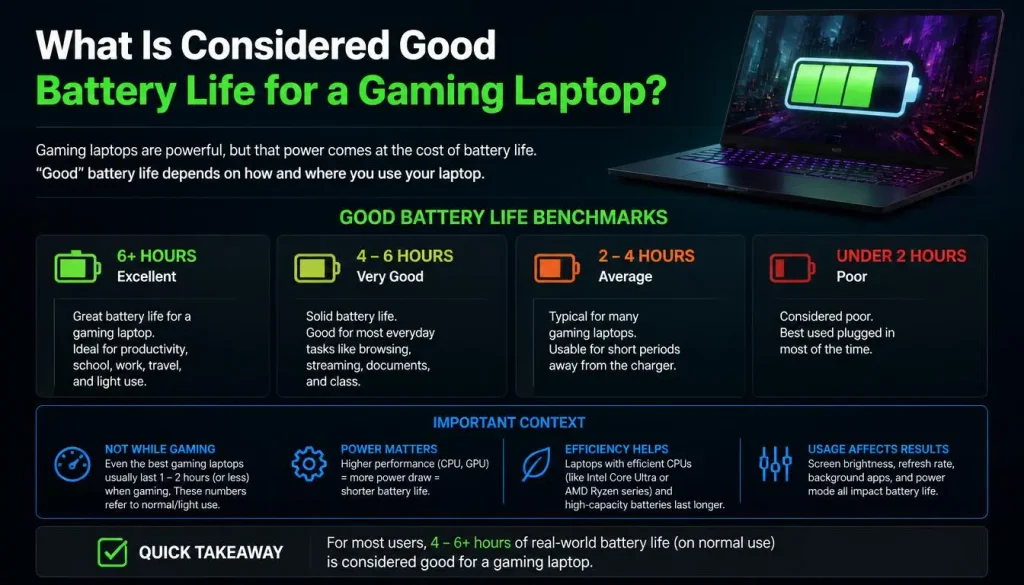
Good battery life depends on what you are doing.
For gaming, two hours may actually be reasonable. For light productivity work, two hours would normally be considered poor.
A simple way to judge battery life is:
- 1–2 hours while gaming: normal for many high-performance laptops
- 2–3 hours while gaming: good
- 5–8 hours for everyday use: good
- 8+ hours for light use: very good for a gaming laptop
You should avoid comparing a gaming laptop directly with an ultrabook.
Thin productivity laptops are designed around efficiency. Gaming laptops are designed around performance, which means they usually have more powerful processors, dedicated graphics cards, faster displays, stronger cooling systems, and higher overall power requirements.
Is 2 Hours of Battery Life Good for a Gaming Laptop?
If you are actively gaming, two hours can be completely normal.
If the same laptop lasts only two hours while doing basic web browsing or typing documents, however, there may be a battery-health issue, a power-hungry application running in the background, or an incorrect performance setting.
Can a Gaming Laptop Last 8 Hours?
Yes.
Some modern gaming laptops can reach eight hours or more during light use, particularly when they switch from the dedicated GPU to integrated graphics.
However, you should not expect eight hours of demanding gaming from the same machine.
Battery life always needs to be evaluated based on workload.
Why Advertised Gaming Laptop Battery Life Can Be Misleading
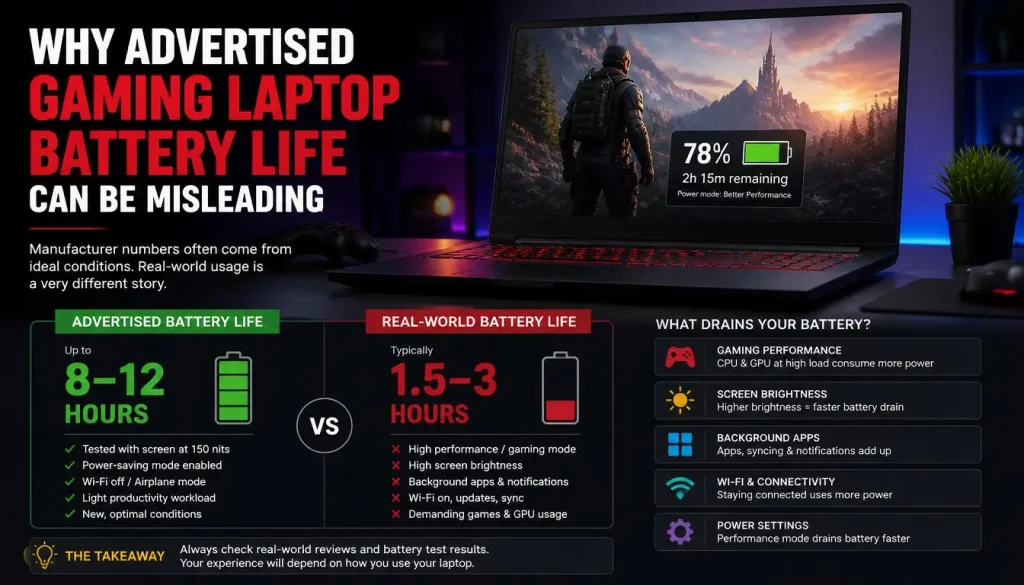
You may see a gaming laptop advertised with claims such as “up to 10 hours of battery life.
That does not necessarily mean the laptop can run games for ten hours.
Manufacturers usually test battery life under controlled conditions. The laptop may be running:
- low screen brightness
- light web browsing
- video playback
- integrated graphics
- reduced refresh rate
- battery-saving settings
Gaming creates a completely different workload.
The dedicated graphics card may consume several times more power than the integrated graphics processor.
This is why a gaming laptop advertised for eight or ten hours of battery life may still last only one or two hours during demanding gaming.
Always compare battery tests that use a workload similar to your own.
Why Do Gaming Laptop Batteries Drain So Fast?
A gaming laptop contains several high-performance components that consume far more electricity than components found in many standard laptops.
Dedicated GPUs Use a Lot of Power
The graphics card is usually one of the biggest reasons gaming laptops drain quickly.
A dedicated NVIDIA or AMD GPU can consume significant power when gaming, rendering, or performing other graphics-heavy tasks.
When the laptop switches to integrated graphics for light work, battery life can improve dramatically.
High-Performance CPUs Consume More Power
Gaming laptops usually use powerful processors designed to maintain high clock speeds.
Boost frequencies can increase performance, but they also increase power consumption.
Games that rely heavily on the CPU may therefore drain the battery quickly even when graphics settings are not extremely high.
High Refresh Rate Displays Use More Power
Many gaming laptops come with 120Hz, 144Hz, 165Hz, 240Hz, or even faster displays.
Higher refresh rates make games feel smoother, but refreshing the display more frequently can increase power usage.
Switching from 144Hz or 240Hz to 60Hz while working on battery can help extend runtime.
High Screen Brightness Reduces Battery Life
The display is one of the most consistent sources of battery drain.
Running the screen at maximum brightness can noticeably reduce battery life, especially on large or high-resolution displays.
When possible, reduce brightness to a comfortable level rather than leaving it at 100%.
RGB Lighting Uses Additional Power
RGB keyboards, light bars, illuminated logos, and connected gaming accessories all consume electricity.
The effect may not be as large as the GPU or display, but every watt matters when you are trying to maximize battery runtime.
Cooling Fans Consume Power
Powerful hardware creates heat.
When gaming, the laptop’s fans may run continuously at high speed to cool the CPU and GPU.
These fans require additional power and contribute to faster battery drain.
Background Applications Can Quietly Drain the Battery
Game launchers, RGB control software, cloud-sync services, browsers with dozens of open tabs, update services, and communication apps can continue using the CPU and network connection even when you are not actively using them.
Closing unnecessary applications can sometimes provide a surprisingly noticeable improvement in battery life.
What Affects Gaming Laptop Battery Life the Most?
Several factors determine how long a gaming laptop lasts on battery.
The biggest include:
- battery capacity
- CPU efficiency
- GPU power consumption
- integrated vs dedicated graphics
- screen brightness
- display resolution
- refresh rate
- performance mode
- game settings
- FPS
- background applications
- Wi-Fi and Bluetooth
- RGB lighting
- cooling requirements
- battery age
- battery health
- operating temperature
Two laptops with the same battery capacity can therefore have very different runtimes.
Does Battery Size Matter in a Gaming Laptop?
Yes, but battery size is only one part of the equation.
Laptop battery capacity is normally measured in watt-hours, written as Wh.
You may see gaming laptops with batteries such as:
- 50Wh
- 60Wh
- 70Wh
- 80Wh
- 90Wh
- 99Wh
A 90Wh battery stores more energy than a 60Wh battery, but that does not automatically mean the laptop will last 50% longer.
If the laptop with the 90Wh battery also uses a much more powerful GPU and CPU, it may actually have shorter battery life.
How to Estimate Gaming Laptop Battery Runtime
You can make a rough estimate using this formula:
Battery runtime = Battery capacity in Wh ÷ Average power consumption in watts
For example, imagine a laptop has a 90Wh battery and consumes an average of 45 watts.
90 ÷ 45 = approximately 2 hours.
If the same laptop consumes only 15 watts during light browsing:
90 ÷ 15 = approximately 6 hours.
Real-world battery life will not match the formula perfectly because power consumption constantly changes and some energy is lost through system inefficiencies.
Still, the calculation is useful for understanding why gaming drains batteries so quickly.
Gaming Laptop Battery Life vs Regular Laptop Battery Life
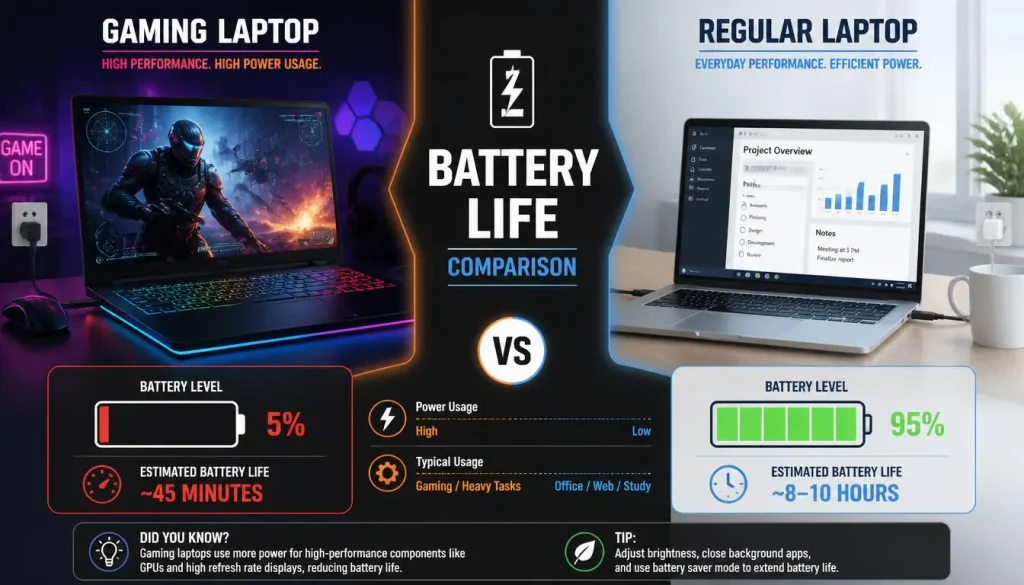
Traditional productivity laptops usually last longer than gaming laptops because they are optimized for efficiency.
A regular laptop may use:
- integrated graphics
- lower-power processors
- 60Hz displays
- less aggressive cooling
- fewer RGB features
- lower overall system wattage
Gaming laptops often have exactly the opposite configuration.
That does not mean gaming laptops have bad batteries. They simply have hardware that can consume much more power when pushed hard.
Should You Game on Battery Power?
You can game on battery, but it usually is not the best option.
Gaming laptops are generally designed to deliver their highest performance while connected to their power adapters.
When unplugged, the system may reduce:
- GPU power
- CPU power
- clock speeds
- frame rates
- display performance
These restrictions help prevent the laptop from draining the battery extremely quickly.
For the smoothest gaming experience, use the correct charger whenever practical.
Does Gaming While Plugged In Damage the Battery?
Modern gaming laptops include charging controllers that prevent the battery from simply continuing to charge beyond its designed limit.
So gaming while plugged in is generally normal.
The bigger concern is heat.
High temperatures can accelerate lithium-ion battery degradation over time. If you spend most of your time gaming while plugged in, using a manufacturer-supported battery charge limit can help reduce long-term battery stress.
Some laptops allow you to limit maximum charging to around 60%, 80%, or a similar level when the machine spends most of its life connected to power.
Why Is My Gaming Laptop Battery Draining While Plugged In?
Seeing the battery percentage fall while the charger is connected can be confusing.
Possible causes include:
An Underpowered Charger
If the charger cannot supply enough power for the CPU and GPU under heavy load, the laptop may temporarily pull additional power from the battery.
Always use a charger that meets the manufacturer’s required wattage.
Using a Low-Power USB-C Charger
Some gaming laptops support USB-C charging but require their larger proprietary charger for maximum performance.
A small USB-C charger may be sufficient for office work while failing to keep up with gaming.
A Damaged Charger or Cable
A failing adapter, damaged cable, or loose charging connector can reduce the amount of power reaching the laptop.
Extreme System Load
Certain laptops may temporarily use battery power during short bursts of extremely high power demand.
A small temporary drop may not always indicate a fault.
However, if the battery continuously drains even while connected to the original charger, the charging system should be checked.
How GPU Switching Affects Gaming Laptop Battery Life
Modern gaming laptops often contain both integrated graphics and a dedicated GPU.
How the laptop switches between them can have a major impact on battery life.
Integrated Graphics
Integrated graphics use much less power and are ideal for:
- browsing
- office work
- video playback
- light productivity
Using integrated graphics can significantly improve battery runtime.
Dedicated Graphics
The dedicated GPU provides better gaming performance but consumes much more electricity.
Keeping it active unnecessarily can shorten battery life even when you are not gaming.
MUX Switch
A MUX switch allows some gaming laptops to change how the display connects to the integrated and dedicated graphics processors.
Using dedicated-GPU-only mode may improve gaming performance but often increases power consumption.
Hybrid mode is usually better when battery life matters.
NVIDIA Optimus and Advanced Optimus
Technologies such as Optimus can automatically move lighter tasks to integrated graphics while activating the dedicated GPU when additional performance is required.
This helps balance performance and efficiency.
How to Make a Gaming Laptop Battery Last Longer
You probably cannot turn a powerful gaming laptop into an ultra-efficient business laptop, but you can often gain meaningful extra runtime by changing a few settings.
Use Windows Energy Saver
Windows includes power-saving features that reduce unnecessary background activity and power consumption.
Enable Energy Saver when you need longer battery life away from a charger.
Use a More Efficient Power Mode
When maximum performance is unnecessary, select a balanced or power-efficiency mode instead of a high-performance profile.
Manufacturer utilities may also include modes such as:
- Silent
- Eco
- Balanced
- Battery
- Hybrid
These modes can lower CPU and GPU power consumption.
Reduce Screen Brightness
Try lowering brightness to around 40–60% if that is comfortable for your environment.
The exact improvement varies by laptop, but the display is always consuming power while turned on.
Lower the Refresh Rate
You probably do not need a 240Hz refresh rate while reading email.
Switching to 60Hz during light work can reduce display power consumption.
Some laptops and versions of Windows also support dynamic refresh-rate features that automatically adjust refresh rate based on what you are doing.
Use Integrated Graphics When Possible
If your laptop provides an Eco, Hybrid, or integrated-GPU-only mode, use it when you are not gaming.
This can make a substantial difference.
Limit FPS While Gaming on Battery
Your GPU works harder when trying to produce as many frames as possible.
If you are playing a game at 150 FPS on battery, reducing the frame-rate limit to 60 FPS can lower GPU load and potentially extend runtime.
The exact improvement depends on the game and laptop.
Use NVIDIA BatteryBoost or Similar Features
Some NVIDIA-powered gaming laptops offer BatteryBoost or related battery-focused gaming settings.
These features can limit frame rates and balance GPU performance against power consumption.
Manufacturer software may provide similar functionality.
Disable Unnecessary RGB Lighting
Turn off keyboard effects, light bars, and other decorative lighting when battery life is more important than appearance.
Close Background Applications
Check whether you really need:
- multiple game launchers
- cloud synchronization
- RGB utilities
- chat applications
- dozens of browser tabs
- background updaters
Closing unnecessary applications reduces CPU activity and memory usage.
Turn Off Bluetooth When You Are Not Using It
Bluetooth usually does not consume huge amounts of power, but disabling unused wireless features can still help slightly.
Keep the Laptop Cool
Heat can hurt both short-term efficiency and long-term battery health.
Keep ventilation openings clear and avoid gaming with the laptop resting on a bed, blanket, or other soft surface that blocks airflow.
How to Find What Is Draining Your Gaming Laptop Battery
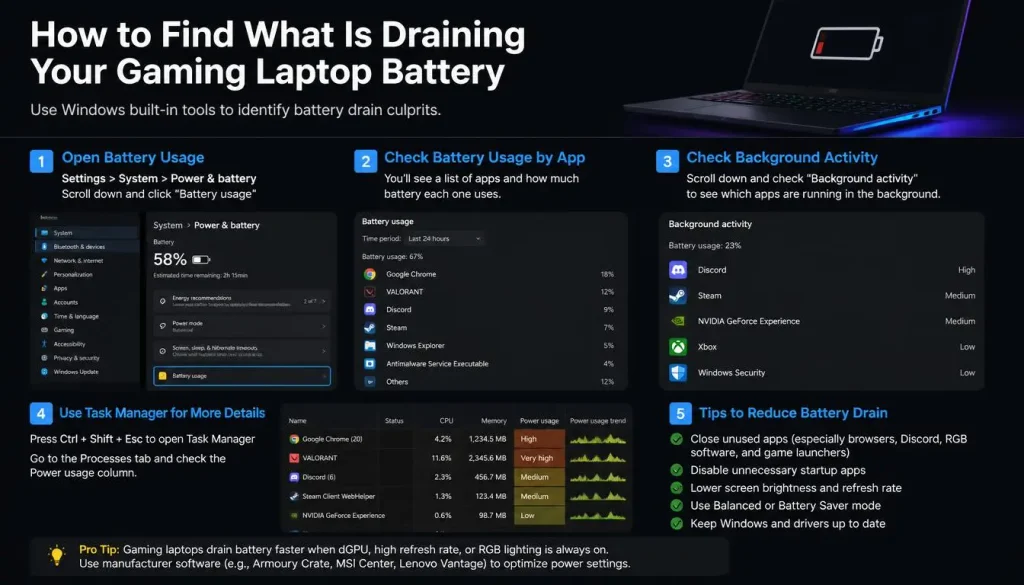
If your gaming laptop suddenly starts losing battery much faster than before, do not immediately assume the battery is dead.
First, check what the system is doing.
Check Windows Battery Usage
Windows can show which applications have used the most battery over a period of time.
Look for apps using unusually high amounts of power.
Check Task Manager
Open Task Manager and look for processes with unexpectedly high:
- CPU usage
- GPU usage
- disk activity
- memory usage
A background application may be preventing the laptop from entering a low-power state.
Check Whether the Dedicated GPU Is Staying Active
Sometimes an application keeps the dedicated GPU awake even when you are doing light work.
This can dramatically reduce battery life.
Closing the application or switching to hybrid graphics may solve the problem.
How Long Does a Gaming Laptop Battery Last Before It Needs Replacement?
Battery runtime and battery lifespan are two different things.
While a gaming laptop may run for only a few hours per charge, the physical battery itself may remain usable for several years.
Many gaming laptop batteries start showing noticeable capacity loss after roughly 2 to 4 years, depending on usage.
Some batteries remain useful longer, while others degrade sooner.
Factors that accelerate battery aging include:
- excessive heat
- frequent full discharges
- heavy daily usage
- keeping the battery at very high charge levels in hot conditions
- large numbers of charge cycles
What Is a Battery Charge Cycle?
One battery cycle represents using a total amount of energy equal to 100% of the battery’s capacity.
It does not have to happen all at once.
For example:
You use the battery from 100% to 50% today.
Tomorrow, you use another 50%.
Together, those two sessions equal approximately one full charge cycle.
Laptop batteries can handle hundreds of cycles, but their maximum capacity gradually decreases over time.
How to Check Your Gaming Laptop Battery Health
Windows includes a useful battery-report tool.
Generate a Windows Battery Report
Open Command Prompt or Windows Terminal and run:
powercfg /batteryreport
Windows will create a battery report that includes information such as:
- Design Capacity
- Full Charge Capacity
- battery usage history
- recent usage
- battery-life estimates
- cycle information on supported hardware
Understand Design Capacity and Full Charge Capacity
Design Capacity is the amount of energy the battery was designed to hold when new.
Full Charge Capacity is approximately how much it can currently hold.
For example:
Design Capacity: 80Wh
Full Charge Capacity: 64Wh
Estimated battery health:
64 ÷ 80 × 100 = 80%
That means the battery can currently store roughly 80% of its original designed capacity.
Signs Your Gaming Laptop Battery Needs Replacing
Battery degradation happens gradually.
Common warning signs include:
- battery runtime has become dramatically shorter
- the laptop suddenly shuts down despite showing remaining charge
- battery percentage jumps unexpectedly
- the battery stops charging at unusually low percentages
- Windows reports battery problems
- battery health has fallen significantly
- the laptop works normally on AC power but shuts down quickly on battery
One warning sign should be treated differently: battery swelling.
If the battery is swollen, stop using the laptop on battery and arrange professional service. Do not puncture, compress, or attempt to repair a swollen lithium-ion battery yourself.
When Should You Replace a Gaming Laptop Battery?
You do not need to replace a battery simply because it has lost a small amount of capacity.
Replacement becomes worthwhile when the battery can no longer provide enough runtime for your needs.
For example, a battery that originally lasted six hours during light work but now lasts only 90 minutes may be inconvenient enough to replace.
You should also consider replacement if the laptop experiences unexplained shutdowns or charging problems after other causes have been ruled out.
Any physically swollen battery should be handled as a safety issue rather than normal battery degradation.
How to Extend the Lifespan of a Gaming Laptop Battery
Battery lifespan is not only about how many hours you get today. Good habits can help slow long-term degradation.
Avoid Excessive Heat
Heat is one of the biggest enemies of lithium-ion batteries.
Keep cooling vents clear and clean the cooling system when necessary.
Avoid Unnecessary Deep Discharges
You do not need to regularly drain a modern laptop battery to 0%.
Frequent deep discharges can create additional battery wear.
Use Battery Charge Limits
If your gaming laptop spends most of its time plugged in, check whether the manufacturer’s software offers a charging limit.
Keeping the battery below 100% during long periods of AC-powered use may help reduce battery stress.
Use the Correct Charger
An incorrect or underpowered charger may create charging problems and reduce gaming performance.
Use the original charger or a properly rated replacement.
Avoid Extreme Temperatures
Do not leave your gaming laptop in a very hot car, direct sunlight, or freezing conditions for extended periods.
How to Test Your Gaming Laptop’s Real Battery Life
If you want an accurate answer for your specific laptop, test it yourself.
Step 1: Charge the Battery Fully
Charge the laptop to 100%, unless you intentionally use a lower charging limit.
Step 2: Choose a Consistent Brightness
Set your normal brightness level and keep it unchanged during the test.
Step 3: Choose a Refresh Rate
Use the refresh rate you normally use on battery.
Step 4: Disconnect the Charger
Record the starting time.
Step 5: Use the Laptop Normally
If you want to test gaming battery life, play the same game with the same settings.
If you want to test productivity runtime, browse, type, stream, and work as you normally would.
Step 6: Record the Ending Time
Stop the test when the battery reaches around 10% or your normal recharge point.
Step 7: Repeat the Test
Battery life can vary from day to day.
Running the test more than once gives you a more reliable average.
Frequently Asked Questions
How long does a gaming laptop battery last while gaming?
Most gaming laptops provide roughly one to two hours of battery life during demanding gaming. Lighter games, lower graphics settings, and FPS limits may extend that time.
How many years does a gaming laptop battery last?
A gaming laptop battery commonly remains usable for around two to four years before significant capacity loss becomes noticeable. Actual lifespan depends heavily on temperature, usage, charging habits, and battery quality.
Is 2 hours of battery life normal for a gaming laptop?
Yes, two hours can be normal during gaming. Two hours during basic web browsing or office work would usually be considered relatively poor unless the battery is old or the laptop is extremely power-hungry.
Is 4 hours of battery life good for a gaming laptop?
Four hours is excellent if you are actually gaming. For web browsing or productivity, four hours is acceptable but not particularly impressive for many modern laptops.
Can a gaming laptop last 8 hours on battery?
Yes, some gaming laptops can reach eight hours or more during light productivity use. Reaching eight hours during demanding gaming is far less realistic.
Why does my gaming laptop battery drain so fast?
Common causes include the dedicated GPU, high-performance CPU settings, high screen brightness, fast refresh rates, RGB lighting, cooling fans, background applications, and battery degradation.
Does a 144Hz or 240Hz display drain more battery?
Higher refresh rates generally require more power than 60Hz. Reducing refresh rate while on battery can help extend runtime.
Does a MUX switch affect battery life?
It can. Running in dedicated-GPU-only mode may improve gaming performance but often uses more power. Hybrid or integrated-graphics modes usually provide better battery life.
Should I keep my gaming laptop plugged in while gaming?
For maximum performance, yes. Gaming laptops are generally designed to provide their full CPU and GPU performance while connected to their proper power adapters.
Should I unplug my gaming laptop when it reaches 100%?
You do not need to constantly unplug and reconnect a modern laptop. If the laptop spends most of its time connected to AC power, using a manufacturer-supported battery charge limit may be more practical.
Does gaming damage a laptop battery?
Gaming itself does not automatically damage the battery. The main long-term concern is heat and repeated battery cycling. Good cooling and sensible charging habits can help reduce degradation.
How do I know if my gaming laptop battery is bad?
Signs include dramatically reduced runtime, unexpected shutdowns, charging problems, sudden percentage drops, or very low full-charge capacity compared with the original design capacity.
Final Thoughts
So, how long does a gaming laptop battery last?
For most gaming laptops, expect around 1 to 2 hours during demanding gaming, around 2 to 3 hours for lighter gaming, and roughly 5 to 8 hours or more during light everyday tasks, depending on the laptop.
The physical battery itself may remain useful for approximately 2 to 4 years before degradation becomes noticeable.
But battery capacity alone does not determine runtime.
Your CPU, GPU, screen brightness, refresh rate, game settings, power mode, background applications, battery health, and operating temperature all play a role.
If you need longer battery life, focus on reducing unnecessary power consumption: use integrated graphics when possible, lower screen brightness and refresh rate, enable power-saving features, limit FPS, close unnecessary background apps, and keep the laptop cool.
And if your battery life has suddenly become much worse than it used to be, check the Windows battery report before assuming the laptop itself has a serious problem. In many cases, the issue is a setting, background application, or aging battery that can be identified and addressed.