Figuring out what is a realistic budget for a gaming laptop trips up almost everyone. Prices range from $700 to $4,000+, and the gap between tiers is massive. Spend too little and you get a laptop that struggles with modern games.
Spend too much and you pay for power you'll never use.
As of 2026, most gamers find their sweet spot between $1,000 and $1,500. That range delivers solid 1080p and even 1440p performance without breaking the bank. Below, we'll break down exactly what each tier gets you so you can match your budget to your games.
what is a realistic budget for a gaming laptop
A realistic gaming laptop budget is $1,000 to $1,500 for most gamers. That tier handles 1080p and 1440p gaming well. Entry-level models start around $700 to $900.
High-end machines cost $1,800 or more. Match your budget to your target resolution and game types.
Why a Realistic Gaming Laptop Budget Matters More Than a Low Price
The cheapest gaming laptop on the shelf is rarely the best deal. Budget models often ship with a weak GPU, single-channel RAM, and poor cooling. You end up paying for a machine that can't run the games you actually want to play.
Realistic means matching your budget to your needs. If you only play esports titles, you don't need a $2,000 machine. If you want 1440p AAA gaming, a $700 laptop will disappoint you.
The goal is to spend enough to hit your target performance without wasting money on unused power.
Price-to-performance drops off at both ends. Below $700, you're usually buying a regular laptop with a weak dedicated GPU. Above $2,000, each extra dollar buys smaller performance gains.
The middle tier is where most gamers get the best value.
Understanding why gaming laptops carry premium price tags helps set expectations. Compact cooling, high-wattage GPUs, and fast displays all cost money. That's why a gaming laptop costs more than a regular laptop at the same price point.
What Each Gaming Laptop Budget Tier Actually Gets You
Entry-Level: Around $700 to $900
Entry-level gaming laptops typically pack an NVIDIA RTX 4050 or equivalent AMD GPU. You'll get 1080p gaming at medium to high settings in most titles. Esports games like Valorant and Fortnite run smoothly at high frame rates.
The trade-offs are real. Cooling is often louder and less effective. Displays usually top out at 120Hz or 144Hz with modest color accuracy.
Battery life tends to be short, often under four hours during light use.
RAM is frequently 8GB in a single-channel configuration. That limits performance in newer games. Storage is usually 512GB, which fills up fast with modern game sizes.
Upgrading RAM and storage later is possible on many models, but not all.
Mid-Range: Around $1,000 to $1,500
This is where most gamers should land. Mid-range models typically feature an RTX 4060 or RTX 4070. You get strong 1080p performance and solid 1440p gaming in most AAA titles.
Frame rates often exceed 60 FPS at high settings.
Displays improve noticeably. You'll find 144Hz to 165Hz panels with better color coverage. Some models include OLED or high-refresh QHD screens.
Cooling systems are more robust, keeping temperatures and fan noise manageable.
RAM usually jumps to 16GB in dual-channel. Storage often includes 1TB NVMe SSDs. Build quality improves with metal chassis on some models.
What makes a gaming laptop truly good often comes down to these mid-range details.
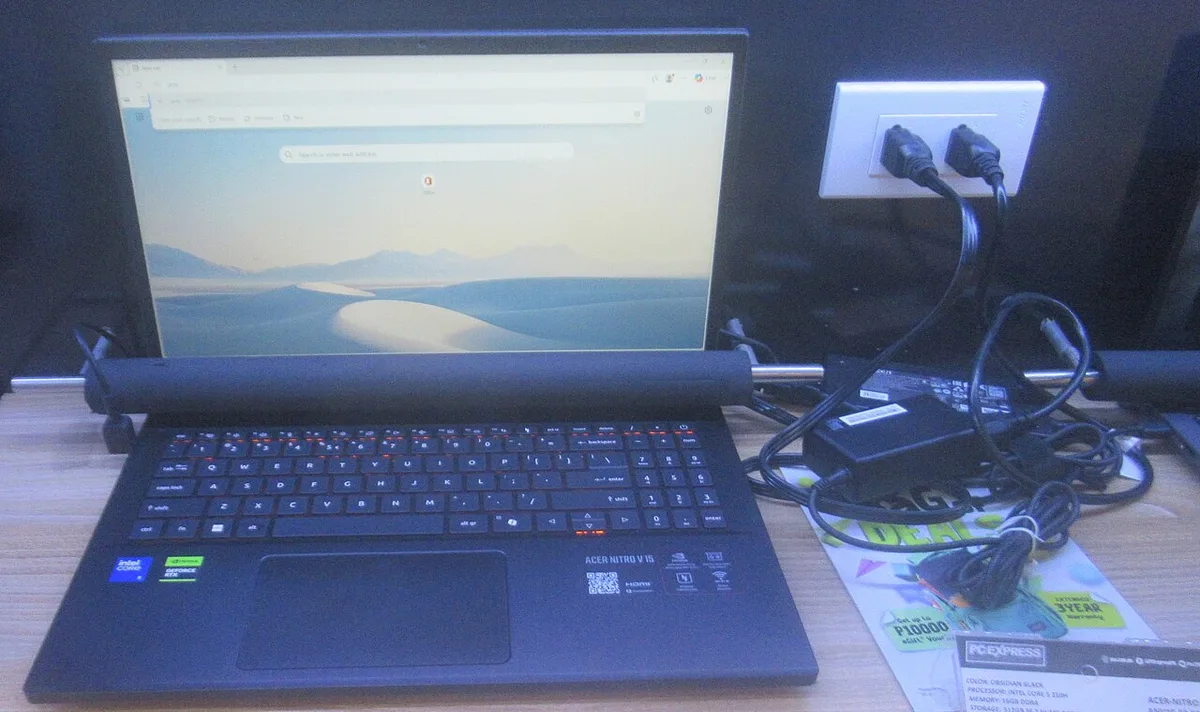
Image source: Wikimedia Commons / P1898 (CC BY)
High-End: Around $1,800 and Up
High-end gaming laptops deliver desktop-class performance. RTX 4080 and RTX 4090 GPUs handle 1440p and 4K gaming with ray tracing enabled. These machines are built for content creators, streamers, and hardcore gamers.
Displays are premium. Expect 240Hz refresh rates, mini-LED backlighting, or OLED panels. Color accuracy suits professional photo and video work.
Speakers and build quality are noticeably better.
The cost is significant. You're paying $1,800 to $4,000+. Diminishing returns hit hard here.
The performance jump from mid-range to high-end is smaller than entry to mid-range. For most gamers, the extra cost isn't justified.
Side-by-Side Comparison of Gaming Laptop Budget Tiers
| Tier | Price Range | Typical GPU | Target Resolution | Best For |
|---|---|---|---|---|
| Entry-Level | $700 to $900 | RTX 4050 | 1080p | Esports, older games |
| Mid-Range | $1,000 to $1,500 | RTX 4060 / 4070 | 1080p / 1440p | AAA gaming, streaming |
| High-End | $1,800+ | RTX 4080 / 4090 | 1440p / 4K | Content creation, max settings |
Entry-level machines work for lighter gaming. Mid-range covers most use cases comfortably. High-end is overkill unless you need specific performance for professional work or 4K gaming.
Decoding spec sheets properly matters when comparing tiers. GPU TGP, RAM configuration, and display panel type all affect real-world performance. Two laptops at the same price can perform very differently.
The biggest jump in value happens between entry-level and mid-range. Spending $300 more often doubles your gaming performance. The jump from mid-range to high-end costs much more for smaller gains.
Best Budget Tier for Your Gaming Goals
1080p Esports and Competitive Play
Entry-level works here. Games like Valorant, CS2, and Rocket League don't need massive GPUs. A $700 to $900 laptop with an RTX 4050 handles these titles at high frame rates.
Prioritize refresh rate over GPU power.
A 144Hz or higher display matters more than raw GPU horsepower for competitive play. Look for models with good cooling to maintain consistent frame rates during long sessions. Battery life is less critical since you'll likely be plugged in.
1080p and 1440p AAA Gaming
Mid-range is the clear choice. Modern AAA games need more GPU power. An RTX 4060 or 4070 handles titles like Cyberpunk 2077 and Baldur's Gate 3 at high settings.
You'll get smooth 60+ FPS at 1080p and playable frame rates at 1440p.
This tier also handles streaming and light content creation. The 16GB RAM and 1TB storage typical of this range supports multitasking. Aligning hardware with your game demands helps you pick the right GPU for your library.
4K, Streaming, and Content Creation
High-end becomes justified here. 4K gaming requires serious GPU power. Streaming while gaming adds CPU and RAM demands. Video editing and 3D rendering benefit from top-tier components.
If you do professional creative work, the investment makes sense. The display quality, color accuracy, and processing power justify the cost. For pure gaming at 4K, consider whether a desktop might serve you better.
Where Your Gaming Laptop Money Actually Goes
GPU and Graphics Power
The GPU is the single biggest factor in gaming performance. It determines your frame rates, resolution capability, and visual quality. Which component drives gaming performance is almost always the GPU in laptops.
GPU TGP matters as much as the chip model. An RTX 4060 at 140W performs significantly better than the same chip at 80W. Always check the TGP before buying.
Manufacturer specifications from NVIDIA's GeForce laptop GPU lineup list the power ranges for each chip.
CPU, RAM, and Storage
The CPU handles game logic, physics, and background tasks. A mid-range Intel Core i5 or AMD Ryzen 5 is sufficient for most gaming. High-end CPUs help with streaming and content creation but add cost.
Memory requirements for smooth gameplay typically start at 16GB. 8GB is too little for modern games. 32GB helps with heavy multitasking but isn't necessary for pure gaming.
SSD space requirements are easy to underestimate. Modern games often exceed 100GB each. A 512GB SSD fills up fast. 1TB is the practical minimum for a gaming laptop in 2026.
Display, Cooling, and Battery
The display affects your daily experience more than any other component. A 144Hz panel feels dramatically smoother than 60Hz. Color accuracy matters for content creators.
Brightness and anti-glare coating affect usability in different lighting.
Cooling determines whether your GPU can sustain its rated performance. Poor cooling causes thermal throttling, reducing frame rates over time. Look for reviews that measure sustained performance, not just peak numbers.
Battery life is the weak point of all gaming laptops. Expect two to four hours during light use and under two hours while gaming. Plan to stay plugged in during gaming sessions.
A lighter power brick is worth considering for portability.
Common Budget Mistakes That Waste Money
Chasing the wrong spec wastes money fast. Many buyers focus on CPU brand or RAM size while ignoring the GPU. Which specs actually drive gaming performance should guide your budget first.
A low GPU TGP is a common trap. Two laptops with the same RTX 4060 can perform very differently. Always check the wattage rating before buying.
8GB RAM in single-channel mode is another mistake. It limits frame rates and multitasking. Storage under 1TB fills quickly with modern games.
Paying for features you won't use also hurts value. RGB lighting, premium audio, and ultra-thin designs add cost. Features worth the extra cost usually include display quality, cooling, and a MUX switch.
Buying at launch price is risky too. Most models drop in price within months. Waiting for a sale can save $200 to $400 without changing the laptop.
Gaming Laptop vs Desktop, Console, and Handheld Alternatives
A gaming desktop gives more performance per dollar. You also get easier upgrades and better cooling. The trade-off is zero portability.
A console like PlayStation 5 or Xbox Series X costs less upfront. It runs games smoothly but lacks PC flexibility. Modding, multitasking, and software choice are limited.
Handheld gaming PCs offer true portability. They suit travel and quick sessions. Performance and screen size are smaller than a laptop.
A used or last-generation gaming laptop can stretch a budget. Check battery health, thermals, and warranty before buying. Refurbished units from the manufacturer are safer than random marketplace listings.
| Option | Best Strength | Main Limitation |
|---|---|---|
| Gaming laptop | Portability and all-in-one use | Higher cost per performance |
| Gaming desktop | Best value and upgrades | Not portable |
| Console | Lower upfront cost | Less flexibility |
| Handheld PC | Ultra-portable gaming | Smaller screen and weaker GPU |
How to Verify Price-to-Performance Before You Buy
Start with your target resolution and games. Then match that to a GPU tier. This keeps you from overspending or underspending.
Check the GPU TGP, RAM configuration, and display specs. Reading spec sheets accurately helps you spot weak configurations. Manufacturer specs from NVIDIA's GeForce laptop GPU lineup show power ranges for each chip.
Look for sustained performance benchmarks, not just peak numbers. Reviewers often test frame rates after 30 minutes of play. That reveals thermal throttling.
Read verified owner reviews for fan noise, build quality, and dead pixels. Check return policies and warranty terms before checkout. Price tracking tools can show whether a deal is real or just marketing.
Final Verdict: The Realistic Budget for Most Gamers
Most gamers should budget $1,000 to $1,500. That range delivers strong 1080p and solid 1440p performance. It also includes better cooling, displays, and memory than entry-level models.
Spend $700 to $900 only if you play esports or older games. Spend $1,800 or more only if you need 4K, streaming, or content creation. For pure gaming, the middle tier is the smartest buy.
Matching hardware to your games matters more than chasing the highest specs. Choosing by budget helps you avoid overspending on power you won't use.
Prioritize the GPU, 16GB dual-channel RAM, and a 144Hz or better display. Then check cooling, storage, and upgrade options. That approach gives you the best gaming experience for your money.
Frequently Asked Questions
How much should I spend on a gaming laptop in 2026?
Most gamers should spend $1,000 to $1,500. That range covers strong 1080p and 1440p gaming. Entry-level models cost $700 to $900.
High-end machines start around $1,800.
Is a $700 gaming laptop worth it?
Yes, for esports and lighter games. An RTX 4050 handles titles like Valorant and Fortnite well. It struggles more with demanding AAA games.
Check cooling and RAM configuration before buying.
What GPU should I look for at $1,000 to $1,500?
Look for an RTX 4060 or RTX 4070. These handle 1080p high settings and 1440p gaming. Also check the GPU's TGP, because wattage affects real performance.
Can I upgrade a gaming laptop later?
Sometimes. RAM and storage are often upgradeable. Upgradability limits often include the GPU and CPU.
Check the specific model before buying.
Are refurbished gaming laptops a good budget option?
They can be. Manufacturer-refurbished units often include warranties. Check battery health, thermal performance, and return policy.
Avoid units with unclear history or no warranty.