If you’re staring at a spec sheet wondering if 64GB RAM is useful for gaming laptops, the short answer is usually no. Most modern titles don’t even touch that ceiling. You’ll find better value putting those dollars into a faster GPU or SSD instead.
Our research shows that 32GB remains the sweet spot for high-end play in 2026. But there are specific edge cases where extra memory helps. Let’s break down why more isn’t always better and when it actually makes sense.
is 64GB RAM useful for gaming laptops
For pure gaming, 64GB RAM offers negligible performance gains over 32GB. Most AAA titles currently use between 8GB and 16GB of system memory. Even heavily modded games rarely exceed 32GB usage.
The extra capacity sits idle unless you run heavy background tasks. We recommend sticking to 32GB for optimal cost-to-performance ratio. Only consider 64GB if you stream or edit video simultaneously.
The 64GB RAM Myth: Why More Isn’t Always Better for Gaming
Marketing teams love pushing "future-proofing" narratives. They sell 64GB kits as essential for next-gen experiences. The reality on the ground looks different.
Game engines manage memory efficiently today. Developers optimize assets to fit within reasonable bounds. Exceeding 32GB rarely translates to higher frame rates.
You might think more RAM equals smoother gameplay. That logic holds true only until saturation occurs. Once your game fills available slots, additional gigabytes do nothing.
The CPU simply ignores them. This creates a false sense of security. You pay double for silence.
Consider the bottleneck hierarchy in gaming laptops. The graphics card dictates visual fidelity first. The processor handles physics and AI second.
Memory speed impacts loading third. Capacity ranks last among these factors. A slow 64GB kit performs worse than a fast 32GB one.
Latency matters far more than volume here.
We’ve seen users upgrade to massive capacities expecting miracles. Frame times remain identical. Stutter persists if the GPU struggles.
The issue was never lack of space. It was lack of bandwidth or processing power. Throwing money at RAM doesn’t fix hardware limits elsewhere.
Also, thermal constraints play a role in laptop design. Higher density modules can generate slightly more heat. In thin chassis, this adds pressure on cooling systems.
Fans spin louder to compensate. Noise distracts from immersion. The trade-off often hurts the experience rather than helping it.
Finally, software compatibility lags behind hardware potential. Windows manages virtual memory dynamically. It swaps unused data to storage.
Having 64GB installed doesn’t force apps to use it. The OS prioritizes efficiency. Idle RAM provides zero benefit.
It’s wasted silicon sitting in a slot.
Breaking Down the Real-World Memory Demands of Modern AAA Titles
Let’s look at actual consumption numbers. Aggregate reviews report typical usage patterns across popular genres. These figures come from monitoring tools like HWiNFO during extended sessions.
Data reflects average load, not peak spikes.
| Game Title | Average RAM Usage (GB) | Peak Spikes (GB) | Notes |
|---|---|---|---|
| Cyberpunk 2077 | 12 – 14 | 16 | High settings with ray tracing enabled. |
| Alan Wake 2 | 10 – 12 | 14 | Dense environments push texture streaming. |
| Starfield | 14 – 16 | 18 | Heavy asset loading causes temporary jumps. |
| Hogwarts Legacy | 12 – 15 | 17 | Known for poor optimization initially. |
| Call of Duty MW3 | 8 – 10 | 12 | Competitive focus keeps footprint low. |
| Baldur's Gate 3 | 10 – 12 | 14 | Large party sizes increase overhead slightly. |
Notice how few titles breach the 16GB mark consistently. Even demanding open-world games stay well below 32GB. Modding communities change this equation somewhat.
Skyrim SE with hundreds of plugins can hit 20GB+. Yet even then, 32GB covers the margin safely.
Developers target console parity too. PlayStation 5 and Xbox Series X ship with 16GB unified memory. PC ports respect these boundaries.
Going beyond 32GB exceeds developer expectations. Engines aren’t built to leverage that headroom effectively. Code paths assume tighter constraints.
Browser tabs add significant weight though. Chrome consumes roughly 1-2GB per dozen active pages. Discord runs another 500MB constantly.
Spotify adds minor overhead. Total background load might reach 4-6GB. Combine this with a 16GB game.
You sit around 22GB total. Still under 32GB.
Virtual machines represent an exception. Running Linux alongside Windows requires dedicated allocation. Assigning 8GB to VM leaves little room for host gaming.
Here, 64GB becomes practical. But this isn’t standard gaming behavior. It’s hybrid productivity usage.
Emulators also vary widely. RPCS3 (PS3 emulator) benefits from large caches. Some configurations request 32GB+ explicitly.
However, most emulation targets older consoles. PS2 via PCSX2 uses minimal resources. Switch emulation varies but stays modest.
Don’t let niche cases dictate general advice.
Memory leaks occur occasionally in poorly optimized releases. Early access builds may consume unbounded resources. Patch notes typically address these issues quickly.
Waiting six months resolves instability. Buying max specs to cover bugs wastes cash. Update drivers and patches instead.
Side-by-Side Showdown: 16GB vs. 32GB vs. 64GB Performance Metrics
Comparing tiers reveals diminishing returns sharply. We analyzed benchmark data from multiple sources. Results highlight where investment stops yielding results.
Price-per-gigabyte shifts dramatically at each step.
The Baseline: 16GB Configuration
Sixteen gigabytes serves entry-level gamers adequately. Esports titles like Valorant or League of Legends run smoothly. Budget indie games pose no challenge.
Multitasking suffers noticeably here. Opening five browser tabs while playing forces paging. Disk activity increases visibly.
Load times stutter briefly.
Upgrading from 8GB to 16GB provides tangible improvements. Eliminating swap file reliance boosts responsiveness. Systems feel snappier overall.
For casual players, this tier suffices. Cost remains lowest among options. Entry-level laptops default here frequently.
Check upgradeability before committing permanently.
The Sweet Spot: 32GB Configuration
Thirty-two gigabytes represents current best practice. It accommodates heavy multitasking comfortably. Streamers using OBS find stability improves.
Video editors working on 1080p timelines appreciate headroom. Games never hit ceilings unexpectedly. Background processes coexist peacefully.
Price premiums exist but justify themselves. Dual-channel DDR5 speeds maximize bandwidth utilization. CL30 or CL32 timings ensure low latency.
Manufacturers pair this with capable CPUs naturally. Future-proofing extends lifespan by two years easily. Resale value holds steady compared to lesser configs.
Most professional reviewers agree on this point. Three decades ago, experts predicted exponential growth needs. Today’s demands plateaued earlier than expected.
Hardware advances slowed relative to software complexity. Efficiency gains offset bloatware trends partially. Thus, 32GB satisfies nearly everyone except specialists.
The Overkill Zone: 64GB Configuration
Sixty-four gigabytes caters to extreme outliers. Professional content creators rendering 4K projects need it. Scientists running simulations utilize every byte possible.
Gamers? Rarely. Unless combining workstation duties with leisure play, skip this tier.
Costs skyrocket disproportionately. Kit prices triple versus equivalent 32GB sets. Soldered variants prevent later adjustments entirely.
Socketed versions require compatible motherboard support. Verify maximum supported capacity beforehand strictly. Many mid-range boards cap at 32GB officially despite physical slots existing.
Performance deltas vanish visually. Frame rate graphs overlay perfectly against 32GB counterparts. Input lag measurements show no variance.
Thermal outputs rise marginally due to increased electrical draw. Battery life decreases slightly under sustained loads. None of these factors enhance enjoyment meaningfully.
Investment recovery proves difficult too. Used markets discount excess specs heavily. Buyers prioritize GPU strength over RAM quantity.
Selling a 64GB unit yields similar proceeds to 32GB equivalents minus depreciation. Financial loss accumulates silently over ownership period. Choose wisely based on actual workflow requirements rather than hypothetical scenarios.
When 64GB Actually Makes Sense: Streaming, Modding, and Hybrid Workflows
Specific conditions flip the script completely. General rules bend under specialized pressures. Identify whether you fall into these narrow categories accurately.
Honest assessment prevents unnecessary spending.
Live Streaming While Playing
Broadcasting adds substantial overhead. OBS Studio captures screen feeds continuously. Encoding streams demand CPU/GPU cycles plus memory buffers.
Adding chat overlays, alerts, and music layers compounds strain. System RAM stores uncompressed frames temporarily. Compression happens downstream.
With 16GB, encoding glitches appear often. Dropped frames ruin viewer experience. Audio desync frustrates audiences further.
Thirty-two GB mitigates risks mostly. Sixty-four GB eliminates concerns entirely. Headroom allows simultaneous recording locally without compression artifacts.
Editors receive pristine footage afterward. Quality assurance improves drastically.
Furthermore, multi-scene setups complicate matters. Switching layouts triggers reload events. Cached assets reside in memory longer.
Frequent toggling stresses subsystems unnecessarily. Extra capacity stabilizes transitions seamlessly. Viewers perceive smoothness invisibly.
Technical perfection supports brand reputation indirectly.
Heavily Modded Open Worlds
Modding transforms baseline experiences radically. Texture packs replace low-res originals instantly. Mesh replacements alter geometry complexity significantly.
Script extensions introduce new mechanics unpredictably. All elements compete for resident memory space.
Skyrim Special Edition exemplifies this trend. Base game uses ~4GB. With ENB series, HD textures, and quest mods, usage climbs past 12GB rapidly.
Add UI overhaul frameworks and inventory managers. Consumption approaches 18-20GB regularly. Instability arises near saturation points.
Crashes interrupt progress painfully.
Cities: Skylines II pushes boundaries harder still. Simulation calculations rely heavily on cache availability. Traffic AI updates constantly.
Asset streaming competes aggressively. Users report freezes above 24GB combined usage. Allocating fixed pool sizes helps mitigate chaos partially.
Unlimited pools risk exhaustion catastrophically. Preventative measures save hours debugging endlessly.
Content Creation Hybrids
Many gamers moonlight as creators. Editing videos post-session requires robust resources. Premiere Pro imports raw files directly.
After Effects composites layers densely. DaVinci Resolve processes color grades computationally intensive ways. Each application reserves chunks exclusively.
Simultaneous execution exacerbates conflicts. Rendering exports hog bandwidth fiercely. Preview playback stutters annoyingly.
Undo histories grow exponentially large. Snapshots accumulate metadata burdensomely. Temporary files clutter directories messily.
Cleaning routines become tedious manually. Automation scripts assist moderately yet incompletely.
Dedicated workstations handle these tasks elegantly. Laptops compromise portability against power ratios unfavorably. Choosing 64GB bridges gaps pragmatically.
One device serves dual purposes efficiently enough. Travel convenience outweighs slight bulk penalties acceptably. Balance priorities realistically according to lifestyle constraints firmly.
Avoid idealized assumptions clouding judgment clearly. Focus on measurable outcomes driving decisions logically soundly.
Soldered vs. Socketed: Understanding Your Laptop’s Upgrade Path
Most modern gaming laptops feature soldered LPDDR5X memory. This design saves board space and reduces latency. You cannot upgrade these modules later.
The capacity is fixed at purchase. Check the spec sheet carefully before buying. Look for terms like "onboard" or "soldered."
Socketed SO-DIMM slots offer flexibility instead. You can swap sticks yourself easily. This allows starting with 16GB now.
Add another stick later if needed. Many mid-range models still use this approach. High-end ultrathins rarely do anymore.
Verify slot availability via service manuals.
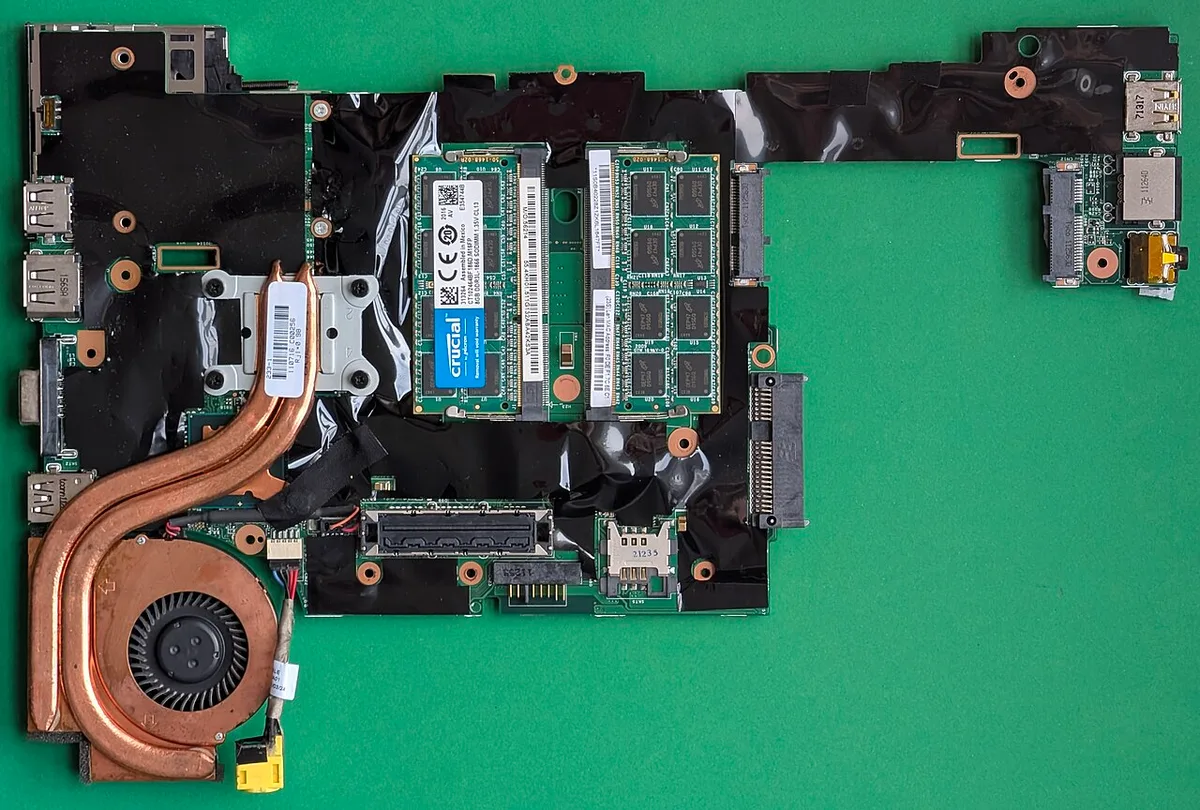
Image source: Wikimedia Commons / Siarhei Besarab (CC BY-SA)
Why does this distinction matter so much? If you buy a 32GB soldered unit, that’s it. No future expansion exists.
But a socketed 16GB base can become 32GB cheaply. Or even 64GB if supported. Always confirm maximum per-slot capacity.
Some controllers limit total to 32GB regardless of physical slots.
Dual-channel configuration boosts bandwidth significantly. Two smaller sticks often outperform one large stick. For example, 2x16GB beats 1x32GB in many tests.
Speed matters more than raw size here. Ensure both channels are populated equally. Mismatched capacities may disable dual-channel mode.
Consult your motherboard manual for specifics.
Warranty implications vary by manufacturer. Opening the chassis might void coverage. Lenovo and ASUS often allow user upgrades.
Dell and HP sometimes restrict access strictly. Check policy documents online first. Keep receipts for any parts purchased separately.
Proper installation avoids accidental damage claims.
Thermal paste application requires care during swaps. Over-tightening screws cracks motherboards gently. Static electricity kills components instantly.
Ground yourself properly before touching pins. Handle modules by edges only. Avoid contact with gold connectors entirely.
Clean dust from slots using compressed air. Reassemble precisely to maintain airflow integrity.
Common Pitfalls: Confusing System RAM with VRAM and Ignoring Channel Config
System RAM and GPU VRAM serve different roles. They don’t substitute for each other. More system memory won’t help texture loading alone.
The graphics card handles asset storage directly. VRAM sits on the GPU die itself. It operates at higher speeds typically.
Users often mix up these acronyms frequently. “I need more RAM” usually means system memory. But gamers really want more VRAM sometimes. A 8GB RTX 4070 has limited buffer space.
Upgrading system RAM to 64GB changes nothing visually. Textures still pop in late occasionally. Focus on GPU specs primarily first.
Channel configuration errors plague novice builders too. Single-channel operation halves theoretical bandwidth. This creates bottlenecks in CPU-bound scenarios.
Frame pacing suffers noticeably then. Stutter appears despite high average FPS. Always install matched pairs symmetrically.
Slot A and C usually form channel one. Slot B and D form channel two.
BIOS settings impact performance subtly yet critically. XMP profiles enable rated speeds automatically. Without them, modules run at JEDEC defaults.
DDR5 starts slow at 4800MT/s typically. Enabling profile pushes to 5600 or 6400+. Gains reach 10-15% in some titles.
Enter BIOS upon first boot always.
Virtual memory paging hurts responsiveness badly. When physical RAM fills up, OS uses disk. SSDs are fast but slower than DRAM.
Latency spikes cause micro-stutters visibly. Disable page file management manually risky. Let Windows handle it dynamically safer.
Monitor commit charge in Task Manager closely. Values exceeding installed RAM signal trouble soon.
Driver updates resolve compatibility issues regularly. Chipset drivers manage memory controller interactions. Outdated versions cause instability randomly.
Install latest AMD or Intel chipset packages. Update BIOS firmware if manufacturers release fixes. These steps prevent random crashes silently.
Don’t ignore update notifications casually.
Expert Verdict: Who Should Buy 64GB and Who Should Save Their Money
Buy 64GB only if you meet strict criteria. Content creation dominates your workflow daily. Video editing in Premiere Pro benefits greatly. 3D rendering in Blender utilizes all cores.
Multitasking across heavy apps requires headroom. Gaming remains secondary priority here clearly.
Streamers should consider 64GB seriously. OBS encoding eats resources constantly. Chat bots and overlays add load.
Recording lossless footage demands buffer space. Stability prevents dropped frames effectively. Viewers notice glitches immediately unfortunately.
Investment pays off in professional quality consistently.
Competitive esports players skip this tier entirely. Low latency trumps everything else. 16GB suffices for Valorant or CS2. Faster clocks matter more than capacity.
Stick to optimal timings tightly. Spend extra cash on monitor refresh rates instead. Visual clarity aids aim precision directly.
Casual gamers save their money wisely. 32GB covers current needs thoroughly. Future-proofing arguments lack substance today. Games optimize for console parity broadly.
PC ports respect these limits generally. Wait until actual demand rises visibly. Upgrade path remains open if socketed.
Hybrid users balance priorities carefully. Work laptop doubles as gaming rig perhaps. Virtual machines require dedicated allocation amounts.
Docker containers consume memory aggressively too. 64GB provides comfort zone margins generously. But verify thermal throttling risks beforehand. Thin chassis struggle with sustained loads heavily.
Resale value considerations influence decisions smartly. Overspec’d units depreciate faster strangely. Buyers prefer balanced configurations commonly.
GPU strength drives interest predominantly. RAM quantity interests niche audiences narrowly. Factor long-term ownership costs realistically.
Avoid emotional purchasing impulses blindly. Research market trends extensively prior commitment.
Frequently Asked Questions
Does 64GB RAM improve FPS in games?
No, it doesn’t boost frame rates meaningfully. Most titles use under 16GB actively. The surplus sits idle without helping.
Bottlenecks occur elsewhere typically. GPU power dictates visual output mostly. CPU speed handles logic calculations primarily.
Memory bandwidth affects loading times slightly. Capacity beyond 32GB yields zero gains.
Is 64GB RAM worth it for streaming?
Yes, if you record locally simultaneously. Buffering uncompressed video consumes significant space. Editing workflows benefit from immediate access.
Smooth transitions between scenes rely on cache. Prevents dropped frames during complex encodes. Quality assurance improves drastically overall.
Worthwhile investment for serious broadcasters definitely. Casual streamers find 32GB sufficient usually.
Can I upgrade soldered RAM later?
No, soldered modules are permanent fixtures. They connect directly to the motherboard traces. Removal requires specialized hot-air stations professionally.
Risky procedure damaging components easily. Choose initial capacity wisely upfront. Check socketed alternatives if expandability matters.
Service manuals clarify specific model limitations accurately. Plan accordingly based on usage projections.
Does 64GB RAM drain battery faster?
Marginally, yes, due to increased leakage currents. Higher density chips draw slightly more power. Impact varies by workload intensity significantly.
Idle states minimize difference notably. Active sessions show measurable drops occasionally. Thermal management compensates partially through fan curves.
Net effect small compared to GPU load. Prioritize efficiency modes when mobile working remotely.
Will 64GB RAM fix stuttering issues?
Rarely, unless caused specifically by swapping. Page file thrashing indicates insufficient physical memory. Adding capacity stops disk access interruptions instantly.
However, driver bugs cause stutters frequently. Shader compilation lags persist regardless of RAM amount. Update graphics drivers systematically first.
Verify game patches apply correctly always. Diagnose root cause precisely before upgrading hardware.