Gaming laptop vs Steam Deck for PC gaming is really a question about where you want your PC to live. One device is a full Windows computer with a screen, keyboard, and discrete graphics. The other is a handheld built around SteamOS, instant suspend, and quiet play.
Both can run much of the same Steam library, but they behave very differently day to day.
Manufacturer specifications indicate the Steam Deck OLED weighs 640 grams and runs a 7.4-inch 90 Hz display, while typical gaming laptops land between 1.8 and 2.8 kilograms with 15.6-inch to 17.3-inch panels. As of 2026, that size gap still shapes almost every buying decision, from battery life to desk setup to how often you actually take the machine out of the house.
Why This Comparison Actually Matters
PC gaming used to mean a desk, a tower, and a monitor. Today, your library can follow you to a couch, a hotel room, a train seat, or a small apartment desk. That freedom is the real reason this comparison matters.
The two devices solve different versions of the same problem. A gaming laptop gives you full Windows compatibility, a larger screen, and more raw power. A Steam Deck gives you handheld comfort, low power draw, and a console-like flow.
Neither is perfect for every game or every person.
The smart move is to match the device to your habits. If you mostly play at a desk, a laptop makes more sense. If you mostly play away from a desk, the Deck has a strong edge.
Gaming Laptop: What You're Really Getting
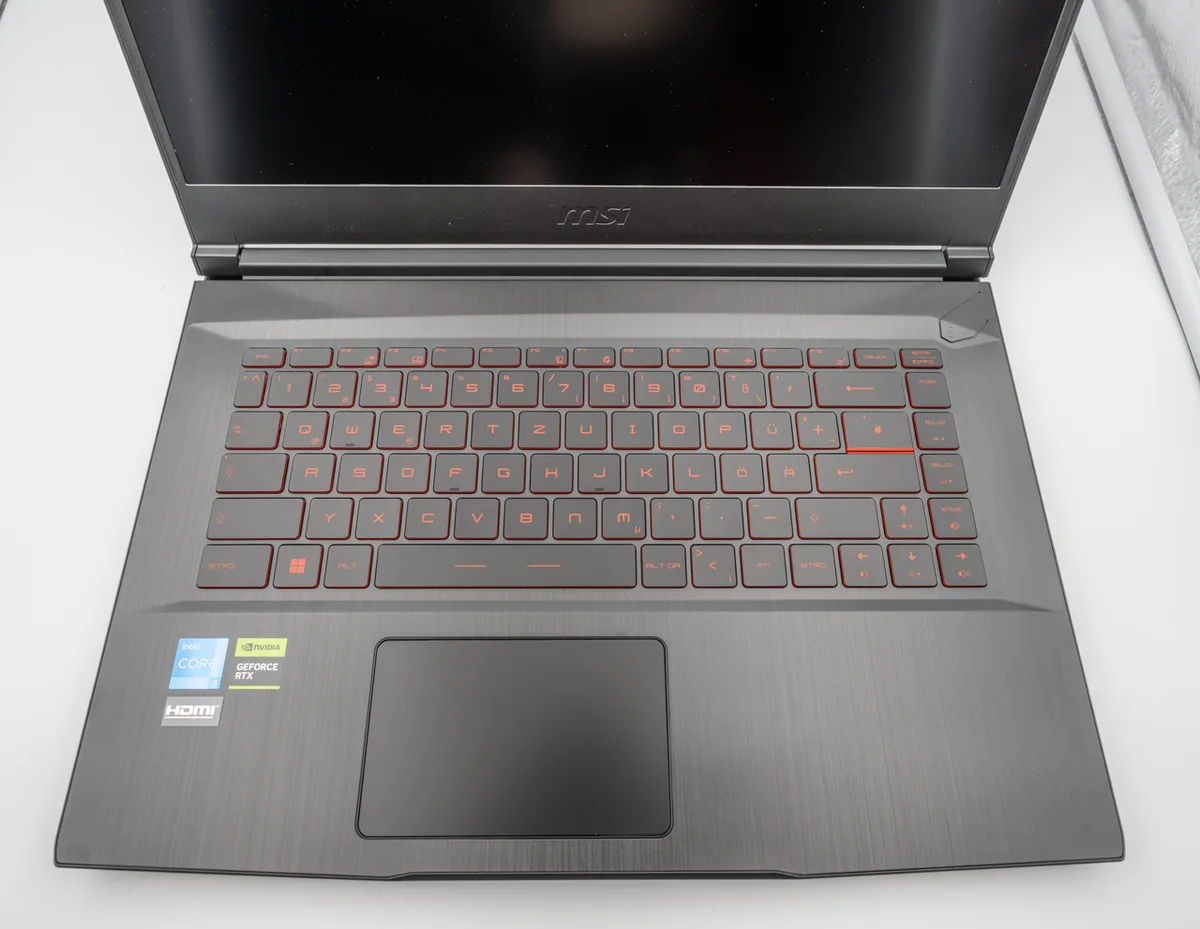
Image source: Wikimedia Commons / PantheraLeo1359531 (CC BY)
A gaming laptop is a portable Windows PC with a built-in screen, keyboard, trackpad, and usually a discrete GPU. That means it can handle modern AAA games, work apps, browser tabs, mod tools, and external monitors without much fuss.
The big advantage is flexibility. You can plug in a mouse and keyboard for shooters. You can connect a 144 Hz or 240 Hz external display.
You can install mods, use launchers like Epic or Battle.net, and run software that expects Windows.
The tradeoffs are heat, noise, and battery life. Manufacturer specs and aggregate reviews report that many gaming laptops draw 35 to 175 watts under load. That power can mean strong performance, but it also means fans, warmth on your lap, and short unplugged gaming sessions.
If you are comparing brands, ROG and TUF differences can help you understand where ASUS splits its lineup. For comfort questions, long-session comfort is worth a look before you buy a heavy 17-inch machine. If you plan to work on it daily, daily work use matters just as much as frame rates.
Steam Deck: What You're Really Getting

Image source: Wikimedia Commons / SparklesTrainNerd (CC BY-SA)
The Steam Deck is a handheld gaming PC from Valve. It runs SteamOS, a Linux-based operating system, and uses Proton to run many Windows games. The result feels closer to a console than a laptop, especially when you suspend a game and resume it later.
The OLED model has a 7.4-inch 90 Hz display, 16 GB of RAM, and an adjustable TDP range from 3 to 15 watts. That low power draw is the magic trick. It helps the Deck stay quiet, stay cool, and last longer than many people expect in lighter games.
You also get thumbsticks, trackpads, gyro aiming, rear buttons, and a built-in controller layout. That makes it great for couch play, travel, emulation, and indie games. It is less ideal for games that need a keyboard, mouse, or heavy modding.
The biggest catch is compatibility. Some multiplayer games use anti-cheat systems that do not work well with Proton. Steam's Deck Verified badges help, but they are not a perfect guarantee.
ProtonDB is useful for checking real-world reports before you buy a game.
Side-by-Side: Specs, Price, and Performance
| Category | Steam Deck OLED | Typical Gaming Laptop |
|---|---|---|
| Price | $399 to $649 | About $700 to $3,000+ |
| Weight | 640 g | 1.8 to 2.8 kg |
| Screen | 7.4-inch 90 Hz OLED | 15.6 to 17.3-inch, 120 to 240 Hz |
| Power draw | 3 to 15 W TDP | 35 to 175 W+ |
| OS | SteamOS with Proton | Windows 11 |
| Battery while gaming | About 2 to 8 hours | About 1 to 4 hours |
| Upgrade path | SSD only | RAM and SSD often |
The table shows the basic split. The Deck wins on portability, price, and battery efficiency. The laptop wins on screen size, raw performance, and Windows flexibility.
Performance is not just about numbers. A laptop with a discrete GPU can run games at higher settings and higher frame rates. The Deck can still look good on its smaller screen, especially with FSR upscaling, but it is working with less power.
Price matters too. The Deck is cheaper up front. A laptop can cost more, but it may replace a desktop and a travel device in one purchase.
If you are shopping laptops, screen size and portability can change how often you actually carry it.
Game Compatibility: The Proton Question
This is the section that can save you from a bad purchase. The Steam Deck runs many Windows games through Proton, but not every game works perfectly. Some need tweaks.
Some run worse than on Windows. Some do not run at all.
Deck Verified badges are helpful, but they are broad labels. A game marked Playable may need a launcher workaround or a small text size. A game marked Unsupported may still work with manual tweaks, though that is not something most buyers want to manage.
Anti-cheat is the biggest real-world problem. Some multiplayer games use systems like EAC or BattlEye that block Proton. If your favorite games are competitive shooters or live-service titles, check compatibility before you buy a Deck.
Modding is another dividing line. Windows laptops make it easier to install mods, run mod managers, and troubleshoot files. SteamOS can do some of this, especially in desktop mode, but it adds friction.
If you love heavy modding, a laptop is the safer choice.
For buyers worried about laptop reliability, Razer Blade ownership tradeoffs and MSI reliability are useful examples of how brand support and build quality can matter as much as specs. Valve's official repair parts, documented through its support channels, also make the Deck easier to service than many sealed handhelds.
Aggregate compatibility reports from ProtonDB and Steam's own Deck Verified system are the best place to check your library. Manufacturer specifications from Valve and AMD explain the hardware limits, but your game list should make the final call.
Best For Each Use Case
The Steam Deck fits people who play away from a desk. It suits travel, couch sessions, bed gaming, indie libraries, emulation, and lighter AAA titles. It also works well if you want a quieter device with a lower price.
A gaming laptop fits people who want one machine for gaming and work. It is better for mod-heavy games, competitive shooters, large screens, external monitors, and software that needs Windows. It also makes more sense if you already own a desk setup.
Some buyers want both. A Deck can handle travel and quick sessions, while a laptop handles desk play and productivity. That split costs more, but it matches very different habits.
| Best Fit | Steam Deck | Gaming Laptop |
|---|---|---|
| Travel and commuting | Strong | Weak to moderate |
| Couch and bed gaming | Strong | Moderate |
| Mod-heavy PC gaming | Moderate | Strong |
| Work and school use | Weak | Strong |
| Competitive esports | Moderate | Strong |
| Emulation and indie games | Strong | Moderate |
Total Cost of Ownership and Long-Term Value
The Steam Deck starts at $399 for the 128GB LCD model and reaches $649 for the 1TB OLED model. Add a microSD card, case, dock, and maybe a better charger, and the real cost rises. Storage upgrades matter because modern games can exceed 100 GB.
Gaming laptops usually start around $700 and climb past $3,000. The base price is only part of the story. You may also need a bag, cooling pad, mouse, external monitor, and replacement battery over time.
Long-term value depends on how you use the device. A laptop can replace a desktop and a work computer. A Deck can replace a handheld console and reduce the need for a second gaming device.
Upgrade paths also differ. The Deck supports SSD replacement, but RAM is fixed. Many laptops allow RAM and SSD upgrades, which can extend useful life.
If you plan to keep a device for years, check upgrade access before buying.
Power use is another cost factor. A Deck draws 3 to 15 watts, while gaming laptops can draw 35 to 175 watts or more. Over years of heavy use, that difference can matter, though game time matters more than idle power.
Expert Tips and Mistakes to Avoid
Check ProtonDB before buying a Steam Deck. Search your favorite games and read recent reports. A game that worked six months ago may have changed after an update.
Do not buy a Steam Deck for anti-cheat multiplayer. If your library is mostly competitive shooters or live-service games, verify each title first. Compatibility can change, but blocked games are a real risk.
Do not expect a thin gaming laptop to match a desktop. Manufacturer specs may show high turbo clocks, but sustained performance depends on cooling. Aggregate reviews often show thermal throttling in slim chassis under long sessions.
Use a quality microSD card if you expand Deck storage. Slow cards can hurt load times and game stutter. Keep the internal SSD for your most played games.
Set charge limits if your laptop supports them. Keeping a battery at 100 percent all day can reduce long-term health. Many OEM tools include a battery conservation mode.
Clean vents and fans on a laptop. Dust buildup raises temperatures and noise. If you are comfortable with basic maintenance, repasting can help, but warranty terms vary.
For warranty confidence, brand warranty comparisons can help you understand coverage before you spend. If you are considering a budget machine, reliability of lesser-known brands is worth checking before chasing the lowest price.
Frequently Asked Questions
Is a Steam Deck better than a gaming laptop for travel?
Yes, for pure travel gaming, the Steam Deck is usually better. It weighs 640 grams, fits in a small bag, and suspends games instantly. A gaming laptop gives more power, but it is heavier, hotter, and harder to use in tight spaces.
Can a Steam Deck run every Steam game?
No. Many Steam games run well through Proton, but some need tweaks or do not work. Anti-cheat systems block certain multiplayer titles.
Check Deck Verified badges and ProtonDB before buying.
Do gaming laptops last longer than a Steam Deck?
Sometimes. Many laptops allow RAM and SSD upgrades, which can extend life. The Deck is more limited, though its SSD can be replaced.
Battery health and cooling maintenance matter for both devices.
Is a Steam Deck cheaper than a gaming laptop?
Yes, in most cases. The Deck costs $399 to $649, while gaming laptops often start around $700. Accessories and storage can narrow the gap, but the Deck remains the lower-cost entry point.
Can I use a Steam Deck like a laptop?
Partly. Desktop mode supports browsers, apps, and some productivity tasks. The small screen and handheld controls make it less comfortable than a laptop for long work sessions.
Should I buy a gaming laptop if I already have a desktop?
Maybe not, unless you need portability. A Steam Deck is often the better second device for couch and travel play. A laptop makes more sense if you need Windows power away from home.
Final Verdict: Which One Should You Buy
Buy the Steam Deck if you want handheld PC gaming, travel comfort, quiet play, and a lower entry price. It is strongest for Steam libraries, indie games, emulation, and flexible couch sessions.
Buy a gaming laptop if you need Windows compatibility, mods, a larger screen, higher performance, and work use. It is the better all-in-one machine for desk gaming and productivity.
The right choice comes down to where you play most. If your gaming happens away from a desk, choose the Deck. If your gaming happens at a desk, choose the laptop.
For authoritative hardware details, Valve's official Steam Deck specifications and AMD's processor documentation are the best primary references.