How is a gaming pc different from a regular desktop? The short answer comes down to one component: the graphics card. A standard desktop leans on integrated graphics built into the processor.
A gaming PC adds a dedicated graphics card to handle heavy visuals. Everything else, from the CPU to the RAM, is often surprisingly similar.
Manufacturer specifications from Intel and AMD show that modern integrated graphics handle light tasks and older games fine. But they struggle with AAA titles at high settings. Per PCI-SIG standards, gaming PCs also tend to use more robust power supplies and better cooling.
That difference matters when you're running demanding software for hours. Let's break down exactly what changes and what doesn't.
how is a gaming pc different from a regular desktop
A gaming PC adds a dedicated graphics card. A regular desktop uses integrated graphics instead. Both can share the same CPU and RAM.
The GPU handles rendering, textures, and frame rates. Cooling and power supply are usually stronger too.
What Actually Separates a Gaming PC From a Regular Desktop
The biggest gap is the graphics processing unit, or GPU. A regular desktop relies on integrated graphics baked into the CPU. These share system memory and handle basic display output.
A gaming PC uses a discrete GPU, a separate card with its own video memory. That dedicated hardware renders game worlds, textures, and lighting in real time.
But the GPU isn't the only difference. Gaming PCs usually ship with better cooling, stronger power supplies, and faster storage. Case design also favors airflow over compact office aesthetics.
Many standard desktops use small form factor cases with limited ventilation. That works fine for spreadsheets. It struggles under sustained gaming loads.
Here's the part people miss. A regular desktop can become a gaming PC with one upgrade. Drop a discrete graphics card into an open PCIe slot and you're most of the way there.
The motherboard, CPU, and RAM carry over. This is why the line between the two categories is blurrier than marketing suggests. The real question isn't which machine you buy.
It's whether the platform supports growth.
If you're shopping for a prebuilt system, our guide to affordable gaming builds covers entry-level options that punch above their price.
The Graphics Card Is the Real Difference (and Why It Matters)
The discrete GPU is the heart of every gaming PC. It contains thousands of cores dedicated to parallel processing. Tasks like rendering shadows, calculating physics, and upscaling textures happen here.
Integrated graphics borrow CPU resources instead. That works for video playback and light gaming. It falls apart with modern 3D titles.
VRAM, or video memory, is a key spec to watch. Entry-level gaming GPUs ship with 8GB of VRAM. Mid-range cards offer 12GB to 16GB.
That memory stores textures, frame buffers, and shader data. Running out of VRAM causes stuttering and texture pop-in. Manufacturer specs from NVIDIA and AMD list exact VRAM for each model.
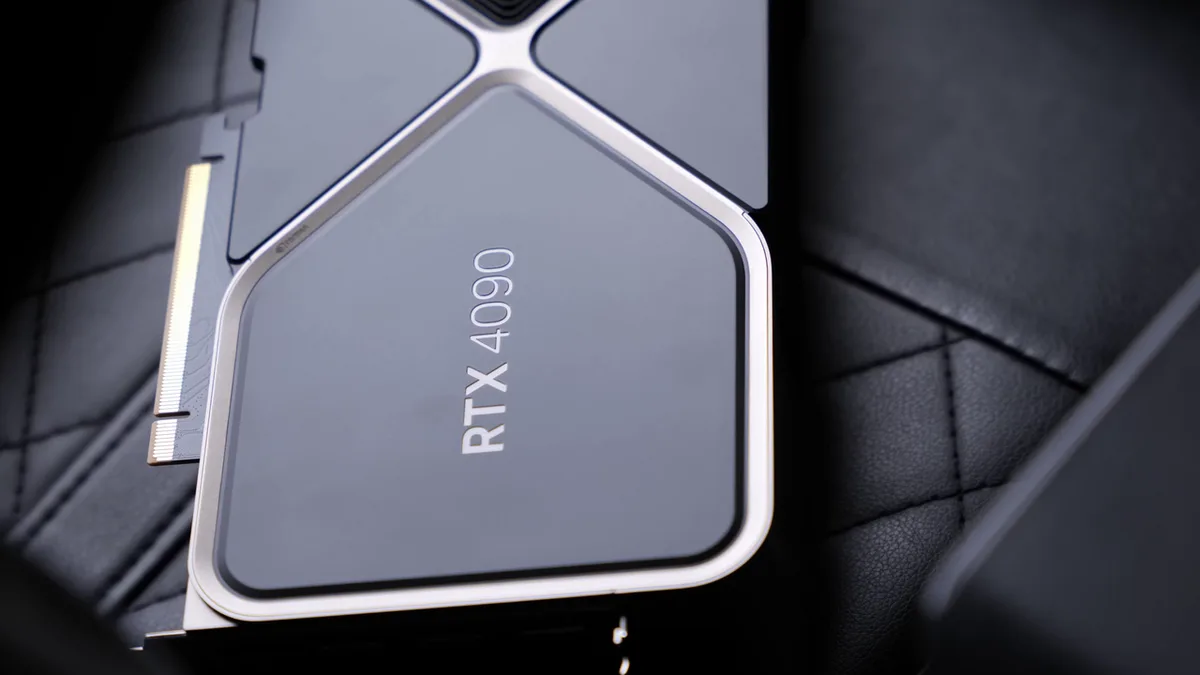
Image source: Wikimedia Commons / ZMASLO (CC BY)
Ray tracing and upscaling tech also live on the GPU. Features like DLSS, FSR, and XeSS boost frame rates by rendering at lower resolution and upscaling. These technologies require dedicated hardware.
Regular desktops without a discrete GPU can't access them. For competitive gaming, higher frame rates mean smoother input response and lower latency.
Image source: Wikimedia Commons / Multicherry (CC BY-SA)
Cooling ties directly to GPU performance. A card running hot will throttle and drop clock speeds. Gaming cases use mesh panels and multiple fans to keep temperatures in check.
Standard office towers often have solid front panels and minimal airflow. That's fine for a CPU running at 30 watts. It's a problem for a GPU pulling 250 watts under load.
If you're comparing graphics options, our breakdown of top graphics cards walks through current picks by tier.
Components That Actually Matter (and the Ones That Don't)
Not every spec deserves your attention. Some matter a lot. Others are marketing noise.
CPU (processor): Modern gaming favors strong single-core performance over core count. A mid-range six-core chip handles most games well. You don't need a 16-core processor unless you also stream or edit video.
Intel and AMD both offer solid options in the $200 to $350 range.
RAM (system memory): 16GB is the sweet spot for gaming in 2026. 32GB helps with heavy multitasking and content creation. DDR5 is faster but costs more. DDR4 still works fine for most builds.
Speed matters less than capacity for gaming.
Storage: An NVMe SSD dramatically cuts load times compared to a hard drive. A 1TB NVMe drive is the minimum we'd recommend. SATA SSDs are slower but cheaper.
HDDs work for mass storage of older games and media.
Motherboard: Pick one that supports your CPU socket and RAM type. Extra features like Wi-Fi and extra M.2 slots are nice. But a basic board runs games just fine.
Don't overspend here.
PSU (power supply): This is where cheap builds cut corners. A low-quality PSU can damage components or fail under load. Look for 80 Plus Bronze certification at minimum.
Gold rated units waste less energy as heat. Size it with 20 to 30 percent headroom above your system's total draw.
Case and cooling: Airflow matters more than RGB. A mesh-front case with two intake fans beats a sealed glass tower. Stock CPU coolers work for budget builds.
Aftermarket air coolers or AIO liquid coolers run quieter and cooler.
What doesn't matter much: RGB lighting, fancy cable sleeves, and premium thermal paste. These improve aesthetics, not performance. Spend that money on a better GPU instead.
For motherboard specifics, our motherboard guide covers current socket and chipset options.
Gaming PC vs Regular Desktop: Side-by-Side Breakdown
Here's how the two compare across key categories.
| Feature | Gaming PC | Regular Desktop |
|---|---|---|
| Graphics | Discrete GPU with dedicated VRAM | Integrated graphics sharing system RAM |
| Cooling | Multiple fans, mesh airflow cases | Minimal fans, often sealed cases |
| Power supply | 500W to 850W, 80 Plus certified | 250W to 400W, often basic |
| Storage | NVMe SSD standard | HDD or SATA SSD common |
| RAM | 16GB to 32GB DDR4/DDR5 | 8GB to 16GB DDR4 |
| Case design | Airflow-focused, room for upgrades | Compact, limited expansion |
| Upgrade path | Easy component swaps | Often proprietary parts |
| Typical cost | $700 to $3,000+ | $400 to $1,200 |
| Noise under load | Moderate with good cooling | Can get loud with small fans |
| Best for | Gaming, streaming, creative work | Office tasks, browsing, media |
The table shows the pattern clearly. Gaming PCs invest in graphics, cooling, and power. Regular desktops optimize for cost and size.
Neither is wrong. They serve different needs.
One thing the table can't capture is longevity. A gaming PC with a solid GPU and PSU lasts five to seven years with upgrades. A budget desktop might need full replacement sooner.
Component-level upgrades spread cost over time. That's a real advantage worth considering.
What You'll Actually Pay for Each (and Why)
Pricing varies widely. Here's what to expect as of 2026.
Regular desktops run $400 to $1,200. Office machines from Dell, HP, and Lenovo sit at the low end. Business workstations with more RAM and storage cost more.
These systems prioritize reliability and warranty support over raw performance.
Entry-level gaming PCs start around $700 to $900. At this price you get a discrete GPU like an RTX 4060 or RX 7600. Performance lands at 1080p high settings in most games.
These machines often use budget cases and basic cooling. That's the trade-off.
Mid-range gaming PCs cost $1,000 to $1,500. Expect an RTX 4070 or RX 7800 XT, 32GB RAM, and a quality NVMe SSD. These handle 1440p gaming smoothly.
Build quality improves with better PSUs and cases.
High-end gaming PCs run $2,000 to $3,500 or more. Top-tier GPUs, premium cooling, and fast DDR5 memory. These target 4K gaming and content creation workloads.
Diminishing returns hit hard above $2,000. Most gamers don't need this tier.
The price gap comes down to the GPU. A mid-range graphics card alone costs $300 to $600. That single component explains most of the difference.
Add stronger cooling, a bigger PSU, and a better case, and the gap widens further.
Hidden costs matter too. Gaming monitors running 144Hz or higher cost $200 to $500 extra. A quality gaming headset adds another $80 to $200.
Our headset roundup covers options across price ranges.
Per UL safety standards, always verify your PSU carries proper certification. An uncertified power supply risks component damage and fire hazards. That's not a corner worth cutting.
If you're weighing prebuilt versus custom, our prebuilt comparison breaks down what you gain and lose with each approach.
Which One Fits Your Life (and Budget)
A regular desktop fits best when your work is email, spreadsheets, video calls, and casual browsing. It also suits families who want one shared machine for homework and streaming. These systems cost less and take up less desk space.
Many also run quietly, which matters in a home office.
A gaming PC fits best when you play modern 3D games, stream, edit video, or run 3D modeling software. It also helps if you want a machine that lasts five to seven years with upgrades. The extra power gives you smoother performance under load.
You are paying for headroom, not just today's games.
Budget should guide the choice as much as hobbies. If your total budget is under $700, a regular desktop plus a modest GPU upgrade can be smarter than a cheap prebuilt. If you have $1,000 to $1,500, a mid-range gaming PC is usually the sweet spot.
Above that, returns get smaller unless you create content or play at 4K.
Here is a quick way to decide:
- Choose a regular desktop if gaming is occasional and light.
- Choose a gaming PC if you play weekly or care about high frame rates.
- Choose a prebuilt gaming PC if you want warranty support and no assembly.
- Choose a custom build if you want exact parts and easier future upgrades.
- Choose a console if you only want plug-and-play gaming.
If you are still torn, our guide to solid starter builds compares entry-level options without pushing you into overspending.
Common Mistakes People Make When Choosing
The biggest mistake is buying RGB lighting before buying a better GPU. Lights look great in photos, but they do not raise frame rates. Put that money into graphics, cooling, or storage first.
Aesthetics can come later.
Another common mistake is ignoring the power supply. A cheap PSU can fail under load and damage other parts. Look for proper safety certification and enough wattage headroom.
Per UL standards, certified units meet tested electrical safety requirements.
People also mismatch CPUs and GPUs. Pairing a high-end GPU with a weak CPU causes bottlenecks. The reverse wastes money on a processor that games cannot fully use.
Match tiers so neither part holds the other back.
Other mistakes worth avoiding:
- Buying a sealed case with poor airflow.
- Forgetting that a 60Hz monitor wastes a fast GPU.
- Choosing proprietary OEM parts that limit upgrades.
- Skipping dust filters and periodic cleaning.
- Buying too little storage for modern game sizes.
A gaming monitor matters more than many buyers expect. If you are pairing a new PC with a display, our monitor guide helps match refresh rate and resolution to your setup.
Pro Tips for Getting the Most for Your Money
Buy one tier below the newest release if value matters most. Last-generation GPUs often drop in price while still delivering strong 1080p and 1440p performance. That saves money without hurting gameplay much.
Check VRAM and power needs before buying.
Prioritize these upgrades in this order:
- Discrete GPU
- NVMe SSD
- 16GB RAM
- Airflow-focused case
- Quality PSU
- Aftermarket CPU cooler
This order gives the biggest real-world gains first. It also prevents spending on parts that do not change performance. RGB and premium cables can wait.
Keep your system clean and cool. Dust buildup raises temperatures and shortens component life. Clean filters every few months and check fan curves after major updates.
Good airflow often matters more than a fancy cooler.
Do not ignore software. Update GPU drivers before judging performance. Close background apps that eat RAM and CPU time.
Use built-in game modes carefully, since some settings reduce visual quality for small frame gains.
If you care about sound as much as visuals, our speaker roundup covers options that fit both gaming and everyday use.
FAQs
Can a regular desktop play games?
Yes, but with limits. Integrated graphics handle older games, indie titles, and esports at lower settings. Modern AAA games usually need reduced resolution or frame rates.
Adding a discrete GPU turns many regular desktops into capable gaming machines.
Is a gaming PC just a normal PC with a better graphics card?
Often, yes. Many gaming PCs use the same CPUs, RAM, and storage as regular desktops. The dedicated GPU is the main difference.
Better cooling, power supply, and case design usually follow from that upgrade.
How much more does a gaming PC cost?
Entry-level gaming PCs usually start around $700 to $900. Regular desktops often cost $400 to $1,200. The gap comes mostly from the graphics card.
Cooling, PSU, and case upgrades add smaller amounts.
Do gaming PCs need special monitors?
Not always, but they benefit from them. A 144Hz or higher monitor makes fast frame rates feel smoother. A 4K monitor needs a stronger GPU to run well.
Match the monitor to the PC instead of buying either one blindly.
Can you upgrade a regular desktop into a gaming PC?
Yes, if it has an open PCIe slot and enough PSU wattage. Install a discrete GPU and check airflow. You may also need more RAM or an SSD.
Proprietary OEM systems can make upgrades harder.
Are prebuilt gaming PCs worth it?
They can be. Prebuilts save time and include warranty support. They may cost more than building yourself.
Check the PSU, cooling, and part brands before buying. Avoid systems with unknown components.
The Verdict: Which Should You Buy?
Buy a regular desktop if your needs are basic and your budget is tight. It handles daily work, media, and light gaming without fuss. You can always add a GPU later if your needs change.
That path keeps costs lower upfront.
Buy a gaming PC if gaming is a regular hobby or you need sustained performance. The dedicated GPU, better cooling, and stronger PSU make a real difference. You also get an easier upgrade path over time.
That matters if you plan to keep the machine for years.
For most buyers, a mid-range gaming PC around $1,000 to $1,500 hits the best balance. It handles 1440p gaming, streaming, and everyday tasks well. Spend more only if you create content or play at 4K.
Spend less if your gaming is casual and occasional.
1 thought on “Gaming PC vs Regular Desktop: Key Differences Explained”
Comments are closed.