If you're shopping for a new machine, you've probably wondered what is the difference between a gaming laptop and a regular laptop. The short answer is graphics power, cooling, and portability. A gaming laptop packs a dedicated GPU and heavy cooling.
A regular laptop favors battery life and light weight.
Manufacturer specs show most gaming models weigh 4 to 6 pounds and last 2 to 5 hours on battery. Ultrabooks often hit 10 to 18 hours and weigh under 3 pounds. As of 2026, the gap is shrinking, but the trade-offs remain real.
Let's break down what actually matters for your daily work and play.
what is the difference between a gaming laptop and a regular laptop
A gaming laptop uses a dedicated graphics card for heavy 3D work. A regular laptop relies on integrated graphics for efficiency. Gaming models weigh more and last fewer hours on battery.
Regular laptops stay light and run cool for office tasks. Choose based on your workload and travel needs.
The Real Difference Isn't Just the Logo: Why You're Comparing Two Different Tools
A gaming laptop and a regular laptop solve different problems. One chases raw performance. The other chases portability and battery life.
The gap starts inside. Gaming models ship with a dedicated GPU like the NVIDIA GeForce RTX series or AMD Radeon RX series. Regular laptops lean on integrated graphics such as Intel Arc or AMD Radeon 700M.
That single choice drives everything else.
Cooling is the next big split. High TDP chips need vapor chambers, dual fans, and heavy copper heatsinks. That adds weight and noise.
Ultrabooks use thin heat pipes and quiet fans. They stay cool under light loads.
Ports follow the same logic. Gaming chassis often include HDMI 2.1, DisplayPort, and RJ45 Ethernet. Regular laptops trim ports to save space.
You may need dongles for monitors or wired internet.
Build quality differs too. Gaming chassis use aluminum or magnesium alloy to handle heat and stress. Many regular laptops use plastic or thin aluminum to cut weight.
Keyboards show the same split. Gaming models often include per-key RGB and deep key travel. Business laptops favor quiet, shallow keys for typing all day.
So the real question isn't which is better. It's which fits your day. A student who games at night needs both.
A traveler who edits video on trains needs battery more than frames.
If you've ever wondered why your machine feels slow in games, the cause often traces back to this design split. Our guide on sudden performance drops walks through the common triggers.
| Design Goal | Gaming Laptop | Regular Laptop |
|---|---|---|
| Primary focus | Frame rates and rendering | Portability and battery |
| GPU type | Dedicated (dGPU) | Integrated (iGPU) |
| Cooling | Vapor chamber, dual fans | Thin heat pipes |
| Typical weight | 4 to 6 pounds | 2 to 3 pounds |
Under the Hood: Dedicated GPUs, Thermal Design Power, and Cooling Systems
The dedicated GPU is the headline feature. NVIDIA's GeForce RTX line and AMD's Radeon RX line handle ray tracing and DLSS or FSR upscaling. Integrated graphics share memory with the CPU and can't keep up in modern AAA titles.
Thermal Design Power, or TDP, measures how much heat a chip produces. Gaming GPUs often run 80 to 140 watts or more. That heat has to go somewhere.
Manufacturers add vapor chambers, liquid metal paste, and multiple fans. The result is real performance, but also real noise.
Aggregate reviews report fan noise above 40 to 50 decibels under load. Quiet offices sit near 30 decibels. So a gaming laptop in a meeting room will be noticed.
This is why some users undervolt their CPU and GPU to cut heat and noise.
Thermal throttling is the enemy. When cooling can't keep up, the chip slows itself. You get stutter and frame drops.
A MUX switch helps by letting the dedicated GPU output directly to the screen. It bypasses the integrated GPU and cuts latency.
Maintenance matters here. Dust clogs filters and fans. Old thermal paste dries out.
Cleaning and repasting every 12 to 18 months keeps performance stable. If your GPU seems stuck at zero percent usage, our guide on dedicated GPU not detected covers the common fixes.
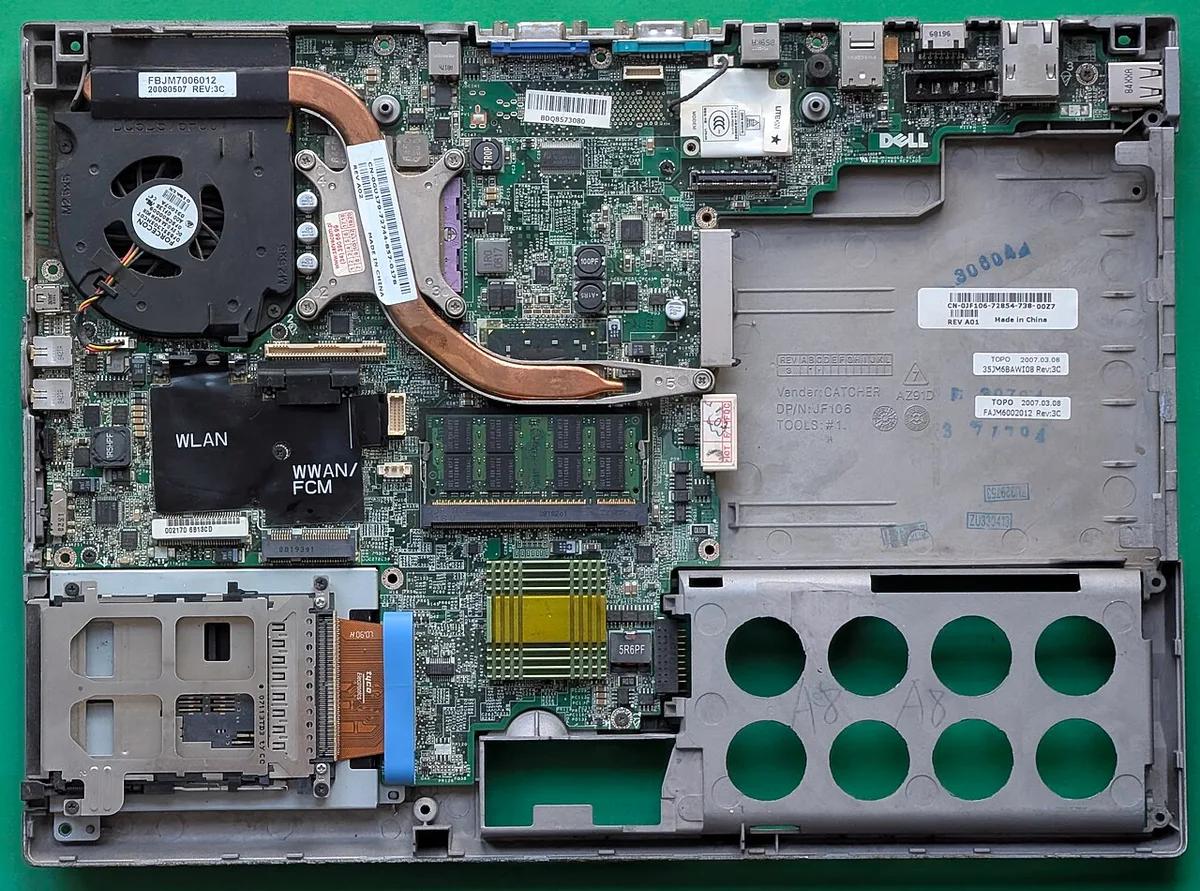
Image source: Wikimedia Commons / Siarhei Besarab (CC BY-SA)
The Portability Trade-Off: Weight, Battery Life, and Chassis Durability
Weight is where gaming laptops lose. Most land between 4 and 6 pounds. Some 17-inch models pass 7 pounds.
Add a 230-watt charger and your bag gets heavy fast.
Battery life tells the same story. Gaming laptops draw 80 to 140 watts under load. Even at idle, the big screen and dGPU sip power.
Expect 2 to 5 hours of light use. Ultrabooks with efficient chips often reach 10 to 18 hours.
Chassis durability cuts both ways. Gaming shells use thick aluminum or magnesium alloy. They resist flex and handle travel knocks.
But the weight itself causes fatigue. Regular laptops use thinner materials. They dent easier but weigh half as much.
Travelers face a real choice. A 3-pound ultrabook fits a small backpack and charges via USB-C. A gaming laptop needs its own brick and more space.
If you fly often, that difference matters more than frame rates.
Battery behavior also varies by mode. Many gaming laptops throttle hard on battery to save power. So your game runs worse unplugged.
Our guide on battery power throttling explains why and how to fix it.
| Factor | Gaming Laptop | Regular Laptop |
|---|---|---|
| Weight | 4 to 6+ pounds | 2 to 3 pounds |
| Battery life | 2 to 5 hours light use | 10 to 18 hours |
| Charger size | Large 180 to 230W brick | Compact 45 to 65W |
| Travel ease | Moderate to poor | Excellent |
Display Specs That Actually Matter: Refresh Rates, Color Accuracy, and Panel Types
The screen is where you feel the difference daily. Gaming laptops push 144Hz, 165Hz, or 240Hz refresh rates. Regular laptops often ship at 60Hz.
High refresh makes motion smoother and input feel faster.
Response time matters too. Gaming panels target 3 to 7 milliseconds. Office panels sit near 25 milliseconds.
Fast response reduces ghosting in shooters and racing games.
Color accuracy is the hidden factor. Content creators need 100 percent sRGB or DCI-P3 coverage. Many gaming screens prioritize speed over color.
Some premium models now offer both. Check the spec sheet before buying.
Panel type shapes the experience. IPS panels balance speed and color. OLED offers deep blacks and instant response.
Mini-LED boosts brightness and HDR. Each has trade-offs in price and burn-in risk.
Resolution adds another layer. 1080p is entry level and easy to drive. 1440p, or QHD, is the sweet spot for 2026. 4K looks sharp but drains battery and demands a strong GPU.
One common trap: buying a 240Hz screen for office work. You pay more and drain battery faster. Match the panel to your actual use.
If your screen feels stuck at 60 FPS on a 144Hz display, our guide on stuck at 60 FPS on 144Hz shows the fix.
Side-by-Side Breakdown: Gaming Laptop vs. Ultrabook at a Glance
Here's the full picture in one table. Use it to match hardware to your needs.
| Category | Gaming Laptop | Ultrabook / Regular Laptop |
|---|---|---|
| GPU | Dedicated RTX or Radeon RX | Integrated Intel Arc or AMD 700M |
| CPU | High TDP Core i7 or Ryzen 7 | Efficient Core Ultra or Ryzen AI |
| Cooling | Vapor chamber, dual fans | Thin heat pipes, quiet fans |
| Weight | 4 to 6+ pounds | 2 to 3 pounds |
| Battery life | 2 to 5 hours | 10 to 18 hours |
| Display refresh | 144Hz to 240Hz+ | 60Hz to 120Hz |
| Color accuracy | Varies, often speed-focused | Often 100 percent sRGB |
| Ports | HDMI 2.1, DP, RJ45, USB-C | USB-C, maybe HDMI |
| Upgradeability | Often RAM and storage | Usually storage only |
| Price premium | 20 to 50 percent higher | Lower entry cost |
| Best for | AAA games, rendering, 3D | Office, travel, study |
Read the table as a starting point, not a rule. A thin gaming laptop can weigh 3.5 pounds. A powerful creator ultrabook can cost more than a gaming rig.
Always check the specific model.
If you want better frame rates without buying new hardware, our guide on boost FPS without new hardware covers software tweaks that help on both types.
Who Should Buy Which? Matching Hardware to Your Daily Workflow
The right pick depends on your heaviest daily task. Match the hardware to what you do most.
Buy a gaming laptop if you do any of these:
- Play modern AAA games at high settings
- Edit 4K video or render 3D scenes
- Run machine learning or simulation software
- Need a second screen for esports tournaments
- Want one machine that handles work and play
Buy a regular laptop if you do any of these:
- Write, browse, and video call all day
- Travel weekly and need long battery life
- Work in quiet offices or libraries
- Run only web apps and light software
- Carry your laptop in a small bag
The overlap zone is real. A creator who edits on trains needs both power and battery. A thin gaming laptop or a powerful ultrabook can bridge the gap.
But each compromise costs something.
Students often face this exact choice. A gaming laptop handles both coursework and evening play. But it weighs more and lasts fewer hours in class.
A regular laptop keeps you light but limits fun.
Remote workers have a different split. Video calls and spreadsheets run fine on integrated graphics. But if you also game, a gaming laptop saves you from buying two machines.
If you're unsure, list your top three tasks. Then check which laptop type handles all three well. If only two match, lean toward the one that covers your heaviest task.
If your GPU seems ignored by games, our guide on NVIDIA GPU not used in games helps you fix that.
Hidden Costs and Long-Term Value: Upgradability, Resale, and Repair Risks
The sticker price is only the start. Long-term costs separate the two categories.
Gaming laptops often allow RAM and storage upgrades. Some let you swap the Wi-Fi card too. But the GPU and CPU are usually soldered.
So the core performance is fixed for life.
Regular laptops are even more locked down. Many ultrabooks solder RAM and use proprietary storage. You get what you buy on day one.
Plan your specs carefully.
Resale value favors gaming models slightly. A three-year-old gaming laptop still runs older titles. A three-year-old ultrabook may struggle with new software.
But gaming models also show more wear. Fans, hinges, and thermal paste degrade faster.
Repair costs run higher on gaming laptops. Vapor chambers and custom heatsinks cost more to replace. Battery swaps are similar on both.
Screen repairs depend on panel type, not category.
Warranty terms matter too. Accidental damage plans cost more for heavier machines. Some brands void coverage if you open the chassis.
Check before you upgrade anything yourself.
One hidden cost is power. A gaming laptop draws 180 to 230 watts. Over a year, that adds up.
Ultrabooks sip 45 to 65 watts. The difference shows on your electric bill.
If you buy used, check thermal health. Ask about fan noise and battery cycles. A gaming laptop with 500 charge cycles and dusty fans may need a $150 service soon.
Our guide on GPU stuck at zero percent covers a common used-buyer surprise.
Common Buying Mistakes: Overpaying for Features You Won't Use
Shoppers overspend on specs they never touch. Avoid these traps.
Buying a 240Hz screen for office work wastes money. You pay more and drain battery faster. A 120Hz panel is plenty for documents and video calls.
Overbuying VRAM is common. 8GB handles most 2026 titles at 1080p. 12GB helps at 1440p. 16GB is overkill for most buyers. Match VRAM to your target resolution.
Ignoring cooling is the biggest error. A slim gaming laptop with a weak cooler throttles hard. You get less performance than a cheaper, thicker model.
Read thermal reviews before buying.
Skipping the MUX switch costs frames. Without it, your GPU routes through the integrated chip. That adds latency and cuts performance by 10 to 15 percent.
Look for MUX support in specs.
Chasing RGB lighting raises price. Per-key lighting adds cost but no performance. If you work in dark rooms, basic white backlighting is enough.
Buying last year's GPU to save money can backfire. Older chips lack DLSS 3 frame generation and newer codecs. The savings fade fast as games update.
Not checking port selection causes dongle hell. A gaming laptop with only USB-C forces adapters. Verify HDMI, DisplayPort, and Ethernet before you buy.
If your new machine runs slow in high performance mode, our guide on high performance mode lag walks through the common causes.
Frequently Asked Questions
Can a gaming laptop be used for everyday work?
Yes. Gaming laptops run office apps, browsers, and video calls without issue. The trade-off is weight and battery life.
Expect 2 to 5 hours unplugged versus 10 to 18 on an ultrabook. Keep it on balanced mode to save power during light tasks.
Do gaming laptops last longer than regular laptops?
Not necessarily. Both last 4 to 6 years with care. Gaming models face more heat stress, which wears fans and thermal paste faster.
Regular laptops face fewer thermal cycles but may age out of software support sooner. Maintenance matters more than category.
Is a gaming laptop worth it for a student?
It depends on the student. A gaming laptop handles coursework and evening play in one machine. But it weighs more and lasts fewer hours in class.
A regular laptop keeps you light but limits gaming. List your top three tasks and match from there.
Can you upgrade a gaming laptop's GPU?
Almost never. The GPU is soldered to the motherboard on nearly all models. You can upgrade RAM and storage on many gaming laptops.
But the core graphics power is fixed for the life of the machine. Plan your GPU choice carefully at purchase.
Do gaming laptops overheat more than regular laptops?
They run hotter by design. Gaming GPUs push 80 to 140 watts. That heat needs active cooling and airflow.
Regular laptops stay cooler because they draw far less power. Keep vents clear and clean dust filters every few months.
Are gaming laptops louder than regular laptops?
Yes, under load. Fan noise often exceeds 40 to 50 decibels during games. Quiet offices sit near 30 decibels.
On light tasks, gaming laptops stay quiet. But sustained load brings the fans up fast. If loud fans cause FPS drops, our guide on fan noise and FPS drops covers the fix.