what is the difference between atx micro atx and mini itx? It comes down to physical size, expansion slots, and how much room you have to grow. These three form factors cover nearly every desktop PC build, but they are not interchangeable.
Picking the wrong one can leave you with a case that does not fit or a board with no room for upgrades.
ATX measures 305 mm by 244 mm, Micro-ATX is 244 mm square, and Mini-ITX is 170 mm square. Those numbers shape everything from cooling clearance to how many RAM sticks you can run. Let us walk through each option so you can match the right board to your case and your goals.
what is the difference between atx micro atx and mini itx
ATX is the largest standard at 305 by 244 millimeters. Micro-ATX is square at 244 by 244 millimeters. Mini-ITX is the smallest at 170 by 170 millimeters.
Larger boards offer more expansion and RAM slots. Smaller boards fit compact cases with fewer upgrades.
Why Motherboard Form Factor Matters More Than You Think
The form factor is the physical size and mounting layout of a motherboard. It decides which cases you can use, how many parts you can add, and how much airflow you get. Get it wrong and your board may not fit the case at all.
Most builders focus on the CPU and GPU first. That makes sense. But the motherboard sets the ceiling for everything else.
It controls RAM slots, PCIe lanes, fan headers, and storage ports. A bigger board usually means more of each.
Space is the other half of the equation. A full-size ATX board needs a mid-tower or larger case. A Mini-ITX board can live in a tiny enclosure on your desk.
Your room, your desk, and your cooling plan all hinge on this choice.
Case compatibility is the first filter. Every case lists which form factors it supports. Mounting holes differ between standards, so a board will not physically attach if the case is not built for it.
Upgrade headroom is the second filter. More slots mean more RAM, more storage, and more expansion cards. If you plan to add a capture card or extra drives later, size matters.
Checking how much room your GPU needs before you commit to a case saves a lot of frustration.
As of 2026, case makers still design around these three standards. That stability is good news. Parts stay interchangeable year after year.
The trick is matching the board to the case before you buy anything else.
ATX: The Full-Size Standard
ATX is the most common motherboard size in desktop PCs. It measures 305 mm by 244 mm and offers the most expansion of the three. If you want maximum flexibility, this is where you start.
A typical ATX board has four DIMM slots for RAM. It also has multiple PCIe slots, often three or four. That means room for a graphics card plus extra cards like a sound card or capture device.
Storage is generous too, with several M.2 and SATA connections.
Cooling is easier on ATX. The larger surface area spreads heat across more space. You also get more fan headers, so you can run a robust airflow setup without splitter cables.
The trade-off is size. ATX needs a mid-tower or full-tower case. That takes up desk or floor space.
For a small apartment or dorm room, it may be too much.
ATX boards also tend to cost more. You pay for the extra slots and features. But for most gamers and creators, the value is worth it.
When choosing the right graphics card for an ATX build, you have fewer clearance worries. Most mid-tower cases swallow even the longest GPUs. That freedom is a big part of why ATX stays popular.
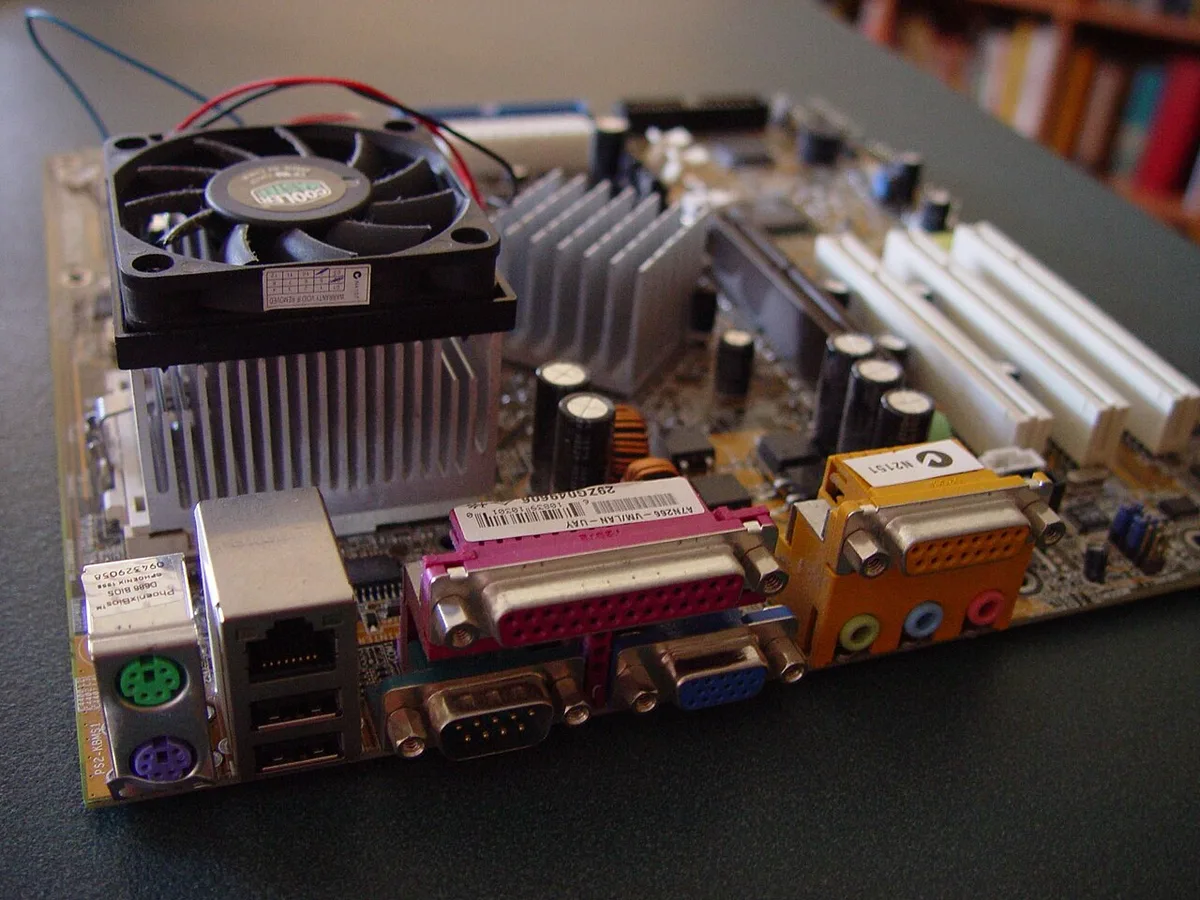
Image source: Wikimedia Commons / Leon Brooks
Image source: Wikimedia Commons / Exey Panteleev (CC BY)
Micro-ATX: The Compact All-Rounder
Micro-ATX, often called mATX or uATX, measures 244 mm by 244 mm. It is square and noticeably smaller than ATX. Yet it keeps most of the features builders actually use.
Most Micro-ATX boards still offer four RAM slots. That matches ATX for memory capacity. PCIe slots drop to one or two, which is usually enough for a single graphics card.
Storage options remain solid, with M.2 and SATA ports on most models.
The smaller footprint opens up case choices. Many compact mid-towers and mini-towers support Micro-ATX. You get a smaller PC without giving up core features.
That balance makes it a favorite for budget builds.
Price is another win. Micro-ATX boards cost less than ATX on average. Cases for them are cheaper too.
If you want a capable gaming PC without overspending, this form factor hits the sweet spot.
Cooling needs more thought in a smaller case. Airflow can suffer if you pack too much into a mini-tower. Plan your fan layout carefully and check clearance for your CPU cooler.
Some builders run integrated graphics on a Micro-ATX board to save money. That works fine for basic tasks. Add a dedicated GPU later when your budget allows.
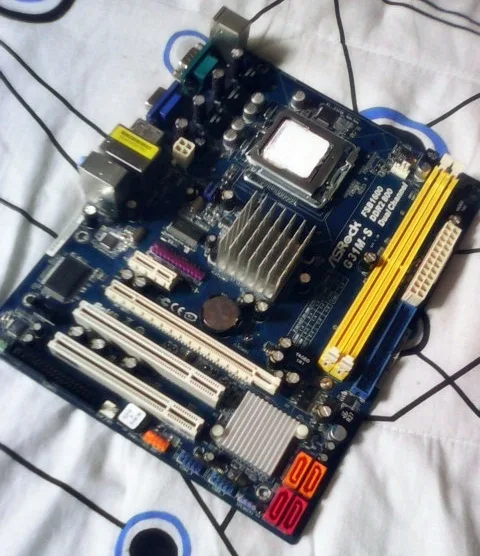
Image source: Wikimedia Commons / Julianprescott2604juuly (CC BY-SA)
Mini-ITX: The Small Form Factor Specialist
Mini-ITX measures 170 mm by 170 mm. It is the smallest of the three standard form factors. These boards are built for compact, space-saving PCs.
A Mini-ITX board usually has two RAM slots. That is the main limitation. You can still run 32 GB or more with two high-capacity sticks, but you lose the flexibility of four slots.
PCIe slots are typically one, sized for a single graphics card.
Storage and I/O vary by model. Many Mini-ITX boards include M.2 slots on the front and back. Rear I/O is often rich, with multiple USB ports and Wi-Fi built in.
Manufacturers pack a lot into a tiny footprint.
The real challenge is building around it. Small form factor cases demand careful planning. CPU cooler height, GPU length, and PSU size all have tight limits.
SFX power supplies are common here instead of standard ATX units.
Heat is the other concern. Less space means less airflow. You may need to undervolt or choose low-profile coolers.
Thermal planning matters more on Mini-ITX than on any other form factor.
Some builders choose Mini-ITX for a living-room PC or a system without a dedicated GPU. That keeps things quiet and compact. It is a great fit for media centers and light gaming.
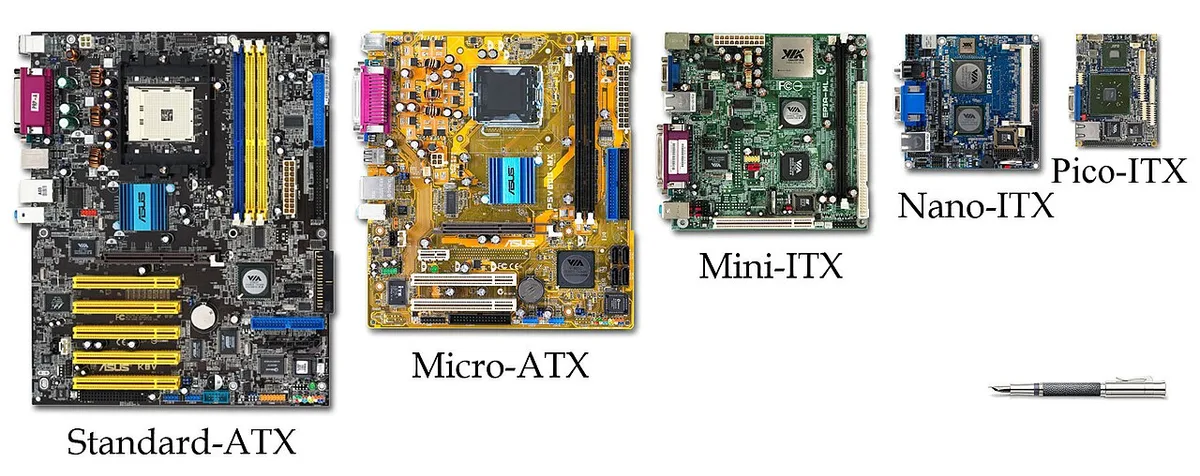
Image source: Wikimedia Commons / VIA Gallery from Hsintien, Taiwan (CC BY)
Side-by-Side Spec Comparison
Here is how the three form factors stack up on the specs that matter most. Use this table as a quick reference when shopping.
| Spec | ATX | Micro-ATX | Mini-ITX |
|---|---|---|---|
| Dimensions | 305 x 244 mm | 244 x 244 mm | 170 x 170 mm |
| RAM slots | 4 | 4 (most models) | 2 |
| PCIe x16 slots | 2 to 3 | 1 to 2 | 1 |
| M.2 slots | 2 to 4 | 1 to 3 | 1 to 2 |
| Typical case size | Mid-tower or larger | Mini-tower or mid-tower | SFF or mini-tower |
| PSU type | ATX | ATX | ATX or SFX |
| Price range | Highest | Mid | Mid to high |
Dimensions and Mounting
ATX is the longest of the three. Micro-ATX trims the length but keeps the same width as ATX. Mini-ITX shrinks both dimensions.
Mounting hole patterns differ, so a case must list support for your specific form factor.
Expansion and RAM Slots
RAM capacity is the clearest divider. ATX and Micro-ATX usually offer four slots. Mini-ITX offers two.
For how much VRAM you need in your GPU, that is a separate question, but system RAM slots follow the same logic. More slots mean more upgrade flexibility.
PCIe slots follow a similar pattern. ATX gives you room for multiple cards. Micro-ATX covers most single-GPU builds.
Mini-ITX is strictly one card. If you need a capture card or Wi-Fi adapter, factor that in early.
Motherboard manufacturers like ASUS, MSI, and Gigabyte publish exact slot layouts. The PCI-SIG specification governs PCIe lane standards across all three form factors. Checking the PCI-SIG PCIe specifications is a good way to confirm lane counts for a specific board.
Heat and power also scale with size. Keeping an eye on CPU temperatures is smart on any build, but it matters most in compact cases. A well-ventilated ATX case forgives more mistakes than a cramped Mini-ITX one.
As of 2026, these three standards remain the backbone of PC building. Intel's ATX specification and the PCI-SIG PCIe standards keep them consistent across brands. That consistency is what makes mixing parts from different makers work so well.
ATX vs Micro-ATX vs Mini-ITX: Which Fits Your Build?
The right choice depends on your case, upgrade plans, and budget. Start with the case you want, then match the board to it. If you want maximum expansion and easier cooling, choose ATX.
If you want balance, choose Micro-ATX. If desk space is tight, choose Mini-ITX.
Use this simple decision flow.
- Choose ATX if you want four RAM slots, multiple PCIe slots, and a mid-tower or larger case.
- Choose Micro-ATX if you want four RAM slots, one or two PCIe slots, and a smaller case.
- Choose Mini-ITX if you want the smallest PC possible and can accept two RAM slots and one GPU.
- Check the case manual before buying. It lists supported form factors.
- Count your needed cards. Capture cards, Wi-Fi adapters, and extra storage controllers all need slots.
- Plan cooling early. Smaller cases need more airflow planning.
ATX is the safest pick for most first-time builders. Micro-ATX is the smart budget pick. Mini-ITX is the specialist pick for compact builds.
If you plan to push high frame rates, monitoring CPU usage while gaming helps you size cooling before you lock in a case.
Best Form Factor for Common PC Builds
Gaming Builds
ATX and Micro-ATX suit most gaming PCs. Both support a full-size graphics card and enough RAM for modern games. ATX gives more room for airflow and extra cards.
Micro-ATX keeps costs and size down.
Mini-ITX gaming builds work well, but they need careful planning. GPU length, cooler height, and PSU size all have tight limits. Heat builds faster in a small case.
If you suspect your processor is holding back performance, signs you need a CPU upgrade can help you decide before you buy a new board.
Office and Productivity
Micro-ATX is the sweet spot for office PCs. It is small, affordable, and has enough ports for daily work. Mini-ITX also works well for a clean desk setup with fewer cables.
ATX is overkill unless you need multiple expansion cards. Most office users never fill more than one PCIe slot.
Compact and Living-Room PCs
Mini-ITX shines here. It fits small cases that sit on a shelf or beside a TV. Pair it with an SFX power supply and a low-profile cooler.
Keep airflow in mind. A compact living-room PC should stay quiet and cool. Undervolting the CPU and GPU can help reduce heat and fan noise.
Common Mistakes When Matching Case and Motherboard
Small errors here can stop a build before it starts. Avoid these common problems.
- Buying the motherboard before checking case support.
- Assuming a mini-tower fits every Micro-ATX board.
- Ignoring CPU cooler height limits in compact cases.
- Forgetting GPU length clearance.
- Using an ATX power supply in a case that needs SFX.
- Overlooking front panel header placement.
- Skipping cable routing space.
- Forgetting RAM clearance under large air coolers.
- Not updating the BIOS before installing a new CPU.
A case manual is your best friend. It lists supported form factors, cooler limits, and GPU clearance. Read it twice before ordering parts.
Manufacturer specs from ASUS, MSI, and Gigabyte also list exact mounting and clearance details.
Expert Tips for Getting the Fit Right
A few habits make form factor matching much easier.
- Read the case manual first. Confirm ATX, Micro-ATX, or Mini-ITX support.
- Check the motherboard manual for standoff positions.
- Install the CPU and cooler before mounting in small cases.
- Dry-fit the GPU and cooler before final assembly.
- Use an SFX power supply for Mini-ITX builds.
- Leave clear airflow paths from front to rear.
- Update the BIOS if your CPU is newer than the board.
- Test the build outside the case first if space is tight.
- Keep spare standoffs organized by size.
These steps reduce guesswork. They also help you catch clearance issues before cables are routed. A slow, careful build beats rushing and bending parts.
Frequently Asked Questions
Can a Micro-ATX board fit in an ATX case?
Yes. Micro-ATX boards fit in most ATX cases because the mounting holes align. You may need to move or remove extra standoffs.
Always check the case manual before installing.
Is Mini-ITX good for gaming?
Yes, if you plan carefully. Mini-ITX supports one graphics card and usually two RAM slots. Cooling and power supply size need extra attention.
It works well for compact gaming PCs.
Do ATX and Micro-ATX use the same power supply?
Usually yes. Both commonly use standard ATX power supplies. Mini-ITX builds more often need an SFX unit.
Check your case specifications before buying.
How many RAM slots does Micro-ATX have?
Most Micro-ATX boards have four RAM slots. Some budget models have two. Always verify the exact board specifications.
RAM capacity and speed limits matter too.
Can I upgrade from Micro-ATX to ATX later?
Only if your case supports ATX. Many mini-towers do not. If the case is too small, you will need a new case along with the new motherboard.
Plan ahead to avoid that cost.
Is Mini-ITX harder to build?
Yes. The smaller space makes cable routing and cooling harder. Parts have tighter clearance limits.
Take your time and test fit everything before final assembly.
1 thought on “ATX vs Micro-ATX vs Mini-ITX: Which Size Fits You?”
Comments are closed.