what is the difference between pcie 4.0 and pcie 5.0 ssds? It is not just a bigger number. One is fast enough for most PCs.
The other pushes peak throughput much higher. The right choice depends on your workload, cooling, and budget.
PCI-SIG lists about 7.88 GB/s for a PCIe 4.0 x4 link and about 15.75 GB/s for a PCIe 5.0 x4 link. Real SSDs do not hit those ceilings. Still, the gap is large enough to matter for some tasks.
Let us walk through where each one wins.
Why the PCIe 4.0 vs PCIe 5.0 SSD Choice Is Not Obvious
PCIe means Peripheral Component Interconnect Express. It is the high-speed link between your CPU or chipset and devices like SSDs. A PCIe 4.0 SSD and a PCIe 5.0 SSD both use the NVMe protocol in most cases.
The difference is how much data that link can carry.
The catch is simple. More bandwidth does not always feel faster. A PCIe 5.0 drive can post huge sequential speeds.
Yet many daily tasks do not use that full pipe. Games, web browsing, and office work often lean on random reads and latency. Those do not scale the same way.
This is why the choice feels messy. PCIe 5.0 looks like the obvious upgrade. PCIe 4.0 often gives better value.
The better drive is the one that matches your platform and your actual work.
- PCIe 4.0 is mature, cool, and widely supported.
- PCIe 5.0 is faster, hotter, and more platform-specific.
- Gaming gains are usually modest.
- Heavy file work can show a bigger gap.
- Cooling and motherboard layout matter more than marketing.
If you build around a modern CPU and motherboard, both can work. If you are upgrading an older board, PCIe 4.0 may be the only sensible path. Check the slot, the heatsink space, and the price before you decide.
PCIe 4.0 SSDs: Mature Speed for Most PCs
A PCIe 4.0 SSD uses four PCIe 4.0 lanes. That gives it a strong balance of speed, heat, and cost. Many models reach around 7,000 MB/s in sequential reads.
That is already far beyond older SATA drives.
These drives are a safe pick for gaming PCs. They load games quickly. They handle large installs well.
They also run cooler than most PCIe 5.0 models. Cooler drives are easier to keep stable under long writes.
You will see two common designs. One uses onboard DRAM. The other uses Host Memory Buffer, or HMB, which borrows system RAM.
DRAM models often feel more consistent in heavy multitasking. HMB models can still be fast and cost less.
NAND type matters too. TLC NAND is common on quality drives. QLC NAND can offer more capacity per dollar.
QLC can slow down after its fast cache fills. If you move huge files often, TLC is usually the safer bet.
For most buyers, PCIe 4.0 is the value winner. It is fast enough for gaming, streaming, and general creative work. It also leaves more budget for memory, cooling, or a better GPU.
If you are unsure how much storage you need, start with capacity first and speed second.
PCIe 5.0 SSDs: Peak Throughput and Its Tradeoffs
A PCIe 5.0 SSD uses four PCIe 5.0 lanes. That doubles the theoretical bandwidth compared with PCIe 4.0. Top models can reach roughly 12,000 to 14,000 MB/s in sequential reads.
That is a real leap on paper.
The benefit shows up in heavy work. Large video projects, big datasets, and fast scratch disks can use that bandwidth. If your job moves massive files all day, Gen5 can save time.
For a normal desktop, the difference is harder to feel.
The tradeoff is heat. Faster controllers draw more power. Sustained writes can raise temperatures quickly.
Many Gen5 drives need a serious heatsink. Some motherboards include one. Others do not.
Platform support is another limit. You need a CPU and motherboard with PCIe 5.0 M.2 support. Some boards share lanes with the GPU or other slots.
That can reduce available bandwidth. Always check the manual before buying.
Price is the final hurdle. As of 2026, PCIe 5.0 drives still cost more per gigabyte. The premium makes sense for workstation users.
It is harder to justify for casual gaming. If you want real game load times, a good Gen4 drive is often enough.
Side-by-Side Specs and Bandwidth Limits
The numbers help, but they do not tell the whole story. Theoretical bandwidth is a ceiling. SSD speed also depends on the controller, NAND, cache, and cooling.
Use this table as a starting point, not a final answer.
| Feature | PCIe 4.0 SSD | PCIe 5.0 SSD |
|---|---|---|
| Theoretical x4 bandwidth | About 7.88 GB/s | About 15.75 GB/s |
| Common peak sequential reads | Up to about 7,000 MB/s | About 12,000 to 14,000 MB/s |
| Typical heat output | Lower | Higher |
| Motherboard support | Very wide | Newer platforms only |
| Price per gigabyte | Usually lower | Usually higher |
| Best fit | Gaming and general use | Heavy creative work |
Look past the headline speed. Random read performance affects app launches and game loading. Sustained write speed matters for video exports.
Thermal throttling can erase the Gen5 advantage if cooling is poor.
A well-cooled PCIe 4.0 drive can beat a hot PCIe 5.0 drive in consistency. That surprises many buyers. It also explains why reviews often show smaller real-world gaps than spec sheets suggest.
If you compare drives, check TBW, warranty, and NAND type. TBW stands for terabytes written. It estimates endurance.
A higher TBW is useful for write-heavy systems. It is less important for a light gaming PC.
Real-World Performance by Workload
Gaming is the most common reason people shop for fast storage. Here, PCIe 4.0 is usually enough. Load times depend on game design, CPU, and asset streaming.
A Gen5 drive may shave seconds, but not transform the experience. If you want to understand how nvme speed affects game loading, focus on random reads and game engine behavior.
Video editing is different. Large 4K or 8K projects can benefit from Gen5. Scrubbing, importing, and exporting large files can feel smoother.
The gain is strongest when the drive is used as a scratch disk. It is weaker if your bottleneck is the CPU or RAM.
Everyday tasks show the smallest gap. Booting Windows, opening apps, and browsing the web feel similar on both. Both are far faster than older SATA SSDs.
If your goal is responsiveness, either modern NVMe drive is a big step up.
AI and data workloads can push Gen5 harder. Large model files and datasets favor high sequential throughput. Even then, memory capacity and GPU performance may matter more.
Storage is one part of the system, not the whole system.
A smart buying rule is to match the drive to the bottleneck. If your workload is not storage-bound, spend money elsewhere. If it is storage-bound, Gen5 can be worth it.
If you are unsure, a high-quality PCIe 4.0 drive is the safer bet.
For platform planning, it also helps to know when a motherboard upgrade makes sense. A new board can unlock Gen5, but it may also require new memory and CPU. That cost can exceed the value of the faster SSD.
A balanced build often beats a single fast part.
Cooling, Compatibility, and Platform Limits
A PCIe 5.0 SSD can run hot during long writes. That is the first thing to check before buying one. If cooling is poor, the drive may throttle and lose its speed advantage.
Many motherboards now include M.2 heatsinks. Some are thick and effective. Others are thin metal covers that help only a little.
Aftermarket heatsinks can work well, but they must fit your case and clear nearby parts.
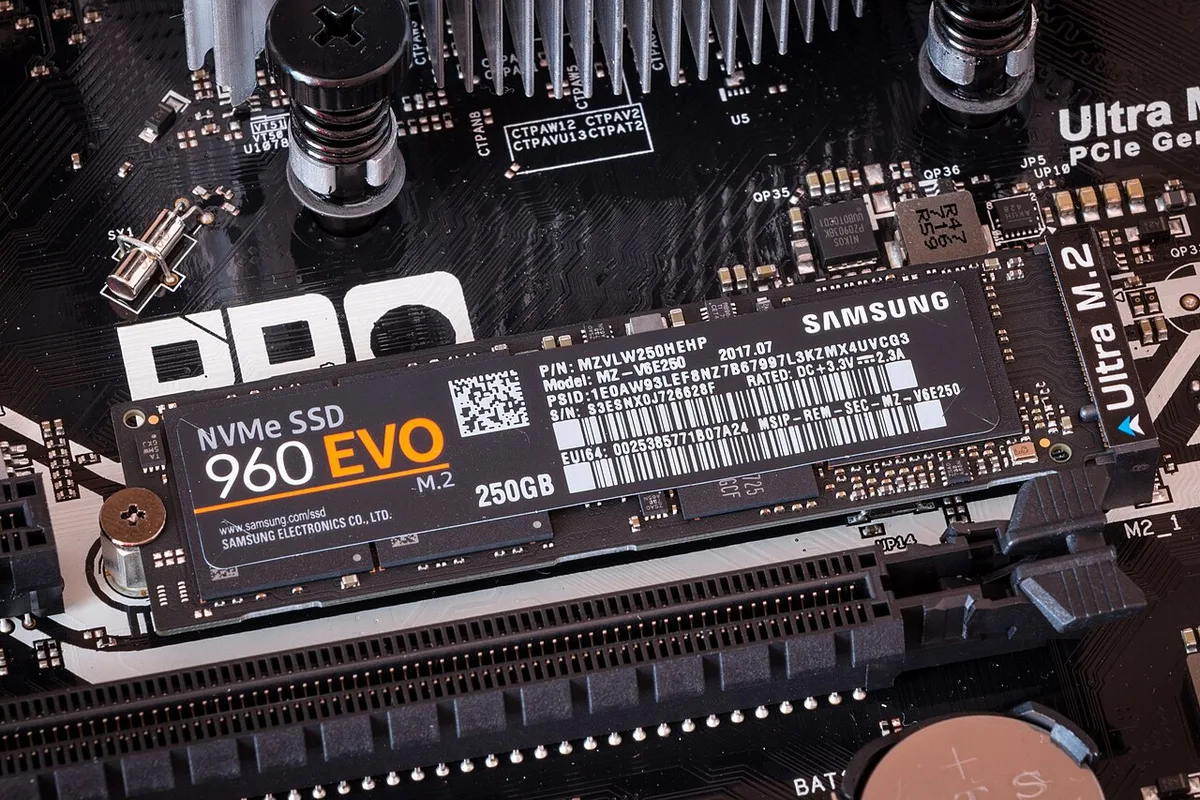
Image source: Wikimedia Commons / Ilya Plekhanov (CC BY-SA)
Compatibility matters as much as cooling. A Gen5 drive needs a PCIe 5.0 M.2 slot. Some boards place that slot near the GPU.
That can block airflow or make installation awkward. Others route lanes through the chipset, which may share bandwidth.
- Check the motherboard manual for PCIe generation support.
- Confirm which M.2 slot gets CPU lanes.
- Measure heatsink height against your GPU and case.
- Leave room for airflow around the drive.
- Avoid blocking the GPU with a tall SSD heatsink.
If your board only supports PCIe 4.0, buy a Gen4 drive. It will run at full speed. A Gen5 drive will still work, but it will fall back to Gen4.
That is wasted money. If you are planning a platform upgrade, it helps to know when a motherboard upgrade makes sense before chasing Gen5 speed.
Costs, Capacity, and Long-Term Value
Price per gigabyte is where PCIe 4.0 usually wins. Gen4 drives have been on the market longer. Supply is strong and prices are competitive.
Gen5 drives still carry an early-adopter premium.
Capacity should come before speed for most buyers. A 2 TB Gen4 drive is often more useful than a 1 TB Gen5 drive. More space reduces write pressure and helps the drive last longer.
It also leaves room for games, media, and project files.
| Buying Factor | PCIe 4.0 SSD | PCIe 5.0 SSD |
|---|---|---|
| Typical cost per gigabyte | Lower | Higher |
| Common capacity sweet spot | 2 TB | 2 TB or 4 TB |
| Endurance focus | Strong midrange options | Strong premium options |
| Best value for gaming | Usually yes | Usually no |
| Best value for heavy work | Sometimes | Often yes |
Endurance is measured in TBW, or terabytes written. A higher TBW means the drive can handle more writes over its life. Gaming PCs rarely stress this limit.
Video editing, caching, and database work can. Check the warranty too, since coverage varies by brand.
If you are deciding storage size, our guide on how much storage a gaming pc really needs can help you avoid buying too little. A slightly larger drive often ages better than a slightly faster one.
Best Use Cases and Common Mistakes
Choose PCIe 4.0 if you game, stream, browse, or do light creative work. It is fast, cool, and affordable. It also works on a wider range of motherboards.
For most people, that is the right balance.
Choose PCIe 5.0 if you move very large files often. It also fits scratch disks, AI datasets, and heavy video workflows. If your work is storage-bound, the extra bandwidth can save real time.
Common buying mistakes include the following:
- Buying Gen5 for a board that only supports Gen4.
- Ignoring heatsink clearance and airflow.
- Choosing QLC for heavy sustained writes.
- Paying for peak speed without checking random performance.
- Buying too little capacity to save money.
Do not assume faster always means better. A warm Gen5 drive can throttle and feel inconsistent. A cool Gen4 drive can stay fast all day.
Match the drive to the job, not the benchmark chart.
Final verdict: buy PCIe 4.0 for value and compatibility. Buy PCIe 5.0 for peak throughput and heavy workloads. If you are unsure, Gen4 is the safer default.
You can always upgrade later when prices drop.
Frequently Asked Questions
Is PCIe 5.0 worth it for gaming?
Usually no. Game load times depend on more than sequential speed. A good PCIe 4.0 SSD is already fast enough for most titles.
Gen5 may help in a few large open-world games, but the difference is often small.
Can a PCIe 5.0 SSD work in a PCIe 4.0 slot?
Yes. PCIe is backward compatible. The drive will run at PCIe 4.0 speed.
You will not get Gen5 performance. Check your motherboard manual before buying.
Do PCIe 5.0 SSDs need a heatsink?
Often yes. Sustained writes can raise temperatures quickly. Many boards include a heatsink, but not all.
If yours does not, plan for cooling.
Is TLC better than QLC for gaming?
Usually yes for consistency. TLC tends to handle sustained writes better. QLC can offer more capacity per dollar.
For heavy transfers, TLC is the safer choice.
Does NVMe speed really affect game loading?
Yes, but only up to a point. Random reads and game design matter a lot. Once you have a solid NVMe drive, CPU and storage layout matter more.
Our article on how nvme speed affects game loading explains this in more detail.
Should I choose SSD over HDD for gaming?
Yes. Even a basic NVMe SSD is much faster than an HDD. Load times, installs, and updates improve a lot.
See our comparison of ssd versus hdd for gaming for the full tradeoffs.