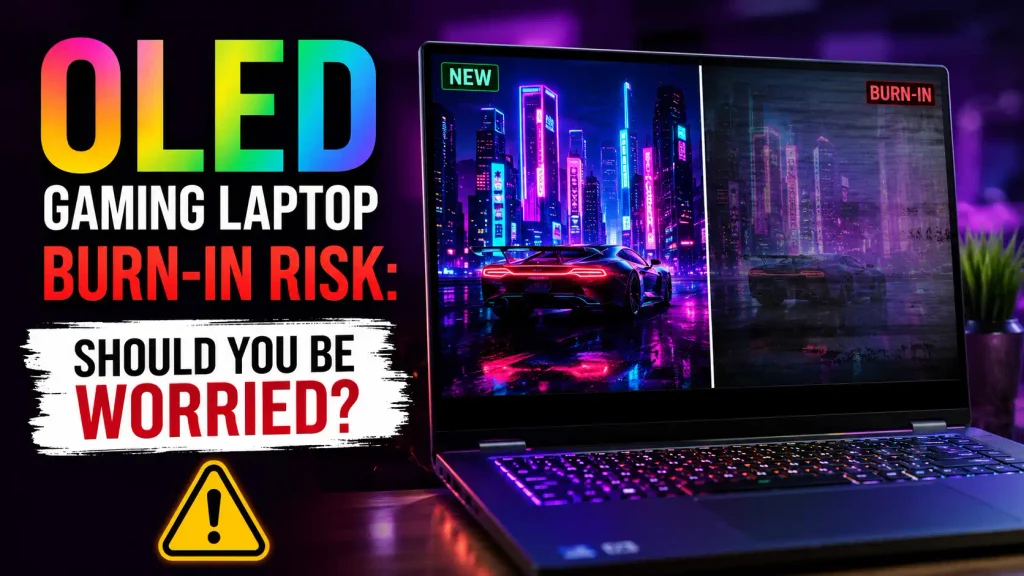
OLED gaming laptops look fantastic. Deep blacks, near-instant pixel response, excellent contrast, and vivid HDR can make games feel noticeably more immersive. But there is one question that keeps many buyers from choosing one: How serious is the OLED gaming laptop burn-in risk?
For most gamers, burn-in should not be a reason to automatically avoid an OLED laptop. Modern OLED panels include protection features designed to reduce uneven pixel wear, and varied gaming, video, and everyday use is much less demanding than leaving the same bright interface on screen every day. Burn-in is still possible, though, especially when bright static elements remain in the same place for hundreds or thousands of hours.
The real question, then, is not whether OLED can burn in. It can. The better question is whether your usage pattern makes it likely enough to matter.
What Is OLED Burn-In on a Gaming Laptop?
An OLED display works differently from a traditional LCD. Instead of using a backlight behind the entire screen, OLED pixels produce their own light. That is what gives OLED its famous black levels: a pixel displaying black can simply turn off.
The trade-off is that OLED’s light-producing materials gradually age as they are used. If certain pixels spend much more time displaying bright content than the pixels around them, they can age at a different rate.
That uneven aging can eventually leave a faint permanent pattern on the screen. This is what people normally mean by OLED burn-in.
How OLED Pixels Wear Out
Think about a competitive game with a health bar that sits in exactly the same position every time you play. The pixels behind that health bar may repeatedly produce similar bright colors while the rest of the screen constantly changes.
One gaming session is unlikely to suddenly damage the display. The concern is repeated exposure over a long period.
This is why OLED burn-in is better understood as cumulative pixel wear rather than an instant failure.
Burn-In vs Temporary Image Retention
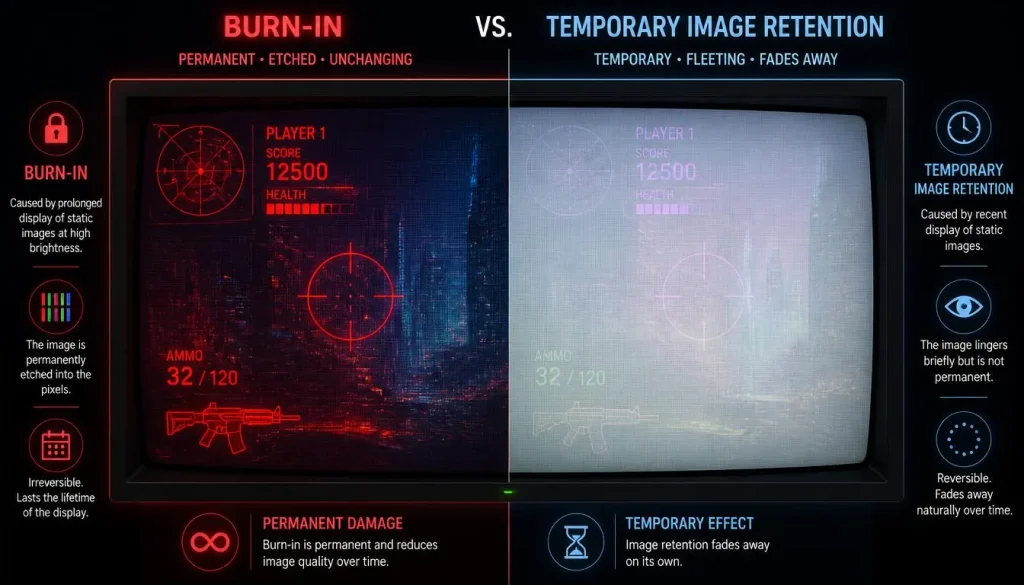
Burn-in and image retention are often treated as the same problem, but they are not always the same thing.
Temporary image retention can leave a faint after-image that eventually disappears. Lenovo, for example, notes that short-term OLED image retention can be recoverable behavior rather than a permanent defect.
Permanent burn-in is different. If the pixels have experienced uneven long-term wear, the visible pattern may remain.
So if you briefly notice the outline of a window or game interface, do not immediately assume the panel is permanently damaged.
Burn-In vs Normal OLED Aging
OLED panels also age normally over time. Overall brightness or color characteristics can gradually change after very long use.
That is different from burn-in.
Normal aging affects the panel more broadly. Burn-in appears as uneven wear, often matching something that has repeatedly occupied the same area of the display.
How Serious Is OLED Gaming Laptop Burn-In Risk?
For typical gaming use, the risk is usually much less dramatic than online discussions can make it sound. It is not zero, but neither should you assume every OLED laptop will eventually develop a visible game HUD permanently stamped onto the screen.
The most important variables are how you use the screen, how bright you run it, how often the content changes, and how effectively the laptop’s OLED protection features are allowed to operate.
ASUS, for example, explicitly acknowledges that prolonged static high-contrast images can cause image persistence while providing Pixel Refresh and Pixel Shift features on its OLED laptops to reduce the risk.
Normal Gaming
If you switch between different games, watch videos, browse the web, and use your laptop for other tasks, the same pixels are not being stressed in exactly the same pattern all day.
That is a relatively OLED-friendly usage pattern.
Games also contain a lot of moving content. Maps change, menus disappear, cutscenes play, environments move, and different applications replace one another.
The static parts of the interface are the main concern—not gaming itself.
Long Gaming Sessions
A six-hour gaming session does not mean an OLED panel suddenly burns in after six hours.
However, playing the same game for long sessions every day can create more uneven wear if its interface contains bright fixed elements such as health bars, mini-maps, inventory slots, score counters, or ability icons.
The issue becomes more relevant when that pattern continues month after month.
Keeping an OLED Gaming Laptop for 3–5+ Years
Long ownership increases the importance of your usage habits because OLED wear is cumulative.
Someone who upgrades every two or three years and mostly plays varied games has a different risk profile from someone who plans to use the same laptop for six years while spending eight hours a day in the same productivity applications.
That does not mean a five-year-old OLED laptop will automatically have burn-in. There simply is no universal age at which an OLED panel suddenly fails.
What Causes Burn-In on an OLED Gaming Laptop?
Burn-in is mainly associated with repeated, uneven use of the same pixels, particularly when bright static content remains in fixed positions for long periods. ASUS similarly warns about prolonged static high-contrast images on OLED displays.
Static Game HUDs
Game HUDs are one of the most obvious examples.
A mini-map may stay in the top corner. A health bar may remain at the bottom. A crosshair can stay near the center. MMO ability bars can occupy exactly the same section of the screen for thousands of gaming sessions.
These elements do not guarantee burn-in, but they give specific groups of pixels a more repetitive workload.
Windows Taskbar and Desktop Elements
The Windows taskbar is another classic example because it can stay in the same position for hours.
Desktop icons, browser tabs, window borders, application toolbars, and other fixed interface elements can create similar patterns during heavy productivity use.
High Brightness
Higher brightness requires OLED pixels to produce more light. In general, repeatedly driving specific pixels hard while showing static content is less favorable for long-term uniformity than running the same content at moderate brightness.
That does not mean you need to use your expensive gaming laptop at an uncomfortable brightness level. It simply means running maximum brightness all day when you do not need it is not an ideal habit.
HDR Gaming
HDR itself is not a burn-in switch.
The concern is that HDR can produce very bright highlights. If a game repeatedly places a bright static HUD element in the same location, that area may experience more demanding use.
Dynamic HDR content that constantly changes is a different situation.
Coding and Productivity Work
This is where some OLED buyers should pay more attention.
Coding tools, spreadsheets, editing applications, browser windows, Discord, taskbars, and office software can keep similar interface structures on screen for hours.
Lenovo’s own OLED guidance advises users to be mindful of burn-in when static elements or the same code remain on screen for prolonged periods.
A laptop used for three hours of gaming at night may actually have a less demanding OLED workload than one used as an eight-hour-a-day office workstation.
Cumulative Pixel Wear
Burn-in does not require you to leave one image untouched for an entire day.
Imagine playing the same MMO for four hours every evening. The display turns off overnight, but the next evening the same HUD returns to exactly the same positions.
That repeated use can accumulate over time.
This is why changing content matters.
How Long Does It Take for an OLED Gaming Laptop to Burn In?
There is no trustworthy universal answer such as 2,000 hours, 5,000 hours, or 10,000 hours.
Different panels, brightness levels, applications, protection systems, temperatures, and usage patterns produce different results.
Two people could own the same laptop for three years and end up with very different display wear.
Does Using an OLED Laptop 8 Hours a Day Cause Burn-In?
Not necessarily.
Eight hours of mixed gaming, video, browsing, and changing applications is very different from eight hours of the same spreadsheet, IDE, dashboard, or MMO interface.
Total screen-on time matters, but what is displayed during those hours matters more than the number alone suggests.
Static Content vs Varied Content
Varied content naturally spreads the workload across the panel.
Static content repeatedly stresses the same areas.
That is one of the most useful distinctions to remember when judging OLED longevity.
What Do Real-World OLED Burn-In Tests Tell Us?
Long-term OLED monitor testing gives us useful clues, although monitor results should not be treated as exact predictions for every gaming laptop.
In one reported 3,000-hour OLED monitor test published in February 2026, roughly 500 hours of Overwatch contributed to faint evidence associated with static game elements. The visible effect remained relatively light rather than turning the display into an unusable mess.
A separate long-term test involving more than 6,000 hours of OLED monitor use showed increasing burn-in after extensive static productivity work. That test intentionally represented a demanding use case, including persistent desktop elements and limited efforts to avoid static content.
These results tell us two things.
First, burn-in remains real.
Second, usage conditions matter enormously.
They do not prove that an OLED gaming laptop will develop visible burn-in after a particular number of hours. Laptop panels, brightness behavior, software protection, thermals, panel technology, and workloads can differ.
What Is Your OLED Gaming Laptop Burn-In Risk?
This table is a practical guide rather than a prediction of exactly when a panel will wear.
| Usage Pattern | Relative Burn-In Risk | Why |
|---|---|---|
| Casual gaming for 2–3 hours a day | Low | Content changes regularly |
| Mixed gaming, movies, browsing, and schoolwork | Low | Pixel usage is varied |
| Playing the same competitive game daily | Low to Moderate | Repeated HUD elements |
| MMO/MMORPG gaming for long daily sessions | Moderate | Large static interfaces |
| Gaming plus full-day office work | Moderate | More static desktop content |
| Coding in the same IDE for many hours daily | Moderate to Higher | Repeated window and toolbar positions |
| Static dashboards at high brightness | Higher | Same bright elements remain visible |
These are relative risk categories, not guaranteed outcomes.
Do Modern OLED Gaming Laptops Still Get Burn-In?
Yes. Modern OLED technology has improved, but manufacturers have not magically removed the physical possibility of uneven OLED wear.
What has improved is the technology used to manage that risk.
Modern OLED laptops may use pixel shifting, refresh routines, screen dimming, more efficient panels, and software designed specifically around OLED longevity.
Newer OLED Panels
OLED development continues to focus on brightness, efficiency, lifespan, and durability.
That matters because more efficient light production can reduce the amount of stress required to achieve a given level of brightness.
Does Tandem OLED Reduce Burn-In Risk?
Tandem OLED is one of the more interesting developments in current laptop displays.
Instead of relying on a single emissive structure, tandem designs use multiple emitting layers. Samsung Display has been expanding tandem OLED technology and stated in 2026 that its tandem structures improve efficiency and lifespan. Its newer laptop tandem OLED panels also push substantially higher peak brightness than conventional single-stack laptop OLED panels.
That is promising for long-term OLED performance.
But tandem OLED is not burn-in-proof. You should still follow sensible OLED-care practices.
What OLED Burn-In Protection Do Gaming Laptops Use?
Protection varies between manufacturers and models, but modern OLED systems can include several methods.
Pixel shifting moves the displayed image by tiny amounts so a static element does not continuously hit precisely the same pixels.
Pixel-refresh systems run maintenance routines intended to maintain panel uniformity.
Automatic dimming can reduce stress when the screen detects inactivity or persistent content.
Some systems can also reduce the brightness of static interface areas.
ASUS states that its OLED laptops use OLED Care technology, including Pixel Refresh during extended idle periods and Pixel Shift to reduce continuous static-image exposure.
The exact features differ by laptop, so check the software and documentation for the model you own rather than assuming every OLED gaming laptop behaves identically.
How to Prevent OLED Burn-In on a Gaming Laptop
You do not need to babysit an OLED display every minute. A few sensible habits provide most of the practical benefit.
- Auto-hide the Windows taskbar if you spend many hours on the desktop.
- Use a reasonable screen-off timer so the display does not show an unused desktop for hours.
- Avoid maximum brightness when you do not need it, especially during static productivity work.
- Keep built-in OLED-care features enabled.
- Do not leave games paused on the same screen for hours.
- Use dark mode where it is comfortable, particularly in applications you keep open all day.
- Hide or adjust game HUD elements when the game allows it.
- Use fullscreen video or other changing content normally instead of worrying about every minute of screen time.
- Let manufacturer maintenance routines complete instead of constantly interrupting or disabling them.
The goal is not to make your laptop inconvenient to use. It is simply to avoid unnecessary static exposure.
Which Games Have the Highest OLED Burn-In Risk?
The genre itself does not burn an OLED panel. Interface design and usage pattern are what matter.
MMORPGs and MMOs
MMOs can be demanding because players may use the same character and interface for hundreds or thousands of hours.
Ability bars, health meters, maps, chat boxes, quest trackers, and inventory elements may barely move.
Competitive Shooters
Games such as competitive FPS titles often contain persistent crosshairs, ammunition counters, health information, mini-maps, and score elements.
If you play several different games, those interface patterns change. If you play one title almost exclusively for years, the pattern is more repetitive.
Strategy and Simulation Games
Strategy games frequently contain large control panels, resource counters, maps, menus, and fixed interface borders.
Long sessions make these worth considering.
Sports and Racing Games
Scoreboards, lap counters, speedometers, timing panels, and other repeated graphics can remain in fixed locations.
Again, this does not mean these games are unsafe for OLED. It simply explains why static UI design matters more than the game’s genre label.
Is OLED Burn-In More Likely When Using a Gaming Laptop for Work?
Potentially, yes.
The funny thing about OLED gaming laptops is that gaming may not be their most demanding burn-in workload.
A game usually contains constantly changing environments. A work setup may display the same taskbar, browser frame, Excel ribbon, IDE panels, timeline, or editing controls every weekday.
If your laptop spends eight to ten hours a day acting as a desktop workstation, you should take OLED longevity more seriously than someone who primarily games and watches movies.
This is especially true if you plan to keep the machine for many years.
How to Check an OLED Laptop for Burn-In
Burn-in can be difficult to notice during normal colorful content.
A practical test is to display several full-screen solid backgrounds, particularly gray and primary colors, in a dim room.
Look for faint outlines where common interface elements usually appear. These might include the Windows taskbar, browser controls, game HUDs, vertical window boundaries, or application menus.
Do not panic if you see a temporary shadow immediately after displaying something static. Give the panel time to run its normal protection routines and check again.
Persistent patterns that remain across different content are more concerning than short-lived retention.
Should You Buy a Used OLED Gaming Laptop?
A used OLED gaming laptop can still be a good purchase, but the display deserves more attention than it would on an equivalent IPS machine.
Do not judge the panel only by displaying a colorful game trailer.
Check solid gray, white, red, green, and blue backgrounds. Look closely at areas where taskbars and application interfaces usually sit.
Ask how the laptop was used. A two-year-old laptop primarily used for varied gaming may have experienced a very different workload from a machine that spent every workday displaying the same editing interface.
The condition of the individual panel matters more than its age alone.
Can OLED Burn-In Be Fixed?
Temporary image retention may disappear with time or after the display completes its normal maintenance routines.
Permanent burn-in is different.
Once uneven physical pixel aging has become visible, software cannot truly restore those pixels to their original condition. A pixel-refresh routine may improve uniformity in some situations, but it should not be treated as a magic repair tool for severe permanent burn-in.
If permanent wear becomes bad enough, replacing the display panel is the real hardware solution.
Is OLED Burn-In Covered by Laptop Warranty?
Sometimes, but never assume it is.
OLED warranty terms can vary by manufacturer, model, country, retailer, and warranty package. A company may explicitly cover burn-in on one OLED monitor while handling its laptop panels differently.
This is particularly important for buyers in the USA, UK, Canada, and Australia, because warranty terms and consumer protections are not always identical across regions.
Before buying an expensive OLED gaming laptop, check the actual warranty for that exact model and market.
Do not rely on a forum post about another product or a warranty statement for an OLED monitor.
OLED vs IPS Gaming Laptop: Which Is Safer Long-Term?
If avoiding burn-in is your top priority, IPS has the simpler advantage.
| Feature | OLED | IPS |
|---|---|---|
| OLED-style burn-in risk | Possible | No |
| Black levels | Excellent | Good to average |
| Contrast | Excellent | Lower |
| Pixel response | Extremely fast | Usually slower |
| HDR potential | Excellent on good panels | Varies widely |
| Static productivity use | Requires more awareness | Easier to live with |
| Long-term burn-in anxiety | Higher | Lower |
| Gaming image quality | Outstanding | Can still be very good |
OLED wins when image quality, contrast, motion clarity, and black levels matter most.
IPS wins when you want a display you can leave on static desktop applications for years without thinking about OLED pixel wear.
OLED vs Mini-LED: Which Has Better Long-Term Reliability?
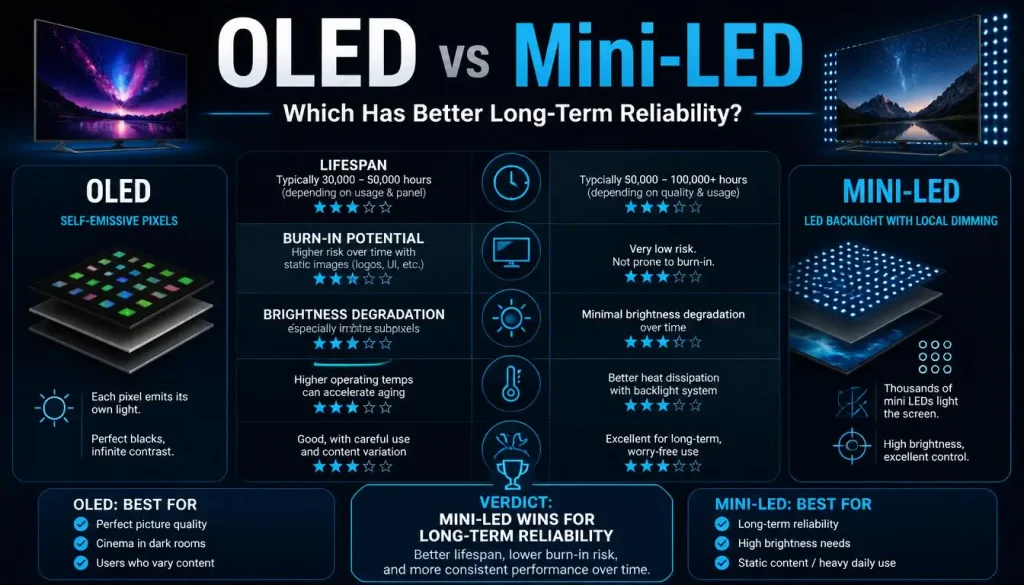
Mini-LED is another strong alternative.
Like a regular LCD, a Mini-LED display uses a backlight, so it does not suffer from OLED-style permanent image retention caused by uneven organic pixel aging.
OLED still has the advantage of controlling light at the individual-pixel level. That produces perfect blacks and eliminates the blooming that can appear around bright objects on Mini-LED screens.
For gaming and movies, many people will prefer OLED.
For heavy productivity work with lots of static content, Mini-LED can offer an appealing middle ground: high brightness, strong HDR, and no OLED burn-in concern.
Common OLED Gaming Laptop Burn-In Myths
“Every OLED gaming laptop eventually gets obvious burn-in.”
Not necessarily. OLED pixels age, but visible uneven wear depends heavily on how the panel is used.
“One long gaming session will burn the HUD into my screen.”
Burn-in is generally associated with cumulative uneven wear rather than a single ordinary gaming session.
“OLED burn-in has been completely solved.”
No. Protection systems and newer panel designs reduce the risk, but they do not eliminate the underlying possibility.
“Pixel refresh can repair permanent burn-in.”
Maintenance routines can help maintain uniformity and deal with some retention issues, but physically worn pixels cannot simply be returned to new condition by software.
“Dark mode makes burn-in impossible.”
Dark mode can reduce how brightly large parts of an OLED panel are driven, but it does not make the display immune to uneven wear.
“Keeping the gaming laptop plugged in causes OLED burn-in.”
Battery charging and OLED burn-in are separate issues. What matters for the display is how the pixels are being used.
Should You Avoid an OLED Gaming Laptop Because of Burn-In?
For most gamers, no.
You should consider an OLED gaming laptop if your priority is excellent image quality, fast pixel response, deep blacks, strong contrast, and an immersive gaming experience. It makes even more sense if you use varied content and are comfortable leaving basic OLED protection features enabled.
IPS or Mini-LED deserves stronger consideration if your laptop will spend most of every workday showing the same interface, you regularly run high brightness, you intend to keep the machine for many years, or you simply do not want to think about OLED care.
Neither choice is universally better.
It depends on what you value.
Final Verdict: Is OLED Gaming Laptop Burn-In a Dealbreaker?
For most gamers, OLED burn-in is a manageable risk rather than a dealbreaker.
Modern OLED gaming laptops have better panel technology and built-in protection features, while normal mixed use naturally reduces the amount of time any one static element stays on screen. Manufacturers such as ASUS actively include laptop-specific OLED protection mechanisms, and newer tandem OLED developments are also improving efficiency and longevity.
Burn-in becomes more relevant when the same bright HUD, taskbar, coding interface, spreadsheet, or application layout is displayed for long periods every day.
If you mainly game, watch videos, browse, and switch between different content, there is little reason to reject a good OLED gaming laptop solely because of burn-in anxiety.
If your laptop will function as an eight-to-ten-hour-per-day static workstation for the next five or six years, IPS or Mini-LED may give you better peace of mind.
That is the real OLED buying decision: not “Can burn-in happen?” but “Does the way I use my laptop make burn-in a meaningful risk?”
Frequently Asked Questions About OLED Gaming Laptop Burn-In
Do OLED gaming laptops get burn-in?
Yes, permanent burn-in is physically possible on OLED gaming laptops because OLED pixels can age unevenly. Modern protection features reduce the risk, but they cannot make OLED completely immune.
How common is OLED gaming laptop burn-in?
There is no reliable universal percentage because usage varies enormously. A laptop displaying varied games and media has a different risk profile from one showing the same static interface every day.
How long before an OLED laptop gets burn-in?
There is no fixed number of hours. Brightness, panel technology, static content, protection features, and usage pattern all affect long-term wear.
Is OLED burn-in cumulative?
Yes. Uneven OLED wear can accumulate through repeated use. A static element does not have to remain continuously visible for days to contribute to long-term wear.
Can gaming HUDs cause OLED burn-in?
Potentially. Bright health bars, mini-maps, crosshairs, scoreboards, and ability bars that remain in the same place during hundreds of hours of gameplay are more relevant than constantly changing game scenery.
Does using an OLED laptop eight hours a day cause burn-in?
Not automatically. Eight hours of varied content is very different from eight hours of the same static desktop layout. Usage pattern is critical.
Does HDR increase OLED burn-in risk?
HDR does not automatically cause burn-in. However, repeatedly displaying very bright static HDR elements can place more demand on those pixels than varied content at moderate brightness.
Does a 240Hz OLED screen burn in faster?
A 240Hz refresh rate alone does not mean the display will burn in faster. Static content, brightness, cumulative pixel usage, panel design, and protection systems are more important factors when evaluating burn-in risk.
Is OLED safe for five years of gaming laptop use?
It can be, but nobody can guarantee that every OLED panel will remain perfectly uniform for five years. Varied content, sensible brightness, and built-in OLED protection give the display a more favorable usage pattern.
Can OLED burn-in be fixed?
Temporary image retention may disappear, but permanent uneven pixel wear generally cannot be fully reversed through software.
Is OLED burn-in covered by warranty?
It depends on the laptop, manufacturer, warranty package, and country. Check the terms for your exact model rather than assuming OLED burn-in is included.
Is OLED good for gaming and coding?
Yes, especially if gaming and visual quality are priorities. However, programmers who keep the same IDE layout open for long daily sessions should use sensible OLED-care practices or consider IPS/Mini-LED if maximum long-term peace of mind is more important.
Should I buy a used OLED gaming laptop?
You can, but inspect the panel carefully. Test solid-color backgrounds and look for persistent taskbar, browser, window, or HUD patterns before buying.
OLED vs IPS: Which lasts longer?
For avoiding OLED-style burn-in specifically, IPS is safer because it does not use self-emissive organic pixels. That does not automatically mean every IPS laptop will have a longer overall hardware life.
Should I buy an OLED gaming laptop in 2026?
For gamers who care about contrast, black levels, responsiveness, and image quality, OLED remains an excellent choice in 2026. New panel technology continues to improve efficiency and longevity, including the latest tandem OLED developments. Burn-in should be considered, but for most mixed-use gamers it does not need to be the deciding reason to avoid OLED.