You're looking at a laptop listing and wondering what does U mean in a laptop processor. It's a small letter with a big effect on speed, heat, and battery life. This guide breaks it down in plain language.
Manufacturer specs and aggregate reviews agree on the basics. We'll show you how to spot it and what it means for daily use.
As of 2026, Intel and AMD still use U on many thin laptops. That letter usually signals a low-voltage mobile chip. You'll learn to read labels, specs, and cooling parts.
The next section gives the fast answer first.
what does U mean in a laptop processor
In laptop model names, "U" usually means a low-voltage mobile processor. It is built for thin laptops and long battery life. It is not a high-performance gaming chip.
Check the full model number, not just the letter. Intel and AMD both use U in different naming systems.
Why That Tiny "U" on a Laptop Sticker Causes So Much Confusion
A sticker can show a full model name like Intel Core i5-1235U. The U sits at the end and looks minor. Many shoppers focus on i5 or i7 instead.
That small suffix changes power limits and cooling. It also changes what tasks feel smooth. In our research, the biggest mix-up is treating every Core i5 as equal.
A U-series chip is made for light, quiet laptops. A gaming laptop may use a different suffix. If you only read the brand and number, you can buy the wrong machine.
The sticker is small, but the label is useful. Read the whole model name before you judge performance. That is why reading the full model name matters.
Step-by-Step: Visually Confirming the U-Suffix in Windows and on the Chassis
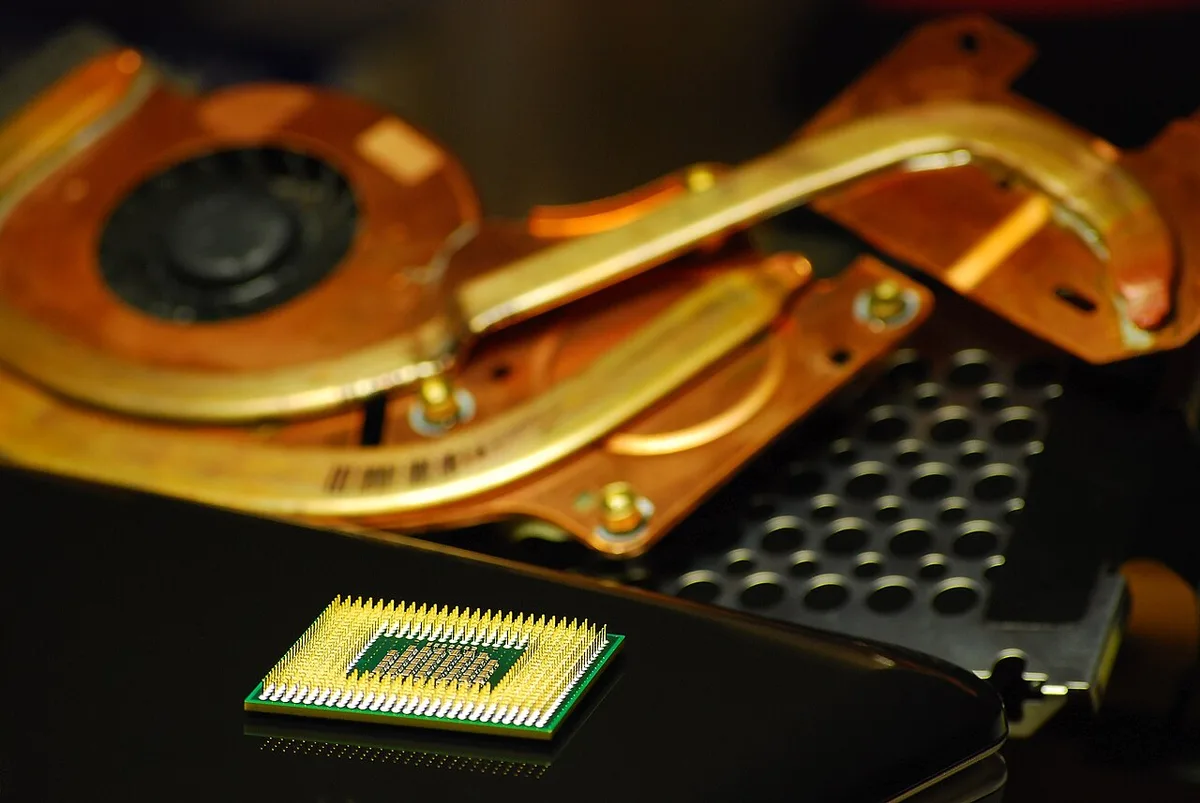
Image source: Wikimedia Commons / Diacritica (CC BY-SA)
You can confirm the suffix without opening the laptop. Start with the sticker on the palm rest or bottom cover. Then check Windows so the software matches the hardware.
This keeps you from trusting a blurry photo or a vague listing.
- Read the full processor name on the laptop sticker.
- Open Windows Settings and select System.
- Open About and find the Processor line.
- Compare that name with the sticker and box.
- Open Intel ARK or the AMD product specifications page.
- Search the exact model number, not just i5 or Ryzen 5.
If the sticker is missing, the Windows entry still helps. You can also check the BIOS screen during startup. Look for the same model number there.
If numbers disagree, trust the BIOS and manufacturer page first. A support page may list the exact SKU for your region.
Decoding Intel and AMD U-Series Naming Conventions
Intel and AMD use different naming systems, so do not guess from one brand to the other. With Intel Core chips, the suffix comes after the model number. An Intel Core i5-1235U means 12th generation, model 35, and U suffix.
The U tells you it is a low-voltage mobile part. With AMD Ryzen chips, the pattern is similar but not identical. A Ryzen 5 7530U means Ryzen 5, 7000 series, model 530, and U suffix.
The U still points to a mobile low-power design. You can verify each chip on Intel ARK or the AMD specification page. Look for TDP, base clock, and boost clock.
Those numbers tell you more than the letter alone.
| Example chip | Brand | What U signals | Better first check |
|---|---|---|---|
| Core i5-1235U | Intel | Low-voltage mobile processor | TDP and boost clock |
| Ryzen 5 7530U | AMD | Low-voltage mobile APU | TDP and integrated graphics |
| Core i7-1355U | Intel | Thin laptop power profile | Core count and cache |
| Ryzen 7 7840U | AMD | Mobile efficiency focus | Memory support and iGPU |
The letter is only one clue. The full specification page shows the real limits. Pay attention to base power and maximum turbo power.
Those values explain why two U chips can feel different.
U-Series vs H, P, Y, and HX: Reading the Suffix at a Glance
The suffix is a quick performance label. U usually means efficiency first. H and HX usually mean more power and more heat.
P often sits between them. Y is even lower power and often fanless. This is why HX chips feel very different from U chips.
| Suffix | Typical laptop type | Main goal | Common tradeoff |
|---|---|---|---|
| U | Thin and light | Battery life | Lower sustained power |
| P | Balanced thin laptops | Mixed daily use | Mid-level heat |
| H | Gaming and creator laptops | Strong performance | Louder fans |
| HX | Workstation and gaming | Maximum mobile power | Heavy cooling |
| Y | Ultra-thin fanless | Very low heat | Slower sustained speed |
Use this table as a first filter, not a final verdict. A U chip can still handle office work, web apps, and light photo edits. An H chip makes more sense for heavy games or long renders.
If you are choosing between laptops, compare the whole CPU choice and not just the letter. Also check how many CPU cores the chip has. More cores help, but cooling and power still matter.
The importance of the CPU depends on your actual tasks.
Visual Cues Inside the Chassis: Soldered SoCs and Cooling Hardware
A U-series laptop often looks simpler inside. The processor may be soldered to the motherboard. That means it is not a removable chip in a socket.
You may also see one small fan or a compact heat pipe. The cooling system is sized for a lower thermal load. This helps keep the chassis thin and quiet.
It also limits long, heavy workloads.
Look for these visual clues during a teardown or repair video:
- A small single fan instead of two large fans.
- A short heat pipe or vapor chamber.
- Soldered memory chips near the processor.
- A compact battery that fills much of the base.
- Fewer thick copper heat sinks.
These clues are not proof by themselves. Some thin laptops still use stronger cooling. Still, the pattern is common.
If you plan to upgrade memory or storage, check the service manual first. Many U-series laptops have soldered RAM. That limits future changes.
For buyers, this means choose enough RAM at purchase. For owners, it means keep vents clear and avoid blocking airflow. Aggregate reviews report that dust buildup can make a U chip throttle sooner.
Clean vents gently and use a hard surface for airflow.
Where U-Series Chips Live in the Laptop Market
You’ll mostly find these processors in ultrabooks and business-class machines. They aren’t built for heavy rendering or high-end gaming. Instead, they prioritize portability and efficiency.
Manufacturers pair them with smaller batteries and lighter chassis designs. This combination creates devices that slip easily into backpacks.
Think of the U-series as the commuter car of computing. It gets you where you need to go reliably. It doesn’t offer the raw speed of a sports sedan.
But it saves fuel and reduces wear on your shoulders. For students, travelers, and office workers, this balance is often ideal. You get all-day battery life without carrying a power brick everywhere.
The market segment is huge because most people don’t need extreme power. Web browsing, document editing, and video calls run smoothly on these chips. Even light photo editing works well thanks to integrated graphics.
You won’t be building 3D models or streaming games locally. But for 90% of daily tasks, the performance gap feels negligible.
Decoding the Full Model Number String
Knowing what "U" means is just step one. The full alphanumeric code tells the whole story. Let’s break down an example like the Intel Core i5-1235U.
Each part serves a specific purpose in identifying capability. Misreading even one digit can lead to poor purchase decisions.
First, look at the brand and tier. "Core i5" indicates mid-range positioning within the family. Next comes the generation number.
The "12" signifies it belongs to the 12th Gen Alder Lake architecture. Newer generations usually bring better efficiency and slight speed bumps.
Then we have the SKU digits. In "1235," the last two numbers differentiate features within that tier. A higher number often means more cache or faster boost clocks.
Finally, the suffix appears. Here, "U" confirms the low-power mobile designation. AMD follows a similar logic but uses different naming conventions.
| Component | Example (Intel) | Meaning |
|---|---|---|
| Brand/Tier | Core i5 | Mid-range consumer focus |
| Generation | 12 | Architecture release year |
| SKU | 35 | Specific feature set variant |
| Suffix | U | Ultra-low power mobile class |
This structure helps you compare apples to apples. Don’t assume a newer "i7-U" beats an older "i9-H." The suffix dictates the thermal limits too much. Always check the full string before assuming performance levels.
Our research shows that users often skip this crucial verification step.
Visual Identification: Spotting the Chip Label
Physical inspection remains the most reliable method. Software reports can sometimes lag behind hardware changes. When buying used or refurbished units, trust your eyes.
Look for the label on the bottom panel or near the hinge. Many manufacturers print the CPU model directly on the chassis.
If the external label is missing, open the back cover carefully. Most modern laptops use screws accessible from the underside. Locate the central processing unit beneath its heat sink.
The chip itself will have laser-etched text. This text includes the full model number and serial codes. Verify that the suffix matches the seller’s description.
Discrepancies here are red flags. If a listing claims an i7-U but the chip reads i5-U, walk away. This mismatch suggests fraud or incorrect refurbishment.
Additionally, check for signs of tampering around the socket area. Scratches may indicate previous removal attempts. Since U-series chips are soldered (BGA), removal requires specialized tools.
For those uncomfortable opening their device, BIOS access offers a safe alternative. Restart the computer and press the designated key (often F2, Del, or Esc). Navigate to the Main or Advanced tab.
The processor name should appear clearly there. This digital view mirrors the physical reality without voiding warranties. Cross-reference this info with official manufacturer documentation if uncertain about legacy models.
Common Misinterpretations of the Letter U
Many buyers confuse "U" with "Ultra" in marketing terms. Intel previously used "Ultra Low Voltage" descriptions extensively. Today, "U" simply denotes the power envelope category.
It does not guarantee premium status. An i3-U is still an entry-level chip despite the letter. Conversely, an i7-U isn’t automatically superior to an i5-H.
Another frequent error involves mixing up U-series with Y-series. Both target low power consumption. However, Y-series chips operate at even lower TDPs, often under 5 watts.
These are typically found in fanless tablets or ultra-thin convertibles. U-series allows for slightly higher sustained loads due to active cooling. Assuming they’re identical leads to disappointing expectations in demanding apps.
Users also mistake the suffix for a version indicator. Some think "U" implies updated firmware or software support. It strictly refers to hardware design parameters.
Driver updates apply regardless of the suffix. Performance differences stem from silicon limitations, not patch notes. Understanding this distinction prevents unnecessary troubleshooting searches.
Focus on architectural generation rather than just the letter when evaluating longevity. Check our guide on CPU core requirements to see how thread count interacts with these power classes.
Thermal Behavior and Sustained Performance Limits
Heat management defines the true capability of U-series processors. These chips rely on conservative power budgets to stay cool. Under short bursts, they perform admirably.
Turbo Boost frequencies spike quickly for responsive tasks. Opening apps or loading pages feels snappy and immediate. This burst mode handles typical productivity workflows efficiently.
Sustained workloads tell a different story. Continuous encoding or large file transfers generate significant heat. The system throttles clock speeds to protect components.
Fan noise increases, then decreases as temperatures stabilize. Aggregate reviews report noticeable slowdowns during extended sessions. You might experience stuttering in video playback if cooling fails.
This behavior contrasts sharply with H-series counterparts designed for endurance.
Battery drain correlates directly with thermal output. High temps force fans to spin faster, consuming energy. Efficient coding minimizes this effect, but physics wins eventually.
Users prioritizing quiet operation should appreciate U-series benefits. Less heat means less fan interference. For noisy environments, this advantage outweighs minor speed losses.
Consider whether silent operation matters more than peak throughput for your use case. Read more about gaming laptop repairs to understand how overheating impacts long-term component health.