You’re staring at two machines that look nearly identical on the outside. But inside, they serve very different masters. If you’ve ever wondered what is the difference between a gaming pc and workstation, you’re asking the right question before dropping serious cash.
The gap isn’t just about price tags or RGB lighting. It’s about architecture, reliability, and certified software support. As of 2026, manufacturers like NVIDIA and AMD draw hard lines between consumer and professional silicon.
Let’s break down exactly where those lines sit so you don’t buy the wrong tool for your job.
Why Gaming PC vs. Workstation Is Really a Workload Question
Stop thinking in terms of brand loyalty. Start thinking in terms of physics. A gaming PC optimizes for burst performance.
It wants to hit high frame rates quickly, then cool down. A workstation optimizes for sustained throughput. It runs heavy calculations for days without blinking.
Your workload dictates the hardware. If you play Call of Duty, you need low latency and high refresh rates. If you render architectural models in Revit, you need double-precision math and error correction.
These are fundamentally different engineering goals.
Consumer parts prioritize cost-per-frame. Professional parts prioritize uptime and accuracy. You can sometimes blur the lines, but usually, one design wins over the other based on the task.
Understanding this distinction saves you from overspending on features you’ll never use. Or worse, underspending on stability you desperately need.
We see many creators try to force a gaming rig into a studio role. They hit VRAM walls or driver crashes within weeks. Conversely, gamers often buy workstations expecting higher FPS, only to find slower single-core speeds.
Match the machine to the mission. That’s the golden rule here.
What a Gaming PC Is Built For (and Where It Shines)
Gaming PCs are built for speed bursts. Their components chase maximum frames per second in real-time applications. This means aggressive clock speeds and optimized driver stacks for DirectX and Vulkan APIs.
The Hardware Philosophy
Manufacturers design these systems around peak performance windows. A GeForce RTX card might boost to extreme frequencies for minutes at a time. Then it throttles slightly to manage heat.
This cycle repeats endlessly during gameplay.
Cooling solutions focus on immediate heat dissipation. Large heatsinks and multiple fans keep temperatures down during intense sessions. The goal is responsiveness.
Input lag matters more than long-term stability in competitive shooters.
Memory configurations favor capacity and speed for assets. DDR5 RAM loads textures rapidly. NVMe SSDs eliminate load screens.
The system feels snappy because everything happens instantly.
Software and Drivers
Game Ready drivers update frequently. They patch bugs for new titles released weekly. This constant churn ensures compatibility with the latest releases.
However, it introduces variability. A driver update today might fix one game but break another.
For most gamers, this trade-off is acceptable. You want the newest title running smoothly now. Stability over months matters less than performance today.
Our research shows that consumer GPUs offer incredible value for pure entertainment purposes.
If you’re building for fun, check out how do the components of a gaming pc work together to understand synergy. The balance between CPU and GPU prevents bottlenecks. This harmony delivers smooth experiences across varied genres.
What a Workstation Is Built For (and Why the Parts Differ)
Workstations prioritize reliability above all else. They run continuous, heavy computational tasks for extended periods. Accuracy and uptime trump raw speed in critical workflows.
Sustained Performance Design
Professional CPUs like Intel Xeon or AMD Threadripper Pro handle massive parallel threads. They maintain stable clocks under 100% load for hours. Thermal designs accommodate this steady-state operation without throttling aggressively.
Memory subsystems differ sharply. Workstations use Error-Correcting Code (ECC) RAM. This detects and fixes bit flips caused by cosmic rays or electrical noise.
Silent data corruption ruins renders and simulations. ECC prevents that disaster.
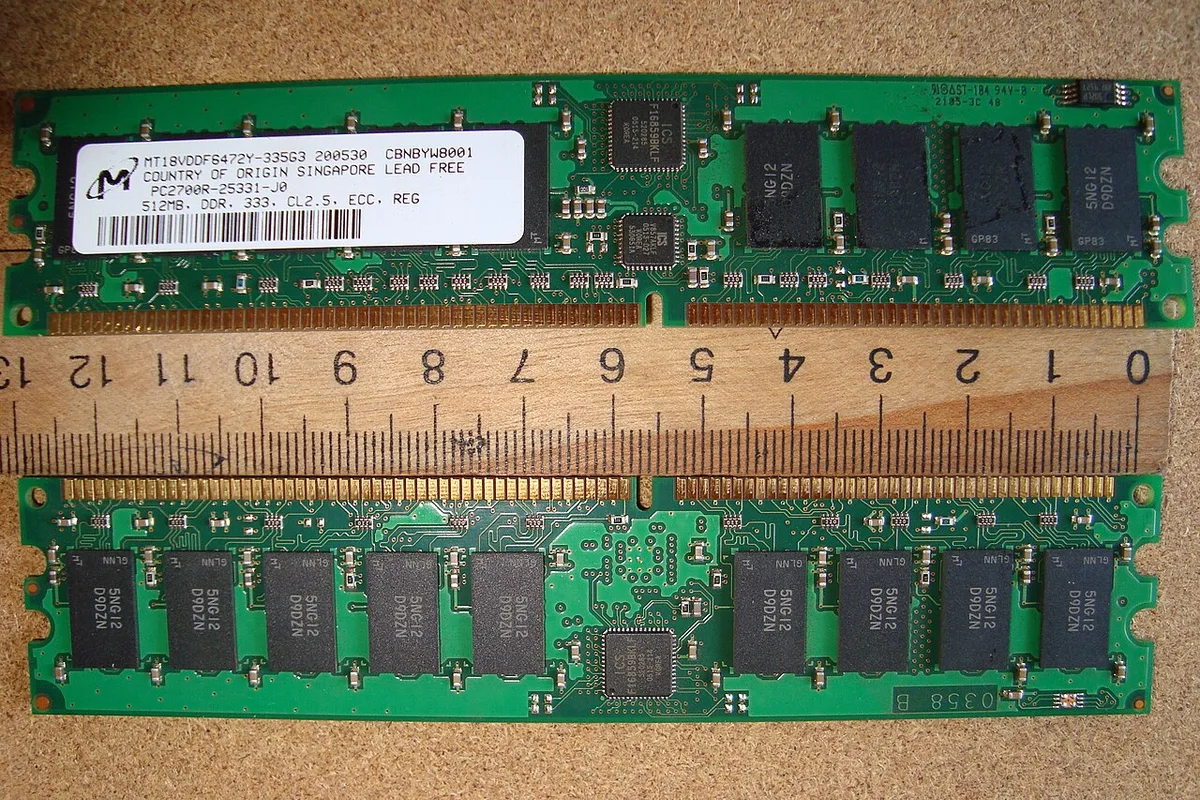
Storage controllers often support RAID configurations. Data redundancy protects against drive failures. Enterprise-grade SSDs handle write endurance better than consumer drives.
These features ensure business continuity when hardware fails.
Certified Drivers and ISV Support
Independent Software Vendors (ISVs) certify workstations for specific applications. Autodesk, Dassault Systèmes, and Adobe validate hardware combinations. This guarantees stability in complex environments like SolidWorks or Premiere Pro.
Professional GPU drivers undergo rigorous testing. Updates are less frequent but far more stable. They won’t crash your simulation halfway through a week-long calculation.
This predictability is worth the premium price tag.
For deeper insights on component roles, see what are the main parts inside a gaming pc versus their pro counterparts. The physical similarities hide vast functional differences. Always verify certification lists before purchasing.
Side-by-Side: GPU, CPU, Memory, Drivers, and Reliability
Let’s compare the core pillars directly. This table highlights where each category excels. Notice how priorities shift from speed to stability.
| Feature | Gaming PC Focus | Workstation Focus |
|---|---|---|
| GPU Architecture | Consumer GeForce/Radeon | Professional RTX Ada/Radeon Pro |
| VRAM Capacity | Optimized for texture streaming | Massive buffers for large datasets |
| CPU Cores | High single-thread boost | Many cores for parallel rendering |
| RAM Type | Standard DDR5 (Non-ECC) | ECC Registered DIMMs |
| Driver Strategy | Frequent updates for new games | Stable, certified for ISV apps |
| Reliability Goal | Peak performance bursts | Continuous 24/7 operation |
| Warranty/Support | Limited retail coverage | On-site service, longer terms |
Gaming GPUs excel at rasterization and ray tracing for visuals. They process pixels fast. Professional GPUs add double-precision floating-point capabilities.
Engineers rely on FP64 for accurate structural analysis. Gamers rarely touch this metric.
CPUs follow similar paths. Gaming chips maximize IPC (instructions per cycle). Workstation chips maximize thread count and memory bandwidth.
More lanes mean faster data movement between CPU and GPU. This reduces bottlenecks in huge projects.
Drivers act as the bridge. Game Ready drivers optimize for visual fidelity. Studio or Enterprise drivers optimize for application correctness.
Mixing them causes instability. Stick to the certified path for professional work.
Our editorial analysis confirms that mixing consumer parts into pro workflows leads to downtime. Verify specs via manufacturer documentation for exact details. Don’t assume similarity equals interchangeability.
The Real Cost Difference (Including Hidden and Long-Term Costs)
Price stickers lie. Look beyond the initial invoice. Total Cost of Ownership (TCO) reveals the true financial picture.
Upfront costs for workstations are significantly higher. A comparable professional GPU may cost three times a consumer equivalent. Yet, the lifespan differs too.
Pro cards often receive driver support for five years or more. Consumer cards drop off after two or three.
Hidden costs include lost productivity. If a gaming rig crashes during a deadline, you pay employees to wait. Downtime kills revenue.
Workstations minimize this risk through robust engineering.
Maintenance plays a role. Custom builds require troubleshooting skills. OEM workstations come with service contracts.
Technicians swap faulty parts quickly. This preserves billable hours.
Consider electricity bills. High-end gaming rigs consume significant power during peaks. Workstations idle efficiently but draw steady loads.
Over thousands of hours, efficiency ratings matter. Look for ENERGY STAR certified models.
Resale value favors branded workstations. Businesses trust Dell, HP, or Lenovo logos. Generic custom builds lose value faster.
Factor this into your budget planning.
If you’re weighing entry-level options, review what specifications define an entry-level gaming pc against pro tiers. The gap widens with every generation. Invest wisely based on expected project volume.
Which One Fits Your Actual Workload and Software
Does your software list demand certified hardware? If you run SolidWorks, CATIA, or Siemens NX, the answer is almost certainly yes. These engineering tools rely on OpenGL pipelines that professional GPUs handle natively.
Consumer cards use translation layers. This adds overhead and potential errors in viewport rendering.
Video editors face a different split. DaVinci Resolve loves CUDA acceleration. Both GeForce and RTX Ada cards perform well here.
However, Premiere Pro users often report fewer crashes with Studio drivers. The stability matters more when deadlines are tight.
Machine learning practitioners need high VRAM capacity. Training large language models requires 24GB or more per GPU. Gaming cards cap out at 16GB or 24GB for flagship models.
Professional cards offer 48GB or even 96GB. This allows larger batch sizes without swapping to system RAM.
Data scientists working with massive datasets benefit from ECC memory. Silent bit flips corrupt statistical analyses over time. A gaming PC cannot guarantee data integrity during multi-day computations.
Workstations protect the validity of your results.
Streaming setups blend both worlds. OBS runs fine on consumer hardware. But if you encode 4K HDR streams while playing games, thermal throttling becomes an issue.
A workstation chassis handles sustained loads better. Yet, most streamers stick with gaming rigs due to cost efficiency.
If you’re unsure about your specific needs, look at what can you do with a gaming pc besides gaming. Many tasks overlap, but certification gaps remain real risks. Always check the ISV database before committing funds.
Common Mistakes People Make When Choosing Between Them
Buying based on brand name alone leads to regret. "Workstation" branding sometimes hides consumer internals. Some vendors slap a premium price tag on standard parts.
Verify the actual components inside the case. Don’t assume the label guarantees professional-grade silicon.
Ignoring driver compatibility is another frequent error. Installing Game Ready drivers on a professional card breaks ISV certifications. Conversely, using Enterprise drivers on a GeForce card limits gaming performance.
Stick to the intended driver stack for your hardware class. Mixing them causes instability and voids support warranties.
Overlooking power delivery requirements hurts long-term reliability. High-end workstations draw significant steady-state power. Cheap PSUs fail under continuous load.
Ensure your unit meets 80 Plus Gold or Platinum standards. Undersized units cause shutdowns during critical renders.
Neglecting cooling headroom creates noise problems. Gaming cases prioritize airflow for bursts. Workstation tasks generate constant heat.
Without adequate ventilation, fans spin loudly. This disrupts concentration in quiet offices. Plan for acoustic dampening if silence matters.
Assuming upgrade paths are identical wastes money later. Proprietary motherboards in OEM workstations limit component swaps. Custom builds offer flexibility but lack unified support.
Decide upfront whether serviceability outweighs ease of upgrades. Read reviews on keeping it running smoothly analogies don't apply, but maintenance mindset does. Treat hardware like precision instruments, not disposable toys.
How to Decide: A Practical Framework
Start by listing your top three applications. Rank them by frequency of use. Identify which one consumes the most resources.
That primary workload determines your baseline requirement. Secondary tasks should fit within that constraint.
Next, evaluate tolerance for downtime. Can you afford a crash mid-project? For freelancers, maybe.
For studios billing hourly, absolutely not. Higher stakes justify higher investment in reliability features like ECC and redundant power supplies.
Set a strict budget ceiling including peripherals. Monitors, keyboards, and mice add up quickly. Allocate 70% to the tower itself.
Reserve 30% for accessories and future-proofing. Avoid maxing out specs immediately. Leave room for minor upgrades next year.
Check software certification lists online. Visit vendor websites for Autodesk, Adobe, or Dassault Systèmes. Search their supported hardware databases.
Confirm your chosen configuration appears there. Uncertified setups risk unsupported bugs.
Consider resale value and longevity. Will this machine serve you for three years or five? Longer lifecycles favor professional platforms.
Shorter cycles allow aggressive consumer tech adoption. Match purchase timing to your career trajectory.
Finally, weigh convenience against control. Prebuilt systems save time. Custom builds optimize value.
Choose based on your technical comfort level. If you fear troubleshooting, pay for peace of mind. If you enjoy tinkering, build it yourself.
Review top-rated brewers logic doesn't transfer directly, but the principle of matching tool complexity to user skill remains valid.
FAQs
Can I edit video professionally on a gaming PC?
Yes, many successful YouTubers and indie filmmakers use gaming PCs. Modern GeForce RTX cards accelerate encoding effectively in Premiere Pro and DaVinci Resolve. However, color grading accuracy may suffer without calibrated monitors.
Professional workflows involving client deliverables often require certified stability. For hobbyists, gaming rigs suffice. For paid contracts, consider workstation reliability.
Do I really need ECC memory for gaming?
No. Gaming titles rarely expose silent data corruption issues visible to players. Standard non-ECC DDR5 offers sufficient speed and capacity for frame rates.
ECC adds latency and cost without tangible benefits for entertainment. Save ECC budgets for scientific computing or financial modeling where precision is critical. Gamers gain nothing from error correction in real-time rendering.
Are Apple Macs considered workstations or gaming PCs?
They occupy a unique hybrid space. M-series chips excel at creative apps like Final Cut Pro and Logic Audio. They handle sustained loads quietly thanks to efficient architecture.
However, native game support remains limited compared to Windows ecosystems. Macs suit content creators prioritizing portability and battery life. Hardcore gamers still prefer discrete GPU desktops for maximum compatibility.
Is a prebuilt workstation better than a custom build?
Prebuilts offer unified support and validated configurations. One phone call resolves hardware issues. Custom builds provide component-level freedom and potentially lower costs.
But diagnosing faults falls on you. Businesses typically choose prebuilts for liability protection. Enthusiasts prefer customs for optimization.
Assess your IT support capabilities before deciding which route minimizes headache.
How long do professional GPUs receive driver updates?
NVIDIA and AMD commit to extended support for enterprise lines. Typically five to seven years of security patches and bug fixes. Consumer graphics cards drop off after two to three years.
This longevity protects investments in stable environments. Gamers accept shorter windows because new titles drive purchases. Professionals value consistency over cutting-edge features.
Check manufacturer roadmaps for exact timelines.
Final Verdict: Which One Should You Buy
Choose a gaming PC if your primary focus is entertainment. The value proposition shines brightest here. You get peak framerates, wide library support, and affordable upgrades.
Creative hobbies fit comfortably too. Just avoid relying on uncertified hardware for billable work. Risk mitigation starts with knowing your limits.
Opt for a workstation when precision pays the bills. Certified drivers prevent costly downtime. ECC memory safeguards intellectual property.
Extended warranties reduce operational anxiety. These features justify the premium for professionals. Don’t compromise stability for marginal speed gains.
Reliability trumps raw metrics in production settings.
Hybrid approaches exist for versatile users. Consider building a dual-boot system. Install Linux for compute-heavy tasks alongside Windows for leisure.
Use professional GPUs for rendering, switch modes as needed. This maximizes utility across diverse demands. Budget accordingly for such flexibility.
Ultimately, match the tool to the trade. Ask what failure costs you. If losing progress means lost income, invest in robustness.
If restarting takes minutes, embrace agility. There’s no universal winner. Only the right choice for your specific reality.
Evaluate honestly before swiping the card.
1 thought on “Gaming PC vs Workstation: Key Differences Explained”
Comments are closed.