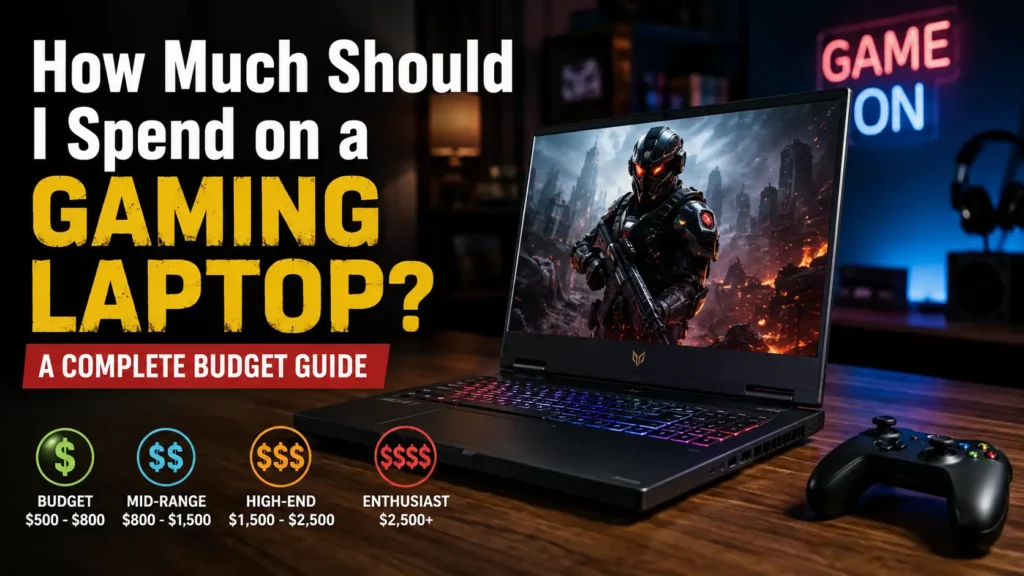
If you are wondering how much you should spend on a gaming laptop, the short answer is that most gamers do not need the cheapest machine or the most expensive one.
For most buyers, the best value sits in the mid-range, where you get enough GPU power, 16GB or more of RAM, usable SSD storage, a high-refresh display, and enough performance to enjoy modern games without paying heavily for small gains.
As a practical starting point, many US buyers should look around $1,000 to $1,500, while equivalent sweet spots are often roughly £1,000 to £1,500 in the UK, C$1,500 to C$2,200 in Canada, and A$2,000 to A$3,000 in Australia. These are buying ranges rather than fixed rules because sales, taxes, configurations, GPU power limits, and regional availability can move prices considerably. Current retail listings show just how different pricing can be between regions even for laptops built around similar graphics hardware.
The right amount for you depends on something more important than the price tag: what games you play, the resolution and frame rate you expect, how long you want the laptop to last, and whether you also need it for school, work, streaming, or content creation.
This guide will help you work out a sensible budget without paying for performance you will never use.
How Much Should You Spend on a Gaming Laptop?
A useful way to set your gaming laptop budget is to start with the experience you want rather than a specific brand or processor.
If you mainly play lighter esports titles, you can spend considerably less than someone who wants demanding AAA games at high settings. Likewise, a player targeting 1080p at 60 FPS does not need the same hardware as someone trying to drive a high-refresh 1600p display.
Here is a practical budget framework.
| Gaming Level | Approx. US Budget | Best For | What to Expect |
|---|---|---|---|
| Entry-level | Under $800 | Casual and lighter games | Basic 1080p gaming with compromises |
| Budget | $800–$1,000 | Esports and mainstream 1080p | Good value, but check display, RAM and GPU power |
| Mid-range | $1,000–$1,500 | Most gamers | Strong 1080p and useful 1440p-class performance |
| Upper mid-range | $1,500–$2,000 | AAA, high refresh, creators | Better displays, cooling and GPU headroom |
| High-end | $2,000–$3,000+ | Enthusiasts | High-end performance and premium features |
| Luxury/desktop-replacement | $3,000+ | Buyers who want very few compromises | Maximum mobile hardware, often with diminishing value |
These ranges should not be treated as hard boundaries. In August 2026, tested gaming laptops below $1,000 still exist, while current deal roundups show a particularly active market between $1,000 and $1,500. Premium systems can climb far beyond $3,000.
The Gaming Laptop Budget Sweet Spot
For the average gamer, $1,000 to $1,500 is the range I would investigate first in the US market.
Why?
At this level, you are more likely to find the combination that matters: a competent dedicated GPU, 16GB of memory, a decent processor, fast SSD storage, and a display that can actually make use of the laptop’s gaming performance.
Current deal coverage also places many attractive configurations in this band, while sub-$1,000 models increasingly require closer attention to compromises such as display quality, memory, storage, chassis quality, or GPU power limits.
Spending more can absolutely make sense, but after a point you may start paying heavily for thinner construction, OLED displays, premium materials, higher-resolution panels, more RAM, larger SSDs, or small performance gains.
How Much Does a Good Gaming Laptop Cost?
A good gaming laptop is not simply one that can launch games. It should deliver a gaming experience that feels appropriate for its price without forcing you to replace the machine immediately because of an obvious weak point.
In today’s market, a good mainstream gaming laptop generally sits above the very cheapest gaming-branded machines.
What Is the Minimum You Should Spend?
Around $700 to $900 in the US is a realistic area to begin looking if your budget is tight.
Below that, genuinely worthwhile new gaming laptops become harder to find unless there is a strong sale. You may encounter older GPUs, 8GB memory configurations, smaller SSDs, weak displays, or significant compromises elsewhere.
Recent testing has still found affordable machines capable of respectable 1080p gaming, including models starting well below $1,000, but low price alone should never be the reason to buy.
What Is a Good Budget for a Gaming Laptop?
For most people, a good budget is the lowest amount that reaches your performance target without creating an obvious bottleneck.
That usually means prioritizing the graphics processor first, followed by enough RAM, adequate cooling, a suitable display, sufficient storage, and a processor that will not hold the GPU back.
A student playing Valorant does not need the same budget as a creator playing Cyberpunk-style AAA games while also editing video.
That is why asking, “What do I need the laptop to do?” is more useful than asking, “What is the most expensive laptop I can afford?”
What Gaming Laptop Can You Get at Each Budget?
Gaming Laptops Under $700
This is bargain territory.
A new laptop below $700 can make sense if you mostly play esports titles, older games, indie games, Minecraft-style titles, or games that are not especially demanding.
Expect compromises. You may need to reduce graphics settings, and you should carefully check RAM, display quality, SSD capacity, GPU generation, and whether the memory can be upgraded.
If you find an unusually good clearance or refurbished machine, your money may stretch further.
Gaming Laptops From $700 to $1,000
This is where budget gaming becomes much more practical.
A good machine in this range should be aimed primarily at 1080p gaming. You may not get premium construction or the best screen, but you can find genuinely capable systems.
Tom’s Hardware, for example, has tested a sub-$1,000 RTX 5050-based laptop as a viable 1080p gaming option, although its display represented one of the compromises that came with the lower price.
That example captures an important lesson: never judge a gaming laptop by its GPU name alone.
Gaming Laptops From $1,000 to $1,500
For a large percentage of buyers, this is the most interesting range.
You can start expecting stronger GPUs, 16GB or more of RAM, faster screens, better CPUs, and configurations that are better suited to demanding 1080p gaming or entry-level 1440p/1600p gaming.
Current PC Gamer deal coverage identifies this range as one of the strongest areas for value, with modern RTX 50-series systems appearing throughout the category.
This is the budget I would prioritize if gaming is important to you but you still care about value.
Gaming Laptops From $1,500 to $2,000
At this level, you should expect more than simply “runs games well.”
Look for improvements in display quality, cooling, build, GPU performance, storage, memory, speakers, keyboard quality, and overall refinement.
This range can be attractive for players targeting higher-resolution gaming, creators who need more memory and storage, or buyers hoping to keep the laptop for several years.
Gaming Laptops Over $2,000
Above $2,000, performance can still rise significantly, but value becomes more complicated.
You may be paying for a more powerful GPU, a premium OLED or mini-LED display, a slimmer chassis, higher-end materials, additional storage, 32GB or 64GB of memory, advanced cooling, or simply a prestigious product line.
Premium machines can become extremely expensive. A 2026 ROG Zephyrus G16 configuration reviewed by PC Gamer reached well above $4,000, illustrating how far the high end can move beyond mainstream gaming-laptop budgets.
Buy in this category because you have a clear reason—not because the largest number must be the best choice.
How Much Gaming Laptop Do You Actually Need?
Your games should decide your budget.
Casual and Indie Gamers
If your library is dominated by indie titles, older games, Roblox, Minecraft, or less demanding games, spending $1,500 on a gaming laptop may be unnecessary.
A capable entry-level or budget laptop could already provide the experience you need.
Competitive Esports Gamers
Games such as Valorant, Counter-Strike 2, Fortnite, Rocket League, and League of Legends often reward high frame rates more than ultra-detailed graphics.
Your priorities should include a capable CPU, a suitable GPU, a high-refresh-rate display, good cooling, and low enough system latency.
A strong budget or mid-range laptop is often a better use of money than an ultra-premium machine.
AAA Gamers
If you regularly buy visually demanding new releases, allocate more of your budget to the GPU.
You will benefit more from graphics headroom, enough VRAM, better cooling, and technologies such as upscaling and frame generation than from paying extra for cosmetic features.
Streamers and Content Creators
Gaming plus streaming, video editing, 3D work, or heavy multitasking changes the calculation.
A stronger processor, 32GB of RAM, more storage, and a better display may become worthwhile even if those upgrades do not directly increase gaming FPS.
Students Who Also Game
Students should balance performance against weight, battery life, charger size, and portability.
A huge desktop-replacement laptop may be excellent at a desk and frustrating to carry between classes.
Do not spend your entire budget on the GPU and then discover that you hate using the machine away from home.
What Specs Should Your Gaming Laptop Budget Prioritize?
GPU: Put Gaming Performance First
For a gaming-focused purchase, the GPU usually deserves the largest share of your attention.
A faster CPU cannot compensate for a graphics processor that is too weak for the resolution and settings you want.
However, GPU model names do not tell the entire story.
GPU TGP and Wattage: Why the Same GPU Can Perform Differently
Two laptops carrying the same GPU name can perform differently because manufacturers may configure the graphics processor with different power limits and cooling systems.
Current retail listings show this clearly. Currys lists an RTX 5060 Acer Nitro V configuration with a 95W maximum GPU power, while another RTX 5060 ASUS configuration has been listed at 115W. Australian retailers also list RTX 5060 laptops with explicitly stated TGP figures.
That does not mean “higher wattage always wins,” because cooling, firmware, CPU choice, and chassis design also matter.
It means you should compare real gaming benchmarks, not just GPU badges.
VRAM: How Much Do You Need?
VRAM is the dedicated memory used by the GPU for textures, rendering data, and other graphics workloads.
For mainstream gaming, 8GB of VRAM is now common on current mid-range laptop GPUs such as the RTX 5060. Current UK and Australian retailer listings show multiple RTX 5060 gaming laptops with 8GB of graphics memory.
If you intend to keep the laptop for years, use higher-resolution textures, play at higher resolutions, or work with GPU-heavy creative software, additional VRAM headroom can become more valuable.
Do not buy based on VRAM alone, though. GPU architecture and overall performance matter just as much.
CPU: Do Not Overspend
A good gaming CPU matters, especially in competitive titles and games that rely heavily on simulation or high frame rates.
But there is little reason to buy the most expensive mobile CPU available if doing so forces you into a significantly weaker GPU.
For a gaming-first machine, a balanced CPU paired with the strongest sensible GPU is often a better purchase.
RAM: Is 16GB Enough?
For a mainstream gaming laptop, 16GB is the practical starting point I would aim for.
Current gaming-laptop listings across the UK, Canada, and Australia frequently pair mid-range dedicated GPUs with 16GB or more of memory.
If you stream, edit video, use large mods, keep many applications open while gaming, or want more long-term headroom, 32GB can be worthwhile.
Is Paying Extra for 32GB RAM Worth It?
It depends on the price difference.
I would rather buy a laptop with a better GPU and upgradeable 16GB RAM than sacrifice a meaningful amount of graphics performance simply to get 32GB preinstalled.
However, the decision changes if the laptop uses soldered memory that cannot be upgraded later.
Always check before buying.
Storage: Is 512GB Enough?
Technically, yes. Practically, it can fill quickly.
The operating system, applications, recordings, and several large games can consume a substantial portion of a 512GB drive.
If your budget allows it, 1TB is a more comfortable starting point for a dedicated gaming machine.
If you find an excellent laptop with 512GB storage, check whether it has a spare M.2 slot. Storage is often easier to upgrade than the GPU.
Display Resolution and Refresh Rate
A powerful GPU connected to a poor display is wasted potential.
For budget gaming, a 1080p or 1200p high-refresh panel is sensible.
As your budget rises, 1440p, 1600p, OLED, HDR, higher brightness, better color reproduction, and faster refresh rates become more common.
Do not automatically assume that a higher-resolution screen is better. Higher resolution also gives the GPU more pixels to render.
Cooling and Thermal Performance
Gaming laptops operate under sustained heavy load.
A machine with excellent specifications on paper can disappoint if its cooling system cannot maintain those speeds.
Before buying, look at independent reviews that test sustained gaming performance, surface temperatures, noise, and whether the CPU or GPU throttles.
Build Quality and Portability
Thin, light, premium laptops often cost more than heavier performance-focused alternatives with similar GPU names.
That extra money can still be justified if portability matters to you.
If the laptop will remain on a desk most of the time, paying a large premium simply to save a few hundred grams may offer little value.
How Much Should You Spend Based on the Games You Play?
There is no reason to buy hardware for a workload you do not have.
| Gaming Type | Sensible Starting Budget | Main Priority |
|---|---|---|
| Roblox, Minecraft, indie games | $600–$900 | Basic dedicated GPU/value |
| Valorant, CS2, LoL, esports | $700–$1,200 | High FPS, CPU, refresh rate |
| Fortnite and mainstream multiplayer | $800–$1,300 | Balanced GPU/CPU |
| Modern AAA games | $1,000–$1,700 | GPU and VRAM |
| High-refresh 1440p-class gaming | $1,400–$2,200+ | Stronger GPU and cooling |
| AAA + streaming/content work | $1,500–$2,500+ | GPU, CPU, 32GB RAM |
| Enthusiast/maximum settings | $2,000+ | High-end GPU and premium cooling |
These are planning ranges, not performance guarantees. Laptop performance varies significantly by configuration and power limits.
How Much Should You Spend for 1080p, 1440p, or 4K Gaming?
Budget for 1080p Gaming
1080p remains the easiest target for a budget-conscious gamer.
You do not need a flagship GPU to enjoy smooth 1080p gaming, and current sub-$1,000 systems can still provide solid results in this resolution when the configuration is well chosen.
For most 1080p players, I would explore roughly $800 to $1,300 before spending more.
Budget for 1440p Gaming
Higher-resolution gaming places more load on the GPU.
For a strong 1440p-class experience, especially in demanding games, a budget around $1,300 to $2,000 gives you more realistic options.
You should pay closer attention to the GPU, VRAM, cooling, and whether the laptop display itself is 1440p/1600p-class.
Budget for 4K Gaming
Native 4K gaming on a laptop is expensive and often unnecessary.
A 15- or 16-inch display does not always provide enough visual benefit to justify the additional GPU load and cost.
If 4K output to an external monitor or television matters to you, high-end hardware may make sense. Otherwise, a strong 1440p/1600p experience often provides a better balance.
60 FPS vs 120+ FPS
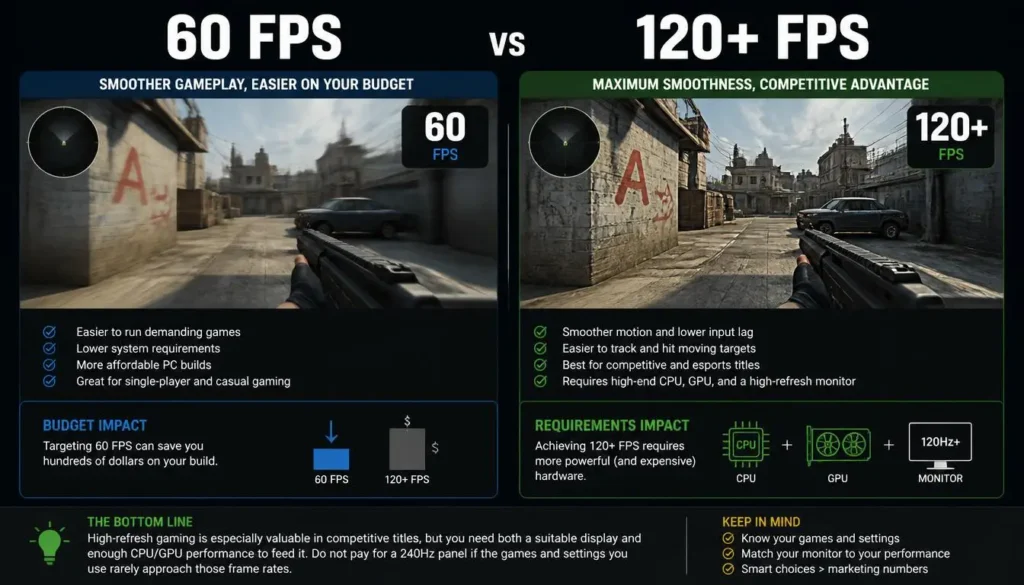
Aiming for 60 FPS is much easier on your budget than trying to maintain 120, 144, 165, or more FPS in demanding games.
High-refresh gaming is especially valuable in competitive titles, but you need both a suitable display and enough CPU/GPU performance to feed it.
Do not pay for a 240Hz panel if the games and settings you use rarely approach those frame rates.
How Much Should You Spend on a Gaming Laptop by Country?
Regional pricing matters.
Do not simply convert US dollars into pounds, Canadian dollars, or Australian dollars and assume the result reflects the local market.
Taxes, VAT, GST, promotions, distribution, model availability, and warranties can all affect the final price.
United States
A practical starting framework is:
| Budget | Typical Buyer |
|---|---|
| Under $800 | Entry-level |
| $800–$1,000 | Budget gamer |
| $1,000–$1,500 | Best area for many mainstream gamers |
| $1,500–$2,000 | Upper mid-range |
| $2,000+ | High-end |
Current US testing still identifies sub-$1,000 gaming laptops, while current deal coverage places many attractive modern configurations in the $1,000–$1,500 bracket.
United Kingdom
For UK buyers, roughly £1,000 to £1,500 is a useful area to investigate for a serious mainstream gaming machine.
As of August 2026, Currys listings show modern RTX 5060 systems around this broad area, although exact prices vary significantly with screen, CPU, storage, power limits, and discounts.
Remember that UK advertised consumer pricing generally includes VAT, so avoid comparing it directly with a US sticker price without considering tax treatment.
Canada
For Canadian buyers, approximately C$1,500 to C$2,200 is a useful mainstream range to examine, with high-end systems climbing substantially beyond it.
Current Best Buy Canada and Memory Express listings show RTX 5060 gaming laptops spanning a wide price range depending on configuration, brand, display, RAM, and promotions.
The lesson is simple: compare the whole laptop, not just the GPU.
Australia
Australia often presents higher nominal gaming-laptop prices than the US market.
A sensible mainstream search range is approximately A$2,000 to A$3,000, although sales can change the picture quickly.
In August 2026, Australian retail listings show RTX 5060 systems around A$2,098 on sale at the lower end, with other configurations around A$2,699, A$2,999, or considerably more depending on brand and features.
For Australian buyers, waiting for a meaningful retailer promotion can therefore make a substantial difference.
Is a Cheap Gaming Laptop Worth It?
Yes—if it meets your actual needs.
A cheap gaming laptop is a bad purchase only when the compromises prevent it from doing what you bought it to do.
For an esports player, a lower-cost 1080p system may be excellent value.
For someone planning to play demanding new AAA releases for four or five years, the same laptop may be a false economy.
What Do You Sacrifice?
The common compromises are not always obvious from the headline specifications.
A cheaper gaming laptop may use a dimmer or slower display, lower GPU power limits, less RAM, less storage, a smaller battery, weaker speakers, a cheaper chassis, poorer webcam, limited ports, or a cooling system that becomes loud under load.
That is why buying the cheapest laptop carrying a specific GPU name can backfire.
Is $1,000 Enough for a Good Gaming Laptop?
Yes, $1,000 can be enough, particularly for 1080p gaming.
Current testing still identifies credible gaming laptops at or below that level.
However, $1,000 is also a price where you need to shop carefully.
Prioritize the GPU, 16GB of RAM if possible, an acceptable high-refresh display, upgradeability, and sufficient cooling.
If a $1,050 laptop fixes two or three major weaknesses of a $900 machine, spending the extra $150 may provide much better long-term value.
Is $1,500 the Sweet Spot for a Gaming Laptop?
For many gamers, yes.
Around $1,500 gives manufacturers more room to balance the GPU, processor, RAM, display, cooling, storage, and build quality rather than optimizing one headline specification while cutting elsewhere.
Current deal coverage also shows strong competition in the $1,000–$1,500 segment.
But do not spend $1,500 automatically.
If a $1,100 laptop already exceeds your needs, the additional $400 would be better kept in your pocket.
When Does Spending More Stop Making Sense?
This is where diminishing returns matter.
Imagine one laptop costs $1,500 and another costs $2,500.
The more expensive machine may be faster, but it will not necessarily feel 67% better simply because it costs 67% more.
At the high end, part of the premium may pay for OLED displays, metal construction, lower weight, larger SSDs, premium speakers, RGB lighting, flagship CPUs, or thinner chassis designs.
Those features can be valuable. They are simply not the same thing as gaming performance.
The best gaming-laptop budget is therefore not the maximum amount you can afford. It is the point where spending more stops meaningfully improving your own experience.
Gaming Laptop vs Gaming Desktop: Where Should Your Budget Go?
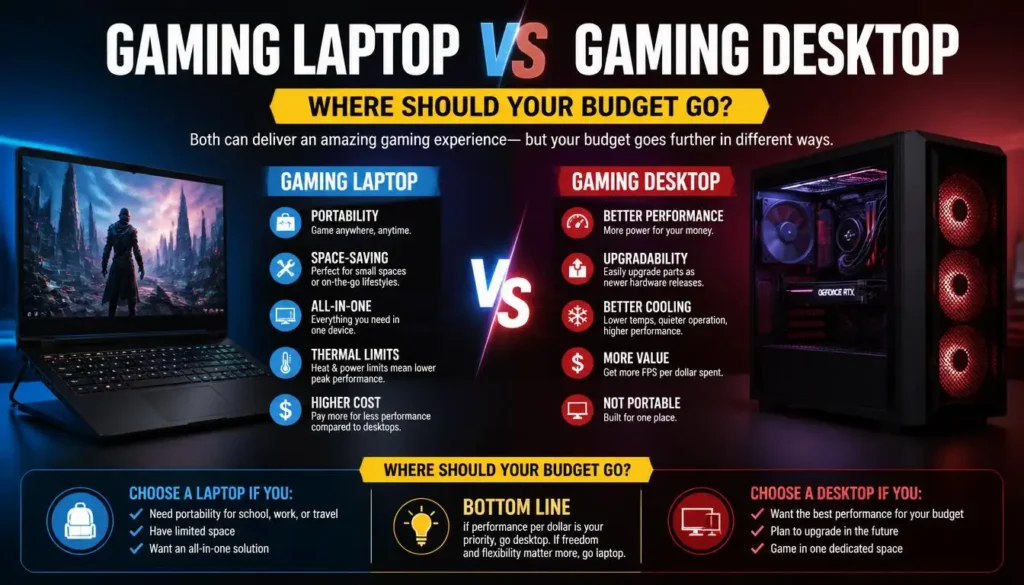
A desktop generally gives you more freedom to upgrade major components later.
A gaming laptop gives you portability, an integrated display, keyboard, trackpad, battery, speakers, and an entire gaming system in one package.
If you never move your computer and already own a monitor and peripherals, compare your gaming-laptop budget with a desktop before buying.
If you travel, study away from home, work between locations, or need a single machine for everything, the laptop’s portability may easily justify the premium.
Should You Buy New, Used, or Refurbished?
A new gaming laptop gives you the simplest warranty experience and the lowest uncertainty.
A refurbished or open-box laptop can stretch your budget further, especially when previous-generation premium hardware falls into a mainstream price range.
A used machine can offer even better specifications for the money, but the risk is higher.
Pay particular attention to battery health, screen condition, charging ports, keyboard wear, fan noise, temperatures, hinges, SSD health, warranty status, and signs that the laptop has been opened or repaired.
For expensive used gaming hardware, I would rather pay slightly more to a reputable refurbisher or retailer with a meaningful return policy than chase the lowest possible marketplace price.
Should You Buy Now or Wait for a Sale?
If your current laptop still works, patience can save money.
Gaming-laptop prices can move dramatically during product refreshes, clearance periods, major retail events, and holiday sales.
One of the best strategies is to decide your required specifications first and watch several suitable models rather than becoming attached to one exact laptop.
A discounted previous-generation upper-mid-range machine can sometimes be a better purchase than a newly released entry-level model.
But compare actual performance before assuming that “older” automatically means slower.
Hidden Costs to Include in Your Gaming Laptop Budget
Do not spend your entire budget on the laptop itself.
You may also want a gaming mouse, headset, controller, laptop stand, external monitor, larger SSD, additional RAM, USB hub, backpack, replacement charger, extended warranty, or accidental-damage coverage.
If your total budget is $1,500 and you know you need $200 of accessories, shop for a $1,300 laptop rather than buying a $1,500 laptop and discovering the real cost later.
How Long Should a Gaming Laptop Last?
A well-chosen gaming laptop can remain useful for years, but “last” has two meanings.
The hardware may continue working long after it stops delivering the graphics settings you want.
A budget machine bought for today’s minimum requirements is more likely to need reduced settings sooner than an upper-mid-range system with greater graphics headroom.
Your expectations matter too. Someone satisfied with medium settings can keep the same laptop useful longer than someone who insists on ultra settings in every new release.
How Much Should You Spend to Future-Proof?
There is no truly future-proof gaming laptop.
Technology changes, new games become more demanding, and laptop GPUs normally cannot be upgraded.
Instead of trying to future-proof forever, buy enough headroom for your realistic ownership period.
If you want to keep the machine for four or five years, I would prioritize a stronger GPU, adequate VRAM, 16GB minimum memory with an upgrade path where possible, 1TB-class storage or expandable storage, and strong cooling.
Do not spend hundreds extra on a flagship CPU while choosing a noticeably weaker GPU in the name of future-proofing.
Is It Better to Spend More Now or Upgrade Later?
It depends on the component.
RAM and SSD storage may be upgradeable.
The laptop GPU and CPU usually are not practical upgrade targets.
Therefore, when choosing between two models, paying extra for the stronger non-upgradeable GPU can make more sense than paying extra for a larger SSD that you could replace later.
Check the service manual or manufacturer’s specifications before assuming that RAM or storage can be upgraded. Some thin laptops use soldered memory.
How to Get the Most Gaming Performance for Your Money
The best way to maximize value is to compare complete systems rather than shopping by one specification.
Focus first on the GPU performance you need. Then check the GPU power limit, processor, RAM, VRAM, display, cooling, SSD capacity, and upgradeability.
After that, read or watch independent reviews showing real game benchmarks.
A gaming laptop that produces the performance you want for $1,200 is a better deal than a $1,700 laptop that looks more impressive on a specification sheet but gives you features you will never use.
Common Gaming Laptop Budget Mistakes to Avoid
The most expensive mistakes are usually caused by focusing on the wrong number.
Do not buy the cheapest gaming laptop simply because it has “RTX” on the box. Do not spend heavily on a flagship CPU while accepting a weaker GPU. Do not assume two laptops with the same graphics chip perform identically. Do not ignore GPU TGP, cooling, display quality, RAM configuration, VRAM, storage capacity, or upgradeability.
Also avoid paying for a 4K screen, enormous RAM capacity, ultra-thin chassis, premium RGB system, or top-tier processor unless you know why you need it.
Every dollar should solve a problem you actually have.
So, How Much Should You Spend on a Gaming Laptop?
For most gamers, the answer is simpler than gaming-laptop marketing makes it seem.
Start with your games, desired resolution, target frame rate, and expected ownership period. Then find the least expensive laptop that meets those requirements without an obvious weak point.
Here is the short version:
| Your Situation | Sensible US Starting Range |
|---|---|
| Casual gaming | $600–$900 |
| Esports gaming | $700–$1,200 |
| Mainstream 1080p gaming | $800–$1,300 |
| Best overall balance | $1,000–$1,500 |
| Demanding AAA gaming | $1,200–$1,800 |
| 1440p/high-refresh gaming | $1,400–$2,200 |
| Gaming + streaming/content creation | $1,500–$2,500 |
| Enthusiast/high-end gaming | $2,000+ |
If you simply want one recommendation, aim around the $1,000–$1,500 range in the US and adjust for your local market.
Spend less if you play lighter games.
Spend more if you genuinely need higher-resolution gaming, high frame rates in demanding titles, premium portability, professional creative performance, or several years of extra hardware headroom.
The goal is not to buy the most powerful gaming laptop you can afford.
It is to avoid paying for power you will never notice while still buying enough performance that you will not regret the purchase a year from now.
Frequently Asked Questions
Is $500 Enough for a Gaming Laptop?
For a brand-new dedicated gaming laptop, $500 is extremely restrictive. At that level, consider strong sales, refurbished machines, previous-generation hardware, or whether a non-gaming laptop is enough for the lighter games you play.
Is $700 Enough for a Gaming Laptop?
It can be. Around $700 is where entry-level dedicated gaming laptops become more realistic, particularly during sales. Expect compromises in the GPU, display, RAM, storage, build quality, or cooling.
Is $1,000 Enough for a Gaming Laptop?
Yes. A carefully selected $1,000 gaming laptop can provide a very good 1080p experience. Current testing still shows viable sub-$1,000 gaming models.
Is $1,500 Too Much for a Gaming Laptop?
Not if you regularly play demanding games or want better performance, cooling, display quality, storage, and longevity. For many serious gamers, the $1,000–$1,500 range is one of the most sensible places to shop.
Is $2,000 Worth Spending on a Gaming Laptop?
It can be if the extra money produces performance or features you will actually use. For a casual 1080p gamer, it is probably unnecessary. For demanding AAA gaming, high-refresh higher-resolution gaming, streaming, or professional creative workloads, it may be justified.
How Much Should a Beginner Spend on a Gaming Laptop?
A beginner should usually start around $800 to $1,200 rather than jumping immediately to a premium system. This provides enough performance to discover what types of games and features matter to you without overspending.
How Much Should a Student Spend on a Gaming Laptop?
Around $800 to $1,500 covers a wide range of useful student gaming laptops. However, students should consider battery life, weight, charger size, webcam quality, and portability alongside gaming performance.
How Much Should I Spend on a Gaming Laptop for Fortnite?
You do not need an ultra-high-end laptop for Fortnite. A budget between roughly $700 and $1,200 can make sense depending on the resolution, graphics settings, and frame rate you want.
Is 16GB RAM Enough for Gaming?
For most mainstream gaming, 16GB is a sensible starting point. Buyers who stream, create content, run heavy mods, or multitask extensively may benefit from 32GB.
Is 512GB Enough Storage for a Gaming Laptop?
It is enough to start, but it can become restrictive if you install several large games. A 1TB SSD or an upgradeable laptop is more comfortable for a dedicated gaming machine.
Should I Spend More on the CPU or GPU?
For a gaming-first laptop, prioritize the GPU once you have a competent CPU. A significantly stronger graphics processor usually provides more gaming benefit than moving from an already capable CPU to an expensive flagship processor.
Does GPU Wattage Matter in a Gaming Laptop?
Yes. Laptops with the same GPU name can use different GPU power limits, which can contribute to different performance results. Current RTX 5060 retail configurations, for example, are listed with differing maximum GPU power levels.
How Much VRAM Do I Need in a Gaming Laptop?
For current mainstream gaming laptops, 8GB VRAM is common in GPUs such as the RTX 5060. Higher-resolution gaming, demanding texture settings, heavy modding, and some creative workloads can benefit from additional graphics-memory headroom.
Is a Refurbished Gaming Laptop Worth It?
Yes, especially when a refurbished previous-generation premium laptop costs the same as a weaker new entry-level model. Buy from a reputable seller, check the warranty and return policy, and verify the condition of the battery, display, cooling system, keyboard, storage, and charger.
How Long Should a Gaming Laptop Last?
There is no fixed lifespan for gaming usefulness. A well-maintained laptop can continue operating for years, while its gaming performance gradually becomes less suited to newer titles. Buying enough GPU headroom and choosing upgradeable RAM or storage where possible can extend its useful life.
Is It Cheaper to Buy a Gaming Laptop or Build a Gaming PC?
A desktop can offer better upgrade flexibility and may provide better performance value when you already own the required monitor and peripherals. A laptop includes the display, keyboard, battery, speakers, portability, and complete system, so the better choice depends on how you actually plan to use it.
2 thoughts on “How Much Should I Spend on a Gaming Laptop? A Complete Budget Guide”
Comments are closed.