Getting the wrong gaming laptop charger wattage is one of those mistakes that looks harmless until you're mid-match and your battery starts draining while plugged in. The answer isn't a single number. It depends on your laptop model, how hard you're pushing it, which charging port it uses, and what power protocol that port speaks.
Get it right and your machine runs at full speed. Get it wrong and you'll see throttling, slow charging, or worse.
Manufacturer specifications indicate that most gaming laptops ship with adapters ranging from 180W to 330W, and USB-C Power Delivery (PD) chargers top out at 240W under the USB PD 3.1 spec as of 2026. That gap matters more than people realize. This guide walks you through the variables, the math, and the decision branches so you pick a charger that actually keeps up.
Let's start with why there's no universal answer.
how to choose the correct gaming laptop charger wattage
Match the original adapter's voltage and wattage, confirm the connector type fits your port, verify your laptop supports the charging protocol (barrel or USB-C PD), and choose a charger that meets or slightly exceeds your sustained gaming draw. Check the OEM label first. When in doubt, match OEM specs exactly rather than guessing.
Why Gaming Laptop Charger Wattage Isn't One-Size-Fits-All
Here's the thing. Two laptops sitting next to each other can need wildly different power. A thin 14-inch gaming laptop with an RTX 4060 might ship with a 180W adapter.
A 17-inch beast with an RTX 4090 and a desktop-class CPU can demand 330W or more. Same brand. Same year.
Different answer.
The wattage on the box isn't just about charging speed. It's about whether the power supply can feed both the battery and the components at the same time. When you're gaming, the CPU and GPU pull hard.
If the adapter can't cover that draw, the laptop pulls the difference from the battery. That's why your charge percentage drops during a session even though you're plugged in.
So the real question isn't "what wattage do gaming laptops need?" It's "what wattage does your laptop need under your load?" That's a decision tree, not a lookup table.
A few variables drive the answer:
- Laptop model and SKU, exact part numbers matter
- Original adapter rating, voltage, amps, and watts printed on the brick
- Charging port type, barrel connector or USB-C
- Charging protocol, proprietary or USB-C PD
- Typical gaming load, light esports titles vs. AAA ray tracing
- Battery state, charging from empty vs. topping off
The Variables That Change Your Wattage Answer (Model, Load, Port, Protocol)
Let's break down each variable so you can actually use them.
Model and SKU. Manufacturers often sell the same chassis with different GPU options. A laptop with an RTX 4050 and one with an RTX 4070 in the same body may ship with different adapters. Always check your specific model number, not just the product line.
Gaming load. Lighter games like Valorant or Rocket League pull less power than Cyberpunk 2077 with ray tracing on. If you mostly play esports titles, you might get away with slightly less headroom. If you run AAA games at max settings, you need the full rated adapter.
Charging port type. This is the big fork in the road. Older and larger gaming laptops use a round barrel connector with a proprietary voltage. Newer models increasingly charge over USB-C.
The port type determines which chargers are even compatible.
Charging protocol. USB-C charging isn't one standard. USB Power Delivery (PD) negotiates voltage and current between charger and device. Some laptops support PD 3.0 at 100W.
Newer ones support PD 3.1 at 140W or 240W. Your laptop must support the higher profile to use it.
Here's a quick decision branch:
- If your laptop has only a barrel port → you need an OEM or compatible proprietary adapter at the rated voltage and wattage.
- If your laptop has USB-C PD charging → you can use a USB-C PD charger, but only up to what the laptop supports.
- If your laptop has both → the barrel adapter usually delivers full power; USB-C may be a lower-wattage fallback.
Aggregate reviews report that users who ignore the protocol step often buy a 100W USB-C charger for a laptop that only accepts 65W over PD, or worse, one that needs 180W via barrel. Neither works well.
How to Read the Original Adapter Label and Calculate True Wattage
This is the single most reliable starting point. The original adapter label tells you exactly what the laptop was designed to receive. Don't guess.
Read it.
Look for three numbers on the brick or the label:
- Input: usually 100-240V AC (universal)
- Output voltage: often 19.5V or 20V
- Output current: e.g., 9.23A, 11.8A, or higher
To calculate wattage, multiply volts by amps. A 19.5V adapter at 9.23A delivers about 180W. A 20V adapter at 11.5A delivers 230W.
That's your target number.
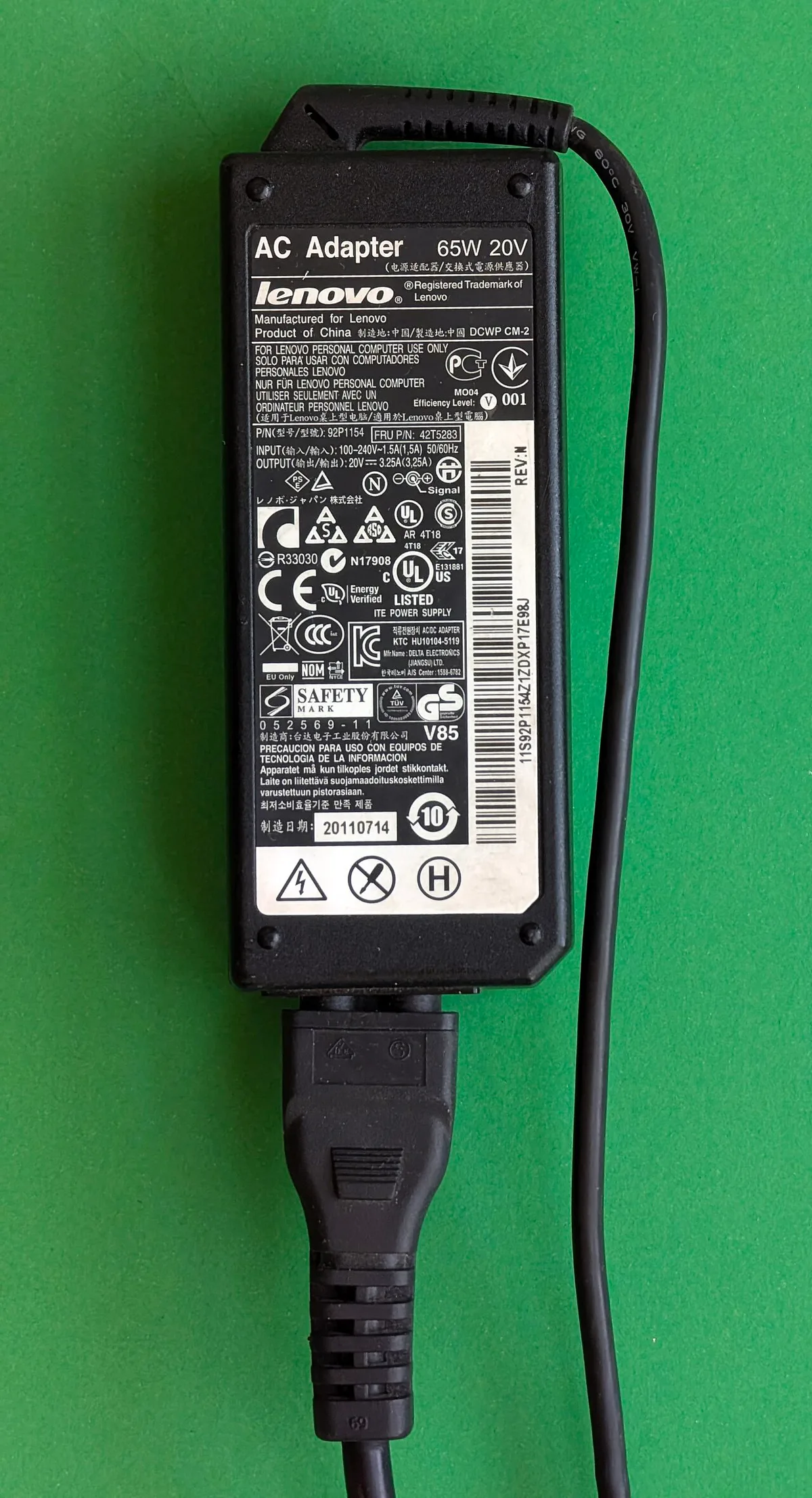
Image source: Wikimedia Commons / Siarhei Besarab (CC BY-SA)
If you've lost the original adapter, check the laptop's underside or the manufacturer's support page. OEM documentation lists the exact adapter part number and wattage. You can also check the BIOS or system info, which sometimes reports the expected adapter wattage.
A few things to watch for:
- Voltage must match exactly. Don't swap a 19.5V adapter for a 20V one unless the manufacturer says it's compatible.
- Wattage can go up, not down. A 230W adapter replacing a 180W one is usually fine if voltage matches. The laptop only draws what it needs.
- Amperage is the hidden spec. Two adapters both labeled 180W might have different voltage and current combinations. Match both.
Per USB-IF specifications, USB-C PD chargers advertise their power profiles. Check the charger's label for supported profiles like 5V/3A, 9V/3A, 15V/3A, 20V/5A. A 100W USB-C charger supports 20V/5A.
If your laptop needs 140W, you need a PD 3.1 charger with 28V/5A support.
USB-C PD vs Barrel Connector: Which Charging Path Your Laptop Uses
This comparison trips up a lot of buyers. Let's clear it up.
| Feature | Barrel Connector Adapter | USB-C PD Charger |
|---|---|---|
| Max wattage | 180W to 330W+ | 100W (PD 3.0) or 240W (PD 3.1) |
| Compatibility | OEM-specific, often proprietary | Universal across PD devices |
| Portability | Bulky brick, fixed cable | Compact GaN designs available |
| Protocol | Proprietary DC input | USB Power Delivery negotiation |
| Best for | High-end gaming laptops under heavy load | Mid-range laptops, travel, lighter gaming |
Barrel connectors dominate the high end for a reason. A proprietary 230W barrel adapter delivers consistent power without negotiation overhead. The laptop knows exactly what it's getting.
USB-C PD is more flexible but has ceilings. Even with PD 3.1 at 240W, some gaming laptops still need 280W or 330W. Those machines simply can't run at full power over USB-C.
They'll charge slowly or throttle.
If you're considering a USB-C charger for a gaming laptop, verify three things:
- Does the laptop support USB-C charging at all?
- What's the maximum PD wattage it accepts?
- Does it throttle or charge slowly on USB-C vs. barrel?
Manufacturer specs confirm that many gaming laptops charge over USB-C at 65W or 100W only, even when the barrel adapter is 180W. That USB-C port is for convenience, not full-power gaming. If you plan to game hard, use the barrel adapter.
Decision Branches: Match, Exceed, or Reject a Charger
Now let's put it together into a decision flow. This is where how to choose the correct gaming laptop charger wattage becomes practical.
Branch 1: You have the original adapter.
Match it. Same voltage, same or higher wattage, same connector. Don't downgrade.
Branch 2: You need a replacement and the original is discontinued.
Find the OEM part number. Search the manufacturer's support site. If unavailable, look for a third-party adapter with identical voltage, equal or higher wattage, identical connector size and polarity, and safety certifications like UL and CE.
Branch 3: You want USB-C PD for travel.
Check your laptop's max PD wattage. Buy a charger that supports that exact profile. A 100W charger for a 100W-capable laptop.
A 140W PD 3.1 charger for a 140W-capable laptop. Don't overbuy expecting more power than the laptop accepts.
Branch 4: You're considering a higher-wattage charger.
Generally safe if voltage matches. A 230W adapter on a 180W laptop won't force extra power. The laptop draws only what it needs.
But don't go wildly over spec, and never exceed the port's voltage rating.
Branch 5: Reject the charger if any of these are true.
- Voltage doesn't match
- Connector size or polarity differs
- Wattage is lower than the original
- No safety certifications
- Unknown brand with no reviews or support
- Cable isn't rated for the wattage
If you're also dealing with performance issues, a charger problem can masquerade as a hardware problem. You might see FPS drops during gaming or thermal throttling when the real culprit is an underpowered adapter. Checking your charger should be step one before chasing software fixes.
If your laptop runs hot while charging, that's another signal. An underpowered adapter makes the system work harder, which generates more heat. You can reduce gaming laptop temperature by fixing the power supply first.
And if you've ever wondered why your gaming laptop gets slower over time, a degraded or wrong charger is a common hidden cause.
For testing whether your current setup actually delivers rated power, benchmarking your gaming laptop under load while monitoring battery percentage is a practical check. If the battery drops while plugged in during a benchmark, your charger is underpowered.
A quick reference for common scenarios:
- Esports on a mid-range laptop, 180W original adapter → match with 180W or use 100W USB-C if supported and load is light
- AAA gaming on a high-end laptop, 230W original adapter → match with 230W barrel; USB-C only as backup
- Travel with light gaming → 100W GaN USB-C PD charger if laptop supports it
- Tournament or LAN party → bring the OEM barrel adapter, no exceptions
The bottom line: start with the label, match voltage exactly, never go below original wattage, and know your port's limits. Everything else is preference.
What Underpowering Looks Like During Real Gaming Sessions
You can spot an underpowered charger before you ever open a benchmark tool. The signs show up in everyday use.
The most obvious symptom is battery drain while plugged in. You're gaming at 60% charge. An hour later you're at 45%.
That gap is the laptop pulling power from the battery to cover what the adapter can't deliver.
Performance throttling is the second sign. The CPU and GPU sense insufficient power and downclock to stay within the adapter's limit. You'll see lower frame rates, stuttering, and inconsistent frame times.
This is especially noticeable in demanding titles.
Here's what the pattern typically looks like:
- Battery percentage drops steadily during gaming sessions
- Frame rates are 15-30% lower than expected for the GPU
- The laptop feels sluggish only when gaming, not during browsing
- Fan noise increases as the system works harder
- Charging takes noticeably longer than the spec sheet claims
Aggregate user reviews report that many people blame their laptop's performance before checking the charger. The fix is often cheaper than a hardware upgrade.
If you want to confirm the diagnosis, monitor your battery level during a 30-minute gaming session while plugged in. If it drops more than 2-3%, your adapter is underpowered for that load. You can also check what really affects FPS to rule out other causes.
Common Charger Mistakes That Cause Throttling and Battery Drain
Most charger problems come from a handful of repeatable mistakes. Avoiding them saves money and frustration.
Buying by wattage alone. A 100W USB-C charger sounds powerful. But if your laptop needs 19.5V at 9.23A (180W), that 100W charger will underpower it. Always match voltage first, then ensure wattage meets or exceeds the original.
Ignoring the connector. Barrel connectors come in multiple sizes. A 5.5mm x 2.5mm tip won't fit a 6.0mm x 1.0mm port. Even if it fits loosely, poor contact causes arcing and heat.
Measure or check the OEM spec before buying.
Using a non-e-marked USB-C cable. Standard USB-C cables max out at 60W (3A at 20V). For 100W charging you need an e-marked cable rated for 5A. For 140W or 240W, the cable must support those profiles specifically.
A cheap cable silently caps your charging speed.
Assuming USB-C charges at full power. Many gaming laptops accept only 65W or 100W over USB-C even when the barrel adapter is 180W or higher. The USB-C port is a convenience feature, not a replacement. Check the spec sheet before relying on it for gaming.
Buying counterfeit adapters. Unbranded chargers on marketplace sites often mislabel wattage. A "230W" adapter might deliver 120W. Worse, they lack overvoltage and thermal protection.
Stick to OEM or certified third-party brands.
Not testing under load. A charger that works fine for browsing might fail during gaming. Always test with a demanding game for 20-30 minutes while monitoring battery percentage and frame rates. You can monitor FPS on your gaming laptop to catch performance drops tied to power issues.
Safety Checks, Certifications, and OEM Warranty Risks
Safety matters here. A bad charger can damage your laptop or worse.
Look for these certifications on any adapter you buy:
- UL listing, tested for electrical safety in North America
- CE marking, meets European safety standards
- FCC compliance, electromagnetic interference limits
- RoHS, restricted hazardous substances
- USB-IF certification, for USB-C PD chargers specifically
These aren't just stickers. They mean the adapter has been tested for overvoltage protection, overcurrent protection, short-circuit protection, and thermal shutoff. Without them, you're trusting an unverified power supply with an expensive machine.
OEM adapters always carry these certifications. Reputable third-party brands like Anker, UGREEN, and Baseus typically do too. Random marketplace sellers often don't.
The UL safety standards are the benchmark most North American adapters should meet.
Warranty is the other consideration. Most laptop manufacturers state that using a non-OEM adapter voids warranty coverage for power-related damage. In practice, enforcement varies.
But if your laptop develops a charging port issue and the manufacturer finds a third-party adapter was used, they may deny the claim.
To protect yourself:
- Keep the original adapter and use it for warranty claims
- Buy third-party only from brands with clear certification documentation
- Never modify or splice charger cables
- Inspect cables regularly for fraying or heat damage
- Stop using any adapter that smells, sparks, or gets unusually hot
If your laptop has been running hot and you suspect the charger, check safe GPU temperatures to understand whether heat is power-related or a cooling issue. You can also clean your gaming laptop vents to rule out airflow problems.
Costs, Specs, and Real Wattage Ranges Worth Paying For
Let's talk money. Charger prices vary widely, and the right price depends on what you're buying.
| Charger Type | Typical Wattage | Price Range (USD) | Best For |
|---|---|---|---|
| OEM barrel adapter | 180W to 330W | $60 to $120 | Full-power gaming, warranty safety |
| Third-party barrel | 180W to 230W | $30 to $70 | Budget replacement, matching OEM specs |
| GaN USB-C PD (100W) | 100W | $35 to $60 | Travel, light gaming, multi-device |
| GaN USB-C PD (140W) | 140W | $50 to $90 | Mid-range laptops with PD 3.1 |
| GaN USB-C PD (240W) | 240W | $80 to $130 | High-end laptops with full PD 3.1 support |
OEM adapters cost more but carry zero compatibility risk. Third-party options save money but require careful spec matching. USB-C GaN chargers are the most versatile but hit wattage ceilings.
For most users, the decision comes down to this. If you game hard and often, buy the OEM barrel adapter. It's the only option that guarantees full power delivery and warranty protection.
If you travel light and play lighter games, a 100W GaN USB-C charger is a solid investment.
Don't overpay for wattage your laptop can't use. A 240W PD 3.1 charger is wasted on a laptop that accepts 100W over USB-C. Match the charger to the port's capability, not your ambitions.
Also consider cable quality. A 100W e-marked USB-C cable costs $10 to $20. A 240W cable costs $15 to $30.
Factor that into the total cost. Cheap cables are a false economy.
If you're optimizing overall laptop performance beyond just power, optimizing your gaming laptop covers software and settings that complement a solid charger setup.
Frequently Asked Questions
Can I use a higher wattage charger than my laptop came with?
Yes, if the voltage matches. A 230W adapter on a 180W laptop won't force extra power. The laptop draws only what it needs.
Just ensure the connector and voltage are identical. Never exceed the port's voltage rating.
Will a USB-C charger work for gaming on any laptop?
No. Your laptop must support USB-C charging, and the port must accept enough wattage for your gaming load. Many gaming laptops only accept 65W or 100W over USB-C even when the barrel adapter is 180W or higher.
Check the spec sheet before relying on USB-C for gaming.
How do I know if my charger is underpowered?
Monitor your battery percentage during a 20-30 minute gaming session while plugged in. If it drops more than 2-3%, the adapter can't cover your load. You may also see lower frame rates and stuttering.
Monitoring FPS helps confirm performance drops tied to power.
Is it safe to buy a third-party gaming laptop charger?
Yes, if it matches voltage and connector specs, meets or exceeds original wattage, and carries safety certifications like UL and CE. Buy from reputable brands with documented certifications. Avoid unbranded marketplace sellers with no reviews or support.
Why does my battery drain while gaming even when plugged in?
The adapter can't deliver enough power for the combined CPU and GPU load. The laptop pulls the shortfall from the battery. This happens with underpowered chargers or when using a low-wattage USB-C port for high-demand gaming.
Switch to the OEM barrel adapter or a higher-wattage certified replacement.
Does charger wattage affect laptop lifespan?
Indirectly, yes. An underpowered charger forces the system to work harder, generating more heat and stress on components. Over time, this can contribute to thermal degradation.
Using the correct wattage adapter reduces unnecessary strain. If you notice your gaming laptop lagging during games, power delivery is one of the first things to check.
1 thought on “How to Choose the Right Gaming Laptop Charger Wattage”
Comments are closed.