Is an eGPU worth it for a gaming laptop? Sometimes, but only when the laptop, monitor, and budget all line up. For many people, the smarter move is a desktop or a better laptop instead.
The key issue is bandwidth. Thunderbolt 4 can move up to 40 Gbps, but that is still much less than the bandwidth a desktop graphics card expects from a full PCIe slot. As of 2026, that gap remains the main reason an external GPU can feel amazing in one setup and disappointing in another.
eGPU vs Gaming Laptop Upgrade: Which Path Makes Sense?
A lot of buyers start here because laptop graphics are hard to change. Most gaming laptops do not let you swap the GPU, and even models with some upgrade paths are limited by cooling and power. That means the real choice is usually between adding an external GPU or buying a different machine.
If your laptop already has Thunderbolt 4 or USB4 with PCIe tunneling, an eGPU can give you a real graphics boost at a desk. If it does not, the enclosure may not work at all, and you should look at other options first. This is why checking compatibility before buying matters more than chasing the fastest card.
There is also a middle path. If your laptop only needs more memory or storage, smaller upgrades can extend its life without a full GPU project. You can compare that idea with real upgrade options for laptop graphics and why most laptop GPUs cannot be upgraded.
- Good fit: you already own a strong desktop GPU or want one clear home gaming station.
- Weak fit: your laptop lacks Thunderbolt 4 or USB4 PCIe support.
- Middle fit: your current laptop is fine for travel, but you want better desk performance.
How an External GPU Actually Works on a Laptop
An eGPU is a desktop graphics card installed in an external enclosure. The enclosure connects to the laptop through a cable, usually Thunderbolt 4 or USB4. The laptop then sends game data out, the GPU renders it, and the image goes to a monitor.
The catch is that this data has to squeeze through a narrower pipe than a desktop PCIe slot. A desktop card can use up to 16 PCIe lanes, while many eGPU links behave closer to PCIe x4. That is why the same card often runs faster inside a desktop than inside an enclosure.
You can reduce some of that loss by gaming on an external monitor. When the image has to travel back into the laptop and out to the internal display, performance usually drops again. So the best eGPU setups are desk setups, not couch setups.
- Thunderbolt 4 and USB4 are the common connection standards.
- The enclosure needs its own power supply.
- Desktop GPU size and power still matter.
- External-monitor gaming usually gives better results.
Desktop PC vs eGPU vs New Gaming Laptop
A gaming desktop is usually the cleanest performance choice. It gives the GPU full bandwidth, better cooling, and easier upgrades. The downside is that it is not portable, so you need space for it.
An eGPU keeps your laptop portable while improving desk gaming. It can also reuse a GPU you already own, which may save money. The tradeoff is extra cost for the enclosure, cable clutter, and a performance penalty compared with a desktop.
A new gaming laptop is the simplest all-in-one route. It avoids cables and compatibility checks, but you are locked into the GPU you choose at purchase. For many buyers, this is the least stressful option.
| Option | Best strength | Main weakness | Best for |
|---|---|---|---|
| Gaming desktop | Full GPU performance | Not portable | Home-only gamers |
| eGPU setup | Portability plus desk power | Bandwidth penalty and extra cost | Laptop-first users |
| New gaming laptop | Simple and portable | Fixed GPU | Travel-heavy users |
If you are deciding between a laptop upgrade and a full desktop, [keeping the correct fluid level before each season] style thinking applies here: check the basics before chasing the big fix. In this case, check ports, power, and budget before buying anything.
Side-by-Side Comparison of Cost, Performance, and Portability
The biggest surprise for many buyers is total cost. The GPU is only part of the bill. You also need an enclosure, sometimes a monitor, and sometimes a stronger power setup.
That can push the real cost close to a used desktop or a discounted gaming laptop.
Performance also depends on resolution and settings. At 1080p, the bandwidth bottleneck can be more noticeable. At 1440p or 4K, the GPU itself becomes more of the limiting factor, so the gap between eGPU and desktop may shrink in some games.
Portability is where the eGPU wins. You can unplug it and take the laptop to school, work, or a trip. A desktop cannot do that, and a new gaming laptop may be heavier than your current machine.
| Factor | eGPU setup | Gaming desktop | New gaming laptop |
|---|---|---|---|
| Upfront cost | Medium to high | Medium to high | Medium to high |
| Peak performance | Good, with penalty | Best | Good |
| Portability | High for laptop | Low | High |
| Upgrade path | GPU can change | Very flexible | Limited |
| Setup complexity | Medium | Medium | Low |
As of 2026, enclosure prices often land around $200 to $400 before the GPU, and a full setup can easily reach $500 to $1,500 or more. That range is why the value question is personal, not universal.
When an eGPU Is the Smart Buy
An eGPU makes the most sense when you already like your laptop and want better graphics at home. It is especially useful if you own a desktop GPU that would otherwise sit unused. In that case, the enclosure cost may be easier to justify.
It also fits users who need one machine for work, travel, and gaming. A light laptop with a strong processor can be great on the road. At home, the eGPU turns it into a much stronger gaming system, especially on an external monitor.
Gamers who play at 1440p or higher may also see better value. The bandwidth penalty can matter less when the GPU is working hard. If your goal is high-refresh 1080p competitive gaming, the same setup may feel less impressive.
- You already own a compatible GPU.
- You game mostly at a desk.
- You use an external monitor.
- Your laptop has Thunderbolt 4 or USB4 PCIe support.
- You want to keep one portable machine.
For readers comparing laptop upgrades more broadly, what parts of a gaming laptop can actually be upgraded helps set expectations before spending money. If your current machine is slow for other reasons, why gaming laptops get slower over time is worth checking too.
When You Should Skip the eGPU
Skip the eGPU if your laptop has no Thunderbolt 4 or USB4 PCIe support. Without that link, the enclosure may not connect at all, and you would be paying for hardware you cannot use.
Skip it if the laptop CPU is weak or runs hot. A faster GPU cannot fix a processor bottleneck, and some laptops thermal-throttle under sustained load. If your main issue is stutter or low FPS, start with fixing FPS drops on a gaming laptop before buying new graphics hardware.
Skip it if you want simple plug-and-play gaming. An eGPU adds cables, drivers, firmware checks, and desk space. A gaming desktop or a new laptop usually asks for less day-to-day attention.
- Your budget is tight.
- You play mostly at 1080p with high refresh rates.
- You travel often and rarely game at a desk.
- Your laptop GPU is already strong enough.
Total Cost Breakdown: Enclosure, GPU, Monitor, and Extras
The GPU is only part of the bill. You also need the enclosure, a power supply, cables, and often a monitor. That is why the real cost can surprise first-time buyers.
As of 2026, enclosures often cost about $200 to $400 before the GPU. A complete setup can land around $500 to $1,500 or more, depending on the card and accessories. Used GPUs can lower the price, but they bring warranty and condition risk.
| Item | Typical cost range | Notes |
|---|---|---|
| eGPU enclosure | $200 to $400 | Check power and size limits |
| Desktop GPU | $200 to $900+ | New or used pricing varies |
| External monitor | $150 to $500+ | Needed for best results |
| Cables and extras | $20 to $80 | Thunderbolt, power, adapters |
| Total setup | $500 to $1,500+ | Compare with desktop or laptop |
If you want a clearer picture of power needs, measuring your laptop's power consumption can help you plan the desk setup. PCIe bandwidth standards are maintained by PCI-SIG, so the link between enclosure and laptop is a real hardware limit, not just a marketing number.
Compatibility Checklist Before You Buy an eGPU
Compatibility is the make-or-break step. Check the laptop first, then the enclosure, then the GPU. Do not buy the card before you confirm the port and firmware support.
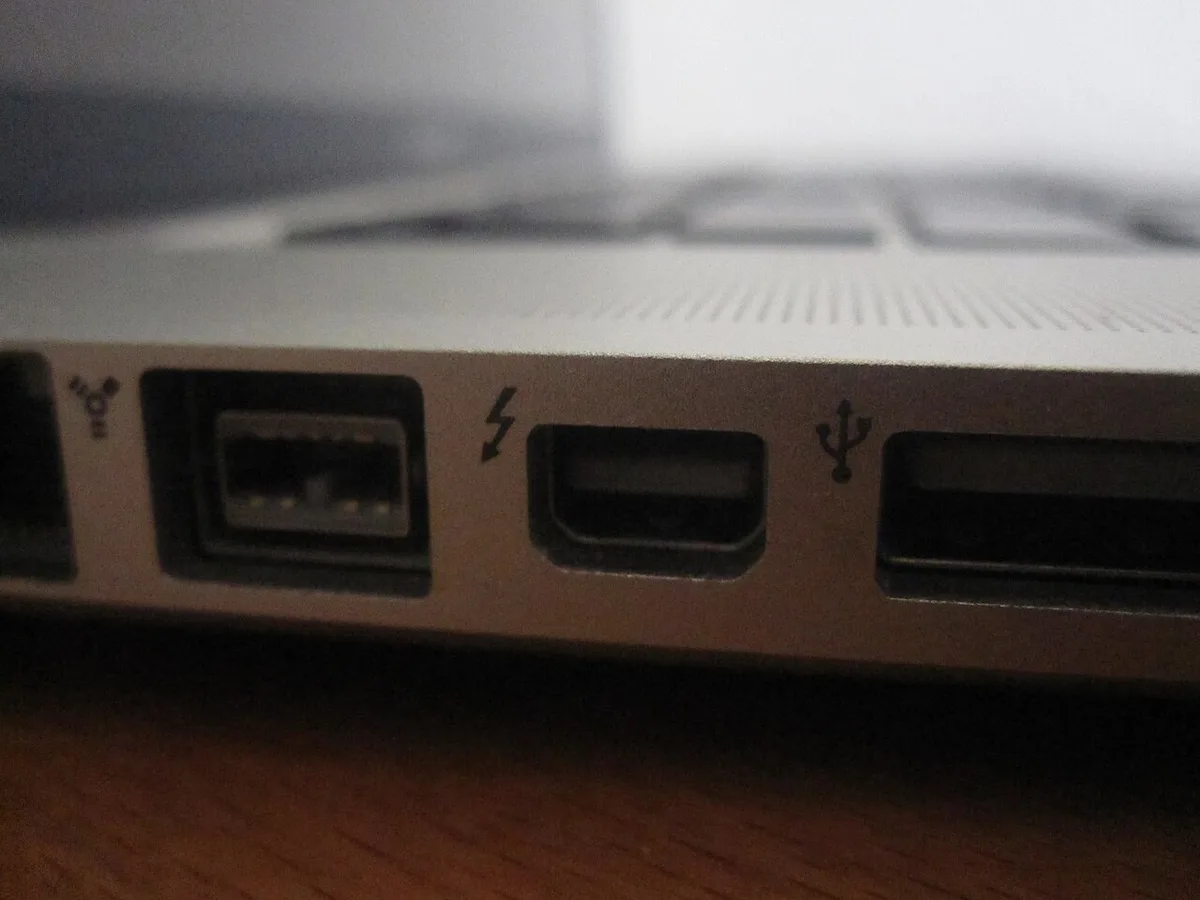
Image source: Wikimedia Commons / Alan736 (CC BY-SA)
Start with the port. Look for Thunderbolt 4, Thunderbolt 3, or USB4 with PCIe tunneling. Then check the laptop maker's support page for eGPU notes.
Some laptops disable the feature even when the port looks right.
- Confirm Thunderbolt 4 or USB4 PCIe support.
- Check the OEM compatibility list.
- Match GPU length, height, and power needs.
- Update laptop, enclosure, and GPU firmware.
- Plan a strong enough power outlet and cable route.
- Verify external-monitor output works as expected.
If the enclosure adds another power brick to your desk, choosing the right charger wattage is a useful related check. Intel's Thunderbolt documentation is also worth reviewing because port labels alone do not tell the full story.
Final Verdict: Is an eGPU Worth It for Your Setup?
An eGPU is worth it when the laptop is already a good machine and you want better desk gaming without giving up portability. It is less convincing when the laptop is weak, the budget is tight, or you want the simplest path.
For many buyers, the best value comes from reusing an existing GPU. If you have to buy both the enclosure and the card, compare that total against a used desktop or a discounted gaming laptop. The desktop will usually win on raw performance, while the laptop will usually win on simplicity.
The safest answer is this: buy an eGPU only after the compatibility checklist passes and the total cost still feels fair. If either one fails, skip it and put the money toward a better machine.
Frequently Asked Questions
Does an eGPU work with every gaming laptop?
No. It usually needs Thunderbolt 4, Thunderbolt 3, or USB4 with PCIe tunneling. Even then, some laptop makers restrict or disable eGPU support.
Always check the OEM documentation before buying an enclosure or graphics card.
How much performance do you lose with an eGPU?
It depends on the game, resolution, and laptop. Many setups see a noticeable gap versus the same GPU in a desktop, especially at 1080p. At 1440p or 4K, the penalty can be smaller because the GPU works harder.
Is an eGPU better than buying a new gaming laptop?
It can be, if you already own a compatible laptop and want to keep it portable. A new gaming laptop is simpler and needs fewer cables. If your current laptop is old or weak, replacement is often the better value.
Do you need an external monitor for an eGPU?
You do not always need one, but it is strongly recommended. Gaming on the laptop's internal display can reduce performance because the image must travel back into the machine. An external monitor usually gives cleaner results.
Are used GPUs a good choice for an eGPU?
They can save money, but condition and warranty matter. A cheap used card may fail early or lack support. Buy from a seller with clear return terms, and compare the total against a new card before deciding.