What is the difference between 12vhpwr and 12v 2×6? It comes down to connector geometry, sense-pin behavior, and how safely the GPU can confirm full power delivery. If you build PCs, this matters because a high-power graphics card can pull up to 600 W through one 16-pin connector.
Manufacturer specifications indicate that full seating and proper sense-pin contact are critical for safe operation. This guide breaks down the real differences, the risks, and the safe practices you need to know. As of 2026, the newer 12V-2×6 design is the connector you will see on newer ATX 3.1 platforms.
Why the Wrong Answer Here Can Melt Your GPU
A melted GPU power connector is not just a rare forum photo. It is a real failure mode when high current meets poor contact resistance. The 12VHPWR and 12V-2×6 connectors exist to deliver a lot of power through one plug.
That convenience is useful, but it also concentrates heat in a small area. If the connector is loose, damaged, or poorly made, the heat can climb fast. You may smell burning plastic before you see damage.
In our research, the common thread is not always the connector standard itself. It is installation quality, cable quality, and whether the sense pins make proper contact. Manufacturer documentation stresses full insertion and correct cable routing.
This is a safety topic, not just a compatibility detail. Treat it like wiring, not like a cosmetic choice.
Watch for these warning signs and risk factors:
- A partially seated 16-pin connector can create high resistance at the power pins.
- Sense pins that do not connect can change the reported power capability.
- Tight cable bends near the connector can pull it out of full contact.
- Cheap or damaged adapters can overheat under sustained GPU load.
- Dust or debris can block proper seating and increase heat.
What 12VHPWR and 12V-2×6 Actually Are
12VHPWR is the original 16-pin high-power GPU connector associated with ATX 3.0 and PCIe 5.0 platforms. 12V-2×6 is the newer revision associated with ATX 3.1 and PCIe 5.1 platforms. Both use 12 power pins plus 4 sense pins. Both are designed to deliver 12 V power to a graphics card.
The "12V" part refers to the voltage. The "2×6" part refers to the newer connector family name.
The important idea is simple. The connector is not only a power plug. It is also a signaling path.
The power pins carry current. The sense pins tell the system what power level is allowed. That means the connector has two jobs at once.
It must carry current safely and communicate correctly.
A GPU can use this connector to request up to 600 W. That is a lot of power in a small space. For context, older high-end cards often needed two or three separate 8-pin connectors.
The 16-pin design reduces cable clutter. It also puts more responsibility on one connection point.
The Real Physical Differences Between 12VHPWR and 12V-2×6
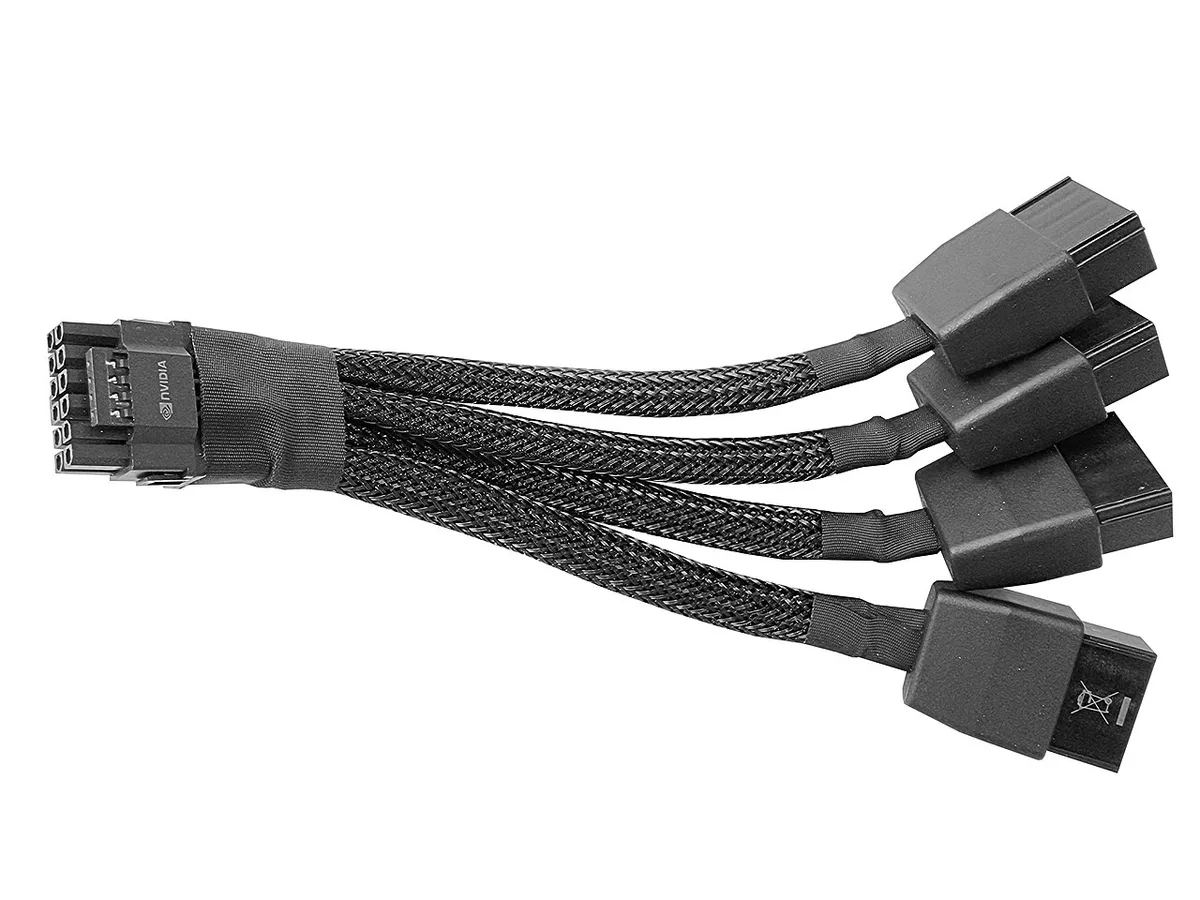
Image source: Wikimedia Commons / Benlisquare (CC BY-SA)
The biggest difference is not the pin count. Both connectors use the same 16-pin concept. The newer 12V-2×6 design changes how the connector behaves when it is not fully inserted.
The sense pins are shorter. That matters because a partially seated connector is more likely to lose sense contact before it loses power contact.
This is a safety-focused change. If the sense pins disconnect first, the system can drop to a lower power level. That reduces the chance of pushing full current through a poor connection.
The newer design also improves retention and physical stability. Better retention means the connector is less likely to loosen from cable tension.
You should not think of this as a magic fix. A bad cable can still overheat. A loose connector can still burn.
The design change helps, but correct installation still matters. Manufacturer specifications indicate that full seating and gentle cable routing are essential.
Here is what to compare in practice:
- Both use 12 power pins and 4 sense pins.
- 12V-2×6 has shorter sense pins for safer partial-insertion behavior.
- 12V-2×6 improves retention and overall connection stability.
- Power capability still depends on sense-pin signaling and system support.
- Physical damage can make either connector unsafe.
How Sense Pins Control How Much Power Flows
Image source: Wikimedia Commons / Darklanlan (CC BY)
The sense pins are the small signaling pins on the 16-pin connector. They do not carry the main GPU power. Instead, they tell the power supply and graphics card which power level is appropriate.
This is why the connector can support different power limits. The system reads the sense configuration and sets a safe ceiling.
In simple terms, the sense pins answer one question. "How much power is safe to deliver right now?" If the connection is complete and correct, the system may allow a higher level. If the connection is incomplete, the system should limit power.
That is the protective idea behind the design.
This is also where many mistakes happen. Users may assume the connector is fine because the GPU powers on. A card can boot at a lower power level.
It may still run games while hiding a connection issue. Heat can build slowly under load. That is why visual inspection and full seating matter.
Use these practical checks:
- Power on does not prove the connector is fully safe.
- A stable GPU at idle does not prove safe high-load behavior.
- Sense-pin contact should be verified by full insertion, not by guesswork.
- Connector temperature should be checked after heavy gaming or rendering.
- Damaged sense pins can cause unstable power reporting.
Where the Melting and Burn Risk Actually Comes From
The main risk is heat from resistance. When current flows through a poor connection, energy turns into heat. That heat can soften plastic, discolor pins, and melt the connector housing.
The damage often starts at the contact point. It can spread quickly once the material weakens.
Partial seating is a major cause. If only part of the connector is inserted, the contact area shrinks. Current still flows, but through a smaller surface.
That raises resistance and heat. Cable tension can make this worse. A stiff cable pressing against the connector can slowly back it out.
Adapter quality also matters. An adapter converts older PSU cables into a 16-pin plug. If the adapter has thin conductors, weak soldering, or poor crimps, it can overheat.
The connector may be fine while the adapter fails. This is why native ATX 3.1 cables are often preferred for high-power cards.
Common risk sources include:
- Partially seated 12VHPWR or 12V-2×6 connectors.
- Tight or sharp cable bends near the GPU socket.
- Low-quality or damaged 2x 8-pin to 16-pin adapters.
- Dust, debris, or bent pins in the GPU power socket.
- Long gaming sessions that keep the connector under high load.
- Repeated unplugging that wears the retention latch.
Safe Installation Practices That Prevent Connector Damage
Safe installation starts before you plug anything in. Inspect the GPU socket and the connector for bent pins, debris, or discoloration. Align the connector carefully.
Do not force it. The 16-pin design is keyed, but forcing can still damage pins or the housing.
Full seating is the single most important step. Push the connector straight in until the retention latch clicks. Do not rely on a partial push.
A connector that looks seated can still be a millimeter short. That small gap can raise resistance and heat.
Cable routing matters as much as insertion. Avoid sharp bends near the connector. A tight bend can pull the plug slightly out of the socket.
It can also stress the wires inside the cable. Leave a gentle curve with enough slack for the cable to rest naturally.
Here is a practical installation checklist:
- Power off and unplug the PSU before working inside the case.
- Inspect both the GPU socket and connector for damage.
- Align the connector with the keying and push straight in.
- Listen for and feel the retention latch click.
- Route the cable with a gentle bend radius and no tension.
- Verify the connector sits flush against the GPU socket.
- Power on and monitor connector temperature after heavy load.
- Recheck seating if you hear coil whine or see power fluctuations.
If you use an adapter, inspect it just as carefully. Check the crimps, solder joints, and wire gauge. A weak adapter can fail even when the GPU connector is perfect.
Native ATX 3.1 cables are preferred for sustained high-power use. Manufacturer specs confirm that proper cable routing reduces strain on the connector.
12VHPWR vs 12V-2×6 vs Older Dual 8-Pin PCIe
Three connector setups dominate modern high-power GPUs. The original 12VHPWR is the 16-pin connector from the ATX 3.0 era. The newer 12V-2×6 is the revised 16-pin connector from the ATX 3.1 era.
Older dual or triple 8-pin PCIe connectors still appear on many cards.
The 16-pin options reduce cable clutter. One plug replaces two or three separate connectors. That is cleaner and easier to route.
The downside is that all current flows through one connection point. One bad seat can cause a real problem.
Older 8-pin connectors spread the load across multiple points. They are bulkier but have a long track record. Many builders trust them because they are simple and forgiving.
They also work with older power supplies without adapters.
Here is how to think about the choice. A newer ATX 3.1 PSU with a native 12V-2×6 cable is the safest 16-pin setup. A 12VHPWR connector with a quality cable and careful installation is still workable.
Older 8-pin setups are reliable but less convenient for very high power cards.
Who each option suits best:
- 12V-2×6 native cable: best for new builds with ATX 3.1 PSUs.
- 12VHPWR with quality cable: acceptable for existing ATX 3.0 platforms.
- 2x or 3x 8-pin PCIe: best for older PSUs and builders who prefer simplicity.
- Adapter-based 16-pin: acceptable only with high-quality adapters and careful routing.
Aggregate reviews indicate that native cables run cooler under sustained load. Adapter-based setups show more heat variability. The PCIe 5.0 platform and newer power standards are designed around these 16-pin connectors.
Older PCIe generations used 8-pin connectors exclusively.
Specs and Power Levels at a Glance
The numbers help clarify the difference. Both 12VHPWR and 12V-2×6 use 16 pins total. Twelve pins carry power.
Four pins handle sense signaling. The voltage is 12 V DC. Maximum capability is up to 600 W when sense pins signal correctly.
The sense pins configure power in steps. Common levels are 150 W, 300 W, 450 W, and 600 W. The system reads the sense configuration and sets the appropriate ceiling.
This prevents the GPU from pulling more power than the connection supports.
| Spec | 12VHPWR | 12V-2×6 |
|---|---|---|
| Total pins | 16 | 16 |
| Power pins | 12 | 12 |
| Sense pins | 4 | 4 |
| Voltage | 12 V DC | 12 V DC |
| Max power | Up to 600 W | Up to 600 W |
| Sense pin length | Standard | Shorter |
| Platform | ATX 3.0 / PCIe 5.0 | ATX 3.1 / PCIe 5.1 |
| Retention | Standard latch | Improved latch |
The table shows why the connectors look similar. The differences are in behavior, not headline specs. Shorter sense pins and better retention make 12V-2×6 safer under partial insertion.
The power ceiling remains the same for both.
A GPU does not always draw 600 W. Most cards run well below that. But peak spikes can approach the limit during heavy rendering or gaming.
That is when connector quality and seating matter most. Thermal behavior in the connector depends on current, contact resistance, and airflow.
When to Replace a Cable, Adapter, or PSU
Replace a cable or connector immediately if you see any damage. Discoloration, melted plastic, or a burnt smell are clear signs. Do not wait.
A damaged connector can fail under load. It can also damage the GPU socket.
A connector that feels loose is another red flag. If the retention latch does not click, the fit is compromised. If the connector wiggles after insertion, replace it.
Do not try to fix it with tape or pressure. That is a temporary patch on a safety problem.
Adapters deserve special attention. If an adapter runs hot, replace it. If the wires feel stiff or the insulation looks damaged, replace it.
Adapters are a common failure point. They add extra connections and extra resistance.
Consider replacing the PSU or cable in these situations:
- The connector shows any melting, browning, or warping.
- The retention latch is broken or does not engage.
- The cable feels excessively hot during gaming.
- The adapter has visible damage or poor crimping.
- The PSU is not ATX 3.0 or newer for a high-power card.
- You upgraded to a GPU that needs more power than the old PSU supports.
Manufacturer documentation recommends using native cables rated for the PSU. Do not mix cables between different PSU brands. Pinouts can vary.
A cable that fits may not be wired correctly. That mistake can destroy the PSU or GPU.
If you are unsure about cable compatibility, contact the PSU manufacturer. They can confirm which cables are safe for your unit. This is especially important for modular power supplies.
Never assume interchangeability.
Frequently Asked Questions
Can I use a 12VHPWR cable with a 12V-2×6 connector?
Yes, in most cases. The connectors are physically compatible. A 12VHPWR cable will seat in a 12V-2×6 socket.
However, you lose the improved sense-pin safety of the newer design. For best results, use a native 12V-2×6 cable with an ATX 3.1 PSU. Always verify full seating before powering on.
Does 12V-2×6 prevent melting completely?
No. The design reduces risk but does not eliminate it. Shorter sense pins help the system detect poor connections.
Better retention reduces accidental loosening. But a damaged cable, partial seating, or poor adapter quality can still overheat. Safe installation remains essential.
Check connector temperature after heavy use.
How do I know if my connector is fully seated?
Push the connector straight in until the retention latch clicks. The housing should sit flush against the GPU socket. There should be no visible gap.
Gently tug to confirm the latch holds. If it moves or clicks loosely, reseat it. Never power on with a connector that feels uncertain.
Are 12VHPWR adapters safe to use?
Quality adapters from reputable manufacturers are generally safe. Cheap or damaged adapters are a common failure point. Check for proper wire gauge, solid crimps, and intact insulation.
If an adapter runs hot during use, replace it immediately. Native cables are preferred for sustained high-power workloads.
What power level does my GPU actually need?
It depends on the card. Many GPUs run between 200 W and 450 W under load. Some high-end cards approach 600 W.
The sense pins configure the maximum allowed power. Check your GPU manufacturer's specifications for the exact requirement. Do not assume 600 W is always necessary.
Should I replace my PSU for a 12V-2×6 connector?
Not always. If your PSU is ATX 3.0 with a quality 12VHPWR cable, it can work. But an ATX 3.1 PSU with native 12V-2×6 support is safer and more convenient.
Upgrade if your PSU is older, lacks native support, or shows signs of strain. Manufacturer documentation can confirm compatibility.