How much ram does a gaming pc need? The honest answer is that it depends on the games you play, your target resolution, and what else runs in the background. Some players do fine with less, while streamers and multitaskers need more headroom.
As of 2026, many mainstream gaming builds target 16GB or 32GB of DDR4 or DDR5 memory, with 16GB still common for 1080p play and 32GB gaining ground for streaming and heavy multitasking. Let's start with the short answer, then break down the real variables.
how much ram does a gaming pc need
Most gaming PCs need 16GB of RAM for smooth everyday play. 8GB is tight for modern titles. 32GB helps if you stream or multitask heavily. 64GB is only useful for workstation-style builds. Match capacity to your actual workload.
Why "How Much RAM" Has No Single Answer for Gaming PCs
RAM is shared space, not a fixed requirement. A game can run fine on 16GB while a streamer with Discord, browser tabs, and recording software open pushes that same build past its comfort zone. That is why the right amount changes with your habits, not just your GPU.
The game matters too. Older or esports titles often stay light, while large open-world games can load more assets and keep them ready. Higher resolutions add pressure because textures and buffers take more space.
Background apps quietly eat memory before the game even starts.
Your platform also sets the rules. Motherboard slots, CPU memory support, and DDR4 versus DDR5 limits decide what you can install and how fast it can run. That is why choosing a motherboard should happen before you buy memory kits.
What RAM Actually Does While You Game
System RAM holds active data close to the CPU. It stores textures, level data, audio, and background program state while the GPU handles rendering. When a game needs data that is not in RAM, it pulls from storage, and that can cause stutters or slow loads.
More RAM does not automatically mean higher average FPS. It mainly improves consistency, especially 1% lows and frame pacing. That is the difference between a game feeling smooth and feeling hitchy during big fights or fast travel.
RAM also works with the CPU's memory controller. Speed, timings, and dual-channel configuration affect bandwidth. A fast kit in single-channel mode can feel slower than a modest kit running in dual-channel mode.
The Variables That Change Your RAM Needs
Resolution changes how much memory games use. 1080p gaming often fits comfortably in 16GB, while 1440p and 4K can push memory harder because larger textures and higher-resolution buffers stay resident. Streaming adds another layer because encoding, capture, and chat tools all want space.
Multitasking is the hidden factor. A browser with many tabs, launchers, voice chat, and overlays can consume several gigabytes. If you keep those open while gaming, 16GB can feel tight even in games that do not need much RAM on their own.
Your build path matters as well. Some platforms require DDR5, while others still use DDR4. CPU socket matching affects what memory standards you can use.
M.2 slot planning and PCIe slot usefulness also shape how much storage and expansion headroom you keep alongside memory.
RAM Recommendations by Use Case and Resolution
Use this as a starting point, then adjust for your own habits. The table below maps common gaming setups to practical capacity targets.
| Build type | Typical use | Recommended RAM | Notes |
|---|---|---|---|
| Budget 1080p | Esports, older games | 8GB to 16GB | 16GB is safer |
| Mainstream gaming | 1080p or 1440p | 16GB | Common sweet spot |
| Streaming or creation | Gaming plus OBS | 32GB | Better multitasking headroom |
| Workstation-style gaming | Heavy apps, mods | 64GB | Only if needed |
8GB: Entry-Level and Older Games
8GB can still run lighter games and older titles, but it is the floor, not a comfortable target. Modern games, launchers, and background apps can fill it quickly. Expect more paging and less stable 1% lows.
If you are on a tight budget, 8GB is usable for basic play. Plan to upgrade when prices allow. A matched 16GB kit is usually the better first upgrade.
16GB: The Gaming Sweet Spot
16GB is the practical baseline for most gamers in 2026. It gives enough room for the game, operating system, Discord, and a few browser tabs. For pure gaming at 1080p or 1440p, it is often the best value.
The key is dual-channel configuration. Two matched sticks usually beat one larger stick because bandwidth improves. GPU memory versus system RAM is worth understanding here, because VRAM and system RAM solve different problems.
32GB: Streaming, Creation, and Heavy Multitasking
32GB makes sense when your PC does more than game. Streaming, recording, editing, heavy modding, and large browser sessions all benefit from extra headroom. It can also reduce stutter when switching between demanding apps.
For pure gaming, 32GB may not raise average FPS much. The benefit shows up in smoother multitasking and fewer memory-related hitches. That is why it is a strong choice for creators who game on the same machine.
64GB: Workstation-Style Gaming PCs
64GB is usually overkill for gaming alone. It fits users who run virtual machines, large creative projects, or professional tools alongside games. It can also make sense for heavily modded titles with large asset packs.
Do not buy 64GB just to future-proof a normal gaming build. Spend that money on GPU, CPU, or storage first. Memory prices and platform limits can change, so match capacity to real workloads.
For memory standards, JEDEC memory standards define baseline behavior, while AMD memory support and Intel documentation list platform-specific limits. Always check your motherboard's qualified vendor list before buying a kit.
DDR4 vs DDR5 and Single vs Dual Channel
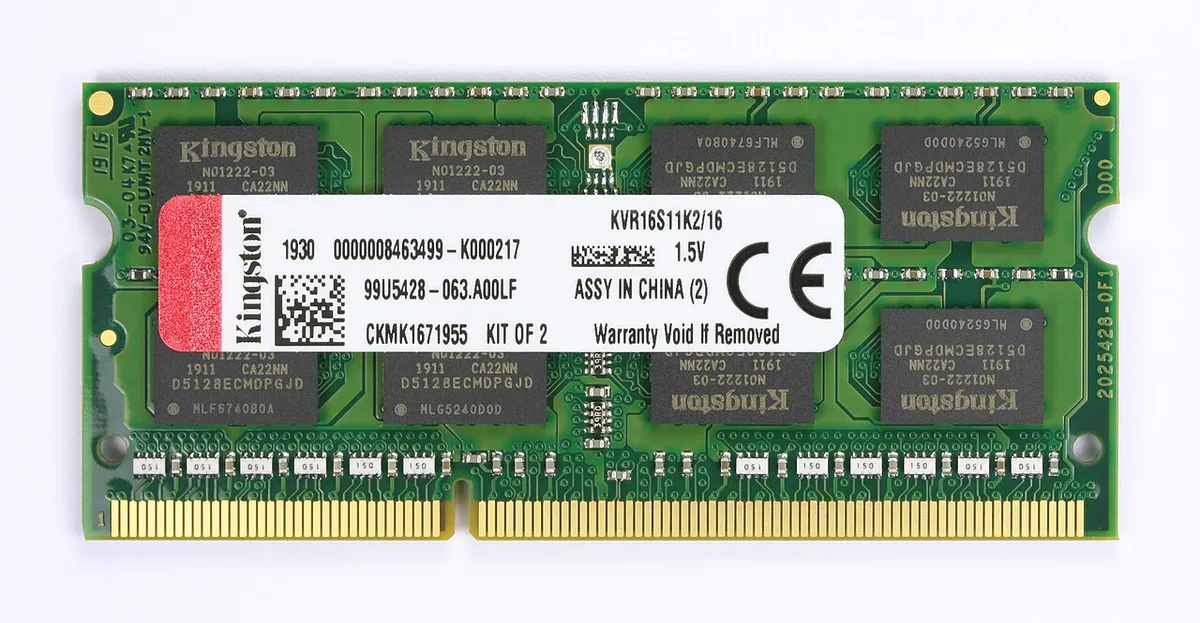
Image source: Wikimedia Commons / D-Kuru (CC BY-SA)
DDR4 and DDR5 both work for gaming, but your platform decides which one you can use. DDR5 is standard on newer platforms like AM5, while many older builds still use DDR4. Do not mix them on the same board.
Speed targets differ. DDR4 often lands around 3200 to 3600 MT/s. DDR5 often lands around 5600 to 6000 MT/s.
Higher speed can help, but stability matters more than chasing the biggest number.
Latency also matters. DDR5 can have higher CAS latency while still offering more bandwidth. In real gaming, the difference between a well-tuned DDR4 kit and a stable DDR5 kit is often smaller than people expect.
Dual channel is the bigger win. Two matched sticks usually beat one stick of the same total capacity. That is because memory bandwidth doubles when both channels are active.
If you are choosing today, match the memory to your CPU and motherboard. Do not buy DDR5 for a DDR4 board. Do not buy a single stick when a matched kit is available.
| Factor | DDR4 | DDR5 |
|---|---|---|
| Typical speed | 3200 to 3600 MT/s | 5600 to 6000 MT/s |
| Platform fit | Older builds | Newer builds |
| Best practice | Matched dual-channel kit | Matched dual-channel kit |
How to Choose, Install, and Verify Your RAM
Start with the motherboard manual. It lists max capacity, supported speeds, and the correct slot order. That saves you from buying a kit the board cannot use well.
Buy a matched kit when possible. Two sticks sold together are tested as a pair. Mixing old and new sticks can work, but it often reduces speed or stability.
Install the sticks in the recommended slots. Many boards prefer A2 and B2 for a two-stick kit. Push until both retention clips click.
Enable XMP or EXPO in the BIOS after installation. This applies the rated speed and timings. If the system will not boot, revert to default JEDEC settings and test again.
Verify the result in Task Manager, BIOS, or a hardware monitor. Check capacity, speed, and channel mode. Then run a memory stress test if you want extra confidence.
Common Mistakes and Costs to Watch
The biggest mistake is buying capacity you will not use. For most gaming PCs, 64GB is wasted money. Put that budget into the GPU, CPU, or storage first.
Another common mistake is running single channel. One stick can leave performance on the table. A matched two-stick kit is usually the smarter buy.
Mixing mismatched kits is risky. Different speeds, timings, or ranks can cause instability. If you upgrade later, a full matched set is often cleaner than adding one stick.
Ignoring the motherboard QVL can cost time. A kit may look right on paper but fail at rated speed. Check the qualified vendor list before buying.
As of 2026, memory pricing still moves with supply and demand. Compare price per gigabyte, not just sticker price. A 16GB kit often offers the best gaming value, while 32GB makes sense for streamers and creators.
| Mistake | Why it hurts |
|---|---|
| Single-channel setup | Lower memory bandwidth |
| Overbuying capacity | Poor value for gaming |
| Ignoring QVL | Stability problems |
| Unstable XMP profile | Crashes or boot loops |
Frequently Asked Questions
Is 8GB of RAM enough for gaming in 2026?
8GB is enough for lighter and older games, but it is tight for modern titles. Background apps can consume a large share of it. For a smoother experience, 16GB is the safer target for most gamers.
Is 16GB or 32GB better for gaming?
16GB is better for pure gaming value. 32GB is better if you stream, record, or multitask heavily. For many players, 16GB is enough today, while 32GB adds useful headroom for heavier workloads.
Does RAM speed matter more than capacity?
Capacity usually matters first. A system with too little RAM will stutter no matter how fast it is. Once you have enough capacity, speed and dual-channel configuration can improve smoothness and 1% lows.
Should I buy one 16GB stick or two 8GB sticks?
Two 8GB sticks are usually better because they enable dual-channel mode. That gives more bandwidth than one 16GB stick. If you plan to upgrade later, a matched two-stick kit is easier to expand.
Can too much RAM hurt gaming performance?
Too much RAM will not usually hurt performance directly. The problem is cost and wasted budget. Spending on 64GB can take money away from parts that raise FPS more, like the GPU.
Final Verdict: Your Decision Guide
If you play esports or older games and keep few apps open, 16GB is enough.
If you game at 1080p or 1440p with Discord and a few tabs open, 16GB is still the sweet spot.
If you stream, record, or edit on the same PC, choose 32GB.
If you run heavy professional tools or large modded games, consider 64GB.
If your budget is tight, start with a matched 16GB dual-channel kit.
If you upgrade later, replace the full kit or match the exact existing kit.
Memory works best when it fits your real workload. Buy for what you do today, not for a vague future.
3 thoughts on “How Much RAM Does a Gaming PC Actually Need?”
Comments are closed.