Is a gaming laptop better than an Xbox? It depends on your space, budget, and games. For some people, a laptop replaces both work and play.
For others, a console is simpler and cheaper.
As of 2026, an Xbox Series X still costs about $499, while capable gaming laptops often start near $1,000. That gap shapes the whole decision. We'll walk through the trade-offs next.
Is a Gaming Laptop Actually Better Than an Xbox?
A gaming laptop is not always better. It wins on portability and PC game access. An Xbox wins on price and simplicity.
Choose based on budget, space, and games.
The honest answer is that neither device is better for everyone. A gaming laptop is a portable PC with a discrete GPU. An Xbox Series X or Series S is a fixed console built for living-room play.
They solve different problems.
If you move often, a laptop makes sense. If you want plug-and-play couch gaming, an Xbox makes sense. Your game library matters too.
Some games are console exclusives, while PC has wider mod support.
What You're Really Comparing: Two Very Different Machines
A gaming laptop runs Windows and behaves like a PC. You can install Steam, Epic Games Store, and Xbox Game Pass for PC. You can also use it for school, work, and creative apps.
That flexibility is the laptop's main advantage.
An Xbox runs a console operating system. It is built for a TV, a controller, and a simple menu. Setup is fast.
Updates are mostly automatic. You do not manage GPU drivers or Windows settings.
The hardware philosophy is different too. Laptop makers chase thin designs and battery life. That can limit cooling and sustained performance.
Console makers tune one fixed box for one fixed target. That often gives smoother long-term consistency.
Game access is not identical. PC players get Steam sales, mods, and emulators. Xbox players get Quick Resume, Smart Delivery, and console exclusives such as Halo and Forza.
Your must-play games should guide the choice.
Side-by-Side: Specs, Price, and Performance
| Category | Gaming Laptop | Xbox Series X / S |
|---|---|---|
| Starting price | About $700 to $1,000+ | About $299 to $499 |
| Target display | 14 to 18 inch screen | TV or monitor |
| Typical gaming frame rate | 60 to 144+ fps | 30 to 120 fps |
| Upgrade options | RAM or storage on some models | None |
| Portability | High | Low |
| Ease of setup | Moderate | Very easy |
Manufacturer specifications indicate that laptop GPU power varies by model. A thin laptop may run an RTX 4060 at a lower Total Graphics Power than a thicker model. That means two laptops with the same GPU name can perform differently.
Check TGP before buying.
Xbox Series X targets 4K gaming and fast load times with its custom SSD. Xbox Series S targets 1440p and costs less. Both support backward compatibility with many older Xbox games.
That matters if you already own a digital library.
Performance is not only about raw power. A laptop can reach higher frame rates with DLSS or FSR. But it may run louder and hotter.
An Xbox is usually quieter and more predictable. For many players, stable 60 fps beats chasing 120 fps.
Brand quality also changes the laptop experience. An ASUS ROG ownership experience can differ from a budget model. Read owner feedback before assuming all laptops perform the same.
Where a Gaming Laptop Pulls Ahead
A gaming laptop is strongest when you need one device for many jobs. It can handle gaming, school, work, video calls, and creative apps. You can carry it to class, a hotel, or a friend's house.
That flexibility is hard for a console to match.
Portability changes how you play. You can game on a desk, a couch, or a train. You can also connect an external monitor at home.
A 14-inch model is easier to travel with, while an 18-inch model feels more like a desktop replacement.
PC gaming also offers more control. You can use a mouse and keyboard for shooters and strategy games. You can mod many games.
You can emulate older consoles. You can adjust graphics settings to balance speed and visuals.
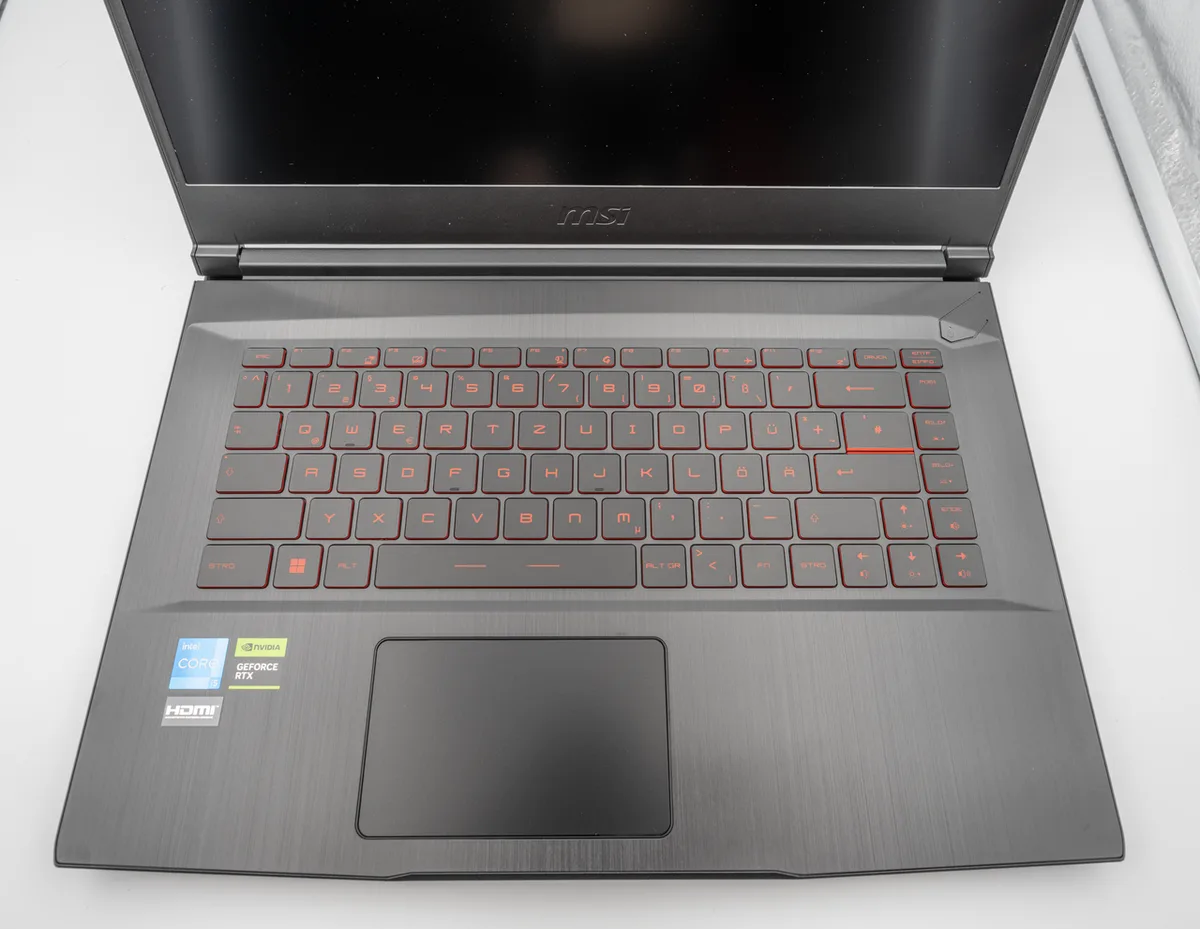
Image source: Wikimedia Commons / PantheraLeo1359531 (CC BY)
Laptop buyers should compare brands carefully. MSI owner feedback can reveal cooling and support patterns. A Lenovo Legion ownership experience may show strong thermals.
An Alienware value question often comes down to price versus build quality.
For graphics hardware details, NVIDIA GeForce RTX laptop GPUs explain features such as ray tracing and DLSS. Those features can improve image quality at higher frame rates. They are most useful on models with enough wattage and cooling.
Where an Xbox Series X (or S) Wins
An Xbox wins on value and simplicity. For about $299 to $499, you get a complete gaming system. You do not buy a separate operating system, antivirus, or productivity software.
You plug it in and start playing.
Living-room gaming is easier on a console. A TV, soundbar, and controller feel natural from a couch. Quick Resume lets you switch games fast.
Smart Delivery gives the best version for your console. These features reduce friction.
Console gaming is also more predictable. Developers target fixed hardware. That can mean fewer driver issues and fewer settings menus.
For many families, that reliability matters more than maximum frame rates.
Lifespan is another factor. A chassis lifespan can be limited by heat, battery wear, and soldered parts. An Xbox has no battery and fewer moving parts.
It may age more gracefully in a ventilated media cabinet.
Brand-specific laptop risks do not apply to consoles. A Razer Blade build quality discussion may matter if you are comparing premium laptops. But if your goal is simple couch gaming, an Xbox avoids those questions entirely.
Total Cost of Ownership Over 3 to 5 Years
The sticker price is only part of the cost. A gaming laptop may also need a mouse, headset, cooling pad, and external monitor. An Xbox may need a TV, extra controller, or Game Pass subscription.
Add those before comparing.
Aggregate buyer feedback shows that laptop owners often spend more on accessories. Console owners often spend more on subscriptions. Both groups can overspend if they buy premium add-ons.
Here is a simple comparison.
| Cost area | Gaming laptop | Xbox Series X or S |
|---|---|---|
| Main device | About $700 to $3,500+ | About $299 to $499 |
| Online multiplayer | Usually free on PC | Game Pass Core or Ultimate |
| Games | Sales, bundles, PC storefronts | Xbox store and Game Pass |
| Repairs | Varies by brand and warranty | Console service or replacement |
| Power use | Varies by model | Varies by model |
Warranty terms matter. Some brands offer better support than others. Comparing gaming laptop brand warranties can save money if a GPU or screen fails.
Extended plans may help, but read the exclusions.
Resale value also differs. Laptops can resell well if kept clean and upgraded. Consoles hold value too, especially during shortages.
Neither is a great investment, but both can offset the next upgrade.
Best Pick by Use Case and Lifestyle
Choose the laptop if you need portability and productivity. Choose the Xbox if you want the cheapest simple couch setup. Most buyers fit one of these patterns.
- College student with one device: A gaming laptop handles class, travel, and games. It can replace a separate school laptop.
- Family living room: An Xbox is easier for shared play. Multiple profiles and controllers are simple.
- Competitive shooter player: A laptop with a high refresh screen and mouse can feel more precise.
- Budget under $500: Xbox Series S is usually the safer pick. Few new gaming laptops are strong at that price.
- Frequent traveler: A laptop wins. Check weight, charger size, and battery life first.
- Content creator: A laptop can run editing and streaming apps. Console streaming is more limited.
If you travel often, read about traveling with a gaming laptop charger. Charger size and voltage matter more than people expect. A bulky power brick can ruin portability.
If you work at a desk, an ergonomic gaming laptop desk setup can reduce neck and wrist strain. Laptop screens are often too low without a stand. That matters during long sessions.
Mistakes People Make When Choosing Between the Two
The biggest mistake is comparing GPU names without checking wattage. A laptop RTX 4060 at 60W is not the same as one at 140W. Always check TGP in the spec sheet.
Manufacturer specs confirm this detail.
Another mistake is ignoring screen size. A 17-inch laptop is less portable than it looks. A 14-inch model is easier to carry but may feel small for couch play.
Screen size and portability is worth reviewing before buying.
People also forget battery life. Gaming laptops often last 1 to 3 hours while gaming. They are not true portable consoles unless you stay near an outlet.
Plan around that.
Some buyers assume every game exists on both platforms. That is false. Console exclusives and PC-only mods can decide the purchase.
Check your must-play list first.
Heat and noise are common surprises. Thin laptops can get loud under load. A cooling pad may help, but it will not fix a weak cooling design.
Read owner reviews for fan behavior.
Final Verdict: Which One Should You Buy
Neither device is better for everyone. A gaming laptop is better if you need one machine for work, travel, and PC games. An Xbox is better if you want affordable, simple living-room gaming.
Match the device to your life, not the hype.
As of 2026, the price gap still matters. An Xbox Series S starts around $299. A strong gaming laptop often starts around $1,000.
If budget is tight, the console is usually the smarter first purchase.
If you already want PC games, mods, and mouse precision, the laptop is worth the extra cost. If you mainly play on a TV with friends, the Xbox is hard to beat. That is the core trade-off.
Frequently Asked Questions
Can a gaming laptop replace an Xbox for living room gaming?
Yes, but it takes extra setup. You can connect it to a TV with HDMI and use a controller. Still, an Xbox is simpler and cheaper for couch play.
Laptops also need power nearby during long sessions.
Is Xbox Game Pass cheaper on PC or console?
Pricing depends on the plan and region. Game Pass PC and Game Pass Ultimate include PC games. Console play may require a different tier for online multiplayer.
Check current Microsoft pricing before subscribing.
Do gaming laptops overheat more than consoles?
They can, especially thin models. Laptops pack powerful parts into small spaces. Consoles have larger cooling systems and fixed airflow.
Read reviews for fan noise and thermal throttling.
Can you use an Xbox controller on a gaming laptop?
Yes. Most Xbox Wireless Controllers connect by Bluetooth or USB. Windows supports them well.
This makes switching between PC and console easier.
Which has better exclusive games?
It depends on your taste. Xbox has series like Halo and Forza. PC has mods, indie games, and older classics through emulation.
Check your favorite genres before deciding.
Is a budget gaming laptop better than an Xbox Series S?
Usually no. At low prices, consoles often deliver better gaming value. Budget laptops may use weaker GPUs or low wattage.
The Xbox Series S is the safer pick under $500.