If you're shopping for a gaming laptop, storage speed can look confusing at first. The real question is whether NVMe makes a noticeable difference once you're actually playing. In our research, NVMe helps loading and streaming more than raw frame rates.
PCIe and NAND details matter too. Let's break it down.
is NVMe SSD important for gaming laptops
NVMe helps load times and asset streaming. It does not raise in-game FPS much. For most gamers, it beats SATA and HDD.
The best gains come with fast PCIe and good NAND. Budget buyers still benefit, but should not overspend.
Is an NVMe SSD Actually Important for Gaming?
NVMe means Non-Volatile Memory Express. It is a storage protocol built for fast flash memory. It talks to the CPU over PCIe, not SATA.
That cuts latency and raises throughput.
For gaming, the big win is speed. Games load faster and stream assets better. You spend less time staring at loading screens.
That matters most in open-world titles.
Per PCI-SIG standards, PCIe links scale by generation and lane count. A good NVMe drive needs enough lanes and cooling. PCI-SIG publishes the interface rules.
NVMe is not magic. It will not fix low FPS. It will not replace a strong GPU.
Think of it as a quality-of-life upgrade.
If you want to check how much RAM your laptop really needs, storage is only one piece. Balance matters more than one spec.
NVMe vs SATA vs HDD: The Real Differences
SATA SSDs are still solid. They beat HDDs by a wide margin. NVMe usually beats SATA on peak speed and latency.
HDDs use spinning platters. They are slow for random reads. Modern games hate that.
Load times can feel painful.
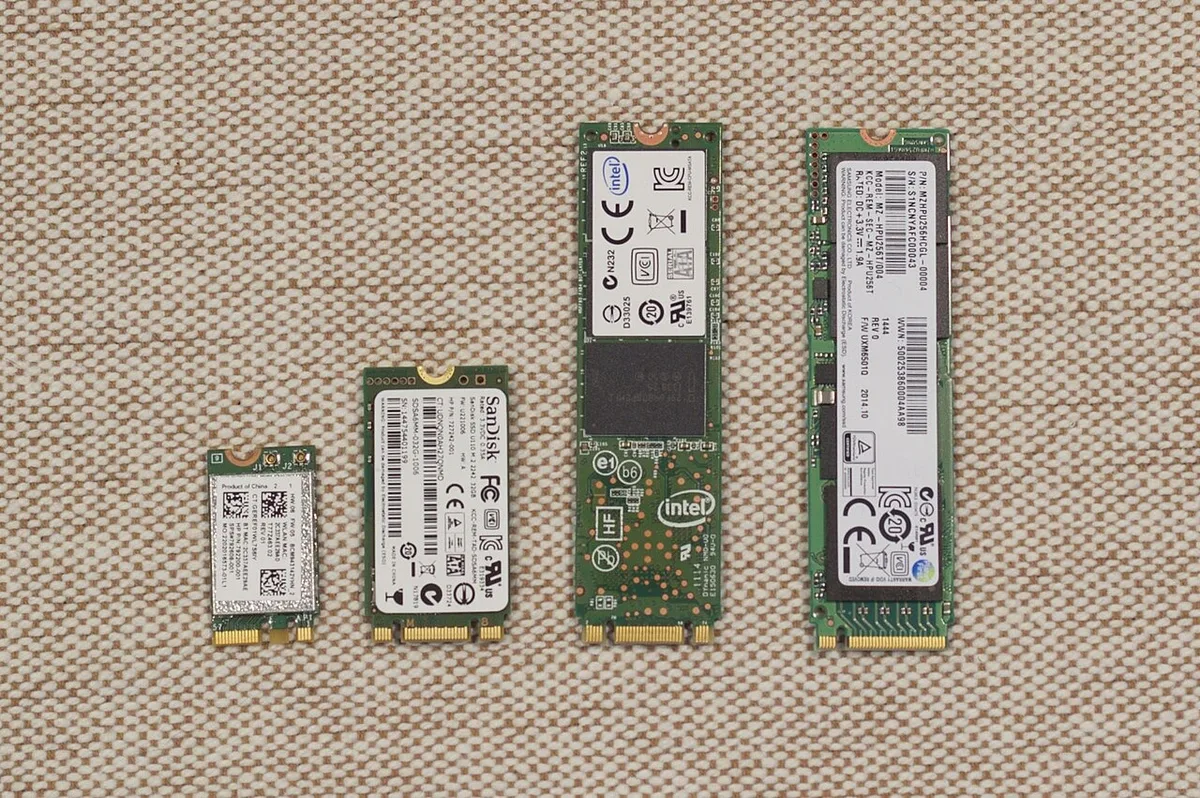
Image source: Wikimedia Commons / D-Kuru (CC BY-SA)
| Drive type | Typical speed | Best use | Main drawback |
|---|---|---|---|
| NVMe SSD | 3,500 to 7,000 MB/s | Fast boots and loads | Can run hot in thin laptops |
| SATA SSD | 500 to 550 MB/s | Budget upgrades | Slower asset streaming |
| HDD | 80 to 160 MB/s | Cheap bulk storage | Very slow game loads |
NVMe is the clear speed leader. SATA is still fine for many players. HDDs work best as secondary storage.
If you check RAM speed on your gaming laptop, do the same for storage. Match the whole system, not one part.
What NVMe Actually Changes in Games (Load Times and Asset Streaming)
Load times are the obvious change. A faster drive reads game files quicker. That means shorter waits between levels.
Asset streaming is the quieter win. Open-world games load textures and models as you move. Faster storage can reduce pop-in and stutter.
The effect depends on game design.
Aggregate reviews report clear gains in install and patch times. Large updates finish faster on NVMe. That saves real time over a year.
Some games use DirectStorage. That API lets the GPU work with storage more directly. Microsoft documents it on the official site.
Microsoft DirectStorage is the reference point.
NVMe helps most when the game is storage-bound. It helps less when CPU or GPU is the limit. Still, faster loading feels better every day.
Where NVMe Won't Help You (The GPU Bottleneck Reality)
NVMe will not raise your FPS in most games. Frame rate depends on GPU, CPU, and thermals. Storage is not the usual bottleneck.
If your laptop has a weak GPU, NVMe will not save it. You will still see low settings or stutter. Spend money on graphics first.
There is also a thermal issue. Thin gaming laptops can throttle NVMe drives. Once hot, speeds drop.
Cooling pads and airflow help.
Budget drives can use QLC NAND. QLC can slow after the SLC cache fills. That hurts large file copies and some game installs.
It may not hurt normal play much.
If you switch between integrated and dedicated GPU, fix that first. GPU behavior often matters more than storage speed.
PCIe 3.0 vs 4.0: Does the Generation Matter?
PCIe 4.0 is faster on paper. Many drives reach around 7,000 MB/s. PCIe 3.0 models often sit near 3,500 MB/s.
In real gaming, the gap is smaller. Load times may improve by seconds, not minutes. Asset streaming can improve, but only in supported games.
As of 2026, many laptops still ship with PCIe 4.0. That is a strong middle ground. PCIe 3.0 is still usable for budget builds.
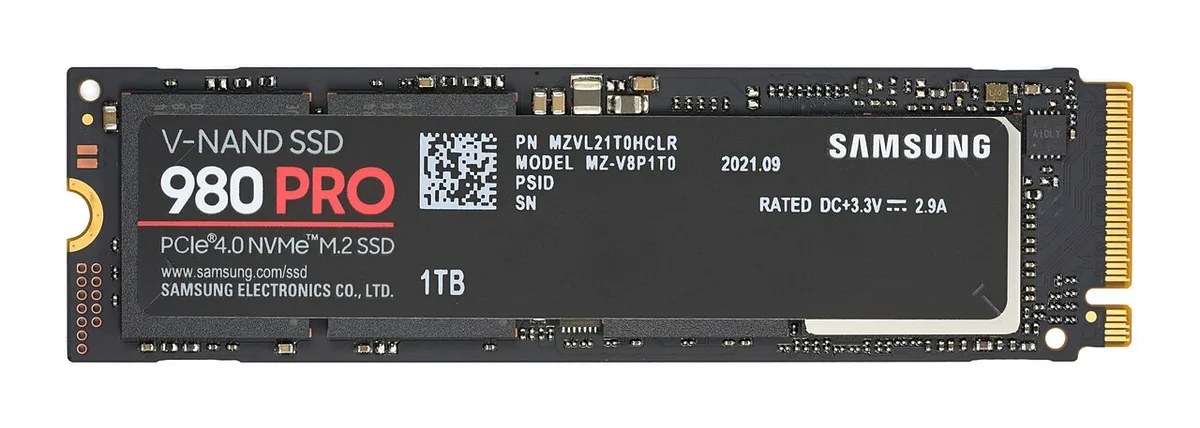
Image source: Wikimedia Commons / D-Kuru (CC BY-SA)
PCIe 5.0 exists, but heat and cost are higher. Most gaming laptops do not need it yet. Future buyers should watch DirectStorage support.
Check the actual drive spec. A PCIe 4.0 label alone is not enough. Look for TLC NAND, DRAM cache, and good thermals.
If you check gaming laptop GPU wattage, you already know balance. Storage should not outrank GPU power.
DRAM Cache, NAND Type, and Thermal Throttling: The Specs Behind the Spec
DRAM cache matters more than many buyers expect. It stores the flash translation layer and mapping tables. That keeps random reads fast and steady.
DRAM-less drives can use host memory buffer (HMB). HMB helps, but it is not the same as onboard DRAM.
NAND type changes long-term behavior. TLC is the balanced choice for most gaming laptops. QLC costs less and packs more capacity.
QLC can slow after its SLC cache fills. That is more noticeable during large installs and file copies. MLC is rare and usually expensive.
Thermals can erase the NVMe advantage. Thin chassis trap heat under sustained load. Many drives throttle near 70 to 80 degrees C.
Once throttled, speeds drop hard. A thermal pad or better airflow can help.
Look at the whole spec sheet. Check NAND type, cache, endurance, and cooling. If you compare memory generations, apply the same logic to storage.
| NAND type | Typical cost | Write behavior | Best for |
|---|---|---|---|
| TLC | Mid | Stable after cache fills | Most gamers |
| QLC | Low | Slows after cache fills | Budget capacity |
| MLC | High | Very stable | Rare premium drives |
Side-by-Side: NVMe vs SATA vs HDD for Gaming Laptops
NVMe is fastest, SATA is middle ground, and HDD is slow. The gap is largest in random reads. Games rely on random reads more than raw sequential speed.
That is why NVMe feels smoother during installs and updates.
SATA SSDs still beat HDDs by a wide margin. They are fine for older games and tight budgets. HDDs work best as secondary storage for media and archives.
Do not install modern AAA games on an HDD if you can avoid it.
Cost per GB still favors HDDs. SATA SSDs sit in the middle. NVMe prices have dropped, but premium Gen4 drives cost more.
As of 2026, 1 TB NVMe is common in mid-range laptops.
| Drive type | Speed feel | Cost per GB | Gaming fit |
|---|---|---|---|
| NVMe SSD | Fastest | Higher | Best overall |
| SATA SSD | Good | Mid | Budget main drive |
| HDD | Slow | Lowest | Bulk storage only |
Standards bodies help decode the labels. JEDEC covers solid-state storage standards. Use specs, not marketing words, when comparing models.
Which Storage Setup Fits Which Gamer
Budget esports player: A 512 GB NVMe drive is enough. PCIe 3.0 is fine. Focus on GPU and thermals first.
AAA open-world player: Choose 1 TB NVMe with TLC. PCIe 4.0 helps asset streaming. Leave free space for updates and mods.
Content creator or streamer: Go 2 TB or more. Fast NVMe helps large file work. Add external or secondary storage for archives.
Dual-drive setup: Use NVMe for games and OS. Use SATA or HDD for media. This balances speed and cost.
It also protects your game drive from junk files.
If you check gaming laptop GPU wattage, remember storage should not outrank graphics. A strong GPU with decent NVMe beats a weak GPU with elite storage.
Common Mistakes When Buying or Upgrading
Buying by label only. "NVMe" alone does not guarantee speed. Check PCIe generation, NAND type, and cache.
Ignoring thermals. A fast drive in a hot laptop may throttle. Look for reviews with sustained write tests.
Leave airflow space.
Overpaying for Gen5. Most gamers will not feel the difference yet. Gen4 is the safer value for now.
Cloning without a backup. Migration can fail. Back up saves and files first.
Verify the clone before wiping the old drive.
Forgetting upgrade limits. Some laptops have one M.2 slot. Others make access hard.
Check the manual before buying. ESD precautions matter during installation.
Frequently Asked Questions
Is NVMe worth it over SATA for gaming?
Yes, for most gamers. NVMe cuts load times and helps asset streaming. SATA is still usable on tight budgets.
If prices are close, choose NVMe. The daily difference is small but real.
Does NVMe increase FPS in games?
Usually no. FPS depends on GPU, CPU, and thermals. NVMe improves loading and streaming.
It can reduce stutter in storage-heavy scenes. Do not buy it expecting higher frame rates.
Is PCIe 4.0 needed for gaming?
No, but it is a nice upgrade. PCIe 3.0 NVMe is still good. PCIe 4.0 helps more with large installs and supported titles.
Buy based on price and thermals.
Can I upgrade a gaming laptop SSD?
Often yes, but not always. Check slot count, form factor, and warranty rules. Some ultrathin models solder storage.
Back up data before you open the chassis.
How much SSD space do gamers need?
512 GB is the minimum for light use. 1 TB is better for modern libraries. 2 TB suits creators and heavy modders. Keep 15 to 20 percent free for performance.