A gaming desktop and a gaming laptop can run the same games, but they're built for very different lives. The real difference comes down to portability versus raw, sustained power. One stays put and runs cool while the other folds shut and travels with you.
Knowing which trade-offs actually matter to you is what makes this decision tricky.
As of 2026, a mid-range gaming desktop with a 175-watt graphics card can sustain higher clock speeds for hours, while a laptop with a nominally similar chip is often power-limited to 80 to 115 watts to manage heat. That gap shows up as lower frame rates and louder fans. Let's break down exactly where that gap comes from and how it should shape your buying decision.
what is the difference between a gaming desktop and gaming laptop
A gaming desktop is a stationary PC built for maximum performance and easy upgrades. A gaming laptop packs similar parts into a portable chassis with a built-in screen and battery. Desktops run cooler, faster, and cheaper per frame.
Laptops trade some power for portability and an all-in-one setup.
Why the Gaming Desktop vs. Laptop Choice Is Harder Than It Looks
The spec sheet only tells half the story. Two machines can list the same chip name and still perform very differently in your hands.
Here's why it gets confusing.
- Same name, different power. A desktop graphics card runs at full wattage. A laptop with the same model name often runs at a lower power limit to manage heat.
- Cooling changes everything. Desktops use large air coolers or liquid cooling. Laptops squeeze heat pipes and small fans into a thin chassis.
- Upgrades are not equal. Desktops let you swap the graphics card, power supply, or storage. Most laptops lock the CPU and GPU to the motherboard.
- Price per frame favors desktops. Laptops charge a premium for portability and the built-in screen.
Marketing adds to the confusion. A laptop might advertise an RTX 4070, but the actual power limit could be 80 watts or 115 watts. Aggregate reviews report real-world performance gaps of 15 to 25 percent between desktop and mobile versions of the same chip in many titles.
Then there's the hidden cost of ownership. Desktops need a monitor, keyboard, and mouse. Laptops include all three.
Desktops take floor space. Laptops fit in a backpack. Small-space setups often push buyers toward laptops even when a desktop would serve them better.
So the choice isn't just about specs. It's about where you play, how often you move, and how long you plan to keep the machine. The factors behind performance matter more than the model number on the box.
What a Gaming Desktop Actually Gives You
A gaming desktop is a stationary PC built from standard parts. You get a full-size graphics card, a full-power processor, and room to breathe.

Image source: Wikimedia Commons / Digital Game Museum (CC BY)
What that means in practice:
- Full-size GPU. Desktop cards run at their full thermal design power, often 250 to 450 watts. That's why they hold higher clock speeds for longer.
- Better cooling. Tower air coolers, all-in-one liquid coolers, and mesh cases keep temperatures in check. Lower temps mean less throttling.
- Standard parts. ATX motherboards, DIMM RAM, and PCIe slots make upgrades straightforward. You can add storage, RAM, or a new GPU years later.
- Lower cost per frame. You pay for the parts, not the engineering to shrink them. Over a five-year span, desktops usually win on value.

Image source: Wikimedia Commons / The author is Newton2 (cropped by Yummifruitbat) (CC BY)
The trade-offs are real too. Desktops need space, a monitor, and cable management. They stay put.
And a full-tower can draw 500 watts or more under load, which shows up on your power bill. If you're new to this world, hardware basics go a long way toward making smart choices.
For many buyers, the desktop is the better long-term machine. You can start mid-range and upgrade the GPU later instead of replacing the whole system.
What a Gaming Laptop Actually Gives You
A gaming laptop packs a processor, graphics chip, screen, keyboard, and battery into one chassis. You open it and play. No cables, no monitor, no desk required.
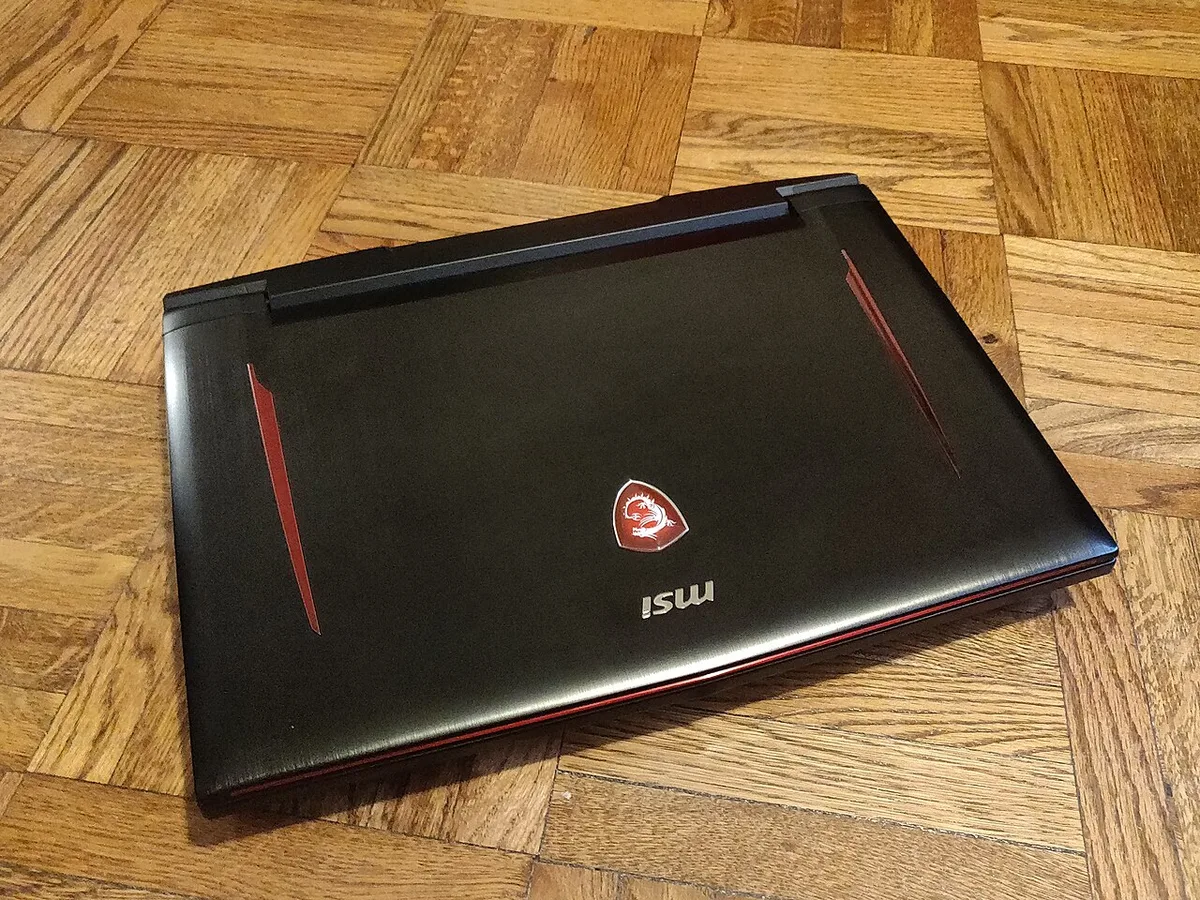
Image source: Wikimedia Commons / Kurt Kaiser
What you actually get:
- Portability. Most gaming laptops weigh 4 to 10 pounds. You can carry one to class, a friend's house, or a LAN event.
- All-in-one setup. The screen, keyboard, and trackpad are built in. Add a mouse and you're gaming.
- Battery backup. You can handle daily tasks on a PC without the wall adapter. Gaming still needs power, but light work runs untethered.
- Small footprint. A laptop fits on a dorm desk or a small apartment table where a tower won't.
The limits matter just as much. Laptop GPUs with the same name as their desktop cousins usually run at lower wattage, often 80 to 175 watts. That means lower sustained frame rates.
The CPU and GPU are usually soldered, so you can't upgrade them later. And gaming on battery drains it in one to three hours.
Heat is the other cost. Fans spin loud under load. The keyboard deck can get warm.
Manufacturer specifications confirm that laptop cooling systems are smaller by design.
For students, travelers, and anyone short on space, the laptop is the practical choice. You give up some power and upgradeability in exchange for freedom.
Side-by-Side: Performance, Thermals, and Real-World FPS
Here's how the two compare on the numbers that actually matter.
| Factor | Gaming Desktop | Gaming Laptop |
|---|---|---|
| GPU power | 250 to 450 watts | 80 to 175 watts |
| Sustained FPS at 1440p | Higher, steadier | Lower, more variable |
| Operating temps under load | 65 to 80 C | 75 to 95 C |
| Fan noise | Low to moderate | Moderate to loud |
| Upgrade options | GPU, RAM, storage, PSU | RAM, storage only (often) |
| Portability | None | High |
| All-in-one cost | No (monitor extra) | Yes |
The FPS gap comes from power and cooling. A desktop GPU holds its boost clock because it has headroom. A laptop GPU throttles sooner.
In demanding titles, that can mean 20 to 40 percent lower average frame rates on the mobile chip.
Thermals tell the same story. Desktop CPUs and GPUs often sit between 65 and 80 degrees Celsius under load. Laptops commonly run 75 to 95 degrees.
Higher temps mean the chip slows itself down to stay safe.
Noise follows heat. Bigger desktop fans spin slower and quieter. Laptop fans spin fast and loud to push air through a small vent.
Per NVIDIA documentation, mobile variants of the same GPU family carry lower power targets by design. Per UL Benchmarks testing, 3DMark Time Spy scores for mobile GPUs trail their desktop equivalents by a clear margin. The gap narrows in less demanding games, but it rarely disappears.
If you play competitive shooters at 240 frames per second, the desktop has the edge. If you play story-driven games at 60 frames per second, a laptop may be plenty. A mid-range machine handles either path well if you set expectations right.
The True 5-Year Cost of Each Option
Sticker price isn't the whole bill. You need to count what you buy now and what you replace later.
A mid-range gaming desktop runs about $800 to $1,200 for the tower. Add a monitor, keyboard, and mouse and you're at $1,000 to $1,500. A comparable gaming laptop costs $1,000 to $1,500 out of the box, screen included.
Over five years, the math shifts.
- Desktop upgrades. You can swap the graphics card for $300 to $500 instead of buying a whole new machine. RAM and storage upgrades cost $50 to $150.
- Laptop replacements. When the GPU ages, you usually replace the whole laptop. That's another $1,000 or more.
- Repair costs. Desktop parts are standard and cheap to replace. Laptop repairs often need proprietary parts and labor.
- Power draw. A desktop pulling 400 watts for three hours a day adds up. A laptop draws far less, even while gaming. ENERGY STAR programs highlight efficiency gains in portable designs.
So the desktop costs more upfront in accessories but less over time. The laptop costs less to start but more to replace.
For a buyer keeping a machine for five years or more, the desktop usually wins on total cost of ownership. The long-term lifespan of a desktop build often stretches past that window. For a buyer who wants simplicity and moves often, the laptop's higher replacement cost may be worth the convenience.
Which One Fits Your Life: Use Cases That Actually Decide It
The right pick depends on where you play and what you do after. A desktop fits a fixed setup. A laptop fits a moving life.
| Your situation | Better fit | Why |
|---|---|---|
| Dorm room or small apartment | Laptop | Small footprint, built-in screen |
| Competitive esports at home | Desktop | Higher sustained FPS |
| Travel and LAN events | Laptop | Portability |
| VR gaming | Desktop | Power and cooling headroom |
| Streaming while you play | Desktop | CPU and GPU headroom |
| Creative work on the side | Either | Depends on space and budget |
If you edit video or run a stream, a desktop gives more headroom. If you need one machine for class and games, a laptop keeps life simple. If space is tight, a small-space setup can bridge the gap without a full tower.
If you play simulation games for hours, sustained cooling matters more than peak boost. A balanced parts list helps avoid paying for power you can't use.
Mistakes Buyers Make When Choosing Between Them
- Matching model names, not power. A laptop RTX 4070 at 80 watts is not a desktop RTX 4070 at 200 watts.
- Ignoring thermal design power. Lower wattage means lower sustained clocks.
- Assuming upgrades later. Most laptops lock the CPU and GPU.
- Forgetting peripherals. Desktops need a monitor and input devices.
- Buying display over GPU. A 240Hz screen with a weak chip wastes money.
- Skipping VRAM checks. 8GB can bottleneck at high settings.
A balanced parts list helps avoid these traps. If one part is far ahead of the others, you pay for power you can't use.
Keeping Either Machine Running Well Over Time
Dust is the quiet killer. Clean filters and fans every few months. Repaste a laptop CPU and GPU every one to two years if temps climb.
Desktop paste lasts longer but still needs checking.
Keep drivers current from NVIDIA or AMD. Set fan curves that favor noise or cooling based on your room. Stress test after changes with tools like 3DMark.
Undervolting can cut heat without hurting performance.
| Task | Desktop | Laptop |
|---|---|---|
| Dust cleaning | Every 3 to 6 months | Every 2 to 4 months |
| Thermal paste | Every 3 to 5 years | Every 1 to 2 years |
| Driver updates | Monthly | Monthly |
| Battery care | Not applicable | Avoid full discharge |
Realistic lifespan expectations help you plan upgrades. A desktop can last 5 to 8 years with part swaps. A laptop often feels old after 3 to 5.
FAQs
Can a gaming laptop match a gaming desktop?
A gaming laptop can match a desktop in light or older games. In demanding titles, the desktop usually wins because of higher power limits and better cooling. Expect a 15 to 25 percent gap in many modern games.
Is a gaming desktop cheaper in the long run?
Yes, usually. You can upgrade the graphics card, RAM, or storage instead of replacing the whole system. Laptops often need full replacement when the GPU ages.
Over five years, desktops tend to cost less per frame.
Do gaming laptops overheat easily?
They run hotter than desktops by design. Small cooling systems push air through tight vents. Keep vents clear, use a cooling pad, and repaste if temps climb past 90 degrees Celsius under load.
Can I upgrade a gaming laptop later?
Usually only RAM and storage. The CPU and GPU are often soldered to the motherboard. Check the spec sheet for socketed parts before you buy if upgrades matter to you.
Which is better for a dorm room?
A laptop fits better. It needs less space, includes a screen, and moves easily. A compact desktop with a monitor can work if you have a desk and don't travel often.
Do I need a monitor for a gaming desktop?
Yes. A desktop has no built-in screen. Budget for a monitor, keyboard, and mouse.
A 144Hz 1080p monitor is a solid starting point for most gamers.
Final Verdict: Which Should You Buy?
Buy a desktop if you want the most performance per dollar, plan to upgrade parts, and play in one place. Buy a laptop if you move often, lack space, or want one machine for work and play.
Neither choice is wrong. The best machine is the one that fits your space, budget, and habits. If you're unsure, lean desktop for value and laptop for freedom.