How does motherboard size affect pc case choice? It decides which cases can physically hold the board, which standoffs line up, and how much room is left for cooling and graphics. If you pick the case first, you may end up with a board that does not fit or a build that is hard to cool.
The safest path is to choose the motherboard form factor first, then filter cases by that exact size.
Motherboard form factors are not just labels. An ATX board is 305 by 244 mm, while a Mini-ITX board is 170 by 170 mm. As of 2026, those sizes still define most consumer case layouts.
Case makers build standoff patterns and clearance around those dimensions.
how does motherboard size affect pc case choice
Motherboard size sets the minimum internal case size. The case must match the board's form factor. Standoffs must line up with mounting holes.
GPU, cooler, and PSU clearance must still fit. A larger board usually needs a larger case.
Why Motherboard Size Is the First Filter in a PC Build
Motherboard size is the first filter because it controls the physical layout before you choose parts. A board that is too large will not mount. A board that is too small may fit, but it can leave odd gaps and waste space.
You should treat the board as the anchor of the build.
The case is not just a box. It holds the standoff pattern, expansion slot cutouts, front panel headers, and cooling layout. If the board does not match that pattern, the build stops before it starts.
That is why choosing a board should come before choosing a case.
This also affects airflow and access. Larger boards often push components wider apart, while smaller boards can pack parts tightly. Tight layouts can trap heat and make cable routing harder.
A good fit keeps airflow paths open and makes later upgrades simpler.
The Form Factors That Actually Determine Case Fit
Form factor is the standard size and mounting pattern of the motherboard. The common consumer sizes are ATX, Micro-ATX, and Mini-ITX. Each one has a different footprint and a different set of case expectations.
Board size tradeoffs matter because they change both fit and features.
ATX is the largest common consumer board. It usually fits mid-tower and full-tower cases. It also offers more expansion slots and more headers.
That makes it a good choice for builds with several add-in cards or storage drives.
Micro-ATX is smaller, usually square, and often fits in mini-tower or mid-tower cases. It can be a smart middle ground for budget or compact builds. Mini-ITX is the smallest common size and usually needs a small form factor case.
It is great for compact desks, but it offers fewer slots and less room for cooling.
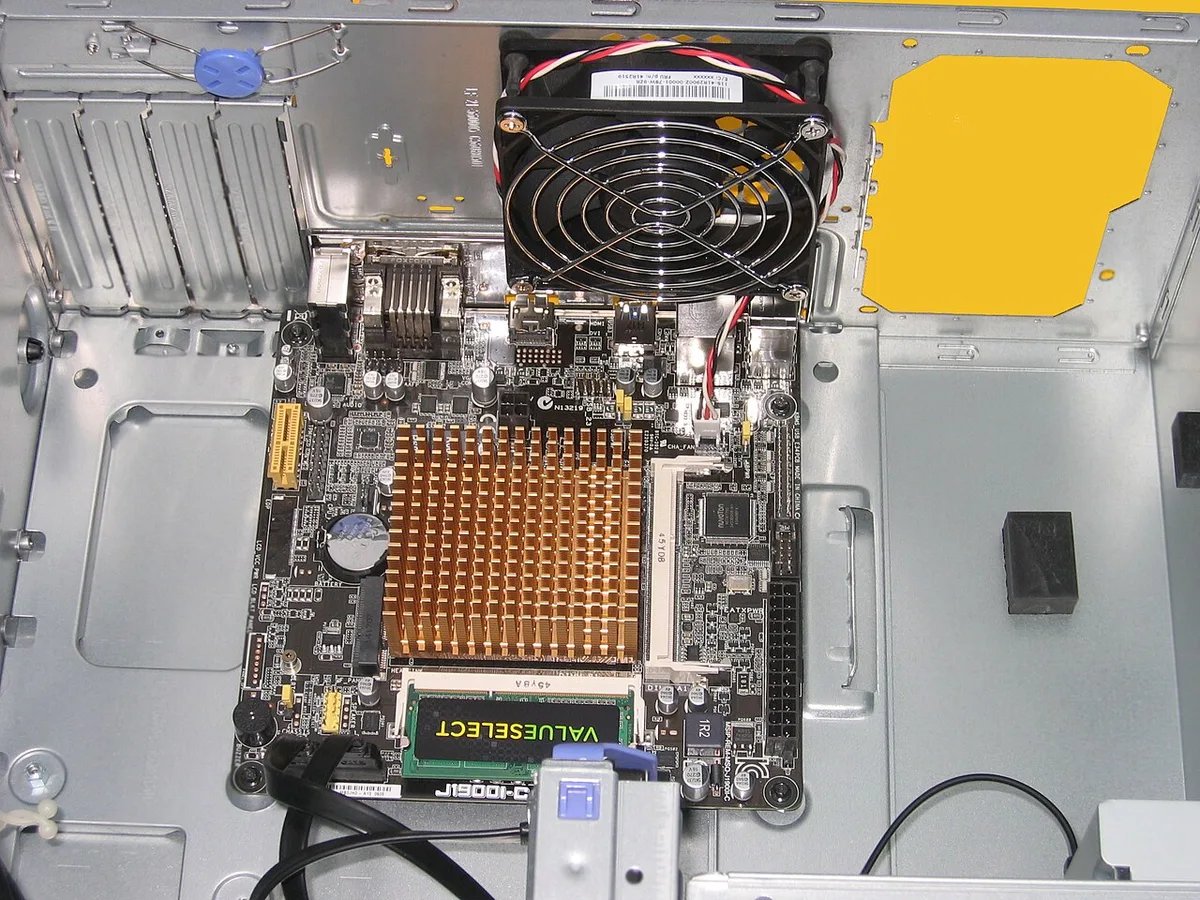
Image source: Wikimedia Commons / Hans Haase (CC BY-SA)
The Four Measurements That Decide Compatibility
Four measurements decide most case and board matches. They are board dimensions, standoff pattern, clearance limits, and expansion slot count. If any one is wrong, the build can fail even when the board technically fits.
This is where many first-time builders get surprised.
Board dimensions tell you whether the tray can hold the board. Standoff pattern tells you whether the mounting holes line up. Clearance limits tell you whether the GPU, cooler, and PSU fit.
Expansion slot count tells you whether your cards match the rear cutouts.
Use this table before buying either part:
| Measurement | What It Means | Why It Matters |
|---|---|---|
| Board dimensions | Length and width in millimeters | Sets the minimum tray size |
| Standoff pattern | Hole positions on the board and tray | Prevents shorts and mounting gaps |
| GPU clearance | Maximum supported graphics card length | Avoids front panel or radiator contact |
| Cooler height | Maximum CPU cooler height | Prevents side panel pressure |
| PSU length | Maximum power supply length | Protects cable routing space |
Do not trust a vague "supports ATX" claim alone. Check the exact millimeter limits in the case manual. A long graphics card can ruin a case that fits the board perfectly.
That is why graphics card length should be checked before finalizing the case.
Decision Branches: Which Case Fits Which Board
Use if and then logic to avoid buying the wrong case. Start with the board form factor, then branch by the parts you plan to install. This keeps the decision simple and prevents expensive returns.
It also helps you avoid cases that are technically compatible but awkward to build in.
If your board is ATX, then choose a mid-tower or full-tower case with an ATX standoff pattern. If you also use a long GPU or large air cooler, then pick a case with extra clearance and a mesh front. If you want custom water cooling, then check radiator support before anything else.
If your board is Micro-ATX, then a mini-tower or mid-tower case is usually enough. If you still want a full-size GPU, then verify GPU length and front fan space. If you plan to upgrade later, then favor a mid-tower because it gives more room for changes.
If your board is Mini-ITX, then choose a small form factor case designed for that size. If you use a high-end GPU, then check both GPU length and PSU type. Many compact cases need an SFX power supply instead of a standard ATX unit.
If you want quiet operation, then prioritize airflow and fan size over the smallest possible footprint.
Step-by-Step: How to Match a Motherboard to a Case
Follow these steps in order. Do not skip the measurement step, even if the product page says it is compatible. Real builds often fail on small details, not big ones.
Taking ten minutes here can save an entire return process.
- Identify the motherboard form factor on the manufacturer page.
- Read the case compatibility list for that exact form factor.
- Check the standoff positions and count in the case manual.
- Measure your GPU, CPU cooler, and PSU in millimeters.
- Compare those numbers to the case clearance limits.
- Plan fan and radiator placement before installing parts.
- Test-fit the board and major components outside the case if possible.
- Install only the standoffs that match the board holes.
- Mount the board, connect front panel headers, and route cables.
- Power on and check temperatures before closing the panels.
If you are unsure about the board's role, review core board functions before buying. That helps you avoid paying for features you will not use. It also keeps the case choice tied to real needs, not marketing.
One more check matters after the build: expansion. Expansion slot count can decide whether a compact case is worth it. A board with two slots is fine for one GPU, but it may not suit capture cards or extra storage controllers.
Match the case to the build you want now, not just the one you have today.
Real-World Build Scenarios and What Usually Goes Wrong
A common scenario is an ATX gaming build in a mid-tower with a 360 mm radiator and a long graphics card. On paper, the parts fit. In practice, the radiator can block front intake fans, and the GPU can press against a drive cage.
Always check both limits in the same build plan.
Micro-ATX builds in mini-tower cases are another frequent trap. The board fits, but cable reach and cooler height become tight. Front panel USB and power cables may need extensions.
This is where a slightly larger mid-tower often saves frustration.
Mini-ITX builds in small form factor cases look simple, but they are the least forgiving. Many need an SFX power supply, shorter GPU, and low-profile cooling. If one part is too large, the whole layout can fail.
Extended ATX is the riskiest case. Some cases say they support E-ATX, but only wider boards. A board that hangs past the tray can bend or lose standoff support.
Check the exact board width, not just the label.
| Scenario | Typical Risk | Best Fix |
|---|---|---|
| ATX plus long GPU | Front radiator contact | Choose deeper case |
| Micro-ATX plus tall cooler | Side panel pressure | Check cooler height |
| Mini-ITX plus ATX PSU | Cable and space conflict | Use SFX PSU |
| E-ATX in ATX case | Poor standoff support | Verify exact width |
Common Mistakes That Waste Money or Damage Parts
The biggest mistake is buying the case by name, not by measurements. "Mid-tower" does not mean the same thing across brands. One case may fit a 360 mm radiator, while another only fits a 240 mm unit.
Another mistake is ignoring standoff count. A board with nine mounting holes should use nine correct standoffs. Extra standoffs can short the board.
Missing standoffs can leave the board unsupported.
Do not force the I/O shield into place. If it does not align, stop and recheck the board position. Forcing it can damage ports or bend the shield.
This small part causes a surprising number of failed first builds.
Other mistakes include assuming every ATX case fits every ATX board, skipping cooler height checks, and buying a case before choosing the graphics card. These errors usually show up during installation, when returns are more annoying. A compatibility checklist prevents most of them.
Expert Tips for Safer Fit and Better Airflow
Start with the manufacturer manual, not the product page. The manual lists exact standoff positions, clearance limits, and supported radiators. Intel's ATX specification is a useful reference for baseline form factor expectations, but case makers still control final fit.
Test fit the board and major parts before final assembly. Place the board on the tray and check hole alignment. Hold the GPU near the slot area and check front clearance.
This takes minutes and catches problems early.
Leave cable routing room behind the motherboard tray. Tight cables can block panels and stress connectors. Use the case channels and tie-down points.
A clean route also improves airflow around the board.
For hot gaming builds, prioritize mesh front panels and direct intake paths. Glass looks good, but restricted airflow can raise temperatures. Match fan size to case support, and do not block intake with a thick radiator unless the case is designed for it.
Frequently Asked Questions
Can a smaller motherboard fit in a larger case?
Yes. A Micro-ATX or Mini-ITX board can usually fit in a larger ATX case if the standoff pattern supports it. You must remove extra standoffs that do not match the board.
Never leave unused standoffs under the board.
Does motherboard size affect cooling?
Yes. Larger boards often spread parts out and leave more airflow room. Smaller boards pack parts closer together, which can trap heat.
Case size and fan layout matter as much as board size.
Can I put a Mini-ITX board in an ATX case?
Usually yes, if the case lists Mini-ITX support. You still need to use the correct standoffs and I/O shield. The case may look oversized, but it can work well for future upgrades.
What happens if standoffs do not align?
The board may not mount securely, or it may flex. In some cases, an extra standoff can touch solder points and cause a short. Stop and recheck the standoff map before tightening anything.
Do Mini-ITX builds need a special power supply?
Often yes. Many compact Mini-ITX cases require an SFX or SFX-L power supply. A standard ATX unit may not fit or may block airflow.
Check PSU length before buying.
Is every ATX case compatible with every ATX board?
No. ATX is a standard, but case makers vary tray width and standoff support. Some boards are wider than standard ATX.
Always verify exact dimensions before buying.
Final Decision Guide: Pick the Case With Confidence
Choose the motherboard first, then let the case follow the board. If you start with the case, you may lock yourself into a board that does not fit your needs. The board controls slots, headers, and physical size.
Use this simple path. If you want maximum expansion, choose ATX and a mid-tower or full-tower case. If you want balance, choose Micro-ATX and a compact mid-tower.
If you want the smallest footprint, choose Mini-ITX and a case built for that size.
Before checkout, verify four numbers: board dimensions, standoff pattern, GPU length, and cooler height. If those match, the build is likely to go smoothly. If one is missing, keep shopping until the spec sheet answers it.
1 thought on “How Motherboard Size Affects Your PC Case Choice”
Comments are closed.